
Pinterest for Ecommerce: How Stores Drive Sales
18 November 2026
Este artigo ainda não está disponível em português, por isso é exibido em inglês.
Your store has forty products, a decent Instagram following, and a Pinterest account you set up two years ago and abandoned after nine pins. Every few weeks a session from pinterest.com lands on a product page, lingers, and occasionally buys. It's a small number. It's also the only traffic on your dashboard that keeps arriving from work you did months ago and never touched again.
That trickle is worth understanding before you write Pinterest off as a waste of time or talk yourself into it as a magic channel. Neither story survives contact with the data. What survives is a specific set of mechanics: how pins get found long after publishing, how a product catalog keeps price and stock honest, and how a sale that starts on a Tuesday in October gets credited to a pin you shipped in June.
Pinterest for ecommerce isn't a posting habit with a shopping button attached. It's a search asset you maintain. The rest of this guide walks the mechanics in the order they matter.
Table of Contents
- A Shop Window That Stays Lit
- Which Pin Type Actually Sells
- How to Set Up the Account and Catalog
- Keyword Planning for Product Search
- A Weekly Publishing Rhythm That Stays Fresh
- How to Measure Saves Clicks and Assisted Sales
- Start With One Catalog and a Steady Cadence
A Shop Window That Stays Lit
It's a Tuesday evening in November, and someone is planning a hallway. They type "narrow shoe bench for a small entryway" into Pinterest, scroll past a dozen images, and stop on yours. Your team published that pin in February and hasn't opened the design file since. The pin still shows the product name, the current price, and a link to the page where they can buy it.
Compare that with a feed post. It gets a day of attention, then it's gone. A pin sits in a search index and keeps resurfacing when the right query arrives, which is why the effort compounds instead of evaporating.
Pinterest behaves as part visual search engine and part mood board. People plan kitchens, outfits, gifts, and renovation projects there before they've decided what to buy, and they save ideas as they narrow the choice. That planning behavior changes what a good pin looks like. On a social feed, the goal is a reaction in the next two seconds. On Pinterest, the goal is to be the most useful answer to a specific question, because the person searching has a project in mind and a budget attached to it, even if that budget is months away from being spent.
The audience is large enough to plan around. Pinterest reported 578 million global monthly active users in Q2 2025, an 11% year-over-year increase, in its Q2 2025 results. Revenue follows the same direction, at approximately $4.2 billion in 2025, up 16% from 2024, according to Sprout Social's Pinterest statistics. That's a commercial channel, not a hobby board.
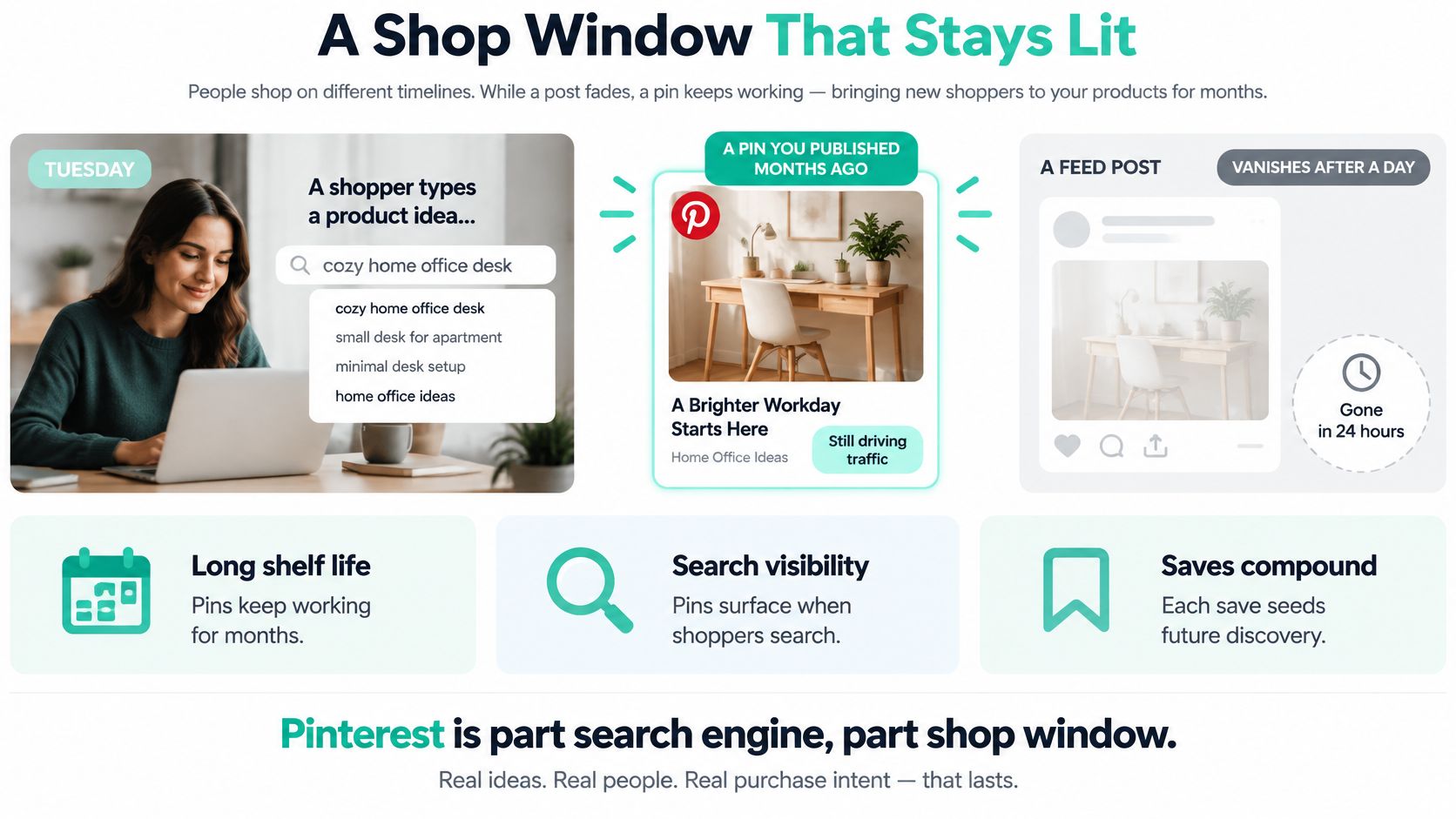
Here's the part store owners misread. The visit usually begins as inspiration, so a same-day purchase is a bonus, not the only thing worth counting. Someone who saves a bench in November may buy in January after spotting the same product in a search ad, a newsletter, or a marketplace listing.
The mental shift: a pin is not a post. It's a page in a catalog that keeps getting found.
The mechanics ahead go in order. Which pin formats can carry a price and become a shopping ad. How a product feed stays true instead of drifting out of date. How to name things so the search finds you. How much to publish in an ordinary week. And how to count sales that land long after the click.
Each useful pin is a small shop window you leave lit overnight. It isn't a shout in a crowded room, and it doesn't run itself. Three blurry photos and a hope for passive income will not run a store.
Which Pin Type Actually Sells
Pinterest will happily accept a pretty image and a pasted link. That doesn't make it a product listing. Judge every asset against two questions: can it carry a price and stock status that match the product page, and can it be promoted as a shopping ad? Most formats fail one of the two.
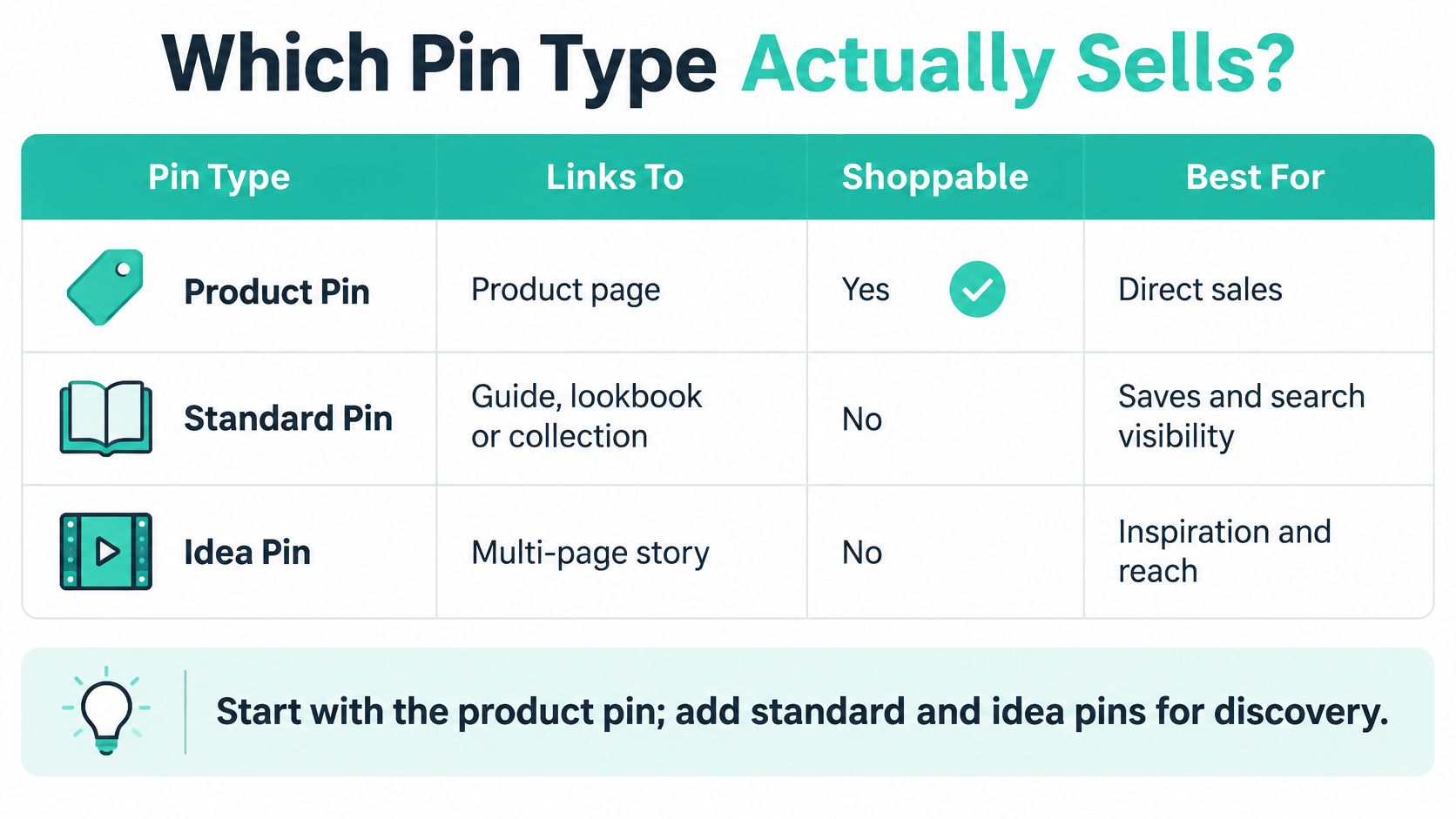
The hard line sits in the catalogs tool. Pinterest says all Product Pins can receive organic distribution, but only Product Pins created through Catalogs can be promoted as shopping ads, per Pinterest's shopping documentation. That single rule decides where your build effort goes.
Which Pinterest asset can sell
| Asset | What the shopper sees | Shopping ads | Best job |
|---|---|---|---|
| Idea or standard pin | Image plus a link to a guide, collection, or article | No | Inspiration and search visibility |
| Manual product pin | Product image and a product link you add by hand | No, organic only | Small tests before a feed exists |
| Catalog Product Pin | Image, price, availability, and product page from the feed | Yes | Scalable shoppable inventory |
| Scene pin with product tags | Lifestyle image with tagged products | Only if the tagged items are catalog Product Pins | Rooms, outfits, and bundles |
| Shopping ad | Promoted catalog Product Pin | Yes, Catalogs tool only | Paid push on proven SKUs |
What each format is for
An idea or standard pin points at a buying guide, a lookbook, or a collection page. It earns saves and search visibility, and it's the right home for "ten small entryway ideas" content that isn't a product listing.
A manual product pin carries one image and a link you paste by hand. Organic reach, no paid amplification. It's a fine way to test six SKUs before you've built a feed, and a miserable way to run a store with 400 of them.
The catalog Product Pin is the workhorse. Image, price, availability, and destination URL all resolve from your feed, so one maintained source of truth generates hundreds of shoppable records. A scene pin with product tags shows the bench in a hallway with a coat rack and a bag, and it can carry a price only when every tagged item is a catalog Product Pin. That's the format that sells rooms, outfits, and bundles.
Shopping ads are the paid layer on top of the catalog, and the layer is growing. Shopping ads accounted for 30% of Pinterest's international revenue in Q3 2025, up from 9% at the company's September 2023 investor day, PPC Land reports. Turn them on once a SKU already earns saves or clicks organically, not before.
Pinterest also reports 97% accuracy for price and availability through its shopping API, per the same Pinterest shopping documentation. That number is the argument for a feed over retyping product facts onto each graphic. Design can be batched. Price, stock, and URL cannot. Build the catalog pin before you design a dozen one-off images.
How to Set Up the Account and Catalog
Retailers aren't waiting. Pinterest reported in March 2025 that the number of retailers setting up shops by uploading or integrating digital catalogs had increased 66% over the preceding year, alongside 70% year-over-year growth in active shopping feeds globally, per Pinterest's annual report. The groundwork is worth doing properly.
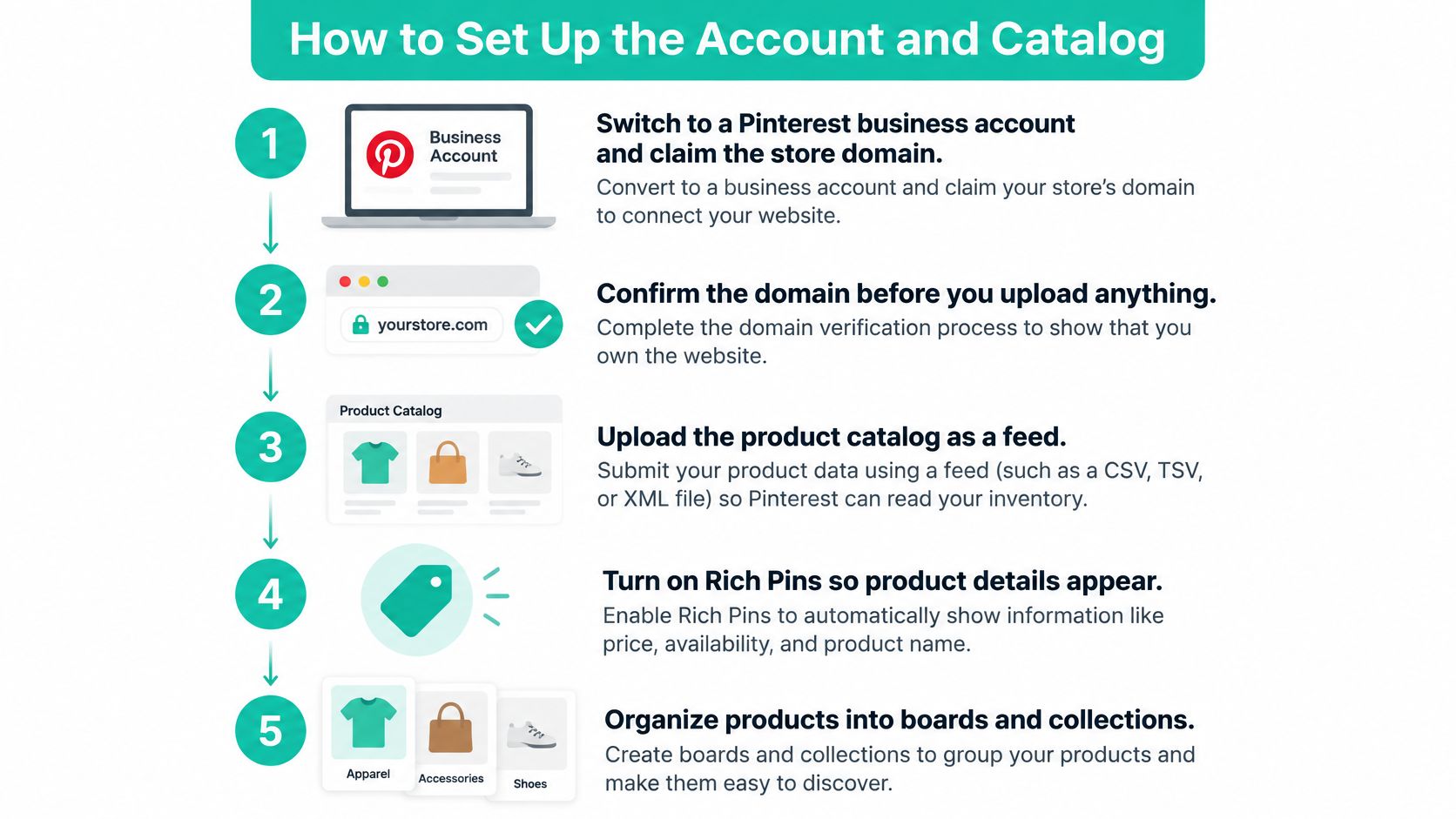
Pinterest can retrieve a linked feed daily and update Product Pins from it, so treat the catalog as a live data contract rather than a file you uploaded once, according to Pinterest's catalog setup documentation. Here's the sequence.
- Switch to a business account and claim your domain. Claiming ties pins to the site you own, so outbound links carry your brand instead of looking like a stray referral.
- Verify the domain before you make creative. An unconfirmed destination weakens every link you publish, and redoing verification later means rechecking pins already scheduled.
- Pick a feed home Pinterest can reach. HTTP or HTTPS, FTP, SFTP, or WebDAV all work. A native store connection is simpler where your platform offers one.
- Map the required fields first. A unique product ID, title, description, price, availability, and landing page. The ID caps at 127 characters and the title at 500, so enforce both before submission.
- Validate the file before the first fetch. A missing or badly formatted required field can fail the entire catalog ingestion, not just the one row.
- Schedule daily retrieval. Price, stock, and URL changes then replace yesterday's data instead of sitting beside it.
- Keep variant IDs stable. A size or color change should update the same product, not spawn a duplicate that competes with the original.
- Split the catalog into groups. Bestsellers, new arrivals, and categories let a later campaign boost a section instead of the whole warehouse.
- Read the rejected rows. A poor merchant rating, a prohibited product, or a claim the guidelines forbid can block items even when the file looks tidy. Pinterest's merchant guidelines set those rules, and row-level failures are how they surface.
Run one compliance pass a week: count rejected rows, watch the merchant rating and any complaint signals, and confirm regional eligibility for each market before shopping ads go live.
Catalog fields that must stay true
| Field | Rule | If it is wrong |
|---|---|---|
| Product ID | Unique and stable, 127 characters maximum | Duplicates or a failed match across variants |
| Title | Required, 500 characters maximum | Rejected or cut-off product names |
| Description | Required | Incomplete product records |
| Price | Required and aligned with the product page | Shoppers see a price the cart does not honor |
| Availability | Required and updated at least daily | Clicks land on out-of-stock items |
| Landing page | Required product URL | Broken or mismatched destinations |
| Feed location | HTTP, HTTPS, FTP, SFTP, or WebDAV | Pinterest cannot refresh pins daily |
| Whole feed format | Every required field present and valid | The entire ingestion can fail |
The field limits and daily refresh rules above match this walkthrough of how to build a Pinterest product catalog for a store feed.
If you'd rather watch the setup than read it, this walkthrough covers the account, the domain claim, and the catalog connection.
The operating rule is blunt. Automation multiplies whatever your data says. Clean prices and honest stock multiply. So do stale prices and dead links, at the same speed, unless one person owns feed errors.
Keyword Planning for Product Search
Start with how a shopper types, not with what your brand calls the product. Nobody searches for the "Aria Collection." They search "linen slipcover for a deep sofa," "small entryway bench," or "gift for a new baker." The phrase carries the object plus the job or room it's for, and that's the shape your titles should take.
A six-step harvest
- List the raw material. For each product, write the name, the material, the room or occasion, and the problem it solves. A candle becomes soy candle, fall table, host gift, someone who avoids synthetic scents.
- Pull phrases from two places. Pinterest's own search suggestions show demand you can reach. Your store's site search shows the words buyers already use when they arrive.
- Choose a specific phrase with a clear buyer. A narrow phrase you can win beats a huge term you can't. "Small kitchen storage" is winnable. "Kitchen" is a lottery.
- Assign one primary phrase per pin, then write the title and description around it in ordinary sentences. The phrase should read as part of the sentence, not a label glued to the front.
- Give the next pin a related but different phrase for the same product. Five pins repeating one sentence look thin to a shopper and give the search nothing new to work with.
- Write alt text that describes the product in the picture, including color and setting. Discovery starts with the image, and alt text is how the image gets understood.
Building that phrase list by hand works. A Pinterest keyword research tool shortens the job by pulling topics and long-tail queries with search volume indicators.
Two lines for a candle store
Say a shop sells a soy amber candle and wants the fall table crowd. The title becomes Cozy Fall Table Ideas With a Soy Amber Candle. The description names the scent, the size, and who it suits, then ends pointing at the product page as the destination.
Board names get searched too. A board called Small Kitchen Storage beats one called New Arrivals, because the board name is one more piece of text the search reads. Default to the search idea every time.
Skip the keyword stuffing. Repeating the same phrase in the title, description, board, and alt text reads badly and adds nothing.
Never claim what the product page can't support. If the page doesn't say non-toxic, the pin doesn't either. And add a phrase to your rotation only while the catalog item is in stock, so a popular keyword never advertises a sold-out SKU.
A Weekly Publishing Rhythm That Stays Fresh
Picture a home store with 40 SKUs, not a marketplace with a million rows. Its whole Pinterest program fits in one person's week. The steady floor is 5 to 15 fresh or refreshed pins a week, and that number rises only when there are enough real products, angles, and phrases to avoid publishing lookalikes.
One week in the calendar
- Monday: a catalog pin for the bestseller, built around its primary phrase.
- Tuesday: a scene pin of that product in a room, tagged back to the catalog item.
- Wednesday: a new-arrival pin with a phrase aimed at a gift or a season.
- Thursday: an idea pin linking to a buying guide or comparison on the store blog, for people still deciding.
- Friday: a second creative for an older product that still earns saves, with a different crop, color story, and keyword.
- Weekend: no scramble. Check which scheduled pins failed or pointed at out-of-stock URLs.
Batching is what makes that week survivable. Design from templates that lock brand colors and type, then swap the product photo and the line of text. The grid looks related instead of cloned, and nobody starts from a blank canvas on a Monday morning.
A pin that points at out-of-stock inventory costs you more than a pin you never made.
Some obvious ways to break the rhythm: posting the identical image daily, pinning a hero product the week it sells out, or letting a seasonal board go silent for a month and then dumping forty pins into it. Each one trains the audience to scroll past you.
Catalog pins update price and stock on their own once the feed is healthy. Lifestyle pins don't. When a hero product changes, someone has to run a template pass or the scene pins start showing last season's colorway. The week counts as a success if the right pins earn saves and qualified clicks, not if the pin count alone went up.
How to Measure Saves Clicks and Assisted Sales
Last-click reporting will call Pinterest a failure almost every time. A pin can help someone narrow a choice days before they buy, and that purchase may land on your site, in an email, or on a marketplace listing. A dashboard that only pays the final click sees none of the influence.
The shopper research supports the delayed pattern. About 80% of weekly users find the shopping experience inspiring, and 75% of festive-season shoppers say Pinterest helped them narrow their purchase options, per Hootsuite's Pinterest statistics roundup. Narrowing is consideration work, and consideration work rarely converts in the same session.
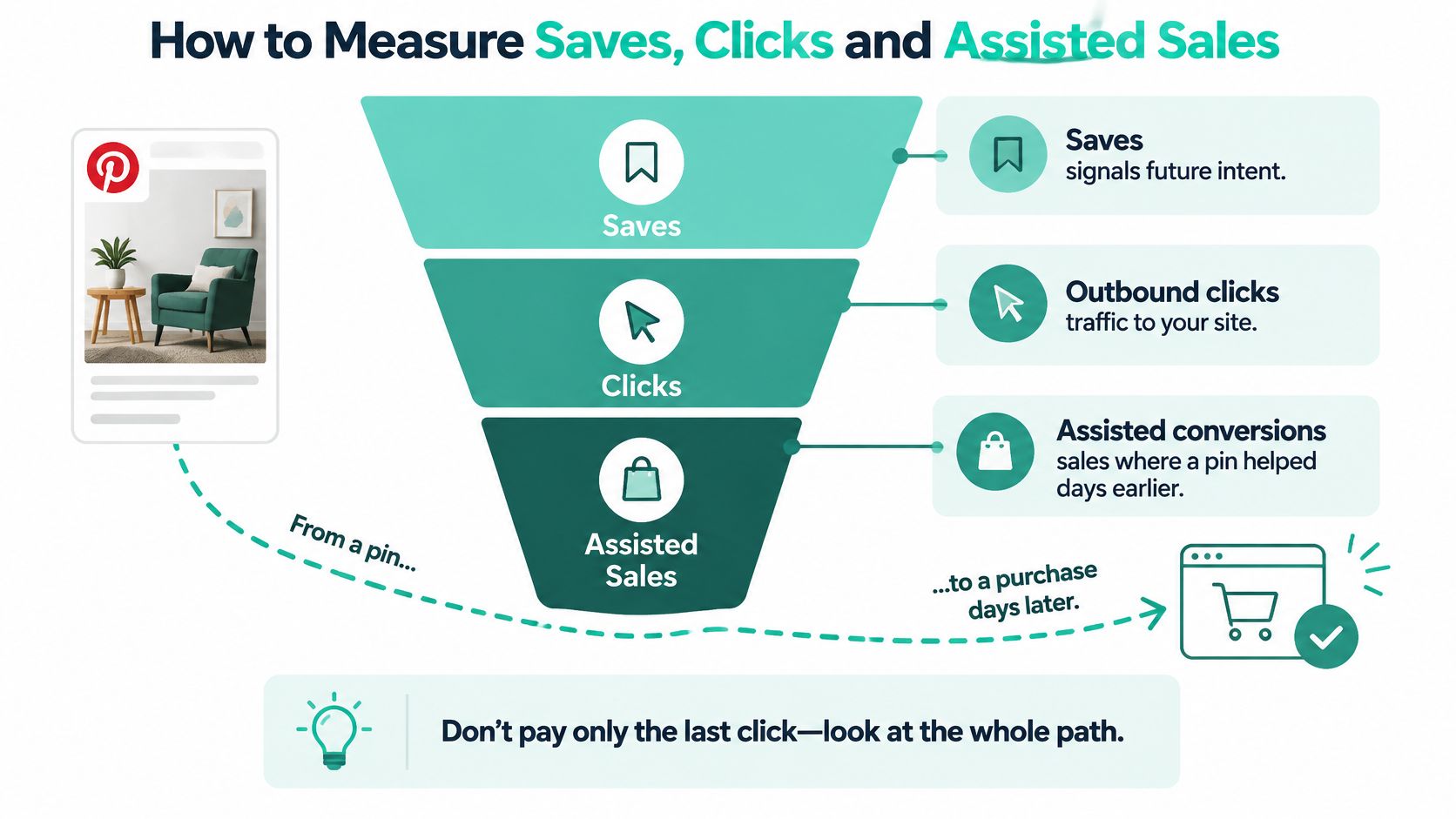
Read metrics in this order and resist collapsing them into one number.
Scorecard for saves, clicks, and assisted sales
| Metric | What it shows | Read window |
|---|---|---|
| Saves | Discovery interest | Ongoing, reviewed weekly |
| Outbound clicks | Interest moving to the site | Same session |
| Repeat exposure and returning viewers | Consideration | 7 days |
| Assisted conversions and view-through actions | Influence before a later click | 7, 30, or 90 days |
| Purchases and revenue | Money, by cohort | 7, 30, or 90 days |
| Feed error rate and rejected SKUs | Whether the data is fit to trust | Weekly |
| Price and stock match on landing page | Click quality | Each check |
Pick a cohort window that matches how long the product takes to choose. A $30 candle deserves 7 days. A sofa deserves 90. Reporting a sofa on a same-session basis guarantees you'll conclude Pinterest doesn't work.
Test influence instead of assuming it
Stores spending on shopping ads can settle the causation question with a holdout. Pause a region or a product group for a few weeks and compare revenue against the matched group still running. If sales barely move, the campaign was harvesting demand that existed anyway. If they fall, the ads were creating it.
One caveat worth saying plainly. People who use Pinterest may already spend more per month than non-users, so reach is not the same as cause. Privacy rules also differ by country, which changes what you can measure and how long you can keep it.
Decision rule: keep content that earns qualified saves and search visibility even when same-session orders are few, and fix or pause any pin sending people to the wrong price or a dead product.
That's the discipline the whole channel rests on. Judge a pin on whether it did useful work, not on whether the buyer happened to click today.
Start With One Catalog and a Steady Cadence
Don't rebuild your whole Pinterest presence this week. Pick one in-stock collection, maybe eight to twelve products, and run it properly for seven days.
- Confirm the feed fields against the field table above before anything publishes, including a landing page that resolves on a phone.
- Publish the small set. Catalog pins for the heroes, two scene pins showing those products in use, and one idea pin answering a real search phrase with a buying guide on your blog.
- Check three numbers after seven days. Saves, outbound clicks, and feed errors, in that order. Raise volume or switch on shopping ads only once those look sane.
If the cadence is the part that slips, Pin Generator is an official Pinterest partner whose pins are designed, generated, and scheduled automatically in your brand look, and its free automation builds preview pins from your own store in your brand colors with no card needed. That's one way to hold the weekly rhythm while you read the metrics.
No tool fixes a bad feed, a policy rejection, or a last-click-only report. Catalog hygiene and honest measurement come first. Production capacity comes second.
Pin Generator takes the catalog you've already cleaned up and turns it into on-brand pins that publish on a schedule, so the shop windows stay lit without a designer rebuilding them every Monday. Connect your Shopify, Etsy, or WooCommerce products and it handles the titles, descriptions, alt text, and board selection around the search phrase each pin is built for. Start with the free preview automation at Pin Generator and see what your own products look like as pins before you commit to a cadence.