
Donor Management Software: A Practical Guide for Nonprofits
7 October 2026
A development director is working from two laptops. One has the master spreadsheet, another has an event export, and a mailed check is waiting to be entered before the recurring-gift report goes out. A colleague has a different version of the donor list, the finance team has a third record of recent gifts, and nobody is fully sure which address a longtime supporter wants you to use.
This is how many nonprofit teams encounter donor management software. They don't begin by asking for a more capable CRM. They begin by trying to stop duplicate records, delayed gift entries, missed follow-ups, and reports that take longer to assemble than the campaign they describe.
The right platform can solve those operational problems. It can also help your team see whether donors are staying, lapsing, or becoming an outsized source of revenue. That makes the category less about storing names and more about protecting relationships when fundraising pressure is concentrated in fewer supporters.
Table of Contents
- The Spreadsheet Problem Every Fundraising Team Knows
- What Donor Management Software Actually Is
- Core Features Worth Paying For
- The Retention Problem the Software Has to Solve
- How Alignmint Can Help
- How to Choose the Right Donor Management Software
- Implementing Donor Management Software Without Burning the Team Out
- Workflows That Show the Software in Action
- Measuring Success and Avoiding the Common Traps
The Spreadsheet Problem Every Fundraising Team Knows
The spreadsheet usually starts innocently. A small nonprofit needs somewhere to record names, addresses, gifts, campaign codes, and notes from conversations. A workbook feels affordable, familiar, and easy to change. The development director adds a tab for the spring appeal, the operations manager adds one for event attendees, and a volunteer creates a list for monthly donors.
Then a donor gives through the website, attends an event, sends a check, and replies to an email. Each action may land in a different system. Someone eventually copies the information into a spreadsheet, but the timing depends on workload, memory, and who knows which file is considered current.
Where manual tracking breaks
The problems are rarely dramatic at first. They appear as small inconsistencies:
- Duplicate records: A donor appears under a personal email in one file and a household name in another.
- Delayed gift history: A campaign or check isn't entered until weeks after the money arrives.
- Manual segmentation: A list of recurring donors, event attendees, or lapsed supporters requires sorting and filtering by hand.
- Scattered preferences: A request for postal mail instead of email sits in an inbox or a colleague's notes.
- Slow reporting: The team spends days reconciling files before it can answer a simple question about campaign performance.
Those gaps create fundraising risk. A supporter may receive an appeal after making a gift, a relationship manager may walk into a meeting without the latest context, or finance may need to explain why the development report doesn't match the ledger.
Practical rule: If more than one person has to remember where a donor interaction belongs, your organization needs a shared system of record.
A donor management platform replaces the patchwork with a central record for constituents, gifts, communication history, preferences, campaigns, and follow-up tasks. It doesn't remove the need for judgment or good process. It gives people one dependable place to apply both.
What Donor Management Software Actually Is
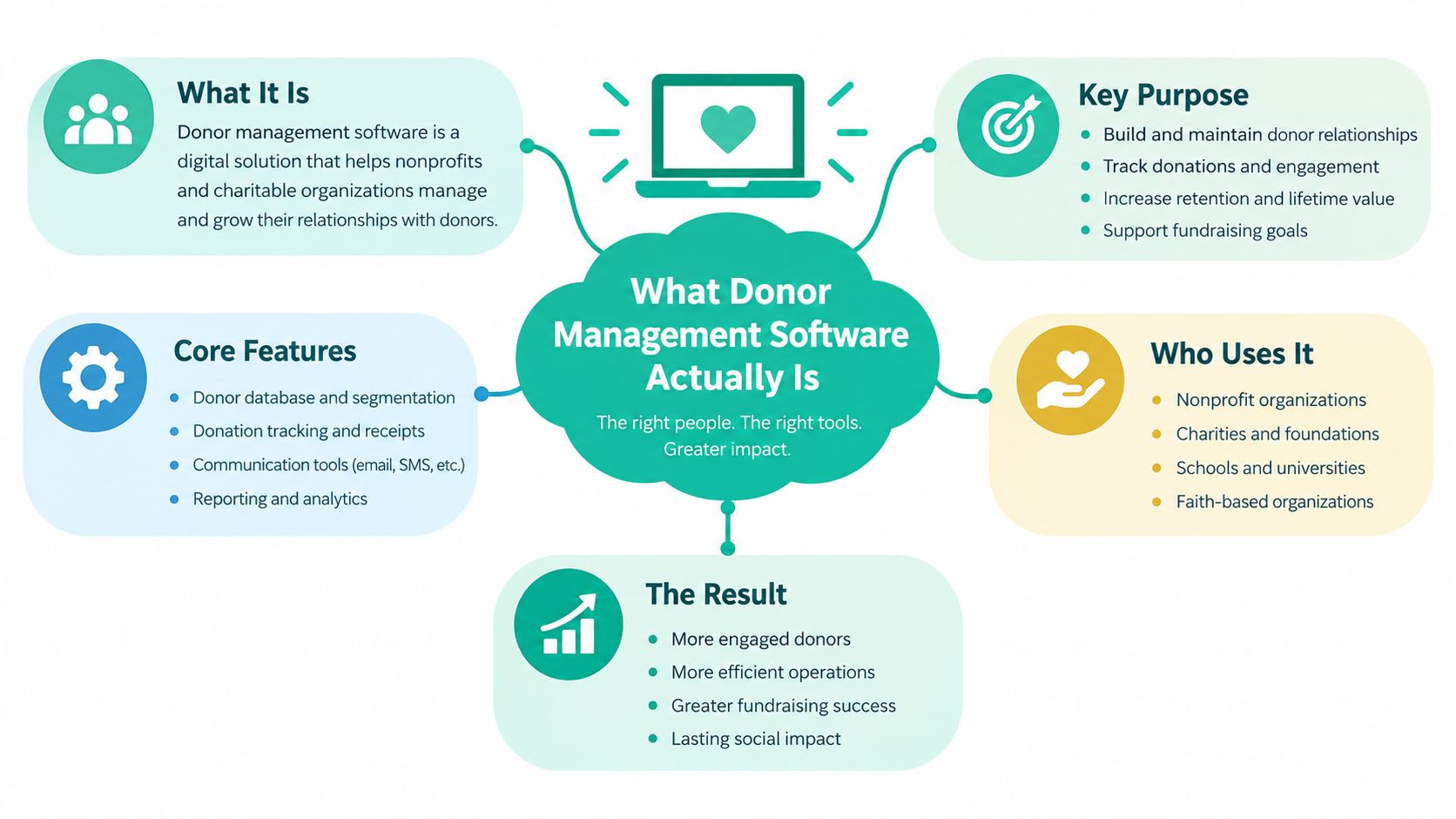
Donor management software is a system of record for donors and gifts, plus the tools your team uses to act on that information. It stores constituent profiles, donation history, campaign attribution, contact notes, preferences, pledges, and recurring gifts. It can also support segmentation, email communication, reporting, payment processing, and workflow automation.
That combination matters. A basic database can tell you who gave. A functional nonprofit CRM can help you identify who gave, understand the relationship, assign the next action, send an appropriate message, and measure what happened afterward. The nonprofit CRM overview from Kindsight describes the category as a platform that centralizes donor records, campaign history, gift processing, email marketing, reporting, and automation, which is a useful practical definition.
Adoption reflects that shift from optional tool to operating infrastructure. A major survey of 379 nonprofits found that 94% used a donor management system in 2024, compared with 75% in 2014, a 19-point increase over roughly a decade. The survey was conducted from October 2023 through March 2024, and the results indicate that dedicated donor systems have become common across organizations of different sizes. The survey details and historical comparison are available in this market report.
The terms overlap, but they aren't identical
You may hear donor database, fundraising software, donor engagement platform, and nonprofit CRM used interchangeably. They overlap, but each term emphasizes a different job.
A donor database focuses on storing and retrieving information. Fundraising software usually emphasizes appeals, online giving, campaigns, and payment collection. A nonprofit CRM adds relationship management, constituent history, tasks, segmentation, and broader workflows. Donor engagement tools may specialize in communications or cultivation without providing the full record-keeping and finance context of a CRM.
Deployment also affects daily use. Installed systems may require local infrastructure and specialized maintenance. Cloud software is accessed through a browser, which makes remote work, mobile access, vendor updates, and integrations easier to support. API-first platforms can exchange information with accounting, email, event, payment, and marketing tools instead of forcing staff to re-enter it.
The useful question isn't whether a vendor uses the label CRM. Ask whether the platform can turn accurate donor information into timely action. The features below matter because they connect records to retention, follow-up, and revenue decisions.
Core Features Worth Paying For
Think of donor management software as a layer cake. The bottom layer is accurate constituent data. Gift history sits above it, then segmentation and reporting, followed by automation and integrations. A polished dashboard can't compensate for missing gifts or unreliable names, so evaluate the foundation before admiring the extras.
Start with a complete donor profile
A useful profile brings together a donor's contact details, giving history, household or organizational relationships, communication preferences, campaign participation, volunteer activity, and staff notes. It should also show changes over time rather than silently overwriting older addresses or preferences.
A checkbox-level product may offer a profile screen but make staff open several unrelated modules to understand the relationship. A stronger system lets a fundraiser prepare for a conversation from one record, see the relevant context, and log the next action without leaving the workflow.
Make every gift explainable
Gift tracking should record the amount, date, payment channel, campaign, fund, appeal, designation, receipt status, and any relevant soft credit. It should handle pledges, recurring gifts, refunds, and adjustments without creating a second unofficial ledger.
Ask a vendor to demonstrate an online gift, a mailed check, and a pledge payment. Watch whether each produces a consistent record and whether finance can reconcile the result without manual detective work.
Turn segmentation into an active tool
Segmentation is more useful when staff can create dynamic groups from current data. A team might need a list of donors who gave to a particular program, attended an event but haven't donated, changed their giving pattern, or haven't been contacted recently.
The system should preserve the logic behind a segment. If a donor makes a new gift, the record should update their status automatically where appropriate. Manual exports can still have a place, but they shouldn't be the only way to produce a reliable audience.
Use reporting to answer decisions
Reports should connect activity to action. Useful dashboards can show campaign results, recurring gift changes, pledge balances, donor movement, communication history, and revenue by fund or channel. Strong reporting lets staff drill from a summary into the underlying records, so a surprising figure can be investigated instead of accepted blindly.
Add automation only where it improves care
Automation can acknowledge a gift, remind staff about a pledge, assign a follow-up task, or place a donor into a reactivation workflow. It shouldn't make every interaction sound identical or send a message that ignores a donor's recent behavior.
The best implementations use automation for consistency and humans for judgment. A receipt can be automatic. A major donor's personal follow-up should still belong to a person.
Treat integrations as part of the product
A platform becomes much more valuable when it connects with the tools your team already uses. Look for integrations with accounting, email, events, payment processing, forms, and marketing systems. Check whether the connection is native, maintained by the vendor, or dependent on an outside connector.
| Feature | What It Should Do | Key Question to Ask |
|---|---|---|
| Donor profiles | Keep biographical, relationship, preference, and interaction data together | Can a staff member understand the relationship from one record? |
| Gift tracking | Capture gifts, pledges, recurring payments, funds, campaigns, and soft credit | Can finance reconcile online and offline gifts cleanly? |
| Segmentation | Build current lists from giving, engagement, interests, and lifecycle data | Do segments update automatically when records change? |
| Reporting | Connect campaigns and donor activity to decisions | Can we drill from a metric to the records behind it? |
| Workflow automation | Trigger acknowledgments, tasks, reminders, and reactivation journeys | Which steps are native, and where does a human review the work? |
| Integrations | Exchange data with accounting, email, events, forms, and payments | What happens when a sync fails or a field doesn't match? |
Features earn their keep when they reduce friction between information and follow-up. The mature layer isn't the longest feature list. It's the point where your team can identify a relationship need and respond without rebuilding the data first.
The Retention Problem the Software Has to Solve
A donor database answers, “Who is here?” A retention-oriented system answers the harder questions: “Who is drifting away?” and “Where are we relying too heavily on a small group?”
The distinction matters because donor files can shrink while revenue rises. Coverage of the AFP Fundraising Effectiveness Project reports that donor counts fell 0.8% year over year in Q1 2026, while dollars raised rose 4.3%, and cites sector retention at 18%. The underlying market discussion places those figures in the context of shrinking donor files and retention pressure.
That combination can make a fundraising program look healthier than it feels. A few large gifts may lift the topline while many smaller or mid-level donors lapse without a clear signal. The result is a thinner relationship base, greater dependence on a narrow group, and fewer supporters developing toward larger or recurring commitments.
What the software should reveal
Segmentation should show more than the largest donors. A useful retention view can identify first-time donors who have not made a second gift, recurring donors whose payments stopped, event attendees with no later action, and supporters whose engagement has declined. These groups need different responses, so a single “inactive” label is rarely enough.
The record should also preserve prior addresses and preferences as history instead of overwriting them. That timeline gives staff context before they contact someone and helps distinguish a genuine lapse from a data-quality problem.
Automated touchpoints protect routine follow-up. The system might send a timely acknowledgment, remind a relationship manager to make contact, or add a lapsed supporter to a carefully written reactivation sequence. Automation handles the prompt; a staff member still decides when a personal conversation is appropriate.
Reporting should show concentration as well as income. Ask how much revenue comes from the highest-value segment, how many donors are giving for the first time, and where recurring or pledge income is weakening. The exact measures should fit your fundraising model, but the operating principle stays consistent: monitor both the money arriving and the relationships supporting it.
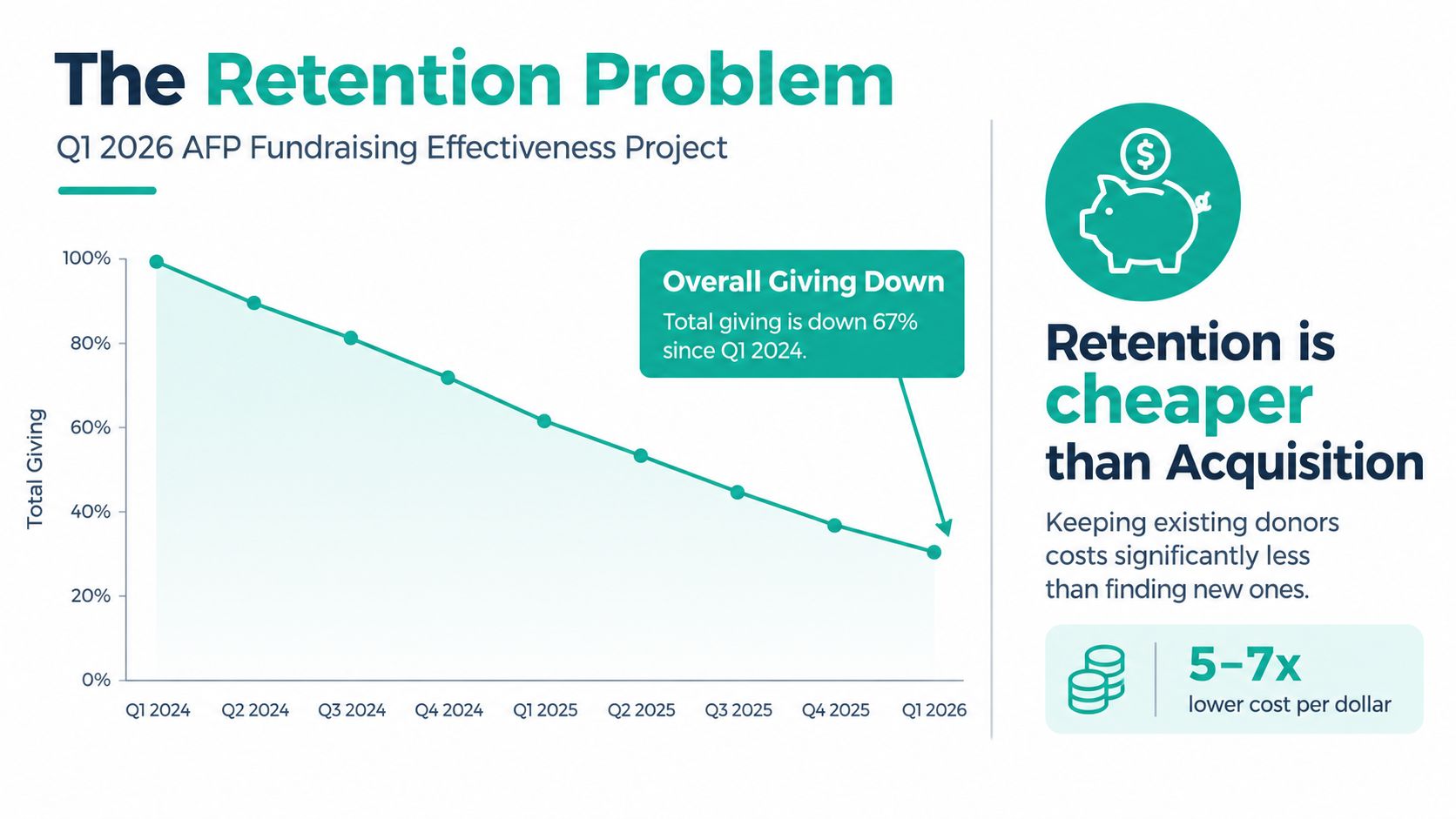
Use retention reporting to turn warning signs into assigned actions. A useful dashboard should help the team see donor loss, revenue concentration, stalled follow-up, and weakening recurring income early enough to respond.
Choose the system that helps staff protect relationships, not the system that merely stores the largest number of records.
That principle changes the buying conversation. Ask whether the product can surface overlooked donors, suggest appropriate next steps, preserve relationship history, and show how revenue depends on different parts of the file.
How Alignmint Can Help
Alignmint is an all-in-one nonprofit operations platform designed to bring accounting, fundraising, volunteers, events, and marketing into one environment. That architecture is relevant when donor retention is being undermined by disconnected data, because a gift record, a fund balance, an event attendance record, and a follow-up action can live in the same operational context.
Its donor-centric CRM supports automatic receipting, pledge tracking, donor self-service portals, and bank-feed reconciliation. Fundraising tools include email and text campaigns, donation page creation, event ticketing, secure payments, promotional codes, and Video Blast for personalized appeals. Minty AI can answer questions about an organization's real data without requiring separate exports or add-ons.
Where the all-in-one model fits
Alignmint may suit a nonprofit that wants to reduce the number of systems staff must maintain. Its fund accounting model includes restricted funds, grants, and programs, with support for Form 990 reporting, restricted balances, grant drawdowns, and Statements of Functional Expenses. Volunteer management covers skills, availability, background checks, groups, self-service access, and hour logging.
The trade-off is straightforward. An all-in-one platform can reduce handoffs, but implementation still requires decisions about data structure, permissions, and workflow ownership. Teams should confirm that the platform's processes match their finance controls and fundraising practices before treating consolidation as an automatic benefit.
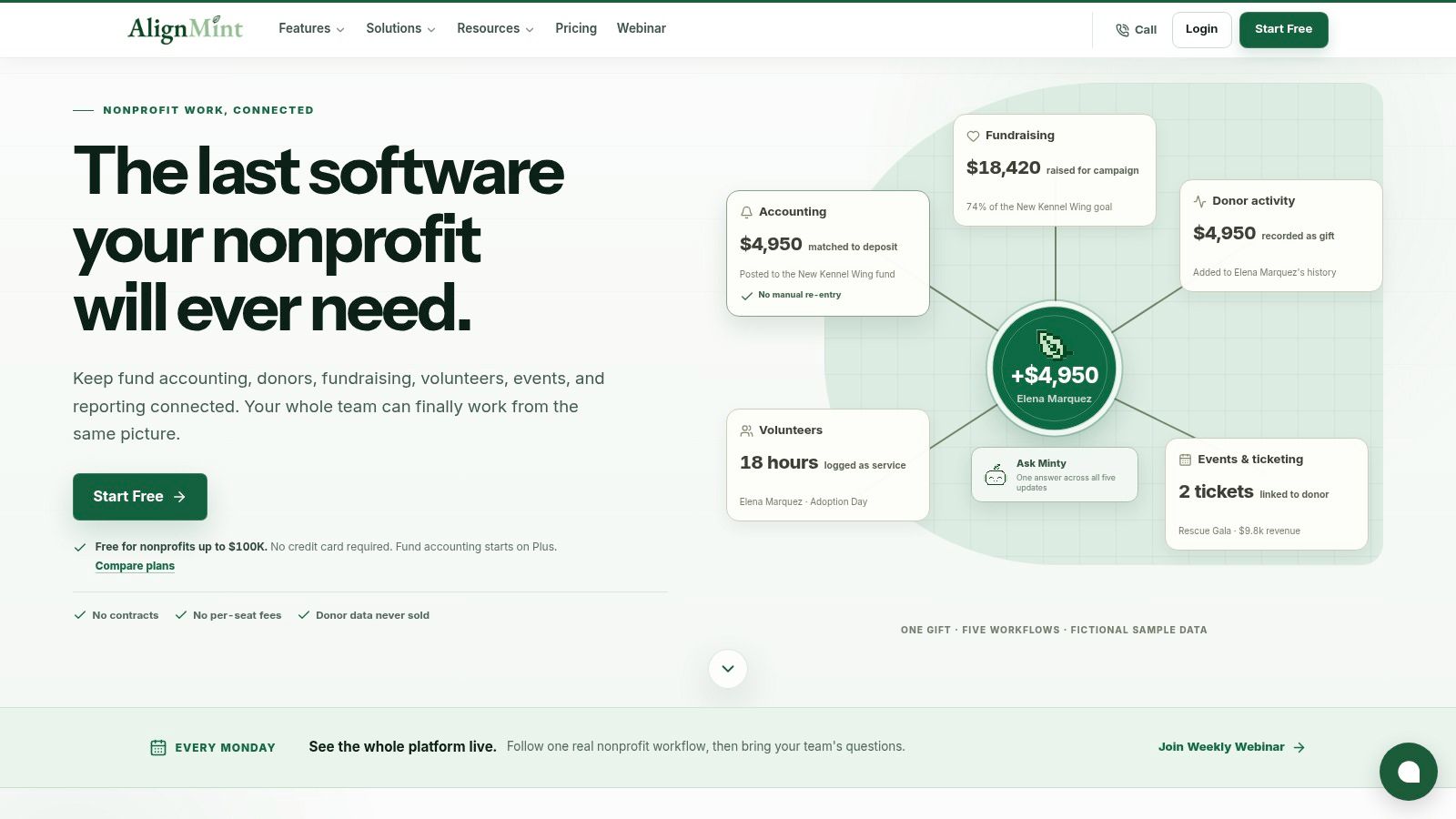
For a closer look at its fundraising and constituent features, review Alignmint's donor management software resource. The platform also states that it uses bank-level encryption, data isolation, and a 99.9% uptime target, and offers a free tier for organizations raising up to $100K per year. Those are vendor claims, so buyers should verify current terms, security documentation, service commitments, and pricing during procurement.
| Platform approach | Best fit | Main strength | Main trade-off |
|---|---|---|---|
| All-in-one nonprofit operations platform | Teams seeking one operating environment | Shared fundraising, finance, volunteer, event, and marketing data | Requires careful setup across departments |
| Specialist donor CRM | Fundraising teams with established finance and event tools | Deep relationship and retention workflows | More integrations to maintain |
| Lightweight fundraising tool | Very small teams prioritizing quick online giving | Fast setup and simple campaign execution | May not support complex records or finance needs |
| Enterprise nonprofit suite | Large organizations with complex governance | Broad controls, reporting, and customization | Greater configuration and adoption burden |
Alignmint is worth considering when fragmentation itself is the central problem. It is less appropriate to choose any platform solely because it promises to be the last system you'll ever need. Test the workflows your team performs.
How to Choose the Right Donor Management Software
Start with the problem, not the vendor category. Write down the fundraising decisions your team can't make today because the data is incomplete, delayed, or spread across systems. Then evaluate each product against those decisions.
Five criteria that deserve a serious test
Scalability means more than storing more records. Ask whether the system can support additional campaigns, funds, users, programs, permissions, and reporting needs without forcing a redesign. A small team may not need complex prospect management today, but it shouldn't buy a product that makes future relationship workflows impossible.
Integrations should be tested with your actual tools. Confirm how the platform connects to accounting, payment processing, email, event registration, forms, and marketing systems. Ask about sync frequency, error handling, duplicate prevention, field mapping, and ownership when a connection breaks. If your team needs to connect a separate marketing workflow, review the vendor's API documentation before assuming the integration will be simple.
Security and compliance require evidence, not reassuring language. Ask about role-based access, encryption, audit logs, backups, data export, retention policies, consent records, and data subject requests. Depending on your jurisdictions and programs, you may need to assess GDPR, CASL, HIPAA, FERPA, or state-level privacy requirements. Request current security documentation, including any relevant SOC 2 report, rather than accepting a badge on a sales page.
Ease of use determines whether records stay current. Put a real fundraiser in the demo and ask them to enter a gift, log a call, create a segment, and schedule a follow-up. A system that looks powerful but makes routine updates tedious will recreate the same stale-data problem as the spreadsheet.
Total cost of ownership includes subscription fees, implementation, migration, training, integrations, payment charges, support, custom development, and the staff time needed to administer the system. A low entry price can become expensive if every meaningful workflow requires an add-on.
| Archetype | Best Fit | Strengths | Watch Out For |
|---|---|---|---|
| All-in-one fundraising suite | Organizations wanting broad native coverage | Shared campaigns, gifts, events, and communication tools | Depth may vary across modules |
| Mid-market nonprofit CRM | Growing teams with defined fundraising processes | Strong segmentation, reporting, and customization | Integrations and administration can add complexity |
| Open-source platform | Technical teams able to manage infrastructure | Flexibility, control, and extensibility | Security, upgrades, support, and development are your responsibility |
| Lightweight tool | Very small organizations with straightforward needs | Simple onboarding and accessible workflows | Limited finance, relationship, or automation depth |
Before signing, ask the vendor to show migration support, duplicate handling, export options, and a complete example of a retention workflow. Separate must-have requirements from attractive extras. A platform that improves the right behavior is more valuable than one that wins a feature-count comparison.
Implementing Donor Management Software Without Burning the Team Out
Implementation isn't a software install. It's a temporary operating project that asks fundraising, finance, operations, and leadership to agree on how information should move.
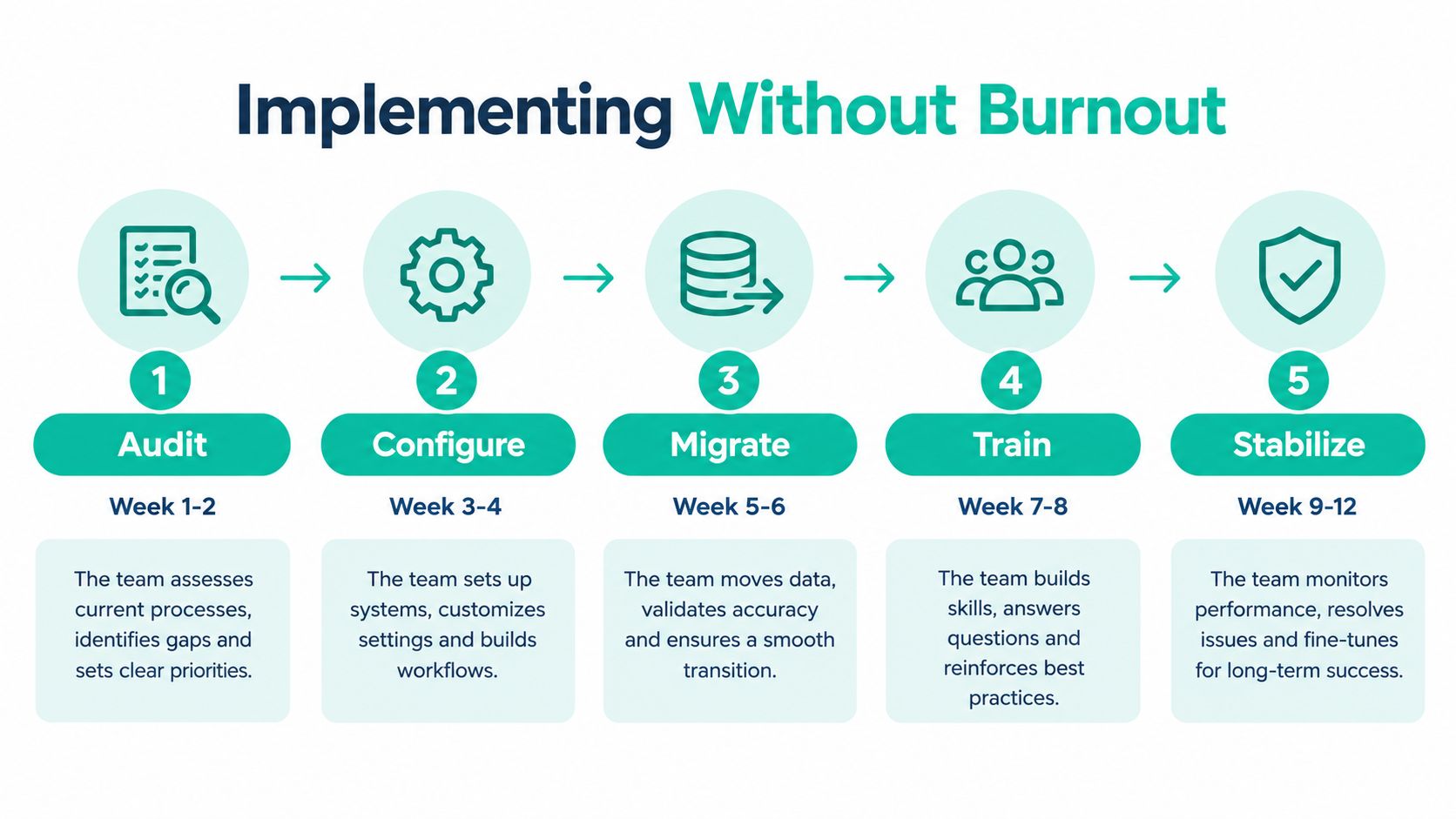
A small team can use a phased roadmap that covers audit, configuration, migration, training, and stabilization over the twelve-week sequence shown below. The calendar will vary with data quality and staffing, but the order matters. Moving dirty data into a new interface doesn't create clean operations.
Begin with an audit
List every place donor information lives, including spreadsheets, payment tools, event platforms, shared drives, personal inboxes, and finance records. Identify the authoritative source for names, gifts, funds, consent, and accounting treatment. Decide which historical information is necessary for current work and which material can be archived instead of imported.
Duplicates deserve special attention. Two records for one household can inflate apparent reach, split gift history, and send conflicting communications. Reconcile gift totals and designations with finance before migration, not after staff begin using the new system.
Protect the fundraising calendar
Don't schedule the launch immediately before a year-end appeal, major event, audit, or grant deadline. Configure fields and permissions first. Then migrate a controlled sample, test gift processing and reporting, and let selected staff practice before the full import.
A short parallel period can expose mismatches between the CRM and finance system. It also gives staff a place to ask questions without turning every campaign into a troubleshooting session. Vendor onboarding resources, such as this implementation and onboarding guidance, can help teams think through ownership, training, and launch readiness, even though the exact process should come from the selected vendor.
Use real workflows to test the system
A recurring gift should create or match a donor record, apply the correct fund and campaign information, schedule payment, generate an acknowledgment, and make the transaction visible to finance. A lapsed-donor workflow should identify the right audience, assign ownership, and record every contact. An event workflow should connect attendance to follow-up instead of leaving check-in data in a separate file.
Include the fundraising lead, finance representative, IT or vendor partner, and an executive sponsor. The executive sponsor removes organizational blockers. Finance protects reconciliation and controls. Fundraising defines relationship needs. The implementation partner handles technical decisions that the internal team shouldn't have to improvise.
Workflows That Show the Software in Action
The value of donor management software becomes clearer when you follow a record from trigger to human decision. The system should handle predictable administration while giving staff better context for personal work.
A recurring gift signup
A donor completes a form and chooses a monthly gift. The payment integration processes the transaction, creates or matches the constituent profile, applies the selected fund and campaign tags, and schedules future charges. The platform sends a branded acknowledgment and tax receipt while placing the recurring commitment in the donor's history.
The human handoff comes when the donor's behavior calls for care rather than administration. A staff member might review a failed payment, thank a longtime supporter personally, or invite a recurring donor into a deeper relationship. The system handles the routine chain, and the fundraiser receives a clear task instead of an inbox alert with no context.
A lapsed-donor reactivation
The team creates a query for donors whose most recent gift falls within its reactivation window. The workflow assigns those donors to a segment, checks their prior giving and communication preferences, and prepares a personalized message or task. Every email, call, and response is logged against the same record.
The fundraiser decides whether the donor should receive a general appeal, a personal note, or no message because of a recent sensitive interaction. That decision is where judgment matters. Automation should make the audience visible and the history accessible, not make the relationship feel mechanical.
An event follow-up
Attendee check-ins sync from the event platform into constituent records. A post-event survey goes to the appropriate audience, and a later cultivation task reminds staff to review responses before making an ask. A volunteer, speaker, sponsor, or first-time attendee can receive a different next step because the system preserves the context of participation.
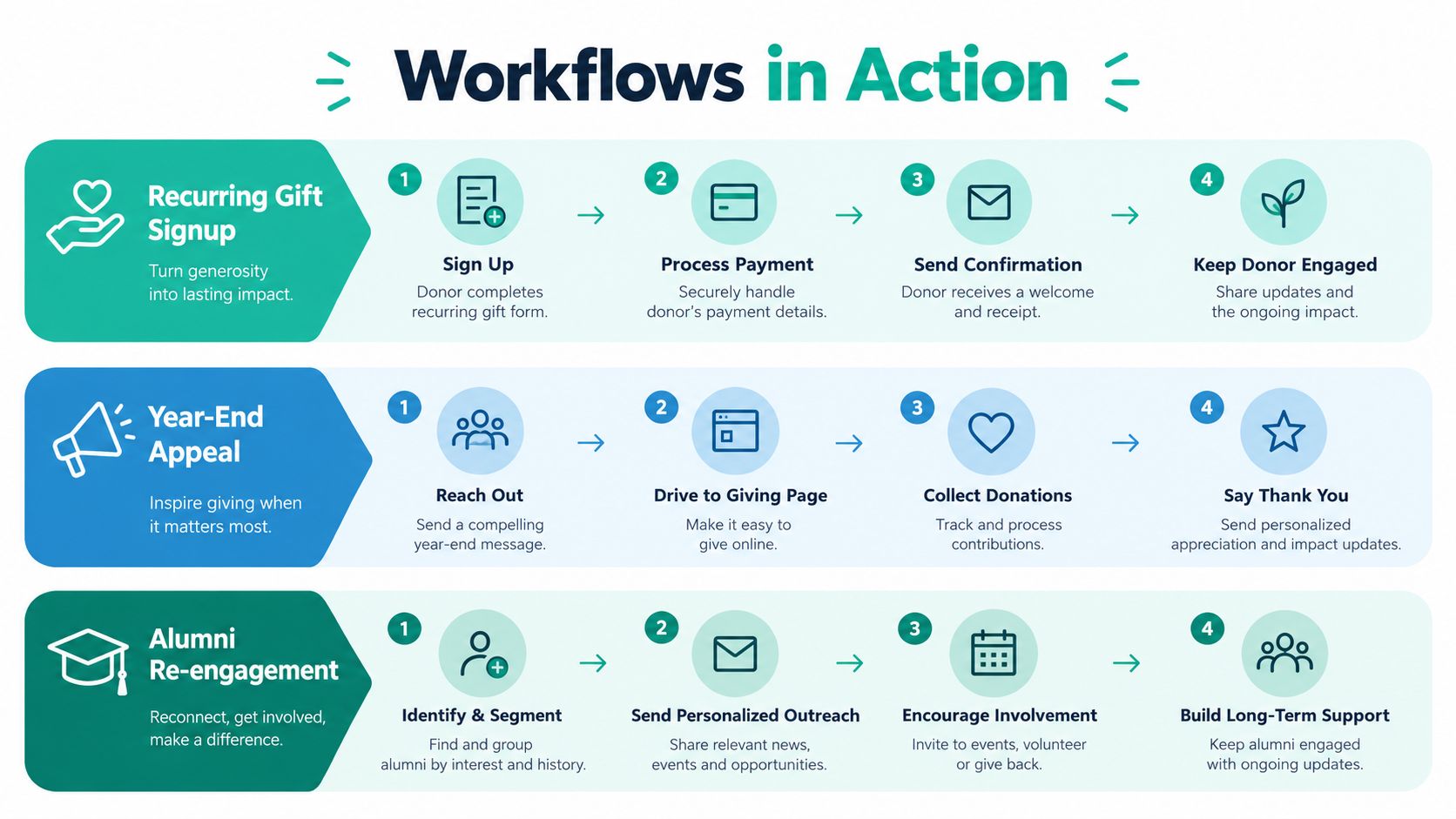
Track whether these workflows improve data completeness, acknowledgment speed, second-gift movement, recurring gift continuity, reactivation activity, and follow-up completion. Don't launch every automation at once. In the first 30 days, choose one acknowledgment workflow, one segment, and one report that staff will review consistently.
Measuring Success and Avoiding the Common Traps
A donor platform succeeds when it changes decisions and behavior, not when the database contains more fields. Choose measures that show whether supporters are continuing, deepening, and receiving appropriate attention.
Useful measures include:
- Donor retention rate: The share of prior donors who give again during the period you define.
- Second-gift conversion: Whether first-time donors make another contribution.
- Average gift movement: How giving changes across comparable donor groups and campaigns.
- Cost to raise a dollar: The resources required to generate fundraising revenue, calculated consistently with your finance practices.
- Revenue concentration: How much income comes from your highest-value donors and whether that dependence is increasing.
- Workflow completion: Whether staff acknowledge gifts, follow up after events, and act on lapse signals.
Don't copy a benchmark from another organization without understanding its donor mix, revenue model, and reporting rules. A community organization with many small gifts and a university advancement program won't define healthy concentration in the same way. Set a baseline, document the calculation, and review movement over time.
Common traps to avoid
Buying for current headcount can leave the team trapped when programs, campaigns, or users expand. Buying for every imagined future need can produce a system nobody understands. Underestimating data cleanup is another predictable failure. Migration takes judgment, especially when historical records conflict or consent information is incomplete.
Some teams turn the new platform into a passive receipt printer. They automate acknowledgments but never build segments, tasks, or reactivation practices. Others skip training for part-time fundraisers and board members, then blame the system when important notes remain in personal files.
A simple first-month checklist keeps the work concrete:
- Confirm data integrity: Reconcile a sample of donor records and gifts with finance.
- Train three power users: Give each person a real workflow to complete and document.
- Automate one acknowledgment: Test the message, receipt, fund, and exception path.
- Review one retention measure weekly: Record the result and agree on one action.
- Capture staff feedback: Fix confusing fields and unnecessary steps before expanding use.
Review the platform as an operating tool, not a trophy purchase. If your team can see who needs attention, act without rekeying information, and learn from the result, the system is doing meaningful work.
If your nonprofit is also managing a steady stream of promotional content, Pin Generator can turn product catalogs, feeds, and articles into branded Pinterest creatives, descriptions, and scheduled posts. Start by documenting your donor data sources, choosing one retention workflow to improve, and booking vendor demos that use your own records and fundraising scenarios.