
How to Advertise Your Blog on Pinterest: A Beginner's Guide
21 August 2025
Advertising your blog on Pinterest boils down to a simple, powerful strategy: treat it like a visual search engine, not just another social media site. Your goal is to create evergreen, helpful Pins that solve problems and answer the exact questions your ideal readers are asking. By doing this, you'll drive consistent, high-quality traffic to your blog long after you hit publish. This guide will walk you through exactly how to do it.
Why Pinterest Is a Goldmine for Bloggers
If you still see Pinterest as a digital mood board for recipes and DIY home decor, you're missing out on a massive opportunity for your blog. Unlike platforms where your content’s lifespan is measured in hours, Pinterest is where your posts can find a real, lasting audience. At its heart, it’s a visual discovery tool, packed with users who are actively planning, searching, and looking for solutions.
This unique user mindset is exactly what makes advertising your blog on Pinterest so incredibly effective. People don’t hop on Pinterest to see what their friends had for lunch; they come to find ideas, learn a new skill, or plan their next purchase.
The Power of User Intent
Think about it. When someone types "healthy weeknight dinner ideas" into the Pinterest search bar, they aren't just scrolling to kill time—they are on a mission. They are ready and willing to click on a Pin that leads them to a blog post offering the perfect recipe. This creates a direct pipeline of genuinely interested traffic right to your website.
This is a world away from someone passively scrolling through a social feed. On Pinterest, your blog post isn't an interruption; it's the destination they were looking for. Grasping this distinction is crucial to unlocking its value.
Evergreen Content and Long-Term Traffic
A single, well-optimized Pin can keep sending traffic to your blog for months, sometimes even years. Compare that to the blink-and-you'll-miss-it visibility of a tweet or an Instagram story. Your Pins don't just disappear into a chronological black hole. Instead, they keep getting discovered in search results and feeds whenever a user is looking for what you have to offer.
This "evergreen" quality gives you a compounding return on your effort. The work you put in today can pay off with a steady stream of blog traffic far into the future, making it one of the most efficient growth strategies out there.
Key Takeaway: Think of each Pin as a permanent digital billboard for your blog. It’s out there working for you 24/7, catching the eye of new readers long after you’ve moved on to your next post.
The platform's growth backs this up. Pinterest’s user base swelled to 570 million monthly active users by early 2025, and a staggering 85% of weekly Pinners have actually bought something based on brand content they saw on the platform. Even better, ads on Pinterest deliver a 32% higher return on ad spend (ROAS) compared to other digital platforms. The commercial intent is undeniable. If you're curious, you can explore the complete Pinterest statistics to see the full scope.
Laying the Groundwork for Pinterest Success
Before you even think about creating your first Pin, you need to build a solid foundation. Think of your Pinterest profile as your blog's digital storefront. It needs to be polished, professional, and optimized to both attract your ideal readers and clearly signal to the Pinterest algorithm what you're all about.
The very first thing you need to do is set up or convert to a Pinterest Business account. Seriously, this is non-negotiable. A business account unlocks a whole suite of tools that personal profiles just don't have—we're talking analytics, Promoted Pins, and Rich Pins. All of these are absolutely essential if you're serious about growing your blog.
Get Your Website Claimed and Rich Pins Enabled
With your business account ready, your next move is to claim your website. This is a quick verification process where you prove to Pinterest that you actually own your blog's domain. It’s the key that unlocks one of the most powerful features for bloggers: Rich Pins.
Rich Pins are a game-changer. They automatically pull metadata from your website directly onto your Pins, giving them way more context. For bloggers, the most important one is the Article Rich Pin. It grabs your blog post's headline, meta description, and author, displaying it right there on the Pin.
This instantly makes your Pins look more professional and trustworthy. Users get a little preview of your content before they even click, which can make a huge difference in your click-through rates.
When you enable Rich Pins, you're not just sharing an image anymore—you're sharing a dynamic, content-rich preview. This one small tweak can dramatically boost the authority of your Pins and convince more people to click through to your blog.
Craft a Profile That’s Built for Search
Your Pinterest profile isn't just a bio page; it's a massive piece of SEO real estate. The Pinterest algorithm scans the keywords in your display name and bio to figure out your niche and who to show your content to.
Here’s how to make it work for you:
- Display Name: Don't just use your name or your blog name. Combine it with your main keywords. So, instead of "Jane Doe," try something like "Jane Doe | Vegan Meal Prep & Easy Recipes." This tells everyone—and the algorithm—exactly what you offer at a glance.
- Profile Bio: Your bio is another golden opportunity to sprinkle in relevant keywords. Write a clear, benefit-driven statement about who you help and how. A travel blogger might say, "Helping solo female travelers explore the world safely on a budget. Find travel guides, packing tips, and budget-friendly itineraries right here!"
Strategically Name and Organize Your Boards
Finally, let's talk about your boards. Think of them as the meticulously organized filing cabinets for all your content. To make them effective, you need to name them with the exact keywords your audience is searching for.
This means ditching the cute, clever board names nobody is actually looking for.
Instead of a board called "Wanderlust Dreams," call it "Europe Travel Itineraries." Instead of "Yummy Things," go with "Quick 30-Minute Dinner Recipes." Every single board title should be a specific keyword phrase that describes the content inside. This simple strategy is what helps your Pins get discovered in search and turns your profile into an indispensable resource for your followers.
Designing Pins That Actually Drive Clicks
Let's be real: a "pretty" Pin doesn't pay the bills. On a platform where users scroll at lightning speed, your Pin design has literally one job: stop the scroll and get the click. A great Pin isn't just one that gets saved to a board for later—it's one that makes someone need to visit your blog post right now.
This isn't just about slapping some text on a stock photo. It’s about creating a strategic visual that pulls the user's eye from the image to your headline, and then makes clicking through to your website feel like the most natural next step.
The Anatomy of a High-Performing Pin
If you want to create Pins that consistently send traffic your way, you need to nail a few core elements every single time. Think of these as the non-negotiables for every Pin you publish.
-
Go Vertical or Go Home: Always, always use a 2:3 aspect ratio (think 1000 x 1500 pixels). This format completely dominates the screen on mobile devices—where over 82% of Pinterest activity happens. More screen real estate means your Pin is harder to ignore.
-
Killer Imagery: Use crisp, high-quality images or video. Your visuals need to instantly communicate what your blog post is about or tap into the desire your reader has. Generic, blurry stock photos are the fastest way to get scrolled past.
-
Bold Text Overlays: This is the most crucial part. Your headline must be on the image itself, written in a bold, easy-to-read font. Make sure it has high contrast with the background so someone can read it in a split second.
Crafting Headlines and Calls to Action
The text on your Pin is your 30-second elevator pitch. It has to hook the user immediately by creating a "curiosity gap" or promising a clear, valuable solution.
Think about it. For a blog post on grocery budgeting, a headline like "Grocery Tips" is boring and will get ignored. But a headline like "5 Shocking Ways We Cut Our Grocery Bill in Half" is a different story. It's specific, promises a huge benefit, and makes you wonder what those five ways are.
After the killer headline, you need a clear Call-to-Action (CTA). This doesn't need to be a big, flashy button. Simple, direct phrases like "Read the Post," "Get the Free Checklist," or "Learn How Here" are perfect for nudging users to take that next step and click the link.
To help you get this right every time, here's a quick checklist of what goes into a Pin that's built to perform.
| Element | Best Practice | Why It Matters |
|---|---|---|
| Aspect Ratio | Stick to a 2:3 vertical format (e.g., 1000x1500px). | Maximizes screen space on mobile, making your Pin more visible. |
| Visuals | Use high-resolution, relevant images or video clips. | Grabs attention instantly and sets the right expectation for your content. |
| Text Overlay | Add a bold, high-contrast headline directly on the image. | Your headline is the primary hook; it must be scannable in under a second. |
| Branding | Include your website URL or logo subtly on the Pin. | Builds brand recognition and helps prevent content theft. |
| Call-to-Action | Use simple, direct text like "Read More" or "Get the Guide." | Clearly tells the user what you want them to do next (click!). |
Nailing these elements is the foundation of a Pin that doesn't just look good but actually works to grow your blog traffic.
A great Pin makes a promise with its headline and proves its value with its visual. The call-to-action is simply the invitation to see that promise fulfilled on your blog.
This is where great design meets smart optimization. It's a workflow that powers real results.
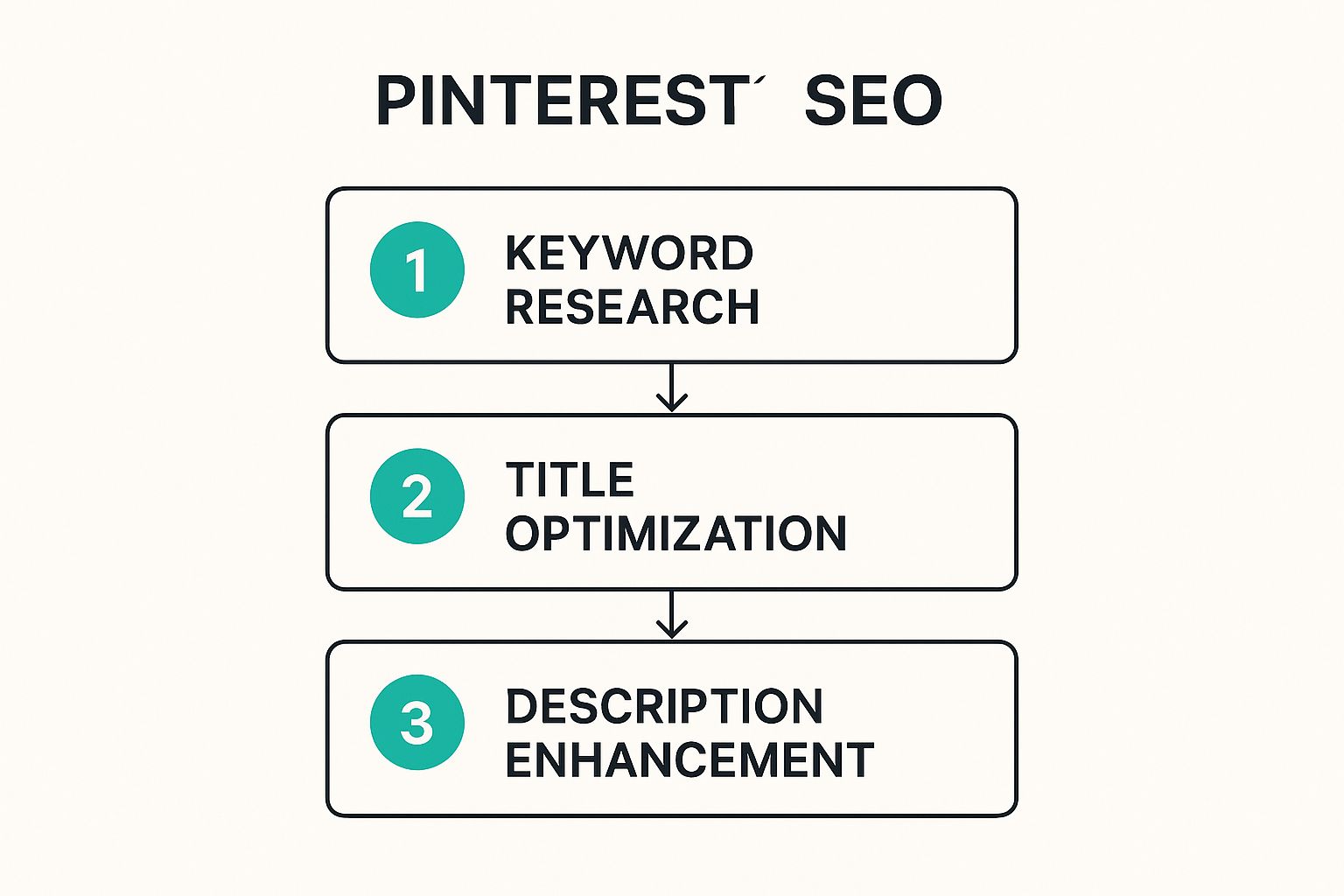
As you can see, a fantastic design is just the starting point. It needs to be backed by solid keyword research and optimized copy to truly take off.
Leveraging Video and Idea Pins
Don't box yourself into only using static images. Both Video Pins and Idea Pins are incredibly powerful for stopping the scroll because movement naturally catches the eye.
A short video clip showing a key moment from a tutorial or a quick montage of a travel destination is far more dynamic and engaging than a single photo can ever be.
For instance, a food blogger could create a 15-second Video Pin of cheese being pulled on a slice of pizza or sauce being stirred in a pan. That little bit of motion gives users a sensory preview that a static photo just can't deliver, making them way more likely to click through for the full recipe. The goal is to give them a compelling taste that leaves them wanting more.
Unlocking Organic Reach with Pinterest SEO
What if you could publish a piece of content that drives traffic to your blog for months—or even years—without spending a dime on ads? That’s the real magic of Pinterest SEO.
Forget the endless churn of social media feeds. A properly optimized Pin is a long-term asset, a digital breadcrumb that continually leads new readers back to your blog.
The trick is to stop thinking of Pinterest as a social network and start treating it like the visual search engine it truly is. People aren't just scrolling; they're actively searching for ideas, solutions, and inspiration. Your goal is to be the answer they find, and that all starts with keywords.
Finding the Keywords Your Audience Uses
Your keyword research mission begins right on Pinterest itself. Seriously, the search bar is your best friend.
Go ahead and type in a broad topic from one of your blog posts. Let’s say you’ve written about "vegan recipes." As you type, watch what happens. You'll see a row of colorful bubbles pop up right below the search bar with suggestions like "for beginners," "high protein," or "on a budget."
Those aren't just random guesses. Those are Pinterest telling you exactly what its users are searching for. Each one is a long-tail keyword, and they are absolute gold because they reveal user intent. Someone searching "vegan recipes for beginners" is much further along their journey (and a much better-qualified visitor for your blog) than someone just typing "vegan recipes."
Weaving Keywords into Your Content
Once you have a solid list of keywords, you need to put them to work. The Pinterest algorithm scans several spots on your Pin to figure out what it's about and who should see it.
Here’s where you need to place them:
- Your Pin Title: This is prime real estate. Make sure your main keyword is front and center. It's the first thing both users and the algorithm see.
- Your Pin Description: Write a short, snappy description that naturally works in your primary and a few secondary keywords. Think of it as a teaser for your blog post—it needs to make people want to click.
- Your Board Title & Description: The board you save your Pin to matters. A Pin about "vegan recipes for beginners" belongs on a board titled something like "Beginner Vegan Recipes," not a generic board called "My Favorite Food."
This isn't about keyword stuffing. It's about writing compelling copy that integrates these terms naturally. A great description solves a problem for the user, while great SEO helps the algorithm find the right user to show it to.
Getting this process down is what turns your Pins from fleeting posts into traffic-driving machines. If you really want to go deep and optimize your entire presence, our ultimate Pinterest SEO guide is the perfect next step.
Organic reach on Pinterest is a fantastic long game, but sometimes you just want to pour a little gasoline on the fire. That's where Promoted Pins come in.
Think of it as the fast track for your blog traffic. It’s how you get guaranteed eyeballs on your content, reaching thousands of new, ideal readers almost instantly. While your organic Pins are out there building slow and steady momentum, a small, strategic ad spend can put your best stuff right where it needs to be—today.
Choosing Your Campaign Objective
First things first, what do you actually want to accomplish? When you set up a campaign, Pinterest will ask you to pick an objective. For bloggers, it really boils down to two main choices:
- Brand Awareness: This is great for when you're just starting out or launching a new series. The goal is simple: get your blog in front of a ton of new, relevant people. You're building that initial name recognition.
- Consideration (Traffic): This is the bread and butter for most bloggers. Your one and only mission here is to get people to click from your Pin over to your blog post. You only pay when they click, which makes it super efficient for boosting your readership.
Honestly, for 9 out of 10 bloggers reading this, the Consideration objective is where you want to live. The whole point is getting people off Pinterest and onto your turf, and that's exactly what this objective is designed to do.
Smart Targeting to Reach Your Ideal Reader
Here’s where the magic really happens. The targeting options inside Pinterest Ads are incredibly powerful. You can stop just hoping the right people see your Pins and start making sure they do.
A successful Promoted Pin campaign isn't about reaching the most people—it's about reaching the right people. Smart targeting ensures your ad spend is working as hard as possible to attract readers who will actually care about your content.
You can zero in on your perfect reader based on:
- Keywords: Get in front of people actively searching for topics you write about.
- Interests: Target users who have shown interest in broader categories, like "healthy eating" or "budget travel."
- Demographics: Filter your audience by age, gender, location, and even language.
But one of the most effective tactics? Creating custom audiences. You can upload your email list or, even better, retarget people who have already visited your blog. This is gold because you're showing your ads to a warm audience that already knows who you are.
The proof is in the numbers, too. A whopping 2 in 3 Pinners have clicked through to a brand's website after seeing a Promoted Pin. It just works. If you're curious about who's on the platform, these stats on Pinterest's impressive user demographics show just how engaged the audience is.
A Few Common Pinterest Questions Answered
Diving into Pinterest to grow your blog always brings up a few questions. It’s totally normal to feel a bit uncertain as you get your sea legs. Let's clear up some of the most common things I hear from bloggers so you can move forward with confidence.
Probably the biggest question is: how often should I actually be pinning? Forget the old-school advice about pinning 25+ times a day. That's a one-way ticket to burnout and doesn't work anymore.
Today, it's all about quality over quantity. I recommend aiming for 1-5 fresh, high-quality Pins per day. A "fresh" Pin is just a new image or video that Pinterest hasn't seen before, even if it links back to an article you wrote ages ago. Consistency beats volume, every single time.
How Long Does This Actually Take?
Okay, the second most common question: "When will I see traffic?" I get it, you want results now. But Pinterest is a long game, not a lottery ticket. While you can get instant gratification with a Promoted Pin, building that sweet, sustainable organic traffic takes a bit of patience.
Realistically, you can expect to see some initial traction and a noticeable bump in blog traffic within 3-6 months of consistent, smart pinning. This gives the algorithm enough time to figure out what your content is about and for your Pins to start ranking.
This isn't a hard-and-fast deadline, but it's a solid benchmark. Don't throw in the towel if your analytics don't explode in the first month. Stick to your strategy, keep an eye on your Pinterest Analytics to see what's resonating, and just keep creating.
Idea Pins vs. Standard Pins: Which One Should I Use?
With all the different Pin formats, it's easy to get confused about which one is "best."
Think of it this way: Standard Pins (both static images and videos) are your workhorses. Their entire job is to get someone to click through to your blog. They are the bread and butter of traffic generation.
Idea Pins, on the other hand, are designed to keep people on Pinterest. They're like mini-blog posts or stories built right on the platform. They are fantastic for building a following and showing off your expertise, but they're not built to send clicks your way.
- Standard Pins: Make these for every single blog post you want traffic for. This is your primary tool for turning pinners into readers.
- Idea Pins: Use them strategically. Think quick tutorials, behind-the-scenes content, or a visual story that builds your brand's community.
Pinterest just keeps growing, which is fantastic news for us. In Q4 2024, they reported a whopping 553 million monthly active users globally. That's a massive, engaged audience looking for ideas. You can dig deeper into Pinterest's impressive growth and marketing statistics to see the full picture. Of course, knowing how to turn that audience into income is the real goal, and our guide on how to make money with Pinterest breaks down exactly how to do it.
Ready to stop spending hours creating Pins by hand? With Pin Generator, you can create dozens of stunning, optimized Pins in just a few clicks, get them scheduled, and let the blog traffic roll in on autopilot. See what automation can do for your workflow. Try Pin Generator now.