
Pinterest Community Guidelines Explained
8 July 2025
The Pinterest community guidelines are the official rules of the road. They exist to keep the platform a safe, positive, and genuinely inspiring place for everyone.
These rules cover what you can and can’t post, making sure all the content you see is authentic and respectful. Following them is non-negotiable if you want to avoid having your Pins taken down or, worse, your account suspended.
Why the Guidelines Are Your Blueprint for Success
It’s easy to look at community guidelines as just a long list of "don'ts." But that's the wrong way to think about them. Instead, see them as the architectural blueprint for a thriving digital city.
Just like a good city plan ensures safe roads, clean parks, and protected homes, these guidelines are here to create a predictable and positive experience for Pinners. Their whole purpose is to prevent the digital version of traffic jams (spam), unsafe neighborhoods (harmful content), and theft (intellectual property violations).
When you understand this blueprint, you can build a presence that people trust, attracting followers and growing your account the right way. The guidelines aren't obstacles; they're the very foundation that makes Pinterest such a valuable spot for creators and businesses alike.
The Core Principles of Pinterest's Policies
At their heart, the guidelines are all about fostering a healthy online space. They really boil down to three simple, core ideas:
- Be Safe: This is a big one. It means no content promoting self-harm, spreading hate speech, or showing dangerous activities.
- Be Authentic: Keep it real. Avoid spam, scams, and pretending to be someone you're not. Your content should be genuine and your intentions clear.
- Be Respectful: This is all about honoring other people's creative work. Don't post content you don't have the rights to use.
This focus on safety and respect isn't just a recent thing. Pinterest's policies have been evolving since its major growth spurt back around 2010, as it worked to balance a massive influx of users with responsible platform management. For instance, way back in 2012, Pinterest introduced a 'nopin' HTML meta tag. This was a direct response to copyright concerns, giving websites a clear way to opt out of having their content pinned. You can actually read more about Pinterest's early policy decisions on Wikipedia.
To make it even clearer, here’s a quick breakdown of what these foundational pillars mean for you as a creator.
Core Pillars of Pinterest's Community Guidelines
| Pillar | What It Means for You |
|---|---|
| Safety First | Your top priority is ensuring your content doesn't cause harm. This includes everything from dangerous DIYs to hateful ideologies. |
| Authenticity is Key | Build trust by being yourself. Don't use misleading links, create fake accounts, or engage in spammy behavior to game the system. |
| Respect for Creators | Always give credit where it's due and only Pin content you have permission to share. This protects you and the original creators. |
These principles are the bedrock of the entire platform, designed to make it a better place for everyone.

The official guidelines page, as you can see above, is organized into clear, accessible categories. Pinterest wants you to understand the rules. They aren't trying to trick you; they’re giving you the map you need to succeed.
Creating Content That Pinterest Loves
To really get ahead on Pinterest, you have to start thinking like Pinterest. It’s not just a digital scrapbook; it's a powerful visual search engine built to serve up inspiration on a silver platter. Sticking to the Pinterest community guidelines is your entry ticket, but creating content the algorithm absolutely loves is how you win the game.
Think of every Pin you create as a signal you're sending out. A crisp, original, and helpful image? That's a strong, clear signal that tells Pinterest you're adding real value. A blurry, recycled photo, on the other hand, is just static that gets ignored.
At its heart, the idea is simple: Create content that genuinely helps or inspires people. When your Pins provide real value, you're perfectly in sync with Pinterest's mission. That alignment is what earns you better visibility and more engagement—naturally.
The Anatomy of a Successful Pin
So, what does one of these "strong signals" actually look like? It’s a lot more than just a pretty picture. A truly successful Pin—one that follows the rules and gets users clicking—has a few essential parts.
- Originality is King: Your own images and videos should always be your top priority. Yes, repinning is part of the platform's DNA, but it's your original content that feeds the Pinterest machine and builds your reputation as an expert.
- Detailed Descriptions: Don't sleep on your Pin descriptions—they're incredibly important. Write clear, keyword-rich sentences that spell out what the Pin is about. This is how you help the search algorithm understand your content and show it to the right people.
- High-Quality Destination Links: The link behind your Pin is a huge piece of the puzzle. It absolutely must go to a reputable, safe, and relevant website. Broken links or shady redirects are massive red flags and a fast track to getting your account flagged.
More Than Just Rules—It’s Good Business
This focus on creating a safe and positive space isn't just about making users happy; it's a fundamental part of Pinterest's business strategy. When the platform rolled out features like Promoted Pins and Buyable Pins around 2014 and 2015, having strict guidelines became non-negotiable for building a secure marketplace.
Enforcing these rules builds the trust needed to make e-commerce work, ultimately facilitating billions in transactions. You can read more about Pinterest's move into commerce on its Wikipedia timeline.
Content That Puts Your Account at Risk
While we all focus on creating amazing content, it’s just as crucial to know what not to post. Breaking the Pinterest community guidelines isn't a small mistake—it can get your Pins taken down, your reach tanked, or even your entire account suspended. Knowing the rules is the best way to protect your brand and build a lasting presence on the platform.
Think of Pinterest as a shared space, like a community park. There are rules in place to make sure it stays safe and inspiring for everyone. Pinterest groups these no-go zones into a few clear categories, so it's easier for us creators to play by the book.
Understanding Prohibited Content Categories
To keep it simple, you can think of risky content falling into three main buckets. Each one is designed to prevent a different type of harm.
- Harmful Content: This is the big one. It covers anything promoting self-harm, hate speech, explicit adult content, or graphic violence. Pinterest has a zero-tolerance policy here to keep the platform a positive space.
- Misinformation and Disinformation: Spreading false or misleading info, especially around things like elections, public health, or safety, is a major no. The aim is to stop harmful narratives from taking root and putting users at risk.
- Deceptive Spam: This includes all sorts of shady behavior. Think link cloaking to hide where you're sending users, faking engagement with bots, or promoting outright scams. The Pinterest community guidelines are built on authenticity, so this stuff is out.
To give you a real-world look at what gets flagged, this chart from Pinterest shows what users are reporting on a daily basis.
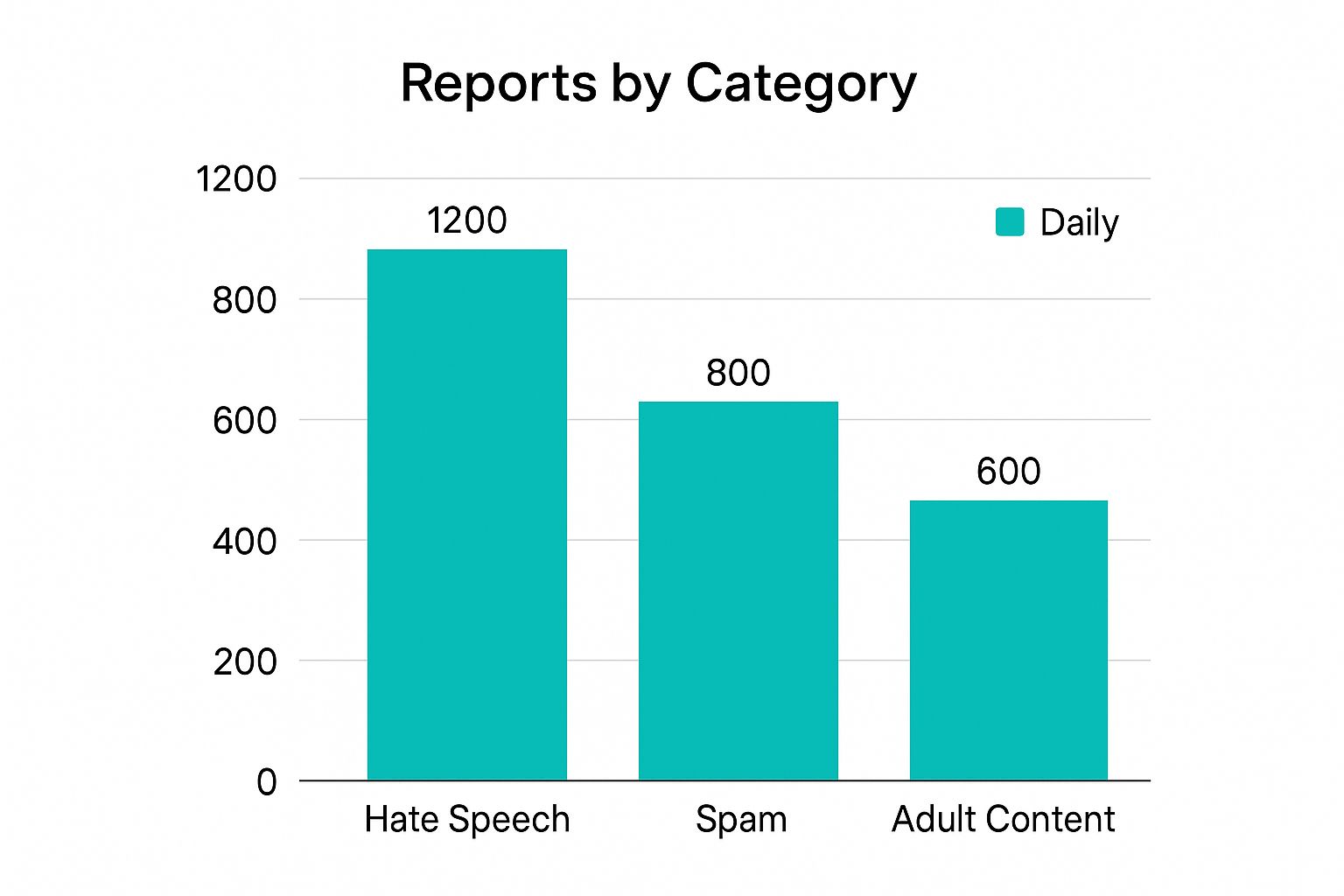
As you can see, things like hate speech, spam, and adult content are at the top of the list. Steering clear of these categories is your first and most important job in keeping your account safe.
To make this even clearer, it's helpful to see what specific violations look like and what happens when you cross the line.
Common Violations and Their Consequences
This table breaks down some of the most common mistakes creators make and the actions Pinterest might take in response. Understanding the risks can help you avoid them altogether.
| Violation Type | Example | Potential Consequence |
|---|---|---|
| Spam | Pinning the same image to dozens of boards in a few minutes. | Pin distribution limited, account flagged or suspended. |
| Misleading Content | A Pin about "healthy recipes" links to a weight-loss pill scam. | Pin removal, link blocked, account suspension. |
| Hate Speech | Creating content that attacks a protected group. | Immediate Pin and account removal. |
| Adult Content | Pinning sexually explicit imagery or videos. | Immediate Pin and account removal. |
| Copyright Infringement | Using someone else's photo without permission. | Pin removal following a DMCA takedown notice. |
Ultimately, staying informed is the best defense. Always check the official guidelines if you're ever unsure about a piece of content. It’s a small step that can save you a massive headache down the road.
How to Handle an Account Suspension
That sinking feeling when you see the "account suspended" notification is all too real. It's stressful, to say the least. But before you panic, take a deep breath. A suspension isn't always the end of the road. The key is to stay calm, understand what happened, and follow the right steps.
Often, suspensions come from repeated slip-ups with the Pinterest community guidelines. Other times, it's just the algorithm having a moment. A sudden burst of activity—like pinning a hundred ideas for a new project or following a bunch of new accounts at once—can sometimes trigger a flag, even if you meant no harm. And in rare cases, one serious violation is enough to get your account shut down immediately.
Navigating the Appeals Process
If you're pretty sure you didn't do anything wrong, you absolutely have the right to appeal. The trick is to act quickly, but also professionally.
First, check your email for the official suspension notice from Pinterest. This message usually has a direct link to their appeals form, which is your starting point. If you can't find that email, you can always head over to the Pinterest Help Center to find the form and submit your case.
When you write your appeal, remember that a human is going to read it. A polite, clear message will get you much further than an angry rant.
A successful appeal is built on clarity and respect. State your case calmly, explain your content strategy, and demonstrate that you understand and value the Pinterest community guidelines. This approach shows you're a responsible creator, not just someone trying to get their account back.
Crafting an Effective Appeal Message
Keep your message short and sweet. The support team deals with a high volume of these, so an appeal that's easy to scan and understand has a much better shot.
Here’s a simple framework to follow:
- State the Purpose: Get straight to it. Start with something like, "I am writing to appeal the suspension of my account, [Your Username]."
- Acknowledge the Situation: Show you've done your homework. Mention that you've reviewed the community guidelines to figure out what could have gone wrong.
- Explain Your Position: This is your chance to tell your side of the story. If you suspect it was an automation error, explain your recent activity. For example, "I was reorganizing my boards for a new product launch and may have pinned more frequently than usual."
- Commit to Compliance: Wrap it up by confirming you're committed to playing by Pinterest's rules.
For a more in-depth look at this process, we've put together a full guide on what to do when your Pinterest account is suspended. While there’s no guarantee, a thoughtful and professional appeal gives you the best possible chance of getting reinstated.
Guideline-Friendly Strategies for Businesses
For businesses and creators, the Pinterest community guidelines aren't just a list of rules to keep you out of trouble. Think of them as a roadmap for sustainable growth. When you align your strategy with Pinterest's vision for a positive and inspiring platform, you connect with an audience that's already looking for what you have to offer.
Here’s a better way to think about it: ditch the aggressive sales pitches. Focus on creating genuinely helpful content instead. A Pin that teaches a new skill, solves a common problem, or sparks a creative project will always do better than one just screaming "buy now." This value-first mindset is what builds real trust and lasting brand loyalty.
"The most successful brands on Pinterest don't just sell products; they sell inspiration and solutions. By adhering to the guidelines, you're not limiting yourself—you're committing to a higher standard of content that users actively seek out and reward with their engagement."
This is especially true when you're working with commercial content, like sponsored posts or affiliate links. When it comes to making money on Pinterest, transparency isn't just nice to have—it's everything.
Disclosing Commercial Content Correctly
Pinterest is serious about making sure users know when they're seeing an ad or a paid partnership. This isn't just a suggestion; it’s a core part of their policy on authenticity. If you aren't upfront, your content can get buried, or worse, your account could get flagged.
Here’s how to stay on the right side of the guidelines:
- Use Clear Hashtags: Always pop a disclosure like #ad, #sponsored, or #affiliate right into your Pin description. It’s a simple step that makes your commercial relationship crystal clear to both Pinners and Pinterest's algorithm.
- Avoid Link Cloaking: This one is non-negotiable. Pinterest’s guidelines strictly forbid using link shorteners or other tools that hide where a link is actually going. Your links have to be direct and transparent so users know exactly what they're clicking on.
- Prioritize Value, Not Just Links: Never just drop a raw affiliate link and call it a day. Instead, link to something genuinely useful, like a detailed blog post or an in-depth product review that contains the affiliate link. You're adding value first, which is what the platform is all about.
Mastering these practices is the key to building a profitable, long-term presence. To really dig in, our guide on Pinterest affiliate marketing has even more detailed strategies for success. By creating authentic, useful Pins that play by the rules, you build a business that can truly thrive.
Common Questions About Pinterest Rules
Even when you think you have a handle on the rules, some situations can still be tricky. The Pinterest community guidelines have their own quirks, especially when it comes to things like sharing content or using affiliate links. Let’s tackle some of the most common questions head-on to give you clear, straightforward answers.
Think of this as your go-to reference. Instead of crossing your fingers and hoping for the best, you can get a direct answer for the scenarios most Pinners run into. It’s all about navigating the platform with more confidence and less stress.
Am I Responsible for Content I Repin?
Yes, you are. 100%. When you save a Pin to one of your boards, you’re basically giving it your stamp of approval. In Pinterest's eyes, you own every single Pin on your profile—it doesn’t matter who made it first.
This means if you repin something that breaks the rules, even by accident, your account could get dinged. The best approach? Be super mindful of what you save. If a Pin looks iffy or like it’s breaking the rules, the right move is to report it, not repin it. You’ll be helping keep the whole community safe.
How Do I Use Affiliate Links Correctly?
Pinterest is fine with affiliate marketing, but you absolutely have to be transparent. It’s a non-negotiable part of both FTC guidelines and Pinterest’s own rules. You must clearly disclose that you have a commercial relationship.
The guiding principle here is "no surprises." A user should know exactly what to expect when they click your link. Trying to hide or disguise links is a surefire way to get flagged for spam.
To play by the rules, just follow these simple steps:
- Disclose clearly: Always pop a disclosure like #ad, #sponsored, or #affiliate right into your Pin description.
- Don't cloak links: Avoid using link shorteners that hide the final URL. Pinterest's system needs to see where that link is actually going.
- Link to something valuable: Your link should take people to a high-quality, relevant page—not just a checkout page with zero context.
What if My Account Was Suspended by Mistake?
Hey, automated systems aren't perfect. Sometimes, accounts get suspended by mistake. If you’re confident you’ve followed all the Pinterest community guidelines to the letter, you should immediately file an appeal through the Pinterest Help Center.
When you write your appeal, keep it polite, professional, and get straight to the point. Calmly explain your content strategy and lay out why you believe the suspension was an error. A well-reasoned, detailed appeal is your best shot at getting your account back.
Can I Post About Sensitive Topics?
Yes, but you need to tread very carefully. Pinterest is built to be an inspiring and positive place, so it has a strict ban on any content that glorifies or encourages self-harm, eating disorders, or suicide.
That said, content that focuses on well-being, shares positive recovery stories, or raises awareness in a supportive way is generally okay. It all comes down to your framing and intent. The content has to be helpful and constructive, never graphic or triggering.
Ready to grow on Pinterest without spending hours creating Pins? Pin Generator helps you create and schedule beautiful, high-quality Pins in seconds. Automate your Pinterest marketing and drive more traffic to your site. Try Pin Generator for free and see the difference.