
Affiliate Marketing on Pinterest A Practical Guide
26 September 2025
If you’ve ever dipped your toes into affiliate marketing, you know the goal is to promote products and earn a commission. When you bring that strategy to Pinterest, you’re plugging into a platform with massive buyer intent.
It's a simple but powerful combination: create beautiful, helpful Pins that link to products you love. When someone clicks through and makes a purchase, you earn a cut. The magic happens when you mix a visual discovery platform with an audience that's literally there to plan their next purchase.
Why Pinterest Is a Goldmine for Affiliates
Forget everything you know about traditional social media. Pinterest isn't about chasing fleeting trends or seeing what your friends are up to. It's a visual search engine where people go to plan, discover, and get inspired for things they actually want to buy.
This unique user mindset is exactly what makes it such a powerhouse for affiliate sales.
Think about someone planning a kitchen remodel. They're searching for "modern farmhouse kitchen ideas" and stumble upon your Pin featuring a gorgeous brass faucet. They save it to their "Dream Kitchen" board. A few weeks later, when they're ready to buy, they go back to their board, click your Pin, and purchase the faucet. You just made a commission from a Pin you might have created months ago.
The Power of High Buyer Intent
The audience on Pinterest is just built differently. Data shows that 80% of weekly Pinners are on the platform with the intent to shop. You’re not trying to convince a cold audience; you're connecting with people who are already in a "planning to buy" headspace.
Here's what sets the Pinterest audience apart:
- They're Planners: Users are building boards for future projects and life events—weddings, home renovations, new hobbies, you name it.
- They're Discoverers: They are actively looking for new brands and products that match their style and solve their problems.
- They're Action-Takers: Saving a Pin is a huge indicator of purchase intent. They're turning their inspiration into real-world sales.
This high-intent behavior means your affiliate content feels less like a disruptive ad and more like helpful inspiration.
The secret sauce of Pinterest is that you meet customers right at the moment of inspiration. You aren't interrupting their scroll; you're becoming a part of their plan. That alignment is what drives sales long after you hit "publish."
Unlocking Passive Income with Pin Longevity
Here's one of my favorite things about Pinterest: the insane longevity of its content. A post on other platforms is old news within hours. A Pin, on the other hand, can drive traffic and sales for months—sometimes even years.
This turns every single Pin into a potential long-term, passive income asset.
While a post on other platforms disappears into the void almost immediately, a Pin has an average lifespan of about 3.5 months. That extended visibility means one affiliate link embedded in one Pin can keep generating clicks and commissions for a long, long time. It’s all about maximizing your return on the effort you put in upfront.
Building Your Profile for Affiliate Success
Your Pinterest profile is your digital storefront. It’s the first impression you make, and in the world of affiliate marketing, that first look is everything. Before anyone clicks on your links, they’ll pop over to your profile to see if you’re legit.
A professional, niche-focused profile builds instant trust. Think about it: a messy profile with pins about everything from keto recipes to car repair sends confusing signals. But a tightly curated profile centered on something specific—like "sustainable home goods" or "budget-friendly travel"—tells both users and the Pinterest algorithm exactly what you’re all about. This clarity is where a winning strategy begins.
Convert to a Pinterest Business Account
First thing's first: you need a free Pinterest Business account. This isn't just a suggestion; it's a must-do for anyone serious about making money on the platform. A business account unlocks a whole suite of tools that a personal account just doesn't have, giving you the data you need to make smart moves instead of just guessing.
Switching over gives you access to some game-changing features:
- Pinterest Analytics: This is the big one. You get to see which Pins are driving the most clicks, your best-performing boards, and who your audience is. This info is pure gold for figuring out what’s working.
- Rich Pins: These are supercharged Pins that automatically pull in extra info from your website, like product prices or blog post headlines. They make your content far more useful and clickable.
- Advertising Capabilities: While you can get amazing results without spending a dime, having the option to boost your top-performing affiliate Pins can really put your earnings into high gear.
Getting familiar with this dashboard is key to managing and growing your brand on Pinterest.
The dashboard puts all the essential tools for reaching your audience right at your fingertips.
Crafting a Keyword-Optimized Bio
Your bio is prime real estate for Pinterest SEO. It’s one of the first things the algorithm scans to figure out what your account is about. Don't waste this space with something fluffy. You need to strategically weave in the keywords your target audience is searching for.
For instance, if you're in the vegan baking niche, a bio that says "I love to bake" is a total missed opportunity. A much better, optimized version would be: "Your source for delicious vegan baking recipes and plant-based desserts. Find easy dairy-free cake ideas and gluten-free cookie inspiration." See how it naturally works in multiple search terms?
Your bio has two jobs: it tells people what you offer and it tells the Pinterest algorithm what searches to rank you for. Nailing this is a simple but incredibly powerful move.
Designing Niche-Specific Boards
Think of your Pinterest boards as the aisles in your digital shop. Each one needs to be a tightly focused collection of Pins on a specific sub-topic within your niche. Forget vague board titles like "My Favorites" or "Cool Stuff"—they do nothing for you.
Get specific. Use keywords in your board titles and descriptions. This is how your boards start showing up in search results, pulling in new followers who are already looking for what you’re sharing.
Let’s say you're an affiliate marketer for home office gear. Here’s how you’d level up your boards:
| Vague Board Title | Optimized Board Title | Why It Works |
|---|---|---|
| Home Office | Small Home Office Ideas | Targets a specific problem: people trying to set up an office in a small space. |
| Tech | Ergonomic Office Chairs | Drills down from a huge category to a high-intent product search. |
| Decor | Minimalist Desk Setup | Taps into a popular aesthetic and catches people searching for that exact style. |
Creating these hyper-focused boards turns your profile into a genuinely useful resource. Not only does this make you more discoverable, but it also gets people to follow individual boards, giving you a direct line to their feeds for all your future affiliate Pins. This foundation is critical for every single Pin you publish from here on out.
Designing Pins That Drive Real Commissions
A great Pin is a perfect blend of art and science. It has to be beautiful enough to stop a user mid-scroll, but also strategic enough to make them want to click. This is where your affiliate marketing on Pinterest really comes alive—turning a simple image into an asset that generates commissions.
Think of every single Pin as a tiny, targeted advertisement. You've got just a couple of seconds to grab attention, show value, and get someone to take action. A blurry photo or confusing text won't just get ignored; it can actually damage your credibility. The goal is to design Pins that feel like helpful, native content, not like a pushy ad.
The Anatomy of a High-Converting Pin
Every Pin that successfully drives affiliate sales has a few things in common. It's not about being a world-class graphic designer; it's about understanding what resonates with the Pinterest audience. Once you nail these core components, you can create a repeatable process for success.
Here's what really matters:
- Optimal Dimensions: Always, always use a vertical aspect ratio. The sweet spot is 2:3, which usually means 1000 x 1500 pixels. This format dominates the screen on mobile devices, which is where most people are browsing Pinterest.
- High-Quality Imagery: Use crisp, clear, and vibrant photos. Steer clear of dark, blurry, or super generic stock images. Your picture should tell a story or showcase the product in a way that feels aspirational.
- Compelling Text Overlay: The image grabs their attention; the text tells them what to do next. Use a bold, easy-to-read font to highlight a benefit or a solution. Phrases like "5 Must-Have Gadgets" or "The Secret to Perfect Coffee" work like a charm.
- Strategic Branding: Subtly add your logo or website URL to the bottom of your Pin. This helps with brand recognition and makes it harder for others to steal your content.
Your Pin's design is its first promise to the user. A clean, professional design signals that the content on the other side of the click will be equally valuable and trustworthy.
To really dial in your designs, it helps to break down the key visual and text elements that make a Pin successful for affiliate marketing.
Pin Design Elements for Higher Conversions
| Element | Best Practice | Why It Works |
|---|---|---|
| Image Choice | Use bright, high-resolution lifestyle or product-in-action shots. Avoid generic stock photos. | Authentic images feel more trustworthy and help users visualize themselves using the product, which is key for a purchase decision. |
| Text Overlay | Keep it short and solution-oriented. Use a bold, contrasting font. Think "How To" or "Top 5" headlines. | This text is your hook. It quickly communicates the value of clicking through, solving a problem or satisfying a curiosity. |
| Color Palette | Use brand colors consistently but make sure they pop. Warm colors like red and orange often perform well. | A consistent color scheme builds brand recognition, while eye-catching colors stop the scroll in a crowded feed. |
| Call-to-Action (CTA) | Use a subtle but clear CTA in the text overlay or description, like "Shop the look" or "Learn more." | A direct CTA removes ambiguity and tells the user exactly what you want them to do next, increasing the likelihood they'll click. |
| Branding | Place your logo or website URL at the bottom of the Pin. Keep it small and unobtrusive. | This builds brand authority over time and protects your creative assets without looking like a blatant advertisement. |
Focusing on these elements will give you a solid foundation for creating Pins that don't just look good, but actually convert clicks into commissions.
Crafting SEO-Rich Descriptions
While the visuals are what stop the scroll, the text that goes with your Pin is what helps the algorithm understand and rank it. Your Pin description is the perfect place to sprinkle in those keywords you researched earlier. Don't just stuff them in; weave them into a natural, helpful description.
A good description sets the scene and makes the user want to click to find out more. Think about what your audience is searching for and answer that question.
Let's say you're promoting an affiliate link for a fancy espresso machine:
- Weak Description: "Great espresso machine. #coffee #espresso"
- Strong Description: "Discover how to make the perfect café-style latte at home with this sleek espresso machine. It’s the ideal choice for a small kitchen coffee bar and makes a rich, flavorful brew. Click through for our full review and the best home espresso setup tips! #espressomachine #coffeelover #homebarista"
See the difference? The strong version uses keywords naturally, highlights benefits, and has a clear call-to-action. It's far more effective for both users and the Pinterest algorithm.
Honesty Builds Trust: The Right Way to Disclose
Transparency is absolutely non-negotiable in affiliate marketing. It's not just a requirement from the Federal Trade Commission (FTC); it's crucial for building a trusting, long-term relationship with your audience. People appreciate honesty and are way more likely to trust your recommendations when you're upfront about your affiliate links.
Disclosing is simple and doesn't have to be awkward. You just need to make it clear and easy to spot.
Here’s how to do it right:
- Use Clear Hashtags: Add hashtags like #ad, #sponsored, or #affiliatelink right in your Pin description. Make sure they're easy to see.
- Incorporate It in Your Text: You can also add a simple sentence like, "This post contains affiliate links."
Failing to disclose can get you in hot water, including having your account suspended. But more importantly, it breaks the trust you’ve worked so hard to build. By being transparent, you show your audience you value their trust above all else—and that's the foundation of any good affiliate marketing strategy. If you want to dive deeper into making your visuals pop, learning how to create truly engaging content is a great next step.
Mastering Pinterest SEO for Organic Traffic
If there's one mistake I see affiliates make over and over, it's treating Pinterest like just another social media site. It's not. Pinterest is a massive visual search engine, and getting your head around its SEO is the secret to unlocking a steady stream of free, high-intent traffic to your offers.
When you nail Pinterest SEO, your Pins don't just get a quick burst of attention and then fade away. They get discovered by users actively searching for solutions for months, or even years, down the line.
The algorithm has one job: connect users with the most relevant content for their search. Your job is to send crystal-clear signals that your content is the perfect match. This all starts—and ends—with smart keyword research.
Uncovering High-Intent Keywords
You don't need fancy, expensive tools to do effective keyword research for Pinterest. In fact, the best insights are hiding in plain sight, right on the platform itself, showing you exactly what real people are looking for.
Your first stop should always be the Pinterest search bar.
Start typing a broad keyword related to your affiliate product, like "home office." See those auto-suggest terms that pop up? That's not a random guess. That's Pinterest telling you what the most popular related searches are right now.
You'll likely see phrases like:
- home office ideas for small spaces
- home office decor
- home office organization
- aesthetic home office setup
These long-tail keywords are pure gold. They reveal a user's intent with incredible clarity. Someone searching for "home office" is just browsing. But someone searching for "home office ideas for small spaces" has a specific problem they're trying to solve—and your affiliate product might be the perfect solution.
Another killer technique is to see what's already winning. Search your main keyword and check out the top-ranking Pins. What kind of language are they using in their titles and descriptions? This little bit of competitor analysis gives you a proven blueprint for what resonates with both the algorithm and your audience.
A Practical Keyword Research Scenario
Let's walk through a real-world example. Imagine you're an affiliate for a high-quality, ergonomic office chair. Your mission is to get your Pin in front of people who are ready to pull out their wallets.
-
Start Broad: Type "office chair" into the search bar. Instantly, you'll see suggestions like "office chair aesthetic," "ergonomic office chair," and "office chair for back pain." Note those down.
-
Drill Down: Click on "ergonomic office chair." Now, look at those colorful bubbles that appear just below the search bar. Pinterest is literally handing you related sub-topics. You might see terms like "modern," "white," "for small desk," or "review."
-
Combine and Conquer: Now, mix and match these terms to create a list of hyper-specific, powerful keywords to target:
- best ergonomic office chair for back pain
- modern ergonomic office chair review
- white office chair for small desk setup
See how we went from a super competitive, generic term to a focused niche? That's where your Pin can stand out and attract a seriously motivated audience. This is just one piece of the puzzle; for a complete guide, check out our deep dive into https://pingenerator.com/blog/pinterest-seo-for-affiliate-marketing.
Where to Put Your Keywords for Maximum Impact
Okay, you've got your golden list of keywords. Now what? You need to strategically place them where they'll make the biggest difference. The idea is to create a consistent "scent" of relevance across your entire Pinterest presence, signaling to the algorithm that you're the go-to expert on this topic.
Your Profile Bio: Weave your most important, high-level keywords into your bio naturally. If your niche is home office organization, your bio should absolutely include phrases like "home office setup," "desk organization ideas," and "productivity hacks."
Board Titles and Descriptions: This is critical. Forget cute or clever names—your board titles need to be direct, keyword-focused phrases. Instead of "My Office Dreams," name it "Ergonomic Home Office Furniture." Then, use the board description to flesh it out with related long-tail keywords.
Think of your boards as filing cabinets for the Pinterest algorithm. Clear, descriptive labels on each drawer (board) help the algorithm quickly understand, categorize, and serve your content to the right people.
Individual Pin Descriptions: Here’s where you unleash your most specific long-tail keywords. Craft a helpful, conversational description that naturally includes the phrases you found. For our ergonomic chair Pin, you’d want to use terms like "comfortable office chair for long hours" and "best chair for WFH back support."
This multi-layered approach gets your keywords working for you at every level. It's how you go from just posting Pins to building a powerful, search-driven machine for your affiliate marketing on Pinterest.
Scaling Your Strategy with Automation and Analytics
If you want to win at affiliate marketing on Pinterest, consistency is the name of the game. The algorithm loves—and rewards—accounts that are always pinning fresh, valuable content. But let's be real, nobody has time to manually publish Pins every single day. That's a one-way ticket to burnout.
The secret to scaling isn't about working harder; it's about working smarter. This means using automation to keep a steady flow of content going and digging into your analytics to see what's actually making people click. It’s this powerful combo that turns your Pinterest from a content-posting machine into a data-driven strategy that actually earns commissions.
Automate Your Pinning for Maximum Efficiency
Imagine spending one afternoon setting up an entire week's worth of top-notch Pins. That's what automation does for you. Scheduling tools aren't just a nice-to-have; they're a strategic weapon that gets your content in front of your audience at the perfect times, even when you're not online.
A consistent pinning schedule tells the Pinterest algorithm that your account is active and trustworthy, which can give your content a serious visibility boost. Instead of pinning like crazy one day and then disappearing for a week, you create a smooth, constant stream of content that keeps your profile fresh and your followers hooked. This is where a tool like Pin Generator becomes a game-changer, letting you build and schedule your content calendar without breaking a sweat. For a deeper dive, check out our detailed guide on how to automate Pinterest marketing.
This simple workflow is really the heart of a successful affiliate strategy on Pinterest.
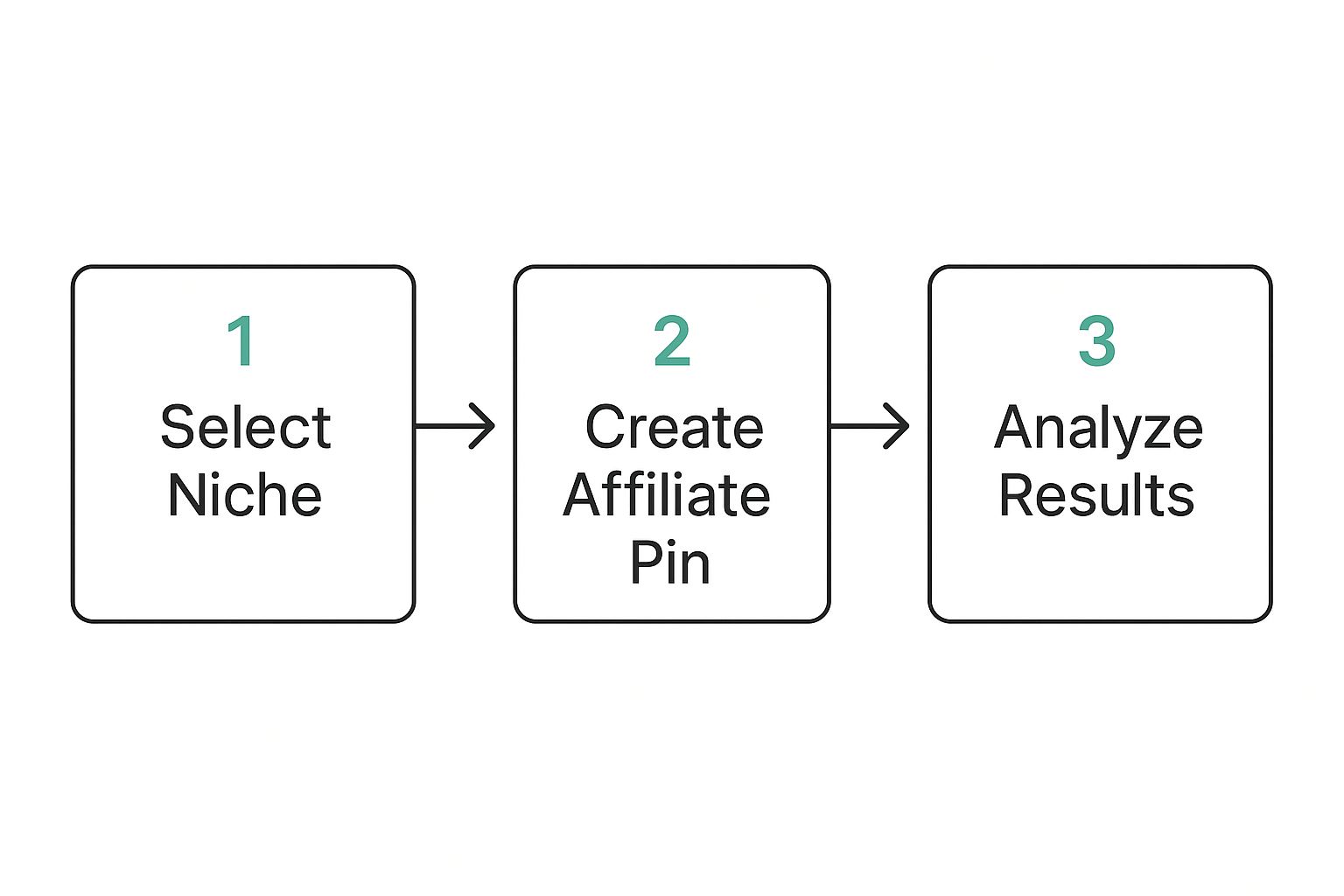
As you can see, it breaks the journey down into three core pillars. It all starts with smart creation, which is then measured by analytics so you can tweak and improve your approach over time.
Dive into Pinterest Analytics to Find Your Winners
Guessing what might work is a recipe for failure. Your Pinterest Analytics is the only crystal ball you need, showing you exactly what’s hitting the mark and what’s falling flat. Once you get the hang of it, you can stop wasting time on Pins that go nowhere and double down on the content that actually performs.
And you definitely need that edge. Globally, the affiliate marketing industry is worth over $17 billion, and something like 81% of brands have their own affiliate programs. Pinterest is a major player here, with 42.2% of affiliate marketers using the platform for promotion—that puts it ahead of both YouTube and Twitter. In such a crowded space, making decisions based on data is non-negotiable.
When you first open your analytics, it can feel a bit overwhelming. Don't sweat it. Just focus on the numbers that directly tie back to your affiliate goals.
Your best-performing Pins aren’t just flukes. They're a roadmap. Figure out why they worked, and then do more of that.
Here are the key metrics you should be watching like a hawk:
- Outbound Clicks: This is your bread and butter as an affiliate marketer. It tells you how many people actually clicked through your Pin to your blog post or product page. A high number of outbound clicks means your Pin and call-to-action are compelling.
- Saves (Repins): When someone saves your Pin, it’s a huge vote of confidence. They’re bookmarking it for later, which often means they’re seriously considering a purchase. Plus, high saves get your Pin in front of that user's followers, extending its reach.
- Impressions: This is simply how many times your Pins were shown to people. While it doesn't directly lead to sales, high impressions are a great sign that your Pinterest SEO is on point and your content is getting discovered.
By checking these numbers regularly, you'll start to see patterns emerge. Do Pins with bold colors get more clicks? Do "how-to" guides get more saves? Use these little discoveries to fine-tune your Pin creation. This feedback loop—create, measure, refine—is exactly how you scale your affiliate income on Pinterest.
Common Questions on Pinterest Affiliate Marketing
Let's be honest, figuring out the rules for affiliate marketing on Pinterest can feel a bit like walking a tightrope at first. It's totally normal to have questions about what you can and can't do, what actually works, and what landmines to sidestep.
So, let's clear the air and tackle some of the most common questions I hear. Getting these details straight from the beginning will help you build a solid strategy that grows your account the right way.

Can I Put Affiliate Links Directly on Pinterest?
Yes, you absolutely can. Pinterest's own guidelines give the green light for putting affiliate links directly on your Pins. It's fast, it's simple, but… it's not always the smartest move for the long haul.
Before you do anything, make sure you double-check the rules for each specific affiliate program you're a part of. Some brands are picky and don't allow direct linking from social media, insisting you send traffic to your own website first.
The real power move? Link your Pins to a relevant blog post or a dedicated landing page on your site. This way, you can offer way more value, capture email addresses, and even promote multiple products at once. You control the entire experience.
No matter which path you choose, transparency is everything. You have to disclose your affiliate relationship. A simple hashtag like #ad or #affiliatelink in your Pin description does the trick.
How Long Does It Take to Make Money on Pinterest?
If you're looking for a get-rich-quick scheme, this isn't it. Affiliate marketing on Pinterest is a marathon, not a sprint, and patience is your best friend.
While you might see a Pin take off within a few weeks, it realistically takes about 3-6 months of consistent, strategic pinning before you start to see any meaningful affiliate income roll in.
Think of it like tending a garden. First, you prepare the soil (that's optimizing your profile). Then you plant the seeds (creating great Pins) and water them regularly (pinning on a consistent schedule). It just takes time for everything to grow.
But here's the beautiful part: a well-crafted Pin has incredible staying power. One successful Pin can drive passive traffic and sales for months—sometimes even years—after you first hit publish.
What Are the Biggest Mistakes to Avoid?
I see so many beginners make the same few mistakes that stall their progress or, even worse, get their accounts into trouble. If you can steer clear of these common pitfalls, you'll be miles ahead of the competition.
- Pinning Inconsistently: The Pinterest algorithm loves active, predictable accounts. Dropping 20 Pins in one day and then disappearing for a week is a huge red flag. A scheduler is non-negotiable for maintaining a steady flow.
- Using Bad Visuals: Pinterest is a visual search engine, first and foremost. Low-quality, blurry, or just plain boring images will get scrolled past every single time. Take a little extra time to create clean, eye-catching designs that make people stop.
- Stuffing Keywords: SEO is crucial, but you have to write for people, not just robots. Jamming keywords into your descriptions makes them sound spammy and unreadable, which turns off both users and the algorithm.
- Forgetting to Disclose: This is the big one. Failing to be upfront about your affiliate links is the fastest way to lose the trust of your audience. It's also a direct violation of FTC guidelines and Pinterest’s own policy, which can get your account shut down for good.
Just by avoiding these few things, you’ll build a much stronger, more trustworthy presence that sets you up for real, long-term success with affiliate marketing on Pinterest.
Ready to stop wasting time and start scaling your Pinterest strategy? With Pin Generator, you can create dozens of high-quality, optimized Pins in minutes, schedule them for months in advance, and unlock the power of automation. Start your free trial today and see the difference at https://pingenerator.com.