
How to Start Amazon Affiliate Marketing on Pinterest (2025 Beginner’s Guide)
13 June 2026
What does it actually mean to make money with Pinterest and Amazon? If you’ve heard about affiliate marketing, then you probably know that Amazon Associates is one of the top affiliate networks, powering nearly half of the global affiliate market.
Pinterest users often come with clear intent, searching for “best kitchen tools for small apartments” or “gift ideas under 50 dollars.” Unlike Instagram or TikTok where you stay inside the platform, Pinterest’s goal is to drive users outward to helpful content, making it ideal for affiliate-linked pages.
If monetizing your Pinterest content using Amazon products is on your radar, this article walks you through the exact steps to set up Pinterest affiliate marketing in 2025, including setting up your accounts, finding products, linking properly, and growing strategically with tools like Pin Generator.
What You Need to Get Started
To make money with Pinterest and Amazon in 2025, you’ll need three components:
- A Pinterest business account
- A simple website or landing page
- An Amazon Associates account
If you’ve already set up your Pinterest business profile and website, feel free to skip ahead to the next section. If not, we’ve linked resources below to help you get set up.
Pinterest Business Account
Pinterest requires a business account if you plan to monetize content. It’s free to create and gives you access to tools like analytics, SEO features, and ads. It also ensures you’re complying with Pinterest’s terms when promoting affiliate content. Need help setting yours up? Follow our Pinterest business account tutorial here.
Website or Landing Page
While you can technically pin affiliate links directly to Pinterest, it’s not the best approach. Amazon Associates typically requires you to have a functioning website or a strong social presence in order to get approved. Even after approval, linking through a value-based page (like a blog post or product roundup) can improve conversion rates and keep your Pinterest account safe from being flagged as spam.
If you don’t have a website yet, we recommend using a beginner-friendly provider like Hostinger. You’ll get a domain, hosting, and drag-and-drop builder that can have your site live in under 30 minutes. For more help on that setup, check out our article on affiliate marketing basics here.
Amazon Associates Account
Once your Pinterest and website are ready, you’ll be able to apply to Amazon’s affiliate program. This article will walk you through that exact process below, including how to grab links, add them to content, and optimize for performance.
If you prefer to watch instead of read, we’ve also created a quick video tutorial that covers this step-by-step. You can watch it here:

How to Apply to Amazon Associates
Once your Pinterest business account and website are ready, it’s time to apply to Amazon Associates, Amazon’s official affiliate program. Start by heading to the Amazon Associates application page. You’ll see in the eligibility section that Amazon requires applicants to have either a functioning website or an active social media presence. Since you’ve already set up a website, you’ll qualify through the website option.
Click Sign Up, and log in with the Amazon account you’d like to use for affiliate tracking (this can be your existing account or a new one for your business). From there, you’ll be prompted to:
- Enter your website URL
- Describe how you plan to promote products (Pinterest and blog content is a clear, acceptable response)
- Complete your contact and tax information
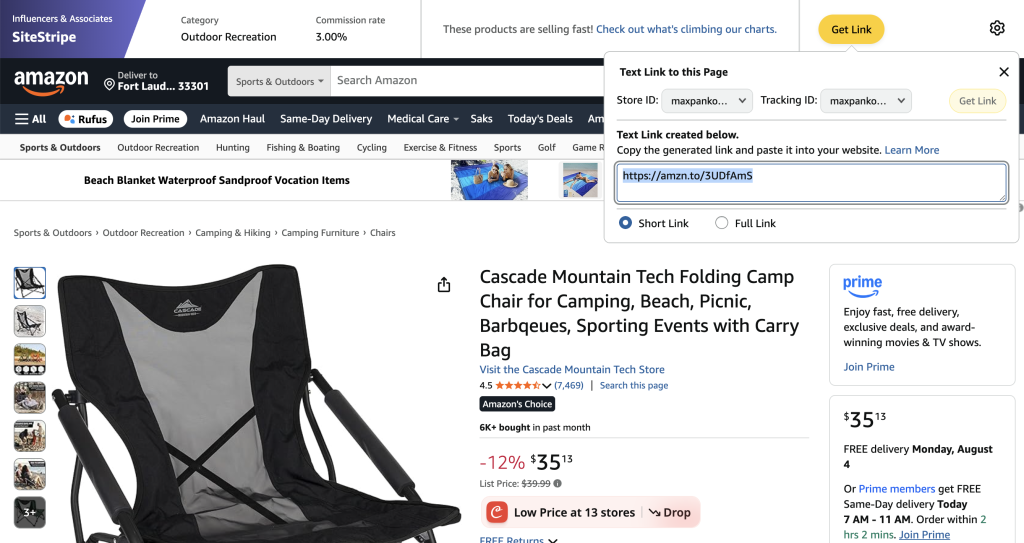
Once approved, you’ll gain access to the Amazon Associates dashboard and a browser extension called SiteStripe, which lets you grab affiliate links directly from any Amazon product page.
How to Find Products and Get Your Affiliate Links
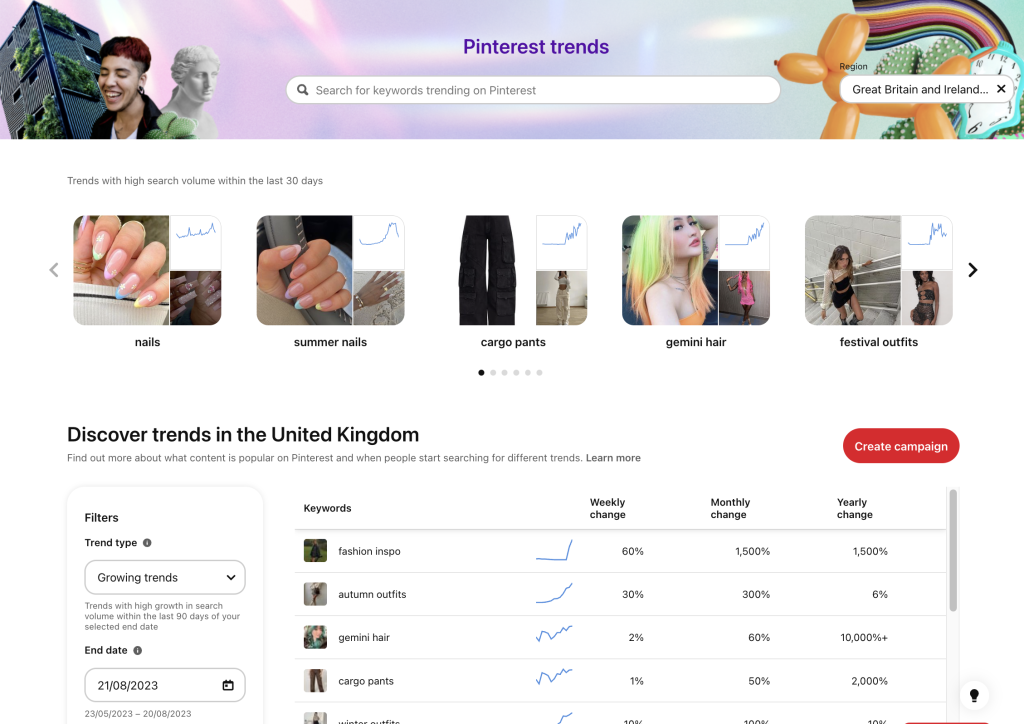
Assuming you’ve already completed the basic steps outlined in our Getting Started article, you’ll have chosen a niche, researched Pinterest trends, and identified potential opportunities for products.
Then, log into the Amazon account connected to your Associates profile and use the Amazon search bar to explore products relevant to your niche, ideally ones with strong reviews, clear product photos, and competitive pricing. For example, if your niche is organization, you might search for “stackable storage bins” or “under-bed organizers.”
As you browse, Amazon’s SiteStripe toolbar (which appears across the top of each product page) will allow you to generate your affiliate link in just one click. Simply click “Get Link”, select the short link option, and copy your unique URL. This link tracks any purchases made by users who click it, and earns you a commission if they buy.
You can use these links in:
- Blog posts or product roundups
- Pinterest pins (in some cases – more on that below)
- Resource pages or gift guides
Tip: If you’re not sure what types of products your audience is searching for, use Pinterest Trends to explore seasonal or trending terms in your niche.
Where to Use Amazon Affiliate Links on Pinterest
While Pinterest technically allows affiliate links, dropping them directly into pins can put your account at risk if done incorrectly or too frequently, as Pinterest identifies this as low-quality content and potential spam. Instead, the safest and most effective approach is to embed your affiliate links inside relevant blog posts or landing pages, then link to those pages from your pins.
For example, rather than pinning a direct Amazon link to a foldable beach chair, you might create a blog post titled “Top 5 Beach Essentials for Moms” and include the product (with your affiliate link) as one of the recommendations. This adds context, builds trust, and gives Pinterest more content to work with when evaluating your pin.
If you do decide to experiment with direct links, there’s one method we recommend which is to use the Pinterest mobile app to create a product pin.
Follow these steps:
- Create a new pin using your own original image or a product collage
- At the bottom of the pin setup, use the “tag a product” option
- Paste your link and check the box to mark it as an affiliate link
By following the above method, Pinterest will automatically generate a product preview and disclose the affiliate status, keeping you in compliance with their terms.
Keep in mind that Pinterest prioritizes fresh content, so to stay in good standing, you’ll want to constantly rotate your images, headlines, pin descriptions, and destination links. You’ll also want to avoid reusing the same graphic and link combination repeatedly, and space out how often you pin the same URL or affiliate link to prevent being flagged as spam.
In most cases, linking to a blog post or curated landing page is a better long-term strategy, as it helps with SEO, increases the chances that your audience clicks, and provides more value for an easier conversion too.

Automate Your Pinterest Strategy with Pin Generator
Once your Amazon Associates account is up and running, consistency is key. But creating fresh pins every day with new images, titles, and descriptions can become overwhelming, which is where automation tools come in.
Our favorite tool… Pin Generator!
Simply enter a product link or blog post URL into the tool, and Pin Generator will create dozens of fresh pin variations by pulling your titles, text, and images, to create ready-to-schedule Pinterest pins in minutes.
Once your pins are created, you can either download and upload them manually (ideal for brand-new accounts) or schedule them directly through the platform. Either way, Pin Generator helps you stay consistent to meet Pinterest’s “fresh content” guidelines, and free up your time to focus on strategy and growth.
Pro Tip: If you’re just getting started, we recommend uploading manually for the first few weeks. Once your account builds trust, you can take full advantage of Pin Generator’s scheduling features and start scaling with ease.
If you’re ready to start making money with Pinterest and Amazon Associates, now’s the time to take action. Get your account set up, start building your first product posts or landing pages, and try making a few pins for free using Pin Generator.
Try Pin Generator for free today and start building your Amazon affiliate strategy the smart way.
Let’s get generating!