
Can People See If You View Their Pinterest?
26 June 2025
Let's get straight to it: no, people cannot see if you view their Pinterest profile. The same goes for their boards or individual Pins. Your browsing is totally private, so you can explore all you want without leaving a footprint.
The Straight Answer on Pinterest Profile Views
Think of your Pinterest activity less like a social network (where platforms like LinkedIn track every profile visit) and more like wandering through a massive digital library. When you pick a book off the shelf or flip through a magazine, the author doesn't get a ping with your name and face attached. Pinterest works the same way, prioritizing content discovery over social surveillance.
This is a deliberate design choice. The goal is to let you explore any topic that catches your eye—from planning a secret wedding to researching a super-niche hobby—without feeling self-conscious. The whole platform is built around anonymous inspiration, encouraging you to dive deep into whatever you find interesting without any social pressure.
The bottom line on Pinterest privacy is this: all your browsing data is aggregated and anonymized. Creators can see how many people viewed their Pins, but they will never see who those people are.
It’s clear many users are still a bit foggy on how this works, as the chart below shows.
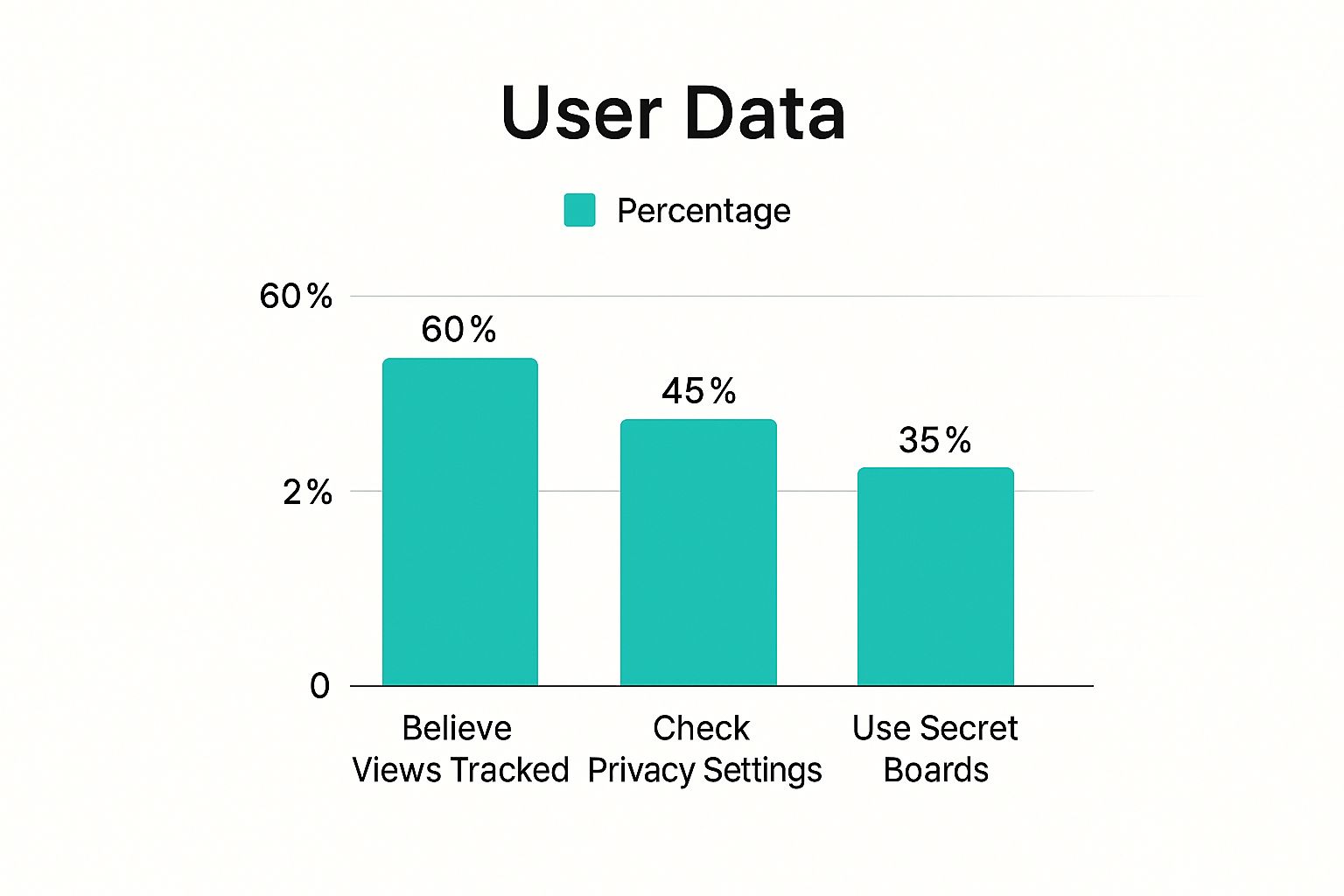
This shows a real gap between what people worry about and how the platform actually functions. Pinterest simply doesn’t tell users when someone checks out their profile or Pins, a policy that sets it apart from networks built on professional connections.
So what is public on your Pinterest account, and what stays private? It can be confusing, so we've broken it down for you.
Your Pinterest Activity: What Is and Is Not Visible
| Your Activity | Is It Visible to Other Users? | Who Can See It? |
|---|---|---|
| Viewing a profile or Pin | No | This is completely private. |
| Saving a Pin | Yes | Your followers can see it in their home feed, and anyone visiting your profile can see it on your boards. |
| Creating a public board | Yes | Anyone who visits your profile can see it. |
| Creating a secret board | No | Only you (and anyone you invite) can see this board and the Pins you save to it. |
| Following another user | Yes | This is public information visible on your profile. |
| Commenting on a Pin | Yes | Your comment is public and tied to your profile. |
Ultimately, your public actions are the ones where you actively engage—saving, commenting, following. Your passive browsing, on the other hand, is for your eyes only.
All the data Pinterest gathers is about how content performs as a whole, not about who is looking at it. This gives creators the feedback they need to make better content without ever compromising your privacy.
You can learn more in our complete guide on Pinterest profile views. For now, you can rest easy knowing you can curate, explore, and get inspired without a second thought.
Why Pinterest Is Built for Anonymous Discovery
Ever notice how using Pinterest feels completely different from scrolling through other social media apps? That's not a happy accident—it's by design. At its core, Pinterest acts more like a visual search engine than a social network.
Its main goal is to help you find new ideas, whether it's for dinner tonight or your dream kitchen remodel. It's not built to be a social surveillance tool that tells you who's peeking at your profile. Think of it like walking through a massive, beautiful library; you're free to pull any book off the shelf without the librarian announcing it to everyone else.
This privacy-first approach is what makes the platform tick. It encourages you to explore rabbit holes and new interests without that nagging feeling of being watched, which is so common on other networks. For you, this means total freedom to be your true, curious self.
Fostering Authentic Exploration
This setup is a huge win for creators, too. The analytics they see are based on genuine interest in their content—not just nosy profile clicks. They get a clear picture of what resonates with people based on meaningful actions like saves and clicks, which is far more valuable than an empty view count. This helps them ditch the guesswork and create more of what their audience actually wants.
Pinterest's whole world is built around the content, not the user's social connections. The platform wants you to find things you love, not worry about who is watching you find them.
This is a really important distinction. It’s the very reason why the question "can people see if you view their Pinterest?" gets a hard "no." The platform’s entire value is built on this foundation of anonymity, which lets inspiration flow freely.
You can see this focus on discovery reflected in how people use the site. The fact that you can't see who viewed your profile aligns perfectly with its search-engine DNA. In fact, nearly 96% of top searches on Pinterest are unbranded. People come to explore completely new territory, not just to check in on brands or people they already follow. You can see these trends for yourself in Pinterest's official trend reports.
For anyone trying to grow on the platform, this means success comes from analyzing broad engagement stats, not trying to figure out who individual visitors are.
What Business Accounts Can Actually See
Okay, so what happens if the profile you’re peeking at is a Business account? Does that change things?
Nope. The answer is still the same: they cannot see that you specifically visited. Your privacy is safe and sound whether you're browsing a personal account or a brand's page.
Think of it like a shop owner. They might have a little digital counter at the front door that tells them how many people walked in today. They can even see which aisles were most popular and what sold best. But what they don't have is a list of names and photos of every single person who browsed their store.
Pinterest Analytics for business accounts works almost exactly like that. It provides a ton of useful data, but it’s always aggregated and anonymous.
Understanding Analytics Metrics
Creators and brands use this data to figure out what content is resonating with their audience, not to keep tabs on individual users. They can't answer, "Who viewed my Pin?" but they can absolutely answer, "How many people viewed my Pin?"
The key thing to remember is that business analytics are all about performance trends, not personal identities. The insights they get are built on anonymized data that respects your privacy while helping them create better stuff.
Pinterest analytics tracks important metrics like impressions (how many times a Pin is shown), Pin clicks, and engagement rates. These stats help creators fine-tune what they share without ever knowing who saw their content or visited their profile. For a deeper dive into these stats, Sprout Social has a great breakdown.
While Pinterest has its own specific analytics, the general idea of measuring what works is common across all marketing. If you're curious about the bigger picture, you can learn more by understanding key performance indicators in marketing.
At the end of the day, even with all their powerful tools, the answer to "can people see if you view their Pinterest" remains a solid "no." If you want to get into the nitty-gritty of what is and isn't visible, check out our detailed guide on Pinterest privacy.
Your Public Footprint on Pinterest
While your browsing habits are your own business, what you actively do on Pinterest is a different story. It’s crucial to get your head around this one key difference: viewing is invisible, but interacting is visible. This is the core of managing your privacy and what people see about you on the platform.
Think of it like walking through a public park. No one knows what you're thinking, but if you stop to admire a flower or chat with someone, people will notice. On Pinterest, certain actions are designed to be public and are tied directly to your profile.
For instance, when you save a Pin from another creator to one of your public boards, that action leaves a trail. The original Pinner might even get a little notification that you saved their content—that’s a huge part of how engagement works for them.
Public Actions That Leave a Trail
Every social platform has its own set of public cues, and on Pinterest, these are the ones that are part of your public record:
- Saving a Pin: When you save someone's Pin to a public board, it can show up in your followers' feeds and will be displayed on your profile for anyone to see.
- Following a User: Your "following" list isn't hidden. Anyone who pops over to your profile can see exactly who you're following.
- Leaving a Comment: Any comment you drop on a Pin is completely public and links right back to your profile.
These interactions are what make Pinterest a community. They're signals that tell creators what’s resonating and help Pinterest share good ideas with more people. Just remember, they are public by design.
Taking Control with Secret Boards
So, what if you want to save ideas just for you? That's where secret boards come in. Think of them as your private, digital scrapbooks.
Anything you save to a secret board is visible only to you and anyone you specifically invite to join. It’s the perfect way to plan a surprise party, brainstorm ideas you aren't ready to share yet, or just keep your inspiration organized without broadcasting it to the world. Using secret boards gives you full control over your public footprint.
The Truth About Third-Party Viewer Apps
If you’ve spent any time searching for ways to see who’s looking at your Pinterest, you've probably run into some tempting offers. Websites, browser extensions, and sketchy apps all pop up, promising to reveal your secret admirers and profile visitors.
Let's cut right to the chase: every single one of these is a scam. There are no exceptions.
Pinterest's system is a fortress built to protect user privacy. Its security and API—the technical gateway that lets different programs communicate—are locked down tight. They absolutely do not allow outside tools to peek at private viewer data. That information simply isn't up for grabs.
Think of it this way: Pinterest is like a members-only club with a very strict bouncer. The club knows who comes and goes, but they will never hand over the guest list to someone asking on the street. These fake services are just selling you a made-up password, hoping you'll fall for it.
The Risks Are Real
So, if they can't give you viewer data, what are these apps actually doing? Their real goal has nothing to do with helping you and everything to do with exploiting you. Getting involved with them puts your personal and digital security on the line.
These phony services are almost always designed to:
- Steal Your Login Information: The moment they ask for your Pinterest username and password, you know it's a trap. Handing it over gives them the keys to your entire account.
- Install Malware: Downloading their software is a great way to infect your computer with viruses or spyware that snoop on everything you do.
- Go Phishing: They often try to trick you into giving up even more sensitive details, like credit card numbers or other personal information.
The best defense is the simplest one: Never give your Pinterest login details to any unauthorized third-party site, extension, or app. Full stop. No legitimate service can show you who viewed your profile because Pinterest doesn't allow it.
The idea of seeing your profile viewers is tempting, I get it. But it's bait. The only thing these services will reveal is just how fast your account can get hacked. Don't take that risk.
Frequently Asked Questions About Pinterest Privacy
Okay, let's clear up a few more common questions. Even after understanding the basics, you might have some lingering "what ifs" about what's really happening behind the scenes.
Here are some quick, straight-to-the-point answers to put your mind at ease.
Can a Business Account See Who Viewed Their Pins?
Nope. While a Pinterest Business account gets access to some pretty powerful analytics, your personal identity is never part of the deal. They can see things like total views, saves, and clicks, but it's all aggregated data.
They’ll see that 1,000 people looked at their Pin, but they will never, ever see a list of who those 1,000 people were. Your profile is completely anonymous in their analytics.
What Does Monthly Unique Viewers Mean?
You've probably noticed this number on a profile and wondered what it means. It’s simply the total count of individual people who saw that profile's Pins over the last 30 days—whether in their feed, search results, or on the profile itself.
Think of it as a channel's "reach." It's a metric for creators to understand how many different eyeballs their content landed in front of, not whose eyeballs they were.
This number goes up and down with content performance and even seasonal trends, but it has zero impact on your personal privacy.
If I View Someone’s Profile Multiple Times Will They Know?
Absolutely not. Go ahead, stalk that profile for the perfect kitchen remodel inspiration a hundred times. The user never gets a notification or has access to any kind of visitor log.
Your browsing habits on profiles, boards, and Pins are your business and your business alone.
Are My Pinterest Searches Private?
Yes, completely. Your search history on Pinterest is for your eyes only.
Pinterest definitely uses that information to tailor your home feed and show you more of what you love. But what you actually type into that search bar is never shared with other users.
Manually creating and scheduling hundreds of Pins is a huge time commitment. With Pin Generator, you can create and schedule beautiful, high-quality Pins in seconds, not hours. Drive more traffic and grow your Pinterest presence effortlessly. Start automating your Pinterest marketing today at https://pingenerator.com.