
Can People See When You View Their Pinterest? Find Out Now
3 July 2025
Let's cut right to the chase. The short answer is no, people cannot see when you view their Pinterest profile or their Pins.
Unlike some social networks that practically announce your arrival with a notification, Pinterest lets you browse in peace. You can explore all you want without leaving a digital footprint.
Understanding Your Privacy on Pinterest
Think of it like wandering through a massive, beautifully curated library or your favorite department store. You can pull books off the shelves (view Pins), stroll down different aisles (check out profiles), and get lost in new ideas without a librarian or sales associate tracking your every move.
Your exploration is completely anonymous. This is a core part of how Pinterest works. The whole point is to help you discover new interests and spark inspiration, not to create social pressure or make you feel self-conscious about what you're looking at. It’s about discovery, not social tracking.
What Account Owners Can Actually See
So, if your visit is a secret, what can creators and business accounts actually see?
They get access to high-level, anonymous data through Pinterest Analytics. They can see what is popular, not who made it popular. For example, a creator might see that one of their Pins got 1,000 views or was saved 50 times. What they can't see is a list of the people behind those numbers.
It's a critical distinction that keeps your browsing private while giving creators the feedback they need to understand what's resonating. You can read more about the anonymous data Pinterest shares on their official help pages.
To clear things up, here’s a quick breakdown of what other users can and can't see when you're on Pinterest.
Pinterest Viewer Visibility: What You Can and Cannot See
| Action on Pinterest | Is the Other Person Notified? | Who Can See This Action? |
|---|---|---|
| Viewing a Profile or Pin | No | No one. Your viewing history is private. |
| Saving a Pin to a Public Board | Yes | Followers will see it in their feed. Anyone can see it on your public profile. |
| Saving a Pin to a Secret Board | No | Only you and any collaborators you invite can see it. |
| Following a User | Yes | The user receives a notification. Your profile appears on their follower list. |
| Commenting on a Pin | Yes | The Pin creator is notified. The comment is public for all to see. |
| Sending a Message | Yes | The recipient receives a notification and can see the message in their inbox. |
Essentially, your passive browsing is completely private. It’s only when you take a direct, public action—like saving, commenting, or following—that you become visible to others.
The infographic below shows just how much confusion there is about this topic.
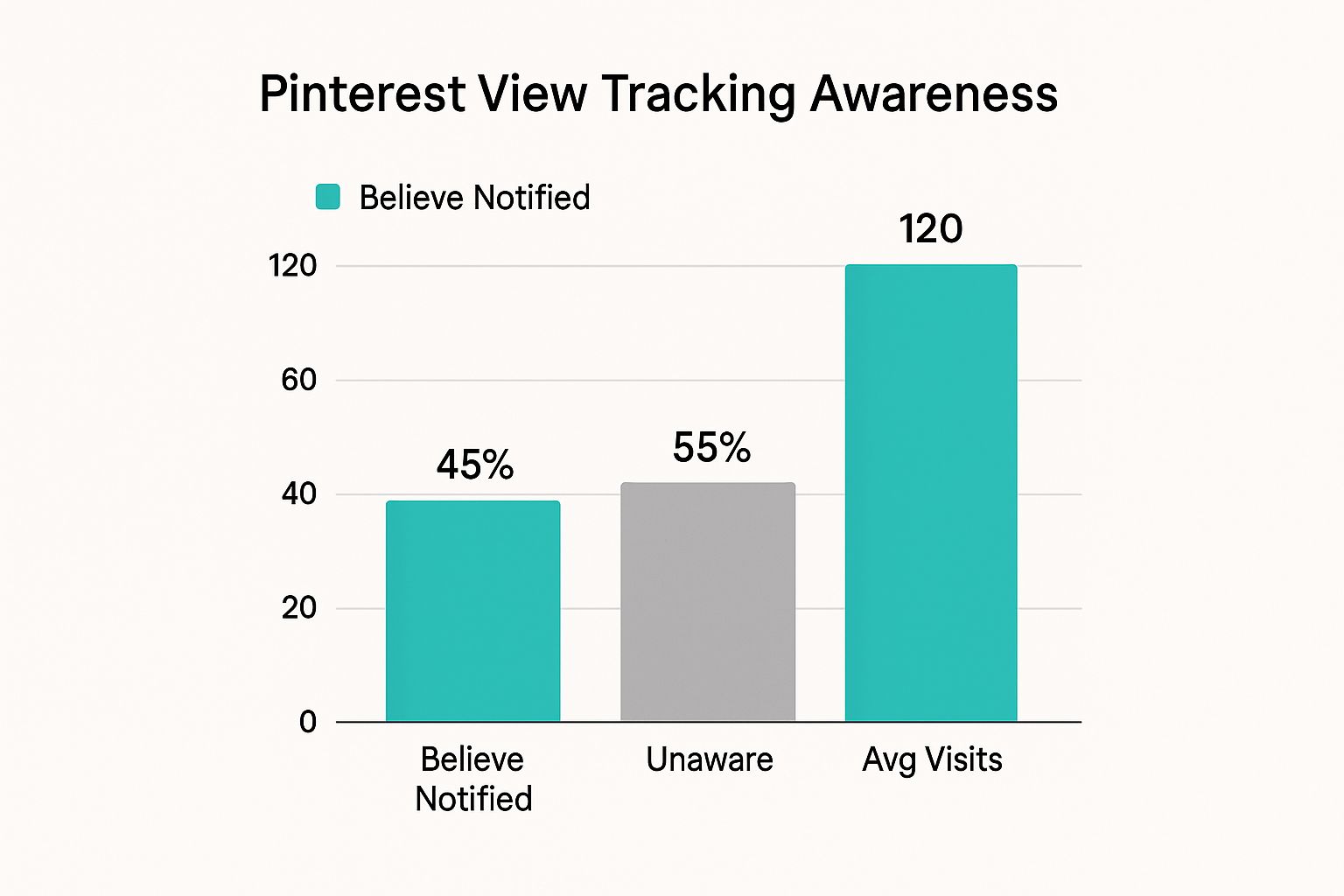
It’s clear many people aren't sure where they stand. But you can rest easy knowing that your late-night scrolling sessions for kitchen remodel ideas or dream vacation spots are your business, and your business alone.
What Pinterest Creators and Businesses Actually See
While your day-to-day browsing stays under wraps, things work a little differently on the other side of the screen for creators and brands. If you've ever wondered what people can see when you view their Pins, the answer changes slightly for those with a Pinterest Business account.
They get a special peek behind the curtain, but it’s not a list of who stopped by.
Think of it like this: a shop owner knows 500 people walked through the doors yesterday and that the blue sweaters were flying off the shelves. What they don't know is the name and face of every single person who came in.
That’s exactly how Pinterest Analytics operates. It’s all about spotting trends and seeing what content resonates—not tracking individual users. Your identity is always kept completely anonymous, so you can keep on pinning without a second thought.
The Power of Anonymous Data
The data creators see is only powerful because it's anonymous and grouped together. Instead of getting a notification that "Jane Doe viewed your Pin," a business account sees broad, helpful patterns. This is the secret sauce that helps them understand what their audience loves so they can create more of it.
Pinterest is a visual discovery engine, not a social surveillance network. The entire goal is to help creators spot content trends, not to monitor the specific browsing habits of individual users. This keeps the platform's focus squarely on inspiration and creativity.
This approach is a win-win. It fiercely protects your privacy while giving creators the insights they need to grow. They can see which of their Pins are total hits, but they can't see who's doing the viewing.
Demystifying the Analytics Dashboard
So, what numbers are these business accounts actually looking at? Their dashboard is filled with metrics that tell a story about their content, not their audience members. Pinterest analytics give them a deep dive into content performance without ever revealing who views what. You can get a closer look at these metrics and how they shape content strategy over at PinHouss.com.
Here are a few of the key data points they follow:
- Impressions: This is simply the total number of times a Pin was shown on screen, whether in a home feed, a search result, or on a board. Think of it as the number of people who walked past a shop window.
- Saves: This metric counts every time someone saves a Pin to one of their boards. A high number of saves is a huge signal that the content is valuable and inspiring.
- Pin Clicks: This tracks how many people clicked on a Pin to see it up close. It’s a great measure of initial interest and curiosity.
- Outbound Clicks: For many businesses, this is the holy grail. It measures how many users clicked through a Pin to an external website, like a blog post or an online store.
These metrics are the puzzle pieces that help creators build a better strategy. They can analyze this data to see big-picture demographics—like the general age, gender, or location of their audience—but it’s never, ever tied back to a specific person.
Your journey through Pinterest remains your own.
Why Pinterest Champions Anonymous Discovery
Ever wondered why Pinterest feels so different from other social platforms? It’s not by accident. The platform’s deep commitment to your privacy is a core feature, intentionally woven into its DNA from day one.
Unlike networks designed for you to broadcast your every move, Pinterest was built as a personal sanctuary. It's your private corner of the internet for gathering inspiration, and that requires a sense of freedom. Anonymity is what unlocks that genuine creativity, letting you explore anything—from quirky new hobbies to massive life plans—without feeling like someone is looking over your shoulder.
A Focus on Ideas, Not Identities
At its heart, Pinterest is a visual discovery engine, not a social surveillance tool. Its entire model is built on you feeling comfortable enough to explore your real interests, plan personal projects, or just daydream.
Think about it. If you were worried about your boss seeing you pin "how to start a new career" or your friends judging your "budget wedding ideas," you’d probably hesitate. That hesitation stifles genuine discovery.
This privacy-first approach is what encourages authentic engagement. The goal is for you to build a collection of ideas that truly reflects who you are and what you aspire to, not a curated version of yourself designed for public applause. We dig deeper into this in our guide on profile visibility on Pinterest.
This is precisely why creators see aggregated data—like total views and saves—instead of a list of specific names. It protects your experience while still giving them the insights they need.
"Pinterest has intentionally designed its platform this way for several reasons. By not tracking who views what, Pinterest creates an environment where users can freely explore content without worrying about their browsing being monitored."
This philosophy is what keeps Pinterest a safe harbor for ideas.
The Sheer Scale of Anonymity
From a practical standpoint, the platform's massive size makes individual tracking nearly impossible, not to mention a huge privacy minefield.
With nearly half a billion monthly active users around the globe as of late 2023, can you imagine the logistical nightmare of tracking every single view? Prioritizing anonymous metrics is a smart, scalable solution that respects user trust. You can explore more of these fascinating user trends in Sprout Social's comprehensive report.
Ultimately, when you ask, "can people see when you view their Pinterest," the answer is a firm "no." And it’s because the platform was built to champion your personal journey of discovery above all else.
Public Footprints: What Actions Are Visible on Pinterest?
While you can browse Pinterest for hours without anyone knowing, the platform shifts from a private scrapbook to a social network the second you start interacting. Think of it like window shopping versus actually walking into a store and trying something on. Looking is silent; engaging leaves a trace.
This distinction is really the core of managing your privacy on Pinterest. When you decide to act on a Pin, you're essentially stepping into the spotlight. We get asked all the time, "can people see when you view their Pinterest?" and the answer is a firm no. But other actions? Those are a different story.
For instance, when you save someone's Pin to a public board, it’s like giving it a public shout-out. The original creator often gets a notification, your followers might see that Pin in their home feeds, and anyone who clicks on your profile can see it sitting right there on that board.
The Engagement Trail
These public footprints aren't just about saving Pins. A handful of other actions are designed to create notifications and public activity records. This is what keeps the platform buzzing and community-focused—it's how creators get valuable feedback and how people connect over shared ideas.
Here’s a quick rundown of the most common public actions and who gets a heads-up:
- Following a User: When you follow someone, they get a direct notification. Your profile is then added to their public "Followers" list for all to see.
- Leaving a Comment: This is one of the most visible things you can do. Not only does the Pin's creator get notified, but your comment is also visible to every single person who views that Pin.
- Creating Public Boards: By default, any board you create is public. Its name, description, and every Pin you add to it are visible on your profile.
- Reacting to a Pin: Tapping that little heart or another reaction icon is a public signal. The creator is notified, and your reaction gets tallied with all the others, contributing to the Pin's engagement score.
The golden rule on Pinterest is pretty simple: If you're just looking, you're invisible. If you're actively clicking to save, follow, or comment, you're visible. This setup encourages you to explore freely while still letting you jump into the community when you're ready.
Your Guide to Public vs. Private Actions
To help you get a crystal-clear picture of what's what, we've put together a simple table. It breaks down common Pinterest actions and spells out exactly who can see what you're doing.
Public vs Private Actions on Pinterest
| User Action | Visibility Level | Who Gets Notified |
|---|---|---|
| Viewing Pins or Profiles | Private | No one |
| Saving to a Secret Board | Private | No one |
| Saving to a Public Board | Public | Pin creator, your followers |
| Commenting on a Pin | Public | Pin creator, all viewers |
| Following another user | Public | The user you followed |
| Reacting to a Pin | Public | Pin creator |
| Creating a Public Board | Public | Your followers may see it |
| Creating a Secret Board | Private | No one (unless you invite collaborators) |
Ultimately, knowing which actions put you on the map gives you the power to use Pinterest exactly how you want. You can be a silent observer, gathering inspiration in total privacy, and then switch gears to engage with your favorite creators whenever it suits you. This flexibility is a huge part of what makes Pinterest so useful.
How to Maximize Your Privacy on Pinterest
Even though your casual browsing is private, you might still want a tighter grip on your digital footprint. The good news is Pinterest gives you some solid tools to do just that, letting you fine-tune exactly who sees what.
Taking a few moments to set things up ensures your inspiration-gathering stays completely on your own terms. These strategies let you go from a typical user to a silent, invisible observer whenever you want. It’s all about using the platform’s built-in features to your advantage.
Embrace the Power of Secret Boards
Your strongest privacy tool on Pinterest is the secret board. Think of it as your private digital scrapbook or a locked folder on your computer. Anything you save to a secret board is visible only to you and anyone you specifically invite to collaborate.
When you Pin something to a secret board, the creator is not notified. Their overall "save" count in their analytics might tick up, but your identity stays completely under wraps. This is the perfect way to plan a surprise party, brainstorm a personal project, or just explore a new hobby without announcing it to the world.
You can make a new secret board from scratch or easily switch an existing public board to private. Here’s how:
- Go to the board you want to make private.
- Click the three dots (…) to open the menu and choose "Edit board."
- In the settings that pop up, just check the box that says "Keep this board secret."
Fine-Tune Your Profile Visibility
Beyond just hiding what you Pin, you can also control who finds your profile in the first place. Pinterest lets you decide if your profile shows up on search engines like Google. If you’d rather not have your Pinterest pop up when someone Googles your name, you can hide it with a simple click.
By adjusting your search privacy, you're basically telling Google and other search engines to ignore your Pinterest profile. This is a game-changer for anyone wanting to keep their online presence low-key and separate their public life from their private inspiration-gathering.
To do this, just go to your Settings, click on Profile visibility, and flip the "Search privacy" toggle on. This adds a serious layer of protection, making you much harder to find for anyone not on Pinterest. For a deeper dive into how all these settings work together, you can find more in our complete guide explaining if people can see your Pinterest views.
The Ultimate Privacy Move: Browsing Logged Out
For total anonymity, the easiest move is often the best one: browse Pinterest while you’re logged out. When you’re not logged in, your activity isn’t connected to your profile at all. You can search for ideas and look at Pins freely, like a complete ghost on the platform.
This is the perfect method for those quick, one-off searches where you don't need to save or interact with anything. It’s the digital equivalent of window shopping without ever stepping foot in the store. For a bigger picture on protecting your digital self, looking into common social media privacy concerns can offer even more great tips.
Frequently Asked Questions About Pinterest Privacy
Even after covering the basics, a few specific "what if" scenarios probably come to mind. It's totally normal to wonder about the nitty-gritty details of how your activity is seen—or not seen.
Let’s tackle some of the most common follow-up questions about Pinterest privacy. My goal here is to clear up any lingering confusion so you can Pin with confidence, knowing exactly what’s private and what’s not.
Does Pinterest Have a Feature Like Instagram Stories Where I Can See Who Viewed My Pin?
Nope. Pinterest doesn't have any feature that gives you a list of individual users who looked at your Pins. This applies to all Pin formats, including the dynamic, multi-page Pins that have taken the place of Idea Pins.
You can see high-level numbers like total views, impressions, and engagements, but the people behind those numbers are always anonymous. This is a core part of Pinterest's philosophy; it's a platform for inspiration and content performance, not for tracking who is looking at your stuff. So, the answer to "can people see when you view their Pinterest" is a hard no, no matter what kind of Pin it is.
If I Save Someone's Pin to a Secret Board Will They Get a Notification?
Absolutely not. The person who originally created the Pin will not be notified when you save their content to one of your secret boards. By design, secret boards are 100% private to you and anyone you specifically invite to join them.
Sure, the creator's total "save" count on that Pin might tick up by one in their analytics, but they'll have no clue that you were the one who saved it. They also won't know if it landed on a secret board or a public one. It's a fantastic feature for gathering ideas for things you'd rather keep to yourself, like surprise gifts or personal projects, without tipping anyone off.
Key Takeaway: Think of secret boards as your private digital scrapbook. They’re one of the best privacy tools on the platform, letting you organize ideas for any topic without leaving a public trail back to your account.
This clear separation keeps your private planning exactly that—private.
Are There Any Third-Party Apps That Claim to Show Who Viewed Your Pinterest?
This is a big one: be extremely wary of any third-party app, website, or browser extension that promises to show you who viewed your Pinterest profile or Pins. Pinterest’s system and its API simply do not share this kind of individual data with anyone.
Any tool claiming it can get this information is almost certainly a scam. These services are usually designed to do something harmful, like:
- Steal your login details and personal info.
- Install malware or other nasty software on your computer.
- Charge you for a fake service that does absolutely nothing.
Using these tools is a major violation of Pinterest's terms of service and puts your account security at serious risk. For real, safe insights, stick to the official Pinterest Analytics.
Can a Pinterest Business Account See More Personal Information?
A Pinterest Business account definitely unlocks a much more powerful analytics dashboard, but it does not reveal the personal identities of individual viewers. The "more" that they can see is all about aggregated, anonymous data.
For instance, a business account can see demographic trends for their audience—things like general age ranges, gender breakdowns, and which countries or cities their viewers are from. They also get deeper stats on their Pins, like impressions, clicks, and saves.
But here’s the crucial part: they can never link that data back to a specific person. They can't see "Jane Doe, 35, from Chicago, viewed your Pin on Tuesday." They can only see trends like, "This Pin is popular with women aged 30-40 in the United States." So while business accounts get richer data, your personal privacy as a viewer is still completely protected.
Creating compelling Pinterest content that drives traffic takes time and effort. With Pin Generator, you can automate the entire process in seconds. Stop spending hours designing Pins and start getting results. Generate dozens of high-quality, customized Pins from any URL and schedule them effortlessly to grow your brand on Pinterest.
Discover how Pin Generator can transform your Pinterest marketing today!