
Does Pinterest Notify When You View Someone's Profile? Find Out!
16 July 2025
Let's get straight to the point: No, Pinterest does not tell users when you view their profile. You can browse profiles, boards, and Pins completely anonymously. Your viewing activity is your own business.
This is a core part of how Pinterest works, setting it apart from professional networks like LinkedIn where profile views are a main feature.
Understanding Pinterest Profile Views
If you've ever found yourself hesitating before clicking on someone's profile, worried they'd get a notification—you can breathe a sigh of relief. Pinterest acts more like a massive digital magazine or a public art gallery than a social club. The whole point is for you to discover ideas and inspiration freely, without the social pressure of feeling like you're being watched.
This is a very deliberate design choice. For a platform that boasts over 553 million monthly active users as of early 2025, making content discovery and user privacy the top priorities just makes sense. This policy isn't just for personal accounts, either; it applies across the board to business profiles and even verified creators.
Pinterest Privacy and Notifications at a Glance
To make it crystal clear, here’s a quick breakdown of what Pinterest does and doesn't track when it comes to notifications.
| Feature | Notification Status | What This Means for You |
|---|---|---|
| Viewing a Profile | No Notification | You can browse any profile without the owner knowing. |
| Viewing a Pin | No Notification | Your views are anonymous and contribute to aggregate data only. |
| Saving a Pin | Notification | The original pinner gets a notification that someone saved their Pin. |
| Commenting on a Pin | Notification | The pinner is notified of your comment, which includes your profile name. |
| Following a User | Notification | The user will be notified that you have followed them. |
Ultimately, your quiet browsing is kept private, while direct engagements like saving, commenting, or following are visible.
Privacy by Design
The platform is intentionally built to encourage exploration without making you feel self-conscious. Whether you're planning a surprise party, checking out a competitor's marketing strategy, or just satisfying a bit of curiosity, your browsing history remains your own. This is a fundamental principle that separates Pinterest from platforms where profile views are treated like a form of social currency.
The platform's choice to hide profile visitors is empowering. It creates an environment of authentic discovery, where your focus stays on the content that inspires you, not on who might be watching.
Now, while you can't see who viewed your profile, this doesn't mean creators are left completely in the dark. Instead of focusing on individual visitors, Pinterest provides powerful analytics that show what content is resonating with an audience. This is a critical distinction, and it sets the stage for understanding how to truly measure success on the platform.
If you want to dive even deeper into this, our guide on whether Pinterest shows who viewed your profile has more details. The next sections will explore the metrics that really matter.
Why Pinterest Is a Visual Discovery Engine, Not a Social Network
To really get why Pinterest handles profile views the way it does, you have to understand what the platform is at its core. It might have some social features, but it's not a social network in the way Facebook or Instagram are. It’s fundamentally a visual discovery engine. The main goal isn’t to connect you with people, but to help you find ideas and inspiration.
I like to think of it as a giant, beautifully organized scrapbook or a public library full of inspiring magazines. When you're flipping through pages, you're focused on the content—the recipes, the DIY projects, the travel ideas. You wouldn't expect the librarian to tap you on the shoulder and announce every single person who glanced at the same shelf. That would just be weird and uncomfortable, right?
Fostering Creativity Without the Social Pressure
Pinterest works on that same exact principle. It’s built to be a positive, inspiring corner of the internet where you can freely explore your interests, whether that's planning a wedding or learning how to bake sourdough.
If Pinterest started sending notifications every time someone clicked on your profile, it would completely change that feeling. It would introduce a layer of social anxiety and self-consciousness that just doesn't belong in a creative space.
Imagine you were secretly planning a surprise party for a friend, researching a sensitive health issue, or even just checking out a competitor's branding. If you knew they’d get an alert every time, that freedom to explore privately would vanish.
By keeping profile views anonymous, Pinterest deliberately protects the user experience. It keeps the platform as a tool for personal discovery, not a stage for social performance.
This isn't an accident or an oversight; it’s a core part of their strategy. It’s what allows you to be your most curious and creative self without worrying about who's watching. You can dive deep into your hobbies and plans without a second thought. This focus on ideas over egos is exactly what makes Pinterest such a trusted well of inspiration for millions.
What Pinterest Tracks Instead of Profile Visitors
Since Pinterest keeps profile visitors anonymous, you might feel like you're flying blind. But don't worry—the platform offers a powerful analytics dashboard that shifts your focus from who visited to what they loved. Honestly, this is a much better way to grow your presence.
Think of it like being a baker. Instead of getting a list of every person who walked past your shop, you get a detailed report showing that your chocolate croissant display made hundreds of people stop and look, while the bagel stand was completely ignored. That insight is gold. It tells you exactly what to bake more of.
Pinterest Analytics for Business accounts works the same way. It gives you real, actionable data on how your content is performing, helping you fine-tune your strategy without ever compromising user privacy.
Shifting Focus to Engagement Metrics
The key is to stop worrying about individual visitors and start digging into audience behavior. Pinterest provides a ton of data that tells a rich story about your content. Even though you can't see who viewed your profile, these numbers give you a solid indirect look at your audience. For instance, business accounts get access to analytics covering impressions, saves, clicks, and engagement rates. It's a broad picture, but it’s the picture that matters.
Here are the core metrics you should get familiar with:
- Impressions: This is simply the total number of times your Pins have appeared on someone's screen—whether in their home feed, a search result, or a category feed. It’s your content’s overall visibility.
- Saves (or Repins): This shows you how many times people have saved your Pin to one of their own boards. It’s a huge signal that your content is valuable and something they want to come back to.
- Outbound Clicks: This one is critical. It tracks how many users clicked through from your Pin straight to your website. For businesses and bloggers, this is a direct line to driving traffic.
- Engagements: This is a catch-all number that bundles together saves, outbound clicks, and close-ups on your Pin. It’s a great way to measure total interaction at a glance.
By analyzing these metrics, you gain a deep understanding of what truly resonates with your audience. You learn which visual styles, topics, and descriptions drive real action, allowing you to create more effective content over time.
This data-driven approach is ultimately far more powerful than a simple visitor list ever could be. If you're curious about other ways people might see your activity, you can also learn more about if people can see when you view their Pinterest content in our related guide.
How Pinterest Protects Your Browsing Freedom
The fact that Pinterest keeps profile views private isn't just a minor detail—it’s a core feature that intentionally protects your freedom to explore. By choosing not to send notifications when someone looks at your profile, Pinterest has built a space where you can browse anonymously. This is absolutely fundamental to its mission as a discovery engine.
This design gives you the power to dive into any topic without feeling self-conscious. You can freely plan personal projects, look up sensitive topics, or even scope out a competitor's strategy without leaving a digital trail. Think of it like wandering through a library and pulling any book you want off the shelf, without the librarian announcing your choice to everyone in the room.
A Pro-Privacy Stance
This setup isn't an accident; it’s a deliberate choice that shows respect for your digital space. In an era where people are rightly demanding better data protection, Pinterest really stands out by putting your comfort and security first.
Pinterest’s no-notification policy is its commitment to you, the user. It ensures the platform stays a safe haven for creativity and personal discovery, free from the social pressures you might find elsewhere.
This approach lines up perfectly with the global conversation around data protection and platform transparency. While other social media giants often get into hot water over how visible user activity is, Pinterest's foundational policy of not tracking or notifying on profile visits keeps its hundreds of millions of users happy. You can discover more insights about this global approach to user privacy and see how it helps build trust.
More Tools for Private Curation
On top of anonymous browsing, Pinterest gives you other fantastic tools to keep your ideas organized and private. The biggest one is Secret Boards.
- What are they? Secret Boards are completely private spaces visible only to you and anyone you specifically invite to join.
- How do they work? You can save Pins to a Secret Board just like any other board, but they won't show up on your public profile or in your followers' feeds.
- Why use them? They're perfect for planning a surprise birthday gift, mapping out a new business idea before it goes public, or just collecting inspiration for a project you're not quite ready to share.
When you combine anonymous profile views with tools like Secret Boards, you get complete control over your creative process. It ensures your journey of discovery stays truly your own.
Understanding the Notifications You Actually Get
Let's clear the air and draw a firm line between public engagement and private browsing on Pinterest. Your profile visits are completely anonymous, but the platform does let you know when someone directly interacts with your Pins. It's a key distinction that shifts your focus from "who's looking?" to "what's working?"
Think of your Pinterest profile like a public art gallery. Anyone can wander through, look at your collections, and admire your work without you ever knowing they were there. But the moment someone buys a print (saves a Pin), leaves a note in the guestbook (comments), or asks the curator about you (mentions your profile), you'll get a notification.
There’s a massive gap between what people think happens and how Pinterest actually works. This simple image says it all.
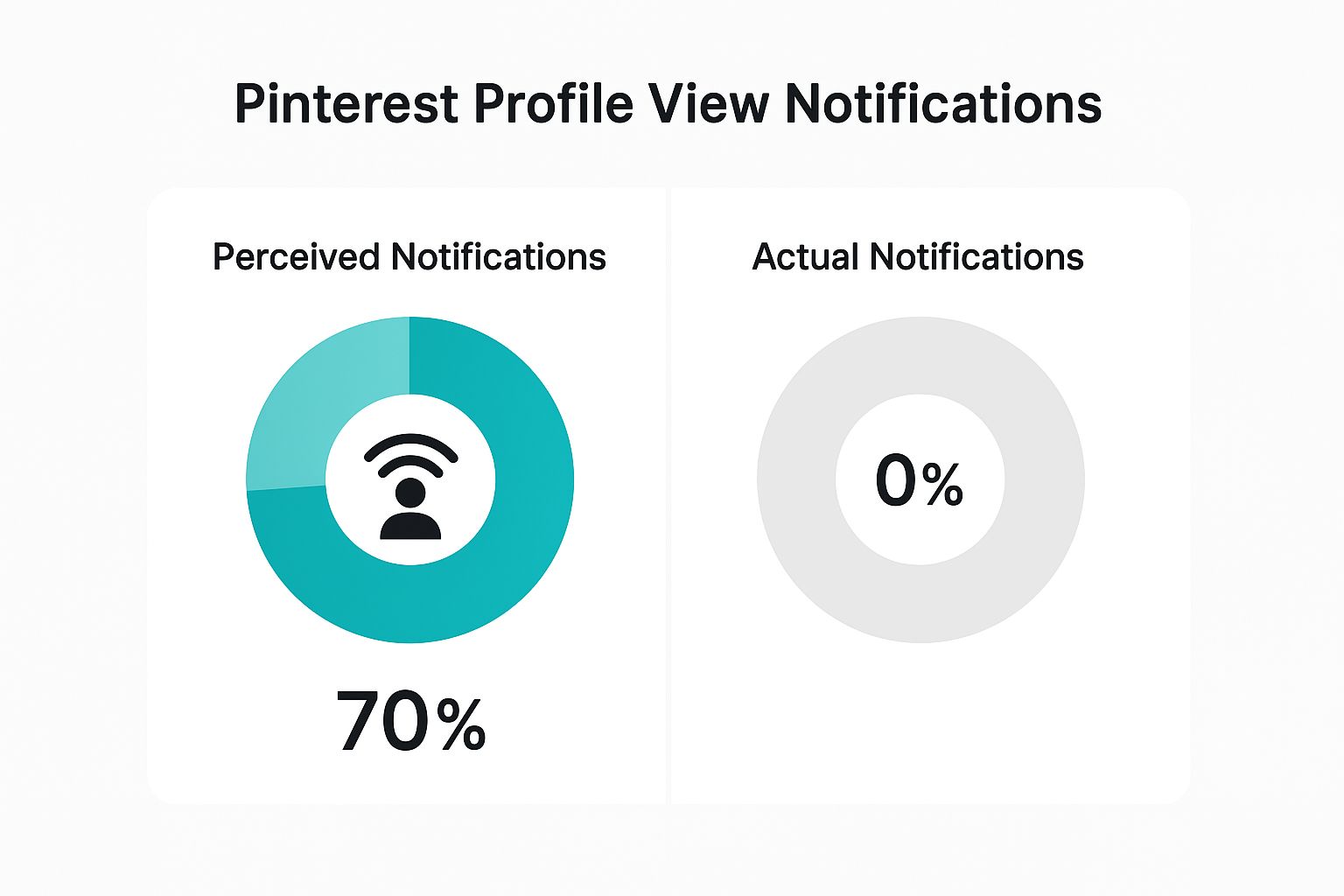
The big takeaway? A whopping 70% of users might think profile views trigger alerts, but the real number is 0%. Your quiet browsing is always private.
Which Pinterest Actions Trigger Notifications
So, what actions actually get someone’s attention and land in their notifications? Here's a breakdown of the specific interactions that will send an alert, versus those that won't.
| Action | Does It Trigger a Notification? | Example |
|---|---|---|
| Viewing a Profile | No | You browse someone's profile and boards. They don't get an alert. |
| Saving a Pin | Yes | You save someone's "Keto Dinner Recipe" Pin to your "Meal Prep" board. They are notified. |
| Following a User | Yes | You hit the "Follow" button on a creator's profile. They get a "New follower" notification. |
| Commenting on a Pin | Yes | You comment "This looks delicious!" on a food blogger's Pin. The blogger is notified. |
| Mentioning a User | Yes | You create a Pin and write, "Inspired by @JaneDoeDesigns!" in the description. Jane gets an alert. |
| Viewing a Pin | No | You click on a Pin to see it up close. The creator has no idea. |
As you can see, every notification you receive is tied directly to a positive, public action. It’s a signal that your content is resonating with the community, not a peek into who’s just passing by.
Your Questions on Pinterest Privacy Answered
Even after covering the big question, you probably have a few "what if" scenarios swirling around. It's totally normal. Let's dig into some of the most common follow-up questions so you can use Pinterest with total confidence.
Think of this as your quick-and-dirty privacy FAQ. We’ll get right to the point to clear up any lingering doubts you might have.
Can Business Accounts See Who Viewed Their Profile?
This is a great question, and the answer is a hard no. Even with their fancy analytics dashboards, Pinterest Business accounts can't see a list of individual users who stopped by their profile. The platform's core privacy rule applies to everyone, business or not.
What they do see is anonymous, bundled data. For instance, they can see general audience demographics like age ranges, gender, and location. They also see which Pins are getting the most love, but it’s all about spotting trends, not tracking people. The focus is always on content performance, never on you specifically.
What Happens If I Accidentally Follow Then Unfollow Someone?
Ah, the classic "fat finger" follow. We've all done it. If you accidentally follow someone and then immediately unfollow them, the person will still get the initial "follow" notification. Pinterest sends that alert out the second you hit the button.
The good news? The system doesn't send a separate "unfollow" notification. So while they might see the first alert if they check their phone right away, they won't be actively pinged when you take it back.
Key Takeaway: Just remember that the follow action is instant and triggers a notification. The unfollow is silent, but you can't un-ring that initial bell.
Does Pinterest Notify When You Screenshot a Pin?
Nope, not at all. Taking a screenshot is something that happens entirely on your own device—your phone, tablet, or computer. Pinterest has zero visibility into that action.
So go ahead and screenshot all the inspiration you find. This is one area where your privacy is 100% guaranteed because the platform simply isn't involved in the process.
Are Third-Party Apps That Show Profile Viewers Real?
Absolutely not, and you should run the other way if you see an app making this claim. Any service promising to show you who viewed your Pinterest profile is, without a doubt, a scam.
Pinterest's official API—the system that lets other apps communicate with it—does not share this kind of private data. It's technically impossible for any third-party tool to get this information. These shady apps are usually just trying to steal your login details or sneak malware onto your device.
Creating standout Pinterest content consistently can be a major challenge. With Pin Generator, you can create and schedule dozens of high-quality Pins in minutes, not hours. Drive more traffic and grow your audience without the manual effort. Get started with Pin Generator today