
How Do I Sell on Pinterest? Tips to Turn Pins into Profits
31 July 2025
Selling on Pinterest isn't just about pretty pictures; it's about turning that visual inspiration into real, tangible sales. The whole game is creating beautiful, high-value Pins that link directly to your products. This approach leverages a unique audience that's already in a buying mindset, transforming Pinterest from a simple mood board into a serious engine for targeted traffic and revenue.
Why Pinterest Is a Goldmine for E-commerce
Let's get one thing straight: Pinterest is not just another social media app for collecting recipes. It’s a powerful visual discovery engine where millions of people are actively planning what to buy next. This fundamental difference in user intent is exactly what makes the platform an absolute goldmine for e-commerce brands.
To really succeed, you have to shift your thinking. Stop treating Pinterest like a typical social network and start seeing it for what it is: a crucial top-of-funnel sales channel. People aren't there to chat with friends; they're there to discover, plan, and ultimately, purchase. Your job is to meet them right in that discovery phase with content that inspires them and solves a problem.
This is where the magic happens. A user searching for "boho living room ideas" stumbles upon a gorgeous Pin you created showcasing your product. With a single click, they're on your product page on your website, ready to make a purchase. That journey from Pinterest content to website traffic and finally to a sale is incredibly short and effective.
To make this happen, you need a few things in place:
- A fully optimized Pinterest Business account to act as your digital storefront.
- A scalable content workflow, because consistency is everything on this platform.
- High-quality, engaging Pins that are compelling enough to stop the scroll and earn that click.
This infographic really drives home just how effective Pinterest is for sellers.
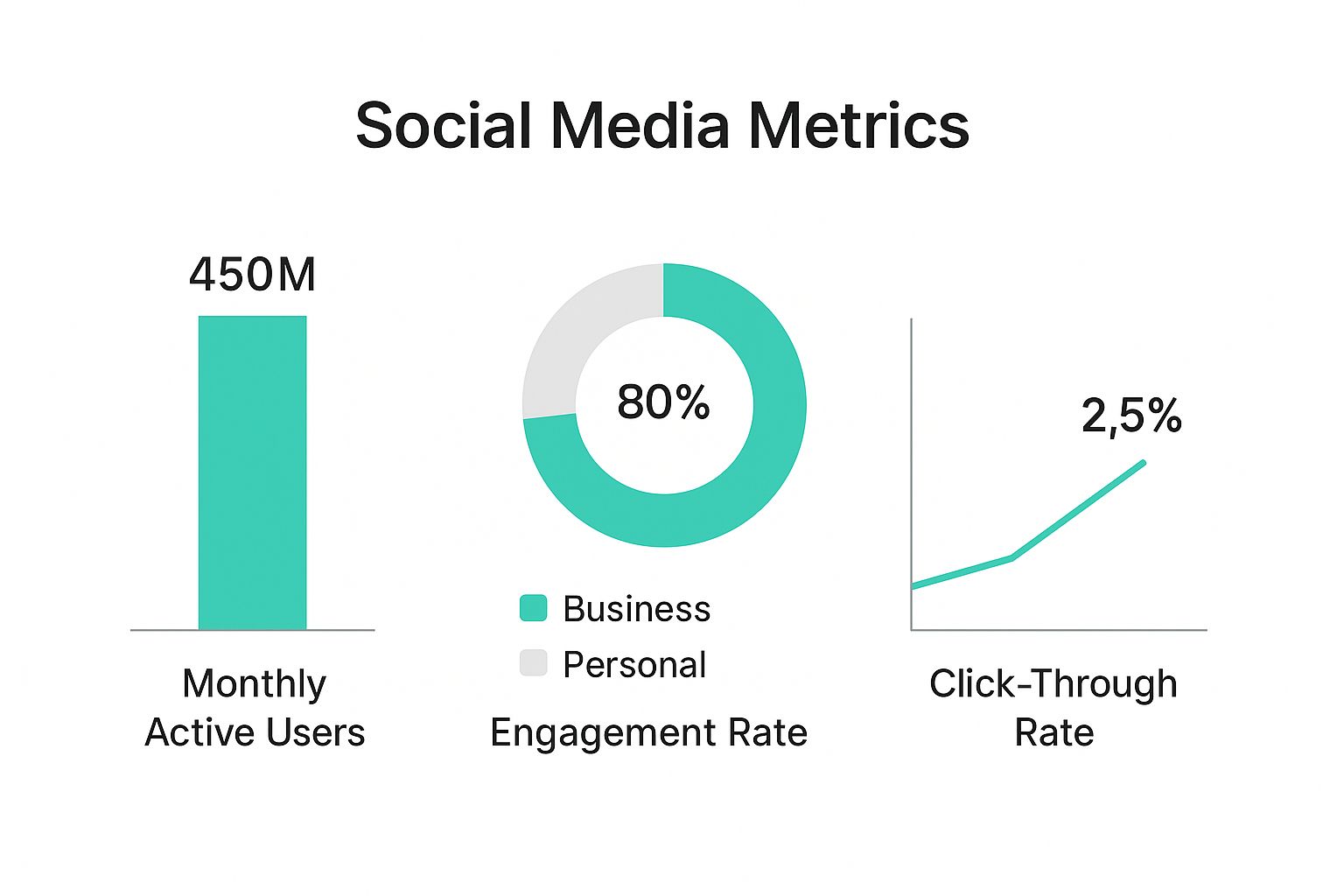
The data doesn't lie. Pinterest users are not just browsing—they're engaged and far more likely to click through to a website than on other platforms.
The Power of Purchase Intent
The numbers alone are staggering. As of 2025, Pinterest boasts over 570 million monthly active users. But what's truly important is their behavior: a massive 85% of weekly Pinners have bought something based on Pins they saw from brands.
Think about that. On top of that, 93% of users are on the platform specifically to plan future purchases, making it the perfect place for your products to be discovered.
To give you a clearer picture, here's how Pinterest stacks up against other social platforms for e-commerce.
Pinterest vs Other Social Platforms for E-commerce
This table offers a quick snapshot of why Pinterest is often the smarter choice for driving traffic and sales.
| Metric | Other Social Platforms (Average) | |
|---|---|---|
| Primary User Intent | Discovery, planning, and purchasing | Social connection and entertainment |
| Click-Through Rate (CTR) | 3.8x higher for retail brands | Varies, but generally lower |
| Return on Ad Spend (ROAS) | 2x higher than other social media | Varies by platform and industry |
| Content Lifespan | Months to years | Hours to days |
| Shopper Conversion Rate | Higher due to purchase-ready audience | Lower, audience is less purchase-focused |
As you can see, the focus on visual discovery and long-term planning gives Pinterest a significant edge for anyone selling products online.
The core strategy is simple: create inspiring visual content that doesn’t just get likes, but drives qualified, high-intent traffic directly to your products.
This is where a tool like Pin Generator becomes a lifesaver. Manually creating enough fresh, high-quality Pins to stay relevant is a massive headache. Pin Generator helps you create lots of pins for your business, automating a huge part of your marketing workflow so you can generate more traffic and focus on making sales on your website.
For a deeper dive, check out our complete guide on using Pinterest for e-commerce. By simplifying your content creation, you can focus on what really matters: turning inspired browsers into loyal customers.
Building Your Foundation for Pinterest Sales
Before you can even think about making sales on Pinterest, you have to lay the proper groundwork. It’s a lot like building a house—you wouldn't start putting up walls on a sandy lot. Similarly, trying to build a sales funnel on a personal Pinterest account just won't work.
Your first, non-negotiable step is to either create or convert to a Pinterest Business account. This is what separates the casual hobbyists from the serious sellers, giving you access to a whole suite of powerful tools built specifically for commerce. You’ll get crucial analytics, the ability to run ads, and features that pave a direct path from discovery to purchase.
Claim Your Website to Unlock Rich Pins
Once your business account is up and running, your very next move should be to claim your website. This is a simple verification step that proves to Pinterest you're the legitimate owner of your e-commerce store or blog.
Think of this as the key that unlocks one of the platform’s most valuable features for sellers: Rich Pins.
Rich Pins are a game-changer because they automatically pull extra, useful information from your website right into your Pins. While there are a few different types, the one you really care about for e-commerce is the Product Pin.
Product Rich Pins are so powerful because they display:
- Real-time pricing: Users see the current price without needing to click.
- Stock availability: The Pin shows if an item is in stock, which can create a nice sense of urgency.
- Product title and description: This info is pulled directly from your product page.
Rich Pins are essential because they bridge the gap between inspiration and information. When a user sees the price and availability upfront, they are a much more qualified lead by the time they click through to your website.
Get Your Product Catalog Connected for Seamless Shopping
With your site claimed and Rich Pins fired up, it’s time to connect your product catalog. This is where you transform your entire inventory into a browsable, shoppable experience right inside Pinterest. Forget manually creating a Pin for every single product—you can upload your entire feed.
By syncing your Shopify, Etsy, or WooCommerce store with Pinterest, you automatically create a Product Pin for every single item you sell. These Pins then get distributed across the platform, showing up in feeds, search results, and dedicated shopping sections. When someone clicks, they land directly on that product page on your site. The path to purchase becomes dramatically shorter.
This automation is incredible, but it creates a new challenge: how do you make unique, eye-catching Pins for hundreds of items without spending your entire life in a design tool?
This is exactly where Pin Generator becomes your secret weapon.
Scaling Pin Creation with Pin Generator
Connecting your catalog is great for getting basic Product Pins live, but to truly capture attention, you need a steady stream of fresh, creative content. Pin Generator is built to help you do that at scale.
Instead of just using the default product image, you can pop a product URL into Pin Generator and watch it work its magic. In minutes, it will spit out dozens of unique, beautifully designed Pin variations.
This lets you:
- A/B test different visuals to see what your audience actually responds to.
- Add compelling text overlays with strong calls-to-action that drive clicks.
- Keep your branding consistent across all your Pins using custom templates.
Imagine you sell handmade ceramic mugs. You can give Pin Generator a single product page, and it will create Pins with different backgrounds, text styles, and layouts. One Pin might say "Your New Favorite Morning Mug," while another highlights "Handmade with Love," and a third shows off a lifestyle shot.
This kind of variety stops your content from getting stale and massively increases the odds of a Pin taking off. By using Pin Generator, you solve the content bottleneck. You can easily create a high volume of diverse, on-brand Pins for all your products, ensuring a constant stream of new Pinterest content is driving traffic right to your checkout page to make sales.
The Anatomy of a High-Converting Pin
Ever wondered why one of your Pins drives a flood of sales while another just… disappears? It's not luck. A successful Pin that helps you sell products includes several key elements working together perfectly. Once you understand the anatomy of a Pin that actually converts, you can stop guessing and start building content that works hard for your business.
Think of every Pin as a tiny, powerful billboard. You have literally seconds to stop someone mid-scroll and get them to take action. When all the pieces click, you don’t just get a view—you get pre-qualified traffic from someone who is genuinely interested in what you’re selling.
Designing for the Scroll Stop
Before anyone reads your title or description, they see your Pin's image. On a platform as visual as Pinterest, this is your first and most important job. To be successful, your visuals have to be strong enough to make someone pause.
Here's what makes the biggest difference:
- Go Vertical. Always use a 2:3 aspect ratio (think 1000 x 1500 pixels). This format dominates the screen on mobile, instantly giving your Pin more real estate and pushing your competitors out of sight.
- High-Quality Always Wins. Grainy, dark photos just won't cut it. Your visuals need to be stunning, but that doesn't mean you need a massive budget. These affordable product photography tips are a great starting point for getting professional-looking shots.
- Show, Don't Just Tell. Don't just post a photo of your necklace on a plain white background. Show it being worn with a great outfit. Help Pinners see how your product fits into their life. That’s what creates the spark of inspiration.
Crafting Compelling Text Overlays
A beautiful image grabs their attention, but the text overlay tells the story. This is the text you place directly onto your Pin, and it needs to be bold, clear, and straight to the point. It’s your hook.
Use the overlay to highlight a huge benefit, solve a common problem, or just spark some curiosity. Instead of simply slapping your product name on the image, try something like:
- "5 Ways to Style Our Linen Scarf"
- "The Secret to a Perfect Night's Sleep"
- "Finally, a Skincare Routine That Actually Works"
This simple shift turns a basic product Pin into a piece of valuable content, making it way more likely to get clicked and saved for later.
Your goal is to connect the dots for the user. A successful Pin shows them the solution (your product) to a problem or desire they have, often before they’ve even fully articulated it themselves.
Writing for Clicks and Conversions
Okay, your visual and overlay did their job. Now the title and description need to close the deal. This is where you blend persuasive copy with smart SEO to get your Pin seen by the right people.
The Pin Title: Make it keyword-rich and compelling. What is your ideal customer actually typing into that Pinterest search bar? A title like "Minimalist Gold Hoop Earrings" is infinitely better than "Product #123."
The Pin Description: Here’s where you can expand on the title. Weave in a few more relevant keywords naturally, talk about the benefits, and always, always include a clear call-to-action (CTA). Phrases like "Shop the look now," "Click to see all colors," or "Get the recipe on our blog" tell the user exactly what to do next.
Remember, the journey from Pin to purchase needs to be as smooth as possible. Around 90% of weekly Pinners use the platform to help them decide what to buy. They expect a direct path. Make sure your Pin links straight to the relevant product page on your website, not just your homepage. Every unnecessary click is a chance to lose a sale.
Scaling Your Pin Creation with Pin Generator
Creating one perfect Pin is one thing. But creating dozens of them, week after week, is where most people get stuck. That’s exactly where a tool like Pin Generator changes the game.
You can drop in a single URL for a product or blog post, and it will instantly create lots of Pin variations for you. This lets you A/B test different images, text overlays, and designs to see what your audience truly responds to—all without spending hours in Canva. This is how you systematically figure out what works so you can sell on Pinterest at scale.
Scaling Your Content Creation with Pin Generator
If there's one thing the Pinterest algorithm loves, it's consistency. It absolutely rewards accounts that feed it a steady diet of fresh, high-quality Pins. But let's be real—who has the time to manually design unique Pins every single day? For most business owners, this is a massive roadblock.
This is the content creation bottleneck where good intentions go to die. You get stuck in a frustrating cycle of spending hours in Canva, only to fall behind and see your Pinterest traffic flatline. This is exactly where a tool like Pin Generator flips the script, turning that tedious task into a quick, automated process.
From One Link to Dozens of Pins
Imagine you're launching a new product. The old way involved designing one or two Pins and just hoping they’d stick. It was a shot in the dark.
Now, you can take that single product page URL, pop it into Pin Generator, and let the AI do its thing. In just a few minutes, you’ll have dozens of unique, on-brand Pin variations ready to go. It feels like magic.
This isn't about spamming duplicates. Pin Generator intelligently pulls different images from your product page, experiments with various text overlays, and uses diverse layouts to build a whole portfolio of fresh content from one link. One Pin might use a lifestyle shot with a question as the headline, while another features a clean product photo with a direct "Shop Now" call to action.
Pro Tip: This massive output is an A/B tester's dream. You can finally get clear data on which visuals, headlines, and CTAs actually drive traffic and sales. Once you find a winner, you can double down on that style.
This is how you directly connect content creation to sales. More Pins mean more touchpoints with potential buyers, which means more traffic to your site and, ultimately, more sales on your website.
Maintaining Brand Consistency at Scale
"But won't it look generic?" That's the first thing people worry about with automation, and it's a valid concern. The good news is, Pin Generator was built to address this. You have full control over the creative output.
Before you even start generating Pins, you can set up your brand kit to keep everything looking sharp and consistent.
You can easily customize:
- Brand Colors: Just plug in your exact hex codes. Every Pin will match your visual identity perfectly.
- Brand Fonts: Upload your custom fonts to maintain that consistent typographic style everyone recognizes.
- Templates: You can create and save your own templates that fit your aesthetic, which the tool then uses as a base for its designs.
This means that even though the Pins are generated in seconds, they look like they were meticulously crafted by your in-house designer. That consistency is what builds brand recognition and trust—a critical piece for anyone trying to figure out how to sell on Pinterest effectively.
The Anatomy of a Successful, Generated Pin
While Pin Generator does the heavy lifting on design, knowing what makes a Pin work is still your job. To make sure your generated content is actually optimized to convert, you need to nail the core elements.
Every successful Pin needs a few key ingredients to drive traffic and sales:
- A Scroll-Stopping Visual: High-quality images or videos are non-negotiable.
- Compelling Text Overlay: A bold, clear headline that grabs attention by highlighting a benefit or a solution.
- SEO-Driven Title and Description: Think like your customer. What keywords are they searching for?
- A Clear Call-to-Action (CTA): Tell people exactly what to do next. "Shop the Collection." "Get the Recipe." Be direct.
- A Direct Link: Always link straight to the relevant product or landing page. Don't make them hunt for it.
Pin Generator helps you pull all of this together efficiently. It can grab your product title to use as a text overlay and automatically adds the destination link. Your role is to refine the messaging to speak directly to your ideal customer. It’s the perfect blend of AI execution and human strategy—and it’s what turns Pinterest into a sales machine you can actually rely on.
Converting Pinterest Traffic into Website Sales
Getting a steady stream of beautiful Pins out there is a great start, but let's be honest—clicks are only half the battle. The real mission is turning all that hard-earned traffic into actual revenue. This is where you connect the dots between your Pinterest activity and your bottom line, transforming inspired browsers into happy customers.
The journey doesn't stop when someone clicks your Pin. In many ways, it's just getting started. What happens after the click is probably the most critical part of selling successfully on Pinterest. A clunky, confusing, or slow landing page will kill a sale in seconds, no matter how amazing your Pin was.
Analyzing Your Top-Performing Content
Before you can start tweaking your website, you need to know what’s already resonating with people. Your first stop should always be Pinterest Analytics. It's a goldmine of data that shows you exactly which of your Pins and boards are driving the most clicks to your site.
Start looking for patterns in what's working best.
- Are video Pins crushing your static images?
- Do Pins with certain color schemes seem to get more attention?
- Which headlines or calls to action are actually getting people to click?
By figuring out your top performers, you can stop guessing and start creating more of what your audience has already told you they love. This isn't about reinventing the wheel; it's about using data to guide your creative process.
The crucial thing to remember is that Pinterest is a visual search and discovery engine, not just another social network. People come here to plan, discover, and shop.
This user mindset is everything. We know that nearly 89% of Pinterest users are on the platform to make purchase decisions, which shows just how much influence it has. Pinterest drives double the referral traffic to shopping sites compared to Facebook, and its users spend twice as much monthly. With an average order value of $58, it stands as the highest among all major social platforms.
Optimizing the Post-Click Experience
When someone clicks through from Pinterest, they expect a smooth, connected experience. The landing page they land on must feel like a natural next step from the Pin they just saw.
If your Pin featured a specific blue ceramic vase, that link has to go directly to the product page for that exact blue ceramic vase—not your homepage and definitely not a generic category page.
Here’s what every high-converting landing page needs:
- Visual Consistency: The product photos and overall vibe of your site should match the Pin's aesthetic. No surprises.
- Clear Information: Make sure the price, product details, and shipping info are easy to find.
- Trust Signals: Show off customer reviews, testimonials, and any trust badges (like secure checkout icons) right away.
Driving traffic is just the first step. Once they're on your site, you need them to convert. For a deep dive into improving your site's performance, check out this ultimate conversion rate optimization guide.
A frictionless checkout process is the final piece of the puzzle. Get rid of unnecessary steps, offer a guest checkout option, and provide multiple ways to pay. Every bit of friction you remove makes it that much more likely you'll close the sale. For more specific strategies on this, take a look at our guide on how to sell products on Pinterest.
When you master both your on-Pinterest strategy and your on-site experience, you create a powerful, end-to-end sales machine.
Alright, let's tackle some of the big questions I always get about selling on Pinterest. If you're just dipping your toes in, it can feel like everyone else is speaking a different language. You see the potential, but a few nagging uncertainties can really hold you back.
Let's clear the air so you can build a real strategy with confidence.
First off, let's bust a huge myth: you do not need a massive following to make sales. Seriously. Unlike social media platforms where your reach is chained to your follower count, Pinterest acts more like a visual search engine.
This is a game-changer. It means your success hinges on the quality of your Pins and how well you match what people are searching for—not how many followers you have. A brand-new account can absolutely have a Pin take off if it hits the right notes with keywords and visuals.
Organic vs. Paid Strategies
People often ask if they should focus on organic growth or just pay for ads. Honestly, the best approach uses a bit of both, but they play very different roles on the team.
- Your Organic Game: Think of this as your long-term foundation. It’s all about consistently creating great, keyword-rich Pins that people will discover for months, even years, to come. This is how you build genuine trust and become a go-to resource in your niche.
- Your Paid Game (Promoted Pins): This is your accelerator. Paid ads are fantastic for getting your best content in front of a very specific audience, right now. Launching a new product? Running a sale? Want to give a top-performing organic Pin a massive boost? This is your tool.
I like to think of it this way: your organic content is the reliable engine that keeps you moving forward day in and day out. Paid ads are the turbo boost you hit for a quick, powerful burst of speed when you really need it.
The real secret is understanding how your Pins connect to a customer's journey. A great Pin isn't just a pretty image; it's the start of a conversation that leads someone to your site and, ultimately, to a purchase.
To make that happen, every single Pin needs a few key things. You need a stunning vertical image to stop the scroll, a bold text overlay to give instant context, an SEO-packed description so people can find it, and a direct link to your product page to make buying a no-brainer. If you miss one of these, the whole thing can fall apart.
How Long Until I Actually See Results?
This is the million-dollar question, isn't it? The honest answer is: it depends. Pinterest is a marathon, not a sprint. Unlike a TikTok that might go viral for a day and then vanish, your Pins have an incredibly long shelf life. It’s totally normal to get traffic from a Pin you created six months ago.
Generally, you can expect to see some real traction within 3 to 6 months of consistent pinning. And consistency is the key. You have to be pinning fresh, high-quality content almost daily. This is where most people give up, because doing it all by hand is an enormous amount of work.
This is the exact problem Pin Generator was built to solve. It completely removes the content creation headache that stops so many businesses cold.
Instead of spending an hour designing a single Pin, you can generate lots of unique, on-brand options from just one product link, and you can do it in minutes. This lets you easily maintain the consistency the Pinterest algorithm loves, which can dramatically shorten the time it takes to see what’s working and start driving real traffic and sales from Pinterest to your website. When the creation is automated, you get to focus on the strategy that turns those clicks into customers.
Ready to stop manually creating Pins and start scaling your Pinterest marketing? Pin Generator can create dozens of unique, on-brand Pins for your products in minutes. Start your free trial today and see how easy it is to drive traffic and sales from Pinterest. Try Pin Generator for free!