
How to Monetize Pinterest & Earn Real Income
27 July 2025
Before we dive into how to make money on Pinterest, we need to lay the groundwork. Your Pinterest profile can't be a random collection of things you like; it must be a professional, keyword-optimized foundation for your business. This initial setup is crucial for turning your Pinterest efforts into actual revenue by driving traffic to your website or e-commerce store.
Think of it like setting up a physical storefront. You wouldn't just throw a few products on a dusty shelf and hope for the best, right? The same principle applies here. When someone lands on your profile, they should instantly understand who you are, what you offer, and why they should stick around. It’s about building a space that feels credible, welcoming, and encourages follows, clicks, and eventually, sales.
Building Your Foundation for Pinterest Monetization
Convert to a Pinterest Business Account
First things first: switch your personal profile over to a Pinterest Business account. This isn't optional for serious monetization, but the good news is, it's completely free. Making this switch unlocks a whole toolbox of features you don't get with a personal account.
It’s easy to do. Just go into your settings and look for the "Convert to business account" option. Once you do, you'll immediately get access to:
- Pinterest Analytics: This is your mission control. You’ll see exactly which Pins are getting impressions, saves, and clicks, which is pure gold for figuring out what your audience actually wants.
- Rich Pins: These are supercharged Pins that pull info directly from your website. If you have a blog, an Article Pin will show the headline. If you sell products, a Product Pin can show live pricing and stock info.
- Ad Platform: You might not be ready to run ads today, but having access to Pinterest Ads is critical for when you're ready to scale things up down the road.
Key Takeaway: A Business account turns Pinterest from a fun hobby into a serious marketing channel. The data from analytics alone is invaluable for making smarter decisions that drive traffic and generate income.
Optimize Your Profile for Discovery and Trust
Now that you have your Business account, it's time to polish your profile. Every element needs to be optimized with relevant keywords to attract your ideal customer and signal that you're a legitimate brand. This is all about playing the Pinterest SEO game.
Remember, your profile is often the very first touchpoint a potential customer has with your brand. Let's make it count.
Profile Picture and Username
Your profile picture should be a crisp, high-quality logo or a professional headshot—something instantly recognizable. For your username, stick to your business name. If it’s taken, find a close, professional-sounding alternative. Consistency across all your social media is a huge trust signal.
Crafting a Keyword-Rich Bio
Your bio is prime SEO real estate. You have limited characters, so every word matters. Tell people exactly what you do, who you help, and what they will gain from following you. Naturally weave in 2-3 of your most important keywords.
For example, a food blogger might write: "Helping busy families with easy weeknight dinners and healthy meal prep ideas. Find simple recipes to make your life easier!" It's clear, helpful, and packed with terms people are searching for.
Claim Your Website
This is the final, crucial step. Claiming your website on Pinterest does two big things. First, it puts a little "verified" checkmark on your profile, which immediately boosts your credibility.
More importantly, it gives you analytics for every single Pin that originates from your website, no matter who pinned it. This provides a 360-degree view of your content's journey on Pinterest, directly linking your platform activity to your website traffic and potential earnings.
Choosing Your Pinterest Monetization Path
Okay, so your profile is polished and ready to go. Now for the fun part: deciding how you're actually going to make money on Pinterest.
There’s no single best way to monetize Pinterest. The right strategy is one that aligns with your brand, your audience, and what you’re genuinely passionate about. Think of it less like a rigid formula and more like a menu of options you can mix and match.
The key is to pick a path that feels authentic. If you try to force a strategy that doesn't fit your content, your followers will notice, and it simply won't work. Let's explore the most popular and effective channels for turning your Pinterest Pins into profit.
Drive Sales With Affiliate Marketing
For many creators, affiliate marketing is the first port of call when they're learning how to monetize Pinterest, and for good reason. It allows you to earn a commission by promoting products you already know and love without having to create a product yourself.
The process is straightforward: you join an affiliate program (like Amazon Associates or ShareASale), get a unique link for a product, and place that link in your Pins. When someone clicks your Pin and makes a purchase, you earn a percentage of the sale. This is a powerful way to use Pinterest Pins to make money.
My Two Cents: Authenticity is everything with affiliate marketing. Only promote products you genuinely believe in. Your audience can smell a disingenuous sales pitch from a mile away, and pushing junk is the fastest way to lose their trust.
Success hinges on relevance. If you're a food blogger, it’s a natural fit to link to your favorite stand mixer or specialty ingredients. Fashion creator? Linking to the items in your "outfit of the day" Pin is perfect. If you're weighing your options, diving into effective affiliate marketing strategies can give you a solid game plan.
Sell Your Own Products Directly
Got your own products to sell, whether they're physical or digital? Pinterest is a visual discovery engine, making it an absolute powerhouse for e-commerce. People on Pinterest aren't just scrolling—they are actively looking for things to buy, making it an ideal channel to get traffic to your website and make money.
Here's how you can turn that intent into sales:
- Physical Products: If you run an e-commerce store on a platform like Shopify or Etsy, you can integrate your product catalog directly with Pinterest. This creates Product Pins—smart Pins that automatically update with real-time pricing and availability, plus a direct "Buy" link.
- Digital Products: This is a fantastic route for coaches, designers, and educators. You can sell anything from e-books and templates to online courses and exclusive workshops. Create stunning, value-packed Pins that showcase the transformation your digital product provides.
The goal is to make the path from discovery on a Pin to checkout on your website as smooth as possible. For a more detailed look, check out our full guide on how to sell products on Pinterest.
Monetize Your Website Traffic
Sometimes the Pin itself isn't where the money is made. Instead, your Pins act as the engine, driving high-quality traffic from Pinterest to your blog or website. From there, you can monetize that audience through other channels. This is a brilliant long-term strategy for building your brand's authority and income.
Consider these traffic-based models:
- Ad Revenue: For bloggers, more website traffic directly translates to more ad income. Create Pins for your most popular articles—like "healthy meal prep ideas" or "weekend DIY projects"—to pull readers onto your ad-supported site.
- Selling Services: Are you a consultant, designer, or freelance writer? Use Pinterest to build a visual portfolio and showcase your expertise. A Pin can lead someone straight to a landing page where they can book a call or purchase your services.
- Lead Generation: Not every conversion has to be a sale. Use Pinterest to grow your email list by offering a valuable freebie, like a checklist or a mini-guide. This builds an audience you own and can market to directly, nurturing leads into customers over time.
You can't argue with the platform's power as a referral source. In fact, Pinterest drives 33% more referral traffic to shopping sites than Facebook. It's a goldmine for anyone looking to increase website visits.
Designing Pins That Convert Clicks to Cash
The image above from Pin Generator gives you a peek at how quickly you can create professional, eye-catching Pins with pre-made templates. Using a tool like this is a game-changer for maintaining brand consistency while producing a high volume of fresh content.
Let's be real: you can have the smartest monetization plan in the world, but if your Pins don't make people stop scrolling, none of it matters. Your entire Pinterest strategy lives and dies by the quality of your visuals. It's time to get past generic advice and break down what makes a Pin drive actual results.
To truly understand how to monetize Pinterest, you have to become a student of design and persuasion. Every element—from the image you choose to the font on your text overlay—has a job to do. That job is to turn a casual browser into an interested visitor, and ultimately, a customer.
The Anatomy of a High-Converting Pin
Think of your Pin as a tiny, powerful billboard. In a sea of beautiful images, it has a split second to grab someone's attention. To make that happen, you need a few key ingredients working in harmony.
First, get the foundation right. The ideal aspect ratio for a Pinterest Pin is 2:3. That usually translates to a 1000 x 1500 pixel image. This vertical format is crucial because it takes up more real estate on mobile feeds—where over 80% of Pinterest users are—giving you a bigger canvas to make an impact.
Next, your imagery must be on point. It needs to be high-quality, crystal clear, and compelling. Blurry or dark photos look unprofessional and are an instant scroll-past. Go for bright, vibrant images that either tell a story or showcase your product in an aspirational light.
Pro Tip: Your text overlay is your hook. Use bold, easy-to-read fonts and powerful, curiosity-piquing words. A phrase like "5 Surprising Ways To…" or "The Secret To Great Skin" is far more effective than just a boring title.
Finally, your branding. It should be subtle but always present. Add your logo or website URL to the bottom of every Pin. This not only builds brand recognition but also helps prevent your content from being stolen and re-posted without credit.
Writing Descriptions That Drive Discovery
The visual is the hook, but the description is what reels them in. The Pinterest search bar is a search engine, plain and simple. A keyword-rich description isn't optional; it's essential for getting your Pins discovered.
But don't just stuff keywords where they don't belong. Write a natural, helpful paragraph that tells the user exactly what they'll get when they click through. What problem are you solving for them? Weave your primary and secondary keywords into that narrative. You have up to 500 characters, so use them to provide context and make that click irresistible.
This is also where hashtags come in. Add 3-5 relevant hashtags at the end of your description. Think of them as sorting labels that help Pinterest understand your content and show it to the right people.
Choosing the Right Pin Format
Not all Pins are created equal. Pinterest offers several formats, and mixing them up is key to keeping your audience engaged.
- Standard Pins: These are your classic image Pins. Think of them as the workhorses of your strategy, driving steady traffic to blog posts, product pages, and affiliate links.
- Video Pins: These are absolute attention-grabbers. They're perfect for quick tutorials, product demos, or behind-the-scenes content. They start playing automatically in the feed, making them almost impossible to ignore.
- Idea Pins: These are multi-page Pins, similar to stories on other platforms. They're fantastic for building your brand and growing your audience directly on Pinterest. While they don't have direct links on every slide, the algorithm loves them, and they can give your profile's visibility a massive boost.
At the end of the day, Pinterest traffic is only half the battle. Your success hinges on your website’s ability to turn that traffic into customers, which makes it vital to also learn how to improve website conversion rates. A great Pin earns the click, but a great website makes the sale.
Mastering Your Pinning Strategy for Traffic and Sales
Okay, let's talk strategy. Creating beautiful Pins is one thing, but if they aren't seen, your hard work won't translate into sales or traffic. The real secret to making money on Pinterest isn't just about pretty pictures—it’s about getting your content in front of the right people, consistently. This is where a smart pinning strategy becomes your most valuable asset.
I've learned that the Pinterest algorithm loves activity. This idea of 'content velocity' is crucial. It means you need a steady, consistent flow of new Pins. Pinning 20 times in one day and then going radio silent for a week doesn't work. The algorithm favors a predictable rhythm.
Manual Pinning vs. Automation
This brings up a big question: should you pin everything by hand or use a tool?
Pinning manually is great for getting a feel for the platform and engaging with your audience in real-time. But let's be honest, it's a huge time sink. For most of us running a business, it's just not practical.
This is where an official Pinterest partner tool like Pin Generator can be a game-changer. It lets you create and schedule your Pins weeks in advance. This ensures your account stays active and your content is posted at optimal times, even when you're busy. It frees you up to work on your business, not just in it.
My Two Cents: The goal isn't to be chained to your phone 24/7. It's about consistency. For busy creators, using an approved scheduler is the most realistic way to get the momentum you need for growth without burning out.
Develop a Practical Pinning Schedule
So what does a good schedule actually look like? While every niche is a bit different, a solid starting point is to aim for 3-10 new Pins every day. You'll want to mix it up with Standard Pins, Video Pins, and Idea Pins that point to all your different money-making channels, whether that's an e-commerce product page, an affiliate link, or a blog post.
Here’s a sample daily routine you can adapt for your business:
- 2-3 Pins pointing to your most popular blog posts (for ad revenue).
- 1-2 Pins featuring your best-converting affiliate products.
- 2-3 Pins showing off your own products or services.
- 1 Pin that leads to an email opt-in to grow your list.
This balanced approach ensures you're giving attention to all your income streams. Remember, it’s about quality over quantity. Every Pin should be unique, well-designed, and packed with relevant keywords.
Comparing Pinterest Pinning Strategies and Outcomes
This table illustrates the potential impact of different pinning frequencies and methods on key performance indicators like reach, traffic, and audience growth.
| Strategy | Pinning Frequency | Tools Used | Potential Outcomes |
|---|---|---|---|
| The Casual Pinner | 1-2 Pins per week | Manual Pinning | Slow audience growth, minimal traffic, low reach. |
| The Consistent Creator | 3-5 Fresh Pins per day | Manual & Scheduling Tools | Steady growth in followers and traffic, improved Pin visibility. |
| The Power Pinner | 8-10+ Fresh Pins per day | Automation (e.g., Pin Generator) | Rapid audience growth, significant website traffic, high algorithm favorability. |
As you can see, a more aggressive and automated strategy tends to yield the most substantial results, driving more consistent traffic and growth over time.
Tap Into New Audiences with Group Boards
One of the best ways to get a massive boost in visibility is by joining Group Boards and Communities. Think of them as shared corkboards where you and other creators in your niche—like "Vegan Recipes" or "Minimalist Home Decor"—can all post content.
When you drop a great Pin into a popular Group Board, you're not just reaching your own followers. You're getting your content in front of the board's entire audience. It’s a powerful way to get a rush of new clicks, followers, and customers who might have never found you otherwise.
The image below gives you an idea of what you can earn from that traffic, showing typical affiliate commission rates across different networks.
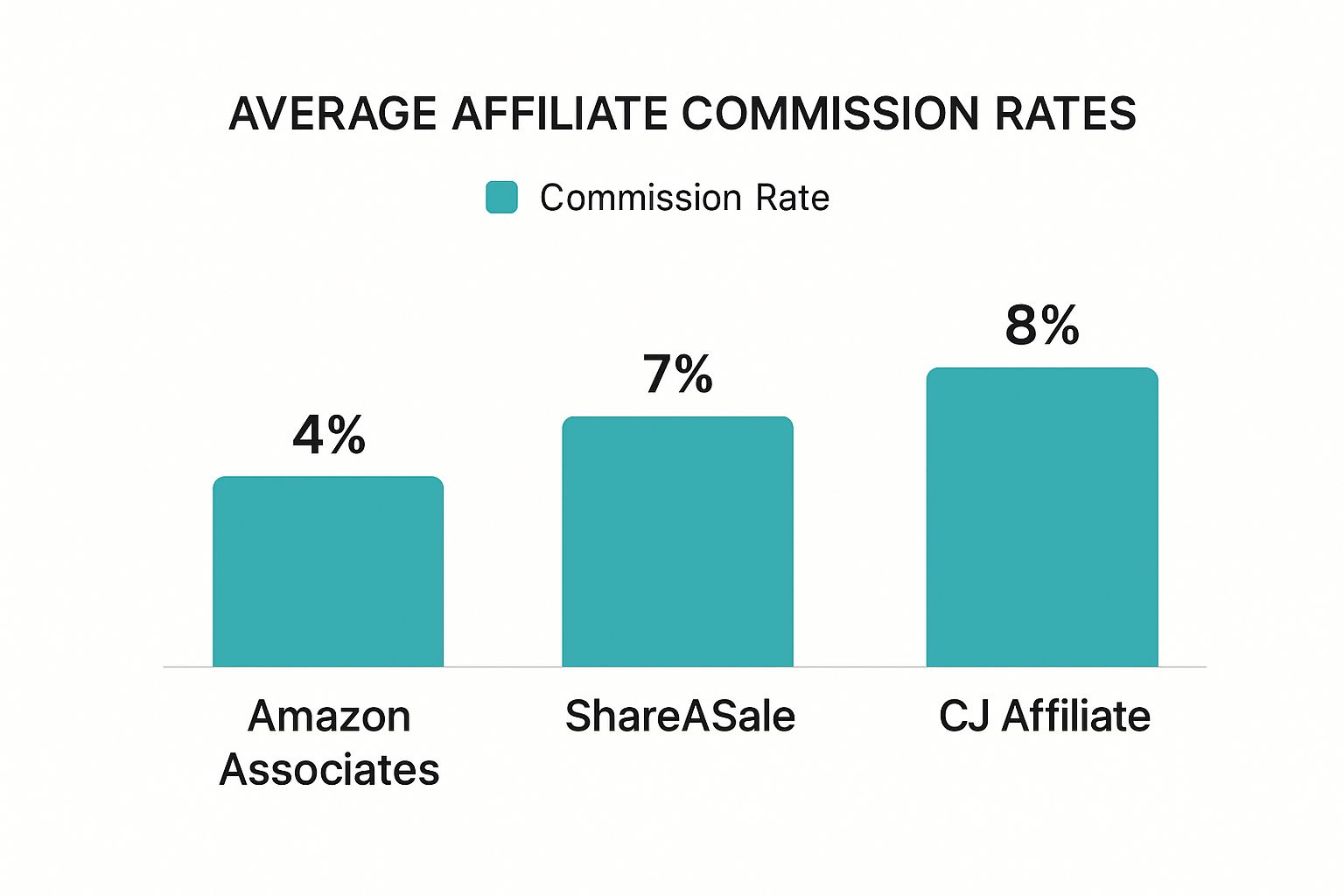
As the data shows, some platforms offer much higher commissions than others, so it pays to be strategic about where you send your Pinterest traffic.
And the opportunity is massive. In the first quarter of 2025 alone, Pinterest pulled in $855 million in revenue—a 16% jump from the previous year—thanks to its 570 million monthly active users. This growth is all about social commerce, where people are actively looking for things to buy.
Ultimately, your pinning strategy is the engine that drives your business on Pinterest. But don't forget that it's just one piece of the puzzle. To really scale your income, you should also be looking at broader strategies to increase website traffic as a whole.
Scaling Your Results with Pinterest Ads
So, you've got a solid organic strategy humming along, bringing in consistent traffic and even some sales. You’ve found your groove. Now, what if you could pour gasoline on that fire?
This is where Pinterest Ads enter the picture. Think of them not as a replacement for your organic efforts, but as a powerful amplifier. Paid ads let you take your best-performing Pins—the ones you know resonate with people—and put them directly in front of a much larger, perfectly targeted audience. It’s how you go from a steady trickle to a torrent of growth.
Setting Up Your First Ad Campaign
Jumping into Pinterest Ads for the first time might seem intimidating, but the platform does a good job of walking you through it. The secret to success isn't just following the steps; it's making the right strategic choices along the way.
Your first decision is the most critical: your campaign objective. What, exactly, are you trying to accomplish with this ad? Your answer tells Pinterest's algorithm how to optimize your ad spend for the best results.
You’ll see a few options:
- Awareness: Great for just getting your brand name and content in front of fresh faces.
- Consideration (Traffic): The sweet spot for many creators. Its goal is simple: drive clicks to your website, blog posts, or affiliate offers.
- Conversions: For when you want users to take a specific action, like making a purchase from your e-commerce store or signing up for your email list. It requires installing the Pinterest Tag (a bit of code) on your website to track those actions accurately.
For most creators focused on how to monetize Pinterest, you'll likely use the "Consideration" and "Conversions" objectives. These directly connect your ad budget to actions that make you money.
When you're first starting, running a "Consideration" campaign to a high-performing blog post is a fantastic way to test the waters and see what kind of traffic you can generate.
Targeting Your Ideal Audience
This is where the magic happens. Pinterest’s targeting is incredibly powerful, letting you zero in on exactly who you want to reach. You’re not just shouting into the void; you’re whispering directly to the people most likely to love what you offer.
You can layer different targeting options to build your perfect audience:
- Demographics: Filter by basics like age, gender, location, and language.
- Interests: Target people based on the categories they already engage with, like "healthy recipes" or "home organization."
- Keywords: Show your ads to users who are actively searching for terms related to your product or content. This is huge!
Pro Tip: One of the most effective strategies is retargeting. You can create a custom audience of people who have already visited your website or engaged with your Pins. These are warm leads who are far more likely to convert.
Creating Ads That Don't Feel Like Ads
The golden rule of Pinterest Ads is to make them look and feel like a regular, high-value Pin. The most successful ads are inspiring, helpful, and visually stunning—they blend right into the user's feed instead of disrupting it.
Always use high-quality vertical images or, even better, a video. Your ad copy and text overlay should focus on the benefit to the user. Ditch the "Buy My E-book" and go for something that solves a problem, like "Unlock 5 Secrets to Meal Prepping in 30 Minutes."
There's a reason Pinterest is an advertising powerhouse. It's home to over 2 million active advertisers, and its ad revenue is projected to hit $5.1 billion in the U.S. by 2027. This isn't by accident. The platform's AI helps businesses connect with the right people, which is crucial when you learn that 85% of weekly users have bought something based on Pins from brands. You can see more compelling stats about Pinterest's advertising power on SocialPilot.co.
To help you get started, here's a quick breakdown of the main campaign objectives.
Pinterest Ad Campaign Objectives Explained
| Campaign Objective | Primary Goal | Best For |
|---|---|---|
| Brand Awareness | Introduce your brand to new users | Getting in front of a broad, cold audience; building initial brand recognition. |
| Video Views | Maximize views on your video Pins | Showcasing a product in action, telling a brand story, or sharing a quick tutorial. |
| Consideration | Drive traffic to your website/landing page | Sending users to a blog post, an affiliate link, or a product category page. |
| Conversions | Encourage a specific user action | Driving sales, email sign-ups, or free trial registrations (requires Pinterest Tag). |
| Catalog Sales | Promote products directly from your catalog | E-commerce stores looking to drive direct sales from their product Pins. |
Choosing the right objective from this table is your first step toward a profitable campaign that aligns with your specific monetization goals.
Budgeting and Measuring Your Success
You don't need a huge budget to get started. You can begin with a few dollars a day to test what works. The trick is to monitor your campaigns closely and be ready to make adjustments.
To know if your ads are actually making you money, you must look beyond simple clicks. The single most important metric for monetization is your Return on Ad Spend (ROAS). This simple calculation tells you how much revenue you’re earning for every dollar you put into ads.
Of course, to measure ROAS and truly understand how your campaigns are performing, you need to be comfortable with your data. For a deeper dive into making sense of the numbers, check out our guide on understanding Pinterest analytics. Combining smart advertising with sharp analysis is how you truly scale your income on Pinterest.
Common Questions About Monetizing Pinterest
When you first start thinking about how to make money on Pinterest, it's normal for a million questions to pop into your head. It can feel like a maze at first. Let's clear up some of the most common questions so you can get started with confidence.
How Long Does It Take to Make Money?
This is always the first question, and I'll be straight with you: it depends. Pinterest isn't a "get rich quick" button. It's a long-term game that rewards consistency and strategy.
Realistically, plan on dedicating the first 3-6 months to building your foundation. This is your setup phase—switching to a business account, polishing your profile, designing quality Pins, and getting into a solid pinning rhythm. Your main job here is to grow an audience and start seeing that initial trickle of traffic.
Most creators start to earn their first real income somewhere between 6 and 12 months. By this point, your audience has had time to grow, and your content has circulated long enough to catch the attention of the Pinterest algorithm.
What Are the Rules for Affiliate Marketing?
Pinterest is one of the more friendly platforms for affiliate marketers, but you must follow their guidelines to stay on their good side. The number one rule? Be transparent.
- Disclosure is a must. You have to clearly state that a Pin includes an affiliate link. A simple hashtag like #affiliate, #ad, or #sponsored in your Pin description does the trick.
- No shady links. Pinterest users want to know where they're clicking. Avoid using link cloakers or shorteners that hide the final destination. This can get your Pins flagged or even your account suspended.
- Check each program's rules. Every affiliate program is different. Before you start pinning, double-check the terms of service for each brand you work with. Some have very specific rules about how you can promote them on Pinterest.
Key Takeaway: Always be honest about your affiliate links. It's not just a Pinterest rule; the Federal Trade Commission (FTC) requires it. Plus, being upfront builds trust with your audience, which is priceless.
Do I Need a Huge Following to Earn?
Nope. Not at all. This is one of the biggest misconceptions about Pinterest. Unlike other platforms where your follower count is everything, Pinterest acts more like a visual search engine. What matters most is the quality of your content and how easily people can find it.
I've seen accounts with just a few hundred followers have a single Pin go viral, driving a ton of traffic and sales. The magic is in creating valuable Pins loaded with the right keywords that directly answer what a user is searching for. This is exactly why you can learn how to monetize Pinterest without needing a massive audience from day one.
Ready to create stunning, high-converting Pins in seconds and reclaim your time? Pin Generator automates your content creation and scheduling, helping you drive traffic and sales without the manual grind. Start your free trial of Pin Generator today!