
How to Make Pinterest Pins with AI
30 June 2026
If you’re still designing every Pinterest pin by hand, you’re spending a lot more time on it than you need to. According to Adobe’s 2026 Creators’ Toolkit Report, 87% of creators using creative AI say it’s accelerated the growth of their business or audience, and 75% describe it as integrated or essential to how they work. AI has moved from a nice-to-have to a core part of how creators actually get things done, and Pinterest pin creation is no exception.
We’ve shared posts before about how to use AI for pin creation, from ideation to alternative titles to quickly rewriting descriptions, and while all of that is still useful, AI is rapidly improving the possibilities available to us. Instead of using a variety of tools for each part of the process, many platforms are now integrating AI directly into their workflow, creating a more streamlined and efficient process. What used to take five different tools and a lot of copying and pasting between tabs can now happen inside one platform, often in a fraction of the time.
This shift towards AI automation is huge for bloggers, shop owners, and affiliate marketers who are trying to stay consistent on Pinterest without it becoming a second job. Today, we’re sharing how AI has changed Pinterest marketing, what separates good AI use from AI slop, and exactly how to make Pinterest pins with AI using Pin Generator.
How AI Has Changed Pinterest Marketing
Not that long ago, creating Pinterest pins at scale meant spending hours in Canva, hiring a designer, or knowing how to use complicated tools like Photoshop or advanced editing software. It also meant piecing together a workflow across several different tools, ChatGPT or Claude for titles and descriptions, an image generator for visuals, Canva to put it all together, then manual scheduling on top of that. It worked, but it took a lot of steps for one pin.
What’s changed is that AI is now built directly into the tools creators are already using, like Canva and Pin Generator, rather than something layered on top through a separate app. This allows creators to make Pinterest pins using AI in seconds, scaling their marketing without the hours of manual work it used to take.
We’re covering all of this in detail, along with a full walkthrough of how to make Pinterest pins with AI, on our YouTube channel. You can watch the video here:
Good AI vs. AI Slop
AI gets a bad reputation sometimes, and it’s not entirely without reason. There’s a lot of low quality, generic content out there that was clearly generated without much thought, and Pinterest’s algorithm is getting better at recognizing it.
AI slop happens when the tool does all the thinking. It’s the pin with a stock-looking image that could belong to any account, a vague title like “tips for success,” and a description that reads like it was written by a robot, because it was. That kind of content might fill up a posting schedule, but it doesn’t build trust with an audience and it doesn’t give Pinterest a clear signal about what an account is actually about.

Good AI use looks different. It’s using AI to speed up a process you’re still directing, giving it context about your brand and your audience, and letting it help you say things faster and at a higher volume.
On the image side, AI works well for product placement and image variations, especially for physical products where a full photoshoot isn’t realistic for every listing. For example, think of a candle business that wants to show the same candle in different settings, such as on a cozy nightstand, next to a bath, or styled for a fall gift guide, without having to pay for a new photoshoot every time. The goal isn’t to create false images or misleading claims, it’s to create clear, useful content that represents what’s actually being offered in a way that’s enticing enough for the viewer to click through and see more.

How to Make Pinterest Pins with AI Using Pin Generator
We love using Pin Generator to make Pinterest pins with AI because it brings a lot of tools into one place. Pin Generator connects directly to top AI models, including ChatGPT and Nano Banana, and it’s regularly updated to reflect which models are performing best for content and image generation. It’s also a trusted third-party tool that links directly to Pinterest.
Pin Generator has two workflows for creating Pinterest pins, as well as a variety of ways to use AI throughout the pin creation process.
The Generate page is the more hands-on option, useful for testing ideas, A/B testing designs, or quickly making pins for something just posted. On the Generate page, hovering over a pin’s title shows an icon to rewrite it with AI, and the same applies to descriptions and alt text. The images section also allows for AI generated images and AI tone of voice adjustments.
The Automation flow is the better long-term option for staying consistent without it taking over a weekly schedule. This is where you can set your brand tone of voice and colors and let AI create your pins for you. If you don’t have a website or an established brand identity, you can even use AI to build out a consistent, themed look from scratch. Once your style is nailed down, AI creates pins for you daily and delivers them to your email for you to review and approve.
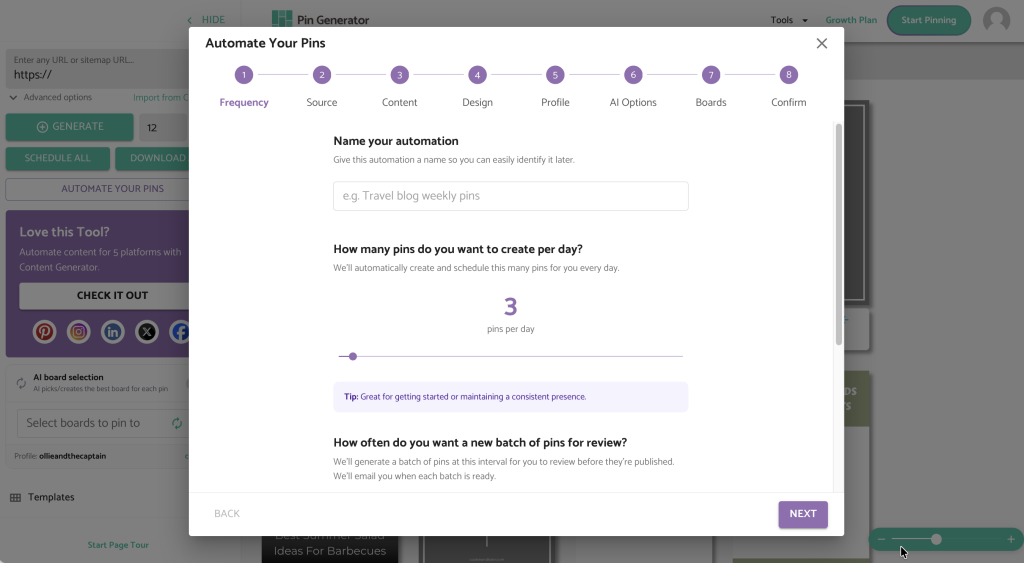
To get started, head to pingenerator.com and click ‘Start Pinning Now’. Name the automation, set a pinning frequency between one and three pins per day, and choose a weekly review schedule. From there, connect a website or shop, or describe the pins directly if there’s no website yet. This description shapes the AI generated titles, images, and overall style, so the more specific it is, the better the results. Add outbound links, choose templates and a color palette, set AI preferences for tone of voice, add disclosure text for affiliate links, choose boards, and hit generate.
How to Get Better Results
The biggest difference between high-performing AI pins and forgettable ones comes down to the input. Vague input gets you vague pins, and specific input gets you pins that actually sound and look like you. If you describe your brand as just “home decor,” you’re going to get something generic. If you describe it as “cozy, minimalist home decor for small apartments, warm neutral tones, no clutter,” the AI has something real to build from, and it shows in the result.
The same goes for tone of voice. Take a few extra minutes to set this clearly, because it carries through every title and description the AI writes after that. A playful, casual brand and a polished, expert brand should never sound the same, and Pin Generator lets you make sure they don’t.
It’s also worth resisting the urge to lean entirely on AI generated images without ever mixing in anything original. A blend of AI generated visuals and a few real photos, especially for product based accounts, tends to perform better and feels more trustworthy than an account that’s clearly running on autopilot. AI should speed up the process, not replace the personality that makes someone want to follow you in the first place.
The best results come from treating Pin Generator like a creative partner rather than a replacement for your marketing team. Feed it good direction, review what comes back, tweak what’s not quite right, and let it handle the repetitive parts so you can focus on strategy instead of design software.
Curious to see how it works? You can try Pin Generator for free. Connect your website and let’s get generating!