
Pinterest Affiliate Marketing: How to Get Started Without a Website
13 June 2026
Can you really earn affiliate income on Pinterest without a website? The short answer is yes, but only if you follow the correct rules and best practices. Pinterest now reaches 578 million monthly users, making it one of the largest platforms for discovery and traffic in 2025. This means it has massive potential for affiliate marketers, like yourself, looking to expand their reach and get in front of buyer’s eyes.
If you don’t have a website yet, it’s okay. There is a path for you to post affiliate links safely, grow your reach, and begin earning. We’re breaking down everything you need to know to choose compliant programs, create original pins, and leverage tools that speed up your workflow.
How to Choose Affiliate Programs That Don’t Require a Website
Before you can start posting affiliate links on Pinterest, you’ll need to sign up for the right programs. Most affiliate programs require a website, blog, or email newsletter to apply, but not all of them do. It’s absolutely possible to find affiliate programs that allow you to sign up without a site, but you need to know where to look.
To find options that fit your country and niche, try searching Google for phrases like “best affiliate programs without a website” or “affiliate programs in [your country] that don’t require a website.”
A few popular options to explore are:
- Amazon Associates – some regions allow applications using a social media profile instead of a website
- ClickBank – accepts creators globally and doesn’t require a website to join
- Rakuten Advertising – includes merchants that approve applications without websites
When evaluating programs, look for two key things:
- Eligibility – confirm that your country and platform (Pinterest) are accepted
- Promotion Rules – make sure Pinterest is listed as an approved traffic source and that direct affiliate links are allowed
Affiliate programs range from individual brand partnerships to large networks that give access to thousands of products. Choose programs that genuinely fit your niche and audience, as this improves performance and builds long-term trust. And also, if you’re brand new to Pinterest Affiliate Marketing, check out our beginner’s guide for more information.
Prefer to watch instead of read? We’ve recorded a video tutorial. Follow along here: https://youtu.be/cSaurfrNB2U
Pinterest Best Practices to Keep Your Account Safe
To keep your Pinterest account in good standing, there are a few important rules to follow. Many affiliate marketers accidentally trigger Pinterest’s spam filters by posting too many pins or using the same link repeatedly. Those filters are designed to detect repetitive or overly promotional activity, which can cause your account to be flagged or restricted.
If you want Pinterest to recognize you as a trusted creator and continue promoting your content in search results, it’s worth doing things the right way from the start. Here are a few best practices to keep your account compliant and performing well:
1. Always use full affiliate links.
Pinterest doesn’t allow URL shorteners, redirects, or cloaked links. Using these can flag your account or even get your pins removed.
2. Clearly disclose your affiliate links.
You’re required to let viewers know when a pin includes affiliate links. You can add a short note like “#affiliate” or “This pin contains affiliate links” directly in the description, or place a small disclosure on the image too.
3. Create original and useful content.
Pinterest values authentic content, not copy-paste product photos. Whenever possible, purchase the product and create your own visuals. You can show the product works, style it in real life, or design a simple image using Canva or Pin Generator.
4. Prioritize quality over quantity.
Avoid posting dozens of nearly identical pins. Pinterest’s algorithm rewards creators who post consistent, original content that adds value to the platform.
BONUS – PRODUCT TAGGING
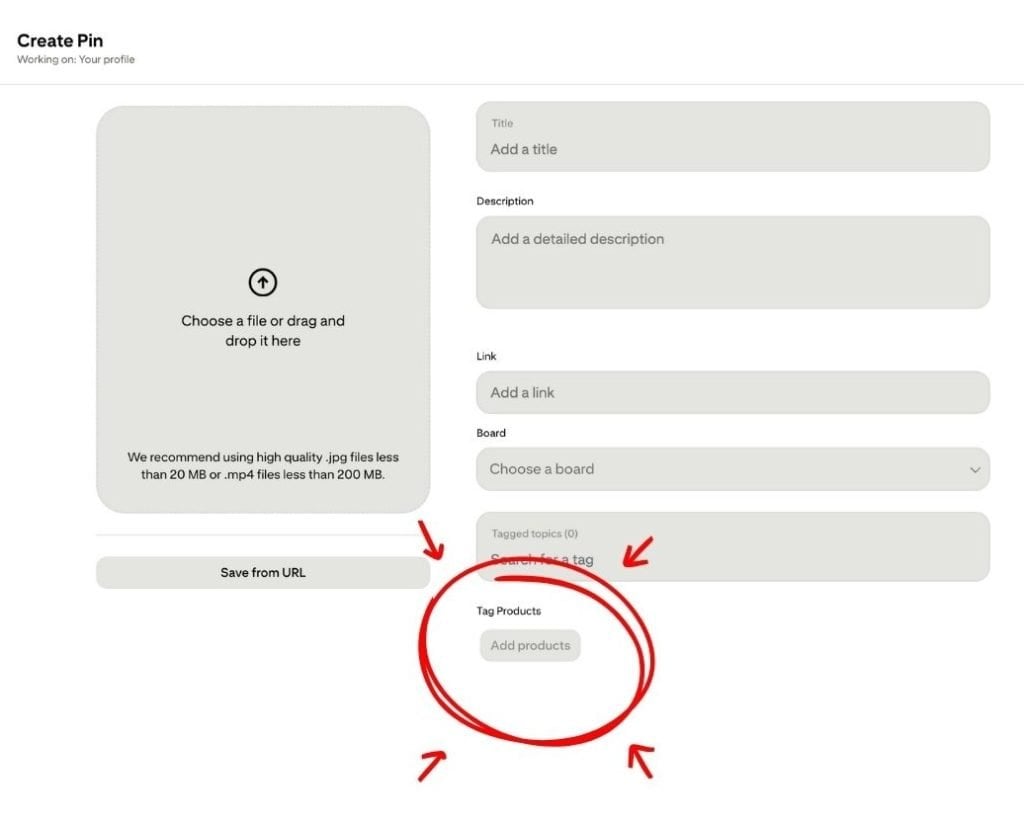
If product tagging is available in your country, use it. This is one of the safest and most effective ways to attach affiliate links inside Pinterest. Product tagging helps Pinterest understand the relationship between your content and the product, which increases reach and visibility.
How to Create and Upload Pins with Affiliate Links
Once you’ve joined a few affiliate programs and understand Pinterest’s rules, it’s time to start creating and uploading your pins. There are a few different ways to add your affiliate links, depending on what’s available in your country and how many pins you plan to make.
The best and most reliable method is Pinterest Product Tagging. This feature lets you tag products directly on your pins so that Pinterest recognizes the connection between your content and the item you’re promoting. When you tag a product, you don’t need to add a separate destination URL, as the link is built into the tag. It’s also the most Pinterest-friendly approach since it works seamlessly with the platform’s shopping features.
That said, not everyone has access to product tagging yet. If it’s not available in your region, you can still add affiliate links by entering them in the “Destination URL” field when you upload your pin. Pinterest has confirmed that direct affiliate links are allowed as long as you:
- Use the full, uncoded affiliate link (no shorteners or redirects)
- Clearly disclose that it’s an affiliate link
- Provide original, high-quality content that adds value
If you’re managing multiple links or products, tools like Pin Generator make the process much easier. There are two features that particularly stand out:
- Bulk Settings: After generating your pins, open the Bulk Settings (in the left hand panel) to update titles, descriptions, and links across all your designs at once.
- CSV Upload: For larger campaigns, you can upload a simple spreadsheet with pin titles, image URLs, boards, and affiliate links. Pin Generator will automatically build and organize all of your pins in seconds. You can learn more about CSV uploads here.
This is a huge time-saver, especially if you’re running multiple affiliate promotions or testing different products. Once your pins are created, you can either download them to upload manually to Pinterest for product tagging or schedule them directly inside Pin Generator.
Many creators use a hybrid approach, meaning they bulk-create and upload pins for efficiency, then manually add product tags to their top-performing designs. This way, they can create quickly and still get the algorithms benefits of tagged content without sacrificing speed or output.

How to Save Time Using Pin Generator
Once you’ve found the right keywords and affiliate links, Pin Generator can help you turn them into ready-to-publish pins in minutes. The tool automatically generates titles, descriptions, and visuals that you can customize too. From fonts and text to images, colors, and links, every pin is created to fit your brand.
If you haven’t tried it yet, test it out and see how much faster you can create optimized, scroll-stopping pins without spending hours designing manually.