
Pinterest AI Generator: Create Eye-Catching Pins Fast
24 June 2025
Making Sense of Pinterest AI Generator Tools
The way we create content for Pinterest has shifted. If you're still designing every single pin by hand, you’re not just working harder—you're probably falling behind. The conversation around AI is everywhere, but it's important to understand what this really means for creators and how a Pinterest AI generator actually fits into a winning strategy. It’s not about replacing your creativity; it’s about making it go further.
I hear a lot of creators worry that using AI will make their pins look generic or robotic. It's a fair point, especially with some of the low-quality "AI slop" that occasionally pops up in feeds. But here’s the secret: the most successful Pinterest marketers aren't just hitting a button and walking away. They use these tools as a starting point—a powerful brainstorming partner that can whip up dozens of concepts in the time it used to take to make one. From there, they inject their own brand voice, colors, and unique perspective. The final product is a pin that’s both eye-catching and genuinely them.
Why AI-Powered Pins Are Gaining Traction
Pinterest's own algorithm is getting smarter, and it’s designed to promote content that people love. The platform’s internal AI is constantly learning what users want to see, and AI-generated content—when done right—often aligns perfectly with these emerging trends. This isn't just a guess; some creators are reporting 10x better engagement after adopting a smart AI workflow.
The numbers tell a similar story. With 81% of Pinterest's monthly active users on mobile devices, the platform's AI-driven recommendations are more powerful than ever. Mobile users are saving AI-influenced content at over double the rate of desktop users, showing a clear preference for the fresh, visually optimized ideas that these tools produce. You can find more details on this trend in the latest Pinterest statistics from Printful.
Beyond Buzzwords: What’s Actually Working
Knowing how to use a Pinterest AI generator is a huge part of a modern content strategy. It fits into the bigger picture of automated content creation, a method that can seriously simplify your entire marketing process. Instead of just creating images, the best tools help you:
- Brainstorm trending topics and catchy title ideas.
- Generate multiple pin variations for easy A/B testing.
- Write compelling, keyword-rich descriptions that improve your pin's visibility.
The goal is to let AI handle the repetitive, time-draining tasks. This frees you up to focus on the high-level strategy and creative details that only a human can bring to the table.
Finding Your Perfect Pinterest AI Generator Match
Picking a Pinterest AI generator can feel like standing in a crowded room where everyone is shouting at you. With so many options all promising the world, it's easy to get analysis paralysis. The secret isn't finding the single "best" tool, but the one that's genuinely the best fit for your brand and workflow.
I’ve seen countless creators get stuck trying and ditching tools because they chose one based on hype rather than their actual needs. A food blogger creating decadent recipe pins needs something completely different from an e-commerce owner selling handmade jewelry. Your choice has to reflect your unique content style.
For example, a food blogger’s top priority might be an AI that creates beautiful, easy-to-read recipe cards and makes their food photography pop. An entrepreneur with a physical product line, however, probably needs a generator with excellent background removal and the ability to drop products into lifestyle mockups. Meanwhile, a business coach needs a tool that can churn out professional quote cards and data-driven infographics. Instead of just scanning a feature list, think about your day-to-day creation process and which tool slides in most smoothly.
Evaluating What Really Matters
Before you pull out your credit card, it's important to look beyond the flashy promise of "AI-generated pins." There are practical details that determine whether a tool becomes your new best friend or a frustrating waste of time and money.
Here are a few critical things I always check for:
- Learning Curve: Is the interface intuitive enough to use right away, or will you need to block off an afternoon to watch tutorials? Some tools are built for speed, while others have more powerful features that take time to learn.
- Template Quality & Variety: Do the templates look fresh and in line with what's currently working on Pinterest, or are they dated and generic? A strong template library is your shortcut to creating great-looking Pins without tons of manual tweaking.
- Integration: Can the tool connect with your other platforms? A direct link to Shopify, Etsy, or even your WordPress blog can eliminate dozens of tedious steps from your workflow.
- Hidden Costs: Be careful with "free" plans that are so limited they're practically useless. Always check what you actually get for your money, especially how many pins you can create or schedule each month.
To give you a clearer picture of what's out there, I've put together a comparison of some popular options. This table breaks down the real-world costs and features to help you see how they stack up against each other.
Pinterest AI Generator Comparison Guide
Real-world comparison of top Pinterest AI generators including actual costs, template quality, ease of use, and Pinterest-specific features
| Tool Name | Monthly Cost | Pin Templates | Learning Curve | Pinterest Features | Best Use Case |
|---|---|---|---|---|---|
| Pin Generator | Starts at $12.99/mo | 1,000+; highly customizable | Very Low | AI scheduling, board rules, direct URL to Pin, text-to-image | Bloggers & Content Creators |
| Canva AI | $14.99/mo (Pro) | Thousands; general purpose | Low | Magic Write, Text to Image, but no direct Pinterest scheduling AI | General Small Businesses |
| Tailwind Ghostwriter | Starts at $29.99/mo | Limited; focuses on text | Medium | AI-driven descriptions, smart scheduling, community features | Service Providers & Marketers |
| Visme | $29/mo (Starter) | Good variety; data-focused | Medium | Infographic & chart tools, brand kit automation | Data-heavy Niches & Coaches |
This comparison shows that tools like Pin Generator are built specifically for the Pinterest ecosystem, offering features that general-purpose tools like Canva might lack. On the other hand, if you're already deep into the Canva or Tailwind ecosystem, their AI features might be enough to get you started.
To get a better sense of what features are most popular, the chart below shows how creators are using key AI functions.
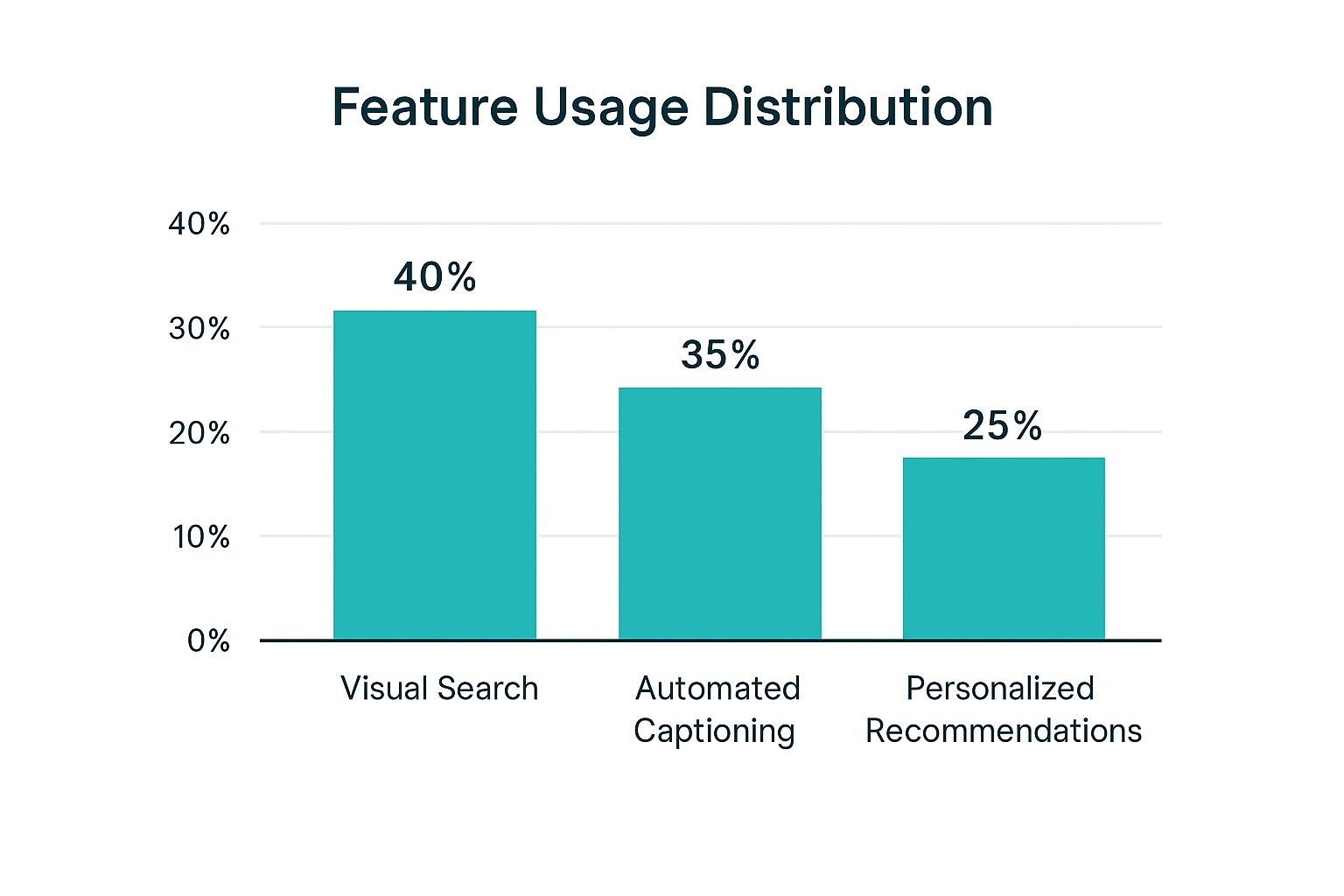
The data clearly shows that creators are leaning on AI for both visual and text-based tasks, with visual search and content generation leading the way. By weighing your specific needs against these factors and exploring the options, you can make a choice you’ll be happy with for the long haul. For a deeper dive into one of these tools, you can learn more about specific Pin Generator products and see their features in action.
Crafting Your First Scroll-Stopping AI Pin
This is where the fun begins—turning your ideas into actual pins that make people stop scrolling, saving, and clicking. The secret to a stunning AI-generated image is a well-crafted prompt. Think of it less like a simple search and more like you're directing a personal creative assistant. If your instructions are vague, you'll get generic, uninspired images. Specificity is your best friend here.
Instead of just telling the AI to create a "fall outfit," you need to paint a vivid picture with your words. A much better prompt would be something like this: “Photorealistic image of a cozy fall outfit. Include a chunky knit sweater in a warm cream color, high-waisted dark wash jeans, and brown leather ankle boots. The setting is a rustic pumpkin patch with soft, golden hour lighting. Pinterest aesthetic, vertical format.” This level of detail guides the Pinterest AI generator to create exactly what you envision, from the specific clothing items down to the mood and lighting.
Prompts That Produce Pinterest-Worthy Results
The real trick is to include details that you know already perform well on Pinterest. Since it's a visual discovery platform, your prompts should use language that reflects popular aesthetics and what users are searching for.
Here are a few tips I've learned for writing prompts that consistently produce great pins:
- Specify the Format: Always start by requesting a vertical image or explicitly state Pinterest's ideal 2:3 aspect ratio. This simple step saves you from getting a square or horizontal image that won't work.
- Describe the Style: Use descriptive terms like "photorealistic," "flat lay," "minimalist design," or "bright and airy aesthetic" to steer the AI toward the look you want.
- Set the Scene: Don’t just describe your main subject; describe its surroundings. Adding details like "on a white marble countertop" or "with a blurred cafe background" gives your pin context and a more professional feel.
- Incorporate Trending Elements: Mention specific textures like "chunky knit" or "linen fabric," or color palettes like "earthy tones" or "pastel colors." This helps you tap into current trends without creating a pin that looks like everyone else's.
A great image is only half the battle; a strong caption can seal the deal. You can use an AI caption generator to quickly write engaging text that matches your AI visual and encourages your audience to interact. When you combine a detailed visual prompt with a well-written description, you get a complete package that's primed to capture attention.
Transforming AI Output Into Pinterest Gold
Getting a decent image from a Pinterest AI generator is just the beginning. The real magic—the part that turns a simple picture into a traffic-driving machine—happens when you start refining it. Think of the AI's output as raw clay; it has potential, but it needs your personal touch to become something special that truly reflects your brand. If you just post the first image the AI spits out, you risk getting lost in the sea of low-effort “AI slop” that users are getting very good at ignoring.
Your first move is to stamp your brand identity all over it. This isn't optional. This could mean adding your logo in a corner, applying a signature color filter, or using your specific brand fonts for text. These details build recognition and trust. A pin that looks like it belongs to you will always do better than a generic one. You also need to be a critic. Does that AI-generated kitchen have weird-looking forks or books with blank spines? Don't hesitate to edit, crop, or even stitch together the best parts of several AI images to create one perfect pin.
Adding Text Overlays That Convert
Text overlays are your secret weapon for turning a pretty picture into a must-click resource. A beautiful image of a meal is nice, but that same image with the text “5-Ingredient Weeknight Pasta | Ready in 15 Mins” is way more valuable to a busy user scrolling for dinner ideas.
When you're adding text, remember these key points:
- Clarity is King: Choose bold, easy-to-read fonts. Your message needs to be understood in the split second someone scrolls past it.
- Keep It Short: For your main title, try to stick to 60-100 characters. This helps ensure your whole message is visible on phones, where most people use Pinterest.
- Focus on the Benefit: Don't just state what it is; tell people why they should care. Use powerful words like “Easy,” “Quick,” or “Ultimate Guide” to grab their attention.
Advanced Refinement Strategies
Once you've got the basics down, you can start exploring more advanced tactics. A great strategy is to create a "series" of pins from a single AI concept. For instance, if you generate a gorgeous image of a home office, you can spin it into multiple pins: one titled "Budget-Friendly Desk Organization," another on "Ergonomic Chair Dupes," and a third covering "DIY Wall Art Ideas." This lets you multiply your content from one creative spark.
For those working with video pins, this refinement stage is even more important. After generating your pins, especially if they include video, making sure they perform well on the platform is essential. Fast-loading videos that look great on any device can seriously boost engagement. You can learn more about effective video compression for social media to ensure your content really pops. By spending this extra time on refinement, you turn a basic AI image into a powerful marketing tool.
Pinning with Purpose: How to Schedule and Distribute Your AI-Generated Content
So, you've got a folder packed with stunning, AI-generated pins. That's a fantastic start, but the job isn't done. The biggest mistake I see creators make is assuming a beautiful pin will automatically find its audience. The reality is that how and when you share your content is just as crucial as the pin itself. A Pinterest AI generator gives you the power to post consistently, but a smart distribution plan is what makes that consistency truly count.
The objective isn't just about pushing out more content; it's about posting smarter. This all begins with understanding your specific audience's behavior. Forget the generic advice you've heard, like "post on Saturday afternoons." Your first stop should be your own Pinterest Analytics. Dig into the "Audience Insights" tab and find out when your followers are actually scrolling. For my own brand, I was shocked to learn my audience was most active on Sunday evenings and Wednesday mornings—times I would have completely missed otherwise. This single piece of data changed my entire approach to scheduling.
Create a Posting Rhythm That Works for You
Once you know the best times to post, you can build a schedule that you can actually stick to. This is where batch scheduling becomes a total game-changer. I recommend setting aside an hour or two each week to schedule all your pins. This simple habit frees you from having to log in and post manually every single day. While there's no universal magic number for how often to post, a great starting point is 3-5 pins per day. This volume keeps your account active in the algorithm without spamming your followers' feeds.
It's also vital to mix up your content formats. Your AI-generated static pins are the foundation, but you need to round out your strategy with other types of content:
- Video Pins: These are amazing for engagement and perfect for showing off a product in action or sharing a quick tutorial.
- Idea Pins: Use these for telling a story or creating multi-step guides that keep users tapping for more.
- Manually Created Pins: Don't forget your personal touch! A pin you design yourself can create a stronger, more authentic connection with your audience.
This variety keeps your profile interesting and appeals to different parts of the Pinterest algorithm. To help you plan this mix, here's a framework with data-driven posting schedules tailored to different niches.
Pinterest Posting Strategy Framework
| Content Niche | Peak Engagement Days | Best Posting Times | Weekly Pin Volume | Seasonal Opportunities |
|---|---|---|---|---|
| DIY & Crafts | Saturday, Sunday | 2 PM – 4 PM, 8 PM – 11 PM | 25-35 Pins | Holiday-themed crafts (Oct-Dec), Spring cleaning projects (Mar-Apr) |
| Food & Recipes | Monday, Tuesday | 10 AM – 1 PM, 6 PM – 9 PM | 20-30 Pins | Holiday baking (Nov-Dec), Summer grilling (Jun-Aug), Healthy eating (Jan) |
| Fashion & Beauty | Friday, Saturday | 7 PM – 10 PM | 30-40 Pins | New season trends (quarterly), Holiday party looks (Nov-Dec), Festival season (Apr) |
| Home Decor | Sunday, Monday | 1 PM – 4 PM, 8 PM – 10 PM | 25-35 Pins | Spring refresh (Mar-May), Cozy fall decor (Sep-Oct), Outdoor living (Jun-Jul) |
| Travel | Friday, Saturday | 9 AM – 1 PM | 20-25 Pins | Summer vacation planning (Mar-Jun), Winter getaways (Oct-Dec) |
This table provides a solid starting point, but always remember to cross-reference it with your own analytics for the best results. By combining a schedule backed by your own data with a diverse content mix, you’ll ensure your AI-generated pins reach the right people at the right time.
Tracking Results and Scaling Your AI Pin Success
Making beautiful pins with a **Pinterest AI generator** feels great, but the real magic happens when you understand what’s working and what isn’t. Data tells a story, and if you listen closely to your analytics, you can turn a few successful pins into a consistent growth machine. Think of your Pinterest Analytics dashboard as your mission control.
When I dive into my analytics, the first two metrics I look for are Outbound Clicks and Saves. Impressions are nice for a quick ego boost, but clicks and saves show me that people are genuinely connecting with my content. A high number of saves tells me my pin is so useful that users want to come back to it. A high outbound click rate means my call-to-action is hitting the mark. When a pin gets a lot of both, I know I've struck gold with the visual, text, and description.
Identifying and Scaling Winning Formulas
Once you've spotted a high-performing pin, it's time to play detective. Why did it do so well? Was it the specific AI prompt you used to generate the image? The color palette? The exact phrasing of the problem you solved on the text overlay? Don't just pop the champagne; break down the success. For instance, if a pin titled "5 Quick Keto Breakfast Ideas" takes off, that’s your green light to expand on that theme.
You can then fire up your Pinterest AI generator to create a whole series of related pins. Think along the lines of:
- “7-Day Keto Meal Prep for Beginners”
- “Easy 3-Ingredient Keto Desserts”
- “High-Protein Keto Lunch Recipes”
This strategy is sometimes called topic clustering. It helps establish you as an expert on a subject and feeds the Pinterest algorithm more content that it knows a specific audience will love. By methodically testing different angles, you're no longer just throwing spaghetti at the wall—you're making informed decisions.
This data-first mindset is exactly what Pinterest itself is doing. As of early 2025, the platform's AI-powered recommendations are a core part of its strategy. In fact, AI-selected ads that trigger positive feelings have seen a 6× higher lift in action intent. You can learn more about how Pinterest is using AI to boost engagement and revenue to see the bigger picture. By tracking your own analytics, you're essentially applying the same powerful principles to your content, making your AI generator a reliable engine for traffic and growth.
Key Takeaways
Putting a Pinterest AI generator into practice is where you'll see real, tangible growth. It's more than just knowing what the tools can do; it's about creating a system that works for you. Let's walk through the most important strategies and build a clear action plan you can start using right away.
Your AI Pin Creation Blueprint
Your path to becoming proficient with AI on Pinterest can be broken down into a few distinct stages. Each step builds on the previous one, so tackling them in order is the best way to avoid feeling swamped and actually see your efforts pay off.
- Laying the Groundwork (Weeks 1-2): Your primary objective here is to get comfortable with your chosen tool. Spend this time generating a bunch of images by playing around with different prompt styles. You're trying to get a feel for what kind of language gives you the best visuals. Don't stress about making perfect pins; this is your time to learn and experiment.
- Refining and Branding (Weeks 3-4): Now it's time to take those AI-generated images and make them your own. Create a system for adding your brand’s specific fonts, colors, and logo to every single pin. Get into the habit of writing short, snappy text overlays (60-100 characters is the sweet spot) that highlight a clear benefit for the viewer.
- Getting Strategic with Distribution (Month 2+): Once you have a small collection of branded pins ready to go, it’s time to be smart about sharing them. Dive into your Pinterest Analytics to see when your audience is most active and schedule 3-5 pins per day during those peak hours. Make sure to mix it up with different formats like Video Pins and Idea Pins alongside your AI-created static images.
- Analyzing and Scaling (Ongoing): Set aside a little time each week to check your analytics. Pinpoint your best-performing pins by looking at Saves and Outbound Clicks. Try to figure out why they worked so well—was it the topic, the image, the headline? Use that successful formula to create more content just like it.
Troubleshooting Common AI Challenges
Even with a solid plan, you might hit a few snags. Here are some quick fixes for common frustrations I've seen.
| Common Problem | Quick Solution |
|---|---|
| Images Look Generic | Your prompts need more flavor. Get specific with aesthetic keywords like "photorealistic," "minimalist," or "golden hour lighting" and describe the background you want. |
| Pins Get Low Engagement | The problem might be your copy, not just the image. Make sure your titles spark curiosity and your descriptions are packed with keywords people actually search for. |
| Feeling Overwhelmed | You're probably trying to do everything at once. Step back and simplify. Concentrate on mastering just one piece of the puzzle, like prompt writing, before adding another layer. |
By breaking down the work into manageable chunks and setting realistic goals, you can build a strong Pinterest presence without the burnout.
Ready to put this plan into motion and stop spending hours creating pins by hand? Discover how Pin Generator can automate your workflow and help you create stunning pins in seconds.