
Best 5 Pinterest Automation Software Tools
20 February 2024
Yes, we reckon that doing Pinterest marketing isn’t a walk in the park.
It is difficult to create quality pins daily and post those pins at the right hour, plus the nerve-wracking pressure to grow your Pinterest followers consistently.
Considering all these may feel overwhelming to you.
But that’s not all.
Pinterest is a social media platform used by many to grow and market their business with over 490 million users logging into the platform.
So you can only imagine how many pins, from all pinners, are being posted daily! Imagine the competition, new brands looking to gain recognition from their target customers.
How do you beat this? How do you overcome the pressure to maintain a strong brand presence?
One word. Automation. Pinterest automation software tools are your best bet for getting more clicks, saves, and sales on Pinterest.
In this post, we will be revealing to you the top 5 pinterest automation software you should know, highlighting their features, pros, cons, and subscription models.
The Benefits of Using Pinterest Automation Software in Your Business
Using Pinterest automation software in your business can be a game-changer. It saves you time by scheduling pins to go out at the best times, even when you’re not online. Plus, it can help you reach a wider audience by consistently sharing your content.
But that’s not all.
With automation software, you can also track your performance, see what’s working, and make adjustments easily. It’s like hiring a virtual assistant to manage your Pinterest presence 24/7.
So, if you want to streamline your Pinterest strategy and boost your business, try using Pinterest automation software. These powerful tools can be the game-changer you’ve been looking for.
Top 5 Pinterest Automation Software You Should Know
Pin Generator
Anyone who creates content will understand how long putting together quality content takes. But with the help of Pin Generator, this will no longer be an issue.
Pin Generator is a Pinterest automation solution that allows you to create a high volume of quality pins in a few seconds. After a quick scan of your website’s URL, it pulls images and information to create eye-catching posts.
And, this tool has several design templates and tools to choose from. This hands you the creative freedom of content creation, allowing you to customize your pins.
It is the perfect tool for anyone looking to increase their number of pins as well as for bloggers, affiliate marketers, e-commerce websites, and websites with a lot of content.
Features of Pin Generator
- Keyword Generation: Pin Generator automatically suggests trendy keywords based on your niche, ensuring your pins are optimized for maximum visibility.
- Customizable Templates: Choose from a variety of professionally designed templates tailored for Pinterest, allowing you to create eye-catching pins in minutes.
- Image Library: Access a vast library of high-quality images and graphics to enhance your pins and make them stand out on Pinterest.
- Text Overlay Tools: Easily add text overlays to your pins to convey messages, highlight key features, or include calls to action, enhancing engagement and click-through rates.
- Brand Integration: Seamlessly integrate your brand elements, such as logos, colors, and fonts, into your pins to maintain consistency and reinforce brand identity.
- Scheduled Posting: Schedule your pins to be published at optimal times for maximum visibility and engagement, even when you’re not actively managing your Pinterest account.
- Analytics Dashboard: Track the performance of your pins with detailed analytics, including metrics such as impressions, clicks, and conversions, to measure the effectiveness of your Pinterest marketing efforts.
- Collaboration Tools: Collaborate with team members or clients by sharing pin designs and gathering feedback, streamlining the pin creation process, and ensuring alignment with your overall marketing strategy.
- Mobile Compatibility: Create and edit pins on the go with mobile-friendly design tools, allowing you to stay productive and responsive to emerging trends wherever you are.
- Integration with E-commerce Platforms: Easily link your pins to product pages on your Shopify store or other e-commerce platforms, driving traffic and conversions directly from Pinterest.
Pros & Cons
Pros:
- Time-Saving: Pin Generator streamlines your pin creation process and allows you to whip out stunning pins without needing graphic design expertise.
- Cost-Effective: By eliminating the need to hire a graphic designer or purchasing expensive design software, Pin Generator offers you a cost-effective solution for creating high-quality pins.
- User-Friendly Interface: With intuitive tools and templates, Pin Generator is accessible to users of all skill levels, making it easy to create visually appealing pins with minimal effort.
- Customization Options: Pin Generator offers a range of customizable templates, fonts, colors, and graphics, allowing users to tailor their pins to suit their brand identity and marketing goals.
- Keyword Optimization: The built-in keyword generation feature helps users optimize their pins for searchability, increasing their visibility and reach on Pinterest.
Cons:
- Limited Design Flexibility: While Pin Generator offers a variety of templates and customization options, you may find it lacking in advanced design features compared to hiring a professional designer.
Pricing:
Pin Generator’s wide range of sales packages means that there is a package for everyone, starting from only $7.99 per month. You’re also able to create pins for free if you’d like to try out the software before making any financial commitments.
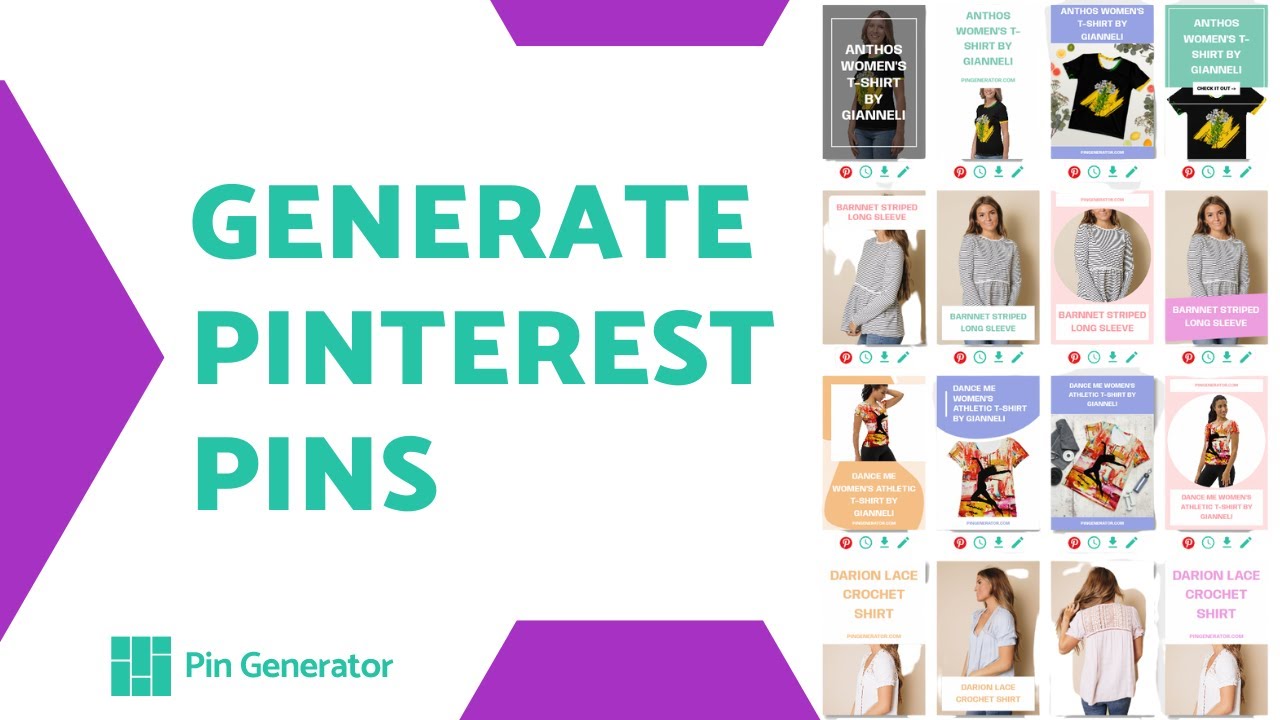
Here’s a video to showing how to generate new pins and schedule them with Pin Genererator:
PinPinterest

This is a Pinterest automation software that offers several different features. PinPinterest can be used to generate and schedule posts while collecting followers.
In a sense, it is a one-stop shop for everything on Pinterest. It is a Pinterest automation software that can help create content and help grow followers, likes, and comments.
However, it is essential to use PinPinterest in moderation and managed control. This is because some bots go against Pinterest’s terms and conditions, which may result in your account being blocked.
Features of PinPinterest
- Automated Pin Scheduling: PinPinterest allows you to schedule pins to be posted at optimal times, maximizing reach and engagement.
- Smart Suggestions: The tool provides intelligent suggestions on content to pin based on user preferences and trends.
- Customizable Pin Settings: You can customize pin settings such as frequency, timing, and board selection to tailor your Pinterest strategy to suit your goals and interests.
- Bulk Pinning: PinPinterest offers bulk pinning functionality, enabling you to upload and schedule multiple pins simultaneously.
- Follow and Unfollow Automation: PinPinterest offers automation features for following and unfollowing Pinterest users.
- Spam Prevention: The tool implements measures to prevent spamming and ensure compliance with Pinterest’s guidelines, maintaining the integrity of users’ accounts.
Pros & Cons
Pros:
- Automation: PinPinterest automates the process of pinning on Pinterest, saving time and effort for users.
- Scheduling: The scheduling tool saves you optimal time to engage more with your target audience.
- Content Suggestions: The smart suggestions feature reduces the need for manual curation of pin ideas.
- Bulk Pinning: PinPinterest allows users to bulk upload and schedule multiple pins, streamlining the pinning process.
- Customization: PinPinterest offers customizable pin settings and designs, allowing users to tailor their Pinterest strategy to their specific needs and branding.
Cons:
- Learning Curve: Some users may experience a learning curve when initially setting up and using the tool, particularly if they are new to Pinterest automation.
- Potential for Over-automation: Over-reliance on automation features may lead to less personalized engagement with followers, reducing the authenticity of interactions.
- Subscription Cost: While PinPinterest offers a free trial, users must subscribe to a paid plan for continued access to its features, which may not be feasible for all budgets.
- Dependency on Platform: PinPinterest’s functionality is dependent on the stability and policies of the Pinterest platform, which could impact its reliability.
- Limited Customization: Despite offering customization options, some users may find PinPinterest’s design templates and features limited compared to other tools.
- Spam Risk: As with any automation tool, there is a risk of inadvertently engaging in spammy behavior if not used responsibly, potentially resulting in account suspension or penalties from Pinterest.
Pricing
PinPinterest has a free trial period of seven days where you can test out the product. It also has a range of sales packages starting at $33.00.
DLVR.it

This Pinterest automation tool allows you to spend more time away from your desk by share media content across all your social networks.
DVLR.it is best known for scheduling, it allows you to schedule content from several platforms and websites at once.
Features of DVLR.it
- Customizable Posting Schedule: With dlvr.it, you can create custom posting schedules.
- Performance Tracking: dlvr. it provides analytics and insights into the performance of your pins, allowing you to track metrics such as clicks, shares, and saves.
- Team Collaboration: dlvr.it offers collaboration features that allow you and other team members to work together on your Pinterest campaigns.
- Integration with Third-Party Apps: dlvr.it integrates with popular tools and platforms such as WordPress, Buffer, and Slack, allowing for seamless workflow integration.
Pros & Cons
Pros:
- Time-Saving Automation: dlvr.It enables users to automate the posting of content to multiple social media platforms, saving time and effort in manual sharing.
- Multi-Account Management: You can manage multiple social media accounts from a single dashboard, and this simplifies the process of maintaining a presence across various platforms.
- Performance Tracking: dlvr. it provides detailed analytics and insights into post-performance, allowing users to track metrics and measure the effectiveness of their social media efforts.
Cons:
- Reliance on External Sources: dlvr.it relies on external sources such as RSS feeds for content sharing, which may lead to issues if the source experiences downtime or technical difficulties.
- Limited Customization: Some users may find that dlvr.it’s customization options are limited compared to other social media management tools, restricting its ability to tailor posts to specific audiences or platforms.
- Customer Support: While dlvr.it offers customer support, some users have reported experiencing delays in receiving assistance or resolving issues
Pricing
Although DLVRIT.it has a free package, it is very limited in what it can do for you. The other sales packages start from $10.79 per month.
Pin Inspector

Pin Inspector is an extremely helpful tool for those who want a deeper look into Pinterest analytics. It has six built-in data extraction tools that help give you a holistic view of what is working and what isn’t.
Features of PinInspector
- Pinterest Analytics: PinInspector provides analytics features on your Pinterest account, including pin performance, audience engagement, and follower demographics.
- Competitor Analysis: With PinInspector, you can analyze your competitors’ Pinterest profiles and strategies.
- Pin Scheduling: PinInspector offers pin scheduling capabilities, allowing you to plan and automate your Pinterest content posting.
- Keyword Tracking: PinInspector allows you to track keywords related to your business or industry on Pinterest.
- Custom Reports: PinInspector enables you to generate custom reports with detailed insights and metrics.
Pros & Cons
Pros:
- Competitor Analysis: You can discover new opportunities for growth by analyzing competitors’ profiles to spot trends, and benchmark opportunities.
- Pin Scheduling: PinInspector offers pin scheduling capabilities, enabling users to plan and automate their Pinterest content posting for consistent engagement.
- Custom Reports: You can generate custom reports with detailed insights and metrics, enabling visualization of Pinterest performance.
Cons
- Dependency on Pinterest: Since PinInspector relies on Pinterest data, any changes or limitations imposed by the Pinterest platform could impact the availability or accuracy of analytics and insights provided by PinInspector.
- Integration Limitations: PinInspector’s integration capabilities with other marketing tools or platforms may be limited, potentially requiring manual data transfer or additional software for marketing analytics.
- Data Privacy Concerns: Users should be aware of data privacy and security measures when sharing Pinterest account information and analytics data with third-party platforms like PinInspector.
Pricing
This Pinterest tool requires a once-off payment of $67 for lifetime use.
Tailwind

Tailwind is one of the most popular Pinterest automation tools. It is used to discover content, schedule posts, and analyze results.
This automation tool is perfect for those wanting to take their Pinterest marketing strategy to the next level.
On account of its advanced features, it is more expensive but it has shown to pay off in the long run.
Features of Tailwind
- Smart Scheduling: Tailwind analyzes your audience’s engagement patterns and suggests the best times to post on Pinterest and Instagram.
- Bulk Upload: You can upload multiple images and videos in bulk, saving time and streamlining your content creation process.
- Hashtag Finder: Tailwind’s hashtag finder suggests relevant hashtags based on your content, increasing the discoverability of your posts on Instagram.
- Content Calendar: The platform provides a visual content calendar, allowing you to plan and schedule your posts in advance, ensuring a consistent posting schedule.
- Analytics: Tailwind offers comprehensive analytics, including engagement metrics, audience demographics, and top-performing content, helping you track your performance and optimize your strategy.
- Community Insights: You can monitor your Pinterest and Instagram communities, track engagement trends, and identify influential followers, facilitating relationship-building and collaboration opportunities.
- Tailwind Tribes: Tribes are communities within Tailwind where members share and reshare each other’s content, increasing reach and engagement.
- Pinterest Board Lists: Tailwind allows you to create board lists, making it easy to schedule pins to multiple boards simultaneously and organize your Pinterest strategy effectively.
- Instagram Hashtag Lists: You can save sets of hashtags as lists for quick and easy access when scheduling Instagram posts, improving post visibility and reach.
- Influencer Collaboration: Tailwind offers tools for influencer collaboration, allowing brands to partner with influencers and track campaign performance directly within the platform.
Pros & Cons
Pros:
- Time-saving: Tailwind’s smart scheduling and bulk upload features save time by allowing users to schedule multiple posts in advance.
- Enhanced visibility: Tailwind Tribes and content discovery tools help increase exposure and reach by sharing content within relevant communities and discovering trending topics.
- Analytics-driven insights: Detailed analytics and insights provide valuable data on post-performance, audience demographics, and engagement metrics, enabling users to make informed decisions.
- Streamlined workflow: Tailwind’s collaboration tools and comment management features streamline content creation, scheduling, and community engagement processes.
- Creative design options: Tailwind Create offers easy-to-use design tools for creating visually appealing graphics and visuals for Pinterest posts.
Cons:
- Potential for over-scheduling: Users may inadvertently over-schedule posts, leading to spammy or excessive content distribution if not managed carefully.
- Lack of real-time engagement: Tailwind’s scheduling nature means that users may miss out on real-time engagement opportunities, as posts are pre-scheduled rather than posted immediately.
Pricing
Tailwind has a free trial period after which different sales options are available. The most basic package is $14.99 per month.
Let Pin Generator Lower Your Stress Levels Today
Running a successful Pinterest marketing strategy can make you want to pull your hair out! But as you’ve seen, several different tools are available to make this process a lot easier for you.
Each tool has its pros and cons but when it comes to content creation, Pin Generator is the one for you.
This Pinterest automation software allows you to create any number of quality pins by simply clicking a button.
No matter if you’re looking to create lots of pins on one topic or a few pins on different topics, it takes the same couple of seconds to create!
So contact us today with any queries or questions that you may have, we’d love to hear from you.
FAQs
Can you automate Pinterest?
Yes, you can automate Pinterest using Pinterest automation software tools. These tools offer features like scheduling posts, managing content, and analyzing performance, allowing users to streamline their Pinterest marketing efforts efficiently.
How do I upload bulk to Pinterest?
To upload bulk content to Pinterest, you can use Pinterest automation software tools. These tools often provide features for bulk uploading images, videos, or pins, allowing you to save time and efficiently manage your Pinterest marketing efforts.
How to Schedule Idea Pins?
To schedule Idea Pins on Pinterest, you can use Pinterest automation software tools that offer scheduling features. These tools typically allow you to create and schedule Idea Pins in advance, specifying the date and time you want them to be published. Using such tools lets you plan your Pinterest content strategy effectively and ensure your Idea Pins are shared at optimal times for maximum visibility and engagement.
How do I make multiple pins at once?
To make multiple pins at once on Pinterest, you can utilize Pinterest automation software tools that offer batch pinning functionality. These tools allow you to upload multiple images or graphics, write corresponding descriptions, and schedule or publish them simultaneously across your Pinterest boards.