
Pinterest Business Strategy 2025 - How to Choose a Niche, Make Money, and Stay Consistent
Pinterest Business Strategy 2025 - How to Choose a Niche, Make Money, and Stay Consistent
13 June 2026
Pinterest isn’t just a place for recipes and home decor anymore, it’s one of the most powerful platforms for small businesses to get seen, drive traffic, and make sales on autopilot.
As of 2025, Pinterest reaches more than 578 million monthly active users, and 80% of weekly Pinners say they’ve discovered a new brand or product on the platform. Because it works like a search engine (not a social feed) your content doesn’t disappear after 24 hours, and a single pin can keep gaining views, saves, and clicks for months.
This is exactly why more creators, shop owners, and service-based businesses are using Pinterest to sell products, grow email lists, book clients, and increase affiliate income.
However, success on Pinterest doesn’t come from posting randomly, it comes from knowing your niche and audience, having a plan for how your business makes money, and creating content consistently (without spending hours in Canva every day).
How to Use Pinterest as a Business
Before you start posting pins, it’s important to understand how Pinterest actually works for business growth. Pinterest is a visual search engine, meaning people come here with the intent to plan, shop, find solutions, or get inspired for something they’re actively working on.
Unlike Instagram or TikTok where people scroll for entertainment, Pinterest users want answers. And to find these answers, they rely on the Pinterest algorithm to serve relevant content from niche accounts and keyword-rich pins.
So if you want your Pinterest business account to get seen and make sales, you need three things working together:
- A clear niche so Pinterest knows who to show your content to
- A way your business makes money (products, services, affiliate links, email list growth, etc.)
- A content system that keeps pins going out consistently without burning out
Think of a general food account that posts everything – desserts, dinners, meal prep, holiday treats. Pinterest doesn’t know exactly who to show that content to, however a gluten-free dessert account instantly tells Pinterest what it’s about, who it helps, and what keywords to rank it under. Every pin is relevant to the same audience, which builds trust faster and leads to more clicks, followers, and sales.
But before we dive deeper, if you’d rather watch this instead of read, I’ve broken down this full Pinterest business strategy in a YouTube video. You can watch it here:
How to Choose (or Refine) Your Pinterest Niche
A niche is simply the main focus of your content – for example, gluten-free recipes or minimalist home decor. It tells Pinterest what your account is about, who should see your pins, and which searches to rank them under. A clear niche also makes it easy for the right audience to recognize that your content is for them.
If you already have a business, this step is about making your niche obvious and easy to understand. If you’re starting from scratch, it’s about choosing one clear direction instead of posting “a little bit of everything.” Questions to refine your niche include:
- Who am I creating content or products for?
- What problem or desire am I helping them with?
- Are people actually searching Pinterest for this?
- Can this topic make money? (products, services, affiliate links, email list, etc.)
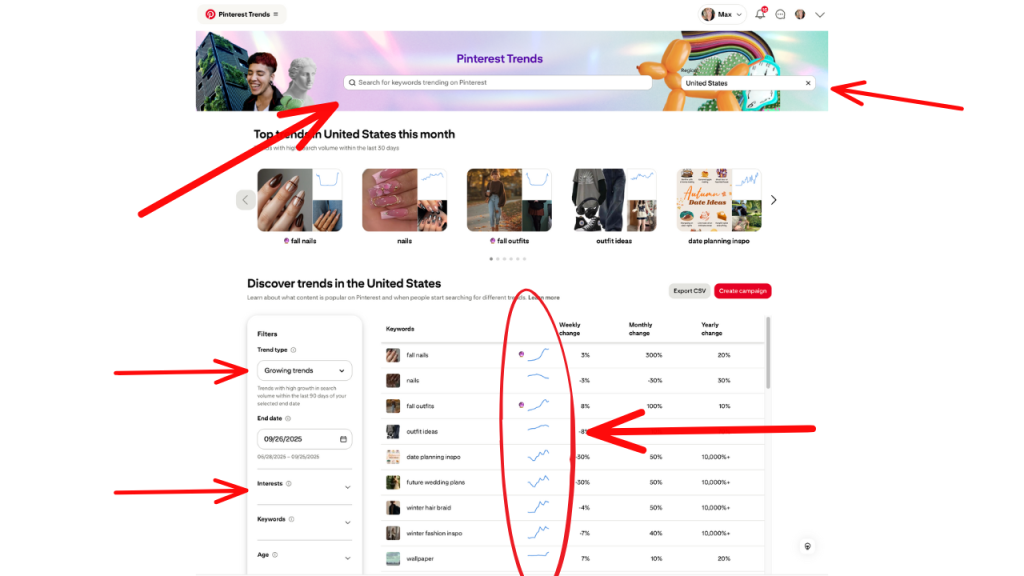
Most strong Pinterest niches will overlap with these three things: [1] people are already spending money in that space (digital downloads, baking tools, home decor, fitness programs, etc.), [2] you know the topic well enough to create content consistently, and [3] there’s proven search demand on Pinterest (meaning you can see it in Pinterest search suggestions, Pinterest Trends, or keyword tools).
Once you have your niche, use relevant keywords everywhere such as your account name, bio, board titles, board descriptions, pin titles and descriptions. Clear and searchable beats clever every time.
How to Make Money on Pinterest
Pinterest is built for discovery and shopping, which makes it one of the easiest places to turn ideas into income. People come here to plan, search, and buy (not just scroll) so if your pins solve a problem or offer something they’re already looking for, Pinterest can become a consistent source of traffic and sales. There’s no single “right” way to make money, but most Pinterest business models fall into one of these categories:
1. Drive traffic to a website or blog
If you earn from digital products, display ads, services, or email list growth, your goal is to get people off Pinterest and onto your site. Each pin should link to a blog post, landing page, product page, or opt-in form.
2. Sell physical or digital products
Shopify, Etsy, Gumroad, WooCommerce – whatever platform you use, you can upload product pins or tag products so people can click directly to buy.
3. Affiliate marketing
You can link directly to affiliate products (with proper disclosure) or send users to a blog post, review page, or gift guide that includes affiliate links.
4. Offer services or consultations
Designers, coaches, photographers, social media managers, and service providers – use pins to showcase your work, point to your portfolio, and link to a booking page.
Note: Many creators combine multiple income streams, like selling digital products while also using affiliate links and growing an email list. You don’t have to choose just one way to earn money.

Create Pins and Plan Your Funnel
The next step is turning your ideas and products into content people can actually click on and buy. This is where most businesses get stuck, not because they don’t have ideas, but because designing pins every day, writing titles, and staying consistent takes too much time.
Before creating anything, decide the purpose of each pin. Is it sending someone to a blog post, a product page, an email opt-in, or an affiliate link? Pinterest works best when every pin leads somewhere intentional. Clear goals make it easier to choose the right keywords, write stronger headlines, and design pins that actually convert.
From there, you need a system that lets you create content consistently without burning out. Manually designing pins from scratch in Canva works for a few posts, but it’s not sustainable long-term. A faster option is using automation tools to handle the first draft. With a tool like Pin Generator, you can enter your blog post, product page, or website URL and automatically generate a batch of Pinterest-ready pins. It pulls in your titles, images, brand colors, and descriptions, which you can then edit or customize as needed. You can save templates, update multiple pins at once, and keep your branding consistent without starting from zero every time.

For brand-new accounts, it’s best to export your pins as a CSV file and upload them directly through Pinterest’s bulk uploader. This helps Pinterest trust your account faster than scheduling with a third-party tool right away. After the first month, you can begin scheduling your pins in advance or automate it even further by connecting an RSS feed so new blog posts or products turn into pins automatically.
Your Pinterest Business Action Plan
Don’t let the idea of a new platform overwhelm you. If you’re just getting started with Pinterest for business (or refining one you already have) here’s exactly where to begin today:
- Define your niche.
- Decide how your business makes money.
- Create pins with Pin Generator to see how quickly you can create pins.
Once you see it only takes a few minutes, confidence improves and consistency gets much easier. You can try Pin Generator completely free today – check it out here.
Let’s get generating.