
How to Use Pinterest to Increase Website Traffic in 2025
13 June 2026
If you’ve been trying to grow website traffic, you’d know how hard it can be to rely on Google or social media. Search rankings can fall without warning, and social posts fade within hours, making it difficult to keep a steady flow of visitors.
Pinterest offers a more reliable option. It’s the third-largest search engine in the world, sitting just behind Google and YouTube. In Q2 2025, Pinterest reached 578 million monthly active users worldwide, an 11% increase from the previous year.
Pinterest is known for its evergreen content, meaning a post or pin doesn’t disappear after a few hours or weeks, instead, it can stay visible for months or even years. This benefits Pinterest users because the products and pages they promote continue to attract visitors long after publishing.
Whether you publish blog posts, run an online shop, or promote a single sales page, Pinterest lets you share every URL in multiple formats and reach new audiences repeatedly, which is key to increasing traffic to your website.
Is Pinterest Right for You?
Before you spend time creating pins, it helps to know whether Pinterest is a good fit for your website or business. Pinterest works best for sites that can share multiple links over time, such as blogs, online shops, or service-based businesses with several landing pages. We recommend starting with at least 10 URLs so you have enough content to keep things fresh.
The reason for this number is simple, Pinterest rewards accounts that publish new content consistently. If you aim to post two fresh links per day, having a pool of 10 URLs lets you rotate through them without looking spammy or repeating the same link every day. If you plan to pin only once a day, you might start with slightly fewer, but ten is a strong baseline.
Those URLs don’t have to be 10 full blog posts. You can mix in a homepage, an about page, key service or sales pages, a resource or FAQ page, and a handful of blog articles. The goal is to give Pinterest multiple quality links it can show to different audiences over time.
Even if your website is small, you can still start. Consider adding a few evergreen posts that answer common questions or highlight how your product or service solves a problem. These supporting pages give you more material to promote and help Pinterest understand what your site is about.
If you prefer to watch instead of read, you can check out our YouTube video for this topic here:
Understanding Keywords to Increase Website Traffic
If you want to get your content seen, you need to tell Pinterest exactly what it’s about. Because Pinterest is a search engine, the way to do this is with keywords. You may have heard the term SEO (search engine optimization) – this simply means using the right words so a search engine understands and can share your content with the right people.
By using accurate keywords, Pinterest knows what your content covers and can show it to users searching for related terms. I’ll explain how to find these keywords in the next section, but for now, just know they can be simple, everyday words that you sprinkle across your Pinterest presence.
Here are key places to use keywords:
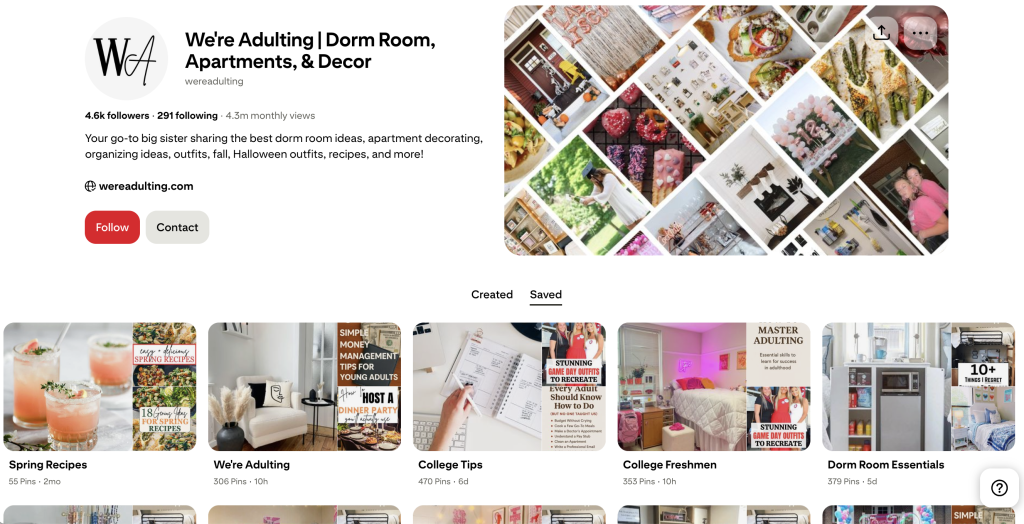
- Profile name and bio
- Board names and descriptions
- Pin titles and descriptions
- Text overlays on pin images
The goal is clarity, not keyword stuffing. Keyword stuffing is when you cram too many keywords into every field, and this can confuse Pinterest and lower your reach. Keywords should fit naturally and accurately describe the page you’re linking to.
Avoid clever but vague names. For example, don’t name a dessert board “Oops I Did It Again Desserts”. While funny, it doesn’t tell Pinterest (or your audience) what to expect. A better choice could be, “Low Calorie Desserts” or “Guilt Free Desserts” – these immediately signal what the board contains and who should see it
When Pinterest sees consistent, relevant language across your profile, boards, and pins, it gains confidence that your content will satisfy a user’s search, helping you reach more of the right visitors.
How to Find the Best Keywords for Pinterest
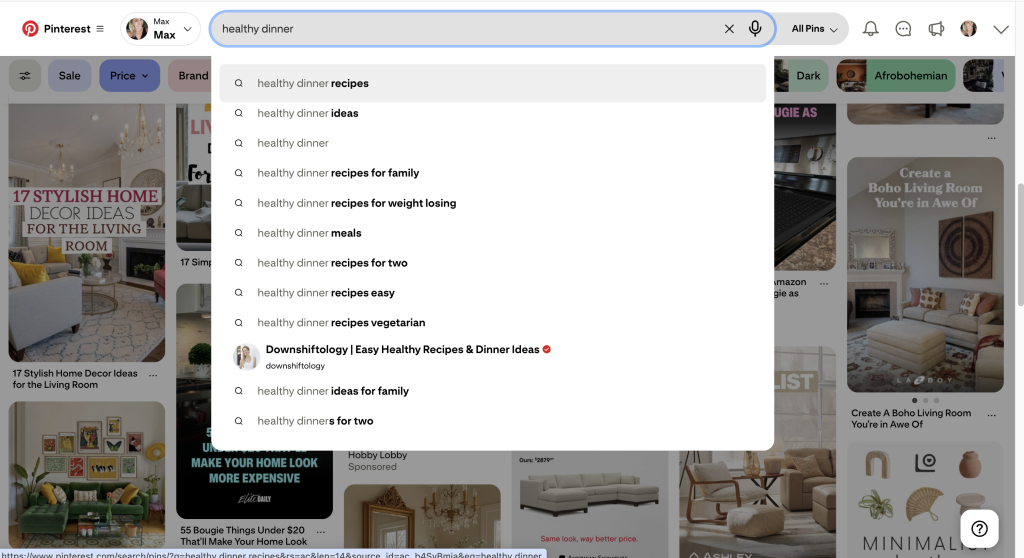
The best place to look for keywords is the Pinterest search bar. Type a word or short phrase that describes your content and watch the autocomplete suggestions that appear. These suggestions come directly from what people are currently searching, making them some of the most valuable keywords you can use.
Next, check the related searches that appear under the results page. These give you variations and long-tail keywords that can help you reach different audiences. For example, typing “budget planner” might reveal ideas like “budget planner printable” or “monthly budget template,” which you can add naturally to your pin titles or descriptions.
You can also explore Pinterest Trends, a free tool that shows what’s popular over time and by season. This helps you plan content ahead of key holidays or shopping periods and stay visible when interest peaks.
As you collect keywords, keep them organized in a spreadsheet or a simple document. Revisit your list regularly to add new terms and retire ones that no longer fit. Consistently using updated, relevant keywords makes it easier for Pinterest to surface your content and send steady traffic to your website. For more information about Pinterest Keywords, check out our complete keyword guide.
Tools and Automation to Turn Keywords into Traffic
The next step is to create and publish pins efficiently. Doing this by hand can be time-consuming, which is why the right tools matter. One of the easiest ways to speed up the process is with Pin Generator. This tool scans your website and pulls in titles, descriptions, images, and links. From there, it puts the content into customizable templates that match your brand’s style.
Pin Generator also lets you import existing Canva templates, auto-generate fresh titles and descriptions with AI, and schedule pins to publish automatically. These features mean you can plan weeks of content in a single session and keep your account active without daily manual work.
Because Pinterest rewards consistency, scheduling pins in advance helps your content stay visible and build momentum. Instead of worrying about posting every day, you can focus on creating quality pages and products for your audience. This is why it’s our favorite tool to create pins and save time!
You can try it for free here: Pin Generator!
But whatever pin creation method you choose, we highly recommend setting up a system to automate as much as possible. Even if you’re making pins as quickly as 10 minutes per pin, publishing 5 pins per day, that’s nearly an hour spent on pin creation every day! Finding a streamlined system will help you stay consistent.
Have questions? Let us know below!
Happy pinning.