
Pinterest Keywords That Actually Drive Traffic
17 June 2025
Why Pinterest Keywords Change Everything
Let's be honest, most people treat Pinterest like Instagram or Facebook. They create pretty visuals and cross their fingers. But here’s the secret: Pinterest isn't just social media, it's a visual search engine. Think Google, but with pictures. People use Pinterest to actively search for ideas, products, and solutions using specific keywords. That means nailing your Pinterest keywords can unlock a wave of traffic you simply won't see on other platforms.
This changes everything about how you think about your Pinterest strategy. Instead of chasing followers, you’re targeting specific searches. Let me give you an example. Imagine you sell handmade jewelry. Posting a picture of a necklace with a caption like “New in!” is basically shouting into the void. But optimize that same pin with keywords like "handmade silver pendant necklace, minimalist jewelry, gift for her," and suddenly you're connecting with people actively looking for what you offer.
What’s even better? Pinterest users are incredibly open to discovering new brands. Think about it: when's the last time you Googled something without a specific brand in mind? It happens all the time. This is reflected in Pinterest user behavior: a whopping 96% of searches on Pinterest don't include a specific brand name. Learn more about Pinterest statistics. That means users are actively searching for fresh ideas and products without pre-existing brand loyalty. This is a huge opportunity.
So, how do you find these magic keywords? Tools like the Pin Generator keyword research tool are essential. It helps you uncover high-volume search terms relevant to your niche. Also, keep an eye on Pinterest Trend Alerts. These can give you a heads-up on what's about to be hot, allowing you to create content around trending keywords before everyone else jumps on the bandwagon.
From there, you can create pin titles and descriptions that are both engaging and optimized. Pin Generator's AI features can help you generate variations and ensure you're hitting the right keywords without sounding like a robot. This combo of smart keyword research and AI-powered content creation can significantly boost your pin’s reach and engagement, bringing in more clicks, saves, and ultimately, more customers.
Mastering Pin Generator's Keyword Research Tool
Let's talk Pinterest keywords. It's not enough to just craft gorgeous pins; you need people to actually see them. That’s where smart keyword research comes into play. Pin Generator's keyword research tool helps you uncover what people are actively searching for on Pinterest – so you can put your pins right where your audience is looking.
Think of it this way: imagine you're a food blogger pinning a killer pasta recipe. You wouldn't just tag it with "pasta," right? You'd use more specific keywords like "easy pasta recipes," "vegetarian pasta," or "one-pot pasta dishes.” That way, when someone searches for those terms, bam – your pin pops up.
This targeted approach using high-volume keywords makes a huge difference in visibility. Take a look at this infographic – it really brings the point home:
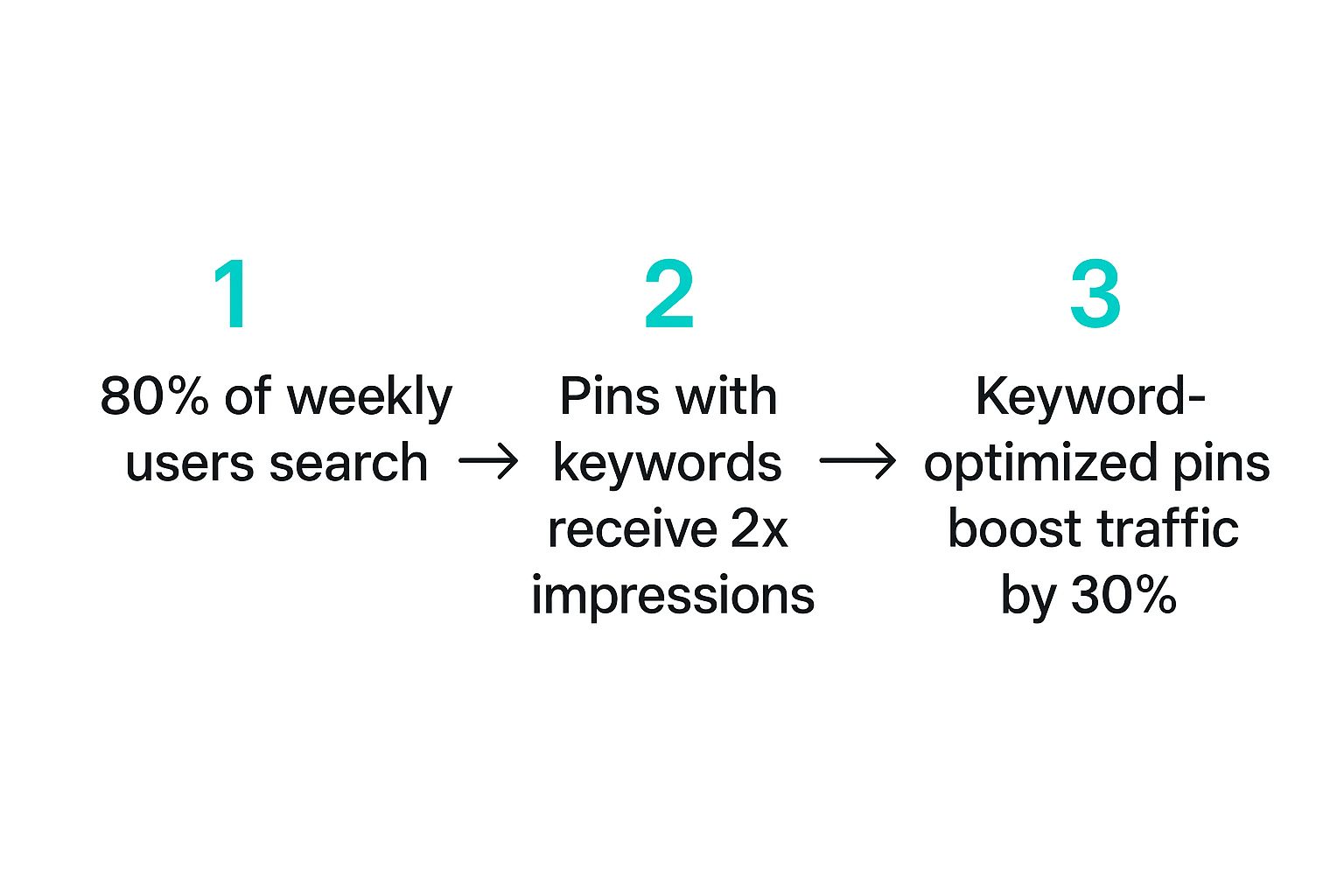
See? 80% of weekly Pinterest users are actively using the search bar. Plus, using relevant keywords can get you double the impressions, and a well-optimized keyword strategy can boost traffic by 30%. Keywords are the key (pun intended!) to unlocking Pinterest’s potential.
Why Pinterest Keywords Matter
Pinterest has exploded, with 570 million monthly active users as of Q1 2025. Discover more insights. That’s a massive audience just waiting to discover your content. Pin Generator’s keyword research tool lets you tap into this potential by identifying the keywords with the highest search volume – information you see directly within the tool. This helps you prioritize and focus on the terms that will actually bring in traffic.
Using the Keyword Tool
So, how does it work in practice? Pin Generator’s tool not only helps you find the right keywords but also seamlessly integrates them into your pin titles and descriptions, using its nifty AI features. The AI tools in the sidebar assist in crafting engaging copy that’s optimized for search and clicks – the best of both worlds.
I've found this especially helpful for staying on top of trending topics and tweaking my pin strategy as needed. It takes the guesswork out of the equation.
To get a really good grasp of what each metric in the keyword tool means, I’ve put together a handy table for you:
Pin Generator Keyword Metrics Decoded: Understanding what each metric means for your Pinterest strategy and when to act on the data
| Metric Type | What It Reveals | Sweet Spot Range | Your Next Move |
|---|---|---|---|
| Search Volume | How many times a keyword is searched per month | 10k – 100k+ | Focus on keywords in this range for maximum reach. If a keyword has super high volume, consider adding long-tail variations. |
| Competition | How many pins are using this keyword | Low – Medium | Aim for keywords with lower competition for easier ranking, especially when starting out. |
| Relevance | How closely related a keyword is to your content | High | Ensure high relevance for accurate targeting and better engagement. Don't just chase volume! |
This table really helps break down how to interpret the data and make informed decisions. Focus on that sweet spot of high search volume and lower competition to maximize your reach and chances of ranking.
Learn More and Level Up
Want to dive deeper? You can explore the Pin Generator keyword research tool for detailed guides and practical tips. Don't forget to keep an eye on Pinterest Trend Alerts too – it's a great way to stay ahead of the curve. By combining these strategies, you can create a powerful Pinterest keyword strategy that keeps your content discoverable and drives consistent traffic.
Finding High-Volume Keywords That Actually Convert

This screenshot from Pinterest Predicts gives a sneak peek at trending searches. Knowing what's on the horizon helps you tailor your keyword strategy to capture that rising interest. It’s like having a crystal ball for future Pinterest searches!
You might be thinking, "High search volume is key!" And you'd be partly right. But simply aiming for the most popular keywords can be a trap. Some are so competitive, you’ll be lost in the crowd.
Balancing Search Volume and Competition
The real magic is finding the sweet spot: keywords with decent search volume but lower competition. Think Goldilocks – not too hot, not too cold, just right. Keyword research and target audience analysis can help you nail this balance.
For example, "wedding dresses" is super competitive. Try more specific long-tail keywords like "bohemian lace wedding dresses" or "plus size vintage wedding dresses." These niche phrases often attract a more interested audience – people actively looking for exactly what you offer.
Utilizing Pin Generator's Keyword Research Power
Pin Generator’s keyword research tool is a game-changer here. It shows both search volume and competition, so you can make smart choices. It's your personal keyword compass!
Leveraging Pinterest Trends
Don't forget Pinterest Trend Alerts! This tool helps you spot emerging trends before they take off. Getting ahead of the curve lets you create content around up-and-coming keywords before the competition gets fierce. Personally, I’ve seen huge engagement boosts by timing my content with these emerging trends.
Once you’ve found your winning keywords, it’s time for compelling pin titles and descriptions. This is where Pin Generator really shines. Use the AI features in the sidebar to create variations of your titles and descriptions, naturally weaving in those keywords. It takes the guesswork out of writing engaging copy, optimizing your pins for both search and click-throughs. It’s a total win!
Using Pinterest Trend Alerts For Keyword Discovery

We've talked about finding those golden, high-volume Pinterest keywords that actually convert. But honestly, staying on top of trends takes more than just a one-time keyword search. You need to be ahead of the game. That’s where Pinterest Trend Alerts come in – they're like your secret weapon. Surprisingly, a lot of people either don't know about this feature or aren't using it to its full potential.
This is where you can really stand out from the crowd. Trend Alerts give you a sneak peek into what searches are about to take off, allowing you to create content before everyone else jumps on the trend. This proactive approach can seriously boost your reach and engagement, especially when seasonal trends or viral moments hit.
For example, a few years back, I noticed a Trend Alert for "DIY Halloween costumes for pets" several weeks before Halloween. I whipped up a bunch of pins showcasing fun pet costume ideas and linked them back to relevant blog posts on my site. Let's just say, my traffic and follower count got a nice little Halloween treat!
Setting Up Effective Trend Alerts
Now, setting up alerts isn't just about clicking a button and hoping for the best. It's about being strategic. Concentrate on alerts that are actually relevant to your niche. If your blog is all about delicious food recipes, setting an alert for "wedding hairstyles" isn't going to do you much good. "Fall baking recipes," on the other hand? Bingo.
Also, learn how to understand the trend data. A rising trend doesn't just tell you what people are searching for, but also when they're searching for it. Timing your content to match these emerging search patterns is key to getting your pins seen.
Combining Trend Alerts with Pin Generator
Want to create a truly killer Pinterest strategy? Combine Trend Alerts with Pin Generator's keyword research tool. Use Trend Alerts to identify those up-and-coming topics, then dive into Pin Generator to find specific, high-volume keywords within those trends.
This two-pronged approach lets you tap into both current and future search interests, ensuring your content stays relevant and easy to find. Speaking of which: Check out our guide on Pinterest Trend Alerts.
Crafting Engaging Content with AI
Once you've got your keywords, resist the urge to just cram them into your pin titles and descriptions. Use Pin Generator’s AI features to create compelling, natural-sounding copy. The AI tools can help you generate a variety of titles and descriptions, ensuring you use the right keywords without sounding like a robot.
This integrated strategy – combining keyword research, trend analysis, and AI-powered content creation – helps you turn those trending searches into a consistent flow of targeted traffic and engaged followers. Trust me, it’s a game-changer for your Pinterest marketing.
To help you plan your content throughout the year, I've put together a handy table:
This table provides a general guide for planning your Pinterest content calendar based on predicted trends and seasonal interests. Remember to tailor these suggestions to your specific niche and audience for optimal results.
| Month | Hot Categories | Peak Search Terms | Content Timing Tips |
|---|---|---|---|
| January | Organization, Healthy Recipes, Winter Fashion | "New Year's Resolutions," "Detox Recipes," "Winter Coats" | Start pinning related content in late December. |
| February | Valentine's Day Gifts, Romantic Destinations, Home Decor | "Valentine's Day Gifts for Him," "Romantic Getaways," "Cozy Living Room Ideas" | Begin promoting related content in mid-January. |
| March | Spring Fashion, Home Improvement, Gardening | "Spring Dresses," "DIY Home Projects," "Gardening Tips for Beginners" | Start pinning related content in late February. |
| April | Easter Decor, Spring Cleaning, Travel | "Easter Egg Decorations," "Spring Cleaning Checklist," "Travel Destinations" | Begin promoting related content in mid-March. |
| May | Mother's Day Gifts, Graduation Gifts, Summer Fashion | "Mother's Day Gift Ideas," "Graduation Gifts for Her," "Summer Outfits" | Start pinning related content in late April. |
| June | Father's Day Gifts, Wedding Planning, Summer Activities | "Father's Day Gifts for Him," "Wedding Planning Tips," "Summer Activities for Kids" | Begin promoting related content in mid-May. |
| July | 4th of July Decorations, Summer Recipes, Travel | "4th of July Party Ideas," "Summer BBQ Recipes," "Summer Travel Destinations" | Start pinning related content in late June. |
| August | Back to School Supplies, Fall Fashion, Home Decor | "Back to School Essentials," "Fall Fashion Trends," "Cozy Home Decor" | Begin promoting related content in mid-July. |
| September | Fall Recipes, Halloween Decor, Home Improvement | "Pumpkin Spice Recipes," "Halloween Costume Ideas," "Fall Home Decor" | Start pinning related content in late August. |
| October | Halloween Costumes, Fall Activities, Thanksgiving Recipes | "Halloween Costumes for Kids," "Fall Activities for Families," "Thanksgiving Dinner Recipes" | Begin promoting related content in mid-September. |
| November | Thanksgiving Decor, Holiday Gift Guides, Winter Fashion | "Thanksgiving Table Decor," "Holiday Gift Ideas," "Winter Coats" | Start pinning related content in late October. |
| December | Christmas Decor, Holiday Recipes, New Year's Eve Party Ideas | "Christmas Tree Decorations," "Christmas Cookie Recipes," "New Year's Eve Party Outfits" | Begin promoting related content in mid-November. |
This table acts as a starting point for your keyword planning. By considering these monthly themes, you can better anticipate trending searches and tailor your content accordingly. Remember, staying ahead of the curve is key to Pinterest success!
Turning Keywords Into Compelling Pin Content With AI

So, you’ve used Pin Generator’s keyword research tool and Trend Alerts to find some awesome Pinterest keywords. That’s a great start! But even the best keywords won't do much if your pin titles and descriptions are boring. The real magic is in transforming those keywords into content that makes people want to click.
Think of your keywords like ingredients. You wouldn’t just throw them all together, right? You'd combine them thoughtfully, add some flair, and make the dish look amazing. That's exactly what we're going for with your Pins. Pin Generator’s AI features, especially the AI-powered title and description generator, can be your secret sauce.
Crafting Clickable Pin Titles
Pin titles are your headlines – that crucial first impression. They need to be keyword-rich and engaging. A title crammed with keywords like "Best DIY Farmhouse Decor Ideas Rustic Style" just doesn’t work.
Instead, try something like, "Transform Your Home with These Rustic Farmhouse DIY Decor Ideas." It still includes those important keywords, but it’s more inviting and natural. Pin Generator’s AI can help you create several title variations based on your keywords, so you can A/B test and see what your audience likes best.
Also, think about the psychology of clicking. Words like "easy," "quick," "simple," "secrets," and "tips" are always effective. They promise value for the viewer’s time.
Writing Descriptions That Convert
Pin descriptions let you expand on your title and provide more details. Don’t just repeat the keywords; weave them naturally into sentences that tell a story and make people curious.
Let’s say you're sharing a chocolate chip cookie recipe. Instead of just listing ingredients, try, "Craving warm, gooey chocolate chip cookies? This easy recipe uses simple ingredients you probably already have at home. Perfect for a quick weeknight treat or a weekend baking project!"
That description is so much more appealing! It creates a sense of desire and naturally incorporates keywords like "chocolate chip cookies," "easy recipe," and "simple ingredients." Pin Generator's AI description tool can help you brainstorm different angles and make sure your descriptions are informative and persuasive.
User engagement on Pinterest is huge – did you know 1.5 billion Pins are saved every week? This shows just how important it is to use the right keywords to get your Pins seen. Discover more insights. Combine strategic keyword placement with captivating copy, and you'll greatly improve your chances of getting your Pins saved and shared.
By using Pin Generator’s AI and understanding what makes pin content clickable, you can turn your Pinterest keywords into powerful Pins that drive traffic and build a loyal following. It’s not just about getting views; it's about getting people engaged.
Testing And Refining Your Keyword Strategy

You’ve nailed down your Pinterest keywords, written catchy titles and descriptions, and you're ready to roll. But here’s the insider scoop: Pinterest isn’t a one-and-done platform. The best Pinners treat keyword research like an ongoing experiment. It's like tuning a guitar – you constantly adjust until you hit the perfect note.
Monitoring Your Keyword Performance
So, how do you know if your keywords are actually hitting the mark? Enter Pinterest Analytics. It’s your control panel for understanding how Pinners interact with your content. Don't get too caught up in vanity metrics like impressions alone. While they matter, clicks and saves are gold because they show real interest.
This screenshot shows the Pinterest Analytics dashboard. Check out how it breaks down impressions, saves, and click-through rates. This data tells a story about which keywords are driving the most engagement and sending traffic your way. Use this intel to make smart choices about your keyword strategy.
Adapting and Pivoting Your Strategy
Don’t be scared to switch things up based on your analytics. If a keyword seems sluggish, don't ditch it immediately. Play around with the pin title, description, or even the image. Tiny tweaks can have a big impact.
For example, I had a pin about "healthy breakfast ideas" that was barely moving the needle. My Pinterest Analytics revealed that people were searching for "quick healthy breakfast ideas." I updated the pin title and description to highlight the speed and ease of the recipes, and boom – way more clicks and saves.
Simple Tracking and Troubleshooting
You don’t need fancy spreadsheets to track your keywords. Keep it simple! Create a list of the keywords you’re using and jot down their performance. Pin Generator's keyword tool is great for saving and organizing your keyword lists, making tracking even easier. To supercharge your Pinterest game, consider using AI for content creation.
If your keywords are still underperforming, ask yourself these questions:
- Are your keywords relevant to your target audience? If you’re talking to the wrong people, even popular keywords won't work.
- Are your pin titles and descriptions enticing? They need to make people want to click and learn more. Try using Pin Generator’s AI features to create variations.
- Is your pin image eye-catching and high-quality? Pinterest is visual – your images have to pop.
By constantly testing, refining, and adapting, you'll build a keyword strategy that gets results. It’s a continuous journey of learning and improvement, ensuring your pins reach the right audience.
Your Pinterest Keywords Action Plan
So, you’ve gotten the hang of Pinterest keyword research and AI-powered content creation. Awesome! Now, let's talk about putting it all together into a strategy that actually works. This isn’t a “set it and forget it” kind of thing. Think of it as a constant cycle: research, implement, tweak, repeat. It’s how you keep growing on Pinterest.
Building Your Keyword Foundation
First things first: you need a solid base. Use the Pin Generator keyword research tool to find your core keywords. These are the broad terms that describe your niche. Let's say you're a food blogger. Your core keywords might be “recipes,” “cooking,” or “food photography.”
From those core keywords, you can branch out into more specific long-tail keywords. Think "easy weeknight dinners," "vegetarian recipes," or "food photography tips for beginners." These niche phrases help you attract people who are really interested in what you offer. They’re actively searching for exactly that!
Prioritizing and Organizing Your Keywords
Don't feel like you have to use every single keyword at once. That can get overwhelming fast! Focus on the keywords with high search volume and low competition. It’s the sweet spot we all want to find. The Pin Generator keyword tool can help you spot these golden opportunities. As you test and refine your keywords, don't forget related services. You might even want to check out something like air duct cleaning if it connects with your niche. Keeping your keywords organized within the tool will help you track your progress and easily add them to your pin titles and descriptions using the built-in AI features.
Integrating Trend Alerts into Your Routine
Don’t forget about Pinterest Trend Alerts! Set up alerts for topics related to your niche so you can stay ahead of the game. For example, if you see a spike in searches for “fall baking recipes,” you can quickly whip up some relevant pins and ride that wave of interest. Combining this proactive approach with your regular keyword research keeps your content fresh and relevant.
Maintaining Momentum and Scaling for Success
Keyword research shouldn’t feel like a chore. Set manageable goals, like researching 5-10 new keywords per week. As you start seeing positive changes—more clicks, saves, and followers—you can gradually increase your research efforts. This helps you build momentum at a pace you can maintain. It turns keyword research from a daunting task into a regular habit that fuels your Pinterest growth. Remember, consistency is key on Pinterest!
Ready to level up your Pinterest marketing? Start a free trial with Pin Generator today and unlock the power of AI-driven keyword research, content creation, and scheduling – all in one convenient platform.