
Pinterest Pin Dimensions A Complete Guide
17 September 2025
When it comes to creating a Standard Pin, the magic numbers are 1000 x 1500 pixels. This gives you the perfect 2:3 aspect ratio that Pinterest loves. Sticking to this vertical format is the single most important thing you can do to get your Pins seen—it prevents awkward cropping in the feed and looks fantastic on mobile, which is where most people are scrolling anyway.
Getting this right is your first step to creating content that actually performs.
Your Quick Guide to Pinterest Pin Dimensions
If you want to create Pins that grab attention, you first have to understand the lay of the land. The entire Pinterest platform, from its algorithm to its user interface, is built to favor vertical images that fill the screen and create a seamless scrolling experience. Using the right dimensions isn't just a design choice; it directly affects how many people see and click on your content.
Pins that stick to that sweet 2:3 aspect ratio don't get cut off. This is a bigger deal than it sounds—a cropped image can hide your headline, obscure your product, and tank your engagement before anyone even has a chance to see what it's about. Pinterest themselves didn't just pull these numbers out of thin air; they established this standard because it's what works. It balances clarity with taking up just enough vertical real estate to make your content pop.
To make things even easier, here's a quick cheat sheet and a breakdown of the most common formats you'll be using.
Pinterest Pin Dimensions Cheat Sheet
For a quick reference, this table has everything you need to know about the most common Pin formats all in one place. Bookmark this page so you can come back to it whenever you're creating new content!
| Pin Type | Recommended Pixels (Width x Height) | Aspect Ratio | Max File Size | Accepted File Types |
|---|---|---|---|---|
| Standard Pin | 1000 x 1500 px | 2:3 | 20 MB | .PNG, .JPG |
| Square Pin | 1000 x 1000 px | 1:1 | 20 MB | .PNG, .JPG |
| Long Pin | 1000 x 2100 px | 1:2.1 | 20 MB | .PNG, .JPG |
| Infographic Pin | 1000 x 3000 px | 1:3 | 20 MB | .PNG, .JPG |
| Video Pin | 1000 x 1500 px (2:3) or 1080 x 1920 px (9:16) | 2:3 or 9:16 | 2 GB | .MP4, .MOV, .M4V |
| Story Pin | 1080 x 1920 px | 9:16 | 20 MB (image), 100 MB (video) | .PNG, .JPG, .MP4, .MOV, .M4V |
| Carousel Pin | 1000 x 1500 px or 1000 x 1000 px | 2:3 or 1:1 | 20 MB per image | .PNG, .JPG |
Keep in mind that while these are the official recommendations, the most critical factor is almost always the aspect ratio. As long as you stick to the ratio, your Pin should display correctly.
Standard and Square Pin Usage
While the 2:3 ratio is definitely king, other sizes have their moments. Square pins, with their 1:1 aspect ratio, are a common sight, mostly because they make it easy to cross-post content from platforms like Instagram. But be warned: they take up much less screen space on Pinterest and, as a result, are generally less effective than their taller cousins.
This chart really drives the point home, showing just how dominant the 2:3 format is compared to other sizes.
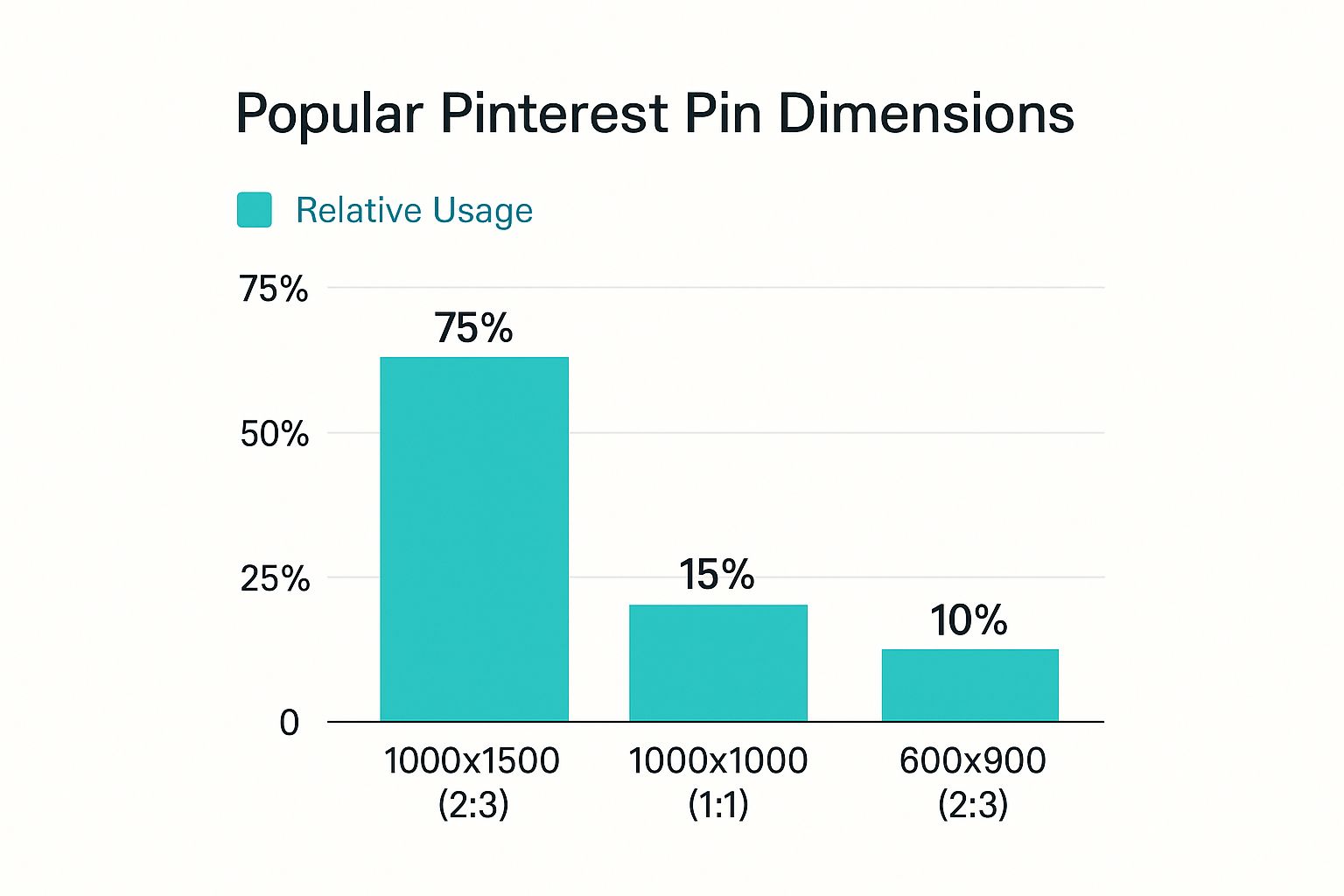
The data doesn't lie. Successful creators overwhelmingly stick with the 1000 x 1500 pixel dimension, which is all the proof you need that it's the go-to choice for getting the most impact. You can always learn more about why these dimensions are officially recommended if you want to dive deeper into the platform's best practices.
Why Correct Pin Dimensions Drive Results
Getting your Pinterest pin dimensions right isn't just about making things look pretty. It's a strategic move that seriously impacts how well your pins perform. Think about it: Pinterest’s algorithm is designed to give users the best possible experience, which means it naturally favors content that fits its signature vertical layout perfectly.
When you upload a pin with the recommended dimensions, you're essentially telling the platform, "Hey, this content is high-quality and made specifically for your audience." That simple step can get you way more visibility in home feeds, search results, and those valuable "More like this" sections. It’s the ground floor of getting your content in front of more eyeballs.
For the people scrolling, a pin that's sized correctly is just plain better. It's easier to read, more engaging, and looks great on any screen, mobile or desktop. A pin that isn’t awkwardly cut off or blurry immediately feels more professional, building trust and making people much more likely to click.

The Connection to Marketing Goals
This laser focus on dimensions has a direct line to your marketing goals. We've seen it time and time again: pins that are sized correctly consistently get higher click-through rates, more saves, and drive more traffic to websites and product pages. Nailing the size is the first hurdle in turning a casual scroller into a loyal follower or a new customer.
“Pins with a 2:3 aspect ratio are less likely to be truncated, leading to better previews and thus enabling merchants and advertisers to capitalize on the platform's blend of content discovery and direct buying.”
At the end of the day, optimizing your pin size is all about getting the most bang for your buck. It makes sure all the effort you put into creating a compelling Pinterest pin doesn't get sabotaged by a simple formatting mistake.
Broader Impact on Visual Search
If you really want to level up your Pinterest game, it helps to understand the bigger picture of image optimization. These ideas work hand-in-hand with pin dimensions to boost your visibility across all visual search platforms, not just Pinterest.
For anyone who wants to go a bit deeper, there's a comprehensive guide on how to do image SEO that gives some great context beyond just Pinterest. Applying these broader strategies can really amplify your results.
Mastering Standard Pin Dimensions
The standard pin is your bread and butter on Pinterest. Get this right, and you're already ahead of the game. While Pinterest gives you a bit of wiggle room, the undisputed sweet spot is 1000 x 1500 pixels.
This size hits that perfect 2:3 aspect ratio. Why does that matter? Simple. A vertical pin takes up more real estate on the screen, especially on mobile where most users are scrolling. It's just more noticeable and harder to ignore.
Think of the 2:3 ratio as your guide rail. You can go bigger, say 1200 x 1800 pixels, and it will still look fantastic because the ratio is the same. The real trick is avoiding the common sizing mistakes that can completely tank your pin's performance before it even gets started.
Common Sizing Mistakes And How To Fix Them
I see two big mistakes all the time that really hurt pin performance. The first is using square pins (a 1:1 ratio). Sure, Pinterest allows them, but they’re way less effective. They just don't command the same attention in a feed built for vertical content and are super easy for people to just scroll right past.
The second mistake is even worse: the infamous "giraffe" pin. It might seem clever to create an extra-long pin to stand out, but Pinterest will actually cut off any pin that's longer than a 2:1 aspect ratio. This means your killer call to action or the most important part of your message could be totally hidden. What a waste!
Sticking to the 1000 x 1500 pixels pin size is one of the easiest ways to boost your click-throughs and repins. This vertical format is way less likely to get awkwardly cropped, making sure your entire design is seen and does its job.
Nailing the dimensions isn't just about looking good; it's about signaling to the Pinterest algorithm that you're creating quality content. Data consistently shows that pins with the correct aspect ratio get more visibility and drive more traffic. It’s a simple tweak with a big impact.
Designing For Success
To make sure your designs are always on point, always start your project with a canvas set to the right dimensions. This removes all the guesswork.
Using a tool that already has these presets baked in can be a massive time-saver. If you want to really speed things up, check out our guide on using a pin design generator. It helps you create perfectly sized pins every single time, letting you focus on what really matters: crafting amazing content that your audience loves.
Getting Your Video Pin Dimensions Just Right
Video is an absolute powerhouse for grabbing attention on Pinterest, but because it's so dynamic, it plays by a slightly different set of rules. Nailing your Pinterest pin dimensions for video from the get-go is key to making sure your content stops the scroll and actually works. While you can totally use the standard 2:3 aspect ratio (think 1000 x 1500 pixels), video gives you a bit more creative wiggle room.
This flexibility is great because it lets you match your video format to your specific goals. For example, a square 1:1 video is perfect if you're repurposing content from Instagram or want to showcase a product in a clean, centered way. On the flip side, a full-screen vertical video at a 9:16 aspect ratio (1080 x 1920 pixels) creates a much more immersive experience. It's fantastic for tutorials or brand stories where you want to fill the whole mobile screen and pull your viewer in.
Key Technical Specs For Video Pins
Beyond the dimensions, there are a few technical specs you need to keep in mind. Getting these right ensures your video loads quickly, plays smoothly, and looks professional on the platform.
- Video Length: Your video needs to be at least 4 seconds long, but can go up to a maximum of 15 minutes. Honestly, though, the sweet spot for keeping people engaged is usually between 6 and 15 seconds.
- File Size: Keep your file size under 2 GB. This is pretty generous and should be more than enough for high-quality, short-form videos.
- File Type: Pinterest is happy with the usual suspects. You can upload .MP4, .MOV, and .M4V files without any issues.
Quick tip: Remember that most people are scrolling with the sound off. Your video has to be compelling enough to tell its story visually, without relying on audio. Use strong on-screen text overlays and powerful visuals to hook people in those first crucial seconds.
So, which format should you pick? It really comes down to your content and what you're trying to achieve. A quick, punchy 1:1 video can be a killer ad, while a more detailed 9:16 tutorial can help you build a real connection with your audience. The main thing is to match your video pin dimensions to the story you want to tell.
Getting Idea and Carousel Pin Sizes Just Right
When you’re working with Idea Pins and Carousel Pins, you’re not just making a single image; you're crafting a multi-part story. These dynamic formats are fantastic for engagement, but they demand a bit more precision to get right. Consistency across your slides and cards is absolutely essential for a smooth, professional user experience.
Idea Pins: Stick to the Rules
With Idea Pins, Pinterest is pretty strict for a good reason. There's only one size that works: 1080 x 1920 pixels. This gives you a perfect 9:16 aspect ratio, designed specifically for that immersive, full-screen mobile experience everyone loves.
If you stray from this size, your pin will look off. You'll end up with awkward cropping or ugly black bars that completely undermine the story you're trying to tell. It’s just not worth the risk.
A pro tip for designing your Idea Pin slides is to always keep the "safe zone" in mind. Think of it as the central area of the screen. Make sure your most important content—like text overlays, your logo, or key visuals—sits comfortably in this space so it doesn't get covered up by Pinterest's own interface elements.
Mastering Carousel Pin Consistency
Carousel Pins give you a little more breathing room, but they come with one non-negotiable rule: every card in a single carousel must be the same size. No exceptions.
You can choose between two formats for your carousel cards:
- Square (1:1 ratio)
- Standard Vertical (2:3 ratio)
Just remember, once you pick one, you have to stick with it for every single card in that carousel. Mixing and matching different sizes creates a jarring, unprofessional look that will make people scroll right on by. A smooth swiping experience is what you're aiming for.
You can get really strategic with your carousel dimensions to tell a better story. The 1:1 ratio is brilliant for getting up close and personal with detailed product shots. Meanwhile, the 2:3 ratio gives you that extra vertical space, making it perfect for compelling lifestyle images or step-by-step tutorials.
The right format really just depends on your content. A square ratio might be perfect for showcasing different angles of a single product, while a vertical format could be better for a before-and-after transformation that flows beautifully from one card to the next.
Nailing these specific Pinterest pin dimensions ensures your multi-card pins look polished and actually work, guiding your audience through a compelling visual journey from start to finish.
Common Dimension Mistakes to Avoid
Even seasoned creators slip up and make simple dimension mistakes that can absolutely kill a pin's performance. When you get your Pinterest pin dimensions wrong, your content becomes nearly invisible in a crowded, fast-scrolling feed. This section is all about troubleshooting the most common pitfalls before they cost you precious clicks and saves.
The number one mistake I see is people using horizontal images, like a 16:9 thumbnail they grabbed from YouTube. On Pinterest's vertical feed, these pins look ridiculously tiny. They get sandwiched between bigger, bolder pins and are scrolled past in a heartbeat. The fix is simple: always, always create in a vertical format. Stick to the recommended 2:3 ratio to take up as much screen real estate as possible.
Don't Overlook The Details
Beyond just getting the orientation right, there are a few other subtle mistakes that can make your pins look cheap and unprofessional. Paying attention to these smaller details is what separates pins that get clicks from pins that get ignored.
- The "Giraffe" Pin: This is what we call those super long, skinny pins that go way beyond the 2:3 ratio. You might think it's a clever way to stand out, but Pinterest will just cut your image off in the feed. That means your brilliant call-to-action or key message at the bottom? It's gone. Completely hidden.
- Blurry, Low-Res Images: Using small or heavily compressed images is another classic blunder. When that pin gets scaled up on a nice, high-resolution phone screen, it looks fuzzy and amateurish. This instantly hurts your brand's credibility. Always export your designs at a high quality—think 1000 x 1500 pixels as your absolute minimum.
- Ignoring the Safe Zones: It's tempting to cram your design full, but placing text, logos, or other critical elements right up against the edges is a risky move. Those areas can easily get cropped or covered up by Pinterest's own interface elements on different devices.
Here's a simple rule of thumb I always follow: leave a little bit of breathing room—a small buffer—around the edges of your design. This ensures your core message is always front and center, no matter how someone is viewing your pin.
By sidestepping these common errors, you're setting every pin up for success. A polished, correctly formatted pin doesn't just look better; it signals quality to both users and the Pinterest algorithm, which can lead to better distribution and far more consistent results.
A Few Common Questions About Pin Dimensions
Got a few lingering questions about Pinterest pin sizes? You're not alone. Here are some quick answers to the most common queries I hear from creators, both new and experienced.
Can I Use Square Pins on Pinterest?
Technically, yes, you can. Square pins (1:1 ratio, like 1000 x 1000 pixels) do have a place on the platform, mostly for things like carousel cards.
But for your standard, everyday static pins? I'd strongly recommend sticking to the 2:3 vertical ratio. Vertical pins simply take up more valuable real estate on a mobile screen. That extra space helps them stand out, and it's what the Pinterest algorithm is optimized for, which can mean better reach and more engagement for you.
What Is the Best Resolution for Pins?
Always go for the highest resolution you can. For a standard 2:3 pin, your target should be 1000 x 1500 pixels. This ensures your images look sharp, clear, and professional on any device, especially on those super crisp, high-resolution screens everyone has now.
Ready to stop worrying about dimensions and just create? With Pin Generator, you can use templates that are already perfectly sized for Pinterest. Start generating pins that perform today.