
Your Guide to a Pin Design Generator
26 August 2025
So, what exactly is a pin design generator? Think of it as your secret weapon for Pinterest. It’s a tool that takes a single link or idea and automatically cranks out dozens of unique, on-brand pins, saving you from hours of manual design work.
Using smart AI, it generates all sorts of visuals for you. This means you can finally scale up your content and keep a consistent look on the platform without hitting that dreaded creative wall. For anyone serious about Pinterest, this is how you maintain an active, fresh presence without burning out.
Why Pin Design Generators Are a Game Changer
Let's be real: keeping up with Pinterest is a marathon. The platform craves fresh, engaging content, and top creators know this. They aren't just pinning once a day; they're pinning multiple times with different designs to see what resonates with their audience. This constant demand for new visuals is a fast track to creative fatigue and, even worse, an inconsistent brand look.
This is exactly where a pin design generator completely flips the script. Instead of painstakingly building every single pin from scratch in a tool like Canva, you can let automation do the heavy lifting.
Imagine feeding it a single blog post URL and getting back 20, 30, or even 50 distinct pin designs in just a few minutes. This isn't just about saving time—it's about fundamentally changing how you create content for Pinterest.
Scale Your Visuals Without Killing Your Quality
The biggest win here is the ability to scale your output—massively.
If you run an e-commerce brand launching a new collection, this means you can instantly create unique pins for every single product. If you're a blogger, you can generate a whole month's worth of pins from just a couple of articles. The best part? A good pin design generator does all this while keeping everything perfectly on-brand.
Here’s how it works:
- Stay On-Brand, Automatically: You just upload your logos, fonts, and color palettes once. From then on, every pin it creates will perfectly match your brand's identity.
- Variety is Everything: The AI is smart. It mixes and matches layouts, images, and text placements to prevent that stale, repetitive look that makes followers scroll right on by.
- Get Out of a Creative Rut: Sometimes, the tool will even suggest visual angles and layouts you hadn't thought of, giving you a fresh dose of inspiration.
By letting a tool handle the repetitive parts of pin design, you free up your brain to focus on what really matters: strategy. You can spend your time analyzing what’s working, talking to your community, and planning your next big move. It turns Pinterest marketing from a daily grind into a powerful growth engine.
How This Works in the Real World
Let's take a food blogger who posts one new recipe a week. Manually, they might spend an hour creating three to five pins for that single post. It’s a ton of work.
Now, with a pin design generator, they can just pop in the recipe's URL and get 40+ pins in less than five minutes. They can then schedule these pins to go out over the next few weeks, keeping the content fresh and driving steady traffic long after the recipe first went live.
This is the kind of productivity that used to require a dedicated design team. Now, tools like Pin Generator put that same power in the hands of solo creators and small businesses. It levels the playing field, making it possible for anyone to compete for attention and clicks on a very crowded platform.
Go from a URL to Dozens of Pin Designs
The absolute best part of using a tool like Pin Generator is its ability to take one piece of your content—like a single blog post—and spin it into a whole bunch of visual assets for Pinterest. This is where the magic really happens. It completely cuts out the most tedious part of Pinterest marketing: that initial design phase.
Forget staring at a blank canvas in Canva. You start with a huge collection of options that are already good to go.
Let's say you just hit "publish" on a new blog post, "My Go-To Vegan Chocolate Chip Cookie Recipe." If you were doing this the old way, you'd probably block off at least an hour to create just a handful of pins. With a generator, all you do is grab the post's URL and pop it into the tool. The AI instantly gets to work, pulling all the important stuff right from your page.
It grabs your title, finds the best-looking images, and even pulls out key phrases from your text to use as text overlays. In just a few moments, you’re looking at dozens of unique pin designs, all created from your original content.
The First Batch of AI-Generated Pins
What you get back isn't just a random mix of templates. The generator is smart. It combines your content with pin layouts that are proven to work well on Pinterest. Some designs might feature a big, delicious-looking photo of your cookies. Others might be more text-focused, with a catchy title like "The Easiest Vegan Cookies Ever."
This automated first pass gives you a massive strategic advantage. You can immediately see which visual styles might resonate with your audience without having to build each and every one yourself.
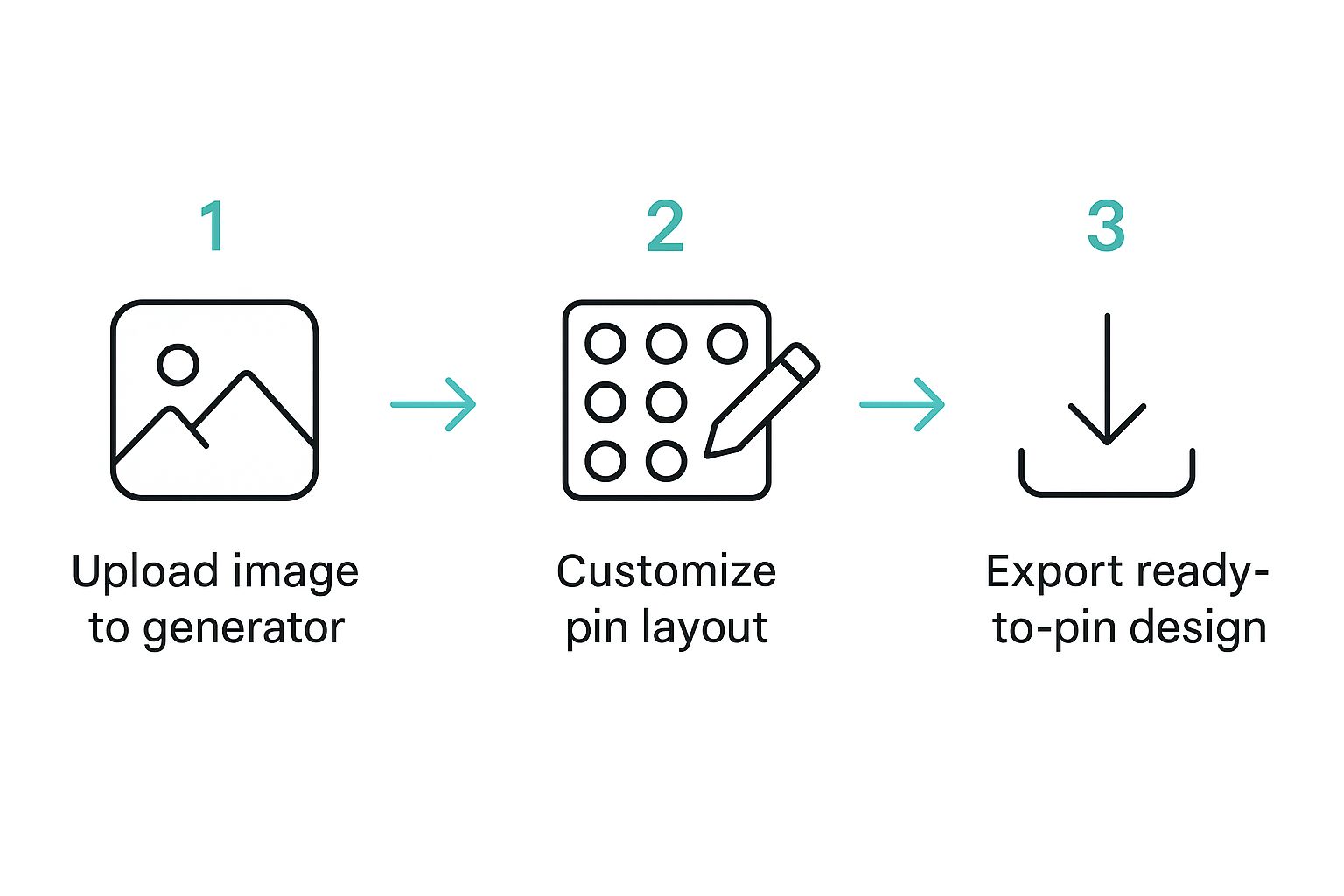
As you can see, the journey from a URL to a finished pin is boiled down to a few simple, manageable steps, which gets rid of all that creative friction.
Think about how this applies to an e-commerce store. Maybe you just added a new handmade leather tote to your Shopify shop. Paste that product page URL, and the pin design generator will pull the product name, price, description, and every single photo. From there, it churns out a whole range of pin styles:
- Product Spotlights: Pins that showcase your gorgeous new tote from every angle.
- Lifestyle Mockups: Designs that put the bag into a real-world context, helping shoppers visualize it.
- "New Arrival" Graphics: Text-heavy pins designed to build hype and a sense of urgency.
The real game-changer here is the immediate variety. You don't just get one good pin. You get a whole campaign's worth of visual content, with each pin hitting a slightly different angle—all from a single link.
Putting It Into Action
This level of efficiency completely changes how you work. Instead of designing pins one by one (which is a total time-suck), you can shift your focus to curating and optimizing. You can quickly sift through the generated options, pick the strongest designs, and then spend a few minutes tweaking them with your brand's unique colors and fonts.
The whole process is built to be intuitive and, most importantly, fast.
If you want to see how your own content looks, you can generate your first set of Pinterest pins using a URL right now. It’s honestly the quickest way to grasp just how powerful this is. This shift from manual creation to AI-assisted generation means you spend less time on tedious design work and more time on the strategy that actually grows your account.
Customize Your Pins with Your Unique Brand
The AI-generated designs are a fantastic starting point, but they're not the finish line. The real magic happens when you inject your brand's unique personality into them. This is how you go from a decent pin to one your audience instantly recognizes as yours.
It’s what makes your content feel authentic and builds that crucial trust, whether you’re creating 10 pins or 100.
Thankfully, this is way easier than it sounds. Most modern pin generators have a "brand kit" feature. It’s a simple, one-time setup where you upload your logos, plug in your specific brand color hex codes, and choose your fonts.
Once you save it, you can apply this kit to any batch of generated pins with just a single click. Boom. Generic designs are instantly transformed into a cohesive, on-brand set of assets. On a fast-scrolling platform like Pinterest, that consistency is everything.
Putting Your Brand Kit to Work
With your brand kit loaded, the real fun begins. I like to think of the AI's output as a really good first draft that's just waiting for my creative direction. The first, most impactful step is to apply your core visual elements.
Here’s my simple workflow for making generated pins my own:
- Logo Placement: I always add a logo to each pin. The key is consistency—find a spot, like a bottom corner, where it’s visible but not screaming for attention, and stick with it.
- Color Palette Swap: Next, I apply my brand colors. The tool is smart enough to swap the template's colors with mine while keeping the design balanced.
- Font Application: Finally, I switch the default text to my brand fonts. This tiny change makes a massive difference in how professional and recognizable my pins look.
This is what separates a truly great pin design generator from a basic template tool. It’s not just about speed; it's about merging the raw efficiency of AI with the creative control you need to build a memorable brand.
To really get your branding right, it's essential to understand the features that let you customize pins effectively. I've put together a quick table outlining what to look for in a good pin generator.
Key Customization Features in a Pin Generator
| Feature | What It Does | Why It's Important for Your Brand |
|---|---|---|
| Brand Kit | Stores your logos, brand colors (hex codes), and custom fonts in one place. | Ensures every pin is consistent and instantly recognizable with a single click. |
| Smart Color Swapping | Intelligently replaces template colors with your brand palette, maintaining contrast and readability. | Saves you from manually adjusting every single design element, keeping your pins looking polished. |
| Custom Font Uploads | Allows you to use your specific brand typography instead of being limited to a default library. | Typography is a huge part of brand identity; using your own fonts makes your pins look professional and unique. |
| Image Replacement | Lets you easily swap out AI-selected stock images for your own product photos or branded visuals. | Gives your pins an authentic feel and showcases your actual products or services, which builds trust. |
| Flexible Text Overlays | Provides full control over the text, including size, positioning, and styling. | Helps you craft compelling headlines and CTAs that align with your brand voice and are easy to read. |
Having these features at your fingertips is what lets you move beyond generic templates and create pins that truly represent your business.
Fine-Tuning for Maximum Impact
Beyond the brand kit, you have total control to tweak every little detail. This is your chance to A/B test different elements and figure out what really connects with your audience.
Maybe you want to swap out an AI-selected stock photo for one of your own high-quality product shots. Or perhaps you want to adjust the text overlay to make it pop. Does a bold, punchy headline get more clicks? Is a softer call-to-action (CTA) a better fit for your brand's voice? A good tool gives you the flexibility to experiment without the headache.
This push for personalization is a massive trend. The global pin buttons market, valued at USD 1.3 billion in 2023, is expected to hit USD 2.1 billion by 2032. As highlighted in this detailed market report, this growth is fueled by consumer demand for unique, custom designs.
While physical pins aren't the same as Pinterest pins, the psychology is identical: people connect with visuals that have a clear, individual point of view. That's why your ability to tweak and personalize AI-generated pins isn't just a feature—it's your key to standing out.
Optimize Every Pin for Pinterest Search
A beautiful pin is only half the battle. Seriously. If your ideal customer can't find it, even the most gorgeous design is just shouting into the void. This is where Pinterest SEO comes in, and it's the bridge between creating pretty pictures and actually getting clicks and sales.
The good news? A modern pin design generator isn't just about the visuals anymore. It builds SEO right into your creation process. The same AI that helps you design pins can also whip up compelling, keyword-rich titles and descriptions that match what people are actually looking for.
Finding Your Core Keywords
Before you let the AI do its thing, you need to give it some direction. This means figuring out the keywords your audience is using. Don't overthink it at first. Just put yourself in their shoes.
If you sell handmade ceramic mugs, what would someone actually type into the Pinterest search bar?
You might come up with a quick list like this:
- Handmade ceramic mugs
- Unique coffee cups
- Artisan pottery gifts
- Cozy aesthetic kitchen decor
These phrases are your starting point. While a good pin generator will have a keyword research tool built-in, you can get a ton of ideas just by typing your main terms into the Pinterest search bar. Pay attention to the auto-complete suggestions—that's Pinterest telling you exactly what's popular and what people are searching for right now.
Once you have a handful of solid keywords, you can feed them to the AI. This ensures it weaves those crucial terms into the titles and descriptions it writes for you, optimizing your pins from the get-go.
The whole point is to make it dead simple for Pinterest’s algorithm to know what your pin is about and who should see it. Using the right keywords is the most direct way to do that, turning your pins into little assets that keep working for you long after you’ve scheduled them.
Crafting SEO-Friendly Titles and Descriptions
With your keywords in hand, the AI can generate a bunch of different titles and descriptions. Your job is to be the editor. Read through them and tweak them to sound like a real person, not a robot. The AI does the heavy lifting, but that final human touch is what makes your content connect.
For instance, a generic title like "Ceramic Mug" doesn't do much. But "Handmade Ceramic Mug for Your Morning Coffee"? Now that's specific, packed with keywords, and speaks to what the user actually wants.
The same goes for the description. Don't just list features. Tell a tiny story. The AI might give you a draft like, "Enjoy your coffee in this beautiful handmade mug." That's okay, but you can easily elevate it to: "Start your day with a cozy moment. This unique artisan coffee cup is handcrafted with care, making it the perfect addition to your kitchen." See the difference? It feels more personal but is still loaded with your keywords.
If you really want to go deep on platform-specific SEO, our comprehensive Pinterest SEO guide covers more advanced strategies to help you get seen.
Finally, always, always double-check your outbound link. Make sure it points to the most relevant page—the exact product, the right blog post, or a specific category page. A bad link is a dead end for the user and a completely wasted click for you.
The best part is that this entire workflow—from finding keywords to the final link check—all happens right inside the pin generator. It keeps everything streamlined and incredibly effective.
Put Your Pinterest Strategy on Autopilot
You've designed some killer pins, but here's the hard truth: the real key to winning on Pinterest is consistency.
Showing up every single day with fresh content is what tells the algorithm you’re a creator worth paying attention to. This is where your pin design generator stops being just a design tool and becomes a full-blown marketing machine.
The dream is a true “set it and forget it” system. By connecting your Pinterest account to a tool like Pin Generator, you can literally schedule your entire content calendar weeks, or even months, in advance. Your pins will go live at the perfect times to hit your audience, even while you’re asleep or on vacation.
This is how you build a sustainable workflow that prevents burnout and lets you focus on the parts of your business that actually need you.
Building Your Automated Publishing Calendar
This is the final piece of the puzzle. The most efficient way to do this is to "batch" your work. Set aside a couple of hours at the start of the month to generate, customize, and schedule everything. It's so much better than the daily scramble to create and post something new.
As you fill up your calendar, keep these pointers in mind:
- Assign Pins to Relevant Boards: Don't just throw everything onto one generic board. A pin for "vegan cookie recipes" needs to go to your "Vegan Desserts" board, not just a general "Food" board. The more specific you are, the better Pinterest understands your content.
- Space Out Similar Designs: Even if you have tons of unique designs, you don't want ten pins that look almost the same going out back-to-back. Mix up the styles and templates to keep your feed looking fresh and interesting for your followers.
- Publish at Peak Times: Dive into your Pinterest Analytics or use your generator's insights to see when your audience is most active. Make sure your best pins are scheduled to go live right in those high-traffic windows.
A well-planned schedule does more than just save time—it ensures your content is strategically delivered for maximum impact. You’re no longer just throwing content at the wall; you’re executing a deliberate plan that drives consistent growth.
The Power of a Streamlined Workflow
This whole process, from that initial design spark to the final scheduled pin, creates an incredibly powerful feedback loop. The more you post, the more data you get back.
You’ll quickly see which designs, headlines, and boards are actually driving traffic. This lets you double down on what works and ditch what doesn't, constantly refining your strategy. It’s the core of modern digital production.
And the technology behind these automated systems is always getting better. Take the pin marking machine market, for example—the tools used for physical product identification. It’s expected to hit USD 1.13 billion by 2035. That growth is all about the demand for precise, automated systems in manufacturing. You can learn more about the industrial marking market on futuremarketinsights.com.
Just like those machines streamline physical production, a pin design generator automates your digital content production. It ensures every pin is perfectly executed and ready to meet its audience at the perfect time.
Common Questions About Pin Design Generators
Whenever you bring automation into a creative process, a few questions are bound to pop up. It’s totally normal to wonder if a tool can really live up to your own design standards or if it's actually faster than what you're already doing. Let's tackle some of the most common hangups people have about using a pin design generator.
A lot of creators I talk to are worried that using a generator means their pins will look generic—like they came off a cookie-cutter assembly line. It’s a fair point, but today's tools are built to solve that exact problem.
Can It Create Truly Unique Pins?
Yes, it absolutely can. While the process kicks off with templates and AI suggestions, the tool isn't meant to spit out a finished product. Think of it as a powerful starting point. The best pin generators give you a ton of control to customize everything from the images and fonts to colors and layouts.
The AI is more like a creative assistant than a rigid designer. You can apply your own brand kit—your specific logo, colors, and fonts—and then make your own tweaks to generate hundreds of pins that are genuinely unique and stay perfectly on-brand.
The real magic of a pin design generator is how it blends speed with your creative control. You get the insane efficiency of automation without having to sacrifice your brand's personality.
Is a Generator Better Than Manual Design?
This really boils down to what you're trying to achieve. If your Pinterest strategy depends on pumping out a high volume of fresh content every single day to stay on top of the algorithm, then a generator is hands-down more efficient.
Designing every pin by hand in a tool like Canva gives you ultimate creative freedom, but let's be honest—it's incredibly time-consuming. It’s a one-way ticket to burnout.
A generator offers the best of both worlds. You get the speed and scale that only AI can provide, combined with all the customization you need to keep your quality high and your branding consistent. For most bloggers, e-commerce stores, and online businesses, a generator is the smarter strategic choice for sustainable growth.
Ready to see how fast you can create a month's worth of content? Try Pin Generator today and put your Pinterest marketing on autopilot. Start Generating Pins Now.