
How to Plan and Schedule a Month of Pinterest Pins in Minutes
13 June 2026
If you’re still creating and posting Pinterest pins manually, you already know how much time it takes. From designing graphics to writing descriptions to figuring out when to post, it can feel like a full-time job. And if you’re trying to publish 5 to 20 pins a day like Pinterest recommends? It’s unsustainable.
But what if there were a faster, easier way?
In this post, we’re breaking down how to plan, create, and schedule an entire month of Pinterest content in just a few minutes. We’ll walk through best practices, common mistakes that can get you flagged, and a step-by-step tutorial using Pin Generator to simplify the process.
Whether you’re a blogger, digital product seller, affiliate marketer, or small business owner, this workflow is designed to help you post smarter, reach more people, and get your time back.
What Pinterest Actually Wants From Your Content
Remember, Pinterest isn’t a social media platform, it’s a visual search engine. This means the more relevant, high-quality pins you publish, the more chances you have to show up and get discovered. But for that to happen, your pins need to meet a certain standard. Low-quality images, missing titles, or descriptions without keywords can cause your content to get buried, no matter how good the link is. And because it’s a visual search engine, your design matters too. It’s worth asking, “Is your pin stopping the scroll?”
Pinterest recently rolled out AI-powered visual search tools, allowing users to search using images instead of just keywords. From identifying outfits to finding related products, Pinterest now reads the content inside your pin images, not just the text around them. This makes strong visuals more important than ever.
Pinterest favors clarity, context, and consistency, while actively filtering out anything that feels spammy or repetitive. Even the prettiest pins can be flagged if they’re reused too often. While repeating designs might feel efficient, Pinterest’s algorithm is built to share fresh, helpful content, and duplicate pins don’t offer much value to users.
So what exactly counts as a fresh pin?
Imagine you’re scrolling and see the same image of a woman in a fitness outfit every day. Eventually, you’ll tune it out. However, if that same outfit appears in different settings such as at the gym, on a walk, or in a tennis match, the image feels new again. Each version tells a slightly different story, and over time, you start to notice it more. Eventually, you might even want to buy it.

This is the logic behind Pinterest’s “fresh pin” preference. You can absolutely link to the same blog post or product page more than once, but every version of the pin should be visually distinct, with a new headline, image, and description.
Creating fresh pins is where many people get stuck. Manually designing, writing, and scheduling dozens of pins each week takes serious time, and for most creators, it isn’t realistic or sustainable.
The key to staying consistent is using the right tools.
Why Manual Pinterest Content Creation Isn’t Scalable
Once you understand what Pinterest wants, the next step is execution. How do you go from “I should pin this” to having a full month of content queued up and ready to go?
It starts with a simple workflow: plan your content, create fresh pin variations, and schedule them consistently. Sounds easy, until you try doing it all manually.
Designing pins in Canva, writing unique titles and descriptions for each one, uploading them to a scheduler, spacing them out across multiple boards, tracking what’s been posted… the time adds up fast. And for most creators, it quickly becomes overwhelming, and the reason many give up.
Here’s where Pin Generator steps in.
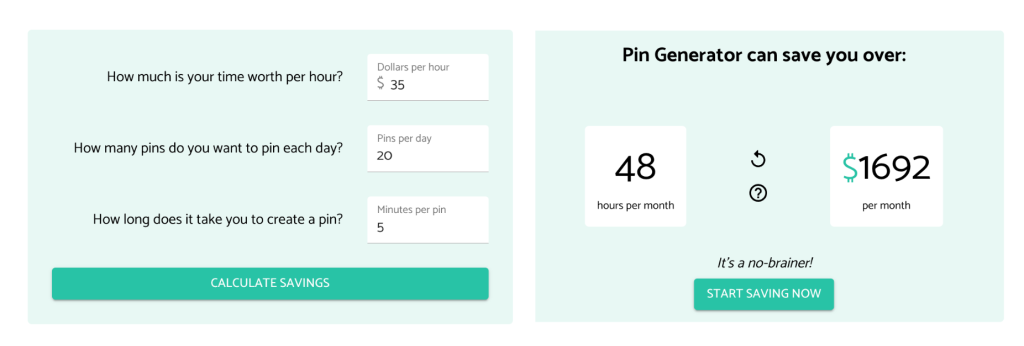
Using the right tool matters. Instead of juggling graphics, copy, and scheduling tools, Pin Generator lets you do it all in one place. Just drop in your blog post or product URL, and in seconds, the tool pulls in your content, creates dozens of unique pin designs, and allows you to schedule everything from the same dashboard.
Whether you’re aiming to post five times a week or twenty times a day, this system takes what used to be a multi-hour task and turns it into something you can do in just a few clicks.
What Is Pin Generator and How Does It Help?
Most bloggers and online sellers know they need to publish fresh pins regularly, but doing it manually takes a lot of time. This is where Pin Generator comes in.
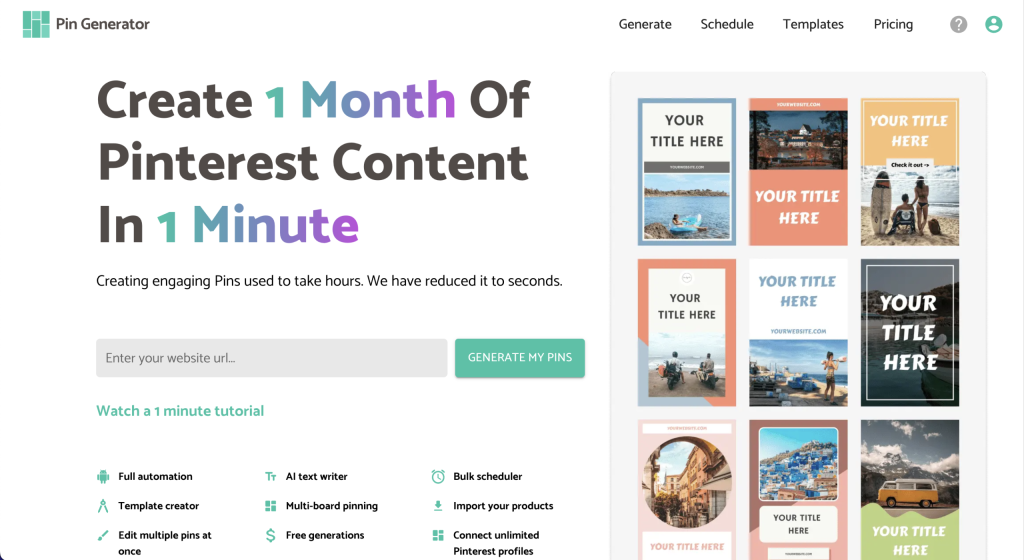
Pin Generator is a Pinterest automation tool built for bloggers, online sellers, and affiliate marketers who want to stay visible on Pinterest without spending hours every week creating pins. Instead of starting from scratch each time, and jumping between Canva, ChatGPT, and a separate scheduling tool, you can do everything all in one place.
You simply drop in your blog post or product URL, and the tool instantly pulls your images, metadata, and content. From there, it creates dozens of fully designed, optimized pins – complete with titles, descriptions, and layouts that match your brand.
It’s a faster, smarter way to stay visible on Pinterest without burning out.
We’ll show you exactly how the process works, including how to go from blog post to scheduled pins in minutes.
How to Create and Schedule Pinterest Pins Step by Step
Pin Generator automates the pin creation process so you can go from blog post to published pins in minutes, not hours. Here’s a quick overview of how it works:
- Paste in a blog post or product URL. Pin Generator scans your page and pulls your metadata, images, and text content automatically.
- Choose your quality. For new Pinterest accounts, best practice is to post 1-5 fresh pins per day. For established accounts, Pinterest recommends 10-25.
- Make sure your pins are “fresh.” This means new on-image text, different images, and varied descriptions, even if you’re linking to the same URL. Pinterest may flag repeated pins with identical content as spam.
- Avoid posting pins to the same URL too close together. A good rule of thumb is to space out duplicate URLs by at least 2-3 days, or even 5-7 days if you’re posting multiple times per day.
- Customize your look. You can update fonts, colors, and layouts to match your brand, or let the tool randomize designs for you.
- Use the built-in AI tools. If you want even more variation, Pin Generator can rewrite your headlines and descriptions in seconds.
- Schedule your content. Choose the frequency and timing of your pins, then publish them to your selected boards. You can also activate AutoPin to continue generating content from the same post over time.
Want to see this process in action? Watch our full demo on YouTube where we create a full month of pins in under five minutes.
How Often Should You Pin on Pinterest?
Consistency is one of the biggest drivers of growth on Pinterest and conversions to your site, but what does consistency actually look like in practice?
If you’re just starting out, Pinterest recommends posting 1 to 5 fresh pins per day. As your account becomes more established, you can increase this to 10 to 25 pins daily, provided each pin offers unique value.
However, frequency isn’t the only thing that matters on Pinterest, as URL spacing and variation are important too.
If you’re promoting the same blog post or product more than once, be sure to space those pins out by at least 2 to 3 days. If you’re pinning at higher volumes, aim for 5 to 7 days between repeats. This helps avoid getting flagged for spammy behavior and ensures your audience sees a variety of content in their feed.
With a strong rotation of posts, varied visuals, and scheduled delivery, you’ll stay visible without overwhelming your audience or your account.
Pin Generator helps automate this strategy so you don’t have to track it manually. Whether you’re pinning five times a week or twenty times a day, the goal is to stay consistent and sustainable.

Get the Most Traffic From Every Pin You Post
A few small tweaks can make a big difference in how many people actually see and click your pins. Here are some quick ways to boost performance:
- Write clear, benefit-driven headlines. Ask yourself, “Would I click this?”
- Include keywords in your descriptions to help your pin surface in search results.
- Make sure the image and link match. Misleading visuals can hurt trust and visibility.
- Play with different colors, layouts, and calls to action. Even small changes can impact engagement.
- Spread your content out. Pinning to multiple relevant boards over time helps get your content in front of new audiences without feeling repetitive.
The best part? You don’t have to test everything manually. With Pin Generator, you can create dozens of unique pins with built-in variation, and schedule them with just a few clicks.
Start Planning Pinterest Content Faster
So, how do you feel? Ready to plan, create, and schedule a full month of Pinterest content without it taking over your whole week?
If you’re tired of juggling tools or stuck trying to keep up with Pinterest, this is your shortcut. You can explore Pin Generator for free and see just how fast things start to click.
It’s time to take your time back and get your content seen. You don’t need a VA, a social media manager, or hours of free time. You just need the right system, and a few minutes to get started.
Let’s get generating!