
What Do Impressions Mean on Pinterest? Boost Your Reach Now
16 September 2025
When we talk about impressions on Pinterest, we're talking about eyeballs. Plain and simple. An impression is counted every single time one of your Pins shows up on someone's screen.
Think of it like a digital billboard on a busy highway. Every car that drives by is an impression. The driver doesn't have to stop, read the whole sign, or take the exit—the mere fact that they saw it is what counts. On Pinterest, that "highway" is someone's home feed, their search results, or another user's board.
What Are Pinterest Impressions
Impressions are the bedrock of your Pinterest analytics. They measure visibility. Before someone can save your Pin, click through to your website, or follow your account, they have to see your content first. That initial view is the impression.
This metric is your first clue into how well the Pinterest algorithm is working for you. A high number of impressions means Pinterest is actively showing your content to users. With hundreds of millions of people saving an incredible 1.5 billion Pins every week, the potential for your content to get seen is huge. You can dig deeper into Pinterest's impressive scale on thunderbit.com.
Impressions vs Other Key Metrics
To really get a feel for what impressions tell you, it's helpful to contrast them with other metrics that track what users do. Impressions measure passive exposure; metrics like saves and outbound clicks measure active interest.
Here's a quick breakdown to help clarify the differences:
Pinterest Metrics At a Glance
| Metric | What It Measures | Example |
|---|---|---|
| Impressions | How many times your Pin was shown on screen. | Your Pin appeared in 1,000 different user feeds. |
| Engagements | The total number of interactions with your Pin (saves, clicks). | 50 people saved your Pin and 20 clicked on it. |
| Outbound Clicks | The number of clicks to the destination URL of your Pin. | 15 people clicked from your Pin to your blog post. |
| Saves | The number of times users saved your Pin to one of their boards. | A user saved your recipe Pin to their "Dinner Ideas" board. |
Each metric tells a different part of the story. Impressions are the opening chapter, setting the stage for all the action that follows.
You can track this all directly within your Pinterest Analytics dashboard. The impressions chart, for example, gives you a visual timeline of your content's visibility.
Watching this chart is like keeping an eye on your content's pulse. A steady upward trend tells you the algorithm is favoring your Pins and your reach is growing. If it dips, it might be time to switch up your strategy.
Why Impressions Are the Starting Point for Growth
Think of impressions as the very first handshake between your brand and a potential customer. They’re much more than a simple number on your analytics dashboard; they represent the top of your marketing funnel and the initial spark of awareness that gets your content in front of fresh eyes.
After all, if no one sees your Pins, nothing else can happen. You can’t get saves, outbound clicks, or website traffic without that initial view. A steady, high number of impressions is a great sign that the Pinterest algorithm sees your content as valuable and is actively pushing it out to users.
This constant exposure works wonders. It's rooted in a simple psychological idea called the mere-exposure effect—people tend to prefer things they’re familiar with. Each time someone sees your Pin, it builds a little bit of subconscious trust and recognition for your brand.
From Visibility to Action
To truly grasp what impressions mean on Pinterest, you need to see them as more than just a passive number. They are an active, real-time indicator of your content’s health and its potential reach. This is the first, crucial step in any user's journey with your brand.
That initial visibility is what paves the way for real business results. Consider this: over 85% of weekly Pinners have bought something based on Pins from brands. Those first impressions are absolutely critical for eventually driving sales. You can dig deeper into how Pinterest usage drives purchases on thunderbit.com.
Impressions are the fuel for your Pinterest engine. A healthy flow of impressions ensures that every other part of your strategy—from engagement to sales—has a chance to succeed. It's the essential first domino to fall.
Ultimately, impressions confirm you have a seat at the table. They tell you that Pinterest's algorithm thinks your content is relevant enough to show to its users. From there, your job is to turn that visibility into meaningful action.
Impressions vs. Engagements: Which Metric Should You Follow?
So, how do Pinterest impressions stack up against engagements? It’s the classic "reach vs. reaction" debate, but the truth is, one isn't inherently better than the other. They just tell you different things about how your audience is interacting with your content.
Think of impressions like window shoppers at a mall. They see your Pin as they scroll by, maybe pause for a second, and register your brand’s existence. It's all about broad visibility and is absolutely crucial for building brand awareness from the ground up.
Engagements, on the other hand, are the people who open the door and walk into your store. These are your saves, comments, and outbound clicks—the actions that show someone is genuinely interested. This active interest sends a powerful signal to you, and more importantly, to the Pinterest algorithm that your content is hitting the mark.
Aligning Metrics with Your Goals
The metric you obsess over should tie directly back to what you’re trying to achieve with a particular Pin or campaign. Chasing high impressions when you really need sales is like bragging about foot traffic without a single person buying anything. You've got to focus on what matters for your goal.
To start, you need to understand the very first step in this journey: how Pinterest even counts an impression. This simple breakdown shows exactly what qualifies.
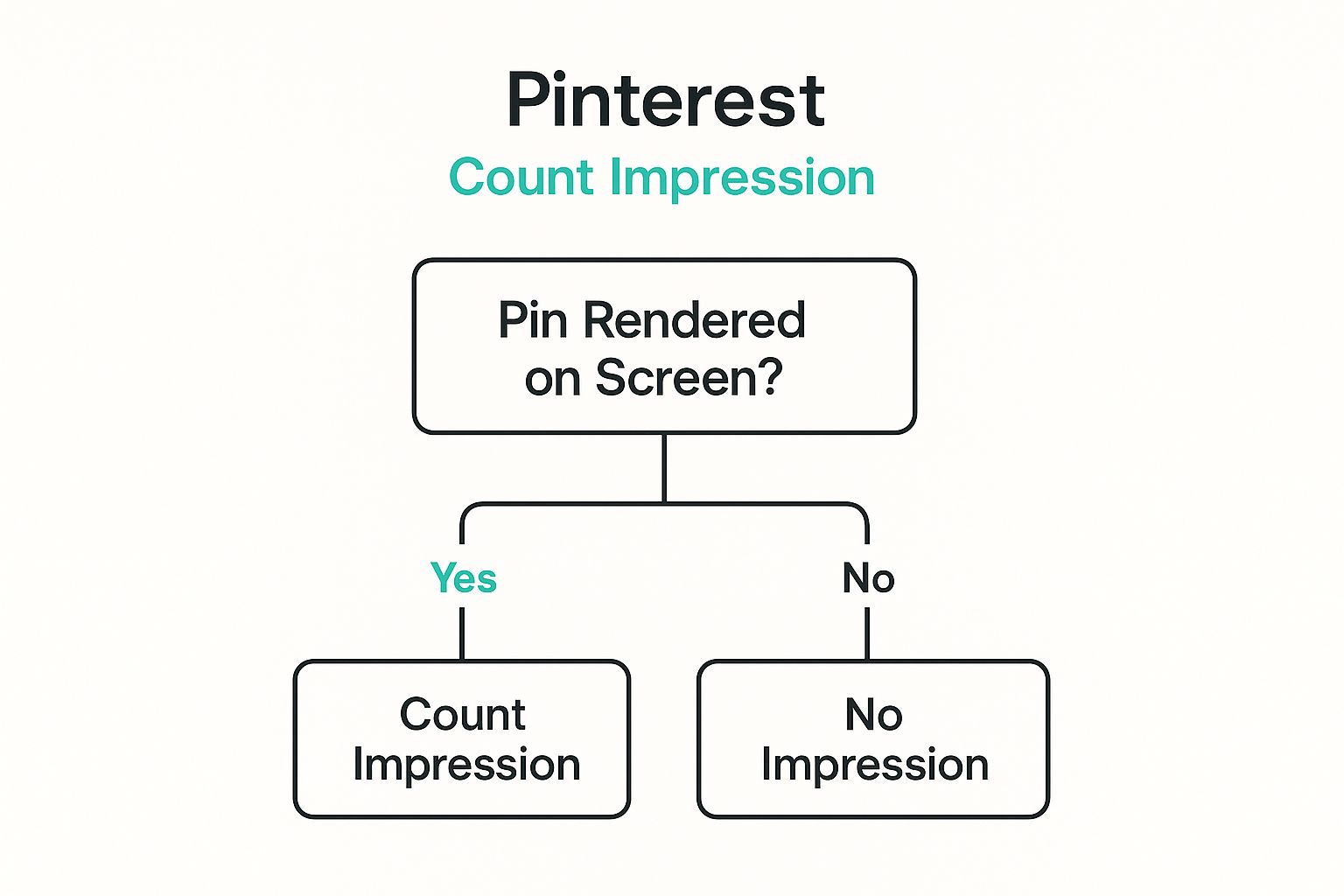
As the visual confirms, an impression is simply about your Pin being shown on a screen. That’s it. It’s the foundational layer of your content's reach.
So, when do you put your energy into each one?
- Focus on Impressions when: Your main goal is brand awareness. Maybe you’re launching a new product or trying to establish yourself in a new niche. Here, the name of the game is getting your content in front of as many relevant eyeballs as possible.
- Focus on Engagements when: You need to drive traffic, generate leads, or make sales. In this case, you need people to do something. That makes outbound clicks and saves your most valuable indicators of success.
To help you decide where to concentrate your efforts, here’s a quick guide to matching your goals with the right metric.
Choosing Your Focus Metric Based on Goals
| Your Goal | Primary Metric to Track | Why It Matters |
|---|---|---|
| Increase Brand Awareness | Impressions | This shows how many people are seeing your content, which is key for getting your name out there. |
| Drive Website Traffic | Outbound Clicks | This directly measures how many users are leaving Pinterest to visit your site, blog, or store. |
| Grow a Community | Comments & Saves | These actions indicate a deeper connection and show that your content is resonating with users. |
| Generate Sales/Leads | Outbound Clicks & Conversions | Clicks get them to your product page, but tracking conversions closes the loop and shows actual business impact. |
Ultimately, choosing the right metric isn't about picking a side; it's about knowing what you want to accomplish and using the right data to see if you're getting there.
A smart Pinterest strategy doesn’t choose between impressions and engagements; it understands how they work together. High impressions create the large audience pool from which high engagement can be drawn.
Learning how to turn that initial visibility into meaningful action is the next step. Digging into some proven social media engagement strategies can provide a ton of great ideas that go beyond just getting seen. The key is to view these two metrics as a team—visibility creates the opportunity, and engagement is the action that follows.
How to Analyze Your Impressions in Pinterest Analytics
Knowing what impressions mean on Pinterest is a great first step, but the real magic happens when you dive into the data and use it to build a smarter content strategy. Your Pinterest Analytics dashboard is the key to unlocking these insights.
First, head over to the Analytics tab on your business profile and click on "Overview." Think of this as your 30,000-foot view of account performance. You can set the date range here to see if your impressions are trending up or down over the last 30, 60, or 90 days.
This is where you'll find your total impression count front and center.
The graph makes it easy to spot daily fluctuations. You can quickly see if a big spike—or a sudden dip—lines up with a particular Pin you published or a seasonal trend.
Digging Deeper Into Your Data
The overview is great, but to really understand what's working, you need to filter your view and look at specific pieces of content. This is how you pinpoint what truly resonates with your audience.
- Top Pins: I always start by sorting my Pins by impressions. This tells me which visuals are getting the most screen time. If you find a Pin with tons of impressions but hardly any clicks, it’s a sign that your call-to-action or title might need a little work.
- Top Boards: It's just as important to see which of your boards are driving the most visibility. This insight helps you decide where to focus your energy for the biggest impact.
Don't get too hung up on daily changes. It's completely normal for your numbers to fluctuate. Pinterest traffic ebbs and flows with seasons, user interests, and algorithm tweaks. What you're looking for are sustained trends over time, not a one-day dip.
By checking in on these metrics regularly, you stop being a passive observer and start making informed decisions. For a full tour of the dashboard, our complete guide to Pinterest Analytics has you covered. This approach helps you learn what the algorithm wants and, more importantly, create content that gets seen.
Proven Strategies to Get More Eyes on Your Pins
Alright, so you understand what impressions are. That’s the first step. Now for the fun part: actually making that number go up. Getting more impressions simply means getting your content in front of more people, which is the whole point of being on Pinterest in the first place.
The good news? This isn't a game of chance. There are concrete, time-tested strategies that consistently get the Pinterest algorithm to notice your content and show it to more people. Let's get into the practical steps you can take right now to boost your visibility.
These aren't just random tips; they're about working with the platform, not against it.
Master the Language of Pinterest: Keywords
Think of keywords as the bridge between you and your audience. When someone is looking for inspiration, they type words and phrases into the search bar. Your goal is to be what they find. Nail this, and you’ve built a solid foundation for discovery.
Put yourself in their shoes. What would you search for to find your content? Once you have a list, weave those keywords naturally into every part of your Pinterest presence.
- Pin Titles: Make them clear, descriptive, and intriguing.
- Pin Descriptions: Write a couple of full sentences that give context. This helps both users and the algorithm understand what your Pin is about.
- Board Titles: Group your Pins into boards with specific, keyword-focused names.
- Profile Bio: Use this space to tell Pinterest exactly who you are and what you Pin.
If you really want to get this right, our guide on SEO for Pinterest will help you dig deeper and fine-tune your keyword strategy.
Create Scroll-Stopping Pin Designs
Let’s be honest: Pinterest is all about the visuals. Your Pin's design is your handshake, your first impression. A truly great design can literally stop someone from scrolling and make them pay attention.
First things first: high-quality, vertical images are a must. You want to aim for a 2:3 aspect ratio (like 1000 x 1500 pixels). This format fills up more of the screen on a phone, which is where over 85% of Pinners are hanging out.
Don't stop there. Add text overlays with bold, easy-to-read fonts that instantly tell the user what they'll get by clicking. Bright colors and clean layouts usually do well, but you should always experiment to see what your audience responds to. When you create beautiful, helpful Pins, you're giving them the best possible shot at earning that initial impression and all the clicks that follow.
Common Questions About Pinterest Impressions
https://www.youtube.com/embed/3zrMaqPup-I
Even once you get the hang of Pinterest impressions, a few common questions always seem to pop up. Let's walk through them one by one to clear up any confusion so you can feel confident in your strategy.
Getting these details right is the key to actually understanding your analytics and making smart moves with your account.
Impressions vs. Reach: What’s the Difference?
This is easily the number one point of confusion, but it’s simple when you think about it this way: impressions are the total number of times your Pins were seen, while reach is the number of unique people who saw them.
So, if one person scrolls past your Pin three different times during the week, that’s 3 impressions but only a reach of 1. Impressions tell you about your overall visibility and brand awareness, while reach tells you how big your actual audience is.
Is a High Number of Impressions Always Good?
Not on its own, no. A huge impression number is exciting because it means Pinterest is pushing your content out there. But that’s only half the story. The real magic happens when those impressions are hitting the right people.
Think about it: a Pin with a million impressions but barely any clicks or saves is a red flag. It might mean your image is great at stopping the scroll, but the title or topic isn’t connecting with the audience who's seeing it. There's a mismatch somewhere.
The sweet spot is high impressions paired with a strong engagement rate. That’s the real proof that you’re not just being seen—you’re providing value to the people you’re reaching.
How Long Does It Take to See More Impressions?
Pinterest is a long game. It’s a marathon, not a sprint. Unlike other platforms that are all about what’s happening right now, a Pin can build momentum over weeks, months, or even years.
If you stick to a consistent, well-planned strategy, you'll likely see a steady climb in impressions within a few weeks. But for that really significant, long-term growth, you’re often looking at a 3-6 month timeframe as Pinterest’s algorithm learns where your content fits. Patience truly is a virtue here.
And one final question for the beginners out there: "Do my own views count as impressions?" The answer is a simple no. Pinterest Analytics is smart enough to filter out your own activity, so you can trust that your data is showing you how everyone else is interacting with your Pins.
The secret to boosting your impressions is a steady stream of fresh, beautiful Pins. Pin Generator lets you create dozens of unique designs in just seconds, freeing you up to focus on strategy instead of spending all your time in a design tool. Automate your Pinterest marketing today with Pin Generator.