
How to create Pinterest pins for any Zazzle store with Pin Generator
Generate Pinterest marketing images for your Zazzle products with Pin Generator
If you are a Zazzle seller or affiliate marketer, you can generate Pinterest pins from the webpage to advertise your Zazzle products.
- Navigate to your listing on Zazzle
- Copy the URL of your chosen product
- Open the [Generate page](https://pingenerator.com/generate) on Pin Generator
- Paste your listing's URL in the URL bar and click Generate Pins
- Select your chosen images and click Done
- Edit and schedule/post your pins as usual
If you run into any snags, which is a common occurrence with Zazzle stores, as Zazzle has a few additional security measures, then the following steps are needed.
- Install the Pin Generator Chrome extension following these easy steps
- Navigate to your listing on Zazzle
- Click on the Pin Generator Chrome extension and select Scan Page
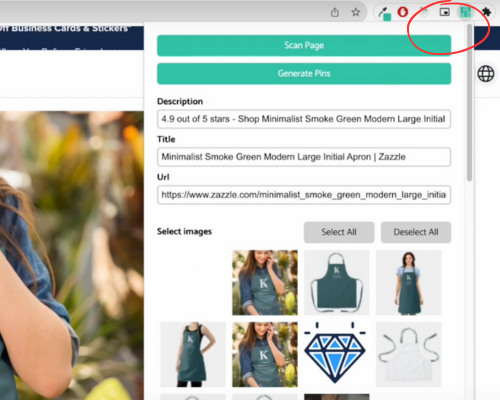
- Select the images you want, edit populated metadata, and click Generate Pins
- Pin Generator will open in a new tab with freshly made pins using the data from your Zazzle store
- Edit and schedule/post your pins as usual
Pin Generator is a great asset to your Pinterest marketing strategy for your e-commerce products on Zazzle, saving you time, money, and effort.
Watch the full tutorial in the video below.