
Your New AI Assistant for Pinterest Marketing
13 October 2026
Creating Pinterest pins has become much easier with AI, but most tools still require you to move between several different steps. You may use one feature to create an image, another to write the description, and a separate scheduler to publish it. By the time everything is finished, you have still spent a surprising amount of time managing the process yourself.
What if you could handle it all through one conversation?
In fact, marketers surveyed by Salesforce estimated that generative AI could save them more than five hours per week, demonstrating why a more connected AI workflow can be so valuable,. Pin Generator’s new AI Chat allows you to describe what you want to promote and turn that request into a complete Pinterest campaign. It can find content from your website, create branded pins, write titles and descriptions, choose relevant boards, and prepare a publishing schedule without requiring you to configure every part of the workflow manually.
You could ask it to create pins for your newest blog post, promote products from your online shop, or simply check the status of your Pin Generator account. The chat works with the tools already built into Pin Generator, which means it does more than offer advice. It can take action inside your account and prepare the campaign for you to review.
What is Pin Generator’s AI Chat?
Pin Generator already offers a structured automation workflow that makes it possible to create, schedule, and publish Pinterest pins with minimal ongoing work. You choose what you want to promote, establish your design preferences, select your publishing schedule, and let the automation prepare future batches.
AI Chat provides another way to access those same tools (and more).
Instead of working through a structured setup, you can begin with a conversational request such as “Create pins for my latest blog post” or “What’s my account status?” The chat gathers the information it needs, asks relevant follow-up questions, and uses your answers to complete the request.
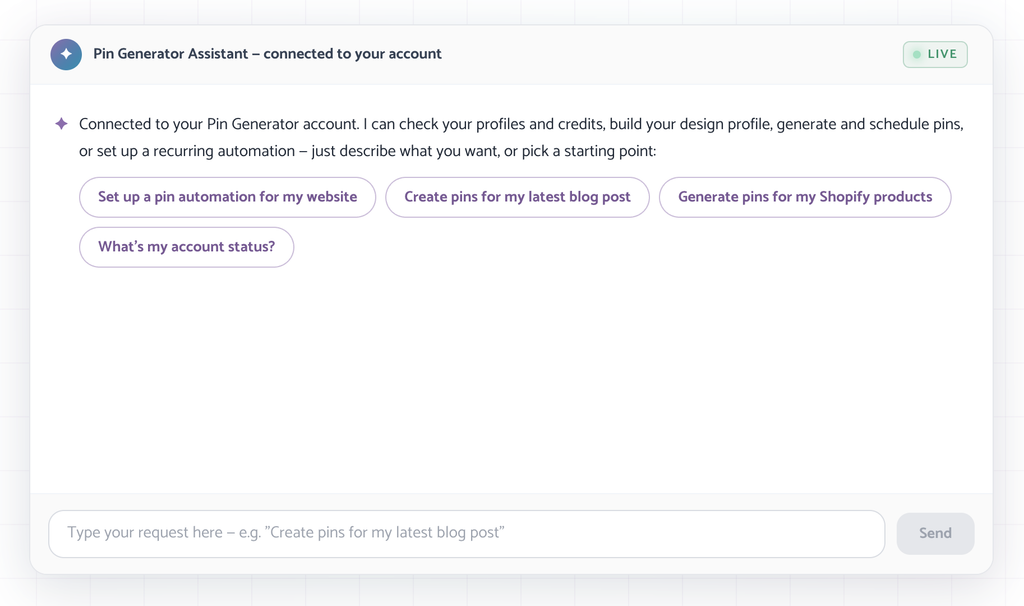
This is particularly useful if you know the result you want but would rather explain it than configure every setting yourself. You can describe the campaign in your own words, review what the chat prepares, and refine the details as the conversation develops.
The standard automation remains a great option when you want a guided process that continues running with minimal oversight. AI Chat is designed for people who prefer a more flexible experience or want greater control over a particular campaign. Neither workflow replaces the other; they simply offer two different ways to manage the same Pinterest marketing tools.
Rather watch instead of read? Our recent YouTube video includes a walkthrough of the AI Chat and several examples of the results you can achieve through a simple conversation:
What Can an AI Assistant for Pinterest Marketing Do?
Although the chat interface looks simple, it connects to 21 Pin Generator tools behind the scenes. You do not need to know what each tool is called or request it individually. The chat determines what it needs based on the outcome you describe.
For example, you can ask the assistant to review your account, show your existing automations, or find content available to promote. If your website is connected, it can search your pages and identify your latest blog post without requiring you to locate and paste the URL yourself.
Once you select the content, the assistant can use your existing design profile to create branded pins. This profile gives the AI direction for your colors, fonts, and overall visual style, helping the finished images feel connected to your business rather than looking like unrelated AI designs.
You can request several designs for the same page or product, experiment with different layouts, and give the assistant feedback on the results. If a design feels too busy, you can ask for a cleaner version. If the pin focuses on the wrong benefit, you can tell the chat what you would like to emphasize instead.
The assistant also handles the less creative parts of Pinterest marketing. It can prepare pin titles and descriptions, assign the correct destination links, help select relevant boards, and create a publishing schedule. You remain responsible for reviewing the campaign, but you no longer need to build each piece from scratch.

Walk Through a Pinterest AI Chat Example
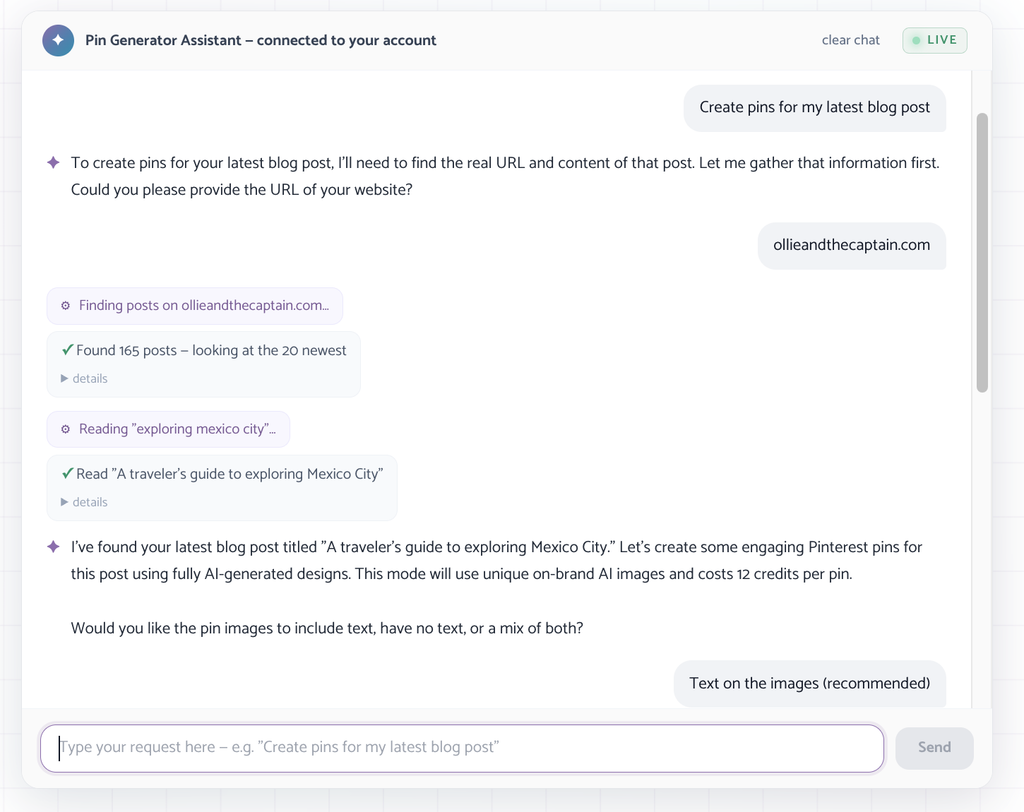
The easiest way to understand AI Chat is to think of it as a conversation rather than another setup process. There is no fixed list of steps you need to complete or a particular order you need to follow. You simply explain what you are trying to accomplish, and the assistant asks relevant questions based on your request.
When you open the chat, you will see a few suggested prompts, such as creating pins for your latest blog post or checking your account status. These are helpful starting points, but you can also type your own request in the same way you would explain the project to another person.
For example, you could ask the assistant to create and schedule pins for your latest article. It can search the content connected to your Pin Generator account, identify the newest post, and confirm that it has found the correct page. If you already have a particular article or product in mind, you can paste the link or describe what you want it to find.

From there, the conversation will depend on what the assistant needs to complete your request. It may ask about the number of pins you want, which design profile it should use, how frequently you want to publish, or whether you would like to approve the content before it goes live. You do not have to anticipate every decision or include every detail in your first message. The assistant guides you through the relevant questions as they come up.
You can also provide as much or as little creative direction as you like. You may ask it to follow your existing branding, try several layouts, use a particular tone, generate alt text, or include an affiliate disclosure in each description. If you are comfortable letting AI make some of those decisions, it can also choose relevant Pinterest boards and prepare a suitable publishing schedule for you.
The conversation remains flexible throughout the process. If you do not like a design, want to feature a different benefit, or decide to change the number of pins, you can explain that in the chat. The assistant can adjust the campaign without requiring you to return to the beginning and rebuild everything.

Connect Pin Generator to an External AI Platform
The built-in Pin Generator AI Chat is the easiest way to use the conversational workflow because it does not require an additional connection. However, if you want to streamline your workflow, you can also manage Pin Generator from a compatible AI assistant you already use, including ChatGPT, Claude, or Cursor.
This connection works through MCP, which stands for Model Context Protocol. You do not need to understand the technical details to benefit from it. In simple terms, MCP allows your AI Chat to communicate with Pin Generator and perform real tasks inside your account.

It also connects to your preferred AI platform and integrates the Pin Generator AI Chat (and tools) into one streamlined location, allowing you to create pins and manage your Pinterest account from your preferred platform. The exact setup varies depending on which AI platform you use, so follow the instructions listed at the bottom the AI Chat page.
Is AI Chat the Right Pinterest Workflow for You?
AI Chat does not remove you from your Pinterest marketing. Instead, it changes your role from building every individual piece to directing and reviewing the campaign.
If you prefer a straightforward, guided setup for an automation that runs regularly, Pin Generator’s standard workflow may still be your best choice. If you like developing ideas conversationally or want to give more detailed instructions for a specific campaign, AI Chat offers additional flexibility without adding more manual work.
You are not limited to one or the other. If you’re ready to learn more about Pin Generator’s AI Chat, you can check it out here.
Let’s get generating!