
How to Use AI to Design Pinterest Pins (No Experience Needed)
4 August 2026
Designing Pinterest pins used to mean either learning Canva inside and out, hiring a graphic designer, or spending hours every week putting together visuals that may or may not perform. AI has changed that significantly, and the timing couldn’t be better. According to HubSpot’s 2026 State of Marketing Report, only 22% of companies currently use Pinterest for marketing, which means there’s a real opportunity for bloggers, shop owners, and affiliate marketers who show up consistently with high quality pins. And the barrier to entry just got a lot lower.
We’re sharing the top AI tools worth using, why brand identity matters more than most people realize, and how Pin Generator’s new fully AI pin design tool pulls all of it together in one place. If you’re looking to create high quality, top performing Pinterest pins, leveraging AI for your pin design is a no-brainer. We’re here to show you how.
How to Use AI
Before we get into the benefits of AI and how to use it to design Pinterest pins, it’s worth covering a few best practices first. AI can be an excellent addition to your pin creation workflow, but it shouldn’t replace your own judgment. Using AI to show your product in a beautifully styled setting is a smart use of the tool. However, using it to generate a version of your product that looks nothing like what you’re actually selling, or to make claims that aren’t true, is what damages trust with your audience and your credibility on Pinterest long term.
If you sell candles, for example, showing that candle in a cozy cabin scene or a minimalist office is a great way to leverage AI generated backgrounds and imagery, as long as the candle itself is accurately represented. That’s the line worth keeping in mind as you go through this.
And if you’d prefer to watch instead of read, we’re covering all of this in more detail, including a full walkthrough of the tool, on our YouTube channel. You can watch the video here:
Which AI Tools Are Worth Using
Up until recently, AI image generation for Pinterest pins wasn’t all that reliable. Images tended to look obviously fake or just didn’t hold up well enough for a real business. Fortunately, AI image generation has changed a lot in 2026, and tools like Nano Banana and the newest ChatGPT image models have gotten good enough that AI generated images are now a real option for pin creation, not just something to play around with.
While these are excellent options for AI image generation, there is a catch. Creating a nice looking image is only one part of the process. Once you have the image, you still need to write a title, write a description, find the right link, and upload everything to Pinterest yourself. Then, do it all over again for your next pin. A pretty pin that still took twenty minutes of manual assembly isn’t actually saving you that much time, it just moved the effort somewhere else. The real time savings come from collapsing the entire process into one tool capable of it all.
Understanding Brand Identity
One thing most AI tools struggle with is consistent brand identity. Generating one nice looking pin is relatively easy, but generating twenty pins that all feel like they came from the same brand is a completely different challenge. Most tools just aren’t built to handle that well, and you end up with a folder full of images that look polished individually but don’t work together as a cohesive brand.
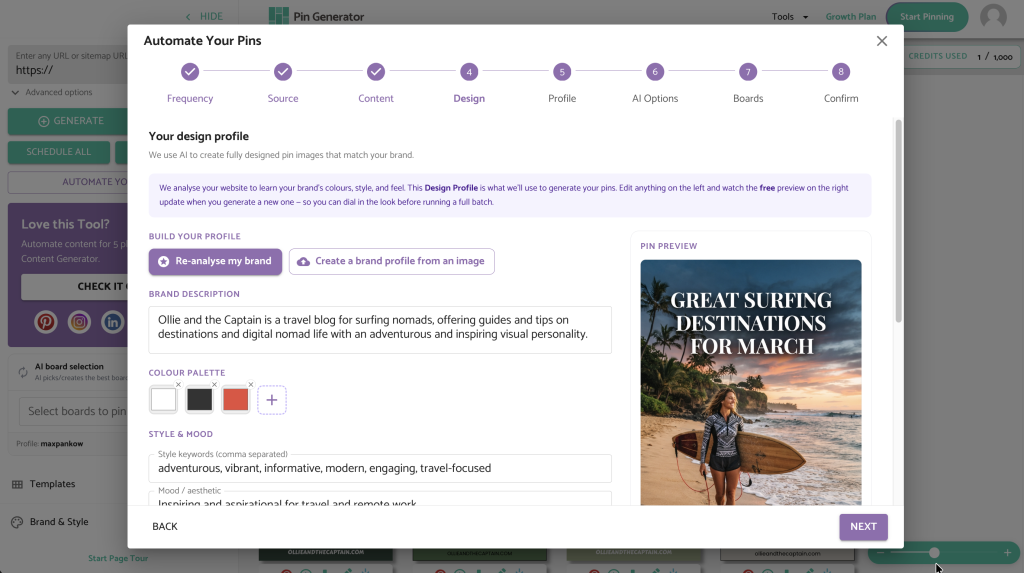
This is one of the gaps that Pin Generator closes in its newest update. Instead of generating random pins and hoping they match your brand, Pin Generator identifies your brand identity first, either by scanning your website or shop automatically, or by building it from a description you provide if you don’t have a website yet. It does the work a brand designer would normally do for you, just automatically and in the background, before a single pin gets created.
Once it’s created a cohesive brand identity, Pin Generator pulls from this to create your pins, every single time. You can set your automation to run for weeks or months without worry. And, if you love a branding style, you can save it for future iterations too.
How to Use Pin Generator’s AI Pin Design Tool
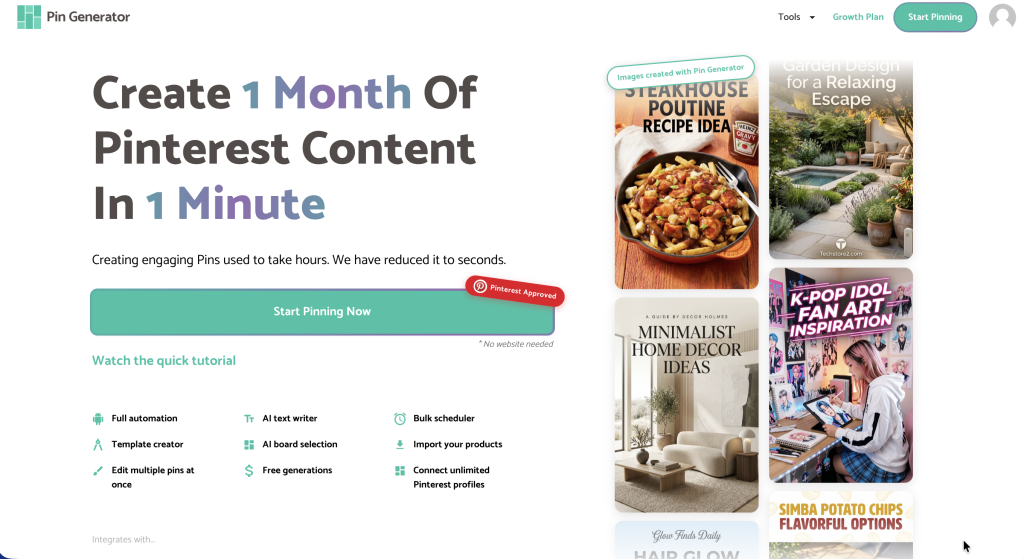
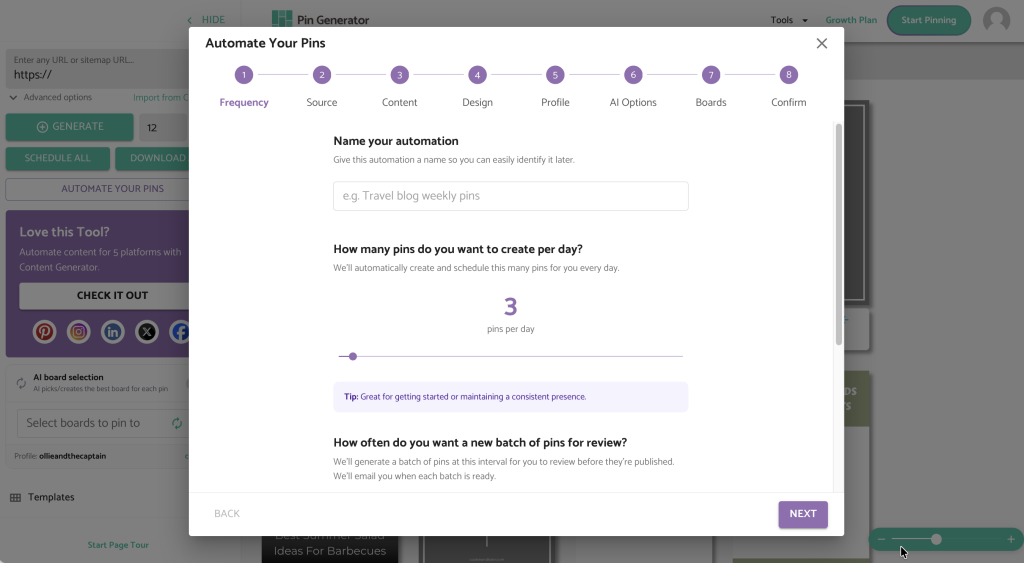
Are you ready to see just how simple it is to create fully AI pin designs with Pin Generator? Head to pingenerator.com and click ‘Start Pinning Now.’ You’ll name your automation, choose how many pins you want to go out per day, and set your review frequency. We suggest weekly review until you get the hang of the review and approve process.
On the next page, you’ll choose whether you have a website or not. If you do, Pin Generator will scan your site, pull up your sitemap, and let you choose which pages or blog posts you want to create pins for. Then it scans your site and identifies your brand identity automatically, pulling your colors, tone, and style. It comes back with a brand description, style keywords, mood, aesthetic, font feel, and how it plans to place text on your pins. All of it is customizable, and you can upload a mood board if you want to steer it in a specific direction. You can keep generating sample pins until you land on something that feels right.
If you don’t have a website, you can describe your brand directly instead. Type in details about your account, the vibe you’re going for, your colors, your aesthetic, and any outbound links you want to use. Pin Generator then builds a brand identity from that description and generates sample pins the same way it does from a website scan.
Whichever path you take, once you’re happy with the direction, you connect your Pinterest profile, choose your boards or let the AI board selector handle that for you, and generate your first batch of pins. You can wait while they’re created on screen or close out and get an email when they’re ready to review. Before anything goes live, you always have a chance to approve each pin, update the title, description, alt text, and links, and swap anything that isn’t quite right.
It turns pin creation into a ‘review and approve’ process rather than a create-from-nothing process, which is really the whole point. You get the creative upside of AI generated design, consistent brand identity, and a workflow that used to take hours collapsed into something you can manage in minutes per month.
Getting Started
The best part about using AI to design Pinterest pins is that you don’t need to have it all figured out before you start. Drop in your website or describe your brand, generate your first batch of pins, and see what comes back. Most people are genuinely surprised by how polished the results look right out of the gate, and how little time it actually takes once the setup is done.
Try Pin Generator for free at pingenerator.com and see what your pins could look like with a little help from AI.
Let’s get generating!