
AI Pin Generator for WooCommerce Stores
22 August 2025
So, what exactly is an AI pin generator for WooCommerce? Think of it as a smart bridge connecting your online store directly to Pinterest. It automates the entire process of creating and publishing Pins for your products, saving you countless hours of tedious manual work. It lets you promote your entire catalog consistently with very little hands-on time.
Why Pinterest Is Your Untapped Sales Channel
If you're running a WooCommerce store, you're already playing in the big leagues. With over 6 million active online stores running on the platform by late 2024, the ecosystem is massive and still growing every year. You can dig into some of the recent studies on WooCommerce's scale to see just how big it is. But while you’re busy optimizing your store, there’s a massive sales channel most people completely ignore: Pinterest.
It's easy to dismiss Pinterest as just a digital scrapbook for recipes and DIY projects, but that's a seriously outdated take. It’s a visual discovery engine where people aren't just scrolling—they're actively planning their next buy. For a WooCommerce business, that kind of user mindset is pure gold.
The Power of Purchase Intent
Here’s what sets Pinterest apart. On other social media platforms, people are mostly there to see what their friends are up to. On Pinterest, they’re planners. They're searching for inspiration for their next purchase, whether that's a new outfit, a piece of furniture, or a unique gift for a friend.
This means the traffic you get from Pinterest is often ridiculously high-quality and primed to convert. When a user clicks on your Pin, they've already signaled a genuine interest in what you're selling, which is a powerful way to drive sales and increase traffic directly to your WooCommerce products.
Takeaway: Pinterest isn't about what people did; it's about what they want to do. This future-focused behavior makes it an incredibly powerful platform for driving sales because users are literally there to find products to buy.
From Discovery to Direct Sales
For certain niches—think fashion, home goods, handmade crafts—products don't just survive on Pinterest; they absolutely thrive. The platform is built for visual appeal, letting your products take center stage. A single, well-crafted Pin can show your product in a real-life setting, helping a potential customer see it in their own life.
The customer journey becomes incredibly smooth:
- Someone searches for "boho living room ideas."
- Your Pin, featuring a beautiful handcrafted macrame wall hanging from your store, pops up.
- They click and land directly on your WooCommerce product page.
- Boom. They add it to their cart and check out, often in the same session.
This straight line from discovery to purchase is what makes Pinterest a must-have tool for any WooCommerce store owner. The trick is to keep feeding the platform fresh, optimized content consistently. And that, right there, is where an AI pin generator for WooCommerce becomes your secret weapon.
Putting Your Pinterest on Autopilot with an AI Pin Generator
Let's be real: creating individual Pins for every single product in your WooCommerce store is a soul-crushing task. It's a one-way ticket to burnout. This is exactly why we built Pin Generator. It’s the bridge between your store’s inventory and your Pinterest account, designed to put your content creation on complete autopilot.
The magic of this integration is how it automatically pulls all the crucial product data. The AI grabs everything it needs—product photos, titles, descriptions, and prices—straight from your WooCommerce setup. From there, it gets to work spinning up an endless stream of fresh, unique Pins.
This isn't just about saving time; it's about creating a true "set it and forget it" system. You get to reclaim hours from your week while constantly feeding the Pinterest algorithm the fresh content it craves. That consistency is key to getting real visibility and driving people back to your product pages.
How Our WooCommerce Integration Actually Works
Think of our direct WooCommerce integration as your very own hands-off Pinterest marketing team. When you connect your store, Pin Generator doesn’t just spit out random Pins. It builds a smart, cohesive Pinterest plan for your brand. It systematically pulls your product images, titles, and prices to create a non-stop stream of on-brand content. This ensures your entire catalog gets the visibility it deserves, not just your bestsellers.
By connecting your store, you can automate your entire Pinterest strategy. The system can create Pins for new product launches, seasonal collections, or even your entire back catalog, ensuring no product gets left behind.
All this consistent activity sends strong signals to Pinterest that your account is active and valuable, which helps boost your organic reach. You’re essentially building a content engine that works for you 24/7, turning your product listings into a powerful source of traffic and sales.
If you’re exploring other ways to automate, we also have a guide on automating Pinterest Pin creation with RSS feeds, which is another fantastic method for streamlining your workflow.
The Secret Weapon: Smart Keyword Integration
Automation is great, but smart automation is what actually moves the needle. To really maximize the impact of your Pins, you need to show up where your audience is searching. That means getting serious about keyword research.
Before you launch your automated campaigns, we highly recommend you check out our Pinterest Keyword Research Tool. It's designed to help you find good keywords that relate to your WooCommerce products and uncover those high-intent terms that people are actively using to find products just like yours.
Once you’ve got a solid list of keywords, you can plug them right into your Pin Generator settings. The AI will then weave these terms into your Pin titles and descriptions, making sure they’re optimized for search the second they go live. It’s a simple step that transforms your automated Pins from just pretty pictures into highly discoverable assets that attract customers ready to buy.
Connecting Your WooCommerce Store to Pin Generator
Alright, let's get your marketing machine humming. The first step to putting your Pinterest on autopilot is linking your WooCommerce store directly to Pin Generator. This is how you turn your entire product catalog into an endless supply of fresh Pins, and I'll walk you through getting it all hooked up.
We're talking about everything from grabbing your API keys to tweaking the first few settings. The whole point is to get you up and running in just a few minutes so the system can start doing the heavy lifting for you.
This little graphic gives you a bird's-eye view of how quick it is to get started.
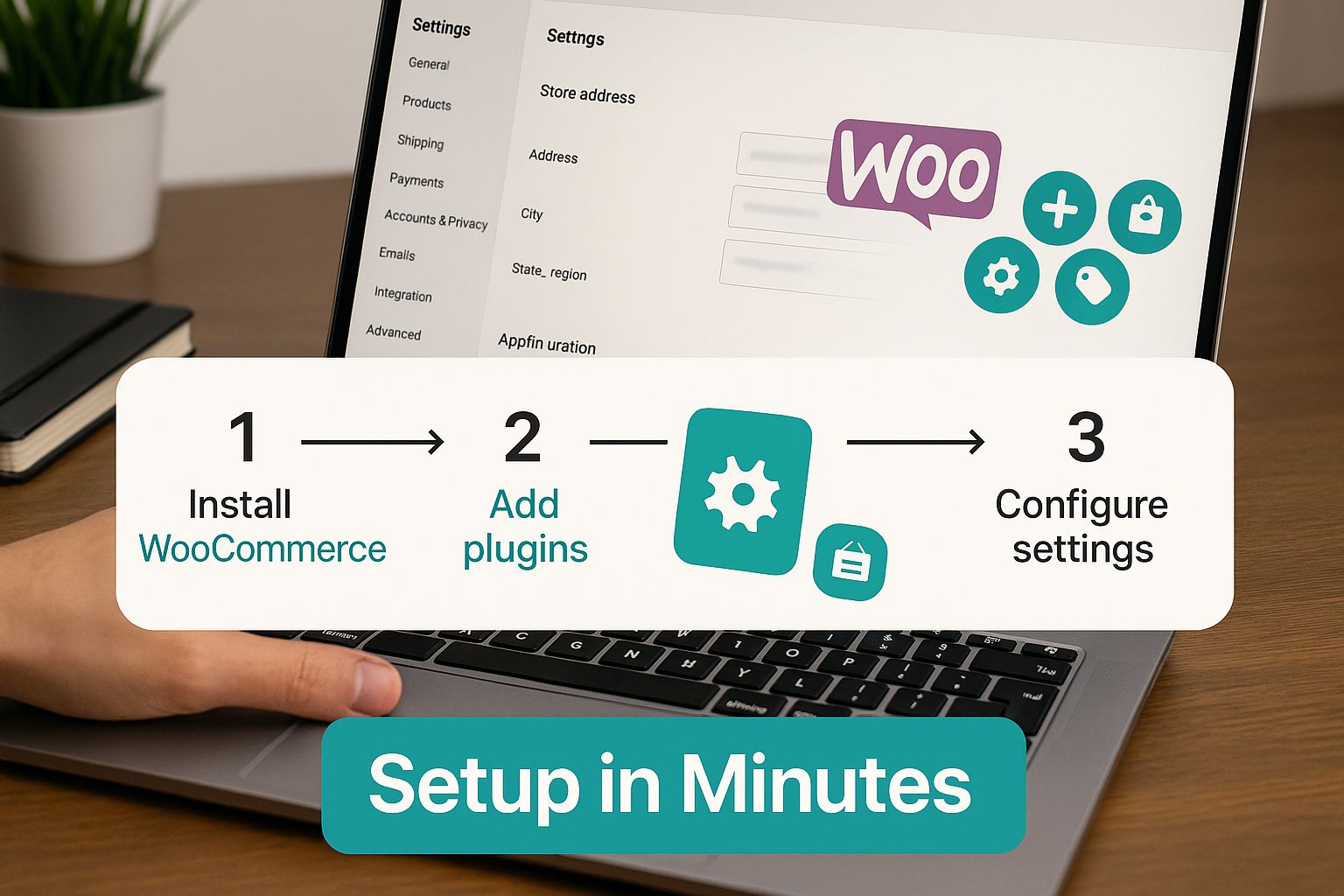
The real magic here is the direct integration. No more clunky, multi-step setups. This is powerful marketing automation made genuinely accessible for any store owner, no matter how tech-savvy you are.
Your Initial Setup Checklist
Before you jump in, let’s make sure you have everything ready. You’ll need to be logged into your WordPress dashboard—the place where your WooCommerce store lives. The integration works by using WooCommerce’s own API to securely pull your product info.
This is not only the most secure way to do things, but it's also ridiculously efficient. Forget manually exporting product lists or wrestling with spreadsheets. Pin Generator talks directly to your store, which means anytime you add a new product or tweak an existing one, it's instantly ready to be turned into a Pin.
This kind of direct API connection is what modern e-commerce is all about. The demand for smart integrations has exploded. In fact, for WordPress alone (what WooCommerce is built on), the top 40 AI-driven plugins saw over 315 million combined visits in a single year. That's a massive shift toward using AI for everything from store operations to content creation. You can dig into more of that data on the rapid adoption of AI in WordPress environments.
Pro Tip: Do yourself a favor and create a dedicated user role in WordPress just for this API connection. Give it limited permissions. It's a security best practice that ensures the integration only has access to the product data it needs and absolutely nothing else.
Configuring Your Automated Pinning Strategy
Once your store is connected, the real fun begins. Now you get to customize how the ai pin generator for woocommerce actually works for you. This is where you go from just being connected to being smart about your automation.
Here are the first things you'll want to set up:
- Product Category Selection: You don’t have to promote your entire catalog at once. Start by picking specific product categories to sync. This lets you build targeted campaigns around your bestsellers, new arrivals, or seasonal items.
- Branded Pin Templates: Make sure every Pin looks like it came from you. Customize the Pin designs to match your brand by uploading your logo, setting your brand colors, and choosing your fonts. Consistency is key on Pinterest.
- Intelligent Posting Schedule: Set up a posting schedule that hits when your audience is actually online and scrolling. You can control the frequency and timing to keep a steady stream of content flowing without spamming your followers' feeds.
Finding the Right Keywords for Your Products
Automation is a powerful tool, but it works best when you give it a smart strategy to follow. Before you let the generator loose, you need to understand what your potential customers are actually searching for on Pinterest. This is where a little keyword research goes a long way.
Take a few minutes and play around with our Pinterest Keyword Research Tool. It's built specifically to help you find the exact search terms and phrases that people are using to find products just like yours. You're looking for that sweet spot: keywords with good search volume but without a ton of competition.
For instance, let's say you sell handmade leather journals. Instead of a generic term like "journals," you'll probably have way more luck with long-tail keywords like "rustic leather travel journal" or "personalized writer's notebook." Once you've identified these gems, you can tell Pin Generator to automatically weave them into your Pin titles and descriptions.
It's a simple step, but it's the one that turns your automated content into a strategic tool that drives highly qualified traffic right to your product pages.
Building a Winning Pinterest Keyword Strategy
Automation is a powerful tool, but let's be real: automation without a clear strategy is just creating more noise. You've connected your WooCommerce store, which is a great first step. Now, it's time to use our ai pin generator for woocommerce to market smarter, not just faster. This is all about moving beyond just making Pins and getting strategic about putting them in front of people who are actually looking for what you sell.
The whole game on Pinterest comes down to keywords. Think of it as a visual search engine, because that's exactly what it is. Just like with Google, keywords are the currency that decides who sees your products. If you're just pushing out Pins with generic titles like "Nice Dress," you're essentially shouting into a hurricane.
Uncovering What Your Customers Really Want
Before you fire up the automation and schedule hundreds of Pins, you have to get inside the head of your ideal customer. What are they actually typing into that Pinterest search bar? Are they looking for a "handmade leather journal" or are they getting more specific with "rustic personalized notebook for writers"? That subtle difference is often what separates a Pin that gets ignored from one that drives a sale.
This is where you need to put on your detective hat for a bit. I promise, a little research upfront pays off massively down the road. It ensures that every single Pin you generate has a fighting chance of being discovered by the right person. The goal here is to find those sweet-spot keywords—the ones with good search volume but less competition, that perfectly match your WooCommerce products.
Key Insight: People on Pinterest are planners. They're looking for inspiration and solutions, and they use descriptive, long-tail keywords to find exactly what they want. Tapping into this behavior is the secret to unlocking a steady stream of high-intent traffic right to your store.
Using the Right Tools for the Job
Throwing keyword guesses at the wall is a recipe for frustration. To build a strategy that actually works, you need data. This is precisely why we built our own keyword research tool specifically for Pinterest.
Our Pinterest Keyword Research Tool is designed to cut through the fluff and show you what’s trending and what users are searching for right now. To get started building your master keyword list, check out our in-depth guide on how to conduct effective Pinterest keyword research. It'll walk you through finding the terms that will drive real, measurable results for your products.
Once you have a solid list of keywords, you just plug them into your Pin Generator settings. The AI then gets to work, intelligently weaving these terms into your Pin titles and descriptions. It's a simple step that optimizes every Pin for maximum organic reach from the moment it goes live.
Creating Pin Campaigns for Specific Business Goals
A "one-size-fits-all" approach to marketing is dead. Your Pinterest strategy needs to be nimble and support your different business goals. With Pin Generator, you can easily create separate campaigns that are tailored to whatever you're trying to achieve at the moment.
Here’s a quick look at how you might structure your content generation for different goals.
Pinterest Content Strategy for WooCommerce Products
| Marketing Goal | AI-Generated Pin Type | Example Keyword Focus |
|---|---|---|
| New Product Launch | Idea Pins & Video Pins | "new spring fashion collection," "latest ceramic mug designs" |
| Seasonal Sale | Standard Pins with Text Overlay | "Black Friday furniture deals," "summer sale women's dresses" |
| Boost Bestsellers | Static Image Pins & Infographics | "best minimalist gold necklace," "how to style a linen shirt" |
| Build Brand Awareness | Behind-the-scenes Video Pins | "our handmade pottery process," "meet the makers" |
By thinking in terms of campaigns, you can create a much more targeted and effective strategy.
For example, you could set up distinct automated campaigns for:
- New Collection Launches: Target keywords like "new spring fashion collection" or "latest home decor arrivals" to generate buzz and early interest.
- Seasonal Sales: Create Pins focused on time-sensitive terms like "Black Friday furniture deals" or "summer sale women's dresses" to capture shoppers when they’re ready to buy.
- Driving Traffic to Bestsellers: Focus on evergreen, high-performing keywords for your top products to keep a consistent stream of customers flowing to your most popular items.
Segmenting your automation like this turns your Pinterest account into a dynamic marketing machine. It’s no longer just a content scheduler; it’s a strategic tool that aligns with your business goals to drive traffic and sales where they matter most.
Taking Your WooCommerce Sales to the Next Level
Okay, so you've got your WooCommerce store hooked up and the Pins are flowing automatically. Awesome. But let's be real, the "set it and forget it" approach only gets you so far. Now it’s time to get strategic and turn that automation into a serious sales engine.
This is where the real magic of an AI pin generator for woocommerce shines. It’s not just about saving a few hours a week; it's about creating a powerful feedback loop to figure out exactly what makes your audience tick.
Your direct WooCommerce integration is the engine. It's constantly pulling in your product data, giving you the raw material to test everything. Think of your Pinterest account as a live marketing lab. You can churn out different Pin designs, play with headlines, and tweak descriptions to see what actually gets people to click and buy.
Get Obsessed with Your Pinterest Analytics
Your Pinterest Analytics dashboard is your new best friend. Seriously. This is where you'll find out which of your AI-generated Pins are actually doing the heavy lifting—driving impressions, clicks, and, most importantly, ringing the cash register. I make it a habit to pop in at least once a week to spot the winners.
Look for the patterns. Are Pins with a certain color palette getting all the love? Do questions in your headlines lead to more clicks? This isn't just data; it's a goldmine of insights. Once you find a formula that's working, you can go back and adjust your Pin templates and keyword strategy to lean into it. This ensures every Pin you generate from here on out is even smarter than the last.
Pro Tip: Don't just skim the surface metrics. Go deep into Audience Insights. Understanding who is engaging with your Pins—their age, their interests—can reveal entirely new customer profiles you never knew you had. This is perfect for brainstorming new products or tailoring your next big promotion.
Think Beyond Just Product Pins
Product Pins are your bread and butter, no doubt. They go straight for the sale. But if you really want to crank up your traffic, start creating Pins for your blog content, too.
Got a post on "Five Ways to Style Our Linen Scarf" or "How to Pick the Perfect Ceramic Mug"? Perfect. Use Pin Generator to whip up some eye-catching Pins that drive traffic directly to those articles.
This content-first approach does a couple of really important things:
- It attracts people who are looking for ideas and inspiration, not just a product. This traffic is often way more engaged.
- It positions your brand as an expert. You're not just selling stuff; you're providing value, which builds trust and keeps you top-of-mind when they are ready to buy.
This isn't just a Pinterest trick; it's a smart e-commerce strategy. We're seeing AI become a core part of how online stores operate. For example, some WooCommerce plugins like StoreAgent Content are now built to generate SEO-ready product descriptions and meta tags automatically. It's clear that AI is becoming fundamental to running and marketing a store, and you can learn more about how AI tools are reshaping e-commerce across the board.
By mixing direct-to-product Pins with this kind of value-driven content—all automated, of course—you build a much more robust Pinterest machine. One that drives sales today and builds a loyal brand for tomorrow.
Diving into a new marketing tool always brings up questions. I get it. As a WooCommerce store owner, you need to be sure any AI pin generator for WooCommerce is going to pull its weight and deliver real results, not just add another task to your plate.
Let's walk through some of the most common questions that pop up.
Think of our direct WooCommerce integration as your very own hands-off Pinterest marketing team. When you connect your store, Pin Generator doesn’t just spit out random Pins. It builds a smart, cohesive plan for your brand on Pinterest.
It systematically pulls your product images, titles, and prices to create a non-stop stream of on-brand content. This ensures your entire catalog gets the visibility it deserves, not just your bestsellers. That kind of consistent, fresh activity is exactly what the Pinterest algorithm wants to see, which helps push qualified traffic right back to your product pages.
How Does This Actually Drive Sales?
Here’s the thing about Pinterest: it’s a visual search engine, not just another social media feed. People are on there actively looking for products and inspiration—they’re in a buying mindset.
When someone stumbles upon your product through a Pin, they’re not just scrolling to kill time. They're often planning a purchase. This direct link from discovery on Pinterest to your product page dramatically shortens the customer journey.
A well-optimized Pin is like a digital storefront sign, catching the eye of shoppers who are already looking for what you sell. By automating this, you’re essentially putting up thousands of these signs, all working 24/7 to bring customers to your door.
This constant promotion naturally leads to more clicks, boosts your brand visibility, and, most importantly, drives more sales for your WooCommerce store. It’s all about meeting your customers exactly where they’re planning their next buy.
Finding the Right Keywords for My Products
Automation is powerful, but without strategy, it's just noise. Pushing out hundreds of Pins that nobody ever sees isn't going to help your bottom line. That’s why a smart keyword strategy is non-negotiable. It’s how you make sure your products actually show up when people search for them.
Before you do anything else, I highly recommend checking out our Pinterest Keyword Research Tool. We built this specifically to help you find the exact terms your target audience is typing into that search bar.
You can quickly pinpoint high-intent keywords that are relevant to your products but aren't oversaturated with competition. Once you have your list, just plug those keywords into Pin Generator. The tool will automatically weave them into your Pin titles and descriptions. It’s a simple step that turns every single Pin into a highly discoverable asset, optimized from day one to attract real buyers.
Ready to put your Pinterest marketing on autopilot and watch your traffic grow? Pin Generator connects directly to your WooCommerce store to create an endless stream of high-quality Pins, saving you time and driving sales. Start your free trial today and see the difference for yourself.