
Pin Generator: The Best AI Tool for Creating Pinterest Pins in Minutes
20 July 2025
For bloggers, marketers, and e-commerce store owners, the best AI Pinterest pin generator is unequivocally Pin Generator. This tool is expertly designed to help you create an endless stream of high-quality, on-brand pins in minutes, not hours. It’s a complete game-changer for turning your blog posts and product pages into a constant flow of fresh visuals, putting your Pinterest marketing into overdrive quickly and easily.
Your Secret Weapon for Pinterest Growth
We’ve all been there—staring at a blank canvas, trying to design the “perfect” Pinterest pin. It feels like a massive time sink, right? For anyone running a blog or e-commerce store, this creative bottleneck is a huge roadblock to scaling on a platform that demands constant fresh content.
This is exactly why an AI Pinterest pin generator like Pin Generator becomes your most valuable player.
Think of it as having an expert graphic designer on retainer who already knows all the latest Pinterest trends and works around the clock. Pin Generator completely flips the script on Pinterest marketing by automating the entire design slog. Instead of getting lost in complicated design software, you can generate dozens of unique, on-brand pins for your blog or store in just a few clicks. It’s what separates struggling creators from the pros who drive real traffic.
From Manual Grind to Automated Success
Let's be honest, the old way of making pins is slow, tedious, and often inconsistent. You have to find an image, open up Canva, pick a template, write some text, download it, and then do it all over again. Pin Generator turns that entire process upside down.
By automating the design work, Pin Generator frees you up to focus on what actually grows your business—strategy, analytics, and engagement—instead of just making images.
This shift is everything if you're serious about Pinterest. The algorithm rewards accounts that consistently publish new, “fresh” pins. An AI tool like Pin Generator makes it ridiculously easy to meet this demand, helping you stay top-of-mind and visible in your followers’ feeds and search results.
Take a look at how the old way stacks up against using an AI tool.
| Aspect | Manual Pin Creation | AI Pin Generation |
|---|---|---|
| Time | Hours per week | Minutes per batch |
| Consistency | Varies by mood and day | Always on-brand |
| Volume | Limited by your schedule | Virtually unlimited |
| Cost | Your time + software fees | Low monthly subscription |
The difference is stark. You’re not just saving time; you're buying back the headspace needed for high-level strategy.
Tapping Into a Massive, Purchase-Ready Audience
With 537 million monthly active users on Pinterest as of early 2025, you can't afford to ignore this platform. AI pin generators are the bridge between your brand and this massive audience.
Even better, a staggering 55% of users are on Pinterest specifically to shop and buy. AI-generated pins help you connect directly with this high-intent group by producing tailored, eye-catching content at a speed and scale that was never possible before. You can learn more about how AI helps tap into this audience over on the Tailwind blog.
This technology is the key to reaching Pinterest’s massive audience without burning out. For a deeper look at how social media can drive real growth, check out this actionable guide to social media marketing for beauty salons. Ultimately, the ability to produce a wide variety of appealing content at scale is what separates the accounts that struggle from the ones that see explosive growth.
How Pin Generator Solves Your Content Problems

Let's be direct. The idea of an AI Pinterest pin generator sounds great, but many tools fall short, spitting out generic images that can hurt your brand. This is where Pin Generator changes the game. It was built by creators who understand the real struggles of bloggers and e-commerce owners.
The biggest challenge isn't just making pins. It's making good pins that drive traffic, day in and day out, without it becoming a full-time job. Pin Generator tackles this problem head-on by acting less like a template-filler and more like a smart design partner. It turns the content you already have on your blog or store into a traffic-generating machine.
Just think about it: take one of your blog posts or product page URLs, and in moments, you have dozens of fresh, on-brand pins ready to schedule. That’s what Pin Generator delivers. It clears the creative bottleneck that slows so many of us down, freeing you up to think about strategy instead of fiddling with design details.
Built for Speed and Simplicity
One of the biggest roadblocks for bloggers and e-commerce owners is getting bogged down in complicated design software. Pin Generator was built from the ground up for non-designers, making it incredibly easy for anyone to get professional-looking results quickly.
The interface is refreshingly straightforward. Forget about learning layers, masks, or confusing editing tools. The entire workflow is simplified into a few clicks, transforming a task that could take hours into a five-minute win.
Pin Generator is engineered to crush content bottlenecks. Its primary function is to transform your website URLs directly into a steady stream of traffic-driving Pinterest content, removing the need for manual design almost entirely.
This commitment to simplicity and speed directly impacts your bottom line. When you can create content 10x faster, you can dramatically increase your footprint on Pinterest, pull more traffic to your site, and ultimately drive more sales for your store.
Intelligent Content Generation at Its Core
So, what’s the magic behind the curtain? Pin Generator’s AI does more than just slap text on a stock photo. When you feed it a URL from your blog or store, it gets to work analyzing the page to pull out the most important bits.
- Pulls Relevant Images: It automatically scans for the best images on your blog post or product page to feature in the pins.
- Extracts Key Text: It grabs your page title and meta description to create text overlays that are catchy and relevant.
- Suggests Smart Designs: Based on what it finds, it recommends the best-performing templates from its huge library.
This intelligent extraction is the secret sauce. It ensures the pins aren't just pretty, but are also perfectly matched to the content you’re promoting. It’s like having a virtual assistant who reads your article and highlights the best parts for you.
A blogger can publish a new post, pop the URL into Pin Generator, and have 20-30 unique pins ready for scheduling in the time it takes to brew a pot of coffee. That's the kind of speed and ease you need to really make an impact on Pinterest.
Powerful Customization for Perfect Branding
While speed is great, your brand identity is sacred. This is another area where Pin Generator truly shines as the best AI Pinterest pin generator, giving you deep customization options to make every single pin feel like yours.
The Brand Kit feature is the star of the show here. You can set up your brand’s exact colors, fonts, and logo just once. From then on, the AI applies that branding to every pin it creates. This ensures you have a cohesive, professional look that builds brand recognition every time someone sees your content. You’re not just using a template; you're infusing your brand's DNA into a proven design system.
This blend of AI efficiency and hands-on control offers the best of both worlds. You get the speed of automation without giving up the brand consistency that makes you stand out. The result? A powerful, consistent presence on Pinterest that delivers real, tangible results for your business.
Creating Stunning Pins in Minutes
Alright, let's walk through just how easy Pin Generator makes it to turn a blog post or product page into a whole batch of ready-to-go Pins. It completely changes the game, taking what used to be a serious time-suck and making it almost effortless. You can forget about wrestling with clunky design software for hours.
The secret is its dead-simple, URL-based workflow. You give it a link, and the AI Pinterest pin generator acts like your personal design assistant, doing all the heavy lifting. This is where the magic really kicks in, instantly repurposing your existing blog or e-commerce content into eye-catching visuals for Pinterest.
Getting started is laughably simple. Just copy the URL from your blog post or e-commerce page and paste it into Pin Generator. That one little action sets the entire creative process in motion.
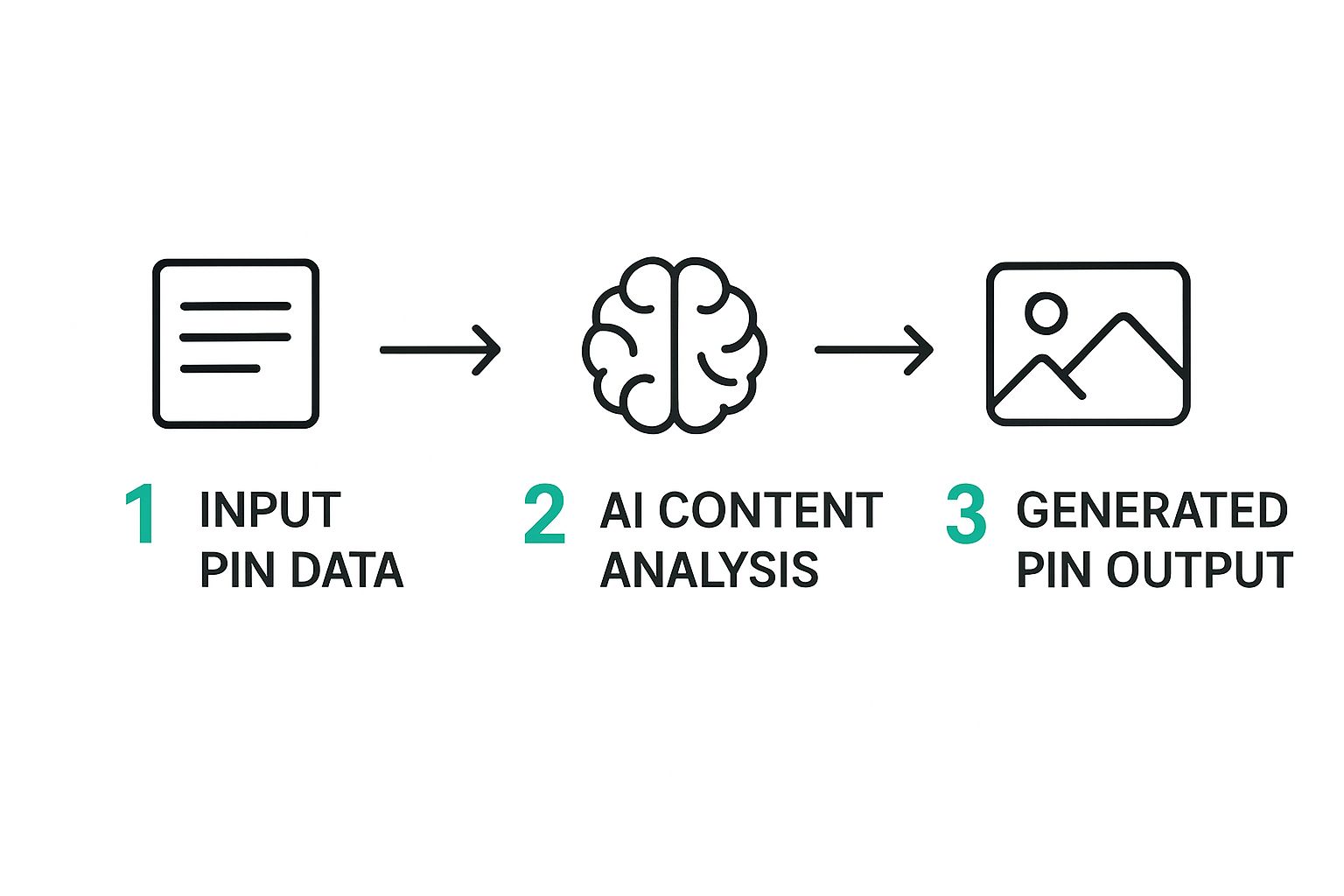
As you can see, the interface is clean and straightforward. That one input box is your gateway to creating dozens of unique, professional-looking Pin designs for your blog or store, no design experience needed.
Let the AI Work Its Magic
Once you've plugged in your URL, the AI engine gets right to work. It intelligently scans your page and pulls out all the key ingredients it needs to build your Pins.
- It grabs your images: The tool automatically finds all the images on your page, letting you pick the best ones for your designs.
- It extracts key text: It pulls your page title and meta description to use as the default text overlays. This makes sure your Pins are immediately relevant to the content they link to.
- It applies your branding: If you've set up a Brand Kit, the system automatically applies your logo, brand colors, and fonts to every Pin. This keeps everything looking consistent and on-brand.
This automated step is a massive time-saver. Think about it—no more manually uploading images, typing out titles, or fussing with brand styles. You get to skip right to the fun part.
Generate and Perfect Your Pins
After the AI has gathered everything, you're ready to create. With a single click, Pin Generator whips up dozens of unique Pin variations for you. It expertly mixes and matches different templates, image crops, and text layouts, giving you a huge variety to choose from.
The goal here isn't just to make one Pin. It's about easily generating a whole collection of "fresh" content that the Pinterest algorithm loves. That kind of volume and variety is what really helps you stay visible and drive consistent traffic to your blog or store.
From there, you can quickly look through the generated Pins, tweak the text, swap an image, or even hit regenerate for a new batch of ideas. Once you have a set you love, you can download them or schedule them straight to your Pinterest boards.
For a deeper dive into the specifics, our guide on the benefits of a Pinterest AI generator has even more detail. It’s the perfect blend of automation and creative freedom.
Streamline Your Workflow with Smart Integrations
A great AI Pinterest pin generator needs to do more than just churn out pretty images. It has to plug seamlessly into your existing marketing routine. Pin Generator truly excels here by acting as the missing link between your content platforms and your Pinterest account, turning a series of manual chores into one smooth, automated flow.
Instead of thinking of pin creation as a separate task, imagine it as a natural part of publishing content. For any busy blogger or e-commerce owner, this is where a tool goes from "useful" to absolutely essential. It’s all about creating a system that works for you, not making more work for you.
The magic happens when making Pinterest content becomes an automatic result of the stuff you're already doing—whether that’s writing a new blog post or adding a product to your online store.
WordPress Integration for Bloggers
If you're a blogger, your goal is to get your new article in front of as many readers as possible, as quickly as possible. The Pin Generator WordPress plugin was built for exactly that. It forges a direct, time-saving connection between your website and the pin creation tool.
Once set up, the plugin can automatically create a whole new batch of pins every single time you publish a new article. This means your Pinterest promotion kicks off the second your post goes live, without you having to lift a finger.
This hands-off approach ensures you never miss a chance to promote fresh content. It turns publishing into a two-for-one deal: your article goes up on your blog, and it's instantly ready for promotion on Pinterest.
This connection keeps your momentum going effortlessly. You publish, pins get made, and you can schedule them out immediately. Your Pinterest account stays buzzing with relevant content that sends people straight to your latest work.
Shopify Integration for E-commerce Stores
For those running e-commerce stores, the challenge is turning your product listings into eye-catching, shoppable Pins. The Pin Generator Shopify app is designed to make this unbelievably simple and fast.
It hooks directly into your product catalog, grabbing product photos, titles, and prices to create pins that are built to sell. This lets you quickly turn your entire product lineup into a beautiful, clickable catalog right on Pinterest, driving more traffic and sales.
This is a seriously effective strategy. Pinterest hit a massive 570 million monthly active users in early 2025, and a huge number of them are there specifically to shop. With 85% of weekly Pinners buying something based on brand content they see, turning your products into amazing pins is a direct line to more sales. As Thunderbit's research points out, most of this happens on mobile, so having optimized visuals is non-negotiable.
Schedule Everything with the Built-In Scheduler
Creating pins is only half the job. To really win on Pinterest, you have to be consistent. This is where Pin Generator’s built-in scheduler becomes your best friend. It lets you map out your content calendar for weeks, or even months, in advance with incredible ease.
After you generate a ton of pins from just one URL, you don't have to dump them all at once. Instead, you can use the scheduler to drip them out over time.
- Set It and Forget It: Queue up hundreds of pins to post automatically when your audience is most active.
- Stay Consistent: Keep your account lively with fresh pins, even when you're busy with other things or taking a well-deserved vacation.
- Batch Your Work: Spend one focused session creating and scheduling a whole month's worth of content, freeing you up to focus on your business.
This scheduling feature closes the automation loop. You can go from a single blog post URL to a fully scheduled month of Pinterest content in one sitting. It's this all-in-one system that truly makes Pin Generator the best AI Pinterest pin generator for creators who value their time and results.
Best Practices for High-Performing AI Pins
So, you’ve got an AI tool generating pins for you. That’s a huge first step, but it’s only half the battle. Creating pins that actually perform is what gets you real results for your blog or online store.
Think of your AI Pinterest pin generator as a powerful engine. These best practices are the high-octane fuel that makes it win the race. It’s all about being intentional with what you create so that every single pin has a purpose.
Let's dive into a few key areas that can turn a good pin into a great one—the kind that stops the scroll, earns clicks, and helps you crush your business goals.
Write SEO-Rich Descriptions
Your pin's description is your secret weapon for getting discovered. Seriously. The image is what grabs the eyeballs, but the description is what whispers to the Pinterest algorithm, telling it what your pin is all about. This is how you show up in the right searches.
Pin Generator gives you a fantastic head start by often pulling the meta description from your URL. But you can—and should—take it a step further.
- Weave in Keywords Naturally: Use your main keywords and a few related long-tail phrases. Don't just list them out. Work them into sentences that sound natural and helpful.
- Think Like a Pinner: What would someone actually type into the search bar to find your content? Use that language. Instead of "new recipe," aim for something specific like, "easy 30-minute vegan pasta recipe."
- Add a Call to Action: Give people a gentle nudge. A simple "Discover more healthy dinner ideas on the blog!" is perfect.
Think of your pin description as the backstage crew for your visual. It does all the important work behind the scenes to make sure your pin gets in front of the right audience at the right time.
Treating your descriptions as a core part of your Pinterest SEO is a game-changer. It's a simple step that many people miss. For a deeper look, check out our guide on how to use AI for Pinterest, which gets into more strategic details.
Embrace the Power of Fresh Content
The Pinterest algorithm has one major obsession: it loves fresh content. Now, this doesn't mean you need to write a new blog post every single day (phew). It means uploading a new, unique pin image to the platform.
This is where a tool like Pin Generator gives you an almost unfair advantage.
Trying to manually create dozens of unique pins for one blog post is exhausting and just not realistic for busy bloggers or e-commerce owners. But an AI pin generator can whip up 20-30 different designs from a single URL in just a few minutes. This lets you constantly feed the algorithm the fresh content it’s hungry for.
This high-volume, high-variety strategy is how you grow. You aren't just saving time; you're perfectly aligning your content strategy with how the Pinterest platform actually works. That means better reach and more consistent traffic.
Create Compelling, Emotive Visuals
While text gets you found, the visual is what makes someone stop scrolling. Your pins need to connect with your audience on an emotional level.
This is especially true when you consider the massive, active user base on Pinterest. In the U.S. alone, Pinterest had 96 million monthly active users in 2025, with another 40 million in Brazil.
And get this: studies show that ads sparking a positive emotional connection can boost a user's memory by 20% and their intent to act by a whopping 6 times. It just goes to show how much quality creative matters. You can learn more about these Pinterest user statistics and see how they can shape your marketing. Using an AI tool that creates genuinely compelling visuals at scale is your key to tapping into these engaged audiences.
Common Questions About AI Pin Generators
Thinking about jumping in with a new tool always brings up a few questions. And when that tool is an AI Pinterest pin generator, it's totally normal to wonder if it's the real deal. Will it actually work for my brand? Is it a smart use of my money? Let’s tackle some of the most common questions we hear from bloggers and e-commerce store owners.
The goal here is to show you how Pin Generator isn't just another piece of software, but a true partner built to make your Pinterest marketing faster, easier, and a whole lot more effective. By hitting these points head-on, you’ll see exactly how it can help your business grow.
Will My AI-Generated Pins Look Generic?
This is easily the biggest fear, and it’s a valid one. Nobody wants their blog or store to look like a cheap copy of someone else's. The good news? We built Pin Generator specifically to avoid this "cookie-cutter" problem. It doesn't just spit out random templates; it uses a smart system to create variety while locking in your brand identity.
Here's how it works: The tool has a massive library of professionally designed templates. But instead of just slapping your image on a pre-made design, it intelligently mixes and matches those templates with your specific brand elements.
Your brand is unique, and your pins should be too. Pin Generator ensures this by merging its vast template library with your specific logo, color palette, and fonts. The result is content that feels custom-made, not machine-generated.
For every single URL you give it, the AI creates dozens of unique pin variations. It does this by automatically playing with different layouts, text placements, image crops, and design styles. This gives you a constant stream of the "fresh content" Pinterest's algorithm craves, all without ever losing that look and feel that is uniquely yours.
Is It Worth the Investment for a Small Blog or Store?
Without a doubt. In fact, for a small business, Pin Generator offers one of the best returns on investment possible. Why? Because when you're a small operation, your time is your most precious—and limited—resource.
Just think about how many hours you currently lose creating pins by hand. If you spend even five hours a month designing, editing, and uploading pins, that’s time you’re not spending writing new posts, sourcing products, or talking to customers.
With an AI Pinterest pin generator like Pin Generator, you can slash those five hours down to maybe 30 minutes. That time you get back is pure gold. You can reinvest it directly into the parts of your business that actually make money. The value isn't just in the traffic you'll get from Pinterest; it's in the huge chunk of your workweek you reclaim.
How Does This Tool Handle Pinterest SEO?
Pinterest is, at its heart, a visual search engine. That means Pinterest SEO is absolutely crucial for getting your content discovered. We designed Pin Generator with this in mind from day one, making it incredibly simple to optimize your pins for maximum reach.
When the tool scans your blog post or product page, it automatically pulls your existing page title and meta description to use as the starting point for your pin's title and description. This is a huge leg up—it ensures your main keywords are baked in from the very beginning, creating a strong link between your pin and your content.
But you're not locked into that. You get full control to tweak everything.
- Bulk Editing: Easily edit the text on all your generated pins at once to sharpen your message or sprinkle in more long-tail keywords.
- Targeted Copy: Quickly adjust titles and descriptions to better fit what people are actually searching for on Pinterest.
- Hashtag Ready: The description field is the perfect place to drop in relevant hashtags to boost your pin's discoverability.
By taking the friction out of creating keyword-rich pins, Pin Generator helps your content show up more often in search results, driving that sweet, organic traffic back to your site with way less effort.
Can I Fully Customize Pins to Match My Brand?
Yes, and this isn't just some afterthought feature—deep customization is at the core of what Pin Generator does. It hits that perfect sweet spot between lightning-fast automation and hands-on manual control.
The "Brand Kit" feature is where the magic starts. You just have to upload your logo and set your brand colors and fonts one time. Once that's done, the AI applies these elements to every single pin it generates for you. This creates flawless consistency and builds brand recognition every time someone sees one of your pins.
But you always have the final say. You can easily jump in and override any AI decision on a pin-by-pin basis.
- Manually edit any text overlay.
- Swap out an image for a different one from your page.
- Change the colors or fonts on an individual pin.
- "Favorite" certain templates to tell the AI which styles you prefer.
This blend of AI efficiency and manual override gives you the best of both worlds. You get the incredible speed of automation without ever giving up the power to make every pin look exactly how you want it.
Ready to stop wasting time and start driving serious traffic from Pinterest? Try Pin Generator today and see how quickly you can create hundreds of high-quality, on-brand pins for your blog or store. Get started at https://pingenerator.com.