
Master ai to create pinterest pins: Boost Your Traffic
7 October 2025
If you've ever felt like you're on a content creation hamster wheel with Pinterest, you're not alone. The secret to scaling your strategy isn't just about working harder—it's about working smarter. Using an AI to create Pinterest pins is hands-down the fastest way to get ahead. These tools can take a single blog post link and spin it into dozens of unique, on-brand pins in seconds, saving you from the soul-crushing manual work.
The New Era of Pinterest Marketing with AI
Pinterest is all about visual discovery, and winning means pumping out a steady stream of fresh, eye-catching content. For most creators, this is a massive bottleneck. You know the drill: hours spent wrestling with templates in design tools, feeling the constant pressure to come up with something new every single day. It’s a grind, and it’s completely unsustainable.
This is where AI tools for Pinterest change the game. It's not about outsourcing your creativity; it's about amplifying it. These tools directly tackle the biggest headaches of manual pin creation by automating design variations, whipping up compelling copy, and optimizing your content for what the Pinterest algorithm actually wants to see.
From Content Creator to Content Strategist
By taking over the repetitive, time-sucking tasks, AI hands you back your most precious asset: your time. Instead of being buried in the day-to-day design grind, you can finally zoom out and focus on what really moves the needle. This is your chance to dive deep into your analytics, refine your strategy, and truly understand what makes your audience tick.
Let's look at the numbers. Pinterest is home to 570 million monthly active users worldwide, and a whopping 42% of them are Gen Z. This is a massive, engaged audience that loves fresh, visually interesting content—exactly the kind of stuff AI helps you produce at scale. With over 1.5 billion Pins saved every week, you need more than just pretty pictures to stand out. You need a strategy, and AI makes that possible.
The real win with AI is the shift from being a content creator to a content strategist. You spend less time making things and more time making things happen.
Tapping Into What's Trending Right Now
A successful Pinterest strategy is all about connecting with what people are looking for right now. This is where AI-powered production meets data-driven insights. You can stay on top of what’s buzzing by using various hot trend trackers to see what consumers are currently searching for. This ensures your pins don't just look amazing—they actually perform.
Before we dive into the "how-to," let's quickly compare the old way versus the new way of doing things. It really highlights the difference an AI-powered workflow can make.
Manual Pin Creation vs AI-Powered Pin Creation
| Aspect | Manual Process | AI-Assisted Process |
|---|---|---|
| Time Investment | Hours per batch of pins | Minutes per batch of pins |
| Design Variation | Limited; requires manual tweaking of templates | Dozens of unique variations generated instantly |
| Copywriting | Time-consuming brainstorming and writing | AI-generated titles and descriptions in seconds |
| Scalability | Difficult; output is tied directly to your time | Easy; create hundreds of pins with minimal effort |
| Focus | On the tedious task of content creation | On high-level strategy and performance analysis |
As you can see, it's not just a minor improvement. It’s a fundamental change in how you can approach your entire Pinterest marketing effort, freeing you up to be the brilliant strategist you were meant to be.
Setting Up Your AI Pin Generation Workflow
This is where the magic really starts to happen. Getting your initial workflow set up is the key to true, hands-off automation. Think of it less as a setup process and more as teaching the AI your unique brand style right from the get-go.
Your first move is to authorize your Pinterest account, which gives the tool permission to schedule and publish pins directly for you. Simple enough.
Next up, and this is the important part, you’ll set up your Brand Kit. This is a one-time task where you’ll upload your logo, plug in your specific brand colors (using the hex codes), and choose your go-to fonts. By doing this work upfront, you’re ensuring every single pin the AI creates will look and feel like it came straight from you, keeping your profile looking sharp and professional.
This infographic breaks down the simple, three-stage process you'll be using.
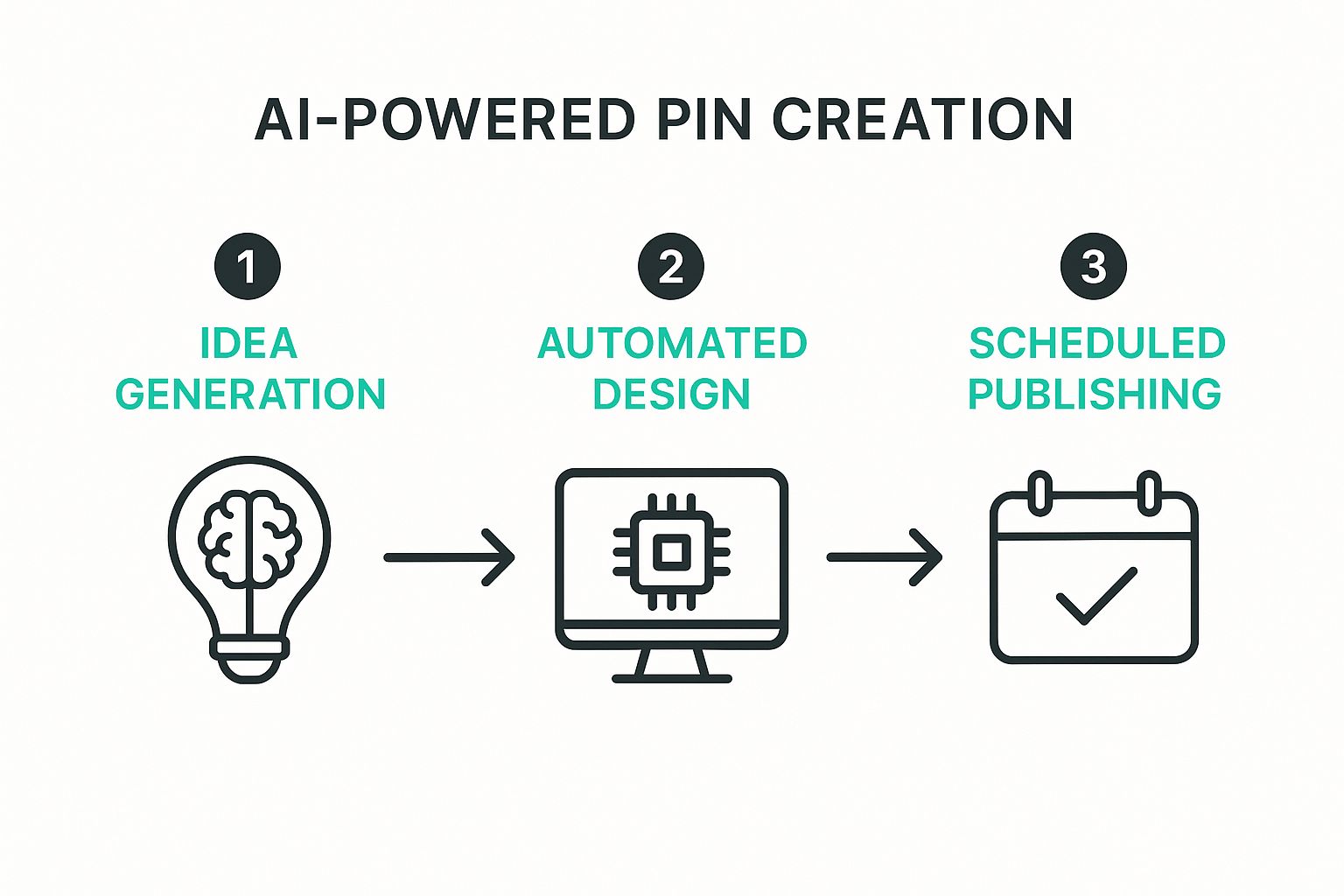
As you can see, it's a smooth handoff from getting ideas, to automated design, and finally, to scheduled publishing. Almost all the usual friction is gone.
From URL to Instant Pin Ideas
The heart of this entire workflow is surprisingly simple: just give it a URL. Whether you’re working with a blog post, a product page, or even a category page, that link is all the AI needs to kick things into gear.
The tool intelligently scans the page and pulls out the essentials:
- Images: It grabs all the relevant pictures from the page, ready for you to pick from.
- Keywords: The AI reads your headlines and content to figure out what the page is about.
- Titles and Descriptions: It even uses your page’s metadata to draft some initial pin copy for you.
For example, if you're a WordPress blogger, you can publish a new article and, moments later, have a dozen or more pin concepts ready to go. You can learn more about this specific integration in our guide to the AI pin generator for WordPress.
This "URL-first" method is what completely crushes the creative bottleneck. You're not staring at a blank screen anymore. Instead, you're instantly repurposing content you've already spent time on, turning one blog post into dozens of pins. It’s a fundamental shift that makes scaling your Pinterest efforts feel effortless.
Bringing Your AI-Generated Pins to Life
Alright, once your brand kit is locked and loaded, the real fun begins. Using an AI to create Pinterest pins isn't about hitting a button and walking away; it's more like a creative partnership. You kick things off by feeding the tool a single URL. Think of it as your creative brief. In seconds, the AI spits back a whole batch of pin designs based on that link.
This first wave of designs is your raw material. You'll get a mix of different layouts, text placements, and image crops. The AI has done the heavy lifting, but now it's your turn to step in as the creative director. This is that crucial "human-in-the-loop" step where you turn good pins into great ones.
Refining the AI's First Draft
Look, not every design the AI suggests will be a home run, and that's totally okay. The first thing I do is a quick scan of everything it generated, looking for the strongest contenders. If a design feels completely off-brand or the image choice just isn't working, I either hit regenerate for a new idea or just delete it. No point wasting time on a dead end.
I focus my energy on polishing the pins that show promise. For me, that usually means focusing on three key things:
- Punching up the Titles for SEO: The AI gives you a solid title, but you can almost always make it better. I like to think about what a real person would actually type into the search bar and then tweak the title to include stronger keywords or a more compelling hook.
- Sharpening Descriptions for Action: This is where you tell people what to do next. I always polish the pin descriptions to include a crystal-clear call-to-action (CTA). Simple phrases like "Shop the look now" or "Get the full recipe here" make a huge difference.
- Choosing the Perfect Image: While the AI pulls images directly from your link, you have the final say. I always make sure to pick the most vibrant, high-quality photo that instantly tells the story of the content.
This is where your unique expertise really comes into play. You're working with some seriously powerful tech here. It makes sense, considering Pinterest's entire search and recommendation engine is now 100% powered by AI. We're already seeing how features like smart cropping and auto-tagging have cut publishing time for creators by 42%. It's worth reading up on Pinterest’s AI advancements to stay ahead of the game.
Keeping it Consistent with Bulk Edits
When you're creating dozens of pins at once, consistency is everything. One of the best features in Pin Generator is the ability to bulk-edit. If you nail the perfect title or want to add a specific hashtag to a whole group of pins, you can apply that change to the entire batch in one click. It's a massive time-saver.
This whole workflow is about using AI for speed and scale while trusting your own intuition to perfect the final product. You're the director, guiding the AI to create pins that genuinely connect with your audience.
This powerful combo ensures every single piece of content—whether it's a simple image or a video pin—is perfectly aligned with your brand voice and marketing goals before it ever sees the light of day.
Automating Your Pinterest Schedule for Growth
Creating beautiful pins with AI is a massive win, but that's really only half the battle. If you want to truly succeed on Pinterest, consistency is everything. The platform’s algorithm absolutely loves accounts that pin regularly, but let's be real—managing a daily pinning schedule can feel like a full-time job. This is where you move from just creating pins to automating your strategy intelligently.
Once you have a fresh batch of AI-generated pins, the real goal is to get them in front of your audience at the perfect times, without you having to lift a finger. Think about a food blogger who needs to publish ten unique pins every single day across five different boards. Trying to do that by hand? It's a one-way ticket to burnout.
Building Your Automated Content Queue
This is where a feature like smart scheduling becomes your best friend. Instead of blasting all your new pins out at once, you build a content queue and let the AI handle the calendar. You just assign your new pins to their boards, and the system automatically spreads them out for the best timing and frequency. It's a simple way to guarantee a steady stream of content that keeps your account active and your audience engaged.
Of course, to take it to the next level, you can also explore specialized Pinterest scheduling tools that offer more advanced features. Many of these platforms provide deep analytics that help you zero in on the absolute best times to post for your specific audience.
The real magic of an AI workflow is turning Pinterest from a daily chore into a self-sustaining traffic machine. You can literally create an entire month's worth of content in one sitting and just let the automation handle the rest.
This automated approach keeps your profile buzzing with fresh pins, which is a huge signal to the Pinterest algorithm that your account is active and valuable. You stay visible and drive traffic 24/7, even when you’re busy with other parts of your business.
For a deeper dive, our guide on how to schedule Pinterest posts covers more advanced strategies to really maximize your reach. This is how you transform your Pinterest marketing from a constant time-suck into a strategic, automated asset that works for you around the clock.
Nail Your Pinterest Game with AI (The Smart Way)
Let's get one thing straight: using an AI to create Pinterest pins is about working smarter, not just churning out content faster. Sure, a tool like Pin Generator can spit out dozens of designs in the time it takes to brew a coffee, but the real goal is building a brand people actually connect with and trust. This is where you blend the insane efficiency of AI with your own human touch.
Think of the AI as your new, hyper-efficient assistant. It’s brilliant at the grunt work—drafting designs, writing first-pass copy, and queuing everything up. But you? You’re the creative director. You get the final say, ensuring every single pin feels like you and speaks directly to your audience.
Keep Your Brand Voice Front and Center
Pinterest is all about inspiration and authentic connection. As more AI-generated content floods the platform, keeping that genuine feel is what will make you stand out from the noise. People follow you for your unique vibe and perspective, so don't let a robot water that down.
This has become even more important since Pinterest rolled out its new transparency rules. In 2025, the platform introduced globally visible “Gen AI” labels. These tags automatically appear on images created by generative AI tools, a move designed to build trust with users by being upfront about where content comes from. If you want to dive deeper into what this means for creators, Metricool has a great breakdown of Pinterest's AI policies.
Your most powerful move is the final human review. This is the single step that separates high-quality, on-brand content from the mountain of generic, automated posts out there. It’s your guarantee that the AI’s output meets your brand's unique voice and standards.
Before you let any AI-generated pins go live, run them through this quick mental checklist:
- Read the Text: Does that headline really sound like something you'd say? Give it a quick tweak to inject your own personality.
- Check the Visuals: Is the image sharp, relevant, and on-brand? Make sure the whole aesthetic fits the board you're pinning to.
- Verify the Link: This one is non-negotiable. Always, always double-check that the pin clicks through to the right URL. A broken link is a dead end for your traffic.
Burning Questions About AI Pin Creation
Whenever you're thinking about adding a new tool to your workflow, questions are going to come up. That’s especially true when you're talking about using AI to create Pinterest pins. Let's tackle some of the biggest concerns creators have so you can jump in with both feet.
Will Using AI Hurt My Pinterest Account?
This is probably the #1 question I hear. People worry that Pinterest will somehow penalize them for using AI-generated content.
The short answer is a hard no—as long as you're smart about it. The Pinterest algorithm is designed to reward one thing above all else: fresh, high-quality content posted consistently. And that's exactly what an AI tool helps you do, just way faster.
The key is to avoid spammy, repetitive behavior. You're not just blasting out identical pins. You're using AI to quickly generate unique pin variations that all lead back to valuable content on your website. That’s a win in Pinterest’s book.
Can I Actually Edit the Pins the AI Makes?
Of course! And honestly, you absolutely should. The best way to use a tool like this is to let the AI do the heavy lifting—the initial creation—and then you come in to add your own strategic, human touch.
A good AI pin creator should make it dead simple to:
- Rewrite the AI's suggested titles and descriptions to nail your SEO.
- Swap out images for visuals you know will stop the scroll.
- Tweak colors, fonts, and layouts to stay perfectly on-brand.
Think of it as a "human-in-the-loop" approach. It ensures every single pin is polished and perfectly aligned with your goals before it ever sees the light of day.
The AI isn’t your replacement; it's your new creative assistant. It scans your blog post, pulls out the important keywords and images, and gives you a fantastic first draft. Your job is to add that final layer of expertise that makes it irresistible to your audience.
Ready to stop wasting hours in Canva and start driving serious traffic? With Pin Generator, you can create hundreds of high-quality, on-brand pins in just a few minutes. Give it a try today at https://pingenerator.com.