
Amazon Affiliate Guide: How the Program Works and Pays
14 November 2026
You pinned a linen duvet cover, a ceramic mug, and a pair of walking shoes you own. Three weeks later your Associates dashboard reads $4.13, and you're staring at it wondering whether the whole idea is broken or just slow.
It's slow, and part of the reason is that most beginner guides measure the wrong thing. Clicks feel like progress. They aren't income. Amazon pays you a percentage of what ships, so a thousand clicks on cheap electronics can earn less than forty clicks on a mattress topper. Judging an amazon affiliate operation by traffic instead of product mix is the single most expensive habit a new publisher picks up.
What follows is the walkthrough an experienced publisher would give a friend: how the mechanism works, what each category pays, how approval works, what costs you commissions, how to read your own reports, and how to run a month-long test that tells you the truth about a pin.
Table of Contents
- How the Amazon Associates Program Works
- Commission Rates by Category at a Glance
- How to Get Approved and Set Up Your Account
- Cookie Window, Disclosure and Costly Mistakes
- Reading Your Associates Reports
- Promoting Amazon Links on Pinterest and a 30-Day Pilot
How the Amazon Associates Program Works
Think of yourself as the shop assistant who knows the aisle. A shopper asks where to find a good pour-over kettle, you point at the shelf, the store handles the till, the bagging and the returns, and the store pays you a small cut for the introduction. Amazon never asks you to hold inventory, take payment or answer a complaint. You recommend, Amazon sells, Amazon pays.
Here's the whole chain, worth memorizing because every later decision hangs off it.
- The click. A reader taps your tracked link. The link carries your Associate ID and a tracking ID, so Amazon knows which of your pages sent the visitor.
- The cookie. Amazon drops a cookie in that browser. It's the receipt that ties a future order back to your introduction.
- The purchase window. If the reader orders inside that window, the order is attributed to you.
- The qualifying items. You aren't paid only on the kettle. Anything qualifying in that same order pays, which is why one click can produce several commissions or none.
- The payout. Earnings post to your account, sit there until you cross the payment threshold, and then go out on the program's schedule.
Notice what's missing from that list: payment for clicks. Clicks cost you nothing and earn you nothing. Only shipped, qualifying items pay.
The mechanism is old and stable. Amazon's launch announcement from July 1996 described roughly 1.1 million book titles and more than 300 enrolled sites within days, and the model it sketched, recommendation plus merchant-run checkout, is still exactly what you're doing today.
The channel is big enough that Amazon reports it to shareholders. Affiliate commissions recorded there totaled $128 million in the first quarter of 2024, according to We Can Track's report of Amazon's disclosed figure. That's the pool you're drawing from, one referral at a time.
Run one real purchase through all five steps in your own account before you build anything else. Find a shipped order, then trace it backwards: which tracking ID, which link, which page, which click date. If you can't complete that trace, you don't yet know which of your pages works.

Commission Rates by Category at a Glance
A Pinterest pin can attract plenty of clicks and still earn little if it promotes a low-rate category or a small basket. Start with the standard rates, then compare the likely commission per order.
| Category group | Standard rate | What it means for you |
|---|---|---|
| Gift cards, wireless service plans, certain subscriptions | 0% | No commission on these categories |
| PCs and PC components | 2.5% | A low rate makes order value matter |
| Home, furniture, pets, tools, sports, outdoors | 3% | Basket size affects the return |
| Physical books, kitchen, automotive | 4.5% | Compare the rate with typical order value |
| Luxury Beauty | 10% | A higher rate can still mean a smaller commission if the order is small |
Amazon calculates commission on the item's sale price, not its list price, as Amazon's commission help page explains. For example, an $80 discounted item at 3% earns $2.40, rather than $3 based on a $100 list price. Coupons, deals and lower sale prices can reduce the amount further.
The rate is only one part of the calculation. A $100 item at 3% earns $3; a $30 item at 10% earns $3 as well. The higher percentage does not guarantee a larger commission.
Why the rate alone doesn't decide earnings
Expected earnings per 1,000 impressions = impressions × outbound click rate × conversion rate × average sale price × commission rate. Since these factors multiply, a weak one can pull down the whole result.
Compare products with the same traffic. A home product with a $200 average order at 3% earns $6 per sale. A beauty product with a $30 order at 10% earns $3. The lower-rate product pays more because its basket is larger.
Practical rule: Compare products by expected commission per click, not by the headline percentage.
Rates can vary by marketplace and change over time. Check the current rates in your Associates account before choosing products, and base your estimates on the category and basket you expect to reach.
How to Get Approved and Set Up Your Account
Approval isn't a formality you clear in five minutes. Amazon is deciding whether your site is a place where a shopper gets real help, and it keeps deciding after you're in.
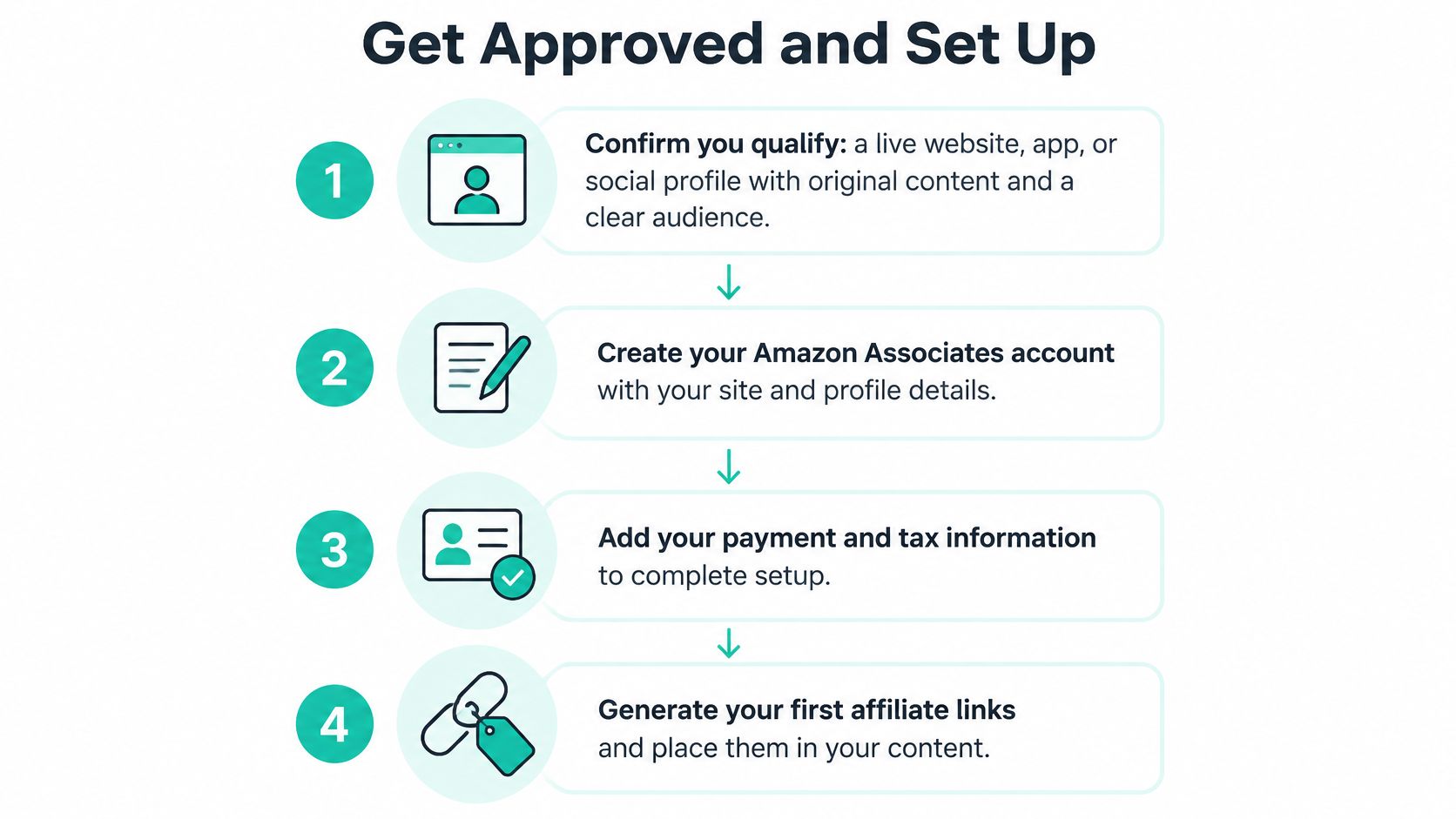
- Confirm you qualify. You need a live website, app or public social profile with original content and a recognizable audience. Amazon reviews the property, not your intentions, so a site of scraped descriptions fails.
- Create the Associates account. Store name, country, contact details. Use your legal name here, because the tax paperwork later has to match it.
- Describe each property accurately. List the topics you cover and where traffic comes from. If Pinterest is part of the plan, say so. What you declare is what gets reviewed, and a mismatch between the declaration and the live site is a rejection waiting to happen.
- Wait for the review. It isn't instant. Approval can arrive before the full check, which happens once sales start arriving.
- Reach three qualifying sales within 180 days. If you don't, the account closes. That deadline means content should be written and published before you apply, not after. Your own purchases don't count.
- Add payment and tax details. Choose a payment method and file the tax form your country requires. Earnings can sit unpaid without them.
- Open your tracking IDs. One per property or campaign, so your reports can separate a Pinterest test from an old blog post.
- Build links with SiteStripe or the link builder. Every product you mention gets a tracked link, never a bare product URL copied from the address bar.
If the approval step worries you, this walkthrough of the Amazon affiliate approval process covers what reviewers look for on a new site.
Before publishing anything, click one of your own links in a private browser window and check that the Amazon page opening carries your tracking ID in the address. A link without the tag produces clicks that never pay, and the report will never tell you why.
Cookie Window, Disclosure and Costly Mistakes
The cookie doesn't behave like a permanent claim on a customer, and beginners lose money assuming it does. A standard referral cookie lasts about 24 hours from the click. Buy the next morning and you're credited. Come back a week later from a saved pin and you usually aren't.
There's one useful extension. If the shopper adds an item to the cart inside that window, that item stays attributed for up to about 90 days, but only that item, not the whole cart. So the cart is not a license to assume a later order pays.
That mechanic should change how you write. Pinterest content gets saved and revisited for weeks, so the pin with 200 saves that converts on day 12 may pay you nothing. Content that settles a decision in a single session, a comparison, a shortlist with reasons, a step-by-step with the product in place, converts while the cookie is still alive.
Why the disclosure has to sit next to the link
A commission is a material connection under the FTC's Endorsement Guides, which means it should be disclosed whenever it could affect how someone weighs your recommendation. The guidance is specific about placement: not behind a profile link, not a vague label, not an unrelated legal page. It offers plain wording such as "I get commissions for purchases made through links in this post."
Three placement rules do most of the work:
- Near the first link. Above the fold on a page, in the first two lines of a pin description.
- Visible on mobile. Check on a phone, where descriptions get truncated and a buried line disappears.
- Repeated per surface. Every page, pin description and video description that carries a link gets its own line.
Plain-language template: "Some links here are affiliate links. I earn a commission if you buy through them, at no extra cost to you."
Disclosure doesn't license loose claims. Don't publish a price you can't verify this week, don't describe testing you didn't do, and keep your description matched to the product page. "Check current price" ages better than a hardcoded number.
The five mistakes, ordered by what they cost
| Pitfall | What it costs you | Fix |
|---|---|---|
| Pins without a disclosure | Platform removal and FTC exposure | Add a plain affiliate disclosure to every description |
| Out-of-stock or repriced products | Frustrated clicks and misleading pins | Recheck availability and price before scheduling |
| Low-commission categories as the default | Little income per click | Rank products by expected commission value |
| Masked or shortened Amazon links | Possible program policy violation | Use direct tracked links |
| Scaling before three qualifying sales | Wasted content and a closed account | Earn first sales on a small set of pages |
Two rows deserve more than a table cell. On links, the Associates Program policies define what counts as qualifying revenue and how links must be formatted, and that document, not a blog summary, decides whether a sale pays. Read it once properly.
On scaling, the last row ends businesses. Every hour spent scheduling hundreds of pins on an account with no qualifying sales is an hour invested in something that can be shut. Get the first sales from five pages you can defend, then add volume.
Reading Your Associates Reports
Your account has one job here: tell you which step is failing. Read the numbers in order and the diagnosis is usually obvious.
Start with clicks by tracking ID. Then ordered items, then shipped items, then returns and cancellations, and only after that earnings. Ordered and shipped are not the same number, and a returned item reverses the commission, so judge a pin on net earnings once returns settle rather than on the day the order lands.
Here's a worked check. Say a pin earns 500 impressions, 10 clicks, and one shipped qualifying order of a $40 item at 3%. That's $1.20, which works out to $2.40 per 1,000 impressions. Use the sale price and rate shown in your own account for your figure.
The comparison unit: earnings per 1,000 impressions, because it folds traffic, click rate, conversion and rate into one number you can rank.
Payout timing and the minimum threshold live in your account settings and vary by marketplace and payment method, so read them there rather than trusting a remembered figure. Tax details must be on file before money moves.
The rule that keeps your schedule honest: a pin keeps its slot when it produces at least one qualifying sale inside a fair test window, compared within its own commission tier, and it gets retired when it produces none after that window. Compare like with like, because a luxury beauty pin and a PC components pin aren't running the same race.
Promoting Amazon Links on Pinterest and a 30-Day Pilot
A pin is a small poster with one job: earn a click from someone who is already shopping. Vertical, roughly 2:3, product shown in use rather than floating on white, a benefit headline a person would say out loud, and a description led by the phrase you want to rank for.
Here's the kind of moment strong product pins tend to show:

Send that click to a page you control, a comparison, a shortlist, a how-to that puts the product to work, rather than straight to a bare product URL. You keep the reader, you can disclose properly, and one page can carry several tracked links instead of one.
The workflow, in order:
- Rank by expected commission. Rate times realistic order value, not how photogenic the item is.
- Import the product from its Amazon URL or a catalog, so price and image stay attached to the right record.
- Write title, description and alt text around one Pinterest search phrase, and keep them consistent.
- Add the disclosure line to every description before anything publishes.
- Assign two or three boards where the pin fits. Spraying it across twelve irrelevant boards buys nothing.
- Schedule one or two pins per board theme per day, rather than ten in one hour.
- Update links in bulk when a tracking ID changes, instead of editing pins one at a time.
If you'd rather watch the workflow before running it, this walkthrough covers the same ground visually.
The 30-day pilot
Pick ten products from two commission tiers, five each. In your Associates account, confirm the current rate, the price and the availability for every one, then create a tracked link for each. Generate three pins per product with different images and one search phrase each. That's thirty pins, a schedule you can maintain, and two groups you can compare.
On day 30, pull clicks, orders and earnings per pin, split by tier, using the metrics defined in the reporting section. Keep the performers, refresh their images with a new angle, and retire the rest without sentiment.
The pilot question isn't "did it get traffic?" It's "which tier earned more per 1,000 impressions?"
Expect month one to look like steady clicks and a handful of qualifying sales. If a tier produces plenty of clicks and no orders, the fault lies in the product choice or the landing page, not in the posting schedule, and more pins won't fix it.
The importing, writing, scheduling and link maintenance are the mechanical parts, and pairing Pinterest traffic with Amazon products is largely an automation problem. Pin Generator builds pins from Amazon product URLs, syncs products from Amazon alongside Etsy, Shopify and WooCommerce, and the Affiliate Links bulk update rewrites the outbound URL across existing pins when a tracking ID changes. That leaves your attention on the decision that moves income: which products you choose and which tier you double down on next month.
Pin Generator takes the repetitive half of an amazon affiliate operation off your desk: product pins built from Amazon URLs, AI-written titles and descriptions around a real search phrase, and one bulk update when your tracking links change. If you'd rather spend your time choosing products than exporting images, start a free preview of Pin Generator and see your first pins in your own brand colours.