
Automate Content Creation Across 5 Platforms with Content Generator (New 2025 Tool)
Automate Content Creation Across 5 Platforms with Content Generator (New 2025 Tool)
13 June 2026
The average small business spends 6-10 hours a week creating and scheduling social media content. Between writing captions, resizing graphics, and posting manually, it’s no wonder most creators struggle to stay consistent online.
Social media teams, small businesses, and solo creators alike are always looking for faster, smarter ways to create content without sacrificing quality. Between trends, captions, and constant algorithm changes, staying visible online can feel like a full-time job. That’s where automation tools powered by AI come in, helping you generate content at scale so you can focus on strategy and connection.
If you enjoy using Pin Generator for Pinterest, you’re going to love Content Generator, our new AI-powered tool that helps you automate content creation across five platforms at once: Instagram, Facebook, LinkedIn, Pinterest, and X (Twitter).
What Is Content Generator (and How It Works)
Content Generator is the newest tool from the Pin Generator team, built to simplify and scale your social media workflow. Instead of creating individual posts for every platform, you can now plan, generate, and schedule content for five platforms in one go – complete with captions, images, and your brand identity.
This tool was designed for people who are tired of switching between Canva, schedulers, and spreadsheets just to stay visible online. With Content Generator, you can plan an entire month’s worth of posts in one sitting, keeping everything consistent and automated.
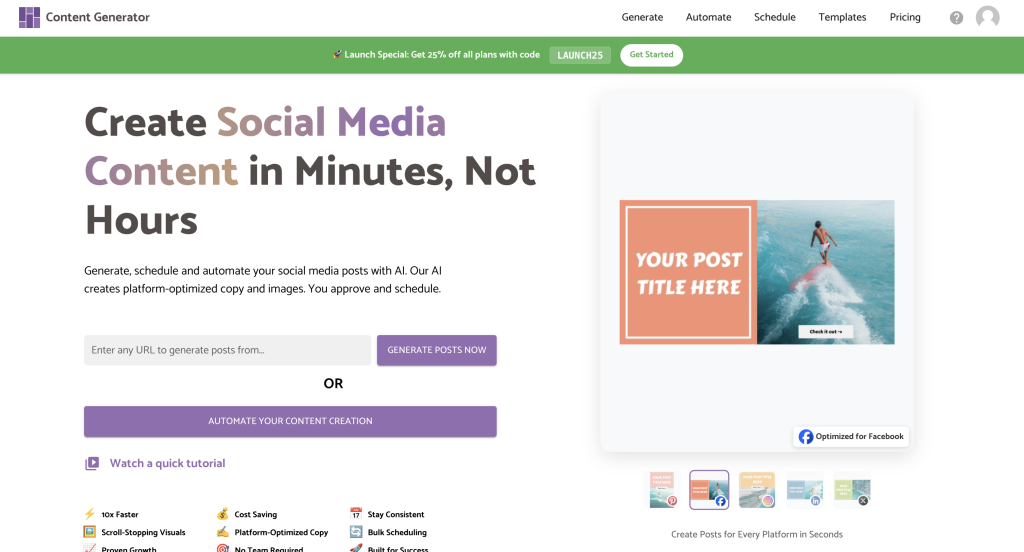
>> Option 1: Generate Content Instantly
Similar to Pin Generator, drop in any URL, and Content Generator will instantly scan your site and turn your pages into ready-to-post content. It automatically pulls your titles, descriptions, and images, formats them for each platform, and applies your chosen template pack and brand colors.
This is perfect if you want to quickly promote a new blog post, announce a product, or share updated services, without needing to rewrite or resize anything.
>> Option 2: Automate Your Content Creation
This is where things get exciting! You can now set up a fully-automated 4-week content automation workflow that creates a month’s worth of posts every four weeks, automatically sent to your inbox for review and scheduling. It’s like having a full-time content creation staff member, but for a fraction of the cost.
Here’s what it looks like:
- Add your website or sitemap
- Connect your social profiles
- Choose how often to post on each platform
- Pick from template packs to keep your visuals consistent
- Customize your AI tone and brand colors
- Preview everything before you hit Generate
Once you’re done, your content is automatically created and sent straight to your inbox for review and scheduling. You can edit the copy, swap images, or tweak messaging before approving the posts.
If you’d rather watch this process in action, check out our latest YouTube video here:
Who Content Generator Is Best For
If you’re running a business or brand online, you already know how hard it is to keep up with content, and that’s where Content Generator shines. It’s built for anyone who wants to stay consistently posting without spending hours writing, designing, and scheduling posts every week.
It’s perfect for:
- Small business owners who want to promote new products or offers without hiring a social media manager.
- Bloggers or creators who regularly publish content and want to share it automatically across multiple platforms.
- Agencies or freelancers who manage several client accounts and need a faster, more organized system.
- Service-based businesses that rely on staying visible between launches or projects to keep their audience engaged.
Whether you post daily or a few times a month, Content Generator helps you stay active and visible while freeing up time to focus on the parts of your business that actually move the needle.
How Content Generator Differs from Pin Generator
If you’ve used Pin Generator, you’ll feel right at home with Content Generator, but there are a few key differences to note. Instead of creating pins for a single platform, Content Generator lets you create and schedule content for five platforms at once: Instagram, Facebook, LinkedIn, Pinterest, and X (Twitter).
Features include:
- 4-Week Automation (New!) – Set your content creation on autopilot. Content Generator automatically generates a full month of posts every four weeks and delivers them straight to your inbox for review, editing, and scheduling.
- Multi-Platform Posting – Choose exactly which platforms you want to post on and how often. You can set posting frequency, time zones, and even customize your posting windows, all from one dashboard.
- Platform-Ready Templates – Every post is built using templates that are already sized and shaped for each platform. That means your content looks clean, professional, and ready to post without manual resizing.
- Smart Image Scaling – The tool automatically adjusts your existing images for each platform while maintaining your brand’s colors, fonts, and overall look.
- AI-Powered Copy and Design – Generate captions and visuals that match your brand voice. You can select tone (casual, professional, friendly, etc), decide whether to include hashtags or links, and apply your brand palette.
Right now, Content Generator focuses on static image and text posts, so it doesn’t yet support videos, RSS feeds, or product integrations (yet!), though these features are likely planned for future updates.

Try Content Generator (Exclusive Launch Offer)
Content Generator is officially live, and for a limited time, you can get 25% off all plans with the code: LAUNCH25.
Whether you’re creating posts for your own brand, managing clients, or running multiple businesses, this tool gives you back your time while keeping your social feeds consistent and on-brand.
Try it for free at contentgenerator.io and you’ll also get your first 4-week content automation feature completely free too!
Try it today, and let’s get generating!