
How to Audit Your Pinterest Account
23 June 2026
If you’ve been pinning consistently but you’re still not seeing the impressions, clicks, or sales you were hoping for, you’re probably wondering what you’re doing wrong. The frustrating part is that most people in this situation already think they’re doing everything right – they’re showing up, their boards are set up, their profile looks fine, and yet they’re still not getting the traction they expected.
While your Pinterest account may look good, it might be missing a few key elements. Most people don’t have a clear sense of what makes a Pinterest account perform well versus one that just looks fine on the surface, so they end up guessing at fixes instead of identifying the real problem. A simple Pinterest audit can solve this problem, however most people aren’t sure what to check or frustrated by the manual process of following an audit found online.
Don’t worry, we’ve got you covered. This guide walks through why your account might be underperforming, how to run a completely free Pinterest audit, how to read your results once you have them, and what to actually do with that information so your account starts moving in the right direction.
Why Your Pinterest Account Might Be Underperforming
If you’ve been on Pinterest for a while and you’re not seeing growth, the instinct is usually to create more content, switch up your designs, or start fresh on a new board. Sadly, none of this helps much if you don’t actually know what’s broken. You could be creating pins every single day and still see low impressions because something at the profile level is holding you back, or you might also have hundreds of pins but only a handful are successfully driving outbound clicks.
Pinterest gives you analytics, but analytics tell you what happened, not why it happened or what to do about it. An audit looks at your account from the outside in. It checks the things that affect how Pinterest reads and distributes your content, like whether your profile is fully set up, whether your pins have descriptions and links, whether your boards are active, and whether you’re pinning at a frequency that signals your account is worth showing to people.
We’re covering all of this in detail, including a full walkthrough of the audit tool, on our YouTube channel. You can watch the video here:
How to Run a Free Pinterest Audit
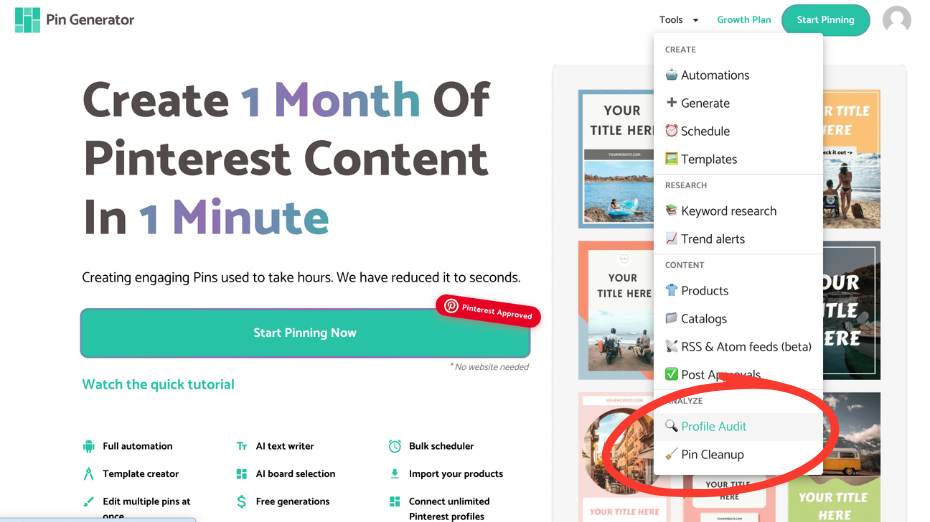
To run your audit, head to pingenerator.com and look for the ‘Tools’ menu in the top right corner. Scroll down to the bottom and you’ll see ‘Profile Audit.’ If you don’t already have a Pin Generator account, this is where you’ll be prompted to create one, and it’s free to do. Once you’re in, connect your Pinterest profile and hit ‘Run New Audit’.
From there, Pin Generator runs through a series of checks on your account automatically. You don’t have to click through anything or manually look anything up. When it’s done, it emails you your results, and the full report stays in your account for 90 days so you can refer back to it.
How to Read Your Pinterest Audit Results
When your audit comes in, the first thing you’ll see is your overall score out of 100. Below that you’ll see your core account stats such as monthly views, followers, total pins, boards, impressions, and outbound clicks.
Pin Generator knows exactly what to check and easily signals what’s working and what needs improvement, which is the part most people get stuck on when they try to audit their own account manually. Without a tool doing this for you, you’d need to cross reference your analytics with a checklist you found somewhere online, manually click into dozens of pins to check for missing data, and try to remember what good Pinterest SEO actually looks like. Pin Generator condenses all of that into one report so you’re not piecing it together yourself.
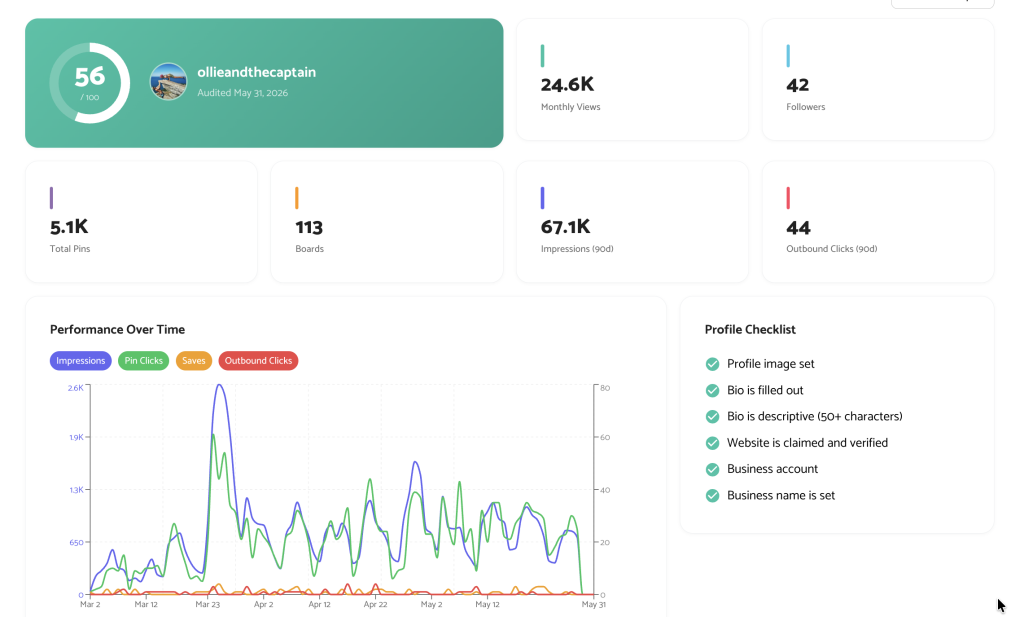
You’ll see a top level profile checklist, which checks things like whether your profile image is set, your bio is filled out and descriptive enough, your website is claimed and verified, and whether you’re set up as a business account. These might seem like small details, but they’re often the first things Pinterest looks at to understand what your account is about, so getting them right matters more than people expect.
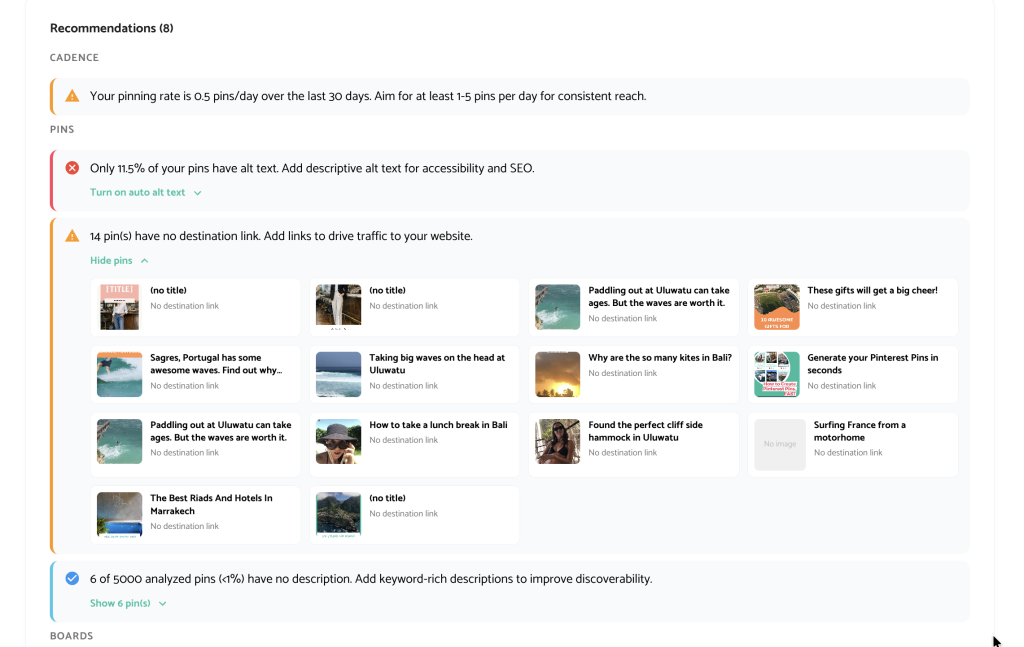
Pin Generator also looks at your actual pins. It flags which ones are missing alt text, descriptions, link destinations, and which ones have broken links. It breaks down your content format distribution and your pinning cadence over the last 7, 30, and 90 days. A low cadence can get your account flagged as dormant, which means Pinterest isn’t seeing enough activity to prioritize showing your content.
You’ll also see a board analysis showing which boards are active, stale, or empty, and a recommendations section at the bottom that pulls everything together and tells you what to address first. Instead of leaving you to interpret a wall of data, the audit essentially does the thinking for you and hands you a clear next step.

How to Fix What’s Not Working
This is what makes the Pin Generator audit stand out from a simple checklist. It doesn’t just perform the audit and tell you what’s broken or what’s performing well, but actually links directly to your pins and boards on Pinterest so you can make corrections right away. You click through and the changes happen instantly, and where possible, Pin Generator connects you to built in tools that help clean up your account or create more of what’s already working.
Start with the recommendations section since it’s already prioritized for you. Pins flagged with missing descriptions, no link destination, or broken links can be fixed directly from the audit. Underperforming pins can be removed, and there’s a pin cleanup automation that deletes up to 10 pins at a time at a safe pace so it doesn’t trigger any bot-like flags on your account.
If your top performing pins show up in the audit, that’s worth paying attention to too. Knowing what’s already working gives you a clear direction for what to create more of, rather than guessing at new ideas or designs that may not perform any better. This is also where Pin Generator is more than just a diagnostic tool, because instead of handing you a report and leaving you to figure out the fix on your own, it gives you a direct path from problem to solution inside the same platform.
A low cadence and a dormant account flag almost always point to the same fix, getting on a consistent posting schedule. Pin Generator’s automation flow handles that for you. You connect your website or shop, describe your pins, set your AI preferences, choose your boards, and the system creates and schedules pins for you on an ongoing basis.
How to Get Started
Running your audit and then setting up automation back-to-back is one of the most efficient things you can do for your account. You identify the gaps, fix what you can directly, and put a system in place to stay consistently pinning. Most people find that once the audit and automation are both in place, Pinterest stops feeling like a guessing game and starts feeling like something they can actually keep up with.
Try Pin Generator’s free Pinterest audit today and see exactly where your account stands.
Let’s get generating!