
How to Schedule Pinterest Posts for Maximum Growth
3 August 2025
When you're looking to schedule Pinterest posts, you have two main options. You can use Pinterest’s native, built-in scheduler for simple, one-off posts, or you can leverage a more powerful third-party scheduling tool like Pin Generator to manage bulk scheduling, automate content, and gain deeper insights into your performance.
The right choice depends on your specific goals. Are you a casual pinner, or are you looking to turn Pinterest into a powerful traffic and growth engine for your business?
Why Smart Pinterest Scheduling is a Growth Superpower
Let's get one thing straight: figuring out how to schedule Pinterest posts isn't just about saving a few minutes. It's a core strategy for real, sustainable growth.
The Pinterest algorithm absolutely loves consistency. It's designed to reward creators who show up predictably. If you post in random bursts and then go silent for weeks, you'll never build any real momentum. A steady, reliable stream of content tells the algorithm you're a serious creator, and that often translates to better visibility over time.
More than that, it builds a relationship with your audience. When your followers know they can count on you for fresh ideas on a regular basis, they're far more likely to engage, save your Pins, and click through to your site. This simple shift takes you from just "posting when I remember" to "planning for maximum impact."
The Magic of Consistency and Timing
A solid scheduling system, whether you use the native tool or a dedicated app, is your foundation for growth. But it’s not just about posting—it’s about posting at the right times. Think about it: you want your content to land in front of people when they’re actually scrolling.
We're not just guessing here. An analysis of over 2 million posts showed a clear pattern: the algorithm strongly favors accounts with a consistent and predictable schedule. This data revealed that sweet spots for posting often pop up around 12 pm, 6 pm, and 8 pm, though the best frequency and content type can change throughout the week.
For example, a killer Monday schedule might look like this: one inspirational Pin in the morning to catch the early birds, a couple of product Pins in the afternoon during a lunch break scroll, and then three or four juicy educational Pins in the evening when users are in learning mode.
Choosing Your Scheduling Path
So, which tool is right for you? It really comes down to your needs and how seriously you're taking your Pinterest strategy. To schedule Pinterest posts effectively, you can use the platform's own free tool or invest in a more advanced solution.
To help you decide, let's break down the two main options.
Pinterest Scheduling Methods At a Glance
| Feature | Pinterest Native Scheduler | Third-Party Tools (e.g., Pin Generator) |
|---|---|---|
| Best For | Beginners, casual users, or one-off posts. | Bloggers, marketers, and businesses needing efficiency. |
| Cost | Free | Varies (free and paid plans available) |
| Scheduling Horizon | Up to 30 days in advance | Often unlimited or much longer (e.g., months ahead) |
| Bulk Scheduling | No, Pins must be scheduled individually | Yes, schedule hundreds of Pins at once |
| Smart Time Slots | No, you must choose times manually | Yes, suggests optimal times based on audience activity |
| Analytics | Basic, platform-level data | In-depth performance tracking for Pins and boards |
As you can see, Pinterest's own scheduler is a perfectly fine starting point. It's free, it's simple, and it gets the job done for basic needs.
But for anyone running a business, blog, or brand, third-party tools are where the real magic happens. They unlock powerful features like bulk scheduling from a spreadsheet, AI-driven time slots, and analytics that go way beyond what Pinterest offers natively. If you're curious about dialing in your timing, our guide on the best time to post on Pinterest is a great place to start.
And remember, scheduling is just one piece of the puzzle. To get the most out of your efforts, it's smart to integrate your Pinterest activity with broader AI-powered social media engagement strategies. This holistic approach ensures every Pin you schedule is set up for maximum success.
Scheduling Posts with Pinterest’s Native Tool
If you're eager to get your Pinterest content organized right now, you don't have to look any further than Pinterest itself. The platform has a free, built-in scheduler that’s perfect for getting your feet wet. This is the most direct way to schedule Pinterest posts without needing any external tools or subscriptions.
Using this tool is incredibly straightforward. As long as you have a Pinterest business account, the option shows up right inside the normal Pin creation screen on your desktop.
How to Natively Schedule a Pin
What’s nice is that the process feels completely seamless because it’s baked right into the platform you’re already using. If you know how to create a Pin manually, there's practically zero learning curve.
Here's how it works:
- Head to your Pinterest home feed, click 'Create' in the top-left corner, and pick 'Create Pin'.
- Next, build out your Pin. Upload your image or video, then fill in all the important stuff: a catchy title, a keyword-rich description, alt text, and of course, the destination link.
- Now, instead of hitting that big red 'Publish' button, look right next to it for the 'Publish at a later date' option.
- A little calendar and time selector will pop up. Just choose the exact date and time you want your Pin to go live.
- Click the red 'Schedule' button, and you're done. Your Pin is officially in the queue and will publish automatically.
You can even schedule Pins from the Pinterest mobile app on iOS or Android, which is handy for planning content when you’re not at your desk.
Understanding the Limitations
While the native scheduler is a fantastic entry point, it comes with some serious limitations that you’ll bump into pretty quickly if you're serious about your marketing. Knowing these trade-offs helps you spot when it’s time to upgrade to a more powerful tool.
The biggest restriction is the scheduling window—you can only schedule Pins up to 30 days in advance. This makes it impossible to plan out long-term seasonal campaigns or batch your content creation for a whole quarter.
My Takeaway: The built-in scheduler is great for one-off posts or very light use. It just doesn't have the horsepower for a real marketing strategy since you have to schedule every single Pin, one by one.
On top of that, the tool offers no bulk scheduling or a visual content calendar. Want to post five Pins a day? You have to go through the entire scheduling process five separate times. That manual work gets incredibly tedious as you start to scale up.
Finally, you won’t find any "smart" features. The tool won't give you suggestions for the best times to post based on your audience activity. You're left to guess or dig through your analytics manually to figure out your best posting slots.
These limitations are exactly why so many creators and businesses eventually move to dedicated scheduling tools like Pin Generator. While Pinterest’s own scheduler is a great launching pad, a dedicated tool gives you the efficiency, insights, and advanced features you need to turn scheduling from a chore into a real growth strategy.
Unlocking Advanced Features with a Dedicated Tool
While Pinterest's own scheduler is a decent starting point, it's a bit like using training wheels. Once you're ready to get serious about your Pinterest marketing—and I mean turning it into a consistent source of traffic and sales—a dedicated scheduling tool isn't just a nice-to-have; it's essential. This is where you graduate from just posting to building a professional, automated strategy.
Platforms like Pin Generator or other post scheduling tools are designed specifically for efficiency and growth. They pick up right where the native tool leaves off, giving top creators and brands a real competitive edge. It’s not just about scheduling anymore. It’s about building an automated content machine that works for you 24/7.
Going Beyond Basic Scheduling
The magic of these tools is in the features that save you an incredible amount of time and give you the data you actually need. Forget scheduling one Pin at a time. Imagine uploading and scheduling hundreds at once. Being able to batch-create your content for weeks or even months ahead is a total game-changer, especially for busy entrepreneurs.
These tools are also central to mastering marketing workflow automation, helping you streamline tasks that go way beyond Pinterest. You can set up a seamless system where your content flows from creation to scheduling and analysis with very little manual input.
Key Takeaway: The real goal here is to shift your energy from the tedious mechanics of posting to the high-level strategy of what to post and why. A dedicated tool frees you up to do exactly that.
AI-Powered SmartSchedules and Deep Analytics
One of the biggest wins is the AI-powered smart scheduling. Instead of just guessing the best times to post, these platforms dig into your audience's engagement patterns and automatically suggest the optimal time slots. This means your Pins go live precisely when they have the best shot at being seen, saved, and clicked.
The analytics are also way more insightful. You can track the performance of individual Pins, boards, and your entire strategy with a level of detail Pinterest’s native analytics just can't provide. This data tells you what’s really resonating, so you can double down on what works and fine-tune your approach for better results. Exploring different Pinterest tools can reveal even more ways to optimize your strategy.
By 2025, using these tools has become critical, especially for managing multiple campaigns. Data consistently highlights the power of long-term planning—Pins between one and two years old can rack up an average of 68 saves in a 90-day period. Tools that let you plan seasonal content 45 to 60 days in advance are crucial for catching these trends. Research even shows that Pins published through a scheduler often get more outbound clicks, proving that strategic timing doesn't just boost visibility; it drives real engagement.
How to Schedule Pins Using Pin Generator
If you're ready to move past Pinterest's built-in scheduler and get serious about saving time, a dedicated tool like Pin Generator is your next step. This isn't just about scheduling; it's about creating a powerful, automated content machine that works for you 24/7.
The whole process is designed to be incredibly simple. You just connect your content, set a schedule, and let the tool do the heavy lifting.
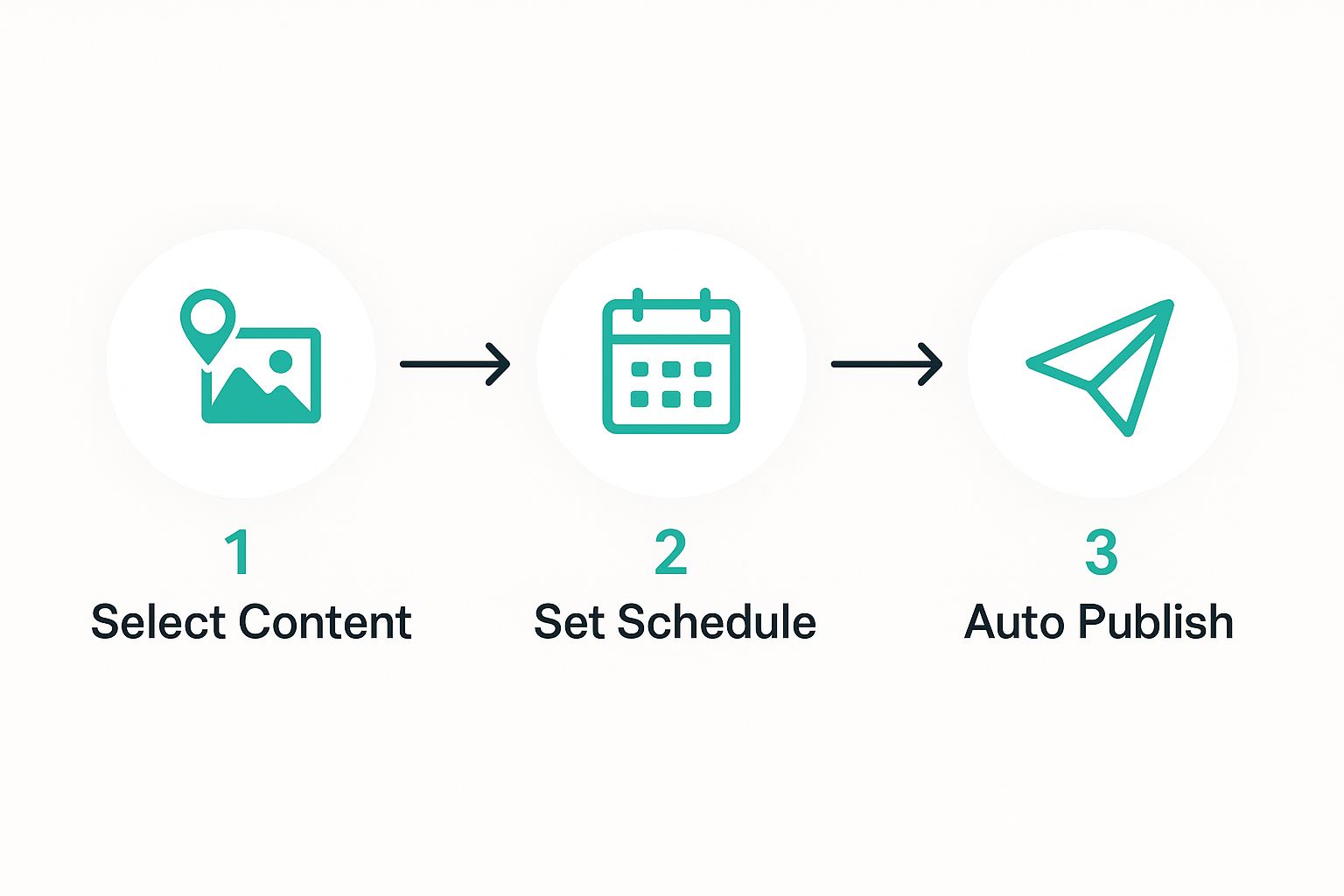
The real magic here is the automation. Once you’ve set everything up, the platform handles all the publishing without you needing to touch a thing.
Connecting and Setting Up Your Account
First things first, you need to connect your Pinterest account. It's a quick, secure process that gives Pin Generator permission to post for you. Once that’s done, you’ll land on the dashboard—think of this as your new command center for Pinterest.
Before you dive in, I always recommend taking a few minutes to configure your brand settings. You can preset your specific brand colors, fonts, and even upload your logo. This is a game-changer for brand consistency, ensuring every single Pin that goes out looks and feels like it came from you.
From URL to Scheduled Pin
Here’s where you'll see the biggest time savings. One of Pin Generator's most powerful features is creating and scheduling Pins straight from a URL. Say you just hit "publish" on a new blog post. Instead of spending the next half hour manually creating five different Pin designs, you can just paste the link.
The tool instantly gets to work, pulling images and text from your page to generate multiple design templates. From there, you can lean on the built-in AI assistant to whip up several SEO-friendly titles and descriptions in just a few clicks.
My typical workflow looks something like this:
- Plug in a URL: I grab the link to a blog post, product page, or whatever I'm promoting.
- Pick the Designs: I'll browse the automatically generated Pin designs and pick a few I like, or tweak them slightly.
- Let AI Handle the Copy: I use the AI writer to generate a handful of keyword-rich titles and descriptions.
- Choose the Boards: Finally, I select the most relevant boards to send the Pins to.
Then, you just decide whether to publish right away, add it to your queue, or schedule it for a specific time. What used to be a 20-minute chore is now done in two minutes. Easy.
Building Your Content Calendar
This is where you graduate from simply scheduling Pins to building a real, strategic content plan. Pin Generator gives you a visual content calendar where you can see your entire month laid out in front of you. You can literally drag and drop Pins to different days and times, which makes it super easy to create a balanced content mix.
One of my favorite features is setting up recurring schedules for my best evergreen content. Let's say I have a top-performing blog post. I can schedule new, fresh Pins for that post to go out every 30 days to different boards. This keeps my most valuable content constantly circulating and driving traffic, long after I first wrote it.
Pro Tip: Use the calendar to find the weak spots in your strategy. Are you posting too much of one type of content on certain days? Forgetting to schedule video Pins for the weekend? When you can see your whole plan visually, it's so much easier to spot these imbalances and fix them on the fly.
Once you get the hang of these features, you’re not just saving time—you’re building a smart system that pushes your content out strategically for the biggest possible impact. This is how you truly learn how to schedule Pinterest posts like a pro.
Developing a Powerful Scheduling Strategy
Alright, so you know how to use a scheduler. That's the easy part. The real magic—and the real results—comes from the strategy behind what you're scheduling and when it goes live.
Let's move past the generic "best times to post" advice. What works for a food blogger might be a total flop for an e-commerce brand selling tech gadgets. Your first move should be to dive headfirst into your own Pinterest Analytics. This is where you'll find your audience's unique peak activity times.
Look at your data. Seriously. Find out when your followers are actually online and engaging. Aligning your schedule with their habits is one of the simplest, yet most powerful, things you can do to give your content an immediate boost.
Crafting a Winning Content Mix
Consistency on Pinterest is crucial, but it doesn't mean spamming the same type of Pin over and over again. If your feed is nothing but product shots, you'll bore your audience fast. A truly successful strategy involves a diverse content calendar that keeps people interested and caters to different moods.
Your schedule should be a healthy mix of different Pin types:
- Product Pins: These are your bread and butter, the direct path to sales. I find these work best when scheduled during times of high purchase intent, like weekday evenings or over the weekend.
- Blog Post Pins: These are fantastic for driving traffic and positioning yourself as an expert. Use them to funnel people to your best articles, guides, and resources.
- Video Pins: Videos are absolute attention-grabbers. They're perfect for quick tutorials, behind-the-scenes glimpses, or dynamic product showcases. They crush it when users are in that "scrolling and discovering" mindset.
- Inspirational or Curated Content: Broaden your appeal. Share content that fits your brand's vibe and aesthetic, even if it doesn't link back to your own site. This builds community and shows you're not just there to sell.
A varied schedule stops your boards from feeling like a constant sales pitch. By mixing in educational and inspirational content with your promotional Pins, you create a more authentic, magnetic presence that makes people want to follow you.
Optimizing Every Scheduled Pin
Don't just schedule it and forget it. Every single Pin is a chance to get discovered. This starts with writing keyword-rich descriptions for everything you post. Put yourself in your ideal customer's shoes—what terms would they type into the search bar? Weave those keywords naturally into your descriptions. This is how you tell the Pinterest algorithm exactly what your Pin is about and who needs to see it.
And let’s be real, a pretty image is non-negotiable. Before you even think about scheduling, make sure your visuals are top-notch by following solid content creation tips for visuals.
One more pro tip? Enable Rich Pins. If you haven't done this yet, do it now. Rich Pins automatically sync extra data from your website—like product prices, article titles, or recipe details—right onto the Pin. They're way more informative and get significantly more clicks.
Putting it all together for 2025 and beyond, effective scheduling is a blend of all these things: understanding your audience's timing, diversifying your content, using Rich Pins, and nailing your keyword game. When you automate this strategic approach with a tool, you're setting yourself up for sustained growth and real engagement.
Answering Your Top Pinterest Scheduling Questions
As you start scheduling Pins, a few questions always seem to pop up. It's totally normal. Getting these sorted out is key to building a content calendar that actually works, whether you're using Pinterest’s own tool or something more powerful like Pin Generator.
Let's clear the air on the most common things creators and marketers wonder about when they first get serious about their scheduling game.
How Far Out Should I Schedule My Pins?
Honestly, this all comes down to what you're pinning.
Your evergreen content—think your cornerstone blog posts, core product Pins, and how-to guides—can be scheduled out for weeks, even months. This is your "set it and forget it" content that keeps your profile active and your best stuff circulating without you having to lift a finger every day.
But when it comes to seasonal content? That's a different story. For things like holiday gift guides, Black Friday sales, or trending topics, you'll want to schedule those Pins 45 to 60 days in advance. This gives the Pinterest algorithm plenty of time to find and index your content so it starts showing up right when people begin their seasonal searches.
Does Scheduling My Pins Actually Hurt My Reach?
This is a big one, and I'm happy to say it's just a myth. The answer is a hard no.
Using Pinterest’s native scheduler or an approved partner tool like Pin Generator won't hurt your reach. Pinterest has gone on the record to confirm this—there's absolutely no penalty.
In my experience, the opposite is usually true. When you post consistently—which is almost impossible to do manually day in and day out—you're sending strong signals to the algorithm that you're an active, reliable creator. That consistency often leads to better distribution and reach over time.
Can I Schedule Any Type of Pin?
Pretty much! You can schedule your standard image Pins and Video Pins without any trouble using either Pinterest's tool or a third-party app.
The main exception you might run into is Idea Pins. Because they're a more complex format, some of their unique features (like specific trending music or interactive stickers) might only be available when you publish them directly from the Pinterest mobile app. It's always a good idea to check what your scheduling tool supports, as things are always changing.
What's the Magic Number? How Many Pins Should I Schedule a Day?
There's no single magic number here. The golden rule is always quality over quantity.
If you're just starting out, aiming for 3 to 10 high-quality Pins per day is a solid goal.
What's most important, though, is being consistent. It’s way more effective to schedule three fantastic Pins every single day than it is to dump 20 Pins on a Monday and then go completely silent for the rest of the week. Dive into your Pinterest Analytics to see what your audience responds to and tweak your schedule based on that real data.
Ready to stop guessing and start seeing real growth? Pin Generator gives you the tools to schedule your content with a strategy, generate endless Pin ideas with AI, and track what’s working, all in one spot. Start your free trial of Pin Generator today and build a Pinterest machine that drives traffic 24/7.