
How to Sell on Pinterest: Real Strategies That Drive Sales
13 June 2025
Why Pinterest Users Actually Buy (And Others Just Browse)
Let's be honest, Pinterest isn't like other social media platforms. It's not about endless scrolling. People on Pinterest are planners. They're actively looking for ideas, gathering inspiration, and—here's the kicker—planning what to buy.
They create boards for future kitchens, dream weddings, or DIY projects they really plan to do. This makes Pinterest a goldmine for anyone who wants to sell.
Think about it: on platforms like Instagram or Facebook, users often passively consume content. On Pinterest, users are actively doing something. They're visually organizing their goals, and that translates to a much higher chance of them buying something.
This is why timing your content to match their planning is so important. Say you sell wedding dresses. Promoting your pins during wedding planning season (usually January to March) is a must. Tools like Pin Generator are incredibly helpful for this. You can schedule your pins months in advance and make sure your products are seen when your target audience is most receptive.
Pinterest Shopping Statistics
Let's talk numbers. Pinterest users are serious about shopping. As of 2025, 55% of Pinterest users actively use the platform for shopping, and a huge 85% of weekly Pinners have bought something they saw on Pinterest. Discover more insights about Pinterest shopping behavior. This impressive conversion rate is because Pinterest is a visual discovery engine.
Shoppers on Pinterest also spend twice as much per month compared to users on other social media platforms. And the average order value? A healthy $58, the highest across social media.
To illustrate this further, take a look at this comparison:
Pinterest vs Other Social Platforms: Shopping Behavior Comparison
| Platform | Shopping Intent (%) | Average Order Value | Monthly Spend vs Others |
|---|---|---|---|
| 55 | $58 | 2x | |
| Other Social Media | (Lower) | (Lower) | 1x |
This table highlights the significant difference in shopping behavior on Pinterest compared to other platforms. Higher shopping intent combined with a higher average order value makes Pinterest a powerhouse for e-commerce.
Selling on Pinterest: A Practical Example
This presents a huge opportunity for those who know how to sell effectively on Pinterest. The platform's algorithm loves high-quality, visually appealing content that connects with users' interests. By creating pins that are both beautiful and informative, you can tap into this active buying audience.
Imagine you sell handmade jewelry on Etsy. You create beautiful pins showing off your latest collection, optimized with relevant keywords like "boho earrings" or "minimalist necklaces." Someone planning their summer wardrobe finds your pin, clicks through to your Etsy shop, and buys something. That smooth experience is exactly what Pinterest is designed for.
The Power of Understanding "Why"
Selling successfully on Pinterest is about more than just pretty pictures. It’s about understanding why users behave the way they do. It’s about strategically showing your products to match how your target audience plans and buys. And it's about using tools like Pin Generator, with its direct integrations with Etsy, Shopify, and WooCommerce, to automate and improve the whole process. More on that later!
Building Your Pinterest Sales Foundation Right
Let's be honest, setting up shop on Pinterest can feel like climbing a mountain. So many people rush the setup and then wonder why their sales aren't taking off. After working with tons of successful Pinterest sellers, I've seen firsthand that those who really kill it are the ones who build a strong foundation. Think of it like building a house – a solid foundation is key.
Understanding your ideal customer is crucial. Where do they hang out online? What are their interests? If you're targeting a specific region like the UAE, researching the local social media landscape is super helpful. Check out this resource on social media marketing UAE.
Whether you're promoting affiliate products or your own shop, optimizing your Pinterest business profile is your first step. This is your digital storefront, and it needs to shine.
Optimizing Your Pinterest Business Profile
Here's what I mean by optimizing your profile:
-
Complete Your Profile: Don't leave anything blank! Fill out your business name, website, about section, and profile image. A complete profile builds trust with potential customers.
-
Claim Your Website: This small step verifies you're the real deal and unlocks valuable analytics. Plus, it shows Pinterest you're serious.
-
Enable Rich Pins: Rich Pins add extra details like pricing and availability right onto your Pins, making it easier for people to buy. They pull this info directly from your website.
-
Connect Your Catalog: If you sell physical products, this is a game-changer. Connecting your Shopify, Etsy, or WooCommerce catalog lets you create shoppable Pins directly from your listings.
This screenshot shows you where to find these settings in Pinterest:
See how easy Pinterest makes it to access these features? They clearly want to help businesses succeed.
Strategic Board Creation
Your Pinterest boards are how you organize your content. Think of them as the shelves in your shop. They're essential for getting the right people to see your products.
-
Create Niche Boards: Instead of one general "Products" board, create separate boards for specific categories. For example, instead of "Clothes," think "Summer Dresses," "Winter Coats," or "Athletic Wear."
-
Keyword-Rich Board Titles: Use words your target audience is searching for. This helps your boards show up in search results.
-
Engaging Board Descriptions: Draw people in with descriptions that tell them what your board is all about. Make them want to follow you!
Leveraging Pin Generator for Streamlined Sales
Now, let's talk about working smarter, not harder. That's where Pin Generator comes in. It helps you scale your Pinterest game, whether you're doing affiliate marketing or running an e-commerce store.
-
Automated Pin Creation: Pin Generator connects directly to platforms like Etsy, Shopify, and WooCommerce, making it super easy to create eye-catching Pins right from your product listings.
-
Smart Scheduling: Say goodbye to manual pinning. Pin Generator schedules your content for optimal times, so you get the most visibility.
-
Template Magic: Design gorgeous Pin templates and apply them to new products in seconds. This saves you so much time and effort.
By building a strong foundation and using tools like Pin Generator, you’ll be setting yourself up for long-term success on Pinterest.
Mastering Product Catalogs That Convert Browsers to Buyers
Your Pinterest product catalog isn't just a list; it's your silent salesperson, working 24/7. Having seen thousands of catalogs in action, I know what makes some sing while others stay quiet. Let's dive into building a catalog that not only showcases your products beautifully but also speaks directly to Pinterest's algorithm, connecting you with ready-to-buy customers.
This infographic highlights how different Pin types perform:
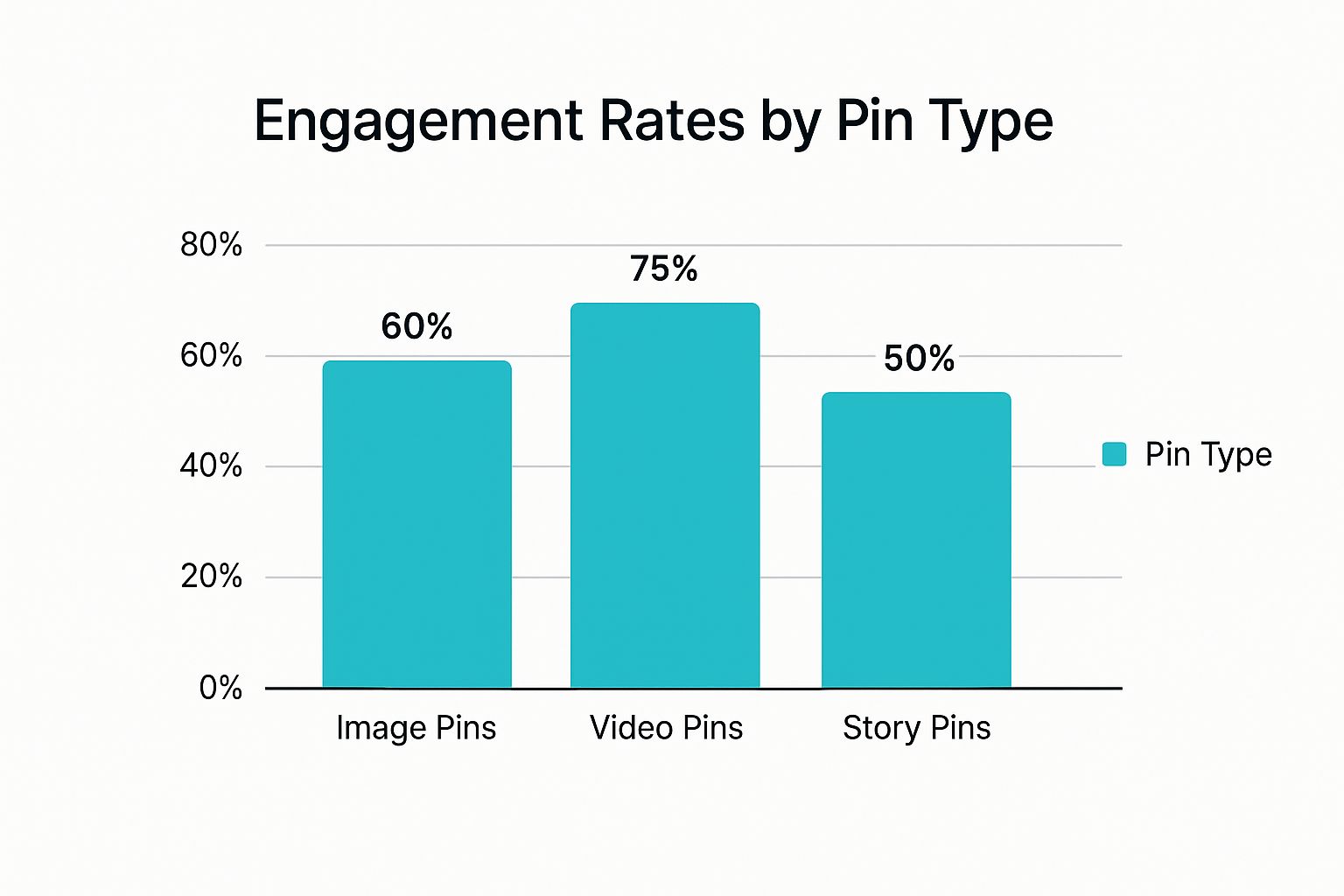
Video Pins take the lead with 75% engagement, followed by Image Pins at 60%. Story Pins come in at 50%, reminding us that choosing the right format is key. Knowing each format's strengths lets you create a dynamic mix in your catalog for maximum impact.
Manual Uploads vs. Automated Feeds: Choosing the Right Approach
First, let's get your products onto Pinterest. You've got two main routes: manual uploads and automated feeds. Manual uploads are perfect for smaller inventories when you want total control over every detail. But with hundreds or thousands of products? It can get overwhelming fast.
That's where automated feeds shine. Platforms like Shopify, Etsy, and WooCommerce integrate directly with Pinterest, syncing your catalog seamlessly. This automation saves you tons of time and keeps your Pinterest listings current with your inventory. Want to supercharge your product listings? Check out these tips to increase Shopify sales.
To help you decide which method is best for you, take a look at this comparison:
To help you choose the right approach, let's break down the pros and cons of each method:
Product Catalog Setup Options: Manual vs Automated Comparison
| Setup Method | Time Investment | Maintenance Level | Best For | Scalability |
|---|---|---|---|---|
| Manual Uploads | High | High | Small inventories, full control | Limited |
| Automated Feeds | Low | Low | Large inventories, efficiency | Excellent |
This table clearly shows the strengths and weaknesses of each, making it easier to pick the right one for your business. Remember, scalability is crucial as you grow.
Structuring Product Data for Maximum Visibility
Once your products are on Pinterest, optimizing your product data is essential. This means making your titles, descriptions, and categories easily discoverable by both shoppers and Pinterest's search algorithm. It's not about keyword stuffing; it's about writing compelling, informative content that accurately reflects your products and resonates with your target audience.
Think like your ideal customer. What would they search for on Pinterest? What problems are they trying to solve? Weaving these insights into your product data helps you connect with the right buyers at the perfect time.
Advanced Catalog Strategies
Beyond the basics, some advanced techniques can seriously boost your conversions and average order value. Seasonal groupings, like a "Holiday Gifts" section during the festive season, help shoppers easily find what they need, driving sales during peak times. Cross-selling configurations, like suggesting matching earrings with a necklace, can also encourage bigger purchases.
Think about how different catalog structures suit different business models. What works for a drop-shipper might not work for a handmade artisan. Looking at successful businesses in your niche can give you ideas to adapt for your own brand. Our guide on Pinterest catalogs also offers helpful tips.
Finally, watch out for common catalog pitfalls. Inaccurate product info, low-quality images, and inconsistent branding can hurt your credibility and turn buyers away. Putting systems in place to avoid inventory issues can protect your brand image and keep customers happy.
Reading Pinterest's Crystal Ball (Trend Prediction Secrets)

Want to know what's going to be hot before everyone else? Pinterest is like having a sneak peek into the future of shopping. It's packed with data that hints at what consumers will be craving down the line, but so many sellers aren't tapping into this goldmine.
Smart sellers, though, are using Pinterest search trends and seasonal info to their advantage. They're checking out what people are searching for right now to spot emerging trends and get their products in front of the right eyes at the right time. This helps them plan their inventory like pros, avoiding overstock and maximizing profits.
Unlocking the Power of Pinterest Predicts
One of my favorite tools for trend prediction is the Pinterest Predicts report. It forecasts upcoming trends based on user searches and has a crazy 80% accuracy rate. This is huge for planning product lines and marketing campaigns. For example, a recent report showed a 325% increase in searches for "cherry red." Knowing these specifics allows businesses to align what they're selling with what people want to buy. Think about it: 1.5 billion pins are saved every week, and people are often saving things they intend to buy. That makes Pinterest a powerful selling platform. Discover more insights on Pinterest trends.
From Trend Spotting to Product Strategy
Okay, so how do you actually use this info to sell? Start by playing around with the Pinterest search bar. Type in keywords related to your niche and see what auto-suggestions appear. Those suggestions are real searches, giving you a peek into what people are actively looking for.
Let's say you sell handmade jewelry. Type "necklaces" into the search bar. You might see suggestions like "layered necklaces," "personalized necklaces," or "gold necklaces." These can give you new product ideas or help you tweak what you already offer. Plus, using these specific terms in your pin descriptions and board titles can seriously boost your visibility.
Balancing Trends with Evergreen Products
Trends are exciting, but don't forget about evergreen content. These are products or topics that are always in demand, no matter the season. They're the steady foundation of your Pinterest strategy, keeping traffic and sales consistent. For example, if you're in the home decor niche, trendy colors and patterns will come and go, but people will always need furniture, lighting, and storage solutions.
The trick is finding the right balance. Use trending insights to create seasonal collections and grab those short-term sales, but keep your core offering of evergreen products for a reliable income stream.
Pin Generator: Your Trend Forecasting Ally
Keeping up with trends and managing a growing product catalog can be tough, especially if you're selling on multiple platforms like Etsy, Shopify, and WooCommerce. That's where Pin Generator comes in. It streamlines everything from creating your product catalog to designing and scheduling pins.
Because Pin Generator integrates directly with these platforms, you can automatically create optimized pins for each new product. No more spending hours making pins by hand! This frees you up to focus on trend analysis and overall strategy. Plus, the scheduling features help you post at the best times, so your pins get seen by more people.
Affiliate Marketing That Feels Natural (Not Salesy)
Affiliate marketing on Pinterest isn't about randomly plastering affiliate links everywhere. It's about genuinely connecting with your audience and recommending products that truly fit their needs. Think of it as helpful suggestions, not a hard sell. From my own experience, this approach makes all the difference.
Some product categories naturally thrive on Pinterest. Home decor, fashion, DIY supplies, digital courses, and productivity tools are a few examples. They align perfectly with what Pinterest users are looking for: inspiration, planning resources, and solutions. These users are often in a project-planning mindset, making them receptive to relevant product recommendations.
Designing Pins That Inspire (Not Sell)
Your pin design is key. Avoid anything that screams "ADVERTISEMENT!" Instead, create visually appealing pins that blend seamlessly into a user's boards. Think high-quality photos, attractive graphics, and text overlays that offer helpful advice. This approach encourages saves, not scrolls.
For example, if you're promoting a productivity planner, picture a beautifully organized workspace featuring the planner in action. Overlay text like "Plan your week in 15 minutes." This provides real value while subtly promoting the product. Attracting users with helpful information is far more effective than aggressive sales tactics.
Copywriting That Builds Trust (And Drives Clicks)
Your pin descriptions are just as vital as the visuals. This is where you subtly present your affiliate product as a solution. Don't just list features; highlight benefits. How does this product improve a user's life? Building trust is the cornerstone of successful affiliate marketing.
Let's say you're promoting a fashion brand. Instead of "Check out this cute dress," try "Searching for the perfect summer dress? This flowy maxi is ideal for hot days and easily transitions from day to night. Click to shop!" Offering solutions and encouraging engagement are crucial. You might find our guide on Pinterest affiliate marketing helpful for more tips.
Timing Your Affiliate Promotions Strategically
Timing is everything in marketing. Align your promotions with seasonal trends and what people are searching for. Promoting a cozy blanket in the fall makes more sense than in the summer. Use Pinterest's trend prediction tools to anticipate user searches and create relevant content.
If you’re promoting online courses, back-to-school season is the perfect time to highlight courses related to education, self-improvement, or professional development. Understanding these seasonal trends maximizes your affiliate product's visibility and potential impact.
Leveraging Pin Generator for Affiliate Success
Managing affiliate pins across different platforms can be a real headache. Pin Generator simplifies this by automating the tedious tasks while preserving a personal touch. Direct integrations with platforms like Etsy, Shopify, and WooCommerce allow you to quickly create optimized affiliate pins directly from product listings.
Pin Generator also offers smart scheduling to ensure your pins are seen when your audience is most active. The template feature helps you create beautiful, consistent pin visuals, saving you hours of design work. This allows you to scale your efforts efficiently without sacrificing quality or authenticity. Bulk editing and seasonal template switching keep your content fresh and engaging, maximizing your earning potential.
Why Pin Generator Transforms Pinterest Selling Forever
Let's be honest, managing Pinterest manually can be a real drag. It's time-consuming and often feels like you're barely making a dent. Pin Generator changes the game by automating those repetitive tasks, freeing you up to focus on the creative, engaging content that actually connects with your audience. I've chatted with sellers using Pin Generator's direct integrations with Shopify, Etsy, and WooCommerce, and they rave about how it removes the tedium of creating individual pins for each product, actually boosting their Pinterest performance.
Automating Your Pinterest Success
Picture this: you create a product, design a pin, write a description, and schedule it. Now, imagine doing that for every single product in your shop. Exhausting, right?
Pin Generator automates this entire process. It connects directly to your e-commerce platform, letting you create optimized pins for every product in a fraction of the time. This not only saves you precious hours but also keeps your branding consistent across all your pins.
This is the Pin Generator dashboard – your command center for all things Pinterest marketing. From scheduling pins to tracking performance, everything is streamlined and easy to manage.
Scheduling and Consistency: The Secret Weapons
Consistency is the name of the game on Pinterest. Regular posting keeps your audience engaged and tells the algorithm you're an active user. But maintaining a consistent schedule manually can be a real challenge, especially as your business grows.
Pin Generator solves this with its powerful scheduling features. You can plan your pins weeks or even months in advance, guaranteeing a constant flow of fresh content without lifting a finger. Even better, the tool analyzes your Pinterest analytics to find your peak engagement times, suggesting the best posting windows to maximize your reach.
Unfair Advantages for Pin Generator Users
Beyond automation and scheduling, Pin Generator offers some serious competitive advantages. Automated A/B testing constantly refines your pins based on performance data, ensuring they're always improving. Seasonal template switching lets you easily adapt your visuals for holidays, sales, and special events, keeping your content fresh and relevant. And with bulk editing, you can update hundreds of pins at once, saving you tons of manual work. This frees you up to focus on strategy and creative development, not tedious updates.
Real-World Results: From Manual to Massive
The impact of Pin Generator isn't just theory; I've witnessed businesses completely transform their Pinterest strategies with this tool. One business owner I spoke with went from posting a handful of manual pins each week to hundreds of optimized pins monthly. This jump in quality and consistency resulted in a 300% increase in traffic from Pinterest in just six months. Another, a small Etsy shop owner, saw a 50% sales boost after implementing Pin Generator's automated catalog integration and scheduling. These are just two examples of how automating and optimizing your Pinterest marketing with Pin Generator can drive serious results. It's not just about saving time; it's about working smarter and getting the most out of every single pin.
Scaling Your Pinterest Sales Without Burning Out
So, you’ve figured out what works on Pinterest. Congrats! Now, how do you grow without losing your mind? It’s not just about pinning more; it’s about pinning smarter. Trust me, I've been there, and scaling strategically is key to avoiding Pinterest overwhelm.
Expanding Your Reach: Cross-Promotion and Collaboration
Don't keep your Pinterest game locked down to just Pinterest. Sharing your pins on other platforms like Instagram and Facebook can seriously boost your visibility. Think about it: posting your newest product pin to your Instagram story can funnel traffic back to your Pinterest shop. This way, you're reaching people who might not even be actively using Pinterest for shopping.
Another great tactic is collaborating with other Pinterest users or joining group boards in your niche. This exposes your brand to a whole new audience. Teaming up with businesses that complement yours, especially those with an engaged following, can dramatically expand your reach without you having to create tons more content. This is especially helpful for affiliate marketing or e-commerce where partnerships just make sense.
Leveraging Analytics for Strategic Replication
Knowing your Pinterest analytics is like having a secret weapon. When you understand which pins are performing best, you can see exactly what your audience loves. Do video pins get more clicks than static images? Are certain keywords driving more traffic to your product listings?
Once you've cracked the code, replicate it! Use those high-performing pin designs, keywords, and descriptions for new products, seasonal campaigns, and even your affiliate marketing. This data-driven approach means you're focusing your energy on strategies that are already proven winners. For more e-commerce tips, the Sprello Blog is a great resource.
Optimizing Workflow and Maintaining Quality
As your Pinterest presence grows, so does your workload. Automating those repetitive tasks becomes crucial for avoiding burnout. Tools like Pin Generator can be a game-changer, especially with its direct integrations with platforms like Etsy, Shopify, and WooCommerce. It can automate everything from creating optimized pin designs to scheduling content for optimal engagement. This frees you up to focus on the bigger picture—strategy and creative development. Features like bulk editing and seasonal template switching can further streamline your workflow and ensure your branding stays consistent across all your pins.
Remember, growth isn't just about numbers; it's about maintaining quality while you scale. As you reach more people and post more often, keep that personal touch in your customer service. Respond to comments and messages quickly, addressing any questions or concerns. This builds trust and loyalty, even as your business expands.
Avoiding Burnout: Recognizing the Warning Signs
Scaling too fast can lead to burnout, which can negatively impact your content quality and engagement. Pay attention to the warning signs. Are you feeling constantly overwhelmed? Is the quality of your pins slipping? Are you struggling to keep up with customer inquiries?
If this sounds familiar, it’s time to take a step back and reassess your strategy. Sustainable growth is a marathon, not a sprint. Focus on long-term strategies that build a loyal audience and generate consistent sales, rather than short-term wins that lead to burnout. Pin Generator can help prevent burnout by automating and optimizing many of those tedious, time-consuming tasks.
Ready to take your Pinterest game to the next level and unlock its full sales potential? Start your free trial of Pin Generator today and see the power of automated, optimized Pinterest marketing: https://pingenerator.com