
How to Increase Traffic to Your Blog Without Google (Get Traffic from Pinterest!)
11 June 2025
If your blog traffic still hasn’t bounced back since Google’s March 2024 update, you’re not alone. Google’s “Helpful Content Update” wiped out visibility for thousands of bloggers, especially those relying on SEO as their primary traffic source.
While Google framed the update as a way to reduce low-quality content, many reputable blogs saw significant traffic declines. HouseFresh, a thriving independent review site, reported a drop in daily Google referrals from nearly 4,000 to just 300. It’s a story many content creators can relate to.
Maybe you’ve pivoted to Instagram or TikTok, hoping to drive clicks through Reels or Stories, only to realize those platforms don’t want users to leave. Outbound links get buried, and all that effort usually leads to platform views, not website traffic.
More than a year later, many bloggers are still stuck in the burnout cycle of creating great content with no visibility, and spending hours trying to promote it.
So, what’s left?
If you’re asking yourself, “How can I increase traffic to my blog?” and unsure where to look, we’ve got the answer. It’s a search engine built for discovery, powered by visuals, and easier to automate than you think.
A Better Way: Pinterest as a Search Engine
If you’ve only ever thought of Pinterest as a place for recipes or DIY projects, it’s time to wake up to its true use. Pinterest is one of the most powerful and underused search engines available, and unlike other platforms, it’s designed to drive traffic off the platform and back to your site.
Each pin is an opportunity to rank. Instead of showing up once on a search results page, each pin creates multiple chances for visibility and engagement. And the best part? With a little upfront planning, you can seriously promote your blog using Pinterest in just a few minutes a week.
Remember, Pinterest users come to search, plan, and save. That makes the platform especially effective for evergreen blog content, how-to posts, product roundups, or affiliate guides.
Pinterest isn’t driven by trends or quick scrolls, it’s built for search and long-term discovery. And once your pins are live, they can keep driving traffic for months or even years without any extra effort. In fact, Pinterest reported a 10% year-over-year increase in global monthly active users, reaching 570 million in Q1 2025
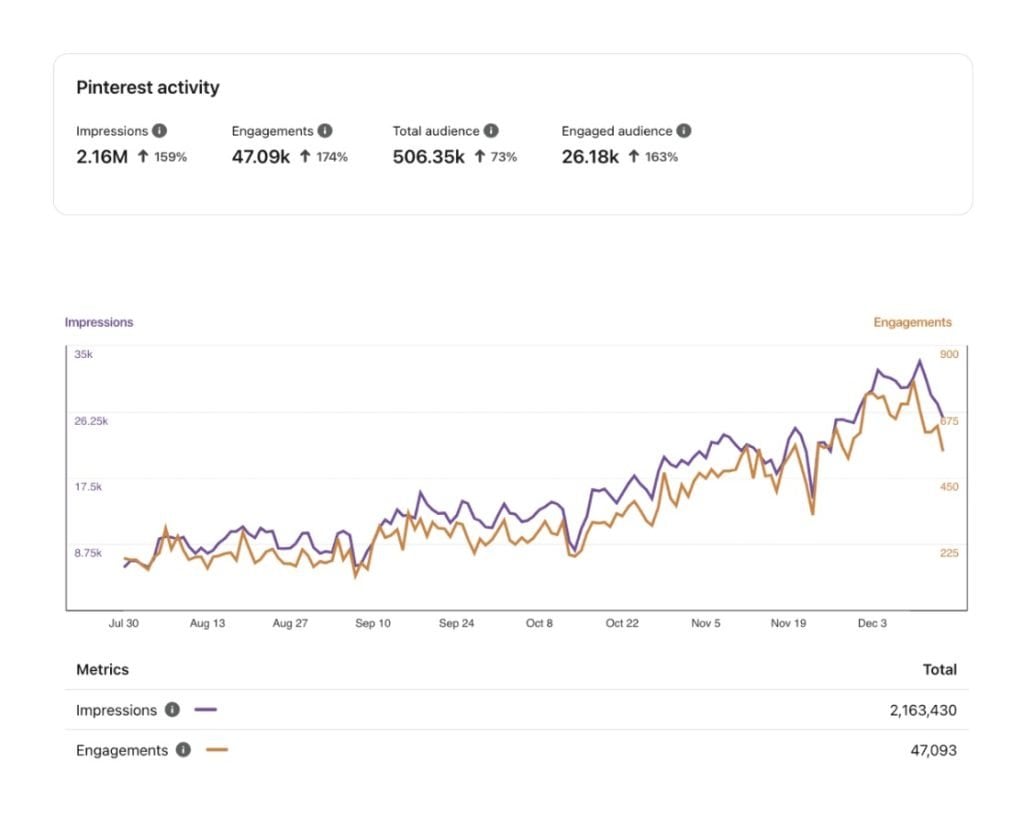
Take a look at how Oodlelife uses Pinterest to drive over 250,000 users to their site!
Why Most People Avoid Pinterest (and Why You Don’t Have To)
For most bloggers, the issue isn’t a lack of interest, it’s time and effort. Creating a single pin might take five minutes, and Pinterest’s best practice of publishing up to 20 pins a day means an extra two hours of content promotion daily. For anyone juggling blog content, email marketing, and the rest of their business, creating pins just isn’t sustainable.
Some bloggers skip Pinterest, assuming it’s just another social media platform they can’t keep up with. Others recognize it functions more like a search engine, but still feel overwhelmed by the time and skills it takes to be consistent. Between designing visuals, writing titles, optimizing descriptions, and scheduling posts, Pinterest can easily feel like a second job.

Sound familiar?
The good news is you don’t need to be a designer, a strategist, or a full-time Pinterest manager to make it work. You just need a system that makes the process manageable.
That’s where automation comes in.
How Pin Generator Solves the Pinterest Problem
Pin Generator is a Pinterest automation tool built specifically for bloggers, online sellers, and affiliate marketers who don’t have time to design, write, and schedule every pin by hand. It turns a single blog post into dozens of optimized pins in minutes.
With customizable templates tailored to your blog’s color scheme, SEO-rich data, and full Pinterest integration, this tool has changed everything for bloggers looking to grow their traffic more efficiently
The best part is that the process is simple. You paste in a blog URL, and the tool scans your page for images, titles, and metadata. From there, it generates fully designed pins using a library of customizable templates that match your brand. You can adjust the colors, fonts, and layouts once, and the tool will apply those settings automatically moving forward.

Pin Generator also includes built-in AI tools to help rewrite headlines and descriptions. This helps keep your pins unique and keyword-friendly without requiring extra effort from you.
Once your designs are ready, you can schedule them to post across your Pinterest boards on a timeline that works for you. Whether you want to publish a few per week or automate a full month of content, the scheduling dashboard makes it easy to stay consistent.
There’s even an AutoPin feature, which allows the tool to continue generating fresh pins for your post over time. Your content stays active on Pinterest without you needing to create or schedule anything manually.
Want to see this in action? Watch how we create 1 month of pins in under five minutes here.

Ready to Start? Here’s Your First Step
Stop wondering, “How can I increase traffic to my blog?” and start taking the steps to actually make it happen. Google reach is unpredictable, and social media platforms aren’t built to send traffic to your site. So why not give Pinterest the chance it deserves?
With Pin Generator, the heavy lifting is already done for you. You don’t need to design graphics, research keywords, or manually schedule every pin. Just set it up once, and let it run in the background while you focus on your content.
And the best part? You can try it out for free. Paste in your latest blog post, explore the templates, play with the fonts and colors, and see how easy it is to create a full month of Pinterest content in just a few clicks.
If you’re looking for more reach with less work, this is a smart place to start.