
Keywords for Pinterest: The Complete SEO Guide
29 September 2026
You've got a product catalog, a folder full of blog posts, or a content calendar that never quite gets published. You create a polished pin, add a few obvious terms, and hope Pinterest finds the right audience. Then the process repeats manually until the keyword list becomes messy, the boards lose focus, and publishing stops altogether.
The problem usually isn't a lack of ideas. It's the absence of a repeatable system that connects search intent, content production, metadata, catalog data, and measurement. Effective keywords for Pinterest should move through that system, from live search behavior to a specific pin, board, destination, and performance record.
Table of Contents
- Understanding How Pinterest Search Actually Works
- Mining the Search Bar for Long-Tail Ideas
- Validating Trends and Search Volume Indicators
- Placing Keywords in Pins and Boards
- Automating Keyword Application at Scale
- Measuring Performance and Iterating Your Strategy
Understanding How Pinterest Search Actually Works
Pinterest behaves more like a visual search engine than a conventional social feed. People don't only open it to follow creators or passively scroll. They use it to plan rooms, compare styles, find recipes, choose outfits, solve beauty problems, and save ideas for later. That difference changes what you should write on a pin.
On a passive feed, a brand name may help recognition. On Pinterest, a descriptive phrase often gives the platform and the user more useful context. A search such as “small bedroom storage ideas” communicates a problem, a setting, and an expected type of result. “Acme storage” communicates far less unless the user already knows the brand.
Pinterest reports more than 80 billion searches per month, and its most-searched terms are heavily concentrated in descriptive, non-brand language, according to Hootsuite's Pinterest statistics overview. In a 2025 snapshot cited there, “nails” led with 52.1 million monthly searches, followed by “wallpaper aesthetic” with 26.9 million, “hairstyles” with 25.9 million, “outfit ideas” with 23.6 million, and “wallpaper iPhone” with 22.2 million.
Search intent comes before brand language
Those examples matter because they show how users frame their needs. They search for an outcome, look, occasion, format, or solution. A catalog business selling wallpaper shouldn't rely only on product names. It should consider phrases that describe the room, mood, device, pattern, or decorating goal.
Industry summaries also report that about 96% of top Pinterest searches are unbranded, while other commonly cited findings say two out of three users log in specifically to search. The same SocialPilot Pinterest statistics summary reports that 39% of consumers use Pinterest as a search engine, and 36% begin searches on Pinterest instead of Google, with Gen Z at 39%.
Treat those figures as directional evidence rather than a reason to stuff every field with keywords. The practical conclusion is simpler: start with the language of the user's task. Build around “linen summer outfit ideas,” “printable meal planner,” or “modern nursery wall art” before forcing a brand-led phrase into the title.
Practical rule: If a stranger could understand the pin's subject and benefit without knowing your company, the keyword direction is probably strong.
Why generic optimization underperforms
A pin can look excellent and still miss its audience when the metadata is vague. “New collection,” “shop now,” and “inspiration” don't tell Pinterest enough about the visual subject or the searcher's goal. They also make it difficult to compare one keyword cluster against another later.
The stronger approach is to connect each phrase to a clear content promise. A product pin might target a room and style. A tutorial pin might target a problem and format. A seasonal guide might target an occasion and timing. That structure gives the algorithm more context and gives the reader a reason to click.
Mining the Search Bar for Long-Tail Ideas
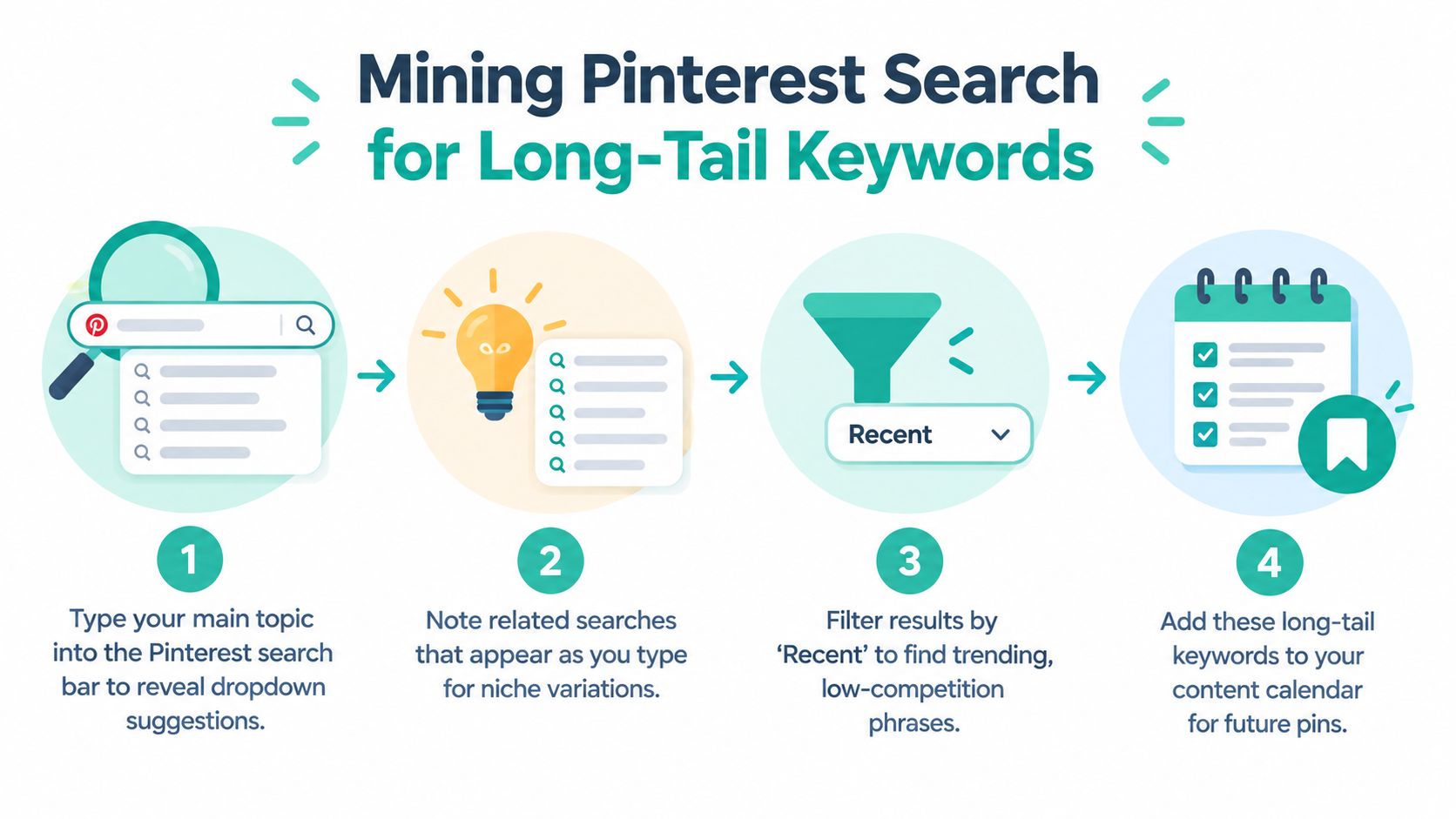
A catalog built around “wallpaper” or “dinner recipes” gives Pinterest too little context to match search intent. The search bar helps turn those broad subjects into the language people use when refining a task, style, audience, or format. Start with one seed topic, such as “wallpaper,” “curly hair,” “dinner recipes,” or “wedding guest outfit.” Enter it on Pinterest and pause before selecting a result. Save the autocomplete suggestions. They show the modifiers Pinterest is currently presenting to searchers, including terms that may be absent from your product feed or editorial calendar.
Use the alphabet expansion method
Return to the seed phrase, add a space and one letter, then work through a to z. Record useful variations instead of copying every suggestion. A seed such as “meal planner” may produce combinations involving printable formats, layouts, routines, or audiences. Suggestions will change over time, which makes this process more useful than relying on a static keyword list created months ago.
Classify the modifiers by the job they signal:
- Format terms: ideas, tutorial, checklist, printable, guide, template.
- Outcome terms: organization, inspiration, routine, storage, styling.
- Audience terms: for small spaces, for beginners, for work, for kids.
- Visual terms: aesthetic, minimalist, colorful, vintage, modern.
- Occasion terms: holiday, wedding, birthday, back to school, summer.
A useful phrase narrows the content promise while keeping the subject accurate. “Kitchen ideas” leaves the creative direction open. “Small kitchen storage ideas” gives a retailer, designer, or blogger a specific subject to express in the pin image, title, destination, and board.
Run a focused research session
One recommended workflow collects 50 to 80 raw terms in a one-hour search-bar session, then validates the strongest 15 to 20 terms with trend analysis. The method is outlined in a one-hour search-bar workflow that collects 50 to 80 raw terms before validation.
Use a spreadsheet with columns for the raw phrase, topic, intent, format, destination, board, and notes. Preserve Pinterest's wording at this stage. Add your classification beside each term rather than rewriting the source language before you have compared the phrases.
| Intent type | Suitable pin direction |
|---|---|
| Inspiration | Image-led collection or mood board |
| Education | Tutorial, checklist, or explainer |
| Product discovery | Catalog pin or comparison guide |
| Planning | Printable, calendar, or seasonal resource |
| Commercial | Product roundup or buying guide |
The goal is a production-ready keyword bank, not a document full of disconnected phrases. Once each term has an intent label, connect it to a pin template, destination, and board. That mapping can then feed automated pin generation and catalog ingestion, reducing one-off keyword placement across product records.
For a structured companion process, use the Pinterest keyword research guide for turning seed topics into long-tail directions alongside live search-bar notes. A tool can organize seed ideas and support repeatable catalog workflows, while Pinterest's current suggestions provide the vocabulary that automation should apply.
The strongest raw term is not always the broadest or most popular-looking option. A specific phrase that matches the visual, destination, and audience can produce a clearer pin than a general category where the content has no distinct promise.
Validating Trends and Search Volume Indicators
A keyword bank becomes useful only after it survives a timing and production check. Pinterest demand shifts with seasons, cultural moments, planning cycles, and preferred visual formats. A phrase may appear promising yet fail as a production choice if content arrives after the search window or cannot meet the implied intent.
Use Pinterest Trends to compare related phrases and review their movement over time. Evaluate timing, relevance, and competitive context, rather than treating one strong-looking signal as a decision. A phrase that rises before a seasonal event needs a different publishing schedule from one with steady demand.
Score the opportunity, not just the phrase
Apply this decision filter to every serious candidate:
- Relevance: Does the phrase accurately describe the product, article, or destination?
- Intent: Does it indicate planning, saving, learning, comparing, or buying?
- Visual fit: Can the pin communicate the promise immediately?
- Timing: Is demand rising early enough for production and indexing?
- Competition: Can the creative compete with the results users will see?
High demand alone does not make a keyword valuable. Broad phrases often place your creative beside highly relevant, polished pins. A narrower variation may offer a clearer promise and a more realistic route to qualified saves and clicks.
For a repeatable workflow, the free Pinterest keyword tool can expand the candidate bank, while native trend analysis decides which candidates deserve production. Keep those functions separate. The generator supplies options. Validation determines what enters the queue, which matters when automated pin generation and catalog ingestion depend on consistent inputs.
Build a prioritized target set
Reduce the raw bank to 15 to 20 target phrases that the team can produce in the current planning cycle. Tag every phrase by seasonality and intent, then connect those tags to publishing windows, pin templates, and relevant catalog or editorial destinations. The result is a production queue rather than a spreadsheet of disconnected terms.
Use this prioritization model:
| Priority | Phrase profile | Action |
|---|---|---|
| Immediate | Relevant, rising, and visually specific | Create and schedule |
| Evergreen | Stable intent with a clear destination | Add to recurring production |
| Test | Relevant but uncertain or competitive | Produce a controlled variation |
| Hold | Poor fit or badly timed | Revisit later |
Assign one primary phrase to a specific pin and supporting terms to its metadata. This separation makes later diagnosis possible. If performance is weak, you can examine the phrase, creative, destination, or timing instead of changing every field at once.
Seasonality needs lead time. A gift guide, holiday recipe, or event outfit should enter production before the planning moment, giving Pinterest time to discover and distribute it. Publishing at the trend's peak can leave the pin competing after users have already saved their preferred ideas.
Placing Keywords in Pins and Boards
Keyword research only becomes useful when Pinterest can connect the phrase to the right asset. Metadata should clarify the pin, not read like a search-term inventory. Write for a person deciding whether to save or click, then make the relevant subject unmistakable to the platform.
Build the metadata hierarchy
Start with the pin title. Put the primary topic close to the beginning when it fits naturally, then add a differentiating detail. “Small Bedroom Storage Ideas for Renters” is more informative than “Storage Inspiration,” because it identifies the space, problem, and audience.
The description should expand the promise in natural sentences. Include secondary phrases where they accurately describe the content, explain what the reader will find, and connect the pin to its destination. Don't repeat the same phrase in every sentence or paste a keyword bank into the field.
Use this checklist for each pin:
- Pin title: State the primary topic and the specific angle.
- Description: Add context, supporting terms, and a clear reason to visit the destination.
- Alt text: Describe the actual visual and its subject for accessibility.
- Board name: Use a recognizable category rather than an internal campaign label.
- Board description: Explain the board's scope with related search language.
Organize boards as semantic groups
Boards should help Pinterest interpret the relationship between your content pieces. A retailer selling home products might separate “Small Apartment Decor,” “Modern Kitchen Storage,” and “Neutral Bedroom Ideas” when those categories reflect the catalog. A board called “Campaign 4” helps an internal team, but it provides little topical meaning.
Board names shouldn't become awkward keyword strings. Use a broad category that accurately covers the pins, then write a description that explains the boundaries. If the board contains tutorials, say so. If it focuses on a room, style, audience, or season, make that scope visible.
Alt text deserves a separate check. Describe what appears in the image and what the pin leads to, without turning accessibility text into a hidden keyword field. A pin showing a rattan shelf in a compact entryway should be described as that, not as a chain of loosely related phrases.
A useful test: Remove the brand name from the pin. If the remaining title still tells a user exactly what they'll find, the optimization is doing real work.
Board maintenance also affects workflow quality. Teams that need to inspect, reorganize, or archive board content can use a practical resource such as this guide to downloading boards from Pinterest. It's especially useful when an account has grown beyond a simple manual setup and the existing structure needs review.
Avoid creating a separate board for every tiny variation. A board should have a coherent subject, enough related content to make the grouping useful, and a name that matches genuine search language. When the board taxonomy is clear, automated assignment becomes safer because each keyword cluster has an obvious home.
Automating Keyword Application at Scale
Manual optimization works for a small publishing schedule. It breaks down when a store adds products, a publisher updates its feed, or a team needs multiple creative angles for the same destination. Writing every title, description, and alt text field by hand creates inconsistency and makes keyword strategy dependent on whoever has time that day.
A scalable system treats each catalog item or content URL as structured input. The pipeline can read the product name, category, attributes, image, price context, and destination, then apply a controlled keyword set to the pin metadata and board assignment.

Connect research to production
The critical design choice is to avoid treating keyword research as a separate marketing exercise. Store each approved phrase with fields such as:
- Primary keyword: The main search phrase for the pin.
- Intent label: Inspiration, tutorial, product discovery, or planning.
- Content type: Product, article, collection, or guide.
- Board destination: The semantically appropriate board.
- Creative angle: Benefit, use case, style, audience, or season.
- Status: Queued, published, testing, or retired.
That data can drive automated generation without removing editorial control. A catalog feed supplies the facts. The keyword bank supplies the search direction. Templates supply visual consistency. A review layer catches mismatches before publishing.
Pin Generator is one option for this workflow. Its platform can ingest product catalogs, RSS or Atom feeds, CSV files, and connected store data, then generate pin designs with titles, descriptions, alt text, board selection, and scheduling. It also provides reusable templates, trend and keyword research features, and history and leaderboard views for reviewing output.
Automate repetition, not judgment
Automation shouldn't publish every product against the same phrase. It should apply rules that preserve relevance. A floral wall print might map to “botanical wall art,” while a geometric print belongs with a different style cluster. A recipe feed may need a format phrase, whereas a product catalog may need a room, use case, or audience phrase.
Set up a controlled workflow:
- Import current catalog or feed data.
- Match each item to an approved keyword cluster.
- Generate several creative and metadata variations.
- Assign boards according to the cluster.
- Review brand, accuracy, and destination alignment.
- Schedule recurring publication.
- Log the keyword-to-pin relationship for later analysis.
This approach solves a problem that batch design alone can't solve. It creates a traceable path from demand to asset. When a pin underperforms, you can inspect the phrase, format, board, and destination rather than guessing which part failed.
Measuring Performance and Iterating Your Strategy
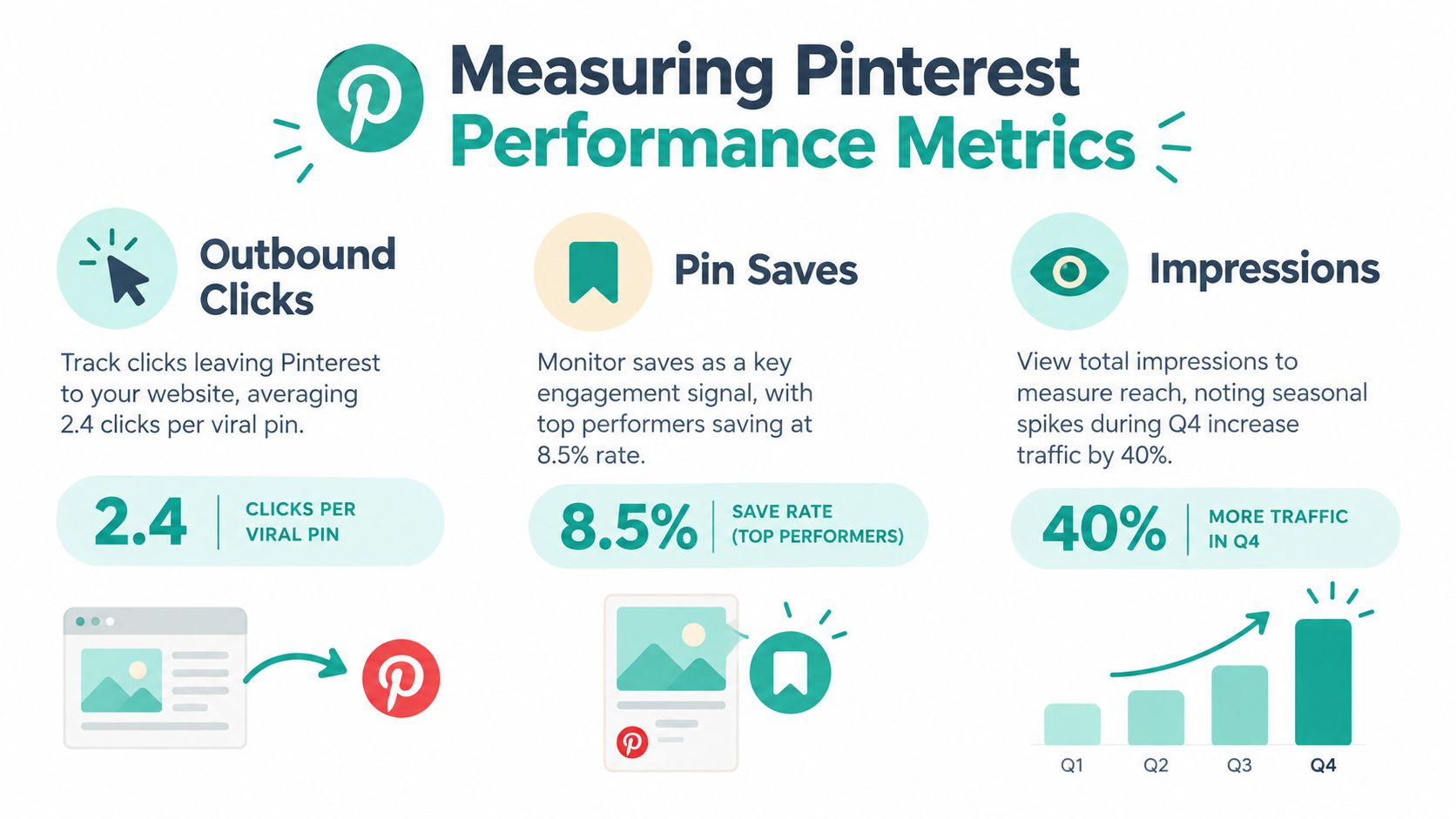
Follower counts don't tell you whether a keyword is attracting useful visitors. A search-led Pinterest program needs a small, consistent KPI set that links visibility to action. Track impressions, saves, outbound clicks, and pin click rate, then compare those metrics by keyword-to-pin pair.
A 2026 technical benchmark from Metadata Reactor's Pinterest SEO guide defines healthy performance as saves above 1% of impressions, outbound click rate above 0.3% of impressions, and optimized pin click rate in the 1% to 3% range. The same benchmark suggests aiming for impressions that grow 10% or more month over month. Use these as reference points, not guarantees. Context, niche, season, creative quality, and account maturity all affect results.
Read the metrics diagnostically
Impressions answer whether Pinterest is exposing the pin to searchers. Saves suggest that the idea has enough perceived value to keep. Outbound clicks show whether the promise and destination are strong enough to move someone off the platform. Pin click rate helps you assess interaction with the creative itself.
A low-impression pin may have a weak keyword, poor timing, unclear board context, or insufficient content history. A pin with impressions but few saves may be visually unconvincing or mismatched with the search intent. A pin with saves but few outbound clicks may inspire people without making the next step clear.
Don't replace the keyword too quickly. First check whether the image, title promise, board, and landing page actually answer the search.
Keep a history view that records the phrase, pin format, board, destination, publication date, and results. A leaderboard can reveal which combinations repeatedly earn saves or clicks, while a history log shows whether the same keyword behaves differently across formats.
The most useful iteration is controlled. Change one major variable at a time, such as the headline angle, image treatment, board, or secondary phrase. Retain winning clusters, retire irrelevant ones, and feed the findings back into catalog rules and content templates. That turns Pinterest SEO from one-off keyword stuffing into a compounding production system.
Pin Generator helps turn Pinterest keyword research into action by generating on-brand pin designs, keyword-aware titles, descriptions, alt text, board selections, and scheduled publishing from catalogs and content feeds. Visit Pin Generator to connect your keyword pipeline with the assets you already need to publish.