
Pinterest Automation Software: Features, Uses and Selection
25 October 2026
You have products to update, posts to publish, and a blank Pinterest board staring back at you. Making each pin by hand is doable for a week. It's miserable by week four, and it's usually where consistency slowly dies.
That's the gap Pinterest automation software fills. Not magic growth. Just a controlled pipeline that keeps pins moving while you keep your hands on the decisions that matter.
Table of Contents
- What Pinterest Automation Software Actually Does
- Core Features and the Benefits They Deliver
- Integration Use Cases from Store to Pinboard
- Catalog Feed Limits That Decide What Publishes
- How to Choose the Right Tool
- Safe Automation Practices That Protect Your Account
- Reading Results Without Mistaking Reach for Revenue
- Confirm Your Pilot Before Scaling
What Pinterest Automation Software Actually Does
Pinterest automation software turns your inputs into scheduled, on-brand pins with little manual work per pin.
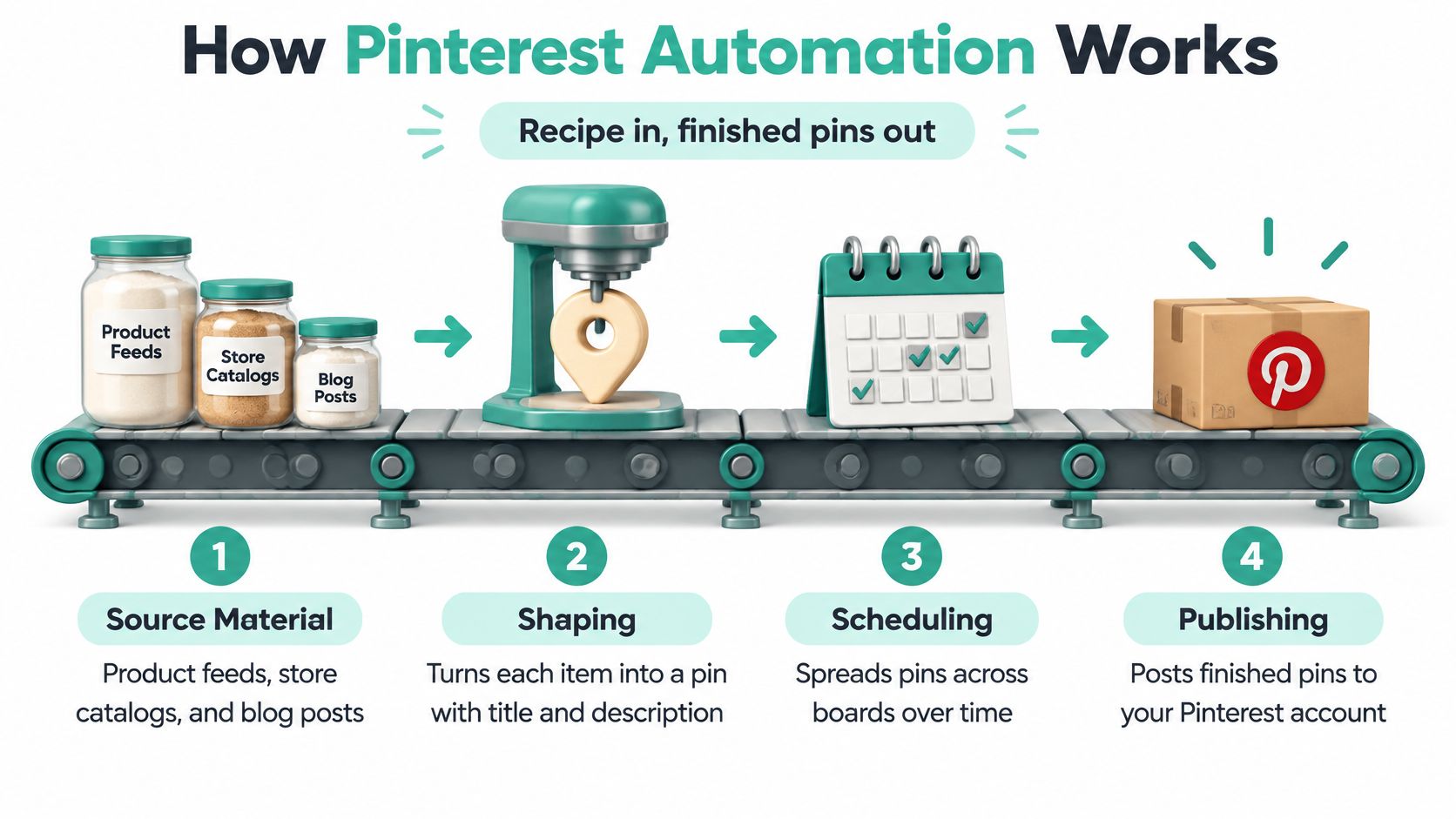
Think of a small bakery conveyor belt. You choose the recipe, and the line handles mixing, shaping, and packing while you check quality at the end.
Pinterest automation software works the same way. You supply source material such as product rows, blog posts, or brand assets. The system shapes each item into a pin, writes the copy around it, and packs it into a schedule.
The Pipeline in Order
First comes input. A store feed might bring in a new candle with its photo, price, and landing page. A blog feed might bring in a new article with its headline and hero image.
Next comes design and metadata. Templates apply your colours, fonts, and layout. The software writes a title, description, and alt text for that pin, then matches it to a relevant board.
Then comes scheduling and review. Pins go into a queue spread over time instead of landing in one lump. You review the batch, fix the odd awkward title, and approve what goes live.
Pin Generator describes its pins as on-brand Pinterest pins that are designed, generated, and scheduled automatically. After setup, an automation can keep turning imported products into pins on a schedule, so each new batch doesn't need manual design or uploading.
What Stays Human
Automation doesn't choose your offer. It doesn't know why your candle is worth buying, which blog post is thin, or whether a seasonal claim is still true.
You still own three things:
- The offer: Which products or posts deserve pins at all
- The brand rules: Templates, tone, and destinations you allow
- The approval: What publishes, and when to pause
The scale explains why people bother. Pinterest reported 619 million monthly active users for the year ended December 31, 2025, up 12% from 553 million in 2024, in its 2025 annual report filed with the SEC.
That figure measures platform activity. It doesn't guarantee impressions or sales for your account. A growing audience makes a steady pipeline more useful, but your inputs still decide whether anyone cares.
Try a quick self test. If your bottleneck is making pins, scheduling them, or keeping product data current, this category fits. If your bottleneck is a weak offer or no source content, fix that first, because automation multiplies whatever you feed it.
Core Features and the Benefits They Deliver
A long feature list is easy to sell and hard to use. Start from the opposite direction. Which job do you repeat every week until you're sick of looking at it?
That's how Pinterest automation software should be judged. A feature earns its place only if it removes a recurring manual step, not because it sounds impressive in a demo.
Start With the Work, Not the Button
AI pin design removes the blank canvas. Instead of opening a design tool for every product variant, you feed in product or article data and get a layout built from it. You still need decent source images. No generator rescues a blurry photo shot against a beige wall.
Brand templates remove repeated formatting decisions. Set colours, typography, and layout once, then let each batch inherit them. It's like giving the bakery one approved box design instead of hand lettering every box.
Titles, descriptions, and alt text remove copy drudgery. The win isn't poetry. It's consistent, keyword led metadata for pins you'd otherwise publish with rushed, identical text.
Recurring scheduling removes the daily upload habit. Our Smart Scheduling posts pins automatically at optimal times and can set up repeating pins, so a queue keeps moving without you logging in to feed it.
The app also includes Automations, AI Chat & MCP (beta), Keyword research, Trend alerts, Catalogs, RSS & Atom feeds (beta), Post Approvals, Profile Audit, Pin Cleanup and Pin History. That's useful only where those modules match your actual workflow.
| Feature | Work it automates | Practical benefit |
|---|---|---|
| AI pin design | Layout and image creation from product or article data | Fresh creatives without a designer for each batch |
| Brand templates | Colours, fonts and layout set once | Uniform presentation across hundreds of pins |
| Titles, descriptions and alt text | Keyword-led copy written per pin | Consistent, search-friendly metadata at scale |
| Board selection | Matching each pin to a relevant board | Fewer manual decisions per pin |
| Recurring scheduling | Timed publishing on a repeating cadence | Steady activity without daily uploads |
| Keyword research and trend alerts | Topic and search-demand discovery | Content tied to current searches |
| Catalogs, RSS and CSV import | Turning feeds into batches of pins | New products or posts enter the queue automatically |
| Pin history and leaderboard | Logging outputs and comparing results | Faster review of what to repeat |
| Post Approvals and Pin Cleanup | Human review and removal of weak pins | Control over what goes live |
| REST API and MCP server | Programmatic generation and scheduling | Connects to internal tools and AI assistants |
Two Different Winners
A store with hundreds of products and no designer gains most from catalog ingestion and templates. Its pain is volume and consistency. Trend alerts are nice, but they won't fix hundreds of unmade product pins.
A blogger publishing several articles a week gains most from RSS import and scheduling. Her pain is turning each new post into pins before the next post arrives. A giant catalog system would be furniture she never sits on.
Practical rule: If a feature doesn't delete a task from your weekly list, treat it as decoration.
Before you compare tools, write down the three manual tasks that cost you the most hours. Match each one to a row above. If a tool is strong everywhere except those three rows, it's the wrong tool for you, however polished the demo looks.
Integration Use Cases from Store to Pinboard
A product page can change while its Pinterest pin stays untouched. Connect the workflow to the source you maintain, and imported products or feed items can enter a scheduled pipeline. The pipeline still needs checks: automation handles repeat work, while you decide what should publish and when.
Pin Generator can import Etsy products, import Shopify products, and generate pins for WordPress. It also supports RSS and Atom feeds, CSV and TSV files, and a REST API. Choose the route that matches where your product or article data is maintained.

Four Everyday Flows
A Shopify store updates seasonal prices. Once products are imported, the owner can generate pins from them and refresh the relevant batch when product details change, rather than reworking every design by hand. Check price and availability before scheduling, since an automated pin can repeat outdated information if the source data is stale.
An Etsy maker adds a small run of handmade items. After the products are imported, an automation can keep turning them into pins on a schedule. The maker should still check stock and avoid near-duplicate designs for similar listings. A polished pin for a sold-out one-off item is still a dead end.
A publisher connects an RSS or Atom feed. New feed items can enter the pipeline after setup, then be turned into pins that link to their articles. Review the headline before approval. A clever article title may not explain the pin clearly enough to earn a useful click.
An agency uses the REST API to generate and schedule pins programmatically. The generate-and-schedule call requires the username of a connected Pinterest profile, so confirm the profile before sending a batch. That validation step helps prevent pins intended for one client from going live on another account.
For one-off promotions, a pin can be generated straight from an imported product without first adding it to a catalog. The Google Chrome Extension offers another route when you are already viewing a page and want to work from it. Use either shortcut with a review gate, rather than treating faster creation as a reason to publish every draft.
The Shopping Ads Connection
Catalog quality also affects shopping ads. Pinterest shopping ads run on a catalog, which is built in Pin Generator and then switched on in Pinterest Ads on the account that owns it. Confirm catalog ownership before configuring ads. Otherwise, you can finish the catalog work and still find it unavailable to the account expected to run the campaign.
Main Risk by Source
Each input has its own failure mode. Check the likely problem before putting that source on a repeating schedule.
- Shopify: Stale or missing prices and stock when product data is not maintained
- Etsy: Near-duplicate pins for similar listings
- WordPress: Pins pointing to thin or outdated posts
- RSS and Atom: Feed items without usable images
- CSV and TSV: Rows from several brands mixed into one batch
- REST API: Scheduling against the wrong connected profile
Start with the source that changes most often, then test a small batch and inspect the pins before increasing the schedule. That keeps automation focused on removing repeat work, not multiplying errors. Track clicks and business outcomes separately from publishing volume: more pins do not, by themselves, show that the workflow is bringing valuable visitors or sales.
Catalog Feed Limits That Decide What Publishes
A product can be ready to sell and still fail to appear in a catalog. The usual culprit is a feed field that is missing, malformed, or no longer matches the product. Treat the feed like a packing list: validate each item before sending the whole batch.
Pinterest warns that missing or incorrectly formatted required fields can cause an entire catalog ingestion to fail. It can also retrieve a hosted catalog source daily, allowing prices and availability to update without manual re-uploading, according to Pinterest's catalog setup guidance. Exact field limits and supported specifications can change, so check Pinterest's current catalog requirements before building or revising a feed.
| Element | What to check | What breaks when it is wrong |
|---|---|---|
| Product ID | Use a unique, stable ID for each product | Changing IDs can create duplicate or orphaned pins |
| Title and description | Follow Pinterest's current field and formatting requirements | Overlong or poorly formatted text may be rejected or displayed badly |
| Catalog size | Check current catalog capacity and plan feed structure accordingly | Large inventories may need careful feed organization |
| File format | Confirm the feed uses a currently supported format | Unsupported formats cannot be ingested |
| Refresh | Keep the hosted source available for Pinterest's scheduled retrieval | Outdated feed data can leave prices and stock stale |
| Required fields | Include every required field in the expected format | A missing or malformed field can fail ingestion |
| Image and landing-page URLs | Confirm both URLs resolve to live, relevant pages | Broken links send shoppers to dead ends |
Validate Before You Submit
A repeatable preflight check catches errors before they block publishing. Keep it boring and consistent.
- Stable IDs: Keep each product's unique ID unchanged when updating its details.
- Required fields: Confirm required product information is present and correctly formatted.
- File hygiene: Check encoding and delimiters in CSV or TSV files.
- Live URLs: Test image links and landing pages, including whether they lead to the right product.
- Change detection: Send updated prices and stock details instead of rebuilding the feed without checking what changed.
Daily retrieval helps keep product pins aligned with current store data, provided the hosted feed itself is maintained. A scheduled fetch cannot fix an outdated source; it just retrieves stale information on time.
Feed and API setups suit different workflows. Pinterest describes its Shopping API as better suited to brands that already manage complex listings through other APIs. For a simpler starting point, Pin Generator can generate and synchronize product catalogs with Pinterest. Review Pinterest catalog setup in Pin Generator, then check the current Pinterest specifications before connecting a feed.
If listings change often, host a maintained feed for Pinterest to retrieve on schedule instead of relying on manual file uploads.
How to Choose the Right Tool
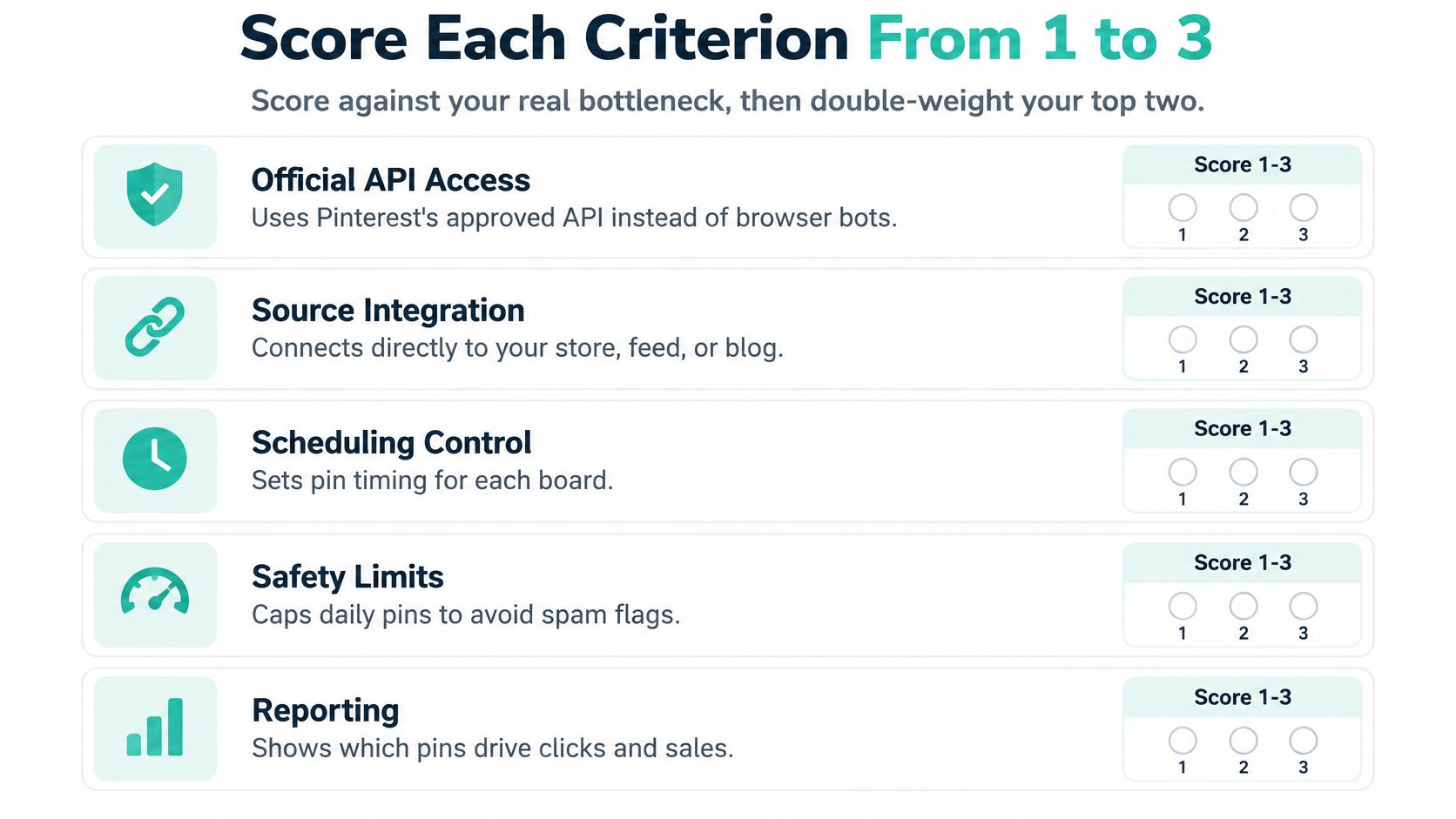
Don't buy Pinterest automation software from a feature checklist. Score it against your bottleneck, the way you'd score a delivery van by your actual route rather than by its top speed.
Score each criterion from 1 to 3. Then double weight your top two. A tool that wins on your heaviest problems beats a tool that's merely decent at everything.
Score Against Your Bottleneck
Official partner status is a trust signal, not a quality guarantee. Pin Generator is an official Pinterest partner. That tells you something about standing, but it doesn't tell you whether the templates suit your brand.
Source coverage asks a blunter question. Does the tool connect to your store, feed, or CSV without you rebuilding product data by hand? If setup means copy pasting your catalog into a new system, you haven't automated. You've relocated the chore.
Brand control is next. Templates should lock fonts and colours so batches stay recognisable, while still letting you edit a batch when a campaign changes. Too rigid is annoying. Too loose and your board looks like five brands sharing one login.
Human approval decides who has the final say. Can you review pins before anything goes live? For new templates, new destinations, and price driven batches, that gate isn't bureaucracy. It's cheap insurance.
Account safety covers pacing, logs, and the pause button. Can you spread publishing, see what went out, and stop a schedule quickly? If the answer is vague, walk away.
Pricing needs the same clarity. Our pin credits are used when a user pins a pin to Pinterest, downloads a pin or schedules a pin. All our plans include access to the complete suite of Pinterest marketing tools, so compare plans on volume rather than feature access.
This short walkthrough shows the workflow in practice before you judge it from screenshots alone.
Verdicts by Situation
A solo creator with one blog needs source coverage, scheduling, and approvals more than API access. Score those heavily. Ignore enterprise sounding extras until they solve a real problem.
A store with thousands of SKUs needs catalog ingestion, feed validation, and brand controls. If the feed breaks weekly, pretty templates won't save the quarter.
An agency needs multiple profiles and clear credit use per client. We allow unlimited Pinterest profiles connected to one account, which matters when client work can't bleed into the wrong board.
Watch for red flags while you test:
- Vague partner claims: Status asserted but never clearly stated
- Hand copied data: Product details rebuilt manually inside the tool
- Manual fixes everywhere: Every pin needs rescue before publishing
- No pause option: Schedules that can't be stopped cleanly
- Hidden credit use: Downloads or scheduling consuming credits without clear notice
- Closed system: No API access when your workflow outgrows the interface
Never buy on a feature you can't test during a trial. Run your ugliest real batch through it, not the tidy sample data.
Safe Automation Practices That Protect Your Account
More automation can make results worse. That sounds backwards until you watch a queue publish near identical pins in one sudden burst and turn a tidy board into a photocopier accident.
Treat publishing like driving a delivery van through a town centre. The engine helps. Speed limits, mirrors, and brakes are what keep you out of trouble.

Pinterest operates automated systems that detect spam content, fake accounts, coordinated behavior, suspicious outbound links, and abnormal activity patterns, with reported transparency data indicating more than one million spam-related account deactivations in a six-month period, according to AI Trace's summary of Pinterest transparency practice.
That doesn't mean automation itself is the problem. It means unrestricted bulk posting is a bad operating model. Experiment, watch the results, and keep a human in the loop.
Pace, Vary, Approve
For a new account, start small as an example pattern, not a universal rule. Begin with a small daily volume on one or two boards. Increase only after several days without publishing errors, and spread each batch across the day.
Variation matters just as much. Rotate titles, image layouts, descriptions, destinations, and boards so pins don't read as copies with the serial numbers filed off. Repetition is where helpful scheduling starts to look spam like.
Keep approval gates for specific moments:
- New templates: First batch from any new design
- New destinations: New domains, redirects, or landing pages
- Price changes: Any batch driven by updated commercial data
Run a policy check too. Pinterest's developer guidelines require apps that publish Pinterest content to link Pins back to their source on Pinterest, identify that content clearly, avoid obscuring or filtering it, and avoid creating redistributed content from existing Pins.
In plain terms, generate original creatives from your own catalogs, feeds, or editorial inputs. Don't republish scraped Pinterest assets and call it automation.
| Signal | Likely cause | Response |
|---|---|---|
| Sudden spike in published pins | Whole batch released at once | Spread the batch across days and pause the schedule |
| Near-identical pins across boards | Templates with minimal variation | Vary titles, layouts and destinations per batch |
| Publishing errors or rejected pins | Invalid specifications or malformed feed fields | Hold failed items and fix the source data |
| Impressions rise while clicks fall | Repetitive creative or weak landing pages | Retire the repeated creative and review destinations |
| Link clicks stop | Broken or redirecting destination URLs | Test every URL before scheduling |
| Account notices or restrictions | Activity flagged as spam or coordinated | Stop publishing, review the history log and contact Pinterest support |
Use a fail closed queue. Invalid items wait for correction. Compliant items keep moving. One bad template shouldn't get to stamp its mistake across every board.
Pause rule: Stop the schedule when errors or spikes persist across a full batch cycle, then review the history log before restarting.
That pause feels dramatic for about ten minutes. It's much less dramatic than cleaning up hundreds of bad pins.
Reading Results Without Mistaking Reach for Revenue
A product pin can collect impressions without bringing a shopper to the store. It is a busy shop window with no one coming through the door. Track the route from discovery to purchase, and treat each metric as a different checkpoint in the pipeline.
Start with trend data, since it is easy to read too much into a rising line. Pinterest's Trends documentation explains that search volume is normalized as a ratio of searches for a trend to total searches during the same period.
That ratio shows direction, not absolute search volume or purchase intent. Use it like a weather vane: it can point to a shift in interest, but it cannot forecast sales. Treat a rising trend as a hypothesis to test against your own clicks and orders, not as a performance benchmark.
Rank Metrics by Business Value
| Metric | What it tells you | Limit of the metric |
|---|---|---|
| Trend direction | Whether a topic is rising relative to total Pinterest searches | Normalized ratio, so no absolute volume or purchase intent |
| Impressions | How widely pins are distributed | High reach can hide weak clicks |
| Click-through rate | How appealing and relevant pins are | Varies by format, board and placement |
| Saves | Interest and likelihood of reuse | Does not prove purchase intent |
| Outbound clicks | Traffic reaching your site or store | Needs working, tracked links |
| Conversions and margin | Real business return | Requires store or affiliate tracking to attribute |
| Feed freshness | Whether prices and stock match the live store | A precondition, not a performance result |
Read the metrics in sequence: direction, attention, action, then money. Impressions are often the loudest number, but they only show distribution. They do not show whether the pin earned a visit or a sale.
A catalog pin with broad reach may still underperform a lower-reach pin that brings stronger clicks or purchases. Catalog eligibility can affect distribution; it does not establish demand for a product. Compare results with your own store data before changing the schedule or expanding a product group.
A Cleaner Test
For a practical comparison, take two product groups over the same month and publish each at an equal frequency. Keep their templates broadly similar. Otherwise, the test compares different design systems as much as it compares products and topics. A tidy spreadsheet beats two unrelated templates wearing trench coats.
Use outbound clicks, conversions, and margin to decide which group performed better, even if the other received more impressions. Then check geography and season before applying the result elsewhere. A winter product gaining interest in one market could reflect seasonal demand, a broader rise in interest, or both. Store data can help separate those explanations.
Pair trend alerts with catalog updates so the test records both topic changes and product changes. When a trend rises and matching products are refreshed, log the dates and review the results together. A steady Pinterest analytics review process helps connect distribution, clicks, and business outcomes.
Record the date of every schedule, template, and feed change so results can be traced back to a specific decision.
Without that record, a graph leaves room for guesswork. You may credit a template change for a result that came from seasonality, or overlook a feed update that affected which products were available. Track the decisions alongside the metrics, and judge automation by what reaches customers and contributes to the business, not by reach alone.
Confirm Your Pilot Before Scaling
Don't automate everything on day one. Run a pilot small enough to inspect and clear enough to judge.
- Pick one changing source: Choose a product feed or blog RSS feed that updates often.
- Preview first: Use our free automation that creates preview pins from your website or store, in your brand colours, with no card needed.
- Open a free account: Free accounts include pin credits to try the full workflow, including brand analysis, AI pins and scheduling, with no website needed. You only create an account when you connect Pinterest.
- Schedule a small batch: Switch approvals on, pace publishing, and vary titles and layouts.
- Review after two to four weeks: Judge trend direction, click through rate, saves, outbound clicks, and conversions together.
- Expand selectively: Scale only the products, posts, and boards that performed, while watching for publishing errors and spikes.
Set your threshold before the pilot starts. Decide what outbound click or conversion result would justify more products or boards.
That turns the pilot into a decision, not a post hoc debate. The single question is simple. Did this source earn a bigger place in your Pinterest automation software pipeline?
Start with one feed, your brand templates, and approvals switched on, then let real clicks and conversions tell you what deserves scale. Pin Generator can turn your store, catalog, or content feed into scheduled on-brand pins while keeping those approval and pacing controls in your hands. Visit Pin Generator to generate a free preview from your own site and test the workflow before you publish at volume.