
Pinterest for Print on Demand: How to Increase Traffic to Your Shop
29 September 2026
If you started a print on demand shop hoping it would be as simple as creating a design, adding it to a product, and waiting for the orders to arrive, you may have discovered that fulfillment is not the difficult part. While your supplier handles the inventory, printing, and shipping, marketing your products well enough to get them seen and sold can quickly feel like a full-time job. Whether you are struggling to decide what to promote, relying on generic supplier mockups, or simply finding it difficult to reach shoppers, attracting attention is often the biggest obstacle standing between a finished storefront and consistent sales.
Pinterest can help close that gap by connecting your designs with people who are already searching for products, as the platform now reaches more than 640 million monthly active users, and Pinterest Business reports that 96% of its top searches are unbranded. People are often searching for an idea or type of product without having a particular company in mind, which gives a smaller shop an opportunity to reach them while they are still deciding what to buy.
The difficulty for many print on demand sellers is creating marketable images when they do not hold inventory, then publishing enough fresh content to keep every new design visible. Today, we’re showing you how to turn your existing product catalog into Pinterest content that stands out and automate the publishing process as your shop grows, even if you do not have a collection of original product photos.
Why Pinterest Works for Print on Demand
Pinterest behaves more like a visual search engine than a traditional social feed, making it particularly valuable for print on demand sellers who have not built a large audience yet. Instead of waiting for followers to notice your products, you are placing them in front of people who are already searching for specific styles, gifts, and ideas.
Niche products perform especially well in this environment because Pinterest users tend to search with specific details in mind. For example, a phrase like “graphic t-shirt” attracts a broad audience, while “funny cat mom shirt” or “retro hiking shirt gift” gives Pinterest a much clearer understanding of the product and the shopper most likely to want it.
Pins also allow you to add a direct link sending the shopper to the corresponding product page, thus removing unnecessary steps between discovery and purchase. Well-designed pins remain searchable long after publication, so a product can continue to receive impressions and clicks for months or even years.
Rather watch instead of read? We’ve created a YouTube video that puts this strategy into practice, showing you how to create marketable Pinterest content for your print on demand products and connect your shop to Pin Generator. Watch it here:
What Makes a Pin Earn the Click?
A physical product pin needs to do more than display your artwork. Shoppers want enough context to picture the item in their own lives, so the image should help them understand its size, style, and intended use before they click.
A mug photographed in someone’s hand tells you more about its proportions than a flat image on a white background. A shirt shown on a person gives shoppers a better sense of the fit, while a framed print displayed in a styled room helps them imagine how the colors might look in their own space.

Additionally, the title and description should add the details Pinterest needs to interpret the image. “Cute shirt” could mean almost anything, while “funny dog mom shirt gift” identifies the design, audience, and reason someone might buy it. Natural, specific wording will usually be more useful than forcing the same broad keyword into every sentence.
Your pin also needs a clear call to action and link destination. Simple wording such as “Shop now” or “See more colors” gives someone a reason to click and shows them what to expect next. The link should lead directly to the relevant product listing rather than asking the shopper to search your storefront for the item they just saw. Your image, title, description, and product page should all present the same offer, creating a smooth path from discovery to purchase.
Our guide to optimizing pins for sales looks more closely at the visual and written elements that influence whether someone clicks.
How to Solve the Print on Demand Mockup Problem
Print on demand makes it possible to sell physical products without buying or storing inventory, but the same convenience creates a challenge when it is time to market them. If you never handle the shirts, tote bags, or wall prints in your catalog, you cannot easily photograph them in the settings where customers would naturally use them.
Supplier mockups offer a quick solution, although every seller working with the same provider may have access to identical models, backgrounds, and product angles. Your design may be original, but the finished listing can still look similar to hundreds of others. Ordering every product and arranging regular photo shoots would give you more control, but the cost quickly adds up as your catalog grows.
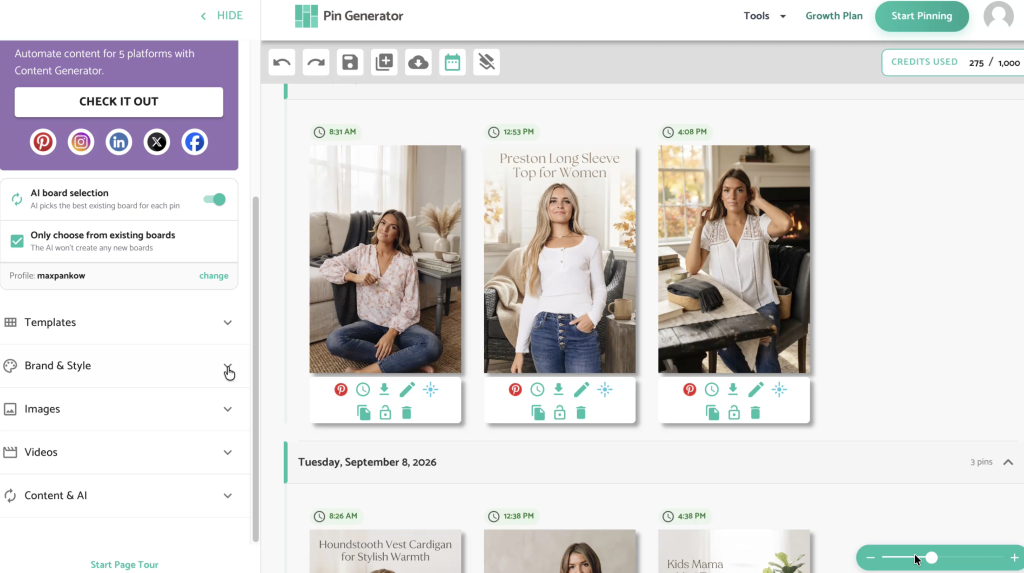
AI imagery with a tool like Pin Generator gives you more room to create variety without photographing every item yourself. The same t-shirt could appear as part of a styled outfit, folded inside a gift box, or displayed in a setting that reflects the audience behind the design. Each scene gives you a fresh way to market the product, although the image still needs to match what the customer will receive. Always check the product’s shape, color, design placement, and other important details before turning an AI-generated image into a pin.
How to Automate Pinterest Marketing With Pin Generator
Creating marketable images is only one part of the process. Every product also needs a relevant title, description, link, Pinterest board, and publishing date, which becomes increasingly difficult to manage as you add new designs and seasonal collections to your shop.
If you want to create high-quality pins at scale without spending hours designing and scheduling them every day, Pin Generator brings the entire process into one workflow. The platform connects to your online store, syncs with the products already in your catalog, and uses your existing images and listing information to create Pinterest content.
Pin Generator creates an AI brand identity based on your shop’s colors, style, and overall visual direction, helping each batch feel cohesive with the business you have already built. You can use templates with your product images and supplier mockups, create fully AI-generated pin designs where appropriate, or combine both options across your catalog. The platform also prepares keyword-focused titles and descriptions, assigns the corresponding product links, and helps match each pin with a relevant Pinterest board.
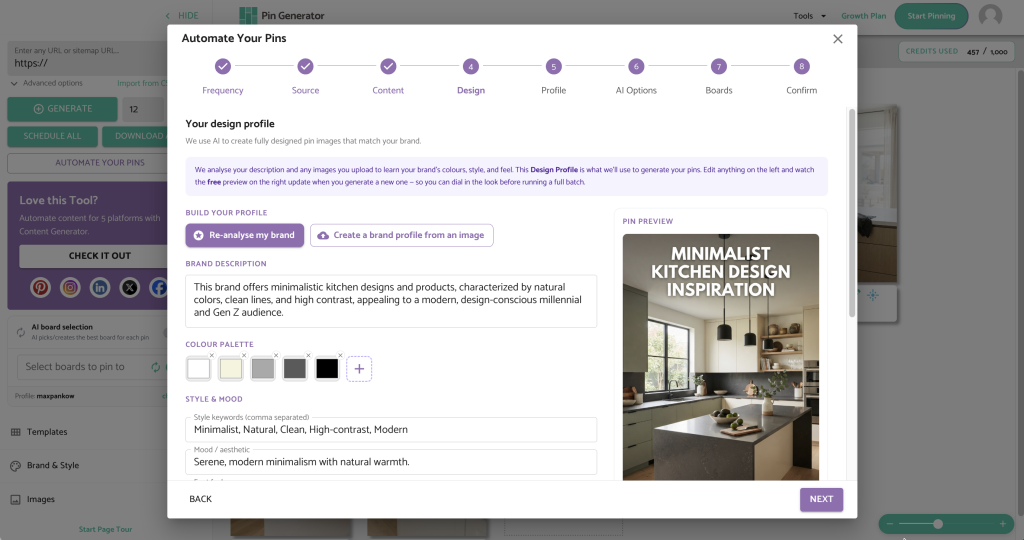
The setup only takes a few minutes, and our YouTube video walks through the complete process using a Shopify store. You choose how many pins you want to publish each day and whether you want to review new batches weekly or monthly, then Pin Generator continues preparing content according to that schedule as your connected catalog grows.
Pin Generator emails you when a batch is ready, giving you time to review the images, copy, links, boards, and publishing dates before anything goes live. Your role shifts from building every pin from scratch to reviewing and refining the content prepared for you, making it much easier for your Pinterest marketing to keep pace with new products and launches.
Our article on creating a month of Pinterest pins in minutes explains how batching and automation can make a regular publishing schedule more manageable.
Start Increasing Traffic to Your Shop
Pinterest can help more shoppers discover your products, but the strongest strategy still begins with designs people want, images that present them clearly, and listings that deliver what your pins promise. Start with a small selection of products, test several visual and keyword angles, and use outbound clicks and sales to understand what deserves more promotion.
If generic supplier mockups or a demanding publishing schedule have kept Pinterest at the bottom of your list, try Pin Generator today and create your first automated campaign.
Let’s get generating!