
Master Pinterest Pin Automation for Fast Growth
29 August 2025
Pinterest automation isn't just a neat trick; it's a fundamental shift in how you can use the platform. It’s all about using software to schedule and publish your pins automatically, breaking you free from the daily grind of manual pinning. This lets you keep up with the high-frequency posting that Pinterest's algorithm loves, which means consistent growth without you having to be chained to your desk.
Why Manual Pinning Is Holding You Back
Let's be real for a moment: the old-school approach to Pinterest is broken. It’s no longer a platform where you can just drop a few images whenever you feel like it and expect to see traffic. The algorithm now heavily favors consistency and volume, creating a treadmill that’s almost impossible for creators to keep up with manually. Trying to do it all by hand is a one-way ticket to burnout.
This change in the platform's DNA makes Pinterest pin automation less of a "nice-to-have" and more of a "must-have" for anyone serious about growth. The sheer number of pins needed to make an impact is mind-boggling.
The Unrealistic Demands of Manual Pinning
To get real traction on Pinterest today, you need to be pinning somewhere in the ballpark of 15 to 30 optimized pins every single day. That's not a typo. And it's not just about volume; you also need to be A/B testing your designs and descriptions to see what works.
From my experience, most people who try to stick to this schedule manually burn out within two weeks. It's just not sustainable. Automation, on the other hand, can handle this pace forever without breaking a sweat.
Just look at a typical content calendar for a high-performing account. The daily volume required is intense.

Seeing it laid out like that makes it crystal clear: for a solo entrepreneur or a small team, managing this manually isn't just a time-sink—it's practically impossible.
The stark contrast between the two methods becomes obvious when you lay them side-by-side.
Manual Pinning vs Automated Pinning
| Aspect | Manual Approach | Automated Approach |
|---|---|---|
| Effort | High daily time commitment. Repetitive and tedious. | Set it up once, then minimal ongoing management. |
| Consistency | Prone to gaps and missed days due to life/burnout. | Flawless consistency, pinning 24/7 without fail. |
| Scale | Very difficult to publish 15+ pins per day. | Easily handles high volume, scheduling hundreds of pins. |
| Strategy | Little time left for analysis, keyword research, or trends. | Frees up time to focus on high-level strategy and content. |
This table really drives home the point that automation isn't just about saving time; it's about enabling a smarter, more effective Pinterest strategy.
Reclaiming Your Time and Strategy
The biggest problem with manual pinning isn't just the hours you lose uploading content. It’s the creative and strategic energy it completely saps from you. When you're stuck on the content treadmill, you have no bandwidth left for the stuff that actually moves the needle:
- Digging into Analytics: Figuring out which pin designs, titles, and descriptions are actually driving clicks and sales.
- Deep Keyword Research: Uncovering new trends and hot topics your audience is searching for.
- Creating Great Content: Writing the blog posts, filming the videos, or designing the products your pins are meant to promote in the first place.
Automation isn't about being lazy; it's about being strategic. It offloads the repetitive, low-value tasks so you can focus your energy on high-impact activities that actually grow your business.
To really appreciate how this shift impacts your entire workflow, it's worth understanding the key business process automation benefits, as many of those principles apply here. You’re building a system that works for you, generating traffic and leads even when you're offline.
Laying the Groundwork for Smart Automation
Jumping straight into Pinterest automation without a plan is a recipe for wasted effort. You can generate hundreds of pins, but if they aren't tied to a clear strategy, you're just creating noise. Before we even open up Pin Generator, let's take a step back and build a solid foundation.
Think of it this way: what does "success" on Pinterest actually look like for you? Are you trying to drive more traffic to your blog? Grow your email list? Or are you focused on selling products from your online store?
Your answer to that question changes everything. An affiliate marketing strategy will look completely different from one aimed at building brand awareness, and your automation needs to reflect that.
What's Your Main Goal?
If you don't have a specific objective, your automated pins will lack purpose. Your primary goal will shape the content you create, the boards you populate, and how you measure your results.
Let’s start by picking one main goal to build around:
- Boost Website Traffic: This is the go-to for most bloggers and content creators. If you rely on ad revenue or just want more eyeballs on your work, your key metric is outbound clicks.
- Generate More Leads: Perfect for coaches, consultants, and anyone with a valuable freebie. Here, success is all about growing that email list.
- Drive Product Sales: For anyone running an eCommerce store, this is the bottom line. Your success is measured in direct conversions and revenue.
Pin Generator is a powerful tool, but it works best when you give it a clear mission. Defining your goal upfront ensures every single pin it creates is a tiny soldier working towards a specific business outcome.
Get Your Pinterest Profile in Order
Your Pinterest profile is your brand's home base. If it isn't properly optimized, you're sending confusing signals to both potential followers and the Pinterest algorithm itself, which can sabotage your automation efforts from the start.
First up, your profile name and bio need to be filled with relevant keywords. Put yourself in your ideal customer's shoes: what words would they type into the search bar to find you? If you need a hand, our guide on Pinterest keyword research is a great place to start.
Next, take a hard look at your boards. Every board should represent a specific niche related to your business, complete with a keyword-rich title and a clear description. A random jumble of boards just confuses the algorithm about what you're an expert in.
The Secret Ingredient: High-Quality Content
Here’s the thing about automation tools: they’re amplifiers, not magic wands. They need great source material to work with. The quality of your blog posts, product pages, and landing pages is absolutely critical.
Your content needs to be genuinely helpful, well-written, and visually appealing. Pin Generator can churn out a stunning variety of pins for a single URL, but if that link leads to a disappointing page, users will hit the back button in seconds.
Ultimately, all your hard work with automation hinges on this. A solid foundation of excellent content ensures that when your pins drive traffic, that traffic actually converts.
Getting Your Pin Generator Workflow Dialed In
Alright, with your strategy mapped out, it's time to get our hands dirty and actually set up your Pinterest pin automation. This is where we tell Pin Generator how to be your 24/7 marketing assistant, turning your website content into a non-stop flow of optimized Pins. Getting this part right from the get-go is the key to making this whole thing work long-term.
First things first, you’ll need to connect your Pinterest account. It's a quick and painless process that gives Pin Generator permission to post on your behalf. Once you’re hooked up, you'll land on the main dashboard—this is your mission control for everything you'll do in the tool.
It’s designed to be pretty intuitive, walking you from a simple URL to a full schedule of Pins.
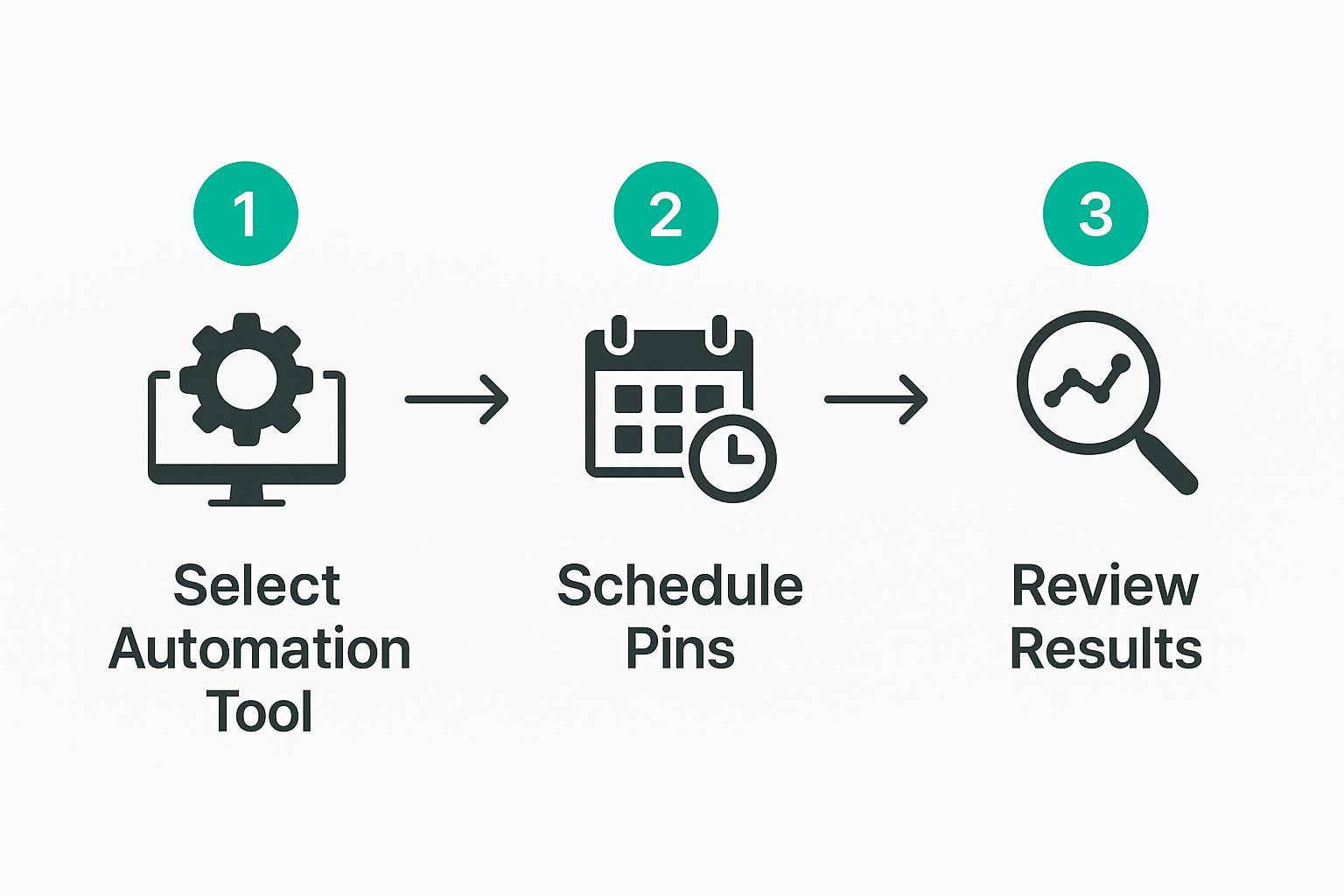
As you can see, the interface is clean and gets straight to the point: turning your existing content into a pipeline of fresh Pins.
Kicking Off Your First Campaign
To start your first campaign, you simply need to tell Pin Generator where to look for content. You can feed it individual blog post URLs, product pages, or even your main website URL and let it crawl for anything that looks pinnable. This flexibility is a huge plus.
Once you provide a source URL, the tool gets to work, pulling images and text it can use to build your Pins. From there, it’s all about setting the rules for the campaign.
There are a few settings you'll want to pay close attention to:
- Pinning Frequency: How often should it post? A great starting point is 5-10 Pins daily. This builds momentum without looking spammy to the Pinterest algorithm.
- Board Selection: Don't just dump everything onto one board. Pick a handful of relevant boards. Pin Generator is smart enough to rotate through them automatically, spreading your content's reach.
- Template Customization: While the default templates are solid, I always recommend tweaking them. Upload your brand fonts, plug in your color codes, and add your logo to keep everything looking cohesive and professional.
Remember, these settings aren't set in stone. In fact, you should plan on coming back to tweak them based on what the performance data tells you.
Your goal with the first campaign isn't perfection; it's about getting the ball rolling. Just grab the URL for your most popular blog post or a best-selling product and let the system do its thing. You'll learn far more from seeing real data come in than you ever will by overthinking it.
The Secret to Unique Descriptions: Spintax
One of the most powerful features you’ll want to get comfortable with right away is Spintax. This is a simple syntax that lets you create hundreds of different Pin titles and descriptions from a single template. It’s absolutely critical for making your Pins look unique and avoiding any spam filters.
So, instead of a static description, you'd write something like this:{Discover|Find|Learn} how to {make|create|bake} the perfect sourdough bread with this {easy|simple|quick} recipe.
Pin Generator will randomly pick one word from each of the curly brackets, creating tons of unique combinations from that one sentence. This little trick keeps both the Pinterest algorithm and your audience happy by ensuring your content always feels fresh. It’s a small bit of effort for a massive payoff.
And that payoff is well worth it. You're tapping into a platform with 570 million monthly active users who are there to shop and discover. A staggering 85% of weekly active users have bought something based on Pins they saw from brands. If you want to dive deeper into these numbers, you can discover more about Pinterest's growing user base on thunderbit.com.
Keeping an Eye on Your First Campaign and Making It Better
Alright, you've flipped the switch and your first automated campaign is officially out in the wild, pushing content to Pinterest. This is where the real fun—and the real work—of Pinterest pin automation begins. The setup phase is over; now it's all about watching the data and making smart adjustments.
The first few weeks are purely for observation. I know it's tempting to jump in and start tweaking things after a couple of days, but you have to resist. Pinterest is a long game. It takes time for pins to get picked up by the algorithm and start circulating. Give your campaign at least two to four weeks to collect enough data before you even think about making changes.
What the Early Numbers Are Telling You
Once you have a solid chunk of data, it’s time to get comfortable with Pinterest Analytics. This dashboard is your command center for figuring out what’s actually working with your audience. Don't let all the charts and numbers intimidate you. Just focus on a few key metrics that tell the story of your campaign's performance.
These aren't just vanity numbers; they're clues that will guide every decision you make from here on out.
Key Metrics for Your First Campaign
To get a clear picture, I always start by looking at a few specific metrics. They help me understand everything from initial visibility to whether people are actually clicking through to my website.
| Metric | What It Measures | What to Look For |
|---|---|---|
| Impressions | How many times your pins have been shown on a screen. | High impressions mean your keywords and scheduling are on point, getting you in front of people. |
| Saves | The number of times people saved your pin to one of their boards. | This is a huge vote of confidence. It tells you the content is valuable and worth keeping. |
| Outbound Clicks | How many people clicked from your pin to your website. | This is the money metric. It shows your pin did its job and drove traffic. |
| Pin Clicks | How many times someone clicked to see your pin up close. | Lots of these without outbound clicks can mean your design is eye-catching but your CTA isn't strong enough. |
Looking at these metrics together gives you the full story. For example, if you have tons of impressions but hardly any saves or clicks, it’s a strong sign that your pin designs just aren't compelling enough to make people stop scrolling.
Finding the Winners and Tweaking Your Strategy
After a few weeks, you'll start noticing clear patterns. Certain pin designs, specific color schemes, or particular headline formats will consistently do better than others. This is your signal to head back into Pin Generator and make some adjustments.
The whole point is to identify what's working and do more of it.
- Pinpoint Winning Designs: Are the pins with bold, simple text getting all the clicks? Do certain color palettes get way more saves? Take note of what your audience responds to visually.
- Analyze Your Text: Look at the titles and descriptions of your top pins. Do they ask a question? Use a specific call-to-action phrase? Use these insights to improve your Spintax formulas.
- Check Board Performance: Is one of your boards sending you way more traffic than the others? Maybe it's time to create more content specifically for that niche.
The best automation isn't a "set it and forget it" tool. It’s a feedback loop. You take the data from Pinterest, use it to refine your rules in Pin Generator, and in turn, Pin Generator creates even better pins.
This cycle of analyzing and adjusting is what will keep your content fresh and your strategy effective over the long haul. It’s what turns a basic automation setup into a powerful traffic-driving machine. If you want to get more granular on the scheduling side of things, our guide on how to schedule Pinterest posts is a great next read.
Advanced Strategies for Long-Term Growth
Real Pinterest automation isn't a "set it and forget it" kind of deal. If you want to see real, sustained growth, you need to think bigger. Once you’ve got the hang of setting up your initial campaigns, it’s time to shift your focus to building an intelligent, evolving system that works for you months—and even years—down the road.
This is less about flipping a switch and more about playing the long game. It means understanding how your content lives and breathes on the platform and keeping your account in good standing with the ever-watchful Pinterest algorithm.
Harnessing the Long Lifespan of Pins
Here’s something you have to understand about Pinterest: its biggest strength is the incredible lifespan of a pin. We're not talking about a tweet that disappears in an hour or an Instagram story that's gone in a day. A well-crafted pin can send you traffic for years.
This isn't just a hunch. A deep dive into over 1 million pins found that even pins between one and two years old were still averaging 68 saves in a 90-day window. That’s some serious staying power. If you’re curious about the data, you can explore the full research on pin lifespans from Tailwind.
When you realize a pin you create today could still be working for you in 2026, you start to see why planning ahead is so critical.
Mastering Seasonal Content Scheduling
Top-tier Pinterest accounts get one thing right: they schedule seasonal content way ahead of time. People on Pinterest are planners. They start looking for holiday and event ideas early—often a full 45-60 days before the date itself. Your automation strategy has to mirror that behavior.
Let's walk through a real-world example. Imagine you're a food blogger:
- By September 1st: You should already have Pin Generator campaigns running for Thanksgiving. Think pins for "best turkey brine" or "easy pumpkin pie."
- By November 1st: Your focus needs to pivot to Christmas. Campaigns for "DIY holiday decorations" and "Christmas cookie ideas" should be going live.
- By January 15th: It’s already time to start pushing content for Valentine’s Day and the first signs of spring.
Scheduling your campaigns this far out ensures your pins are indexed and circulating right when people start searching. You get to ride the wave of every seasonal trend without ever having to scramble.
Here’s a pro tip: Set a reminder in your calendar twice a year to plan your next six months of seasonal content. It’s a simple habit that transforms your Pinterest account from reactive to proactive, making you a go-to source for inspiration.
Keeping Your Automation Account Healthy
For any of this to work long-term, you have to keep your account healthy. Pinterest is smart, and its algorithm is designed to sniff out spammy, repetitive behavior. To stay in its good graces, your automation needs to look and feel like a real, thoughtful human is behind the curtain.
Here are a few non-negotiable best practices.
Best Practices for a Healthy Automation Strategy
- Diversify Your Boards: Don't just hammer the same URL to the same board over and over. A huge red flag. Instead, set up your Pin Generator campaigns to rotate each pin across at least 5-7 highly relevant boards. This tells Pinterest your content has broad appeal within its topic.
- Keep Your Descriptions Unique: This is where Spintax becomes your best friend. If you’re pinning the same link ten different times, every single one of those pins needs a unique description. Identical descriptions are a shortcut to getting flagged as spam, and it will kill your reach.
- Balance Your Pinning Ratio: I've found the 80/20 rule works wonders here. Make sure 80% of your pins link back to your own great content—your blog posts, your products, your lead magnets. The other 20% should be high-quality pins from other creators in your niche. This positions your profile as a valuable resource, not just a billboard for your own stuff.
When you start weaving these strategies into your workflow, Pin Generator stops being just a scheduler. It becomes the engine for a dynamic, sustainable growth machine built for the long haul.
Have Questions About Pinterest Automation? Let's Clear Them Up
Diving into Pinterest automation for the first time? It's completely normal to have a few questions. In fact, it’s smart to get the lay of the land before you jump in. I get these questions all the time, so let's walk through the big ones so you can feel confident about your strategy.
We’ll tackle everything from account safety to how long it actually takes to see your hard work pay off.
Is Pinterest Pin Automation Actually Safe for My Account?
This is usually the first thing people ask, and for good reason. The short answer is a resounding yes, but with a huge caveat: you have to use a reputable tool.
A service like Pin Generator is built on Pinterest's official API. Think of the API as the front door—it's the approved, secure way for other apps to talk to Pinterest and ensures everything you do is compliant with their rules.
Where you run into trouble is with sketchy tools that use scraping or other back-door methods that Pinterest hates. Real, smart automation works by mimicking healthy, human-like activity. It's all about pinning great content to the right boards with varied descriptions. This approach keeps your account in perfect health while you get to enjoy the incredible efficiency.
How Long Does It Really Take to See Results?
Let's be honest: Pinterest is a marathon, not a sprint. It's a long-term growth engine. Once you get automation running, you should start to see a nice, steady climb in your impressions and engagement within the first 2-4 weeks. That's the immediate effect of consistently showing up.
But the real prize is website traffic, and for that, you need to be patient. Realistically, you're looking at a timeline of 3 to 6 months before that automated pinning translates into significant, predictable traffic. Automation's main job is to provide the relentless consistency needed to build that long-term momentum.
Can I Automate Pins for More Than One Website?
Absolutely, and this is where these tools really shine. Any solid automation platform is designed for people juggling more than one project. With Pin Generator, for example, you can easily connect multiple Pinterest accounts or manage different website campaigns all from one dashboard.
This is a lifesaver for:
- Marketing agencies handling a roster of client accounts.
- Brand managers who are responsible for a portfolio of different properties.
- Bloggers and creators running several niche sites.
Each site gets its own dedicated set of templates, schedules, and campaigns. It keeps your entire Pinterest operation tidy and running smoothly.
So, Should I Stop Pinning Manually Completely?
I'd strongly advise against it. The sweet spot is a hybrid strategy. Let your pinterest pin automation tool do the heavy lifting—that's the daily, consistent pinning that keeps your boards fresh and your content circulating. That's its superpower.
Save your manual pinning time for the high-impact stuff. I'm talking about a big product launch, a special holiday promotion, or when you want to craft a really detailed, multi-page Idea Pin. This strategy gives you the best of both worlds: the massive scale of automation combined with the creative, personal touch that only you can provide.
Ready to stop spending hours on Pinterest and put your growth on autopilot? Pin Generator helps you create and schedule hundreds of high-quality pins in minutes. Start your free trial today and see the difference automation can make.