
Pinterest Search Trends: The Complete Guide for Creators
12 October 2026
Pinterest search trends are shaped by scale and visual intent: Pinterest reported approximately 80 billion monthly queries in Q3 2025, while queries on its latest visual-search features grew 44% year over year. The practical answer is to stop guessing broad topics, validate demand in Pinterest Trends, and build visuals that match both the phrase people use and the image they expect to discover.
A creator can spend an afternoon designing a polished pin about “rustic home decor,” schedule it for the season, and then watch the analytics stay quiet. Nothing is obviously broken. The image is attractive, the description sounds reasonable, and the topic seems popular. Meanwhile, another creator is earning attention with a more specific visual concept, such as “Japandi living room ideas,” because that phrase reflects an actual discovery path rather than a personal hunch.
That difference matters because Pinterest search is no longer limited to typed keywords. Users can begin with words, an image, a camera input, a related item, or a broad visual idea. Your job is to make the content legible across those paths. Pinterest Trends provides the demand signal, while disciplined creative production turns that signal into useful pins.
Table of Contents
- Why Guessing Pinterest Trends Fails
- What Are Pinterest Search Trends
- How to Access and Interpret Trend Data
- Building an Automated Trend Workflow
- Manual vs Automated Trend Strategy
- Avoiding the Viral Trap
- Your Next Steps for Trend Mastery
Why Guessing Pinterest Trends Fails
A pin can look polished, match the season, and still go nowhere.
That usually happens because the creator picked a topic they could name, not a topic people were trying to find in a specific visual form. “Rustic home decor” sounds plausible. It is also broad enough to cover furniture, wall art, shelving, color palettes, and room styling. A pin built around “Japandi living room ideas” gives Pinterest, and the user, a much clearer match on style, room, and intent.

Broad topics hide useful intent
Guessing fails because broad categories flatten real demand. “Home decor” can mean inspiration, shopping, DIY, small-space fixes, or a full room refresh. Each of those needs a different image, title, and landing page. If the pin tries to cover all of them, it usually serves none of them well.
The same problem shows up in seasonal planning. A generic holiday content calendar tells you when interest might rise, but it does not tell you whether users want table settings, outfit ideas, gift wrap, party food, or travel inspiration. Marketers who rely on the calendar alone often publish on time and still miss the query.
My rule is simple. Treat intuition as a starting point, not as proof.
Pinterest is visual search, not just keyword search
Many Pinterest guides still treat the platform like a text-first search engine with images attached. That approach misses how discovery works now. People can start with a phrase, then refine through related visuals, product cues, or image-based exploration. If the creative does not make the topic obvious at a glance, the metadata has to do too much work.
Trend research and production need to connect. A useful trend signal is not just “people search this phrase.” It is “people expect to see this idea presented in a certain way.” For a recipe, that may mean the finished dish in clear focus. For home decor, it may mean the full room, not a cropped lamp. For fashion, it may mean the outfit on a person rather than a flat lay.
That shift creates a real trade-off. Highly specific pins usually match intent better, but they also narrow reach. Broad pins reach more categories on paper, but they tend to earn weaker engagement because the image and query do not line up tightly enough. In practice, the better bet is usually a cluster of specific pins built from one validated theme.
That is also why guessing does not scale. Manual brainstorming can produce a few solid ideas, but it breaks down once you need consistent coverage across styles, seasons, and subtopics. At Pinterest scale, trend work is part research and part production system. Teams that pair search signals with repeatable creative workflows, including automation tools like Pin Generator, are better positioned to turn demand into enough testable pins to matter.
What Are Pinterest Search Trends
A pin can be perfectly designed and still miss if the trend read is wrong. The usual failure is simple. Someone sees a phrase rising, assumes it means raw search volume is high, and builds creative around the wrong interpretation.
Pinterest search trends track how interest in a term changes relative to other activity on Pinterest over a selected period. That distinction matters in practice because the chart is showing comparative demand, not a fixed count of searches. If a phrase climbs, it means it is taking a larger share of attention inside the market and time frame you chose. Change the country or the date range, and the meaning can change with it.
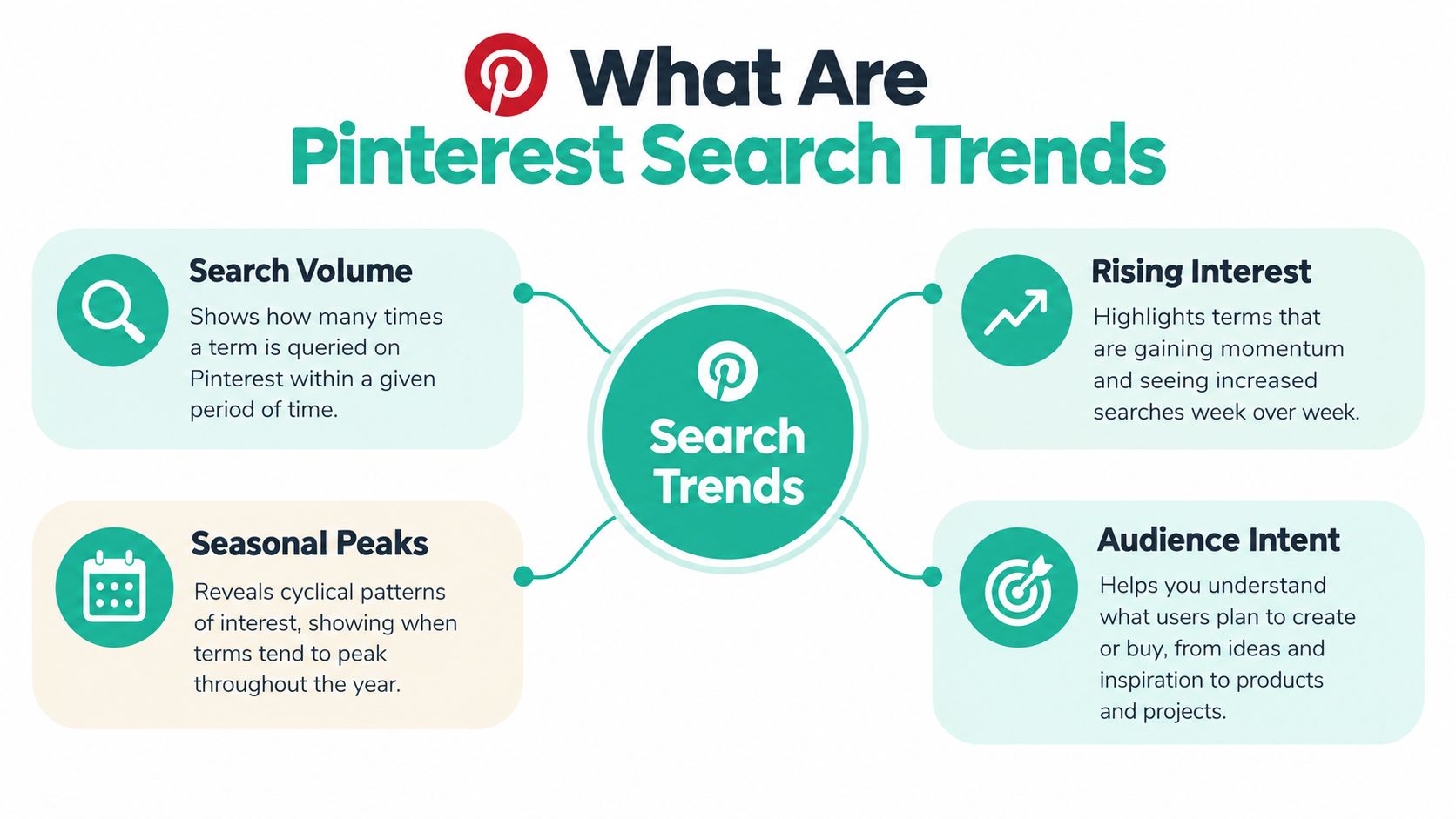
That is why trend data is more useful than a flat keyword export. A keyword list can confirm that a phrase exists. Trend data shows whether the phrase is rising, recurring seasonally, concentrated in one market, or splitting into related subtopics that deserve separate pins.
The useful views tend to fall into five buckets:
- Relative interest shows whether a topic is gaining or losing share within the selected comparison.
- Short-term movement helps spot themes that may need creative this week, not next month.
- Seasonal patterns help teams publish before demand peaks, which is usually where the easier clicks are.
- Regional concentration prevents broad rollouts for ideas that only resonate in specific markets.
- Related queries turn a broad theme into production-ready angles.
Pinterest trends also need to be read as visual intent, not just text intent. People do not only search with words and stop there. They refine through images, save behavior, recommendations, and adjacent ideas. On a topic like wedding reception planning, the phrase may be broad, but the winning creative usually is not. A pin about QR wedding pictures works better when the image makes the use case obvious at a glance, such as guest photo sharing, table cards, or a sign near the dance floor.
That is the practical difference between Pinterest and a standard search engine workflow. The trend signal is only half the job. The other half is matching that signal with a visual treatment that fits how people discover content on the platform.
At Pinterest scale, that matters more than marketers like to admit. With search and discovery happening across an enormous volume of monthly queries, the edge comes from translating one validated theme into enough strong visual variations to test. That is why trend research works best when it feeds a repeatable production system, whether the pins are built manually or with a tool like Pin Generator.
How to Access and Interpret Trend Data
A common failure point looks like this. A marketer spots a rising query, builds three pins around it, and later realizes the spike was limited to one region, one short window, or one narrow visual use case. Pinterest Trends helps prevent that, but only if you read it with context instead of chasing the first upward line.
Start with a broad seed that matches what you sell, publish, or teach. Then narrow it fast. Geography, category, and time range are not minor filters. They change the meaning of the trend.
Enter a seed such as “wedding ideas,” “small kitchen,” or “men's fashion,” then review the related phrases before choosing a direction. The phrase worth producing against is often one layer deeper than the headline term. A wedding publisher might find stronger intent around guest photo displays, seating charts, or reception signage. A retailer might spot that a specific material, fit, or room type deserves its own creative set.
A practical reading sequence
Use the interface in this order:
- Set the market first. Keep the country or region fixed when comparing terms. Holidays, weather, and local culture can shift demand fast.
- Choose the time window. Short windows help with timely tests. Longer views are better for recurring campaigns and seasonal planning.
- Read the index correctly. It is a normalized measure of search interest, not a raw search count.
- Open related phrases. Look for modifiers that clarify audience, product type, occasion, or format.
- Study the curve. A clean seasonal rise is more useful than a single sharp spike with no history.
- Save the context. Record the keyword, region, date checked, and comparison window so later decisions are based on the same frame.
The interpretation job starts after the chart. Rising interest does not automatically mean broad opportunity. It may point to a small but clear niche, and that is often enough on Pinterest if the visual is specific. I would rather back a narrower phrase with obvious image intent than a huge generic term that produces vague creative.
That matters because Pinterest is not a text-only search system. Query data shows what people ask for. The pin still has to answer visually in a fraction of a second. If the trend is “small kitchen storage,” the winning test is rarely a generic kitchen photo. It is usually a visual angle with immediate clarity, such as drawer dividers, over-sink shelving, or corner cabinet organization.
A guide to finding trending Pinterest keywords can help standardize that research habit. The value is not the keyword list by itself. The value is comparing terms the same way every time, then turning the useful ones into repeatable creative tests.
Turn a trend into a creative brief
Before designing, write one sentence that defines the match:
Audience + searched concept + visual treatment + destination.
For example, “Couples planning a reception, QR guest photo sharing, bright table display, wedding resource page.” That sentence forces alignment between the query, the image, and the click target. If the keyword suggests a clean minimalist space but the pin shows a crowded maximalist room, the trend research was fine. The creative interpretation was off.
Building an Automated Trend Workflow
Trend data only creates value when it reaches production in time. A manual process often breaks between discovery and publishing. Someone notices a rising phrase, adds it to a spreadsheet, postpones the design, and returns after the visual moment has passed.
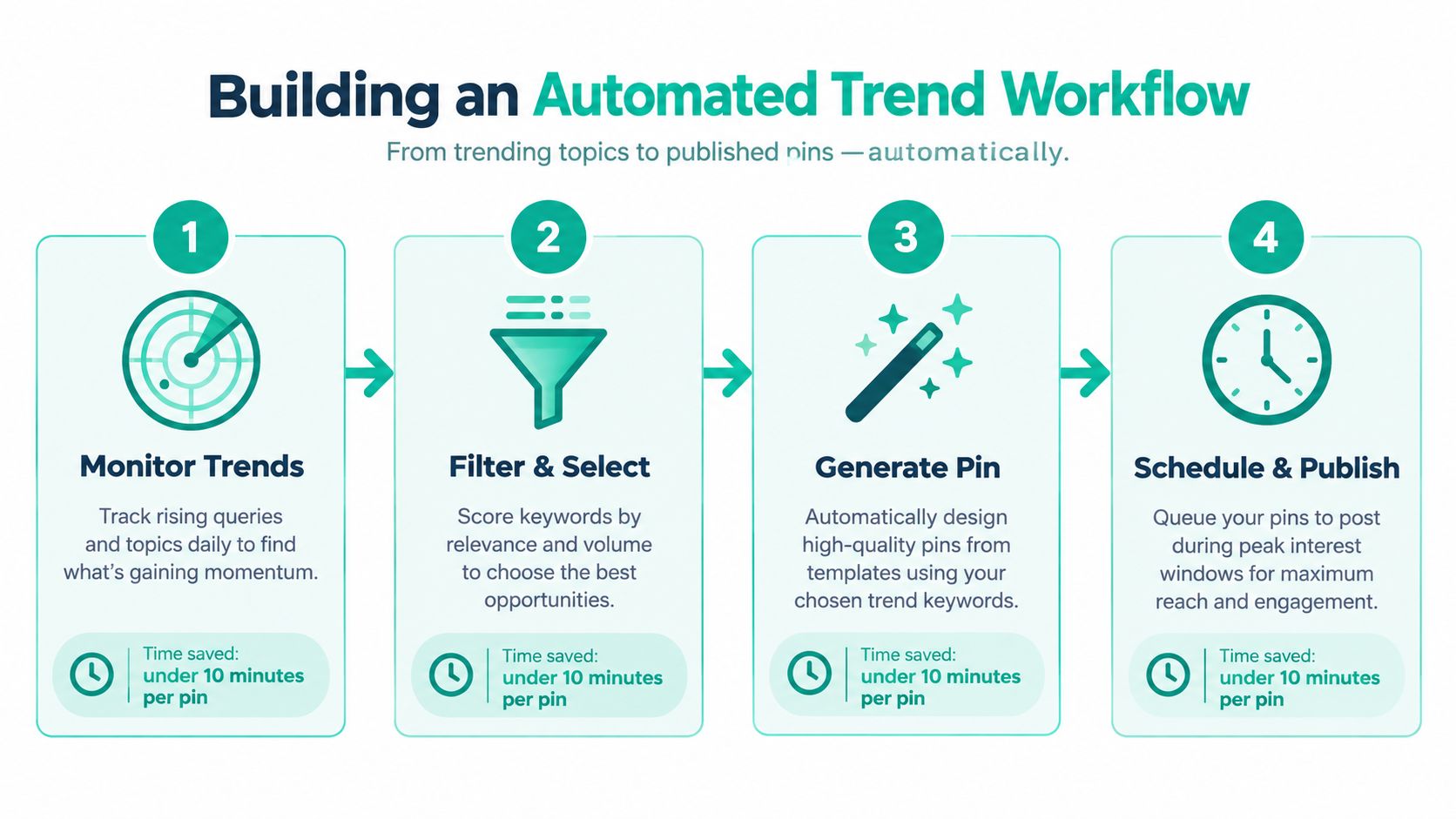
A better workflow treats trends as inputs to a controlled content pipeline. Monitor, qualify, generate, review, and schedule are separate decisions. Automation can reduce repetitive work, but it shouldn't decide whether a topic fits your brand or whether a claim is accurate.
Build the pipeline around judgment
Monitor. Check selected seeds by region and keep the date attached to every observation. Trend alerts are more useful when they notify you about a relevant topic rather than every movement in your category.
Qualify. Score the phrase for topical fit, commercial relevance, visual clarity, and durability. A term can be rising and still be wrong for your audience or impossible to represent accurately in a pin.
Generate. Feed the approved brief into a tool such as Pin Generator. Its documented workflow can create on-brand pin designs, titles, descriptions, alt text, board selections, and recurring schedules from product catalogs, feeds, or other connected inputs. Use reusable templates to test different image compositions without changing the underlying message.
Review. Check the image first. Confirm that the main object is visible, the wording is readable, the destination matches the promise, and the metadata uses the selected phrase naturally. Automated output still needs editorial judgment.
Schedule. Queue related variants across a sensible publishing cadence. Avoid publishing a dozen near-identical designs that differ only by a background color. Give each variation a distinct angle, image, crop, or use case.
This workflow is similar to broader AI social tools for small business, where automation handles repetitive execution while the owner controls positioning and approval. The trade-off is clear: speed increases, but weak inputs can produce weak output at scale.
Keep the data attached to the creative
Store the trend phrase, region, observation date, comparison interval, creative concept, destination URL, and publishing status together. That makes later analysis more useful because you can distinguish a text-led test from a visual-led test.
The automation should also preserve variation labels. Name designs by concept, such as “product close-up,” “room scene,” “before and after,” or “step sequence.” Without labels, performance data tells you that a pin moved, but not which visual decision contributed.
For a more detailed implementation approach, see automated Pinterest pin generation. The principle remains platform-neutral: automate the repeatable parts, retain human approval for relevance, accuracy, brand fit, and destination quality.
Manual vs Automated Trend Strategy
Manual production gives you control at every stage. You can choose the exact photo, adjust the hierarchy by hand, rewrite a title until it sounds natural, and decide whether a trend deserves attention. For a small catalog or a narrow publishing schedule, that control may justify the time.
The weakness appears when every pin requires the same sequence of design, copywriting, uploading, board selection, and scheduling. A merchant with many products can spend more time preparing assets than deciding which products deserve promotion. A publisher can identify useful trends but fail to publish while the topic is still timely.
| Approach | What it does well | Where it breaks |
|---|---|---|
| Manual creation | Detailed art direction and careful editorial judgment | Slow repetition, inconsistent cadence, difficult batching |
| Template-led production | Faster variation while retaining brand controls | Can look repetitive if concepts don't change |
| Automated workflow | Connects research, generation, feeds, and scheduling | Needs clean inputs and human quality checks |
| Hybrid process | Combines scale with approval and creative direction | Requires clear ownership and review rules |
Automation doesn't replace creative strategy. It removes low-value repetition so a marketer can spend more attention on the parts machines handle poorly, including audience positioning, offer clarity, image selection, and the decision to reject a weak trend.
Decide where human review belongs
Keep manual approval for:
- Brand fit: Does the visual belong to your established aesthetic?
- Truthfulness: Does the pin promise only what the destination delivers?
- Visual relevance: Would the image make sense for the searched concept without the description?
- Commercial context: Is the product or service appropriate for the audience's likely next action?
- Cultural and regional fit: Does the creative respect the market selected in the trend data?
Automate repetitive production when the inputs are stable. Product catalogs, RSS feeds, Atom feeds, CSV files, and connected stores can supply a steady stream of source material, but they still need rules. Exclude out-of-stock products, outdated articles, and destinations that no longer match the creative.
The strongest arrangement is usually hybrid. People choose the direction and approve the output. Systems handle formatting, variations, metadata drafts, and scheduling. That division preserves judgment without forcing a marketer to perform the same mechanical task for every pin.
Avoiding the Viral Trap
A familiar Pinterest mistake looks like this. A term spikes, the chart looks dramatic, and a team rushes out 20 pins before asking a harder question. Are people actually looking for something you can show clearly and fulfill credibly, or are you reacting to motion on a graph?
That distinction matters because Pinterest is not only a text query system. It is a visual discovery platform. A phrase can rise fast while the winning creative angle stays narrow, seasonal, or too weak to support a full campaign. Search interest gets your topic on the board. Visual fit decides whether the pin earns attention.
Treat sharp movement as a testing signal, not a green light for volume. A short-lived topic can justify a few fast pins if the destination is timely, the creative can be produced quickly, and you are prepared to stop if response stays flat. What fails is promoting a spike into a permanent content pillar before it proves repeatable demand.
Use a simple filter before you produce anything at scale:
- Relevant and rising: Publish a small test tied to one clear destination.
- Relevant and seasonal: Build early, then schedule around the known demand window.
- Relevant and steady: Invest in evergreen assets and refresh the visuals over time.
- Rising but off-topic: Skip it.
- Unclear, news-driven, or celebrity-led: Watch it longer before assigning design time.
The time view changes the decision. Short windows are useful for timing a test. Repeated patterns across longer windows are more useful for planning inventory, creative themes, and supporting content. One exciting week is weak evidence. Recurring behavior is stronger evidence.
I use a simple rule here. Trends earn scale in stages.
Start with one topic, a few visual angles, and one destination that matches the promise of the pin. If the idea holds up, then expand. That is where automation helps without taking over judgment. A tool like Pin Generator can produce variants quickly, but speed only pays off when the topic already cleared a relevance check. Otherwise you just create off-target volume faster.
Evergreen content keeps the account stable while you test timely ideas. It gives you durable landing pages, cleaner reporting, and more chances to learn what your audience responds to visually. Timely pins can capture short bursts of demand. Evergreen pins build a library that still works after the spike fades.
The visual test matters as much as the keyword test. Do not publish five near-identical pins built around the same phrase. Show the idea in different ways: a product close-up, a lifestyle scene, a step sequence, a comparison, or a bold text-led concept if the query needs explanation. That is how you learn whether the searcher wants inspiration, instruction, proof, or a product.
Virality is not the goal. Useful, relevant distribution is. On Pinterest, the better question is not "Is this trending?" It is "Can we represent this intent visually, at scale, without lowering quality?"
Your Next Steps for Trend Mastery
Start with a small operating loop and make every decision traceable. Open Pinterest Trends, choose a seed that belongs to your niche, and inspect the related terms in the market you serve. Record the phrase and context rather than copying a screenshot and relying on memory.
Then select topics according to fit, not excitement. A useful trend should connect to an existing product, article, service, recipe, or resource. If there's no credible destination, the trend is only an idea, not a publishing opportunity.
A first-week checklist
- Explore deliberately. Review a few relevant seed terms and compare them using the same region and time window.
- Select focused phrases. Choose rising or seasonally useful terms that you can represent clearly in an image.
- Write the brief. Define the audience, visual concept, metadata language, and destination before opening a design tool.
- Create controlled variants. Change the composition or angle, not just the background color.
- Schedule with intent. Publish while the topic is relevant, but keep enough evergreen content in the queue to avoid a profile built entirely around fleeting moments.
- Review the output. Check readability, visual relevance, destination accuracy, and brand consistency before anything goes live.
- Record what you learn. Keep the trend context alongside the creative label so future tests have a useful baseline.
Pinterest reported more than half a billion monthly users in its 2026 trend-report coverage, while its Gen Z audience generated 30% more searches year over year (Marketing-Interactive's coverage of Pinterest's 2026 trend report). The category movement reported for Gen Z was especially strong in food and drink, men's fashion, and women's fashion. That reinforces the need to combine broad evergreen planning with timely, audience-specific research instead of publishing one generic calendar for everyone.
The durable advantage comes from connecting three elements: demand evidence, visual relevance, and consistent execution. Trend data tells you where to look. Creative judgment determines what to make. A repeatable workflow gives good decisions a chance to reach the audience.
Pin Generator can turn approved trend ideas into on-brand pin designs, titles, descriptions, alt text, board selections, and scheduled publishing from catalogs or content feeds. Visit Pin Generator to connect trend research with a repeatable Pinterest production workflow.