
Ultimate Pinterest SEO Guide: Boost Your Visibility Today
11 June 2025
Why Pinterest Is Actually a Search Engine in Disguise
Here’s something that totally changed my Pinterest game: I started thinking of it like Google, not Instagram. So many marketers treat Pinterest just like any other social media platform. They focus on pretty pictures and hope for likes. But they’re missing something huge: Pinterest users are actively searching for things, not just passively scrolling. They’re looking for solutions, inspiration, and products – just like they are on Google.
This search-first mindset is the key to unlocking Pinterest’s true potential. Pinterest’s algorithm actually rewards helpful, searchable content over flashy graphics. Think about it: when you’re looking for a new recipe or a DIY project, are you drawn to the prettiest pin or the one that actually matches your search and seems like it will be helpful? In my experience, it’s the latter. This means keywords, descriptions, and Rich Pins become your new best friends.
To better understand how search engine optimization works for visual content, check out SEO for Photography. It’s a great resource for understanding the power of visuals in search. This translates perfectly to Pinterest, where visual appeal and search intent work together. Optimizing your pins for search terms relevant to your niche makes it way more likely that the right people will find your content.
This brings us to a vital point: understanding Pinterest’s user base. Pinterest’s reach is massive, influencing purchasing decisions and offering a unique marketing channel. It’s not just about pretty pictures; it’s about connecting with a huge audience actively searching for information and inspiration. For example, did you know that as of 2025, Pinterest has 570 million monthly active users, a 10% year-over-year increase? This growth alone shows how important it is to optimize your content. Plus, 85% of weekly Pinners have made a purchase based on Pins from brands. That’s a huge opportunity for driving sales. Discover more insights.
The Long Shelf Life Advantage of Pinterest SEO
Another crucial difference with Pinterest is its “long shelf life.” Unlike other platforms where content disappears quickly, pins can stay relevant and searchable for months, or even years. I’ve had pins I created ages ago suddenly take off and drive a ton of traffic to my website.
This longevity creates a snowball effect – the work you do today keeps paying off down the road. This long-term visibility makes Pinterest incredibly powerful for building a lasting online presence and consistently driving traffic to your website or online store. That’s why a good Pinterest SEO strategy isn’t a sprint; it’s a marathon. The consistent effort you put in today builds a foundation for ongoing visibility and reach.
Finding Keywords That Actually Convert on Pinterest
Forget keyword stuffing. Pinterest is a visual discovery platform. People use it for inspiration, finding solutions, and shopping. That means your keyword research has to reflect how people actually search. In my experience, aligning your content with real user intent is key to Pinterest marketing success.
Beyond the Search Bar: Uncovering Hidden Keyword Gold
The Pinterest search bar is a good starting point, but it’s not the whole story. Really mastering keywords means understanding seasonal trends, regional differences, and the nuances of visual search. For instance, searching for “fall recipes” in September will give you different results (and search volumes) compared to searching in January. Check out our Pinterest keyword research guide for more in-depth strategies.
Using Pinterest Trends to Your Advantage
Pinterest Trends is a powerful tool for understanding what’s popular right now. It gives you insights into rising search terms, so you can jump on trends before your competition. This is incredibly useful for seasonal content where timing is crucial. Think about creating pins for “Halloween decorations” weeks before the search volume peaks – you’ll be ready to capture all that traffic.
Visualizing Search Volume: Understanding User Interest
To show how search volume can change, let’s look at some popular keywords. The infographic below compares the monthly search volume of three top terms: home decor, DIY crafts, and healthy recipes.
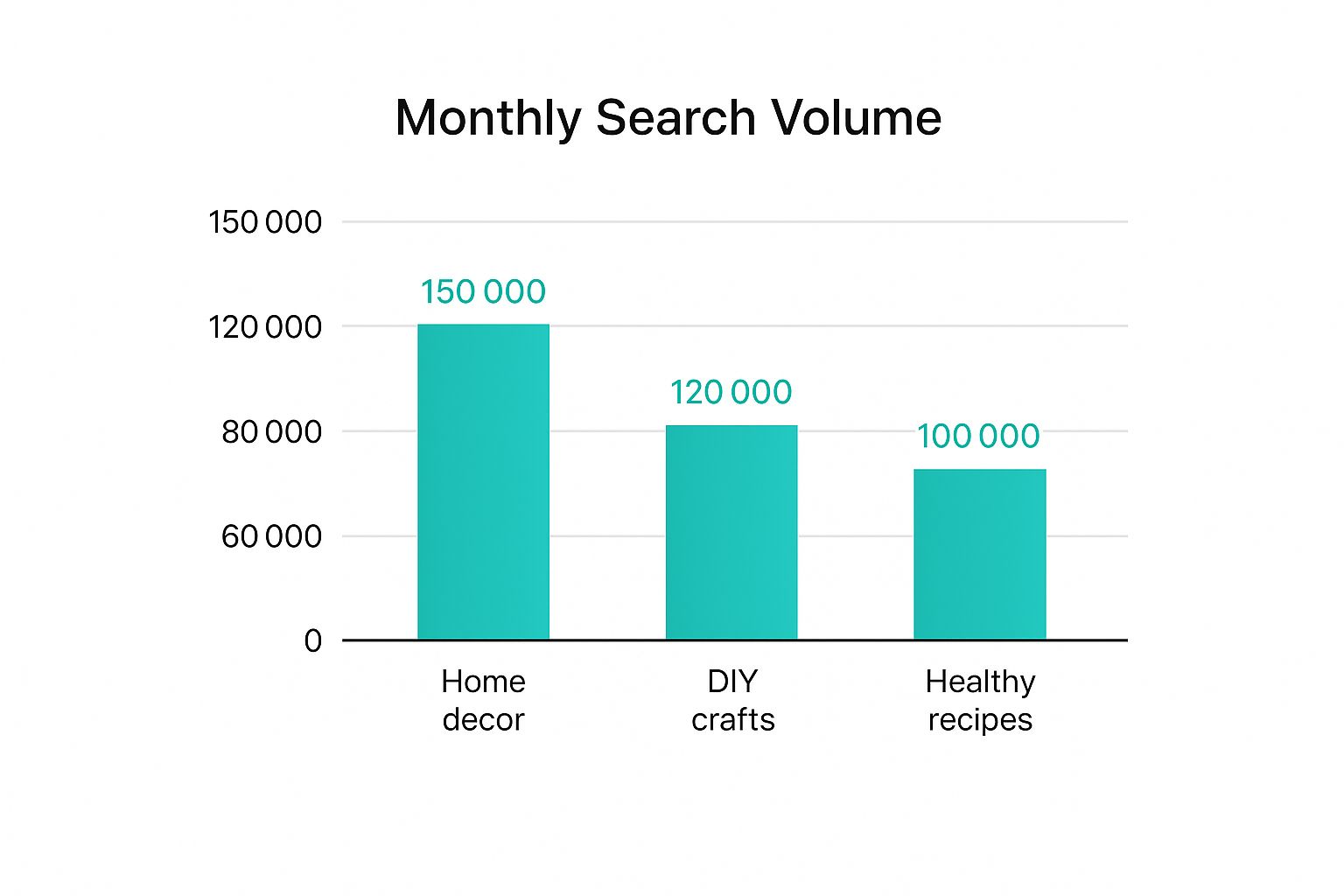
As you can see, “home decor” has a much higher search volume than “DIY crafts” and “healthy recipes.” This shows how important it is to understand user interest and prioritize keywords accordingly. Knowing these differences helps you focus on the keywords with the biggest potential reach.
Competitor Analysis: Ethical Spying for Keyword Success
Don’t be shy about checking out what your competitors are doing. Analyze their successful pins, board titles, and descriptions. What keywords are they using? What kind of content are they creating? This isn’t about copying. It’s about understanding what works in your niche and finding ways to stand out. For example, if a competitor is ranking well for “rustic wedding decor,” you could target a more specific long-tail keyword like “rustic outdoor wedding decor ideas.”
Crafting Keyword Lists That Drive Results
Creating a targeted keyword list isn’t about randomly brainstorming words. It’s about understanding your audience and their search habits. Think about the problems your content solves and the language your ideal customer uses. This helps you identify long-tail keywords with high buying intent, which are essential for driving conversions, not just clicks. Also, think about adding seasonal keywords to capitalize on recurring trends throughout the year. By combining these strategies, you’ll build keyword lists that actually make a difference to your business.
To help you find the perfect keyword research tool, here’s a quick comparison:
Pinterest Keyword Research Tools Comparison: A comprehensive comparison of free and paid tools for Pinterest keyword research, including features, pricing, and best use cases.
| Tool Name | Type | Key Features | Best For | Pricing |
|---|---|---|---|---|
| Pinterest Trends | Free | Built-in, shows trending searches and seasonal insights | Quick overview of popular topics, identifying rising trends | Free |
| Tailwind (Tailwind) | Paid | Keyword research, analytics, scheduling, and community insights | Bloggers, small businesses, and agencies managing multiple Pinterest accounts | Starts at $19.99/month |
| Pin Generator (Pin Generator) | Freemium | Keyword research, Pin creation, scheduling, and analytics | Businesses looking to automate and scale their Pinterest marketing | Free and paid plans available |
This table summarizes some popular options, from the free Pinterest Trends to more robust paid tools like Tailwind and Pin Generator. Choose the tool that best fits your budget and needs.
Writing Pin Descriptions That People Actually Click
Let’s be real, most Pinterest descriptions are dull. They sound like they were written by robots, for robots. And what happens? Your pins get lost in the noise. The core of a good Pinterest SEO guide? Remembering Pinterest is a search engine, yes, but one used by people.
This screenshot shows what you typically see searching for “easy dinner recipes.” Look at how the top pins use great visuals and short, keyword-focused descriptions to get those clicks. A lot of them use Rich Pins, showing extra details like ingredients and cooking times. This extra info makes them way more attractive to users and the Pinterest algorithm.
The secret sauce? Write for people first, then optimize for Pinterest. After analyzing loads of viral pins, I’ve noticed some patterns that consistently get more engagement and clicks. Forget keyword stuffing (seriously, don’t!), it’s about understanding what makes someone save and click through to your site.
Crafting Compelling Opening Hooks
Think of the first few words of your pin description as your headline. You’ve gotta grab attention fast. Skip the generic descriptions. Try starting with a question, a bold statement, or a problem your pin solves.
For example, instead of “Chocolate chip cookie recipe,” try “Craving warm, gooey cookies? This recipe is a game-changer.” Big difference, right?
Weaving Keywords Naturally into Your Descriptions
Keywords are crucial for any Pinterest SEO guide, but they need to flow naturally within your description. Don’t just cram them in. Think about how people actually search. What words would you type in to find this pin? Use those keywords in your description, making sure they make sense in the context.
For example, a pin about “rustic farmhouse decor” might include phrases like “farmhouse style,” “rustic home,” or “DIY farmhouse decorating ideas.”
Using Psychological Triggers to Encourage Clicks
A little psychology goes a long way on Pinterest. People love pins that offer solutions, inspiration, or a sense of urgency. Sprinkle in words that create desire and evoke emotion.
Words like “easy,” “quick,” “secrets,” “tips,” and “discover” can be super effective. Think: “Discover 5 easy tips for creating stunning floral arrangements.”
Formatting for Readability and SEO
Giant blocks of text? No thanks. Break up your descriptions with line breaks, emojis, and bullet points. This makes it easier to read and highlights important info and keywords. I personally love using emojis and bullet points together to guide the reader’s eye and emphasize key takeaways.
Creating Multiple Description Variations
Don’t stick to just one description per pin! Create a few different versions, each focusing on slightly different keywords. This broadens your reach and lets you see which ones perform best.
For example, one description could be about “budget-friendly travel tips,” while another focuses on “solo travel adventures.” This way, you’re catching a wider audience searching for similar, but not identical, terms.
Example Pin Descriptions for Different Niches
Let’s see these tips in action. Here are some examples:
- Fashion: “Obsessed with this floral dress! 🌸 Perfect for spring weddings or a night out. Shop the look now! #springfashion #floralprint #weddingguestdress”
- Food: “Craving a healthy and delicious weeknight meal? This 30-minute salmon recipe is a game-changer! 🐟 #easyrecipes #healthyfood #salmon”
- DIY: “Transform your living room with these 5 easy DIY decorating ideas. ✨ Get a designer look on a budget. #diydecor #homedecor #budgetdecor”
Using these tips, you can write pin descriptions that not only get clicks but also boost your overall Pinterest SEO. Remember, it’s all about connecting with your audience and giving them something valuable. That personal touch makes all the difference in your Pinterest marketing.
Rich Pins: Your Secret Weapon for Pinterest Domination
Let’s talk about Rich Pins. I’ve noticed a lot of marketers either don’t know about them or are straight-up intimidated by them. But trust me, they can seriously level up your Pinterest game, and they’re way easier to set up than you think.
I’ve seen firsthand how Rich Pins can transform a Pinterest strategy. We’re talking automatic updates, more info right there on the pin, and a huge boost in click-through rates. Seriously, the engagement compared to standard pins is night and day. More clicks mean more traffic, and more traffic means more success.
Understanding the Power of Rich Pins
So, what’s the big deal with Rich Pins, especially when we’re talking Pinterest SEO? They pull data directly from your website, so the info on your pins is always up-to-date. This is huge. Imagine changing a product price on your website. With Rich Pins, the price on your Pinterest pin updates automatically. No more manually tweaking hundreds of pins!
Rich Pins also add those extra details that make your pins stand out. Product Rich Pins show pricing, availability, and a direct purchase link. Recipe Rich Pins show ingredients, cooking times, and serving sizes. Article Rich Pins feature headlines, author info, and descriptions that make them way more appealing in search results.
Real-World Results: Rich Pins in Action
Here are a few examples of how Rich Pins have made a difference:
- An e-commerce store saw a 30% sales increase after using Product Rich Pins. The streamlined buying process really helped.
- A food blogger got a 50% traffic jump with Recipe Rich Pins. Those extra details right on the pin made all the difference.
- A news site’s Article Rich Pins got 20% more engagement. People just connected with the richer content.
These are just a few examples – Rich Pins are incredibly versatile and a key part of any solid Pinterest SEO plan.
Setting Up Rich Pins: A Simple Guide
Setting up Rich Pins is much simpler than you might imagine. It involves prepping your website, adding a few meta tags (it’s not as scary as it sounds!), and then validating your pins with Pinterest. We’ll cover the step-by-step process in the next section, breaking it down so it’s super easy to follow. We’ll also cover troubleshooting and some advanced optimization strategies to really maximize your Rich Pin impact.
Leveraging Rich Pins for Pinterest Shopping and Increased Visibility
Rich Pins aren’t just informative; they unlock more advanced Pinterest features, especially Pinterest Shopping. They help create a seamless shopping experience, opening up things like product tagging, shoppable catalogs, and the “Shop” tab on your profile – all leading to much better visibility in search. For e-commerce businesses, this is a game-changer. Rich Pins are essential for connecting with customers and driving conversions on Pinterest, from improved click-through rates to enhanced product discoverability.
Board Strategy That Actually Builds Your Pinterest Empire

Your Pinterest boards are way more than just digital scrapbooks; they’re the backbone of any solid Pinterest SEO strategy. I used to think pretty boards were the key. Nope. They need to be strategically designed to attract both Pinners and the Pinterest search algorithm. Think of them as curated shop windows, showing off your expertise and best content.
The Psychology of Clickable Board Names
Board names are like mini-headlines. They need to be catchy and instantly tell people what the board is all about. After looking at tons of successful accounts, I noticed a pattern: simple, keyword-rich names perform best. For example, “Easy Weeknight Dinner Recipes” works way better than “My Favorite Recipes.” Specificity is your friend.
Board Descriptions: Your SEO Goldmine
Don’t neglect your board descriptions! This is where you can really boost your SEO. Work in relevant keywords naturally to help people find your boards. For a “Healthy Smoothies” board, sprinkle in keywords like “breakfast smoothies,” “green smoothies,” and “smoothie recipes.” This tells Pinterest exactly what your board is about and who to show it to.
Structuring Your Boards for Maximum Impact
Think of a department store – different sections for different products. Your Pinterest boards should be organized the same way. Use a mix of broad and niche boards to target general and specific keywords, covering all your bases. For example, a “home decor” niche could have a general “Home Decor Ideas” board and niche boards like “Modern Living Room Decor” or “DIY Bedroom Decor.”
Board Cover Images: First Impressions Matter
Your board cover image is the first thing people see, so make it count! Choose high-quality, eye-catching images that truly represent your board’s content. My trick? I often use an image from one of my top-performing Pins on that board. It gives users a preview of what to expect and makes a great first impression.
Seasonal Boards: Capitalizing on Trends
Seasonal boards are a secret weapon in any Pinterest SEO guide. They let you ride the wave of trending search terms and keep your content fresh. Creating boards for holidays or seasons (like “Fall Recipes” or “Holiday Gift Guides”) has worked wonders for my engagement. Plus, it’s a great way to repurpose existing content.
Optimizing Board Size and Content Variety
How many boards and Pins should you have? There’s no magic number, but in my experience, accounts with varied board sizes do well. A good mix of smaller, niche boards (10-20 Pins) and larger, broader boards (50+ Pins) keeps your profile dynamic and interesting.
Leveraging Pinterest Analytics for Continuous Improvement
Pinterest Analytics isn’t just for vanity metrics. It tells you what’s working and what’s not. I constantly check my board analytics to see which boards are driving the most traffic and engagement. It’s invaluable for shaping my future board strategy.
Board Optimization Checklist
To help you out, here’s a handy checklist to make sure your boards are following best practices:
| Element | Best Practice | Common Mistakes | SEO Impact |
|---|---|---|---|
| Board Name | Keyword-rich, clear, and concise | Vague, generic, or unrelated to content | Improved discoverability |
| Board Description | Detailed, keyword-optimized, benefit-driven | Missing, too short, or keyword-stuffed | Enhanced search visibility |
| Cover Image | High-quality, relevant to board theme | Blurry, low-resolution, or unrelated | Increased click-through rate |
| Board Organization | Mix of broad and niche boards | Too many similar boards, disorganized content | Wider reach, targeted traffic |
| Content Variety | Mix of original and repinned content | Only pinning own content, lack of diverse visuals | Increased follower engagement |
| Analytics | Regularly check board performance metrics | Ignoring analytics, not adapting strategy | Data-driven optimization |
By following these tips, you can turn your Pinterest boards into powerful SEO machines that drive traffic and grow your Pinterest presence. Remember, it’s about strategy, not just pretty pictures.
Scaling Pinterest SEO Without Losing Your Mind
So, you’ve got the Pinterest SEO basics down—keywords, descriptions, Rich Pins—and things are looking up. Awesome! But now’s the real challenge: scaling your efforts. How do you optimize hundreds, even thousands of pins without burning out? This is where a good system and the right tools come in.
Automating Your Pinterest Workflow
I’ve tried tons of Pinterest automation tools, and frankly, most are just glorified schedulers. They don’t solve the real problem: keeping quality high when you’re creating a lot of content. You need a tool that streamlines everything, from keyword research to pin creation and scheduling. Pin Generator, for example, offers bulk pin creation and automated keyword integration. This means you can upload a bunch of images, add pre-written descriptions with relevant keywords, and schedule them across different boards in minutes. This type of automation has been a lifesaver for me managing multiple client accounts. Learn more about effective scheduling by reading our guide on how to use a Pinterest scheduler.
Content Repurposing for Pinterest Power
Another scaling key is smart content repurposing. Don’t start from scratch every time. Turn existing blog posts, videos, infographics, and even social media updates into fresh Pinterest content. I’ve noticed that even small changes to images or descriptions can make a big difference in reach. One blog post can easily become dozens of pins, each targeting different keywords and audience segments. Your board strategy can even include promoting related services, like this Grand Canyon Hoover Dam tour.
Analyzing and Refining Your Strategy
Scaling isn’t about doing more; it’s about doing better. Regularly check your Pinterest Analytics to see what’s working. Which pins are getting the most clicks and saves? Which boards are driving the most traffic? I use these insights to constantly adjust my keyword lists, improve pin designs, and optimize my overall board strategy. It’s a constant learning process. Remember, what works for one business might not work for another. Experiment, track your results, and adapt to find what works best for your niche and audience.
Building Sustainable Pinterest Systems
Finally, think long-term. Create processes that can grow with your business. If you’re on your own, start with simple automation tools and build up. For agencies handling multiple clients, a more robust system with team collaboration features might be necessary. The goal is a sustainable workflow that gets rid of tedious tasks so you can focus on the strategic parts of your Pinterest SEO. This means having systems for content creation, keyword research, scheduling, and analytics. It’s an investment that really pays off as your Pinterest presence grows.
Measuring What Matters for Pinterest SEO Success
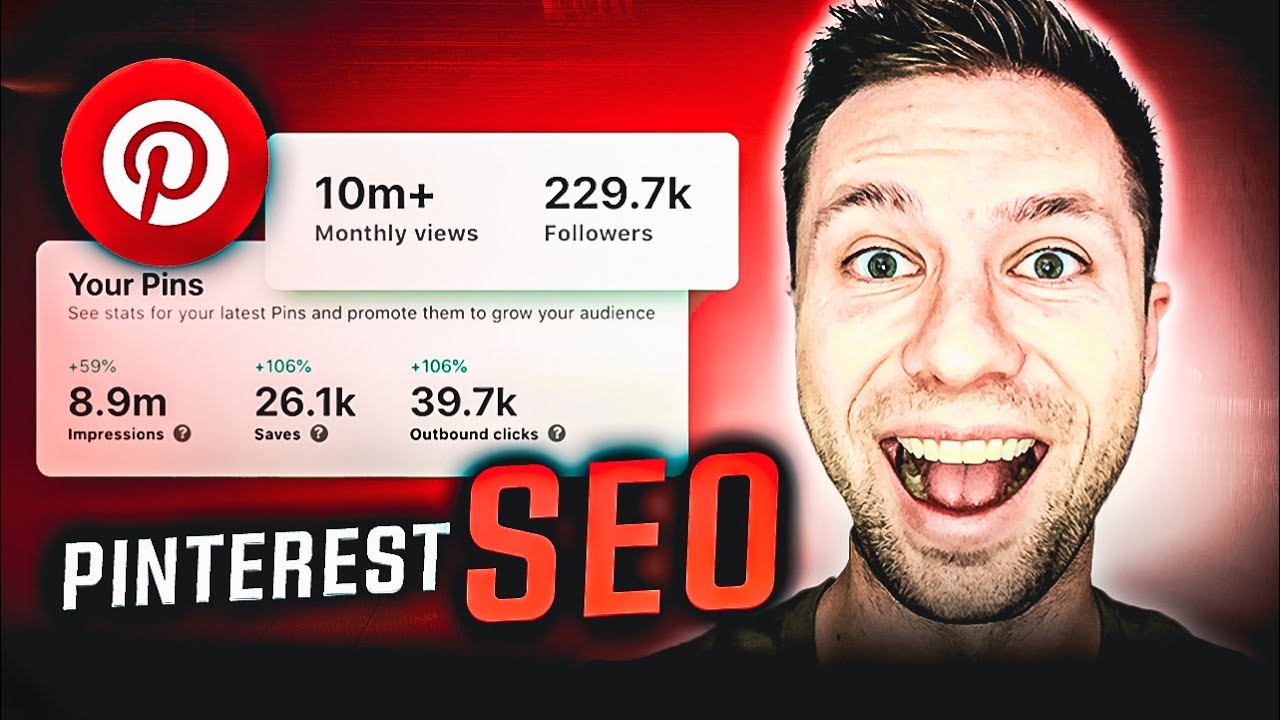
I’ve seen plenty of Pinterest marketers get bogged down in complicated strategies, thinking that’s the key to success. But honestly? It’s much simpler. The real difference between those who thrive and those who struggle on Pinterest comes down to understanding which metrics actually matter and knowing how to use that data. Pinterest Analytics (Pinterest Analytics) is a treasure trove of information, but it’s easy to get distracted by vanity metrics like follower count. Sure, a high follower count looks impressive, but it doesn’t always mean your business is growing.
Beyond Vanity: Metrics That Drive Business Goals
So, what should you be tracking? Well, it really depends on your goals.
- Brand Awareness: If you’re trying to get your name out there, focus on impressions and reach. These tell you how many eyes are on your content.
- Website Traffic: Want to drive more people to your website? Then keep a close eye on click-through rates and outbound clicks. These show you how effective your pins are at actually getting people to click through to your site.
- E-commerce Sales: For online stores, conversions are the ultimate goal. Track how many people are buying your products after clicking on your pins.
Tracking the Customer Journey: From Pin to Purchase
Understanding the customer journey is super important. Think of it like a map: you want to know where people are discovering your pins, which boards are bringing in the most traffic, and which pins are leading to the most sales. Pinterest Analytics gives you the tools to track this entire process, showing you what’s working and where you can make improvements. This allows you to optimize not just individual pins, but your entire Pinterest strategy.
A/B Testing on Pinterest: Fine-Tuning for Success
A/B testing is your secret weapon on Pinterest. Experiment with different pin designs, descriptions, and even board layouts. Personally, I like to test different text overlays on my pin images. You’d be surprised how a tiny tweak in the wording can significantly boost your click-through rates. By tracking the performance of each variation, you’ll learn what resonates best with your audience. This data-driven approach helps you continuously refine your strategy and stay ahead of the game.
Staying Ahead of the Algorithm: Data-Driven Decisions
The Pinterest algorithm is constantly changing. What worked last month might not be as effective today. That’s why regularly analyzing your data is so crucial. By keeping an eye on your key metrics, you can quickly spot trends and adapt to algorithm updates. For instance, if you see a sudden drop in impressions, it might signal a shift in keyword popularity or a change in how Pinterest is ranking content. Being aware of these changes lets you adjust your strategy proactively, not reactively.
Ready to take your Pinterest marketing to the next level? Pin Generator simplifies everything from pin creation to scheduling and analytics. It’s a great tool for scaling your Pinterest SEO efforts without feeling overwhelmed. Check it out!