
Promoting Affiliate Links on Pinterest: Steps That Work
1 November 2026
You've got a spreadsheet of affiliate links, a folder of product photos, and a Pinterest account that's ready to go. Then you pause, because one wrong move can get a pin limited before it earns anything. Promoting affiliate links on Pinterest isn't hard because the posting is technical. It's hard because you're solving a volume-control problem, scaling a catalog without looking like spam, and then proving which pins earned money.
Table of Contents
- Pinterest Affiliate Rules to Check Before You Pin
- Direct Links Versus Bridge Pages
- How to Publish an Affiliate Pin in Seven Steps
- Pin Design and Copy That Earns Clicks
- Scheduling, SEO and Automation Without Spam Signals
- Tracking Clicks Versus Approved Commissions
- What to Do When Pinterest Limits a Pin
- Confirm Your First Ten-Pin Test Before Scaling
Pinterest Affiliate Rules to Check Before You Pin
Pinterest didn't always allow this. The archived Pinterest newsroom announcement says the company previously removed affiliate links because spammers were abusing them, then permitted them again after strengthening its spam-detection system, with the relaunch announced in January 2026 and affiliate networks rolling out over the following weeks.
That history shapes today's rules. Permission is conditional. Your content must be original, add unique value, disclose its commercial nature clearly, and avoid manipulative distribution. Pinterest prohibits fake accounts used to create or save affiliate links, quid-pro-quo requests for saves, requests that others publish links containing your affiliate identifier, and repetitive or high-volume affiliate pins.
Pre-Publish Compliance Checklist
| Requirement | What it means in practice | How to check it |
|---|---|---|
| Original content | The pin links to a page you wrote or tested yourself, not a copied listing | Open the destination and confirm your own images, notes or test results |
| Visible disclosure | Plain words such as I earn commissions from qualifying purchases sit in the pin description | View the pin on a phone without tapping more |
| Relevant destination | The link opens the exact product or category the pin describes | Compare the pin text with the landing page |
| Moderate volume | No dozens of near-identical pins for one product | Count pins per product per week |
| Account integrity | One real account, no fake accounts, no saving swaps or requests for others to save links | Review who has access and how saves are requested |
| Network terms | Merchant and affiliate network rules also apply to every link | Read the terms before adding the link to any pin |
Two layers sit on top of Pinterest's rules. Pinterest's paid-partnership guidance applies whenever a brand pays you or gives you free product, and the affiliate network's own terms apply to every link. Before you pick topics, work through affiliate keyword intent analysis so each pin targets a real buying question rather than a broad product name.
Don't assume any universal conversion rate will rescue a weak process. I treat compliance as the baseline, not a tactic. If a pin can't pass this checklist, it isn't ready, however good the commission looks.
Direct Links Versus Bridge Pages
Every affiliate pin takes one of two routes. A direct link sends the click straight to the merchant with your tracking parameter attached. A bridge page sits on your own site, explains the product, carries the disclosure, and then links out to the merchant.
| Factor | Direct affiliate link | Bridge page on your site |
|---|---|---|
| Setup time | Minutes per pin | Hours to a few days per page |
| Disclosure control | Only the pin description you write | Full control on the page and in the pin |
| Link risk | Merchant URL can change or break; less room to adjust | You control the page and can update the outbound link in one place |
| Tracking depth | Sub-IDs in the URL only | Sub-IDs plus page-level analytics |
| Best for | One well-known product with a simple offer | Comparisons, several products, higher-priced items |
| Ownership | Depends on the network and merchant | You own the page and its content |
| Main risk | Looks like a bare ad if the pin text is thin | Thin pages that only redirect |
The Decision Rule
Use a direct link when the product is well known, the offer is simple, and the pin itself can carry enough context to justify the click. A replacement water filter for a popular jug fits that pattern. The buyer knows what it is, and price and fit are the main questions.
Use a bridge page when the buyer needs help choosing. That's comparisons, several products in one category, or higher-priced items where materials, sizing, or upkeep affect the decision. The page earns its place by answering questions the merchant listing buries.
Say a kitchen blogger has tested five chef's knives over several months. One bridge page compares weight, grip, and sharpening needs, with a photo of each knife in hand. Each pin then links to the matching section of that page, so five different pins support one substantial asset instead of five thin ads.
A bridge page only helps if it adds real content. A page that repeats the listing and pushes the reader onward is a redirect with extra steps.
Check network terms before you commit to either route. Some networks restrict redirects or require specific link formats, and rebuilding a route after you've published wastes the pins you've already distributed.
How to Publish an Affiliate Pin in Seven Steps
Work one pin at a time until this sequence is muscle memory. Speed comes later, once the checks are built in.
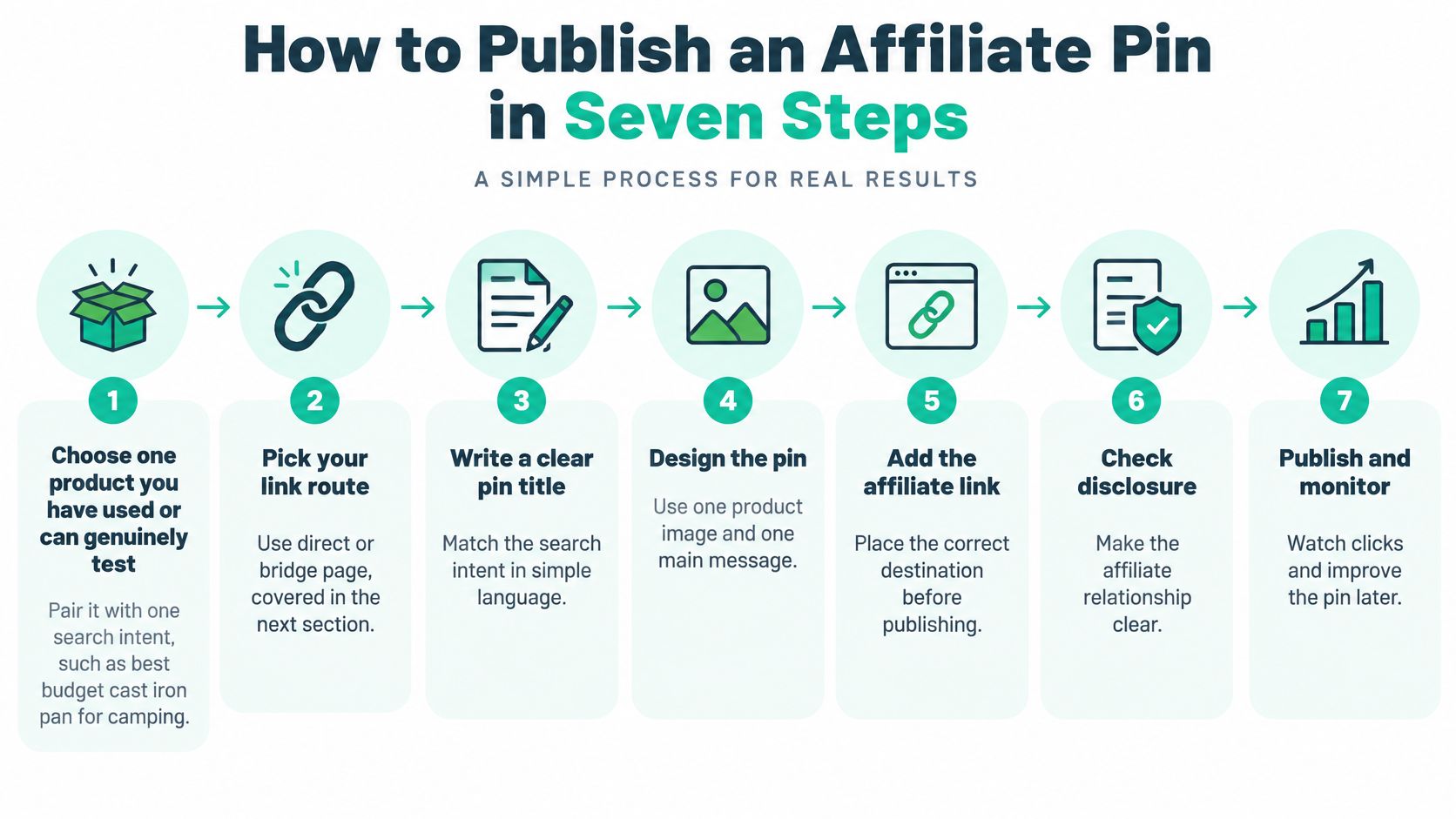
Choose one product and one intent. Pick something you've used or can test, paired with a specific search, such as best budget cast iron pan for camping. The common slip is promoting a whole category, which gives the pin nothing concrete to promise.
Pick your link route and test the URL. Apply the direct versus bridge decision, then load the final URL on your phone and confirm it resolves cleanly without an unsupported shortener. A link that lands on a generic category page breaks the promise your pin made.
Design a 2:3 vertical image. Show the product in use and keep the headline to about six words, readable at thumbnail size. Headlines that only repeat the product name give nobody a reason to click.
Write the title around the search phrase. Open the description with the use case and put the keyword in the first sentence. Burying the phrase after two lines of background wastes the text Pinterest weighs most.
Add the disclosure in the visible description. Place it near the recommendation and the link, not after a row of hashtags. The FTC Endorsement Guides FAQ states that disclosures must be clear, conspicuous, difficult to miss, and understandable to ordinary consumers, and warns that disclosures buried among multiple tags or links are unlikely to be conspicuous.
Publish to one relevant board. Don't post the identical pin to several boards at once, since that multiplies repetition without adding reach. One well-matched board tells Pinterest exactly who the pin serves.
Test the live pin. Tap through from the published pin, confirm the destination and sub-ID, check the disclosure on mobile, and log everything in your tracking sheet. Skipping this step is how broken links stay live for weeks.
Why Step Five Carries the Most Weight
Commissions, free products, discounts, and sponsorship all count as material connections, so every monetized recommendation is an endorsement that needs disclosure. Platform disclosure tools may not satisfy the standard on their own. Build the disclosure into your reusable pin templates, validate it on mobile, and audit a sample of published pins each week.
There's no defensible universal affiliate conversion rate to benchmark against here. What you can control is whether a reader understands your commercial relationship before she clicks. That clarity is also what keeps the account publishable.
Pin Design and Copy That Earns Clicks
Start with the image, because it's what gets judged first. The example below shows the in-use context that usually outperforms a flat product shot, a real desk, a real hand, a product doing its job.

Use a 2:3 vertical frame, one product shown in use, a headline of no more than six words, and a consistent palette across the account so regular viewers recognize your pins. When you make variants, change the angle, background, and layout. Changing only the background colour produces a set that reads as duplicated, which is exactly what you're trying to avoid.
If you're new to the mechanics, this guide on how to create pins on Pinterest covers the publishing flow. For motion, short product-in-hand clips work well, and tools like the ImagesArt AI elf video maker show how quickly a simple seasonal video variant can be produced for testing.
The walkthrough below shows pin creation in practice, which is worth watching before you batch your own set.

Copy That Gives a Reason to Click
Your title should mirror the search phrase, such as cast iron skillet for camping. Open the description with the use case and one specific benefit. Compare "best pan ever" with "tested on three weekend camping trips, still non-stick over open flame." The second line carries proof. Put the disclosure on the following line, and write alt text that describes the image itself rather than listing keywords.
- Skip all-caps headlines: They read as shouting in a feed built on calm inspiration.
- Drop fake urgency: Claims like "selling out fast" need evidence you probably don't have.
- Never promise earnings: Specific income claims create compliance risk and erode trust.
- Lock the layout into a template: Disclosure, headline zone, and logo placement stay fixed so nothing gets dropped in a rush.
A clickable pin proves the offer. A compliant pin proves you can be trusted with it.
Scheduling, SEO and Automation Without Spam Signals
Pinterest search rewards specificity. Check autocomplete and related searches for your topic, pick one primary phrase per pin, and use it in the title and the opening of the description. A dedicated Pinterest keyword research tool speeds up that shortlist when you're planning a whole category. If a pin needs a landing page built for a store audience, Shopify-ready presell pages are one route to a structured comparison page, provided the content on it is your own.
For cadence, I'd start with three to five new affiliate pins a week, spread across different days rather than dumped in one batch. Batch your production instead, roughly ten pins per product category in one sitting, then release them slowly. Set your own volume cap too. Mine would be no more than three pins for the same product in a month. That's an internal guideline, not a Pinterest rule, and it forces variety.
Why Volume Is the Risk
The Pinterest community guidelines prohibit repetitive or high-volume affiliate pinning, fake accounts, and reciprocal saving schemes, and Pinterest can remove, limit, or block violating content or accounts. The guidelines also note that some link-shortening services are unsupported, so your URL setup can break a pin before anyone judges its content.
That flips the usual growth logic. Posting more affiliate pins isn't automatically a growth strategy, because Pinterest's own policy ties large-volume affiliate publishing to spam risk. Sustainable scale means controlled variation and quality checks, not maximum frequency.
Four Habits That Keep a Catalog Clean
- Map each pin to a relevant page: The destination must match the product the pin describes.
- Vary creative and copy: New angle, new headline, new opening line for every variant.
- Audit links monthly: Remove broken or redirected URLs before they accumulate.
- Review before anything recurs: A human approves each batch before a schedule goes live.
Automation earns its place as a drafting tool. Pin Generator can generate titles, descriptions, and board choices and run a recurring schedule, which saves real hours. The review step still belongs to you, because automated consistency can turn into duplication. Run the compliance checklist on each batch before it's scheduled, and treat the scheduler as the last step, not the first.
Tracking Clicks Versus Approved Commissions
Three numbers describe an affiliate pin, and they don't live in the same place. Pin impressions and outbound clicks come from Pinterest analytics. Approved commissions come from your affiliate network, which decides attribution windows, reversals, and whether a sale is credited at all.
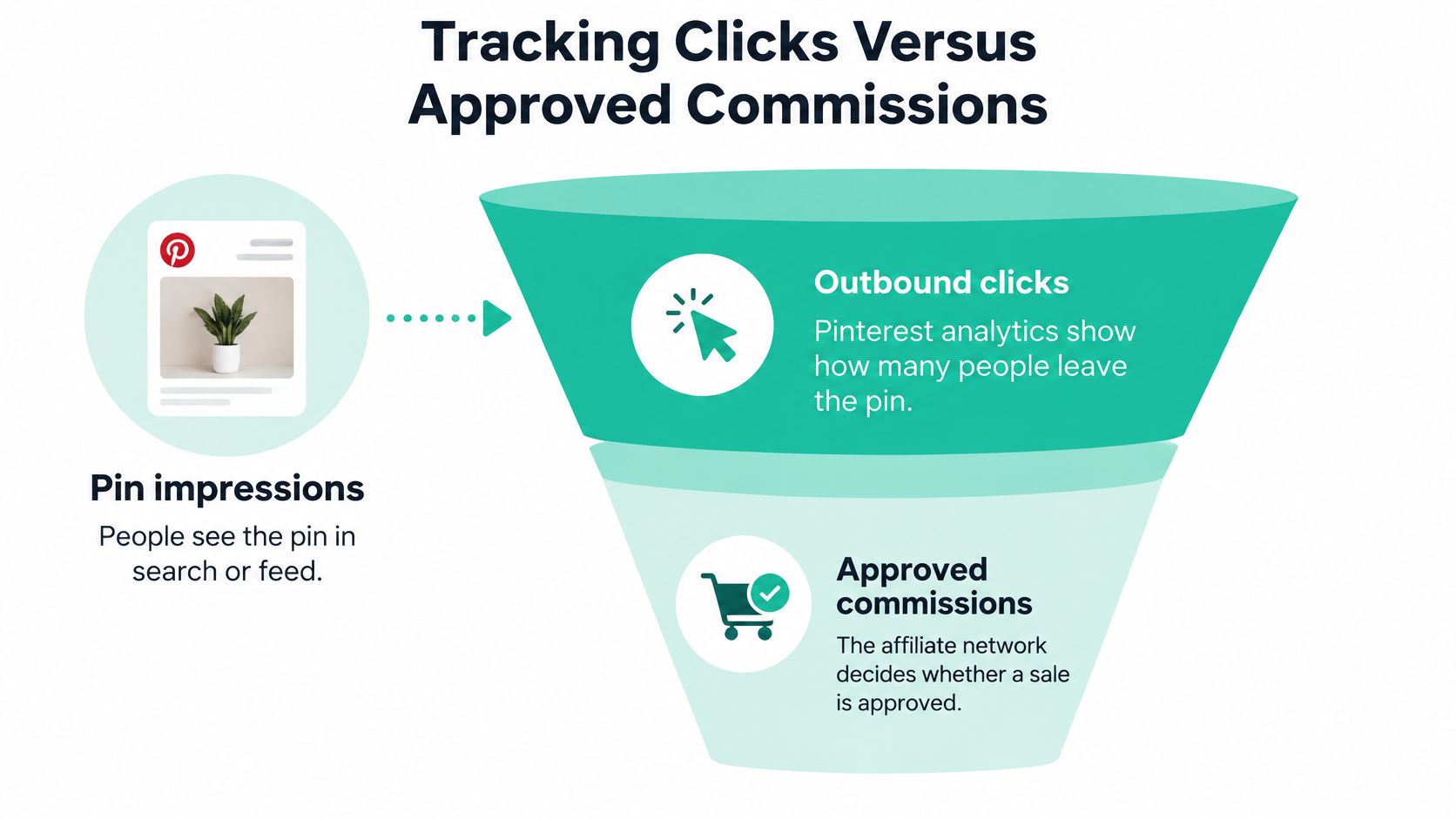
The Pinterest terms of service clarify that third-party links and transactions occur outside Pinterest, and Pinterest doesn't assume responsibility for those external sites or purchases. So the network dashboard is your source of truth for revenue, and Pinterest analytics only explain the traffic that led there.
| Outcome | Source | What it tells you |
|---|---|---|
| Pin impressions | Pinterest analytics | How often the pin was shown |
| Outbound clicks | Pinterest analytics and bridge page analytics | How many people left toward the offer |
| Approved commissions | Affiliate network dashboard | Revenue source of truth, subject to attribution windows and reversals |
| Approved earnings per impression | Calculated from the two sources above | Which pins earn, not just get clicked |
Making Each Pin Traceable
Assign a unique sub-ID per pin, product category, board, and creative version. Without that, you're comparing account totals and guessing. Then reconcile weekly. Compare Pinterest outbound clicks with network clicks, investigate large gaps, and remove dead or redirected links.
Say pin A earns twice the clicks of pin B but produces no sales, while pin B earns two approved commissions from fewer clicks. Pin A isn't your winner, whatever its click-through rate says. Keep B's layout, rewrite A's copy, and check whether A's landing page matches what its headline promised. Clicks measure curiosity. Commissions measure fit.
Optimize for approved earnings per impression, not clicks alone. Keep one complication in mind when you compare programs, since merchants and networks may use different currencies, cookie rules, and privacy regimes. Normalize for those before you declare one product better than another.
What to Do When Pinterest Limits a Pin
Treat a limited pin as diagnostic information, not bad luck. Work through these checks in order and change one thing at a time.
- Check the link first. Confirm the final URL resolves on mobile and doesn't run through an unsupported link shortener, since Pinterest says some shortening services are unsupported.
- Compare the pin against your compliance checklist. Confirm the disclosure sits in the visible description, the destination matches the product, and the linked page holds original content.
- Look for near-duplicates. If several pins share one image or headline for the same product, retire the extras and keep the strongest variant.
- Review account integrity. Confirm one real account is posting, nobody was asked to save or publish your links, and no saving swaps are running.
- Fix one thing and log it. Record each change in your tracking sheet so you can see which fix restored distribution.
- Pause new affiliate pins for that product. Resume at your normal cadence only after the fix is confirmed.
Pinterest can remove, limit, or block violating content or accounts, so audit your whole process rather than only the flagged pin. Don't resubmit the same pin to a new board or with a slightly changed title. That repeats the pattern that triggered the limit and turns a warning into a habit.
Confirm Your First Ten-Pin Test Before Scaling
Don't scale a catalog you haven't validated. Run this two-week test first. Pick two products you've used, then build five pins for each, three designs per product plus two copy variants. Split the ten evenly between direct links and one bridge page so you can compare routes on real numbers.
Run the compliance checklist on all ten pins before anything publishes. Then schedule them across the two weeks with no more than one new pin per product per day. That spacing keeps you well inside a moderate cadence and gives each pin its own data.
Budget the work before you start. Pin credits are used when you pin a pin to Pinterest, download a pin, or schedule a pin, so plan the test within your allowance. If you later need to swap a merchant link across many pins, the Affiliate Links bulk update lets you bulk update affiliate links in the outbound URL of pins instead of editing them one by one.
Day Fourteen Decision Rules
- Keep earners: Any pin producing approved commissions stays, and its layout becomes a template candidate.
- Rewrite clickers: Pins with clicks but no sales get new copy and a landing page check.
- Pause ignored products: Impressions with no clicks after a fair test means the offer or creative isn't landing.
Scale only after the test shows at least one pin earning approved commissions. Add new products one at a time, keep the disclosure in every template, and keep the volume cap you set. Today's action is simple. Choose your two products and draft the first pin.
Ready to run that ten-pin test without designing every variant by hand? Pin Generator creates on-brand pins from your product and affiliate URLs, writes the titles and descriptions, picks boards, and schedules them on a steady cadence, while you keep the review step that protects your account. Connect your Pinterest profile, build your first disclosed affiliate pins, and let approved commissions, not clicks, tell you what to scale.