
Schedule Pinterest Posts for Maximum Growth
14 September 2025
If you want to see real growth on Pinterest, you have to switch from pinning manually whenever you find a spare moment to strategically scheduling your pins. This one change moves you from just being active on the platform to having an actual system—one that gets your content in front of the right people at the right time, every single time. It's the difference between hoping for traffic and building a reliable engine to drive it.
Why Manual Pinning Is Holding You Back
Let's be honest, pinning something by hand feels productive. You finish a long day, hop onto Pinterest, and share a few new product photos or your latest blog post. Boom, another thing checked off the to-do list. But this "live-pinning" habit is actually one of the biggest things getting in the way of your growth.
When you pin this way, you're being reactive, not strategic. Your pinning schedule is based on your availability, not when your audience is actually online and scrolling. Just pinning whenever you remember sends inconsistent signals to the Pinterest algorithm, and that's a problem.
The Problem with Inconsistency
Imagine a small business owner who creates beautiful content but only has time to pin late at night, around 11 PM. They upload their best work, but their target audience—say, stay-at-home parents planning DIY projects—was most active hours earlier. The pin gets very little initial engagement, and because of that, it never really gains traction.
The Pinterest algorithm absolutely loves consistency. When you publish content sporadically, it learns that your account isn't a reliable source of fresh ideas. The result? Your pins start losing visibility, getting buried under content from creators who show up like clockwork.
A scheduled, consistent presence tells the algorithm you're a serious creator worth promoting. Manual, random pinning suggests you're just a casual user, which can limit your content's reach right from the start.
Shifting from Activity to Strategy
Moving away from live pinning is about more than just saving time; it's a fundamental mindset shift. You stop treating Pinterest like a digital scrapbook and start treating it like the powerful marketing channel it is.
This means you need a system where your content is working for you around the clock, not just when you're online. Here’s what making that strategic shift really opens up for you:
- Targeting Peak Times: You can schedule pins to go live during the exact windows when your audience is most active, which dramatically increases the odds of getting that crucial initial engagement.
- Winning Over the Algorithm: A steady, consistent stream of content signals that your account is reliable. Over time, the algorithm rewards this with better distribution and more reach.
- Batching for Sanity: You can sit down for a few hours on a Monday and schedule out an entire week's—or even a month's—worth of pins. This frees you up to focus on the million other things your business needs.
The goal here is to build an automated system that guarantees your content gets seen. By choosing to schedule Pinterest posts, you stop leaving your growth to chance and start designing it with intention.
The Power of a Consistent Pinning Schedule
If there's one secret that separates Pinterest pros from everyone else, it's this: ditching random, "when-I-feel-like-it" pinning for a planned, consistent schedule. This is the single biggest move you can make to turn your Pinterest account from a digital mood board into a genuine traffic-driving machine for your business.
The magic is in the momentum. Pinterest's algorithm absolutely loves creators who reliably share fresh, valuable content. When you schedule Pinterest posts to publish at regular intervals, you're sending a strong signal that your account is active and dependable.
This consistency helps the algorithm learn what your content is all about and, more importantly, who needs to see it. That's how you build the kind of long-term growth that sporadic pinning just can't touch.
Pinpointing Your Audience's Peak Activity
One of the best parts about scheduling is that you can hit your audience's most active hours, even if that's when you're asleep or busy with other things. Getting your pins seen right after they go live is a huge deal for gaining early traction. A pin that gets immediate saves and clicks has a much better shot at being shown to a wider audience.
Don't just take my word for it. Data from over two million posts shows that engagement can jump by a staggering 250%–300% when posting between 9 AM and 4 PM. Even better, the evening window from 7 PM to 9 PM often brings in three times the visibility. That’s a lot of opportunity to miss out on if you’re just pinning whenever you have a spare moment. You can dive deeper into these stats over on Recurpost's analysis.
Think of it like a new store opening. You wouldn't unlock the doors at midnight and hope for the best. You'd plan your grand opening for a busy Saturday afternoon to attract the biggest crowd. Scheduling your pins does the same thing in the digital world.
Tools with a visual calendar view are a game-changer here. They let you see your entire content plan at a glance, making it easy to spot gaps and ensure you have a steady flow of pins going out.
You can instantly see if you're about to dump ten pins on a Monday and then go silent for the rest of the week. That kind of visual planning is key to maintaining consistency.
Building a Predictable Traffic Engine
At the end of the day, a consistent pinning schedule creates a system. Instead of wild, unpredictable spikes and dips in your website traffic, you start building a steady, reliable stream of visitors. For any online business, that kind of predictability is pure gold.
Just think about the difference in results over a 90-day period.
Manual Pinning vs. Scheduled Pinning Impact
| Metric | Manual Pinning (Sporadic) | Scheduled Pinning (Consistent) |
|---|---|---|
| Traffic | Unpredictable spikes, long flatlines | Steady, compounding growth |
| Monthly Views | Stagnant or slow, erratic growth | Consistent upward trend |
| Outbound Clicks | Occasional boosts, low baseline | Reliable daily click-throughs |
| Follower Growth | Minimal and inconsistent | Noticeable, steady increase |
With a manual approach, you might see a little bump in traffic when you have a burst of energy, but it's usually followed by crickets. Growth is slow and feels like a constant uphill battle.
Now, flip that. By scheduling just 5-10 fresh pins daily, you're constantly feeding both the algorithm and your audience new content. Your monthly views, outbound clicks, and follower count will start climbing predictably. This methodical approach is what moves you from just posting to strategically distributing your content, turning your Pinterest efforts into a dependable asset for your business.
Your Guide to Scheduling Pins with Pin Generator
Alright, let's move from theory to practice—this is where the real magic happens. This section is your hands-on guide to using Pin Generator to build out and automate a truly powerful Pinterest schedule. We'll skip the fluff and jump straight into the features that will save you hours and seriously amplify your results.
Let’s walk through a common scenario. Imagine you just listed a new product on your Shopify store. Instead of manually creating a single pin, you can plug that product URL into Pin Generator and instantly get 10 or even 20 unique pin variations. And I don't just mean different colors; we're talking about genuinely fresh designs and layouts that Pinterest's algorithm loves to see.
From URL to Scheduled Queue in Minutes
At its core, the process is beautifully simple. Once you've connected your Pinterest account, you just paste a URL from your blog or e-commerce shop, and the tool does the heavy lifting. It pulls in images, product details, and page titles to generate a whole batch of pin designs based on templates you've already picked out.
This one feature solves one of the biggest headaches in Pinterest marketing: the relentless need for a high volume of fresh pins. Manually creating dozens of unique pins for just one product is a massive time-suck. Automating it means you can build a deep queue of content in a fraction of the time.
From that initial batch, you can then fine-tune each pin.
- Tweak Titles and Descriptions: Adjust the auto-generated text to target different keywords. For a "handmade leather journal," you could create variations like "Rustic Writing Notebook" or "Personalized Gift for Writers."
- Assign to Different Boards: Schedule one pin variation to your "Handmade Gifts" board today, and another to your "Journaling Ideas" board tomorrow. This is a great way to spread your content out naturally.
- Set Your Publishing Frequency: You control how often your pins go live. You could schedule five unique pins for that new journal to post once a day for the next five days, giving it consistent promotion without ever looking spammy.
The real power here is in batching your workflow. In a single 30-minute session, you can generate and schedule an entire week's worth of optimized, unique pins for several different products or blog posts. This is how you build an automated traffic system that works for you 24/7.
This visual breaks down the simple three-stage process of using an automation tool to schedule your Pinterest posts.
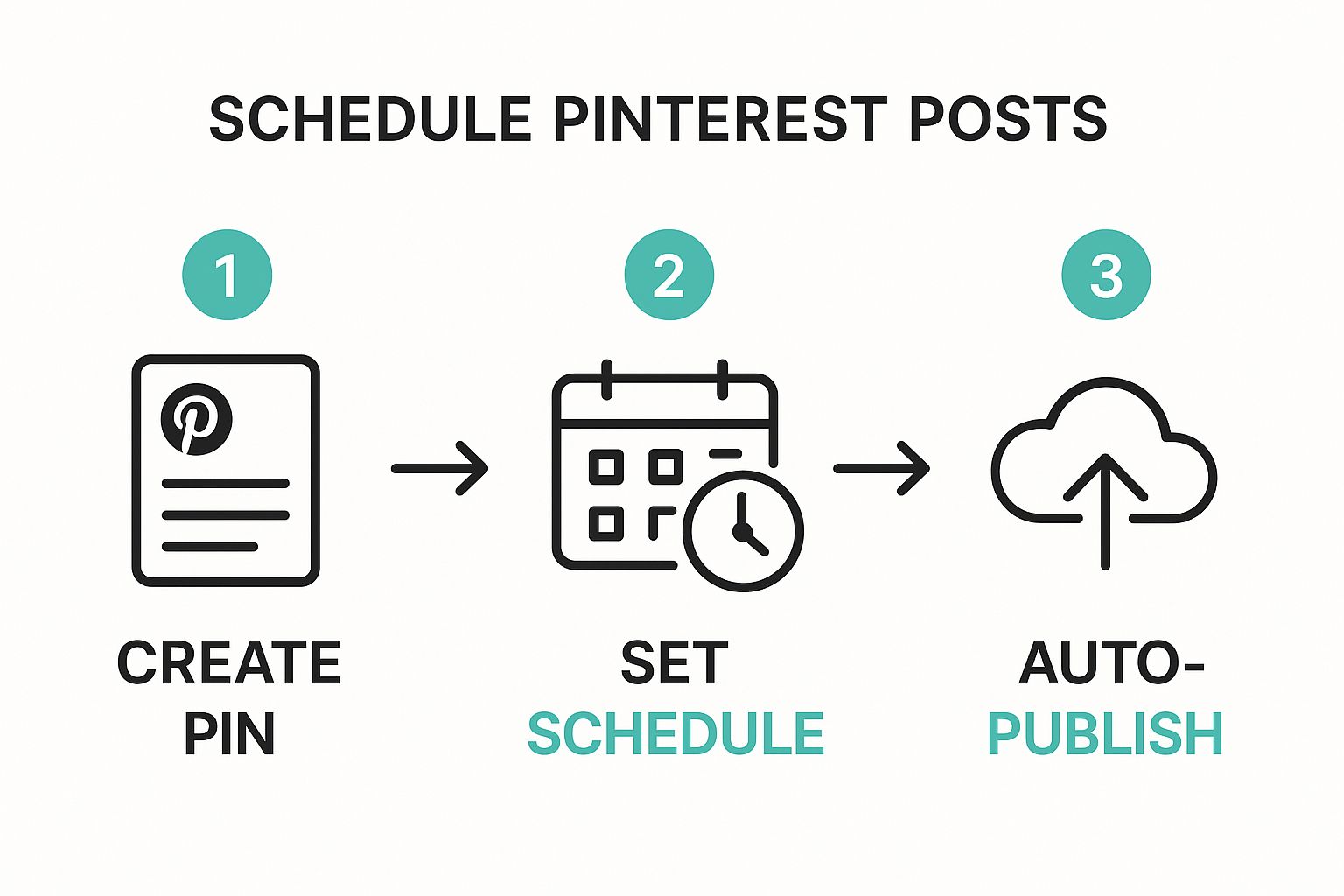
As the diagram shows, the workflow is designed to be seamless: from creation to scheduling, and finally to hands-off publishing. It's all about making your content pipeline more efficient.
Fine-Tuning Your Automation Strategy
Once you've got the basics down, you can start building a more sophisticated strategy. You don't have to schedule everything all at once. I've found that a balanced approach works best, combining bulk scheduling with more targeted, timely posts.
For example, you can bulk-schedule your evergreen content—those foundational blog posts or best-selling products—months in advance. This creates a solid baseline of activity on your account. Then, you can layer in more timely content for seasonal promotions, new product launches, or trending topics as they pop up.
Pin Generator’s system is built for this kind of flexibility. You can view your entire content calendar, drag and drop pins to different dates, and easily spot and fill any gaps in your schedule. If you want to dive deeper, you can explore the specific features of our https://pingenerator.com/scheduling to see exactly how it can fit into your workflow.
While Pin Generator is laser-focused on Pinterest, it can also be helpful to look at other top social media scheduling tools that cover multiple networks. Understanding the broader automation landscape helps you make the best choice for your entire marketing ecosystem.
Ultimately, the goal is to create a system that works for you. Whether you prefer to schedule daily, weekly, or monthly, the key is to establish a consistent rhythm. That steady flow of fresh content is what signals to the Pinterest algorithm that you’re a reliable creator, which is the first and most critical step toward building sustainable, long-term growth.
How to Squeeze the Most Juice Out of Your Pinning Schedule
Alright, so you've got your pinning automated. That's a huge first step. But if you really want to see your account take off, you can't just "set it and forget it." The real magic happens when you start optimizing.
Think of your schedule less like a static plan and more like a living, breathing thing that adapts to what your audience is actually doing. You're creating a feedback loop: schedule some pins, see how they do, and then use that data to make your next batch of scheduled pins even smarter. This is the secret sauce that separates accounts that just coast along from the ones that skyrocket.
Build a Content Pillar Strategy
First things first, you need a balanced diet of content. If all you do is schedule pins that shout "buy my stuff," you'll turn people off pretty quickly. A winning Pinterest strategy is built on content pillars that serve different purposes: attracting, educating, and then, finally, converting.
Here’s how that might look:
- Attract: These are pins that solve a problem or spark inspiration. If you sell home decor, a pin like "5 Genius Ways to Style a Bookshelf" is perfect.
- Educate: This is where you show off your expertise. Something like a "Beginner's Guide to Choosing the Right Paint Finish" works wonders.
- Convert: Now you can go for the sale. These are your direct product pins, like "Shop Our New Ceramic Vase Collection."
By scheduling a mix of these pillars, you're constantly providing value. That builds trust and creates an audience that's actually excited to see your content. A solid starting point is to aim for 80% value-driven content (the attract and educate stuff) and just 20% promotional content (the convert pins).
Let Pinterest Analytics Be Your North Star
Guessing when to post is a rookie mistake. Your Pinterest Analytics is a goldmine of hard data telling you exactly when your specific audience is online and scrolling. Sure, you can find generic "best times to post" articles, but your own data will always be more accurate.
Jump into your analytics and hunt for the days and hours that have the highest impressions and engagement. You might be surprised to find your crowd is super active on Sunday mornings, a peak time you were completely missing. To get the most out of this, you really need to understand how to create viral content that hits the mark.
Once you’ve pinpointed these golden hours, go back into your Pin Generator schedule and concentrate your best, most important content in those windows. It's a simple, data-backed tweak that makes sure your pins land in front of people when they're most receptive. For a deep dive, check out our guide on finding the best times to post on Pinterest.
Your schedule should never be based on a hunch. Use your own analytics to make informed decisions. This is how you turn scheduling from a simple chore into a powerful growth strategy.
Pinterest really rewards this kind of strategic thinking. Businesses that stick to a consistent, data-informed schedule often see real, measurable traffic increases within 60 to 90 days. It’s proof that a steady, optimized approach will beat random, sporadic posting every single time.
Integrating Pin Scheduling into Your Workflow
Automating your pinning is a huge time-saver, sure. But the real magic happens when scheduling becomes such a natural part of your process that you don't even think about it.
For this to really work long-term, it can't feel like another task on your list. It needs to be the final, automatic step of whatever you're already doing. That's how you build a marketing engine that truly runs itself.
Think about it. If you're running an e-commerce shop, what if you made a new rule for yourself? Every time you add a new product to Shopify or Etsy, the job isn't done until you've also popped that product link into Pin Generator and scheduled 10 unique pin variations for it. Just like that, every product launch instantly becomes its own automated traffic campaign.
Creating a System for E-commerce and Blogging
Bloggers can build the exact same kind of habit. The moment you hit "publish" on a new article, your very next click should be to paste that URL into Pin Generator.
In just a few minutes, you can have a full week's worth of fresh, eye-catching pins queued up to promote that new post. This guarantees an immediate traffic boost right out of the gate and keeps driving eyes to your content for the long haul. It changes publishing from a one-and-done event to an ongoing promotion.
The trick is to tie the act of creating directly to the act of promoting.
This simple connection eliminates that friction, that moment of hesitation where you think, "Okay, now what should I pin today?" The system takes over. The workflow is already decided, ensuring a steady stream of new content is always hitting your audience. For anyone serious about building a more efficient content creation workflow, this is a non-negotiable step.
A killer Pinterest strategy isn't about occasional bursts of intense pinning. It's built on a reliable, repeatable system where creating your content and scheduling the pins for it are just two sides of the same coin.
By making scheduling an automatic part of your routine, you kickstart a powerful flywheel effect. More consistent pinning gets you more visibility. More visibility drives more traffic. And that traffic motivates you to create even more great content. It’s a self-sustaining cycle that turns your Pinterest account into a rock-solid asset for your business.
Got Questions About Scheduling Pinterest Posts?

Even when you've got a solid plan, a few questions always seem to pop up once you actually start to schedule Pinterest posts. Let's get them answered so you can move forward with total confidence.
I hear these questions all the time from creators and shop owners just dipping their toes into automation. Nailing these answers is the key to building a Pinterest system that actually works without burning you out.
How Many Pins Should I Schedule Per Day?
Look, there's no single magic number here. The real goal should always be consistency over sheer volume. For most accounts just starting out, scheduling 5-10 fresh, unique pins every single day is a fantastic starting point.
Think about it from the algorithm's perspective. Posting 30 pins in one massive burst and then going silent for a week is confusing. A steady, predictable flow of new content signals that your account is an active, reliable source of ideas.
My advice? Start with that 5-10 range, then dive into your Pinterest Analytics to see how your audience responds. You can always adjust from there.
Is It Bad to Pin the Same Thing to Multiple Boards?
Pinning the exact same image with the same description to a bunch of boards at once is a surefire way to look spammy to Pinterest. The platform is hungry for fresh content, so a "fresh pin" strategy isn't just a suggestion—it's essential.
So, instead of just repeating yourself, create variations. It's easier than it sounds:
- Use different images or videos that all point back to the same blog post or product page.
- Write unique pin titles and descriptions that target slightly different keywords.
- Space them out. This is crucial. Schedule these unique variations to your relevant boards over several days, or even weeks.
This approach makes Pinterest see each post as a brand-new, valuable piece of content, not a lazy duplicate. It’s a much smarter way to promote the same URL without tripping any spam filters.
Can Pinterest Penalize You for Using a Scheduler?
This is a big one, and I get why people worry. But the answer is a clear no, with one major condition: you must use an official Pinterest Marketing Partner.
Tools like Pin Generator, Tailwind, and Later are all built using Pinterest's official API. This is the approved, secure, and fully endorsed way for third-party apps to publish content for you. Using these tools is completely safe.
The only real risk comes from using unapproved, sketchy tools that break Pinterest's rules—especially those that automate things like follows, comments, or other spammy behavior. Stick with the official partners, and you have nothing to worry about.
Ready to build a powerful, automated Pinterest strategy? Pin Generator gives you all the tools you need to create, schedule, and publish content in a fraction of the time. Start your free trial today!