
Using an AI Pin Generator to Supercharge Your Amazon Sales
19 August 2025
If you're an Amazon seller, you know the constant challenge of finding new, high-intent traffic. Promoting your products on Pinterest is a golden opportunity, but the manual effort can be overwhelming. This is where using an ai pin generator for amazon becomes a game-changer. It's the fastest way to turn your product listings into a steady stream of traffic from a platform where users are ready to buy.
Tools like Pin Generator are designed to make this process incredibly simple. With a direct Amazon integration, you can just paste in an Amazon product URL, and the tool will automatically pull all the product details—images, titles, descriptions, and price—to generate dozens of unique Pinterest pins in minutes. This automates a task that would otherwise consume your entire afternoon.
Why Pinterest is an Untapped Goldmine for Amazon Sellers
Many Amazon sellers overlook Pinterest, treating it like just another social media platform. That's a huge mistake. Pinterest isn't about social updates; it's a visual discovery engine. Millions of people use it daily to find inspiration, plan projects, and, most importantly, discover products to buy.
This makes the Pinterest audience uniquely valuable. Users are in a "discovery" mindset, actively looking for solutions and products. A recent study revealed that 80% of weekly Pinners have discovered a new brand or product on the platform. By showcasing your Amazon products on Pinterest, you're placing them directly in front of an audience that is primed to make a purchase, creating a seamless path from discovery to checkout.
Bridging the Gap Between Discovery and Sales
The journey from a Pinterest discovery to an Amazon sale is remarkably direct. Unlike ads on other platforms that can feel intrusive, your pins are a natural part of the user's browsing experience.
Imagine someone searching for "modern kitchen gadgets." They come across a pin showcasing your sleek electric kettle. They click on it, and it takes them straight to your Amazon product page. It’s a smooth, intuitive process that makes Pinterest one of the most effective channels for driving high-quality referral traffic to your Amazon store.
Understanding how to create compelling visuals is crucial, a skill highlighted in guides like those on social media marketing for beauty salons, where strong imagery directly drives customer interest. The same principle applies here.
The Challenge: Manual Pin Creation is a Time Vampire
Let's be honest: the biggest hurdle for Amazon sellers on Pinterest is the sheer volume of work required. To gain any real traction, you need a consistent flow of fresh, well-designed pins for your products.
Manually creating pins for every product is a massive time sink. The process involves:
- Downloading all product images from your Amazon listing.
- Spending hours in a design tool arranging layouts.
- Writing unique, keyword-optimized titles and descriptions for every single pin.
- Manually uploading and linking each pin one by one.
This is precisely where an ai pin generator for amazon comes to the rescue. It automates this entire painstaking workflow, transforming a multi-hour chore into a quick, efficient task. By solving this one major bottleneck, you can finally scale your Pinterest marketing without sacrificing your time.
What Is an AI Pin Generator for Amazon?
So, what exactly is an ai pin generator for amazon? This is far more than a simple template tool. Think of it as your dedicated marketing assistant, specifically designed to bridge the gap between your Amazon products and a massive audience on Pinterest. The trend of how AI is transforming business operations is perfectly embodied in this technology.
Its power lies in its direct integration with Amazon. You simply provide a product URL, and the AI instantly gets to work, pulling all the crucial data directly from the listing.
What does it grab?
- High-quality product photos
- The current price
- Key points from the product description
- The exact product title
With this information, the generator produces dozens of unique, eye-catching pin designs in seconds. You can say goodbye to the tedious process of downloading images and manually copy-pasting text.
How AI Makes Pin Creation Smarter
This is where the "AI" part truly shines. The tool doesn't just randomly place text and images on a template. Its AI features help you optimize your content for Pinterest's search algorithm.
For example, the AI can rewrite your functional Amazon product title into something more engaging and inspiring for a Pinterest audience. More importantly, it can help you target keywords that are popular on Pinterest, generating descriptions that improve your pin's visibility in search results. Our guide on how to use AI for Pinterest explores these advanced strategies in more detail.
The real game-changer is turning a slow, manual chore into a lightning-fast process. It’s about scaling your marketing without getting bogged down in the grind.
A Smarter Way to Sell on Amazon
This automated approach is rapidly becoming the new standard. As of 2025, about 34% of Amazon sellers are already using AI to help write and improve their listings. In an increasingly crowded marketplace, every competitive edge matters. An AI pin generator is the logical next step in an intelligent marketing strategy.
Ultimately, an AI pin generator for Amazon enables you to maintain a consistent stream of fresh content on Pinterest. This leads to more visibility, more traffic to your listings, and more time for you to focus on growing your business. It's the classic principle of "work smarter, not harder" in action.
Generating Your First Amazon Pins in Minutes

Ready to see how fast you can turn an Amazon product page into a batch of beautiful Pinterest pins? I'll walk you through this incredibly efficient, AI-powered workflow.
The first step is simple: grab the URL of the Amazon product you want to promote. With a tool like Pin Generator, its direct Amazon integration allows it to instantly read and process the listing data.
You just paste the URL into the generator. The AI immediately pulls all the essential information—product photos, title, features, and price. This direct integration is what makes an ai pin generator for amazon so powerful, as it eliminates all manual data entry.
Navigating the Design and Customization Interface
Once the product information is loaded, you'll be presented with numerous AI-generated pin designs. These aren't just random templates; they are pre-populated with the images and text from your Amazon listing, giving you a perfect creative starting point.
From there, you have complete control to customize everything to align with your brand.
- Fonts and Colors: Easily change the typography and color scheme to match your brand guidelines.
- Layouts: Experiment with different arrangements of images and text to find what's most eye-catching.
- Brand Elements: Add your logo or other branding elements to maintain consistency across all your pins.
The user-friendly interface allows you to produce a high volume of unique pins quickly, even if you have no graphic design experience. You can create a month's worth of content in the time it used to take to create a single pin manually.
Using AI to Write Compelling Titles and Descriptions
This is where the AI truly works its magic. The built-in AI writer is an incredibly powerful feature. The product titles that work on Amazon are often not effective on Pinterest, a platform driven by inspiration and discovery. Your text needs to be more engaging and optimized for how users search.
The AI writer can take a dry, functional Amazon title and transform it into several keyword-focused, appealing options. For example, "Stainless Steel 8-inch Chef's Knife" could become "The Only Chef's Knife You'll Ever Need for Your Dream Kitchen."
The AI can also rewrite your descriptions to target popular Pinterest keywords. This helps you position your product in a way that resonates with what users are searching for, directly boosting your pin's visibility and click-through rate.
Let's say you’re promoting a high-speed blender. The AI can generate titles like "5-Minute Smoothie Recipes with Our Power Blender" and write descriptions that naturally include terms like "healthy recipes," "kitchen hacks," and "meal prep"—all highly searched terms on Pinterest. This is how you get your pins in front of the right audience and drive that valuable traffic back to your Amazon page.
Optimizing Pins for Maximum Reach and Clicks
So you've used an ai pin generator for amazon to create a batch of shiny new pins. That's a huge time-saver, but it's really just the starting point. The magic happens when you move from simply making pins to making them work for you. That's what turns a trickle of traffic into a genuine stream of potential buyers heading to your Amazon listings.
The creation part is beautifully simple. You connect your account, pick a style, and let the AI do the heavy lifting.
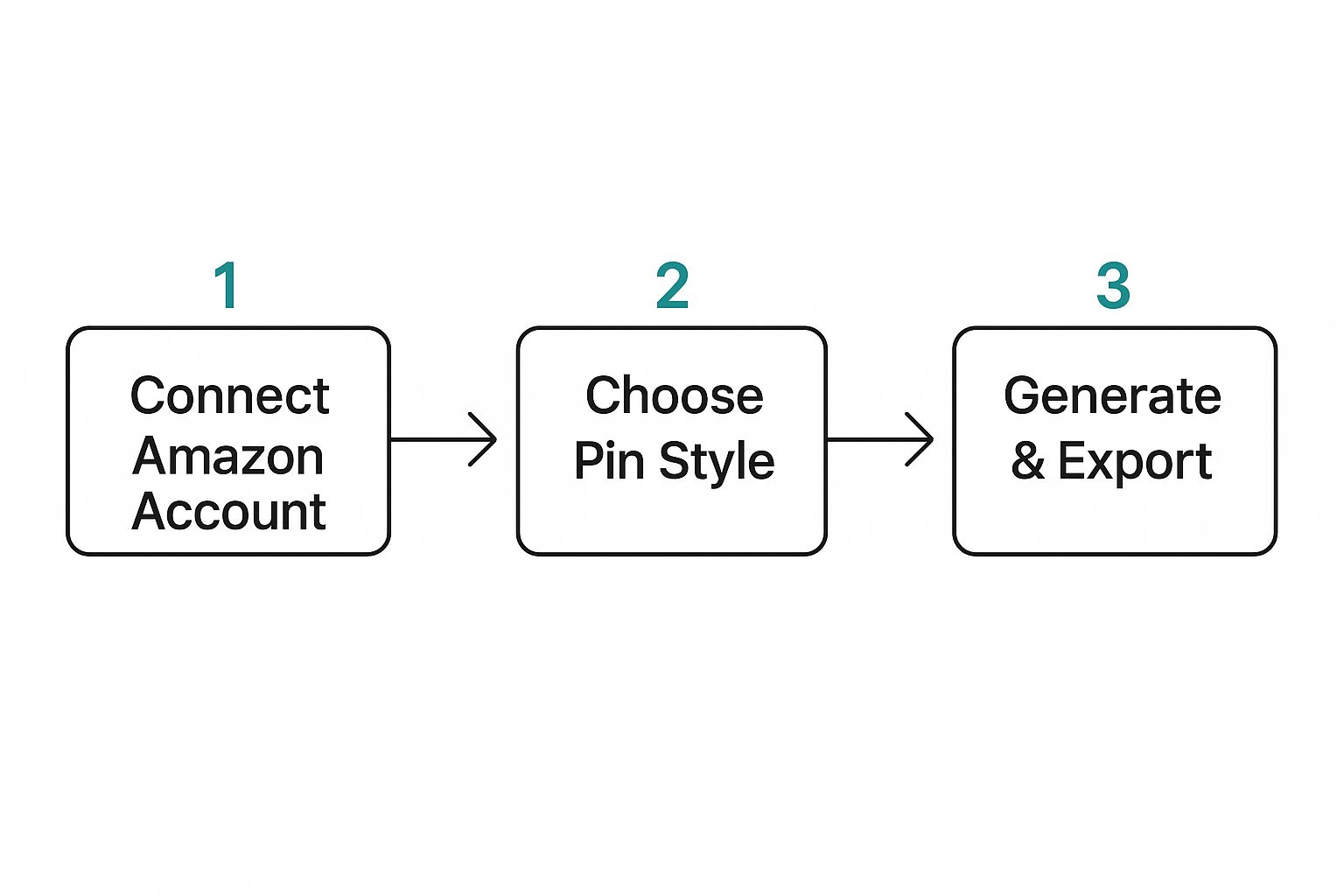
This super-efficient process is what frees you up to focus on the optimization strategies that actually drive results. It's not just about getting pins on the board; it's about getting the right pins in front of the right people.
Let’s be honest, the old way of creating pins for Amazon products was a total grind. Before tools like this, the process was painfully manual. You’d have to find images, open up Canva, design each pin one-by-one, write descriptions, find keywords, and then schedule them all out. It was a massive time sink.
Just look at the difference in workflow.
Manual Pin Creation vs AI Pin Generator Workflow
| Task | Manual Process (Time per 10 Pins) | AI Pin Generator (Time per 10 Pins) |
|---|---|---|
| Image Sourcing & Prep | 30-45 minutes | 0 minutes (Pulls from Amazon URL) |
| Pin Design | 60-90 minutes | 5 minutes (Selects template) |
| Title/Description Writing | 20-30 minutes | 2-5 minutes (AI-assisted) |
| Keyword Research | 15-20 minutes | 1-2 minutes (Built-in AI tool) |
| Scheduling | 10-15 minutes | 1-2 minutes (Bulk scheduling) |
| Total Time | ~2.5 – 3.5 hours | ~10 – 15 minutes |
Seeing it laid out like that is pretty eye-opening, isn't it? That time you save isn't just a number; it's time you can pour back into keyword strategy and board organization—the stuff that actually moves the needle.
Tapping into Popular Pinterest Keywords
The built-in AI features are your secret weapon for discoverability. Forget guessing games. You can use the generator's AI to research and rewrite your pin titles and descriptions so they're packed with high-traffic keywords people are actually searching for on Pinterest.
Let's say you're promoting a minimalist desk lamp. The AI might suggest swapping a generic title for something like "home office inspiration," "study room decor," or "wfh setup ideas." Suddenly, your product isn't just a lamp; it's part of a solution people are actively looking for.
This isn't just a small tweak; it's fundamental. By feeding the Pinterest algorithm the right keywords, you're essentially giving it a roadmap to your ideal customer.
Smart Board Organization and Pin Freshness
How you organize your pins is just as critical as the keywords you use. Think of your Pinterest boards as highly curated collections, not a digital junk drawer. A single, massive "Amazon Finds" board just won't cut it.
Instead, create specific, niche boards for that desk lamp:
- Minimalist Home Office: Caters to users who love a clean, modern vibe.
- College Dorm Essentials: Directly targets students who are setting up their study space.
- Productive Work from Home Setups: Grabs the attention of the remote workforce.
This approach not only helps users find what they're looking for but also encourages them to follow your boards, giving you a direct line to them for future pins.
Here's a pro-tip: Pinterest's algorithm is obsessed with fresh pins. This doesn’t mean you need a new product every day. It just means you need new pin images for your existing products. An AI generator makes this a breeze—you can churn out dozens of unique designs for one Amazon product in minutes.
Crafting Calls to Action That Actually Work
At the end of the day, every pin needs a job to do. Your job is to get that user from Pinterest over to your Amazon product page. A clear call-to-action (CTA) is your tool for this. You can't add a fancy button, but you can definitely use your text overlays and descriptions to guide them.
Try simple, direct phrases like "Shop the look," "Click to see more colors," or "Find this on Amazon." This small nudge is often all it takes to turn a passive scroller into an active shopper.
Remember, even the best AI tool relies on good source material. Your pin's success starts with your product photos. For some great pointers, check out these top product photography tips to make sure your images are compelling enough to stop the scroll.
Automating Your Amazon Pinterest Strategy
Making pins in a flash is a great start, but the real game-changer for your marketing is automating your publishing schedule. This is where you graduate from simply creating content to building a hands-off system that keeps sending traffic to your Amazon listings, day in and day out.
An ai pin generator for amazon with a solid scheduling feature is exactly what you need to make this "set it and forget it" strategy a reality.
Forget logging in to manually upload pins every single day. Instead, you can sit down and batch-create your content, filling up your publishing calendar for weeks—or even an entire month—in one go. This kind of consistency is a massive signal to the Pinterest algorithm that you're a serious creator, which can do wonders for your visibility over time.
Strategic Scheduling for Peak Engagement
Just pushing pins out isn't the whole story. You have to post them when your audience is actually scrolling. The best scheduling tools let you zero in on these golden hours, making sure your new pins land in front of as many people as possible right away.
You can get super specific, setting the exact date and time for each pin to publish. This is so much more effective than just posting whenever you remember, and it helps your pins get that crucial initial burst of engagement. If you want to get really granular with this, our guide on the best Pinterest scheduling tools has some great insights.
The real win here is building a powerful, consistent presence on Pinterest without the daily time sink. This frees you up to focus on other parts of your business, like finding new products or handling customer service.
Leveraging Interval Pinning for a Natural Flow
One of the slickest automation features you'll find is interval pinning. This lets you automatically drip-feed your content over a period you choose. For instance, you could tell the scheduler to publish one of your new pins every six hours or once a day until your queue is empty.
This creates a much more natural, steady stream of content instead of just dumping everything at once, which can look spammy to both users and the algorithm.
It's this kind of smart automation that helps your Pinterest marketing shift from a daily chore to a powerful, strategic asset. Your account starts working for you around the clock, driving a constant flow of traffic to your Amazon store and building your brand on one of the best platforms for product discovery out there.
Got Questions About AI Pin Generators?
Diving into any new marketing tool always comes with a few "what ifs." I get it. When you're talking about connecting your Amazon business to something new, you want to be sure you've got all the facts.
Let’s walk through the most common questions Amazon sellers have, so you can move forward with total confidence.
Is It Really Safe to Connect My Amazon Account?
This is usually the very first question people ask, and it's a smart one. The short answer is yes, it's safe.
Reputable tools like Pin Generator don't get access to the keys to your kingdom. They use a secure, authorized connection that only pulls public-facing information from your Amazon product page. Think product titles, descriptions, and images—the exact same stuff any customer sees when they land on your listing.
Your sensitive seller data, customer info, and financial details are never touched. The tool is built to be a read-only marketing assistant, not an account management tool.
Will I Get in Trouble for Using an AI Tool?
Another valid concern is whether using an ai pin generator for amazon products breaks any rules with Amazon or Pinterest. Good news here, too: you're in the clear.
These tools operate well within the terms of service for both platforms. All you're doing is automating the creation of promotional content, which is a totally standard marketing activity.
Think of it less like a shady bot and more like a super-efficient graphic designer. It’s not creating spam or trying to trick the system; it’s just helping you create content for your products at scale.
How Does It Handle Products With Different Colors or Styles?
What about that best-selling t-shirt that comes in ten different colors? A good ai pin generator for amazon is designed for exactly this scenario.
When you paste in the Amazon URL, the tool is smart enough to see all the product variations and pull the images for each one. This is a massive time-saver.
Instead of creating pins for your red backpack, then starting all over for the blue one, you can generate unique pins for every single variation from one link. This lets you easily target different customer tastes and showcase the full breadth of your product line without any extra work.
The whole point of this technology is to be a safe, compliant, and seriously powerful part of your marketing workflow. It's designed to help you scale your efforts, not put your accounts at risk.
What Kind of Results Should I Expect in the First Few Months?
Let’s set some real-world expectations. Pinterest is a long-term play, not a get-rich-quick scheme. Your first one to three months are all about laying the foundation.
The main goal is to get into a rhythm of publishing fresh, keyword-rich pins consistently. An AI tool makes this part a breeze.
During this initial phase, you'll start to see impressions and saves climb. As Pinterest's algorithm begins to understand what your content is about, you’ll see those outbound clicks to your Amazon listings start to follow. Consistency is everything on Pinterest, and automation is your secret weapon for achieving it.
Ready to stop wasting time and start driving real traffic? Pin Generator automates your entire Pinterest workflow, turning your Amazon products into a stream of high-quality pins in just minutes. Try it now and see how easy scaling your marketing can be.