
AI Pinterest Pin Templates for Affiliate Marketers | Boost Conversions
8 September 2025
Sure, there are hundreds of free Pinterest pin templates for people to use with affiliate marketing, but if you're serious about your brand, creating your own designs is where the magic really happens. With a tool like Pin Generator, you can create your own templates to suit your brand needs perfectly. This lets you craft a look that's uniquely yours, moving beyond generic layouts to build a cohesive, recognizable brand that actually helps you hit your goals.
Why Pinterest Is a Goldmine for Affiliate Marketers
Let's get one thing straight: Pinterest isn't just another social media platform.
On other sites, people are mindlessly scrolling through updates from friends and family. But on Pinterest? They're on a mission. Users show up with a specific mindset—they're there to discover, get inspired, and most importantly, plan. This future-focused attitude makes it an incredibly rich channel for affiliate marketers trying to connect with an audience that's already looking for what you're offering.
The Unique Mindset of a Pinterest User
Think about the last time you jumped on Pinterest. You were probably searching for something, right? "Kitchen remodel ideas," "summer outfit inspiration," or "healthy meal prep recipes." You weren't just killing time; you were building a visual roadmap for a future purchase or project.
This is the sweet spot for affiliate content.
Your pins don't feel like annoying ads because they're not. They're helpful solutions. When someone searching for home decor inspiration stumbles upon your pin for the "perfect minimalist bookshelf," you're meeting them exactly where they are in their decision-making journey. It’s a perfect match.
The Incredible Longevity of a Single Pin
Here's what really sets Pinterest apart: the ridiculously long lifespan of its content. A post on Instagram or Facebook is old news within a few hours. A well-optimized Pinterest pin? It can keep driving traffic for months, sometimes even years, after you hit publish.
A single pin acts like a slow-burning marketing asset. It gets saved to boards, rediscovered through search, and continuously recirculated by the algorithm, generating passive traffic and potential affiliate commissions long after your initial effort.
This means the work you do today compounds over time. The pin you design this afternoon could still be earning you money next year. Talk about an efficient use of your time! And the platform is only getting bigger. Pinterest is growing like crazy, hitting over 553 million monthly active users globally by the end of 2024. That’s a massive 23.2% increase from the year before, giving your evergreen content an ever-larger audience. You can dig into more of these stats on Pinterest's impressive growth over at amraandelma.com.
A Visual Search Engine with High Purchase Intent
At its core, Pinterest acts less like a social network and more like a visual search engine. People type in keywords to find ideas and products, just like they do on Google.
This search-driven behavior, combined with the visual nature of the platform, creates a direct line from discovery to purchase. An eye-catching pin that beautifully showcases an affiliate product isn't just a pretty picture—it's a direct, visual answer to what someone is looking for. And that, right there, is a goldmine for conversions.
How AI Pin Templates Can Seriously Upgrade Your Marketing Game
Let's be real: the old way of making Pinterest content was a total grind. We've all been there, spending hours hunched over Canva, wrestling with fonts, colors, and layouts just to get something that might stop the scroll.
For affiliate marketers who are juggling a dozen different products and niches, this manual process is a massive bottleneck. It slows you down and eats up time that could be spent on, well, anything else.
This is where AI pin templates completely change the picture. Forget the creative struggle. We're talking about a leap into strategic, scalable content creation. Tools like Pin Generator aren't just making pretty pins; they're generating designs that are already optimized to perform from the second you hit publish.
It's All About Data-Driven Design
So, what’s the secret sauce? It’s all about the data.
An AI platform like this has analyzed thousands upon thousands of top-performing pins across every niche imaginable. It learns what actually works—which color palettes grab attention, what text overlays get clicks, and which layouts are most likely to earn a coveted save.
This isn't guesswork. It's design driven by hard performance data. Instead of starting from a blank page and hoping for the best, you’re building on a foundation of what's already proven to succeed. That's a huge shift for affiliate marketers who need to pump out high-quality content without missing a beat.
The use of AI-generated Pinterest pin templates is a game-changer for affiliate marketing, allowing creators to scale content production efficiently while maintaining visual appeal. These tools generate on-brand, engaging designs tailored to specific campaigns, which saves huge amounts of time and money typically spent on manual graphic design. Explore more about how AI is boosting affiliate marketing returns on AuthorityHacker.com.
Think about the hours you used to spend tinkering in a design app. Now, contrast that with the few minutes it takes to generate dozens of unique, on-brand pins. The efficiency gain is just massive.
Hundreds of Free Templates Ready to Go
Best of all, you don't need a huge budget to get started. Many AI pin generation tools come loaded with hundreds of free Pinterest pin templates, providing a huge library of professionally crafted designs for people to use with affiliate marketing.
These aren't some generic, cookie-cutter designs. They are layouts backed by performance data that you can easily adapt for any affiliate product or blog post you're promoting.
This massive library of free templates is an incredible starting point. You can quickly find a style that fits your brand's vibe, drop in your content, and have a fresh batch of pins ready to schedule in minutes. It completely removes the design barrier, letting you test what resonates with your audience without spending a dime.
Create Your Own Templates for a Perfect Brand Match
While the free templates are fantastic for getting your feet wet, the real magic happens when you start customizing. With a tool like Pin Generator, people can create their own templates to suit their brand needs perfectly. This is how you build a cohesive visual identity.
It's actually pretty powerful when you think about it:
- Brand Colors: Just plug in your exact hex codes, and every single pin will perfectly match your brand palette. No more eyeballing it.
- Custom Fonts: Got a specific brand font? You can upload it for a consistent and professional look across the board.
- Logo Integration: Set it once, and your logo can be automatically added to every design. Instant brand recognition.
- Layout Preferences: You can even tell the AI what you like. Whether your style is minimalist, bold, feminine, or a collage, it will generate templates that fit your vision.
By creating your own templates, you're building a unique look that helps your audience recognize your content in a crowded feed. As an affiliate marketer, building that trust and authority is absolutely crucial.
If you're ready to dive deeper, we have a whole guide on getting started with AI automated pin generation on PinGenerator.com.
Creating Custom AI Pin Templates for Your Brand
While premade designs are a great way to get moving quickly, the real magic for affiliate marketers happens when you create a unique, recognizable brand identity. This is where crafting your own AI Pinterest pin templates becomes a total game-changer. It’s the move that takes you from just pinning stuff to building a memorable brand your audience actually trusts and looks for.
The best part? You don’t need to be a graphic designer to pull this off. Tools like Pin Generator are designed to make this process incredibly simple, letting you set your brand’s visual rules so the AI can churn out an endless stream of on-brand content.
Defining Your Brand's Visual Core
Before you even open up the generator, you need a crystal-clear idea of your brand's core visual elements. This is the foundation everything else gets built on. Seriously, take a minute and think about what makes your brand your brand.
- Your Color Palette: Forget generic colors. You need your specific hex codes (like #1A2B3C) to keep things perfectly consistent across the board.
- Your Brand Fonts: What fonts are you using on your blog or website? Sticking to the same ones on your pins creates a smooth, professional experience for your audience.
- Your Logo: Have a high-quality version of your logo ready to go. This is absolutely non-negotiable for brand recognition.
- Your Vibe: Are you going for a minimalist, clean aesthetic? Or maybe something bold and vibrant that screams for attention? Perhaps your niche calls for a more feminine, elegant feel.
Sorting these details out first makes the setup process a breeze and ensures the AI has the right guardrails to work within.
This is what it looks like inside Pin Generator—a super intuitive dashboard where you can plug in all your brand specifics, from fonts and colors to exactly where you want your logo to sit.
As you can see, you get super granular control. This ensures every single template the AI spits out perfectly matches the brand guidelines you've already established.
Building Your First Custom Template Set
Okay, once your brand assets are loaded up, it’s time for the fun part: guiding the AI to create your first set of custom templates. This isn't a passive "let the robot do it all" process. You're the creative director here, telling the AI exactly what you need.
You can specify your layout preferences, like whether you prefer single-image pins, multi-image collages, or designs that are heavy on text. This flexibility lets you build out a whole library of varied formats that still feel cohesive. For instance, you could create a set of "Quick Tip" templates with a big, bold text overlay and another set for "Product Roundups" that uses a cool collage layout.
The real win here is scalability. Once you’ve set these rules, you’re not just making one pin. You’re building a system that can produce hundreds of unique, on-brand pins with just a click. This is how you stay consistent without sacrificing volume.
Let's walk through a real-world example. Imagine you're an affiliate marketer in the home decor space. Your brand is modern and minimalist, with a color palette of charcoal grey, white, and a pop of mustard yellow.
- First, you plug in your exact hex codes for that specific grey, white, and yellow.
- Next, you upload your custom sans-serif font you use everywhere else.
- You add your clean, simple logo and set it to always appear in the bottom corner of every pin.
- Finally, you tell the AI to prioritize layouts with lots of white space and a single, high-impact image.
Within minutes, Pin Generator will produce dozens of template variations that all perfectly nail your minimalist brand vibe. Just like that, you have a limitless supply of AI Pinterest pin templates ready for any affiliate product you want to promote, guaranteeing your feed looks sharp, professional, and stands out from the noise.
Optimizing Your AI Pins for Clicks and Conversions
Okay, so you've used Pin Generator to create some seriously stunning AI Pinterest pin templates for affiliate marketers. That's a huge first step, but honestly, it’s only half the battle.
A beautiful pin that nobody sees won’t earn you a dime. The real magic in driving affiliate income happens when you optimize every single part of your pin for maximum clicks and, ultimately, conversions. This is where we need to start thinking like both the Pinterest algorithm and the user we're trying to reach.
Writing Titles and Descriptions That Actually Convert
Your pin's title and description are prime real estate for keywords, and you can't afford to waste them. Before you write a single word, you have to get inside your audience's head. What are they actually searching for?
Think like a user on a mission. Are they looking for "boho living room ideas" or something more specific like a "minimalist desk setup"? A great way to find out is to just use the Pinterest search bar. Its autocomplete feature is a goldmine, showing you the exact terms people are actively using.
Once you have a solid list of keywords, it's time to weave them into your pin title and description naturally.
- Get Specific in Your Title: Don't just say "Nice Bookshelf." That's way too generic. Try something like "Modern Minimalist Bookshelf for Small Spaces." It's far more descriptive and hits multiple long-tail keywords people are searching for.
- Tell a Story in Your Description: Use the description to solve a problem. Explain why this product is the perfect solution for them. Sprinkle in your keywords again, and always, always include a clear call-to-action to tell them what to do next.
This simple process helps your pins show up in the right searches, putting you in front of users who are already warmed up and ready to buy.
The Power of On-Pin CTAs and Affiliate Disclosure
While your pin description is critical, the most powerful text of all is often the words you place directly on your pin image. Your AI templates should have a dedicated spot for a compelling call-to-action (CTA).
A strong CTA creates a sense of urgency and tells the user exactly what you want them to do. You'd be surprised how much of a difference a few simple words can make:
- Shop the Look
- Click to See More
- Get the Recipe
- Learn How Here
Just as important is being upfront and honest. You absolutely have to disclose your affiliate relationships clearly. Adding a simple line like #ad, #affiliate, or #sponsored to your pin description builds trust with your audience. It also keeps you on the right side of both Pinterest and FTC guidelines. Transparency is everything for long-term success.
Affiliate marketers do so well on Pinterest because users are already in a shopping mindset. In fact, research shows that about 80% of weekly Pinners use the platform with the intent to shop. This creates the perfect environment to promote products. Combine that with a pin's incredibly long lifespan—around 3.5 months on average—and you get a steady stream of traffic to your affiliate links. You can learn more about Pinterest's potential for affiliate marketing over at tagembed.com.
When optimizing your affiliate pins, it's helpful to think about how your approach differs from a standard, non-monetized pin.
Key Differences in Pin Optimization Elements
| Pin Element | Standard Approach | Affiliate-Optimized Approach |
|---|---|---|
| Call-to-Action (CTA) | Often subtle or focused on saves (e.g., "Save for later"). | Direct and action-oriented (e.g., "Shop Now," "Get the Deal"). |
| Text Overlay | May focus on a blog post title or general topic. | Highlights a specific benefit, solution, or product feature. |
| Keyword Strategy | Broad keywords to attract a wide audience. | Niche, long-tail keywords with high purchase intent. |
| Description | Explains the content or idea behind the pin. | Solves a problem and directly links the product as the solution. |
| Disclosure | Not applicable. | Mandatory and clear (e.g., #ad, #affiliate). |
This table really highlights the shift in mindset required. For affiliate marketing, every element needs to guide the user one step closer to making a purchase.
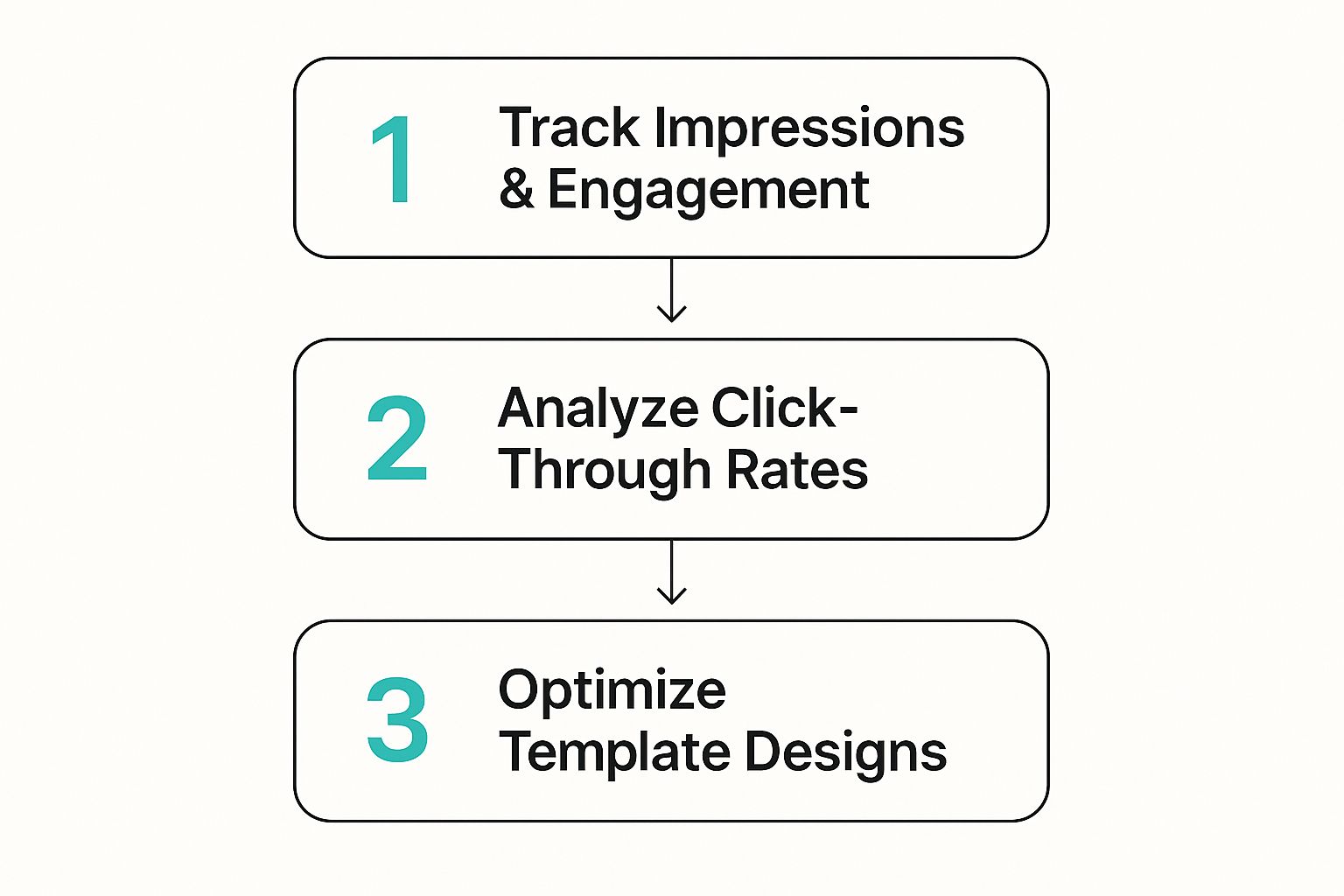
The key takeaway here is that optimization isn't a one-and-done task. It's a continuous cycle of tracking your performance, analyzing what's working (and what's not), and tweaking your designs based on that real-world data.
Advanced Strategies for Scaling Your Affiliate Income
Okay, you've nailed down a solid system for creating on-brand AI Pinterest pin templates. That's huge. But now it’s time to shift from daily creation to strategic scaling. This is where the magic really happens—where you turn your Pinterest account into an automated engine that cranks out passive affiliate income for you.
Think of yourself as a scientist in a lab, and your Pinterest account is your experiment. It's all about testing, analyzing, and fine-tuning to figure out what really gets your audience to click, buy, and come back for more.
A/B Testing Your AI Pin Templates
One of the most effective things you can do is A/B test your designs. It sounds complicated, but the idea is simple: create two slightly different versions of a pin for the same affiliate product and see which one gets better results. Pin Generator is a game-changer here because you can whip up tons of variations in no time.
You can test just about anything to see what sticks:
- Headlines: Try pitting a benefit-focused headline ("Get Flawless Skin in 5 Steps") against something that sparks curiosity ("The Skincare Secret Nobody is Talking About").
- Imagery: Does a lifestyle photo outperform a crisp, clean product shot? Test it and find out.
- Colors: See if a bold, high-contrast color scheme grabs more attention than a softer, muted palette.
Keep a close eye on your metrics—especially clicks and outbound clicks. This data is pure gold. It tells you exactly what your audience wants, so you can refine your templates and make sure every new pin you create is already optimized for maximum impact.
Expanding into Video Pins and Idea Pins
If you're only creating static image pins, you're leaving money on the table. It's that simple. Video Pins and Idea Pins are designed to stop the scroll and capture attention way more effectively in a busy feed. The best part? You can use your existing AI templates as a launchpad.
For instance, that static pin with a recipe can easily become a snappy 15-second video showing quick clips of the cooking process. A roundup pin for "Top 5 Home Office Essentials" can be transformed into a multi-slide Idea Pin, with each slide linking to a different affiliate product. It's crucial to understand the rules for each format, and you can learn exactly how to use Pinterest and affiliate links in our detailed guide to make sure you're doing it right.
This is all about working smarter, not harder. Stop creating brand-new content for every single format. Repurpose your winning ideas into different pin types to multiply your reach and impact with minimal extra work.
Repurposing Content into Multiple Pin Formats
Your existing content is an absolute goldmine. A single blog post can be broken down and spun into dozens of unique pins with the help of AI.
Take a listicle, for example. You can create one main pin for the overall topic, then generate totally separate pins for each individual point in the article. This strategy not only fills your content calendar but also lets you target a wider range of long-tail keywords, bringing in a more diverse audience.
By consistently feeding the Pinterest algorithm with fresh content derived from your core topics, you're building a powerful, scalable affiliate marketing machine that drives traffic and sales on autopilot.
Got Questions About AI Pin Templates?
I get it. As an affiliate marketer, you're always looking for an edge, but diving into a new tool can feel like a big step. Let's tackle some of the most common questions I hear about using AI Pinterest pin templates for affiliate marketing.
Are There Any Free Options?
Yep, and this is one of the best parts. When you start with a tool like Pin Generator, you're not starting from scratch. You get immediate access to a massive library of professionally designed templates, completely free.
We're talking hundreds of free Pinterest pin templates, all ready for people to use with affiliate marketing. These aren't just your run-of-the-mill, boring layouts. They’re designs backed by data on what actually grabs attention and gets clicks on Pinterest, giving you a serious head start without spending a dime. It's the perfect way to play around, test different styles, and figure out what your audience loves.
Can I Make Templates That Match My Brand?
While the free templates are a fantastic launchpad, the real magic happens when you build a cohesive, recognizable brand on Pinterest. And yes, you absolutely can. With Pin Generator, people can create their own templates to suit their brand needs perfectly.
Instead of being boxed into someone else's aesthetic, you can:
- Upload your own brand fonts and logo.
- Plug in your exact brand color hex codes.
- Set up layout preferences that reflect your unique style.
Doing this ensures every single pin the AI creates looks and feels like it came from you. That consistency is what builds trust and makes you stand out in a crowded feed.
The goal isn't just to churn out more pins; it's to build a scalable system for your brand. When you create your own templates, you're essentially teaching the AI your visual language. It can then replicate that style endlessly, saving you a ridiculous amount of time while keeping everything looking professional and on-brand. That's how you move from tedious manual work to a truly automated affiliate marketing machine.
Ready to stop guessing and start creating pins that actually convert? Join thousands of smart affiliate marketers and bloggers who use Pin Generator to put their Pinterest strategy on autopilot. Start designing high-converting pins in minutes with Pin Generator.