
AI Automated Pin Generation for Pinterest Growth
1 September 2025
So, what exactly is AI automated pin generation?
Think of it as moving away from the endless cycle of manual design in tools like Canva. Instead, you're using a smart system that takes your existing content—like blog posts or product pages—and automatically turns it into a steady flow of fresh, eye-catching Pins. It’s the only sustainable way to keep up with the Pinterest algorithm's hunger for new content.
The New Reality of Pinterest Marketing
Welcome to Pinterest in 2024. It’s a completely different game now. Winning isn’t just about pinning pretty pictures anymore; it’s about relentless, high-volume consistency.
The platform’s algorithm gives massive preference to accounts that publish a constant stream of high-quality, fresh content. For bloggers, e-commerce stores, and creators, this is a huge hurdle.
Trying to manually create 15-25 unique Pins every single day is a one-way ticket to burnout. This is where AI automation stops being a "nice-to-have" and becomes a critical part of your strategy. It’s the key to hitting the high output you need for growth without losing your mind or sacrificing quality.
From Manual Grind To Intelligent System
This isn't about replacing your creativity with robots. It's about giving it a massive boost with an intelligent system. Modern tools can analyze what's already working on Pinterest and combine that with your branding to churn out endless Pin variations that your audience is primed to love. It turns Pinterest marketing from a daily chore into a scalable, automated workflow.
The benefits are pretty straightforward:
- Save a Ton of Time: What used to take hours of daily design work now takes just a few minutes of setup.
- Stay Perfectly Consistent: Your account keeps publishing fresh Pins, staying in the algorithm's good graces, even when you’re busy with other things.
- Get Better Results: The AI can generate Pin variations based on proven, high-performing designs, which naturally increases your chances of getting clicks and saves.
Looking at how Pinterest marketing is changing, the difference between the old way and the new way is stark.
Manual Pinning vs AI Automated Pin Generation
| Feature | Manual Pinning | AI Automated Pin Generation |
|---|---|---|
| Output Volume | Low. Creating 5-10 unique pins a day is a struggle. | High. Easily generates 20-50+ unique pin variations in minutes. |
| Time Investment | High. Hours per week spent on design, writing, and scheduling. | Low. Minutes for initial setup and review. |
| Consistency | Difficult. Prone to gaps and burnout, leading to algorithm penalties. | Effortless. Maintains a consistent posting schedule automatically. |
| Design Variety | Limited. Relies on a few go-to templates, leading to creative fatigue. | Endless. Generates hundreds of variations from proven templates. |
| Optimization | Guesswork. Based on personal intuition and past performance. | Data-Driven. AI can analyze top designs to create better-performing pins. |
| Scalability | Poor. Your output is directly tied to the hours you can work. | Excellent. Scale your pinning strategy without increasing your workload. |
The table really tells the story. Manual pinning just can't keep up anymore.
By 2025, the top tools are already doing more than just creating Pins. They're pioneering AI that analyzes trending content to automatically generate new variations tailored to what audiences want right now. We're moving from simple scheduling to full-on automation, with systems that can even predict a Pin's potential success before you publish it. If you want to dive deeper, check out some of the best Pinterest automation tools and see what they can do.
The goal is to build an intelligent system that maintains the high-volume, high-quality output the Pinterest algorithm rewards, freeing you to focus on the bigger picture of your business.
When you embrace ai automated pin generation, you're doing more than just making Pins faster. You're building a sustainable growth engine that works for you 24/7, letting you scale your presence and drive real traffic without getting bogged down in the daily grind.
Building Your Automated Pinning Workflow
Alright, let’s get the foundation of your content machine built. Setting up your AI automated pin generation system is something you really only have to do once, but it pays off in countless hours saved down the road. I'll be using Pin Generator as our main example here, but these core ideas will work for most quality tools out there. The big goal is to create a totally smooth workflow from your content straight to Pinterest.
This whole process boils down to making a few key connections. First, you'll need to give the tool permission to access your Pinterest account so it can post for you. After that, you'll link up your content source—maybe your blog's RSS feed or your Shopify store—so the AI knows where to pull images and text from.
Establishing Your Brand Identity
Before you let the AI create anything, you have to teach it what your brand looks like. Most of these tools have a "Brand Kit" section where you can pre-load your specific logos, fonts, and colors. Honestly, this step is non-negotiable if you want to maintain a professional and recognizable look.
You’ll want to upload a few key things:
- Your Logo: Make sure it's a high-resolution version so it can be automatically placed on your pins without looking fuzzy.
- Brand Fonts: The specific fonts you use for headlines and body text are a must.
- Color Palette: Plug in your exact brand hex codes. This ensures every single pin is perfectly on-brand.
Getting this right from the start means every pin the system creates will feel like it was custom-made by you, not just churned out by a robot. It’s the difference between generic, forgettable content and a cohesive brand experience that actually builds trust.
Think of this initial setup as your strategic blueprint. By defining your brand's visual language upfront, you're empowering the AI to work for you, ensuring every pin it generates reinforces your identity and looks polished.
The use of generative AI in business has absolutely exploded. Since 2023, its adoption has more than doubled, and projections show 65% of organizations will be using it by 2025. This growth is backed by a solid return, with an average of $3.70 earned for every dollar spent. You can dig into more of these generative AI adoption statistics on amplifai.com.
Configuring Your Initial Settings
With your brand assets locked in, the last piece of the puzzle is to configure the automation rules. This is where you tell the system exactly how you want it to handle your content.
You can see how clean and simple the workflow is in AI tools like Pin Generator. You just give it a link.
The interface is intentionally straightforward. You provide one URL, and the AI does the heavy lifting of pulling the content and whipping up designs.
Here, you'll set things like default boards for new pins, choose how the tool uses images from your links, and set up any specific scheduling patterns you want to follow. A great place to start is to have the system pin to your most relevant, high-traffic board first. Then, schedule follow-up pins to other related boards over the next few days.
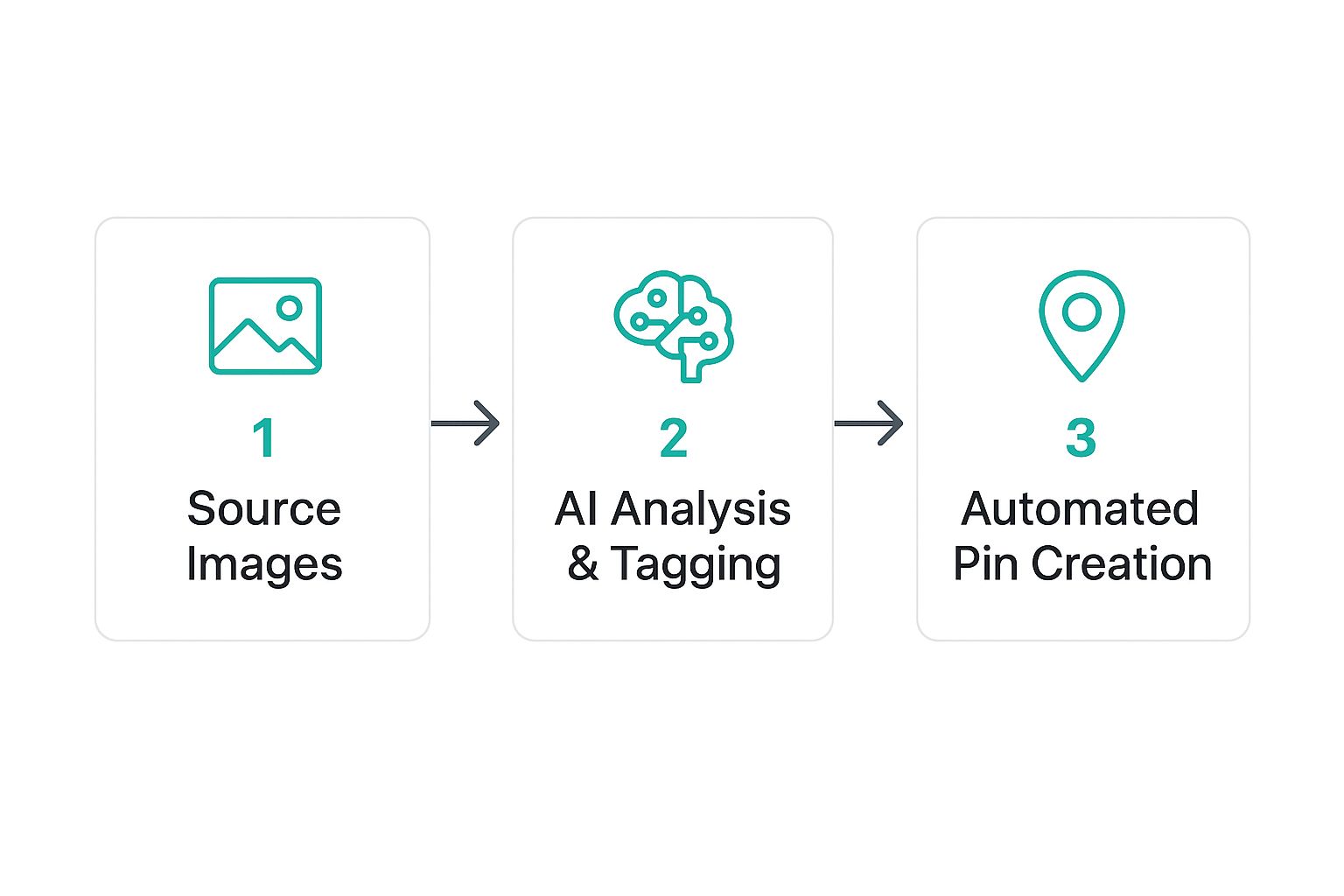
This is basically how it all works behind the scenes:
This simple three-step process—sourcing, analyzing, and creating—is the engine that will power your whole automated workflow. Once you've got these settings dialed in, your system is fully configured and ready to start turning your content into a steady stream of Pinterest traffic.
Designing Pin Templates That Convert
Your AI is a seriously powerful assistant, but it can’t read your mind. The real success of your AI automated pin generation strategy boils down to one thing: the quality of the templates you feed it.
Think of your templates as the blueprints for a house. The AI can build it, but you need to hand over a solid design that people will actually want to step inside.
This isn’t just about making things look nice. It's about creating a strategic framework that drives clicks and saves. The goal is to design templates with flexible, well-defined areas for images, headlines, and calls-to-action that the AI can easily populate with content from your blog posts or product pages.
The Anatomy Of A High-Performing Template
A great template is so much more than a pretty background and a fancy font; it's a strategic layout. Every single element should have a purpose, guiding the viewer's eye exactly where you want it to go—straight to your call-to-action.
When you're building your templates inside Pin Generator, make sure to include these core components:
- A Bold Headline Area: This is your hook. Carve out a prominent, easy-to-read space where the AI can place those can't-ignore titles.
- A Clear Image Placeholder: Define a specific spot for the main visual. Since the AI pulls images directly from your URL, your template needs a designated place for them to shine.
- Space for a Call-to-Action (CTA): Don't forget a smaller text block for crucial phrases like "Shop Now," "Read More," or "Get the Recipe." This tells people exactly what to do next.
- Your Branding: Always include a spot for your logo or website URL. It builds brand recognition and protects your content from being stolen.
To help you nail this, here's a quick breakdown of what every great pin template needs.
Essential Pin Template Components
| Component | Purpose | Best Practice |
|---|---|---|
| Headline Space | To grab immediate attention and convey the pin's value. | Use large, legible fonts. Ensure enough contrast with the background. |
| Image Area(s) | To provide visual context and appeal. | Create templates with single large image spots and some with multiple smaller ones for variety. |
| Call-to-Action (CTA) | To prompt the user to take the next step (e.g., click through, save). | Keep it short and action-oriented. Place it near the bottom or where the eye naturally lands. |
| Brand Identity | To build brand recognition and claim ownership of the pin. | Subtly place your logo or website URL, typically at the bottom of the pin. |
| White Space | To avoid a cluttered look and improve readability. | Don't cram elements together. Allow text and images to breathe. |
Getting these components right is the difference between a pin that gets ignored and one that drives consistent traffic.
Your template library is your competitive advantage. A diverse set of well-designed templates prevents your content from looking repetitive and allows the AI to create a stream of visually distinct pins, which is exactly what the Pinterest algorithm loves.
For a deeper dive into creating visually stunning designs from scratch, our guide on using an AI Pinterest pin generator is packed with advanced tips to help you refine your templates even further.
Building A Diverse Template Library
Relying on just one or two templates is a recipe for creative burnout. Your audience will quickly start scrolling past your pins if they all look identical. To keep things fresh, you should aim to build a library with at least 5-10 diverse templates.
This doesn't mean you have to start from zero every time. Simple variations can make a huge impact.
- Switch Up Text Placement: Create versions where the headline is at the top, another where it's in the middle, and one where it's at the bottom.
- Play with Image Ratios: Design templates with full-bleed images, some with clean borders, and others that feature multiple smaller image blocks.
- Experiment with Colors: Make alternate versions of your best-performing templates using different colors from your brand palette.
Good visuals go beyond just photography. The idea of digitally enhancing images, much like virtual staging for enhancing digital visual appeal in the real estate world, can make your pins significantly more attractive and boost conversions.
With a solid library in place, the AI can mix and match elements, generating what feels like an endless supply of new pins from a single blog post. This variety is also fantastic for A/B testing, helping you quickly figure out which designs truly connect with your audience and bring in the most traffic.
Automating Your Content and Scheduling
Okay, you’ve got your system dialed in and your templates are looking sharp. Now for the fun part: unleashing the full power of AI automated pin generation. This is where we move from setup to actual execution, tapping into the features that will save you a ridiculous amount of time and basically put your content strategy on autopilot.
The core idea is beautifully simple. You take one piece of content—say, a blog post—and let the AI spin it into dozens of unique, SEO-friendly pins. This isn't just about slapping different images onto a template. It's about generating distinct titles and descriptions to blow up your reach and keep you on Pinterest's good side.
Generating Endless Pin Variations
One of the biggest mistakes I see people make is pinning the same URL with the same description over and over again. Pinterest can flag this as spammy behavior, and that’s a quick way to tank your account’s visibility.
The solution is genuine variety. And the secret weapon for that? Spintax.
Spintax (short for "spinning syntax") is a simple but powerful way to write text that lets an AI create thousands of unique variations from a single sentence. It uses curly braces {} and pipes | to signal interchangeable words or phrases.
For instance, a simple description could look like this:{Check out|Discover|Explore} this {awesome|amazing|fantastic} {guide to|tutorial for|article on} {healthy eating|clean eating|nutritious meals}.
From just that one line, the AI can generate a ton of unique combinations:
- "Check out this awesome guide to healthy eating."
- "Discover this fantastic tutorial for clean eating."
- "Explore this amazing article on nutritious meals."
Using Spintax is a non-negotiable best practice if you're serious about Pinterest automation. It ensures every single pin you schedule has a unique description. This signals to the Pinterest algorithm that you’re providing fresh, valuable content, not just reposting the same old thing.
This kind of automation is a huge piece of why the AI industry is booming. The whole sector is projected to hit $47.1 billion by 2030, largely driven by tech that enables autonomous actions like content creation. You can dig into this trend and see how AI agents are transforming e-commerce on techedgeai.com.
Creating a Smart Pinning Schedule
Once you've got a batch of unique pins ready to go, the next step is scheduling them intelligently. Just dumping them all at once is a waste. The goal is to build a consistent, long-term pinning calendar that works with the platform, not against it.
A smart scheduler, like the one inside a tool like Pin Generator, lets you do a few key things:
- Pin to Multiple Boards Over Time: Schedule one pin variation to your most relevant board today. Schedule another to a different (but still relevant) board in three days, and a third to a group board next week. This is how you maximize the lifespan and reach of every single blog post.
- Set Optimal Intervals: You never want to spam the same board. A good rule of thumb is to leave at least 2-3 days between pins going to the same board. This keeps your pinning rhythm looking natural and human.
- Batch Your Workflow: This is the real game-changer. Sit down for one session and generate and schedule all your pins for the entire month. It's a "set it and forget it" approach that keeps your account active even when you’re busy with other parts of your business.
If you publish new content regularly, you can take this even further by integrating an RSS feed. This automatically pulls in your latest blog posts and starts creating pins for them, creating a seamless pipeline from publishing to promotion. You can learn more about this killer technique in our guide on how to automate Pinterest pin creation with RSS feeds.
By combining AI-generated pin variations with a strategic schedule, you build a resilient system that consistently drives traffic without needing you to be hands-on every single day.
Analyzing and Optimizing Your AI Strategy
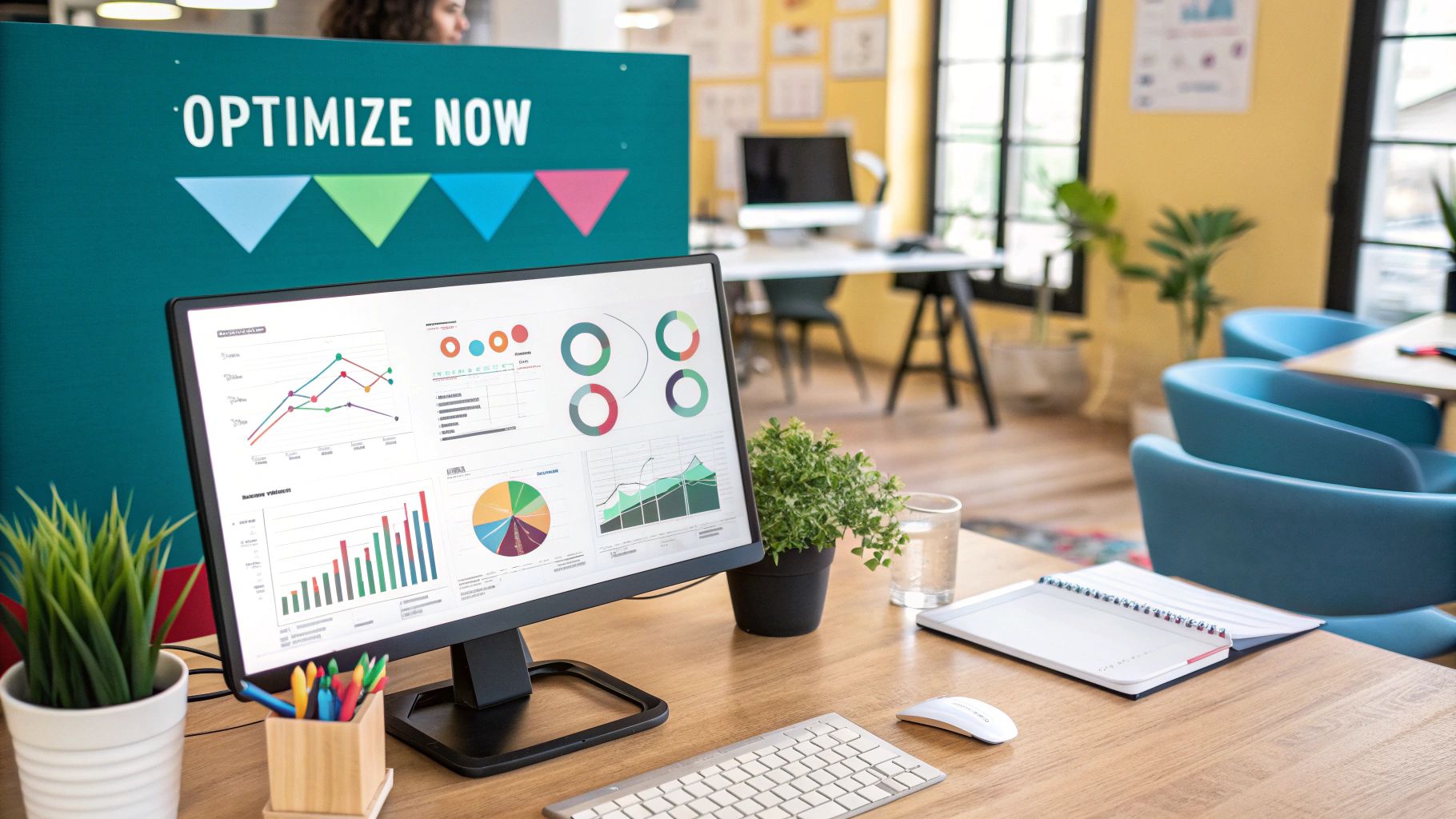
Getting your ai automated pin generation system up and running is a massive win, but don't pop the champagne just yet. This is where the real work—and the real growth—begins.
The secret to long-term success isn't just "set it and forget it." It's about creating a smart feedback loop: analyze your results, see what's working, and double down on it. This is how you turn a simple automation tool into a powerful, intelligent growth engine that gets smarter over time.
It all starts by digging into your analytics. Forget the vanity metrics like impressions and look at what actually moves the needle for your business, like outbound clicks and saves. Both your native Pinterest Analytics and the dashboard inside a tool like Pin Generator are gold mines of information.
Interpreting Your Performance Data
Your first move should be to pull up your top-performing pins from the last 30 to 90 days. Start looking for patterns.
Are your winners all video pins? Do they share a specific color scheme? Is there a common thread in the headlines, like using numbers or asking a question? This data is your roadmap.
For example, you might find that pins using a bold, sans-serif font get 30% more clicks than those with a delicate script font. That’s not a guess; it’s a data-backed insight you can immediately feed back into your templates.
When you're looking at the numbers, focus on these key metrics:
- Outbound Clicks: For most of us, this is the holy grail. It tells you how many people are actually leaving Pinterest and landing on your website. It's the clearest sign that your pins are driving real business results.
- Saves: This metric signals that your content is high-value and has staying power. High saves are a huge hint to the Pinterest algorithm that your pin is worth showing for a long, long time.
- Engagements: This is your catch-all for close-ups, comments, and reactions. It shows your pin is grabbing attention and stopping the scroll, even if it doesn't immediately lead to a click.
Treat your analytics not as a report card, but as a conversation with your audience. The data is their way of telling you exactly what they want to see more of. Listen closely and adjust your strategy accordingly.
Refining Your Automated Strategy
Once you’ve figured out what your audience loves, it's time to act. This is the optimization part of the cycle, where you make specific, targeted improvements to your entire automated workflow.
This isn't about throwing everything out and starting over. It's about making small, intelligent tweaks that compound over time. Think of it like a ship's captain making minor course corrections—those tiny adjustments are what get you to your destination faster.
Here are a few practical refinements you can make right away:
- Double Down on Winning Templates: If one or two templates are consistently knocking it out of the park, make them your new default. Create a few new variations based on those winning designs to keep things fresh.
- Retire Underperforming Designs: Be ruthless here. If certain templates consistently flop, get them out of your rotation. This ensures the AI is only working with your absolute best creative assets.
- Adjust Your Scheduling: Are your outbound clicks spiking on weekend evenings? Tweak your schedule to publish more of your A-list content during those peak traffic windows.
- Refine Your Content Themes: Maybe your pins about "easy weeknight dinners" get massive saves, but your "gourmet dessert" pins fall flat. That’s your audience telling you what to create next! Let their demand guide your future blog post ideas.
This continuous cycle of analysis and refinement is what separates the accounts that plateau from the ones that see sustained, long-term growth. By regularly checking your data and making informed adjustments, your ai automated pin generation system becomes smarter and more effective every single week.
Got Questions About AI Pin Generation?
Jumping into any new tool is bound to stir up a few questions. When it's about something as important as your Pinterest strategy, it's only natural to want to get the full picture before you dive in.
So, let's tackle some of the most common things people wonder about when it comes to AI automated pin generation. I want to give you clear, straight-up answers so you can feel confident about how this all works.
Can AI Get My Pinterest Account Banned?
This is always the first question, and for good reason. The short answer? No, not if you use it the right way.
Good tools are built to play by Pinterest's rules. The real danger of getting flagged as spam isn't automation itself—it's low-quality, repetitive behavior that looks robotic.
To keep your account safe and sound, variety is your best friend. Create a solid library of different, high-quality pin templates. Use Spintax to mix up your pin descriptions, making them unique every time. And most importantly, schedule your content to post at natural times across different—but always relevant—boards.
The big no-no is pinning the exact same image with the same link to the same board over and over again in a short period. When you use AI automation correctly, you're just acting like a super-efficient, strategic human pinner. And that's exactly the kind of consistency Pinterest loves to see.
How Much Human Work Is Still Involved?
While the AI does the heavy lifting of creating and scheduling pins, your brain is still the most important part of the equation. Think of the AI as your incredibly productive assistant, but you're still the marketing director calling the shots.
You're still in charge of the crucial stuff:
- The Foundation: You write the awesome blog posts or create the product pages that the AI is going to promote.
- The Creative Vision: You're the one designing the beautiful, on-brand pin templates that define your style.
- The Strategy: You set the initial scheduling rules and decide which keywords the AI should focus on.
- The Analysis: You'll want to pop into your analytics every now and then to see what's working, tweak your templates, and update your strategy.
The AI is running the machine, but you're the one who designed it and tells it what to create. Your strategic input is what makes the whole thing work so well.
How Does The AI Know What to Put on the Pins?
It's actually pretty clever and straightforward. The AI starts by looking at the URL you give it, like a blog post. It scans the page and pulls out key pieces of information: the post's title, its meta description, and all the images on the page.
From there, it uses the templates you've already designed. It intelligently drops the images it found into the image spots on your templates. For the text, it'll take your post's title and spin it into several different, eye-catching headline options.
For the pin descriptions, it can use your meta description as a base or use tools like Spintax to generate hundreds of unique, SEO-friendly variations. This whole process ensures you get a ton of fresh, diverse pins from just one piece of content.
Ready to stop wasting time and start driving serious traffic from Pinterest? Try Pin Generator today and see how quickly you can create hundreds of high-quality, on-brand pins for your blog or store. Get started at https://pingenerator.com.