
Your Guide to a Free Pin Generator
23 August 2025
Let’s be honest: staring at a blank canvas trying to design the perfect Pinterest pin is a special kind of creative nightmare. It’s a massive time suck, and before you know it, hours have vanished.
A free pin generator isn't just a simple shortcut. It’s a strategic move to leapfrog the biggest roadblocks every creator and marketer faces: the constant demand for fresh content, design burnout, and the simple, crushing lack of time. It's about finally working smarter, not just harder.
Why a Pin Generator Is a Smarter Way to Work
If you’ve ever found yourself lost in a design tool, endlessly adjusting fonts or scrolling through stock photos, you know exactly what I'm talking about. Manual pin creation is a bottleneck.
A pin generator completely flips that script. Instead of painstakingly building one pin at a time, you can feed it a blog post URL or a product page and get dozens of unique pin variations in a matter of minutes.
This approach is so effective because it plays directly into what the Pinterest algorithm loves: fresh content. And "fresh" doesn't just mean a new blog post. It means new pin images, new titles, and new descriptions the algorithm has never seen before. Trying to create that much variety by hand is a recipe for burnout.
The Power of Automation and Scale
A good free pin generator handles the tedious stuff for you. It automatically grabs images, pulls headlines, and snags descriptive text from your existing content, then remixes it all into professionally designed templates.
Suddenly, you can:
- Batch-create your content: What used to take all afternoon can now be done in an hour, giving you a week's worth of pins.
- A/B test on the fly: Effortlessly create and test different images and headlines to see what your audience actually clicks on.
- Keep your branding on point: Use pre-set templates to make sure every single pin looks like it came from you.
This isn't just about saving time; it's about being able to compete. Pinterest's user base hit a staggering 553 million monthly active users in the last quarter of 2024, an 11% jump from the previous year. And with the average pin sticking around for nearly four months, a high-volume strategy pays dividends for a long, long time. (You can dig into more stats like these over at Printful.com.)
To put it into perspective, here’s a quick look at how the two methods stack up.
Free Pin Generator vs Manual Pin Creation
| Feature | Free Pin Generator | Manual Creation |
|---|---|---|
| Time Investment | 5-10 minutes for 20+ pins | 1-2 hours for 5-10 pins |
| Design Skills | None required | Basic to advanced skills needed |
| Content Output | High volume, high variety | Low volume, limited variety |
| Cost | Free (trial or free tier) | Free (if you own software) |
| Consistency | Effortlessly consistent | Requires manual effort |
The table makes it pretty clear. While manual creation gives you total control, the sheer efficiency and scale you get from a generator is a game-changer for anyone serious about growth.
The real win with a pin generator isn't just the speed. It's the strategic freedom it gives you. You can stop fussing with design and start focusing on keyword optimization, performance analysis, and actually growing your reach.
Escape Design Burnout for Good
Let’s face it, not all of us are professional graphic designers. The pressure to create pins that are not just good, but scroll-stopping, is intense.
A quality pin generator erases that pressure completely. It comes loaded with a library of proven, eye-catching templates that are already optimized for Pinterest’s vertical format and mobile-first experience.
That means no more second-guessing your color choices or font pairings. You can confidently churn out high-quality pins that look amazing and drive clicks, all without a lick of design training. That mental energy you get back can be poured into what really moves the needle: your business.
Getting Started with Your Free Trial

This screenshot pretty much sums up the magic of a great free pin generator. The interface is clean, simple, and points you directly to the most important task: turning your content into a fresh batch of pins. All the usual design headaches and friction? Gone.
The whole point of a free trial is to see if a tool actually works for you. You want to go from signing up to holding a set of high-quality, branded pins in your hands in less than 15 minutes. It’s that instant "aha!" moment that shows you just how much time you can get back.
Getting signed up is the easy part. Once you're in, the first thing you'll do is connect your Pinterest account. This is handled through Pinterest’s official API, meaning the tool gets permission to post for you without ever needing your password. It’s a totally secure handshake between the two platforms.
Navigating the Dashboard and Key Features
Once you’re connected, you'll land on the main dashboard. It's tempting to explore every single button, but for your first run, let's just focus on the features that deliver the biggest, fastest wins.
- Generate from URL: This is where the real power lies. Just grab a link to a blog post or product page, paste it in, and watch the tool work its magic. It automatically pulls in your images, headlines, and descriptions.
- Template Library: Before hitting "generate," spend a minute browsing the templates. Look for a few styles that match your brand’s vibe. You can customize everything later, but starting with a template you already like saves a ton of time.
This isn't just about the tech. Let's say you're a food blogger who just published a new recipe. You can drop that URL in and instantly see five pin designs, each one highlighting a different photo from your post. Or, if you run an e-commerce shop, you can do the same with a product page to create pins that showcase different angles and features.
That first moment when you see your own content instantly transformed into beautiful pins is a game-changer. It’s when the idea of a "pin generator" stops being an abstract concept and becomes a real tool that saves you hours of work.
Your First Pin Generation Run
Okay, let's walk through a real-world example. Imagine you have a blog post called "10 Easy Ways to Organize Your Kitchen."
You copy and paste that URL into the generator. The tool gets to work, pulling the text and images straight from your article.
Next, you pick five templates that catch your eye and hit "Generate." Within seconds, you've got a whole collection of unique pins. Each one has a different image from your post and a slightly tweaked, AI-suggested title like "Kitchen Organization Hacks" or "Declutter Your Kitchen Fast."
From there, you can make a few quick edits, tweak the text, or swap an image if you want. But the heavy lifting—the design, the layout, the copywriting—is already done. You just did an hour's worth of work in about two minutes. That's the power you're testing with a free pin generator.
Creating Your First Batch of Quality Pins
Alright, let's dive into the fun part—where you really see the power of a free pin generator come to life. This is where you take one single link, whether it’s a blog post or a product page, and spin it into a whole collection of beautiful, scroll-stopping pins. And you can do it in minutes.
It all starts with a URL. Just pop it in, and the AI gets to work, scanning the page and pulling out all the essential bits and pieces. It automatically grabs your images, sniffs out potential headlines from your titles and H2s, and even finds juicy snippets of text for pin descriptions.
Honestly, this step alone is a game-changer. Gone are the days of manually saving images and copy-pasting text back and forth. The generator does all that tedious prep work for you, setting the stage for the creative magic to happen.
Bringing Your Brand to Life with Customization
After the AI works its magic, you'll see a bunch of pin drafts ready to go. They usually look pretty slick right off the bat, but the real fun is in the fine-tuning. This is your chance to inject your brand's unique vibe and make sure every pin is perfectly optimized.
The template switcher is your best friend here. With just a click, you can cycle through dozens of different designs and instantly see how your content looks in different layouts. It’s like having a designer at your beck and call, showing you mockups in real-time.
From there, you can easily:
- Tweak brand colors: Got specific hex codes? No problem. Adjust the color palette to match your brand guide perfectly.
- Edit AI-generated text: Polish the headlines and descriptions to nail your brand voice and sneak in some keywords.
- Swap out images: Maybe the AI grabbed a good image, but you know another one would be even better. Switch it out in a second.
This whole workflow is designed to be super intuitive, letting you go from a simple link to a finished pin in no time.
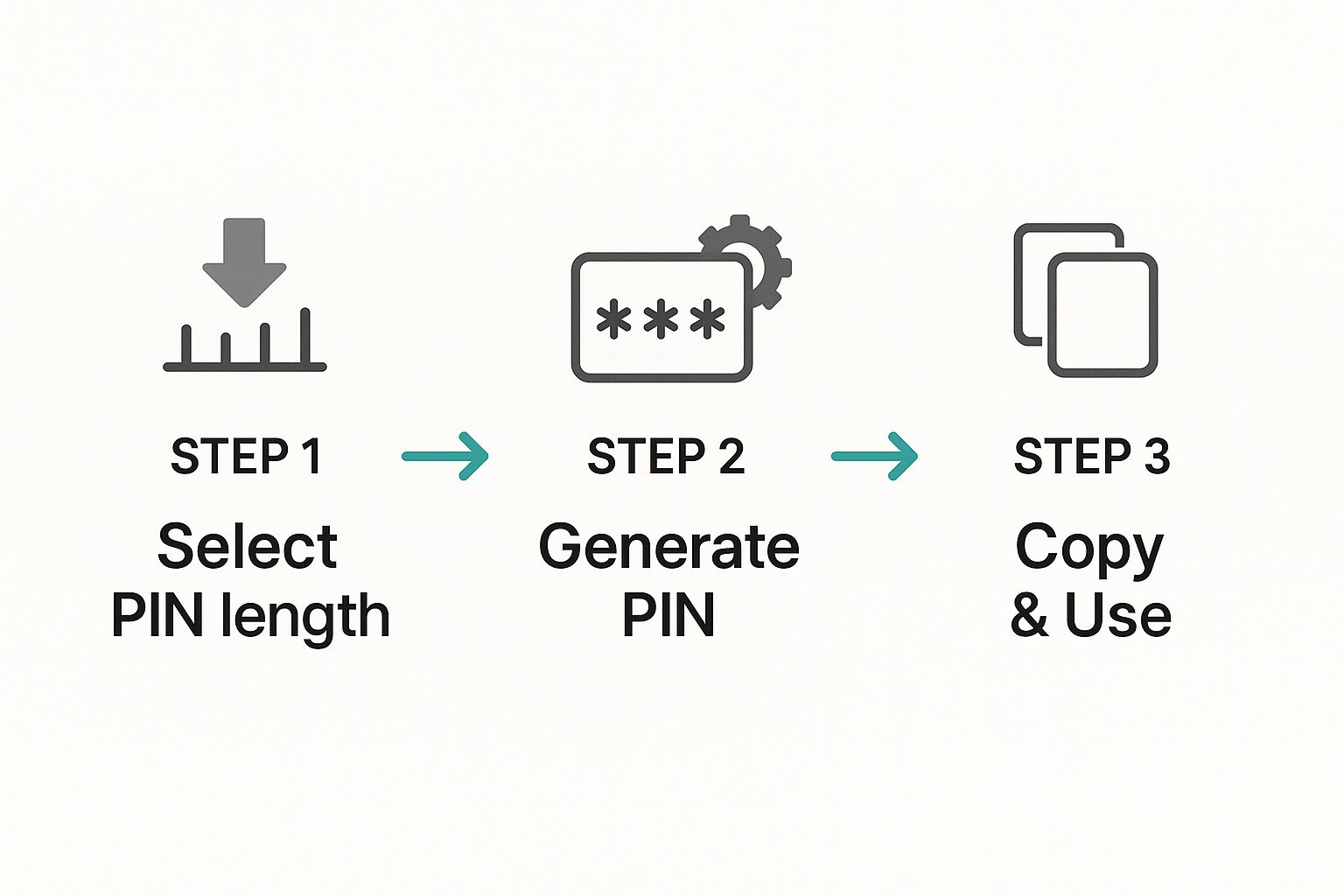
As the infographic shows, it’s a simple three-step dance: select, generate, and use. That’s it.
The Strategic Value of Pin Variety
The real goal isn't just about making pins faster; it’s about making more of them. A diverse set of pins is gold on Pinterest. The algorithm loves fresh content, and a free pin generator makes it incredibly easy to create that variety at scale. You can crank out multiple pins for the same URL, each with a different image, title, and call to action.
This is a fantastic way to A/B test your content without even trying. Launch a handful of variations and you'll quickly see which headlines catch people's attention and which images get the clicks.
Creating a dozen different pins for one blog post might sound like overkill, but with a generator, it’s the new normal. This is how you collect data, learn what works, and constantly fine-tune your strategy without all the manual effort.
Even Pinterest itself is leaning into AI tools to help marketers. With 55% of users on the platform specifically to shop, being able to create fresh, unique Product Pins quickly is a huge advantage. It's this kind of activity that helped Pinterest hit its first-ever billion-dollar revenue quarter in Q4 2024.
This focus on creating lots of varied, engaging pins is the cornerstone of a winning Pinterest strategy. If you want to dive deeper, our guide on using a Pinterest pin generator has all the best practices to get you started.
Optimizing Your Pins for Maximum Reach
Alright, you've used a free pin generator to whip up some gorgeous pins. That’s a huge first step, but honestly, it’s only half the battle. If you really want to get traction, you have to start thinking like an SEO pro.
Your main goal is simple: make it crystal clear to the Pinterest algorithm what your pin is about so it can serve it up to the right people.
This all starts with the text. While Pin Generator's AI gives you a fantastic head start on descriptions, you should always take a moment to tweak them. Weave in your most important keywords—the actual search terms your ideal person is typing into Pinterest.
This small step transforms your beautiful pin from just another image into a discoverable asset that drives traffic for months, even years.
Mastering Titles and Descriptions
Pinterest gives you a good amount of space for text, and you need to be strategic with every character. Your pin’s title and description are prime real estate for the keywords that will get you found.
A great title is short, punchy, and to the point. I always aim for 60-100 characters so it doesn't get cut off on mobile. For the description, you get up to 500 characters, but the sweet spot is usually around 150-250 characters. Keep it scannable.
Here’s how to put that into practice:
- Be Specific: Instead of a generic title like "Fall Outfit," try something like "Cozy Fall Outfit Ideas for Apple Picking." You immediately narrow in on a specific user need.
- Use Power Words: Add words like "Easy," "Proven," or "Ultimate" to grab attention and signal value.
- Weave Keywords Naturally: A description for a recipe pin shouldn't just list ingredients. It could include phrases like "healthy dinner idea" and "quick weeknight meal" because that’s what people are actually searching for.
The text fields in Pin Generator are your playground for this. Draft a few variations and see what feels the most natural and click-worthy. This is where you perfectly blend the speed of automation with your own marketing know-how. If you want to go really deep on this, our complete Pinterest SEO guide has you covered.
Your pin's text isn't just a caption; it's a set of instructions telling the Pinterest algorithm who needs to see your content. Treat it with the same care you give your pin’s design.
Strategic Board Selection and Scheduling
Where you save your pin matters just as much as what's on it. Seriously.
Always, always save your newly generated pins to the most relevant board you have. A pin saved to a board named "Healthy Dinner Recipes for Beginners" is going to perform way better for SEO than one tossed onto a generic board called "Food."
This specificity helps both users and the algorithm understand the pin's context. It’s a powerful signal that your content is a perfect match for searches in that niche.
And then there's timing. A free pin generator with a built-in scheduler is an absolute game-changer. Don't just dump all your pins at once. Schedule them to go live when your audience is most active. You'll have to test different times and days to find that sweet spot, but doing so ensures your fresh content gets maximum visibility right out of the gate.
A consistent pinning schedule also signals to Pinterest that you're an active, reliable creator, which is always a good thing.
What About Security and Tool Limitations?
Let's be real—the word "free" can sometimes set off alarm bells, especially when you're connecting a new tool to your business accounts. It's smart to be a little skeptical about the security and quality of any free pin generator, so let's tackle those questions head-on.
First things first, let’s clear up a classic mix-up. The "Pin Generator" we’re talking about is a marketing tool for creating stunning visuals for Pinterest. It has absolutely nothing to do with a security "PIN generator" that creates numeric passcodes for your bank account.
The confusion is understandable. Security PIN generators are often scrutinized for potential flaws. After all, studies show that a shocking 10-20% of people still use painfully obvious PINs like "1234." Yikes. Experts often warn that not all free code generators are built the same, and some don't meet the tough cryptographic standards needed for high-security stuff. You can see a breakdown of different generator tools in this software comparison.
But here’s the good news: a legitimate marketing tool like Pin Generator doesn't work that way. It connects to your account using Pinterest’s official API. Think of it as a secure handshake—you grant specific permissions without ever handing over your password. Your account integrity stays locked down tight.
Understanding the Free Trial Fine Print
A free trial is the perfect way to take a tool for a spin, but it's important to know what the limitations are. These aren't sneaky "gotchas"—they're just there to give you a feel for the tool's power while saving the heavy-duty features for paid users.
Here’s what you can typically expect with a free trial:
- Watermarked Images: Your beautiful new Pins might have a small watermark on them.
- A Cap on Generations: You'll likely have a limit on how many Pins you can create.
- Locked Features: The really advanced stuff, like bulk scheduling or team collaboration tools, is usually reserved for paid plans.
These kinds of restrictions are pretty standard across the board and help you figure out if the tool is a good fit for your workflow.
Think of the free trial as a test drive. You get to feel the engine's power and see how it handles, but you don't get unlimited mileage. The goal is to see if the tool solves a real problem for you before you commit.
Ultimately, those limitations have a purpose: they help you make a smart decision. Once you see for yourself how a free pin generator can save you hours of tedious design work, the value of upgrading to a paid plan becomes crystal clear. It's the natural next step for anyone serious about growing their Pinterest presence and unlocking the tool's full potential.
Common Questions About Pin Generators
Jumping into a new tool always brings up a few questions. It’s totally normal to want to get the lay of the land before you dive in. So, let's clear up some of the most common things people ask when they first start using a free pin generator.
Think of this as the final check-in before takeoff. We'll hit the practical "how-to" stuff and the strategic "why" questions that usually come up. My goal is to give you clear, straight answers so you can get started with confidence.
How Many Pins Should I Actually Create?
This is the million-dollar question, isn't it? While there’s no single magic number, the real goal is consistency and variety, not just pumping out a massive volume of pins.
A great place to start is generating 3-5 unique pin variations for every new blog post, product, or piece of content you create.
This approach gives the Pinterest algorithm plenty of fresh content to test and distribute without burning out your audience (or yourself!). Once you find your rhythm, you can definitely ramp it up. But starting small and manageable is the secret to building a workflow that actually sticks.
The most successful accounts on Pinterest focus on consistently publishing fresh pins. A free pin generator is your secret weapon for creating that much-needed variety without spending hours on it.
Will This Work for My Niche?
You bet it will. Whether you're a food blogger sharing gluten-free recipes, a DIY guru teaching macrame, an Etsy shop owner selling handmade jewelry, or even a B2B service sharing marketing tips, a pin generator is designed to be flexible. Its main job is to turn your content—whatever it is—into beautiful, clickable pins.
The secret sauce is the templates. A good free pin generator offers a huge library of styles you can tweak to match your brand's vibe.
- For E-commerce: Find templates that make your product photos the star of the show. Look for designs with space for a price or a clear call-to-action like "Shop the Collection."
- For Bloggers: Templates built for listicles ("5 Ways to…") or how-to guides are your best friend. Bold, eye-catching text is key here.
- For Service Providers: Go for clean, professional layouts. Templates that let you highlight a powerful quote, a surprising statistic, or a key takeaway are perfect for building authority.
The generator provides the skeleton; you bring the niche-specific content. That combination is what makes it work for pretty much any industry out there.
What Happens When My Free Trial Ends?
Free trials are there to let you kick the tires and see what the tool can really do. Once your trial is up, you'll usually have a couple of options. Most platforms will gently move you to a limited free-forever plan. This might mean you get a watermark on your pins or have a monthly cap on how many you can create.
The other path is upgrading to a paid plan. This is the logical next step if you’ve seen how much time the tool saves you and you’re ready to unlock everything—like unlimited pin creation, advanced scheduling tools, and premium templates. The trial is your chance to prove the ROI to yourself, so when it ends, the decision to upgrade feels less like a guess and more like a smart business move.
Ready to stop the endless scroll in Canva and start creating pins that actually drive traffic? Pin Generator helps you create dozens of unique, high-quality pins in minutes. See what it can do for you. Start your free trial today.