
How to Use Pinterest for SEO Without Guesswork
20 October 2026
You've designed attractive Pins, written descriptions, and scheduled a steady stream of posts. Your dashboard shows impressions and occasional saves, but your website still isn't getting the visitors you expected. Before you redesign everything or publish more, check whether each Pin answers a clear search query and gives people a compelling reason to click.
Learning how to use Pinterest for SEO means connecting search demand to useful content, then measuring what visitors do next. Treat publishing as a controlled keyword-to-conversion loop, not a contest to keep your account busy.
Table of Contents
- Turn Pinterest Into a Search Workflow
- Research Keywords Before Designing Pins
- Build a Search-Focused Profile and Boards
- Optimize Every Pin for Search Intent
- Build a Sustainable Pinterest Publishing Rhythm
- Measure Search Visibility and Business Results
- Improve Pinterest SEO Through Continuous Testing
Turn Pinterest Into a Search Workflow
Consider a home-decor creator publishing polished living-room images. Some Pins link to the homepage, others to broad category pages, and the descriptions alternate between decorating advice and product promotion. This is a hypothetical example, but it illustrates a practical problem: attractive content without a defined destination strategy.
I wouldn't start by changing the fonts. I'd choose a specific search promise, such as small living room layout ideas, and identify the article that answers it. Someone looking for furniture arrangements needs layouts and explanations, not a homepage that makes them search again.
Define the job before creating the asset
Pinterest SEO is a discovery strategy, not merely a social-posting tactic. Pinterest reported 578 million global monthly active users in the second quarter of 2025, an 11% year-over-year increase, illustrating the scale of the discovery opportunity in its quarterly results announcement.
Audience size isn't a reason to target everyone. Your job is to connect a particular need with a useful answer and a measurable next action.
Use this workflow to keep those decisions connected.
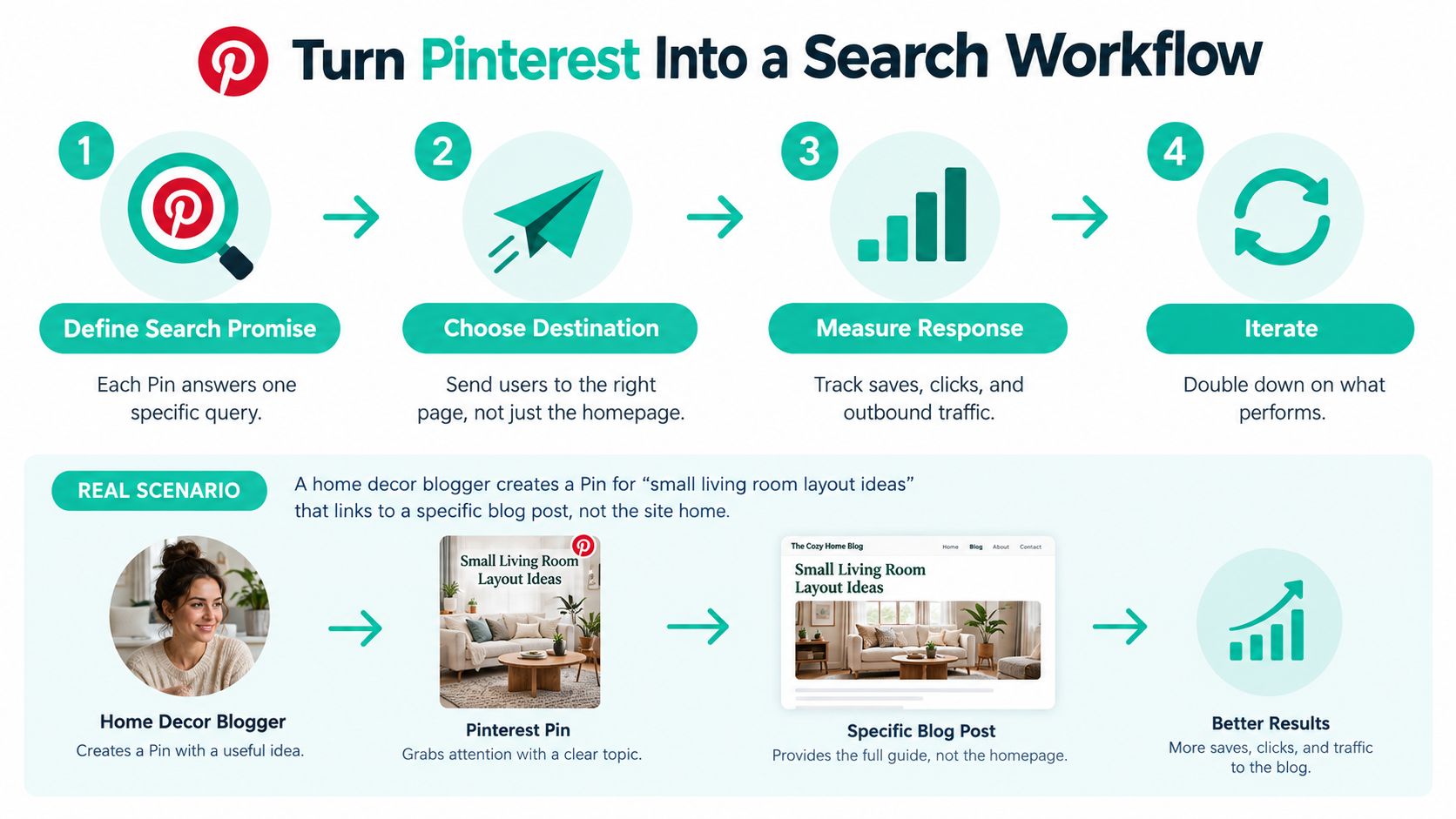
Before production, write a short planning statement containing:
- Search promise: What question or need does this Pin address?
- Destination: Which existing page provides the answer?
- Desired response: Should visitors read instructions, compare options, or purchase?
- Review decision: What result would justify another creative treatment?
For the home-decor example, the promise is usable furniture arrangements, the destination is a dedicated layout article, and the immediate business goal might be an engaged article visit. A store could use the same method for a product category, while an affiliate publisher could apply it to a comparison guide.
Practical rule: If you can't explain why the searcher should visit the destination, the Pin isn't ready for design.
Research Keywords Before Designing Pins
Start inside Pinterest, not with a phrase you hope people use. Enter a relevant topic into search and collect autocomplete suggestions. Check Pinterest Trends for movement over time, then compare those ideas with the topics already earning attention in your native analytics.
Treat these inputs differently. Autocomplete supplies candidate language, Trends supplies timing context, and your account data supplies evidence about your existing content. None should become an automatic instruction to produce a Pin.
Separate a topic from an intent
Home decor is a broad topic. Small living room layout ideas is a narrower informational query. Small living room sofas points toward product exploration, while buy compact sectional sofa expresses a shopping need.
Those phrases shouldn't all lead to the same page. Choose the destination and call to action before opening your design tool.
Pinterest Keyword Intent Map
| Search intent | Typical query style | Best destination | Primary Pin role |
|---|---|---|---|
| Informational | Small living room layout ideas | Detailed layout article | Demonstrate a useful answer and invite reading |
| Commercial | Sectional versus sofa for a small room | Comparison guide | Clarify trade-offs and encourage evaluation |
| Shopping | Compact sectional sofa | Relevant product or collection page | Show the product and invite shopping |
Use broad pillar language to organize your account, then assign narrower queries to individual assets. A long-tail phrase is useful because it clarifies the task, not because a longer phrase is automatically better.
Build a working keyword brief
Keep a planning sheet with the candidate query, intent, destination, visual concept, and proposed call to action. Add related terms only when they help explain the same subject.
For example, a layout article might naturally support apartment living room, furniture arrangement, and narrow living room. Throwing in unrelated kitchen or bedroom phrases won't make the Pin more useful.
In its observational 2025 benchmark analysis, Tailwind reported that approximately 80% of viral Pins included a target keyword in the title, while most descriptions contained five or fewer keywords; these are patterns, not guaranteed performance formulas, as discussed in Tailwind's keyword benchmark findings.
My recommendation is to prioritize intent clarity over keyword count. Use this Pinterest keyword research guide to develop a repeatable collection process, but reject any candidate query your content can't satisfy.
When research uncovers demand without a suitable destination, you have a content-development opportunity. Don't disguise that gap with an appealing Pin.
Build a Search-Focused Profile and Boards
A board called Ideas tells a visitor almost nothing. Living Room Layout Ideas makes the subject understandable before they open it. Start with language your audience would recognize, not internal campaign names or clever labels that need explanation.
Your profile should describe the account's overall territory. Boards should divide that territory into useful, distinct themes. For a home-decor publisher, living-room layouts, color palettes, and lighting can serve different browsing needs without becoming disconnected subjects.
Make the hierarchy easy to understand
Use the account structure below as an organizational model, not a requirement to create every possible category.
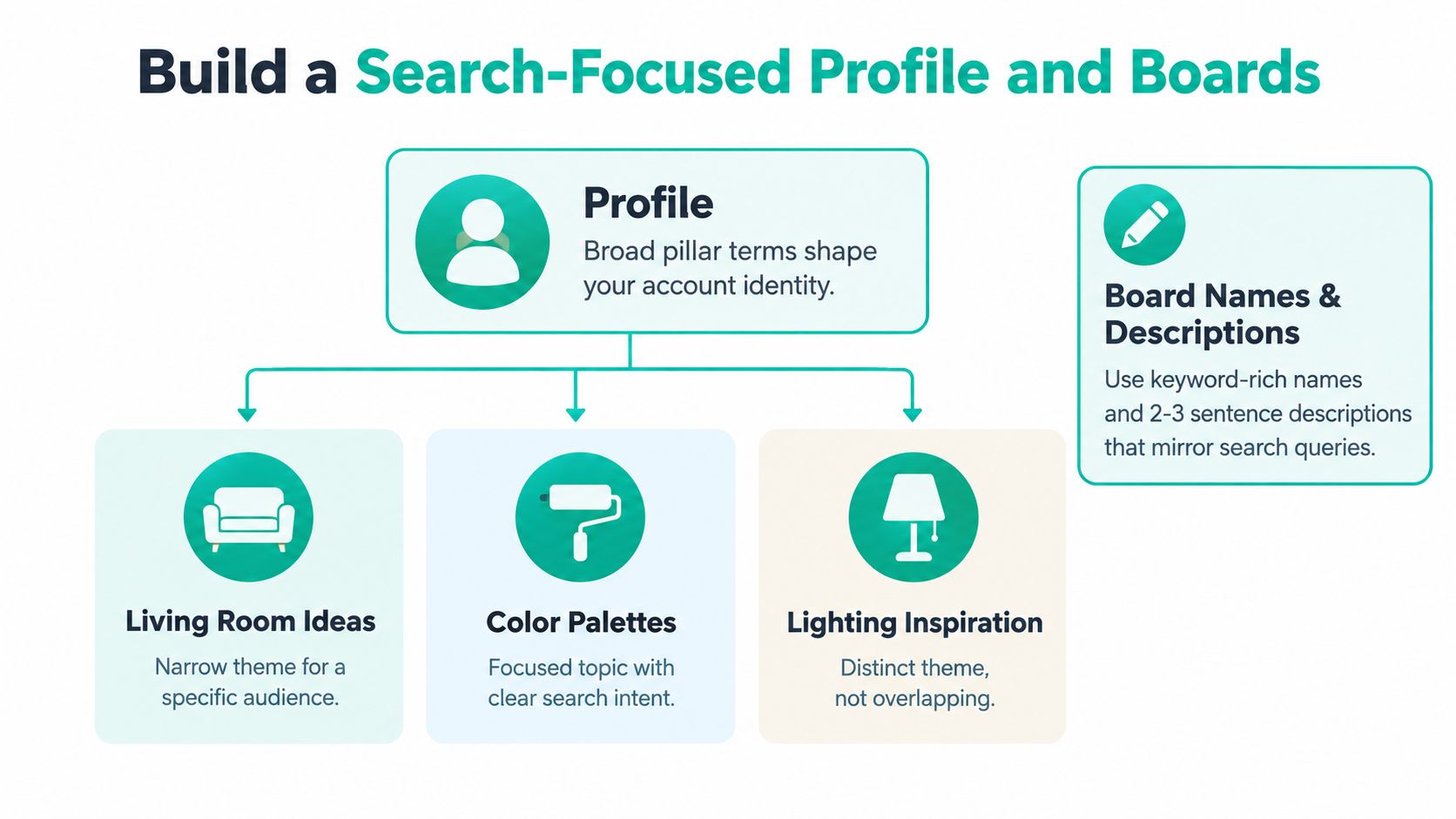
Before creating another board, ask whether it represents a different need. Small Living Rooms and Small Living Room Ideas probably don't need separate homes unless you can articulate a meaningful editorial distinction.
Board descriptions should explain what people will find. A layout board might cover furniture placement, awkward room shapes, and arrangements for apartments. That's more useful than repeating the board name with minor keyword variations.
Clean up the account foundations
Pinterest SEO guidance describes domain quality, Pin quality, Pinner quality, and query relevance as broad ranking dimensions, and recommends business-account setup and website claiming in its account and optimization recommendations.
Use those dimensions as an audit framework, not as a disclosed scoring formula:
- Account ownership: Use a business account and complete the available website-claiming process. Don't confuse claiming a domain with earning a separate verification badge.
- Topic boundaries: Keep boards distinct enough that placement decisions are straightforward.
- Profile language: Explain the subjects you cover and who you help without turning your biography into a keyword list.
- Board relevance: Choose the board that most closely fits the individual Pin, rather than distributing it wherever there's space.
I'd rather maintain a smaller set of purposeful boards than expand an account with overlapping categories nobody can consistently distinguish. If your team debates where every Pin belongs, revisit the taxonomy.
Organization should make publishing decisions easier. It shouldn't create extra destinations for the same repetitive content.
Optimize Every Pin for Search Intent
Take the query creamy dairy-free tomato soup. The searcher expects a recipe that delivers creaminess without dairy. A bowl photographed with an unexplained cream garnish creates uncertainty before the person even reads the title.
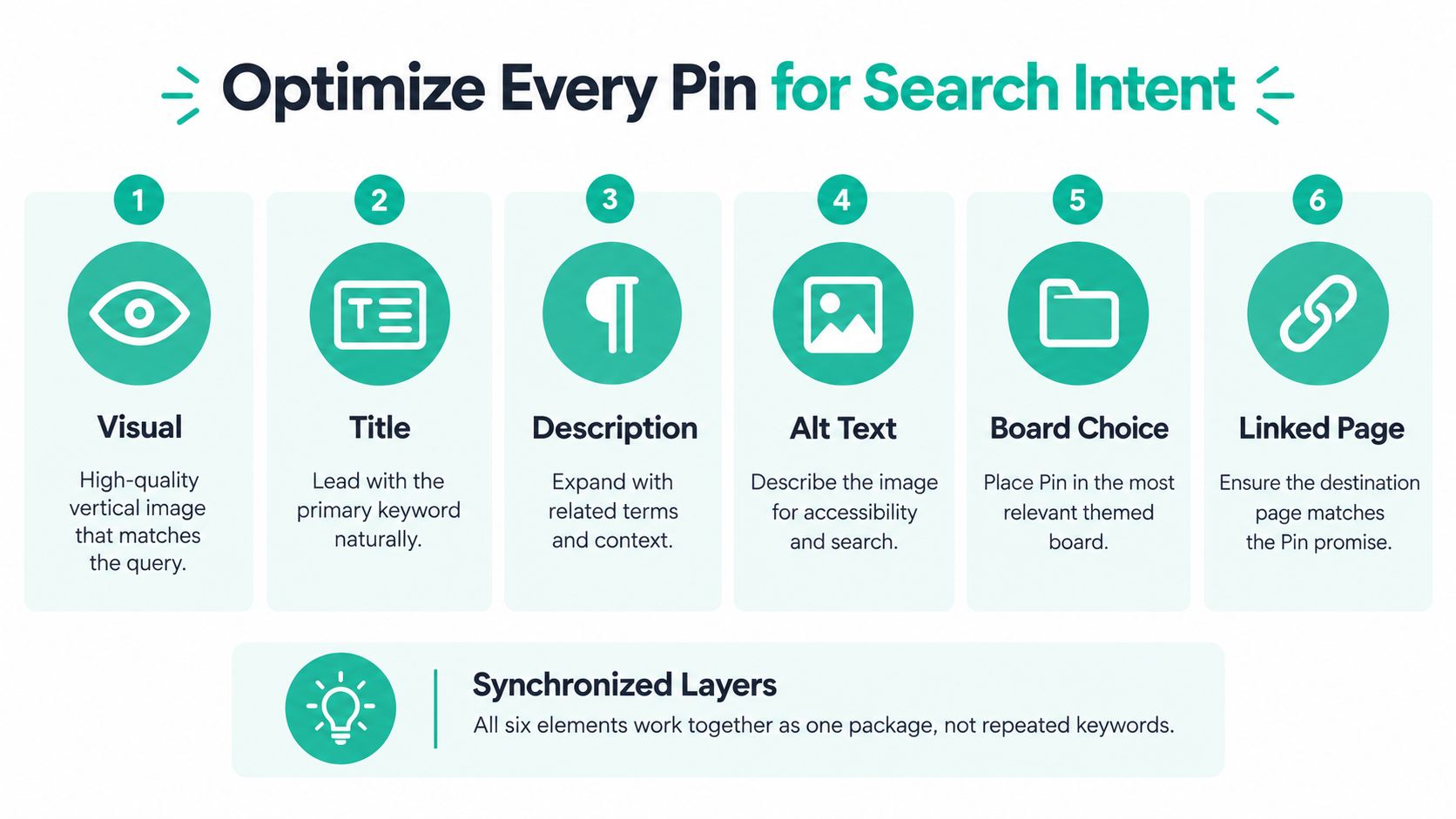
Build the creative package around that expectation. The following checklist shows how the elements should fit together.
Make the subject unmistakable
Pinterest's researchers describe systems that combine image understanding with recommendation signals, supporting the need to consider visual content alongside text in their technical overview of visual discovery. Don't treat the image as decoration around your keywords.
For the soup example, use a vertical image with the finished dish as the dominant subject. Keep the text overlay readable, and show only ingredients or garnishes consistent with the actual recipe.
Then write the supporting elements as a coherent package:
- Title: Creamy Dairy-Free Tomato Soup is direct and descriptive.
- Description: Explain the recipe's relevant characteristics and invite readers to get the instructions. Mention coconut milk or another substitute only if the recipe uses it.
- Alt text: Describe what's visible, such as tomato soup in a ceramic bowl with basil. Don't turn accessibility text into a promotional keyword list.
- Board placement: Choose a relevant recipe board, not a broad lifestyle board because it has more content.
- Destination: Send the visitor directly to the recipe, with ingredients and instructions easy to find.
Create variations with a purpose
A finished-bowl photograph, an ingredient-led design, and a preparation image can each support the same recipe. They're meaningful alternatives because they emphasize different reasons to engage while preserving the original intent.
Changing only a background color gives you another file, but little insight into what your audience needs. I'd test a clearer benefit or a different visual explanation before producing cosmetic variations.
A strong Pin makes a promise the destination can keep. More keywords can't compensate for an inaccurate promise.
Check the linked page on a phone. Remove avoidable loading friction, confirm the recipe remains accessible, and make sure the visitor doesn't have to look elsewhere for the answer.
For a video walkthrough, use the embedded tutorial below.
Before scheduling, ask whether the image, title, description, and destination all describe the same result. Check spelling, readability, link accuracy, and factual details. If any element requires an explanation to reconcile it with the others, fix it before publishing.
Build a Sustainable Pinterest Publishing Rhythm
Choose a schedule from your supply of useful content, not someone else's daily quota. A store with maintained product data has different production options from a blogger who publishes detailed tutorials. Both need a rhythm they can sustain without releasing weak or misleading assets.
I'd start with an inventory review. Identify current destinations, usable imagery, seasonal relevance, and the review work each asset requires. Your publishing capacity is the amount you can prepare and quality-check, not the amount a scheduler can upload.
Batch the work without automating the judgment
Separate research, creative production, metadata review, and scheduling into manageable batches. That reduces repeated setup work while keeping editorial decisions visible.
Choose inputs according to the business:
| Content source | Practical publishing use | Review requirement |
|---|---|---|
| Product catalog | Prepare creatives from product information | Confirm availability, pricing, and image accuracy |
| RSS or Atom feed | Bring published articles into a production queue | Check whether each article remains useful |
| CSV import | Organize selected URLs and metadata | Validate fields and destination links |
| Reusable template | Maintain brand presentation across assets | Ensure the layout suits each subject |
These are workflow options when your chosen tools support them, not reasons to process everything automatically. A feed can surface an outdated article just as efficiently as a current one.
Use trends as a filter
Pinterest explains that its Trends tool lets users inspect keyword movement over time in its Pinterest Trends guidance. Use that information to assess timing, rather than treating every rising term as a content assignment.
My trend filter is deliberately strict:
- Sustained interest: Look for continued movement rather than reacting to an isolated spike.
- Seasonal recurrence: Check whether the topic follows a recognizable pattern.
- Editorial fit: Confirm that your existing boards and destinations support the query.
A home-decor creator could adapt an emerging color trend through an existing room-styling article. Jumping into unrelated fashion queries because they're rising would be a distraction.
Publish ahead of anticipated demand when the trend history supports that decision, then adjust as you learn from your own account. There's no universal lead time that fits every niche and content type.
When the queue becomes difficult to review, reduce the cadence. Consistency should protect quality, not excuse repetitive images, stale products, or loosely related topics.
Measure Search Visibility and Business Results
A seasonal inspiration image can collect saves while sending little traffic. A product-comparison Pin might attract fewer saves but bring visitors who evaluate products and purchase. Neither outcome is wrong, but they serve different business goals.
Don't let the most visible metric become the default definition of success. Choose the decision first, then inspect the measure that can inform it.
Match each metric to a decision
| Metric | What it helps you assess | What it doesn't establish |
|---|---|---|
| Impressions | Whether Pinterest is distributing the Pin | Whether viewers want to visit |
| Saves | Whether people want to keep the content | Whether they'll become customers |
| Outbound clicks | Whether people leave Pinterest for the destination | Whether the visit is useful or profitable |
| Engaged sessions | Whether visitors interact meaningfully with the page | Whether Pinterest caused a later purchase |
| Conversions and revenue | Whether tracked visits produce business outcomes | The full value of every earlier discovery touchpoint |
Qualified outbound traffic is a better operating target than popularity when your goal is website growth. For a publisher, that may mean engaged reading. For a store, it may mean product exploration followed by a meaningful conversion event.
Connect Pinterest activity to site behavior
Use consistent UTM tagging so your website analytics can distinguish Pinterest traffic and identify the creative or campaign. Record the Pin, destination, primary query, board, and creative treatment in a tracking sheet or publishing history.
Then review landing-page behavior alongside Pinterest Analytics. The practical distinctions in this Pinterest analytics guide can help you organize that review.
- Preserve attribution consistency: Use stable naming conventions rather than changing campaign labels between batches.
- Define meaningful events: Track actions such as purchases, sign-ups, or qualified enquiries according to your business.
- Compare related cohorts: Group Pins by query, board, creative format, and destination type.
- Allow for delayed journeys: Review assisted-conversion paths where your analytics supports them, while acknowledging attribution gaps.
Community discussion includes UTM tagging and analytics review in this Pinterest SEO measurement conversation. I'd extend that basic advice into a documented review process rather than relying on remembered winners.
Use publishing-history and leaderboard views to find candidates for investigation. They can reveal patterns in output, but they can't decide whether a sale was incremental or whether the visitor found the promised answer.
Measurement warning: A saved Pin is evidence of interest, not proof of commercial value.
Improve Pinterest SEO Through Continuous Testing
Performance review should end with a decision, not a report. Keep the successful search intent, identify the weakest part of the experience, and change a major variable you can interpret.
If a layout Pin attracts relevant visits, preserve the topic while testing a different visual hook. If visitors arrive but don't engage, investigate the destination before rewriting every title.
Diagnose before changing
| Observed problem | First investigation | Sensible next test |
|---|---|---|
| Low impressions | Query relevance, topic fit, and whether the subject is obvious | A clearer title or more recognizable visual |
| Saves without clicks | Whether the Pin gives a reason to visit | A creative treatment emphasizing useful page content |
| Clicks without conversions | Visitor intent, page experience, offer, and tracking | A better-matched destination or clearer page action |
| Previously useful content weakens | Product availability, article accuracy, and broken links | Refresh the destination before producing more variants |
These are diagnostic starting points, not guaranteed explanations. Low impressions alone don't prove a keyword is wrong, and weak conversions don't automatically mean the creative failed.
Compare tests over a fixed review period, with reasonably similar publishing conditions. Don't change the image, title, board, and destination simultaneously, then claim you know which change helped.
Turn the review into a monthly routine
Keep a test log containing the hypothesis, changed variable, comparison group, review window, and business outcome. Judge groups of related Pins over several weeks where practical, rather than reacting to daily fluctuations.
Use this monthly checklist:
- Research: Revisit useful queries and check whether demand or intent has shifted.
- Optimize: Audit new assets for clarity, accuracy, and destination fit.
- Publish: Maintain the cadence your team can review properly.
- Measure: Compare discovery, traffic quality, and conversion outcomes.
- Decide: Expand a winning approach, revise a weak element, or stop an unproductive topic.
I'd rather finish a review with a clear next experiment than a long list of metrics. Pinterest SEO becomes less speculative when every publishing decision follows evidence from the previous round.
Pin Generator offers keyword research, reusable designs, AI-written metadata, and recurring scheduling for merchants, creators, and publishers. Use it to prepare and manage your keyword-to-conversion workflow, then review the generated assets against your search promises and website results before expanding production.