
Pin Creation Tool: What It Does and How to Choose One
24 October 2026
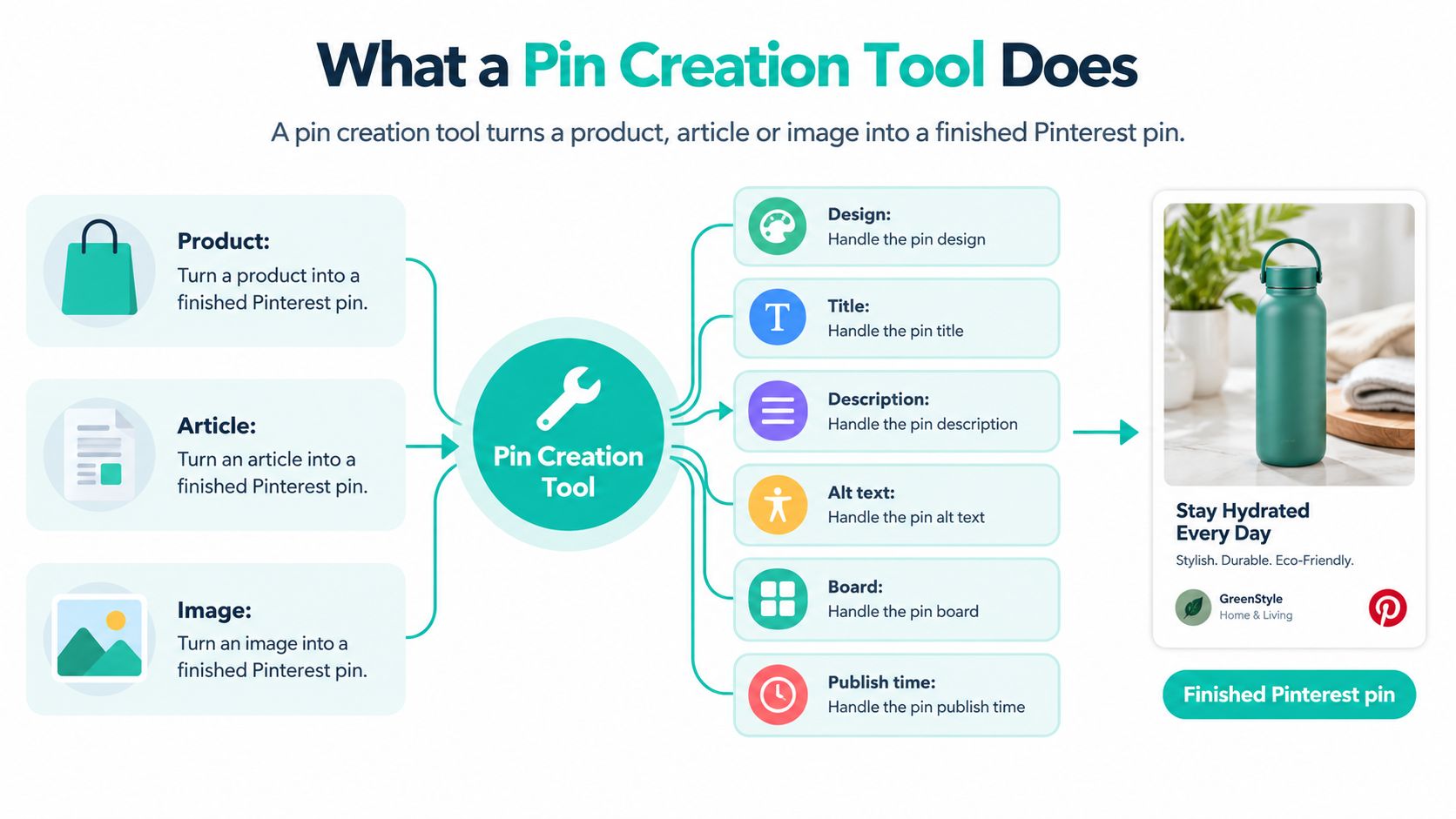
A pin creation tool turns a product, article or image into a finished Pinterest pin, with design, title, description, alt text, board and publish time handled in one workflow. A useful tool also checks what it generates before anything reaches the publishing queue.
You've imported your products, picked a template and generated a batch that looks finished at a glance. Then you notice a headline spilling over the logo, a product photo that doesn't match the selected variant and an image description that reads like a list of keywords.
Those aren't reasons to abandon automation. They're reasons to treat it as a production system, with clear inputs, hard limits and review gates, rather than a shortcut around editorial judgment.
Table of Contents
- What a Pin Creation Tool Does
- Core Features to Check Before You Buy
- Pinterest Limits Every Generated Pin Must Respect
- Who Benefits and the Use Cases That Pay Off
- Quality Checks Before Anything Goes Live
- How to Run a Pin Workflow from Feed to Schedule
- Reading Results Beyond Impressions
- Choose Your Tool and Start Your First Batch
What a Pin Creation Tool Does
A print shop starts with a shared brief, then hands copy, artwork, layout and dispatch to different specialists. A pin creation tool performs that same coordination job. It takes a source item and produces the creative plus the publishing fields needed to release it: image, title, description, alt text, destination, board and publish time.
The image is only one part of that record. A product input should connect the selected variant, product page and accurate details. An article input should preserve the headline's promise and connect it to the supporting image and URL. A standalone image still needs its destination and enough context to publish responsibly.
From source material to a publishing record
The output should remain traceable to its input. If a merchant changes a product's material or withdraws a color, the team should be able to find every generated pin that depends on that information. Otherwise, a catalog update can leave obsolete details circulating.
A useful tool also exposes each generated field separately. That gives the reviewer a clear record to approve rather than an attractive image with hidden choices attached. For example, a pin for one planter size should not inherit the title or landing page for another size just because both products use the same image style.
Practical rule: Treat the finished pin as a publishing record with an image attached, not an image with optional fields.
Automate the repetitive handoffs first: transfer source information, apply approved layouts and prepare the queue. Keep claim accuracy, exceptions and final release approval under human control.
Core Features to Check Before You Buy
Judge a pin creation tool by the manual work it removes, not the length of its feature list. A template editor can simplify design while leaving you to write every description, assign every board and upload every finished file.
Pin creation tool feature checklist
| Feature | Manual task it removes | What to check before buying |
|---|---|---|
| Template design | Rebuilding each pin in a design app | Brand colors, fonts and layout variations lock in place |
| AI titles, descriptions and alt text | Writing metadata for every pin | Keyword fit, character limits and alt text that describes the image |
| Board selection | Guessing which board fits each pin | Editable matching rules by category or season |
| Catalog, RSS and CSV import | Hand-building pins from each product or article | Connectors for your store or feed format |
| Recurring scheduling | Daily manual uploads | Cadence controls and spacing between repeat pins |
| Keyword and trend research | Guessing which searches to target | Clearly explained search indicators and useful trend alerts |
| History and leaderboard | Judging output by feel | Logs connecting variant, board and publish time to results |
Test behavior, not checkbox availability
Ask the vendor to demonstrate metadata generated for distinct variants, rather than the same description copied across products. A cotton throw and a wool throw shouldn't receive interchangeable material claims because they share a category. Likewise, an article about cleaning a dining table shouldn't inherit shopping copy from a furniture template.
Board selection needs editable rules. You should be able to direct seasonal merchandise to an appropriate seasonal board without sending every product containing the same color word there. Ask what happens when the tool finds no suitable match, because a review queue is preferable to a confident but irrelevant assignment.
For history, check whether you can identify the exact creative and copy associated with an outcome. A gallery of published images isn't enough if it doesn't preserve the choices your team needs to evaluate.
Make the trial reflect your real source
Bring awkward source material into the trial, not just your cleanest listing. Use a long product name, an article with several images and an item whose variant names require careful handling.
- Import behavior: Check which fields arrive, which disappear and whether missing information is flagged.
- Editing scope: Confirm whether a correction affects the selected pin, the entire batch or the underlying template.
- Integration depth: For Shopify, Etsy, WooCommerce, Amazon or WordPress, test the actual connection you need rather than accepting a platform logo as proof.
- Advanced access: Consider an API only if someone on your team can maintain the connection and handle failures.
Without scheduling, you still have an uploading job. Without readable history, you still have a checking job. Include both in the buying decision, even when the design editor is the most impressive part of the demo.
Pinterest Limits Every Generated Pin Must Respect
A template can look correct when you build it and fail when real content arrives. A longer product name changes the line breaks, a translated sentence occupies more space, or a replacement font pushes the headline toward an interface overlay.
The check must happen after variable substitution, when the tool has inserted the actual words and images. Approving an empty template doesn't approve every future output.
Validate the finished render
Pinterest's official pin specification guide lists BMP, JPEG, PNG, TIFF and WEBP as accepted file types and sets a 100-character maximum for the pin title field. It also defines safe-zone offsets, and those numbers only make sense against a canvas size. The values below assume a 1000×1500 px pin, the standard 2:3 layout most templates target. On a different canvas, the offsets need proportional adjustment rather than literal copying.
One field the guide does not cap is text inside the creative itself. That limit is yours to set, and 250 characters is a workable default before legibility suffers on a phone screen. Keep it separate from the title field in your validation rules, because overflowing overlay text breaks the design while an overflowing title breaks the metadata.
Pinterest specification limits a tool must enforce (canvas: 1000×1500 px)
| Requirement | Limit | What the tool should do |
|---|---|---|
| Supported file types | BMP, JPEG, PNG, TIFF, WEBP | Reject unsupported formats before upload |
| Pin title (metadata field) | 100 characters maximum | Measure after variable substitution and shorten overflow |
| On-image text (internal cap) | ~250 characters, set by your team | Rewrite overflowing text without changing its meaning |
| Top safe zone | 270 px from top edge | Keep the headline clear of the top overlay area |
| Left safe zone | 65 px from left edge | Keep text clear of left-edge overlays |
| Right safe zone | 195 px from right edge | Keep text clear of right-edge overlays |
| Bottom safe zone | 790 px from top edge | Keep the call-to-action clear of the bottom overlay |
A character ceiling is not a copywriting target. A pin with 240 characters of overlay text usually reads worse than one with 40, even though both pass the limit.
Check meaning as well as length
A tool should measure rendered text using the selected font, identify overflow, and produce a preview at the intended aspect ratio. For layout decisions, use the guide to Pinterest pin dimensions alongside the current official specifications.
If a product name exceeds the title allowance, preserve the product identity and one meaningful distinguishing attribute. Cutting the final characters can remove the size, material, or intended use, which changes what the pin promises.
- Inspect the preview: Confirm that the headline, product, and call-to-action remain legible together.
- Reject unresolved overflow: Send the item back for correction instead of shrinking text until it becomes difficult to read.
- Preserve intent: Check that shortening hasn't changed what the destination page offers.
Alt text needs its own quality review, not just a presence check. Run validation on every generated batch, including outputs from templates your team has already used successfully, because the template that passed last month can still overflow on this week's product names.
Who Benefits and the Use Cases That Pay Off
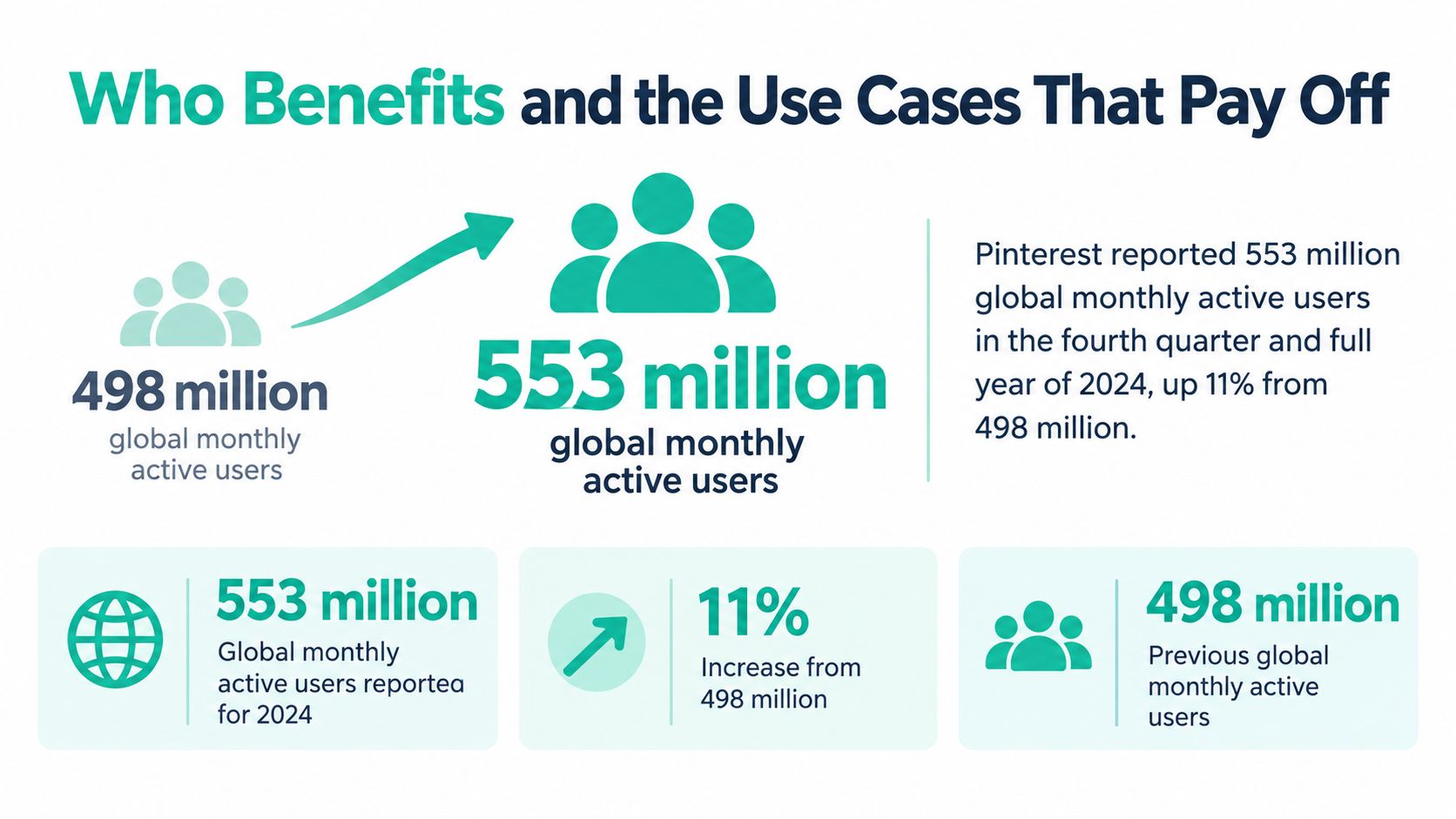
Pinterest reported 553 million global monthly active users for the fourth quarter and full year of 2024, up 11% from 498 million, including 307 million outside the United States, Canada and Europe, according to its full-year results announcement.
That audience makes systematic publishing worth considering, but reach alone doesn't justify buying software. The strongest use cases involve a dependable source of content and repetitive preparation work that the team can describe clearly.
Recognize the readiness signal
- eCommerce merchants: Turn approved Shopify or Etsy listings into product-specific creative. You're ready when staff repeatedly copy the same catalog fields into layouts, but first make sure variant images and landing pages stay connected.
- Bloggers: Use an RSS feed to prepare pins for new articles and selected evergreen posts. The readiness signal is a reliable publishing archive, not just a large folder of images.
- Affiliate marketers: Create distinct angles around the same relevant product or comparison. Keep required disclosures intact and check that automated rewriting doesn't remove important qualifications.
- Multi-brand agencies: Separate client templates, source material and board rules. Automation becomes useful when repeated account switching creates opportunities for the wrong logo, voice or destination to enter a batch.
- Small shops with limited design support: Reserve the designer's attention for approved layouts and exceptions. The opportunity is strongest when routine resizing and text replacement delay otherwise publishable work.
The common thread is repeatability. If every pin requires a fresh concept, original illustration and extensive editorial judgment, an automated generator won't remove that creative work. It can still handle preparation and scheduling, but it shouldn't be judged as a replacement for bespoke design.
Localization needs an operational owner
A globally usable workflow requires more than translating the headline. Someone must confirm that the linked page serves the intended market, the product is available there and the seasonal framing makes sense for that audience.
For example, don't reuse a region-specific delivery promise across every localized version of a homewares pin. Keep the visual system consistent while allowing market-specific wording and destinations.
The buying signal isn't a particular catalog size. It's the point at which your team spends more effort repeating approved decisions than making new ones. Automate that repetition while keeping a named person responsible for regional accuracy.
Quality Checks Before Anything Goes Live
A pin can look polished and still give shoppers the wrong idea. That creates a trust problem: the image, description and linked page should all match what the visitor will find. Retail Brew reported that 39% of Gen Z shoppers preferred beginning product searches on Pinterest and that 96% of Pinterest's top searches were unbranded. Those figures describe search behavior, not how shoppers assess a product or recognize a brand.
Review accessibility and product fidelity separately
Alt text should describe the actual image. Name the subject, useful visual context and relevant product attributes. Avoid turning the field into a list of search terms or repeating a promotional title when a screen-reader user needs to know what appears in the image.
For example, “Grey woven storage basket with handles, shown beneath a wooden console” describes the visual. “Best stylish storage basket for beautiful home organization” does not.
Compare generated imagery with the catalog. Check color, material, quantity and included accessories against the approved product record. A grey basket rendered in cream is a mismatch. So is a decorative lid if the buyer won't receive one.
Check commercial claims against the destination. Confirm that prices and availability match the intended regional page. If the source doesn't support a claim, remove it or hold the pin for review.
A polished render doesn't confirm that product details are accurate.
Route sensitive exceptions to a person
Brand consistency matters, but consistent styling should never obscure inaccurate product representation. Mega Income Stream's guide to a consistent look for your business provides context on visual branding.
Set clear human-review triggers:
- People-focused imagery: Review generated people, product use and any experience the image implies.
- Regulated categories: Have a qualified reviewer assess health-related or financial claims.
- Price-sensitive products: Check time-dependent offers and claims that could become misleading before publication.
- Accessibility-critical descriptions: Escalate complex images if a basic generated description leaves out information needed to understand them.
Give reviewers specific reason codes, such as “image mismatch” or “unsupported claim,” instead of a vague failure status. That makes corrections easier to assign and helps reveal recurring source problems.
Automation can move approved work efficiently. It should send exceptions to a person, not publish them by default.
How to Run a Pin Workflow from Feed to Schedule
Start with a source you can inspect and correct. A small, understandable batch is more useful than a large import whose mistakes you can't trace.
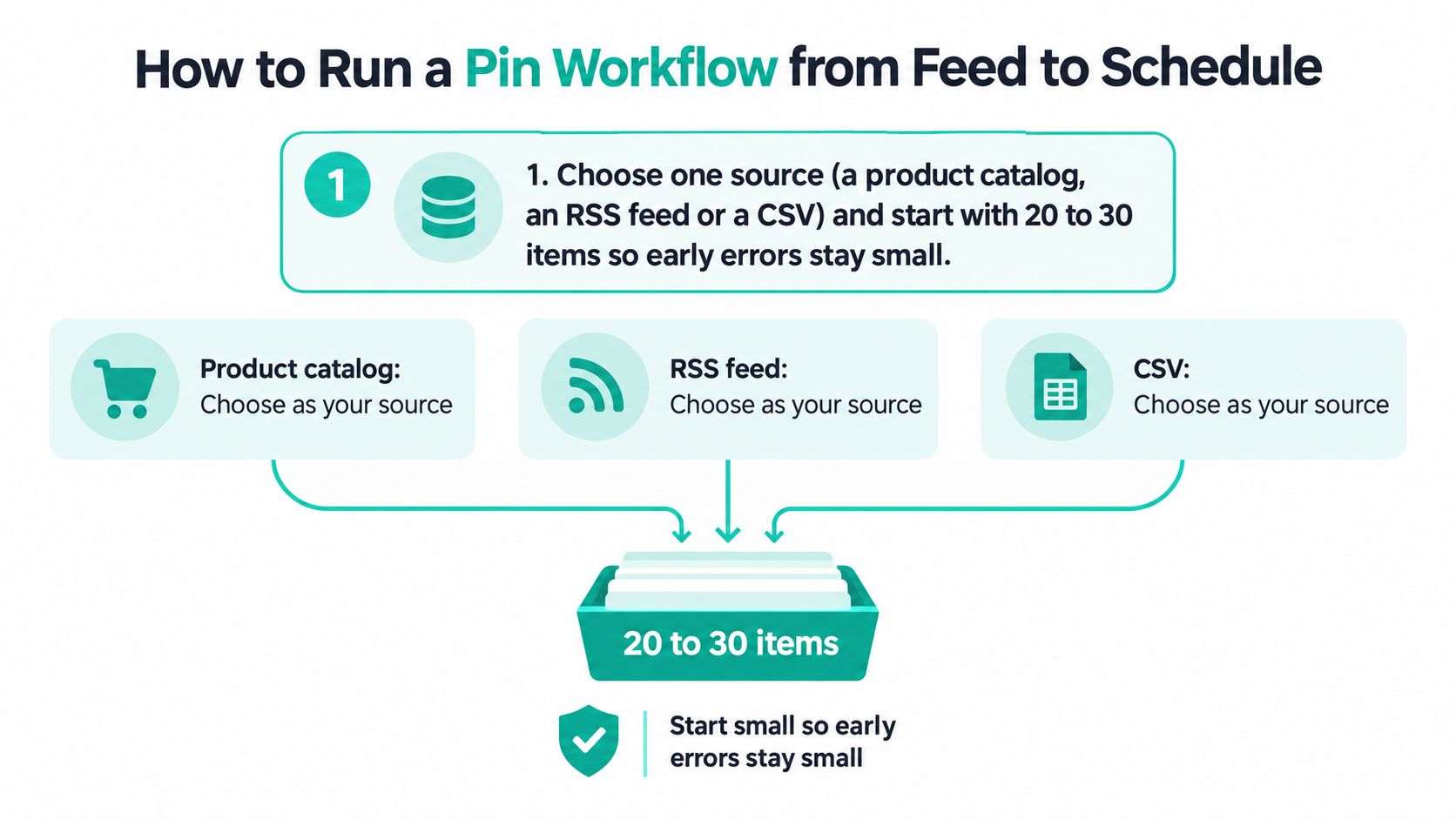
The source-selection diagram illustrates that starting point.
Build a repeatable release routine
Choose a source and define the batch. Use a product catalog, RSS feed or CSV containing material you know well, because familiar inputs make missing fields and incorrect associations easier to spot.
Lock the brand template. Approve colors, fonts, logo placement and layout alternatives before generating the batch, so reviewers aren't repeatedly making the same design decisions.
Generate distinct search angles. Prepare title and description alternatives around relevant search phrases, because useful variation changes the reader's reason to click rather than merely rearranging adjectives.
Assign an appropriate board. Keep written matching rules for product categories, article topics and seasonal exceptions, so the team can explain why each destination fits.
Apply the release gate. Run the technical validation and human-review triggers already defined, because an unresolved failure should return the item for correction rather than enter the queue unnoticed.
Set the recurring schedule. Space related creative deliberately and review the queue for unnecessary repetition, so the publishing plan reflects distinct content rather than repeated uploads of the same message.
Record what was approved and published. Preserve the source, variant, board and publication time, because later analysis needs to connect outcomes to the actual choices your team made.
The software can handle ingestion, draft metadata, template rendering and recurring publishing when those capabilities are available. A person still needs to approve source mappings, decide which search angles are honest and resolve ambiguous exceptions.
For example, a blogger could turn an article about caring for linen bedding into separate pins about washing and storage. Those are useful variations only if the article addresses both subjects. A generated stain-removal promise would need to be rejected if the destination doesn't support it.
Decide whether a trend deserves production
Trend alerts belong before generation, not at the end as an excuse to insert a popular phrase. Pinterest's Trends documentation explains that its data is normalized against total platform searches, so a rising trend indicator isn't the same thing as a count of absolute demand.
Use the alert to ask operational questions. Is the topic relevant to the product? Can the destination answer the searcher's need? Will the item still be available when the scheduled pin publishes?
- Accept a relevant trend: Produce a timely angle when the product, destination and market align.
- Hold an uncertain trend: Wait when the connection depends on unsupported claims or unclear demand.
- Choose an evergreen alternative: Use a durable product benefit when the trend would make the pin feel forced.
A scheduling tutorial can help with the mechanics after those decisions are made.
Use the practical guide to scheduling Pinterest posts when configuring the publishing queue. Keep approval status separate from scheduled status so an unfinished item can't be mistaken for released work.
Release discipline: Changing a template creates a new version that needs validation, even when the previous version passed.
A common slip is editing a font or text area after generating a batch and assuming the earlier approval still applies. Re-render affected outputs, rerun the release gate and record the new approval. Don't let an apparently cosmetic change bypass the production process.
Reading Results Beyond Impressions
A study of Pinterest's activity graph found that more than 70% of incoming activity per user came from non-followers, while 12.3% of followers interacted on average through likes, comments or repins. Most of the audience a published pin reaches has no prior connection to the account, which is why publishing decisions should be judged by performance with strangers rather than by follower counts.
The practical question is what people do after encountering the creative. Impressions describe exposure. They say nothing about whether the pin delivered useful visitors or prompted someone to save it.
Compare outcomes against exposure
- Normalized saves: Compare saves relative to impressions to see how often exposure leads to a save.
- Outbound clicks: Track visits to the destination, particularly when referral traffic is the publishing objective.
- Closeup-to-click ratio: Outbound clicks divided by closeups. It shows how often opening the pin leads to a click through to the page.
Treat the following as an illustrative comparison. The figures show the decision problem without implying a universal performance benchmark.
Two pins compared on closeup-to-click ratio
| Pin | Impressions | Closeups | Outbound clicks | Closeup-to-click ratio |
|---|---|---|---|---|
| Pin A | Higher exposure | Many opens | Fewer clicks relative to opens | Lower |
| Pin B | Lower exposure | Fewer opens | More clicks relative to opens | Higher |
If the objective is qualified traffic, Pin B deserves closer examination. An impressions-only leaderboard would favor Pin A even though fewer visitors reached the destination.
That doesn't automatically make Pin B the permanent winning template. The pins may target different queries, appear on different boards or have had different opportunities to circulate. Check the publishing record before crediting the result entirely to design.
Turn the leaderboard into an editing tool
Compare variants that share a meaningful objective and sufficiently similar conditions. If you change the headline, image treatment and board together, you won't know which change caused the difference.
Keep the next test focused. A strong closeup-to-click ratio with weak saves raises a different follow-up question than a frequently saved pin that rarely sends visitors onward.
- Inspect strong performers: Identify the specific promise, visual treatment and destination alignment worth testing again.
- Investigate weak performers: Check relevance and technical errors before assuming the entire topic failed.
- Retire deliberately: Pause consistently weaker variants after comparable exposure, not after an arbitrary waiting period.
A leaderboard earns its place when it supports a decision. Preserve the original version and record what you changed so the next batch builds on an observation rather than a vague preference.
Choose Your Tool and Start Your First Batch
Choose the tool that fits your source and your review process. An advanced editor won't compensate for an import that loses variant information, and a direct store connection won't help if your team can't hold an inaccurate pin before publication.
If your products live in Shopify, Etsy, WooCommerce or Amazon, test that connection with representative listings. If your publishing source is WordPress, RSS, Atom or CSV, check how the tool handles article images, destination pages and missing fields.
Make approval part of the buying test
Ask the vendor to demonstrate the limits and exception handling discussed earlier. Don't assume that generating alt text means reviewing its accuracy, or that displaying a preview means automatically checking the layout.
- Source fit: Your team can import real material without rebuilding it by hand.
- Review control: A reviewer can hold, correct and recheck an item before release.
- Traceability: The publishing record remains connected to its source and generated variant.
- Operational ownership: Someone knows how to handle failed imports, changed templates and rejected outputs.
For the trial, choose a batch small enough to inspect completely. Include the awkward cases that normally slow your team down, not just the easiest products or articles.
Then run the full routine through publication and results review. That exposes whether the software removes work or just moves it from design into cleanup.
Price the work you actually remove
Record the time spent importing, correcting, reviewing and scheduling during the trial. Compare that with your current process, including the work that happens after the image is finished.
A useful cost check is subscription cost divided by net hours saved over the same billing period. Don't divide a monthly fee by the time for an unrelated batch, and don't count automated generation time as savings if reviewers spend it repairing preventable errors.
Also account for setup and maintenance. A tool can still be worthwhile when initial configuration takes effort, provided the recurring workflow becomes clearer and less labor-intensive.
Start small, measure and scale only after the process works. Add another source when the existing workflow produces accurate, reviewable pins and the results give you a reason to expand.
Pin Generator offers reusable templates, AI-written titles, descriptions and alt text, store and feed connections, recurring scheduling, and history and leaderboard views in a single pin creation workflow. Visit Pin Generator to connect a source and prepare a trial batch, then review the finished outputs before expanding your publishing queue.