
Your Guide to Pin Generator 2025
29 September 2025
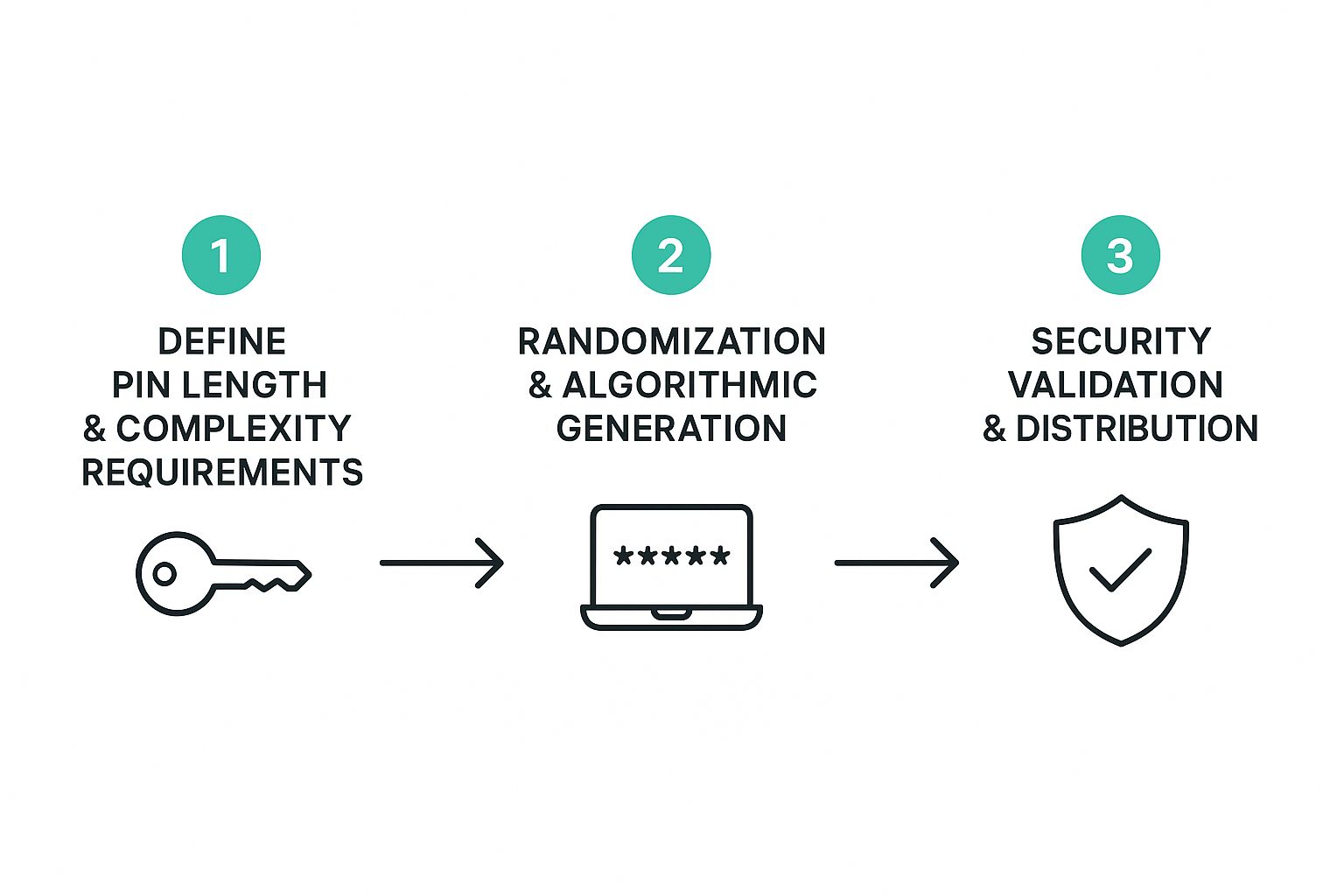
Let's be real: trying to manually pump out dozens of fresh, high-quality pins every single week is a one-way ticket to burnout. This is exactly where a pin generator in 2025 gives you a massive advantage, turning your Pinterest workflow from a soul-crushing chore into an efficient, traffic-generating machine. It's less of a tool and more of a strategic partner for scaling your content without losing your mind.
Why Pin Generator Is Your 2025 Pinterest Advantage
The Pinterest algorithm in 2025 is hungry for two things: a high volume of fresh content and high-quality, relevant pins. For most busy bloggers, marketers, and shop owners, trying to deliver both consistently is next to impossible. Pin Generator is the bridge that closes that gap.
Think about all the hours you sink into finding the right images, brainstorming catchy titles, writing keyword-rich descriptions, and fiddling with designs in Canva. A tool like this automates the most monotonous parts of that grind, freeing you up to actually focus on the big-picture strategy. It’s all about working smarter, not just harder.
Regain Your Time and Keep Your Brand on Point
The number one win here is pure efficiency. Using smart templates and a bit of AI magic, you can crank out a whole week's worth of pins in the time it used to take you to make just a handful. That's more time for you to dig into analytics, chat with your audience, and plan your next big campaign.
But it’s not just about speed. A cohesive brand look is non-negotiable on a visual-first platform like Pinterest. Pin Generator locks in your brand identity by using your own pre-set templates. This means every single pin, whether it’s for a brand-new blog post or an old product, consistently features your unique:
- Brand Colors: Automatically splash your signature palette across every design.
- Logos: Stick your logo in the same spot, every time, without even thinking about it.
- Fonts: Use your go-to brand fonts to build that instant recognition.
The real magic isn't just generating pins; it's generating on-brand pins at scale. That kind of consistency builds trust and makes your content jump out in a busy feed.
Here’s a quick look at the features that make this possible.
Pin Generator 2025 Feature Overview
Pin Generator is packed with functionalities designed specifically for the demands of modern Pinterest marketing. This table breaks down the core features and how they directly benefit your workflow.
| Feature | Primary Benefit |
|---|---|
| AI Pin Title & Description Writer | Overcomes writer's block by generating multiple keyword-optimized options for a single pin, boosting its search visibility. |
| Bulk Pin Creation | Produces hundreds of unique pins from a single URL or set of images in minutes, solving the "fresh content" dilemma. |
| Smart Scheduling & Shuffle | Automates posting at optimal times and mixes up content from different posts, ensuring a varied and consistent feed. |
| Customizable Brand Templates | Locks in your fonts, colors, and logos to maintain perfect brand consistency across every pin you create. |
| Royalty-Free Image Integration | Provides instant access to millions of high-quality stock photos and videos, saving time on sourcing visuals. |
These features work together to create a powerful, automated system that keeps your Pinterest profile active and growing, even when you're focused on other parts of your business.
The Bigger Picture: The Shift to Automation
This move toward automation in content creation isn't happening in a vacuum. It mirrors a much larger trend. The global generator market, valued at a staggering USD 43.63 billion in 2025, is set to keep growing, all thanks to tech that makes things more efficient and reliable. The same logic applies here—automating pin creation smooths out your marketing operations and gives your content a much longer lifespan.
To get a better sense of how AI is shaking up the social media world, it's worth checking out the top AI social media tools for small businesses in 2025. This context makes it crystal clear why grabbing a specialized tool for Pinterest isn't just a good idea; it's a forward-thinking business move.
Now, let's get our hands dirty and walk through the practical steps.
How to Use Pin Generator in 2025: A Step-by-Step Guide
Ready to transform your Pinterest workflow? This guide will walk you through the exact process of setting up your account, generating pins in bulk, and automating your schedule for maximum impact in 2025.
Step 1: Set Up Your Account for Success
A powerful Pinterest strategy starts with a solid foundation. Before you generate a single Pin, taking a few minutes to get your Pin Generator account set up the right way is the most important thing you can do.
- Connect Your Pinterest Account: First, grant Pin Generator permission to connect to your Pinterest profile. This is what allows the tool to see your boards and schedule your pins seamlessly.
- Establish Your Brand Kit: This is the heart of your visual strategy. In the settings, upload your logos, define your brand color hex codes, and select your default fonts. This ensures every pin you create is perfectly on-brand.
- Add Your Website(s): Add the websites you'll be creating pins for. This allows the tool to automatically pull the correct destination URL for any content you generate.
Getting this right is the core of an effective Pin generation strategy in 2025. It's the difference between just pumping out random images and building a truly recognizable, professional presence.
Step 2: Generate High-Quality Pins in Bulk
This is where the magic happens. Turning a single link into dozens of unique pins is the core of what makes a dedicated pin generator so powerful.
- Enter Your URL: Start by pasting the URL of a blog post, product page, or landing page into the generator. The AI will scan the content and pull out key phrases and all the images from the page.
- Refine the AI-Suggested Text: The tool will generate multiple pin titles and descriptions for you. Treat these as a starting point. Edit them to add your target keywords and inject your brand's voice for maximum impact.
- Select Your Visuals: Choose from the images pulled from your article or browse the integrated library of royalty-free stock photos and videos to find the perfect visuals for your pins.
Think of it as a perfect partnership: let the AI do the heavy lifting, then you swoop in with your marketing brain to make the final pins truly shine. This strategic editing ensures your pins are not just pretty pictures, but are fully optimized for the Pinterest search algorithm from day one.
Step 3: Design Your Pins for Maximum Impact
With your text and images ready, it’s time for design. You have total control over the final look.
- Choose Your Templates: Select one or more of your pre-made brand templates to apply to your batch of pins.
- Shuffle for Variety: Use the "random" or "shuffle" feature to apply different designs to each pin. This is a great way to A/B test which styles resonate most with your audience.
- Generate the Pins: Click the "Generate Pins" button. The tool will instantly create a whole batch of unique, on-brand pins based on your selections. You can still make final tweaks to individual pins before scheduling.
This streamlined process is what lets you pump out dozens of pins in minutes, not hours. It's the same kind of efficiency driving growth in other industries. Just look at the portable generator market—it’s projected to hit USD 5.22 billion in 2025 because people demand reliable, automated solutions.
Step 4: Build an Automated Pinning Schedule
Creating beautiful pins is only half the battle. Now you need to get them seen. This is where smart scheduling comes in.
- Select Your Pins and Boards: Choose the pins you want to schedule and select multiple relevant Pinterest boards to post them to.
- Define Your Smart Schedule: Head to your scheduling settings. Set up your time slots (the specific days and times you want to post) and your daily pin limit (a range of 5-15 pins per day is a good starting point).
- Set Your Intervals: To avoid spammy behavior, set an interval for how often a pin can be posted to the same board (e.g., no more than once every 7 days). This ensures your content is distributed naturally over time.
- Add to Queue: Click "Add to Queue." Your pins are now loaded into a "set it and forget it" system that will publish them automatically based on your schedule.
A great schedule is your blueprint for consistency. By defining your time slots and daily limits, you ensure a steady flow of fresh content hits your audience's feed without any daily manual effort on your part. For a deeper look, brush up on general marketing automation best practices and Pin Generator's guide on how to schedule Pinterest posts.
Advanced Tactics for Power Users
Okay, so you've got the hang of generating and scheduling pins. That's fantastic. But if you want to really move the needle, it's time to think bigger. A top-tier pin generator in 2025 is way more than a set-it-and-forget-it scheduler; it's the engine for your entire Pinterest marketing machine.
This is where we go beyond just pushing out pins for your latest blog post. We're talking about driving specific, targeted actions that grow your whole business. Forget generic "Read More" CTAs. It's time to get surgical.
Look Beyond the Blog Post
Your Pinterest strategy shouldn't just be a mirror of your blog feed. Pin Generator can whip up beautiful, clickable visuals for literally any link you want to get eyes on. This unlocks a massive opportunity to drive sales and grow your list in ways you might not have considered.
Here are a few ideas to get the wheels turning:
- E-commerce Products: Got a Shopify store? Pull your product images right into the generator. Create pins with titles like "The Summer Look You Need" or "Heads Up: Low Stock!" Your call-to-action is no longer "Read More," it's "Shop Now."
- Affiliate Links: Are you promoting products you love? Don't just rely on in-text links. Make a dedicated set of pins for that awesome kitchen gadget you recommend. A title like "My 5 Can't-Live-Without Kitchen Tools for 2025" linking straight to your affiliate URL can be a game-changer.
- Email Opt-ins: Build that list! Design pins that lead people directly to your freebie landing page. Use punchy text overlays like "Grab Your Free Meal Plan" or "Download My Ultimate SEO Checklist."
The big shift here is treating every single pin like a piece of direct-response advertising. You're tailoring the design, the text, and the CTA to the destination link, telling the user exactly what you want them to do next.
How to A/B Test Your Pins (The Smart Way)
Ever wonder which of your pin designs actually work? Stop guessing and start testing. It’s easier than it sounds.
Here’s a simple framework: create a batch of 10-20 pins for one single URL. Now, split them into two different creative "camps." For example:
- Group A: Uses bold, vibrant, in-your-face templates.
- Group B: Uses clean, minimalist, and airy designs.
Schedule them to publish over a few weeks. Once they're out in the wild, pop into your Pinterest analytics and see which group drove more clicks and saves. This isn't rocket science, but this data-driven approach is what separates the pros from the amateurs.
Breathe New Life Into Your Best Content
Your evergreen content is a goldmine. Don't let it gather dust. With Pin Generator, you can systematically create fresh pins for your most popular, high-performing articles.
Make it a quarterly habit. Go back to your top 5 or 10 posts and generate a new batch of 5-10 pins for each. Use updated templates, new title variations, and maybe even some fresh keyword ideas.
This simple tactic keeps a steady stream of traffic flowing to your most valuable content without you having to write a single new word. It’s all about maximizing the return on the work you've already done. It's a principle seen across major industries; the global generator market, for example, is expected to reach USD 25,614.8 million by 2025 because businesses demand reliable, automated systems that boost output. You can dive deeper into these global generator market trends on cognitivemarketresearch.com. Applying that same mindset of automated efficiency is exactly how you'll transform your Pinterest results.
Common Pin Generator Questions Answered
Whenever I start using a new tool, I always have a million questions. It’s totally normal. Getting the answers sorted out from the get-go is the difference between a clunky workflow and a smooth, traffic-driving machine.
Let's dive into some of the questions that come up most often about using a pin generator in 2025.
One of the first things people ask is about images. "Do I have to find and upload all my own photos?" Nope! While you can definitely use your own images, Pin Generator hooks right into stock photo libraries like Pexels. This means you get access to millions of amazing, royalty-free images without ever leaving the platform. It's a massive time-saver.
Another big one: "Does the AI-generated text sound like a robot wrote it?" It's a fair question. The AI is really there to give you a solid starting point, not the finished product. It pulls key phrases from your blog post to draft relevant titles and descriptions. My advice? Always treat these as a first draft. Spend a few seconds tweaking them to match your brand's voice and sprinkle in some of your favorite long-tail keywords.
How to Get the Most Out of Your Workflow
So, how many pins should you actually make for each blog post? This comes up a lot. While there's no single magic number, I’ve found that creating 10 to 20 unique pin designs for every new piece of content is the sweet spot.
This gives you plenty of different visuals and headlines to test over time. More importantly, it builds up a library of fresh content you can drip out through the scheduler for weeks, or even months. Consistency is everything on Pinterest, and batching your pin creation is the smartest way to stay on top of it.
One of the biggest myths is that you need to be a design pro to make this work. Honestly, the templates do all the heavy lifting. If you set up your brand kit properly from the start, every single pin will look professional and on-brand, zero graphic design skills required.
"What about video pins?" Yes, absolutely! Video is a huge engagement driver on Pinterest, and you can create them right inside the tool. The process is pretty much the same as making a static pin. You can upload your own clips or grab stock videos, add your text overlays, and schedule them right alongside your image pins. It's a great way to mix things up and keep your feed interesting.
Finally, people sometimes worry if this creates duplicate content issues. Because Pin Generator mixes and matches your images, headlines, and templates, Pinterest sees every single output as a fresh pin. This is a huge advantage, since the algorithm loves new content. You're not just repinning the same old thing—you're publishing genuinely new assets every time.
Ready to stop wasting hours on manual pin creation and start driving serious traffic from Pinterest? Pin Generator automates your entire workflow, from design to scheduling, so you can focus on growing your business. Start generating pins in seconds with Pin Generator.