
Your Guide to Using a Pin Generator Online
14 October 2025
Think of a pin generator online as your secret weapon for Pinterest. It's a specialized tool designed to automatically create dozens of unique, on-brand pins in just a few minutes. It’s like having a tireless design assistant who takes one piece of your content—say, a blog post or a product page—and spins it into a constant stream of fresh visuals.
What Is a Pin Generator and How Does It Work
Imagine trying to fill a library with books, but you have to handwrite every single copy. That’s what manual pin creation can feel like. It’s slow, it’s repetitive, and it quickly becomes a huge bottleneck in your marketing workflow.
A pin generator completely flips that script. It’s your personal printing press. You give it one manuscript—your blog post URL—and it churns out hundreds of beautifully designed "books" ready for your audience.
At its heart, a pin generator is a content creation engine. You just provide a single input, and the tool does all the heavy lifting.
- It Scans Your Content: You paste in a URL, and the tool instantly gets to work, pulling out key pieces like your page title, description, and images.
- It Applies Your Branding: Using a pre-set brand kit with your logos, fonts, and colors, it makes sure every single pin looks like it came straight from you.
- It Creates Tons of Variations: This is where the magic happens. The system intelligently mixes your content with proven templates to create dozens of unique designs. No more creative burnout.
Moving Beyond Simple Templates
This is a whole different ballgame compared to basic graphic design tools where you’re stuck manually dragging and dropping every little element. A pin generator online is built for one thing: scale.
The goal isn't just to make one pretty pin; it's to knock out a month's worth of content in a single sitting. This tech solves one of the biggest headaches on Pinterest: the platform’s bottomless appetite for fresh content. By automating the design part, you can consistently feed the Pinterest algorithm new visuals without losing hours of your life inside a design app.
A pin generator isn't just a time-saver; it’s a strategic asset. It frees you up to stop being a pin factory and start focusing on high-impact work like strategy, analytics, and actually talking to your community.
This move toward automated content tools is a huge trend right now. The global AI-powered content creation market was valued at $2.09 billion in 2023 and is expected to explode to around $8.45 billion by 2032.
That massive growth shows just how much businesses need smart tools that can handle the grunt work, which is why a pin generator has become so vital for anyone serious about building a powerful presence on Pinterest. To see just how fast this space is growing, you can explore more about the rise of AI content tools on Skywork.ai.
Essential Features of Top Online Pin Generators
Let's be real: not all online pin generators are built the same. While plenty of tools can slap an image together, the truly great ones are full-blown marketing partners, packed with features designed to save you time and actually boost your performance.
Picking the right one is like choosing a car. Sure, a basic model gets you from A to B. But a premium model with GPS, cruise control, and all the safety features makes the whole trip faster, smoother, and way more enjoyable. The same goes for your Pinterest tool—the right features can turn a manual, tedious grind into an automated success story.
Core Functionality for Every User
At the very least, any pin generator online you consider should have a solid set of foundational features. Think of these as the absolute non-negotiables that make the whole process work.
- Extensive Template Libraries: You need options. Lots of them. Look for a tool with hundreds of professionally designed templates. This is critical for creating "fresh pins," which the Pinterest algorithm absolutely loves, and it stops your account from looking repetitive and stale.
- AI-Powered Design Variations: This is where the magic really happens. The best generators use AI to intelligently mix and match your blog post or product page content with different templates, colors, and layouts. It’s the key to creating dozens of unique pins from a single link in just minutes.
- Automated Text Overlays: The tool has to do the heavy lifting. It should automatically grab your blog post title or product name and place it right onto the pin design, saving you from the soul-crushing task of manually typing text for every single image.
This infographic breaks down the ideal workflow, showing how a top-tier tool moves you from AI-powered design to template selection and, finally, to scheduling.
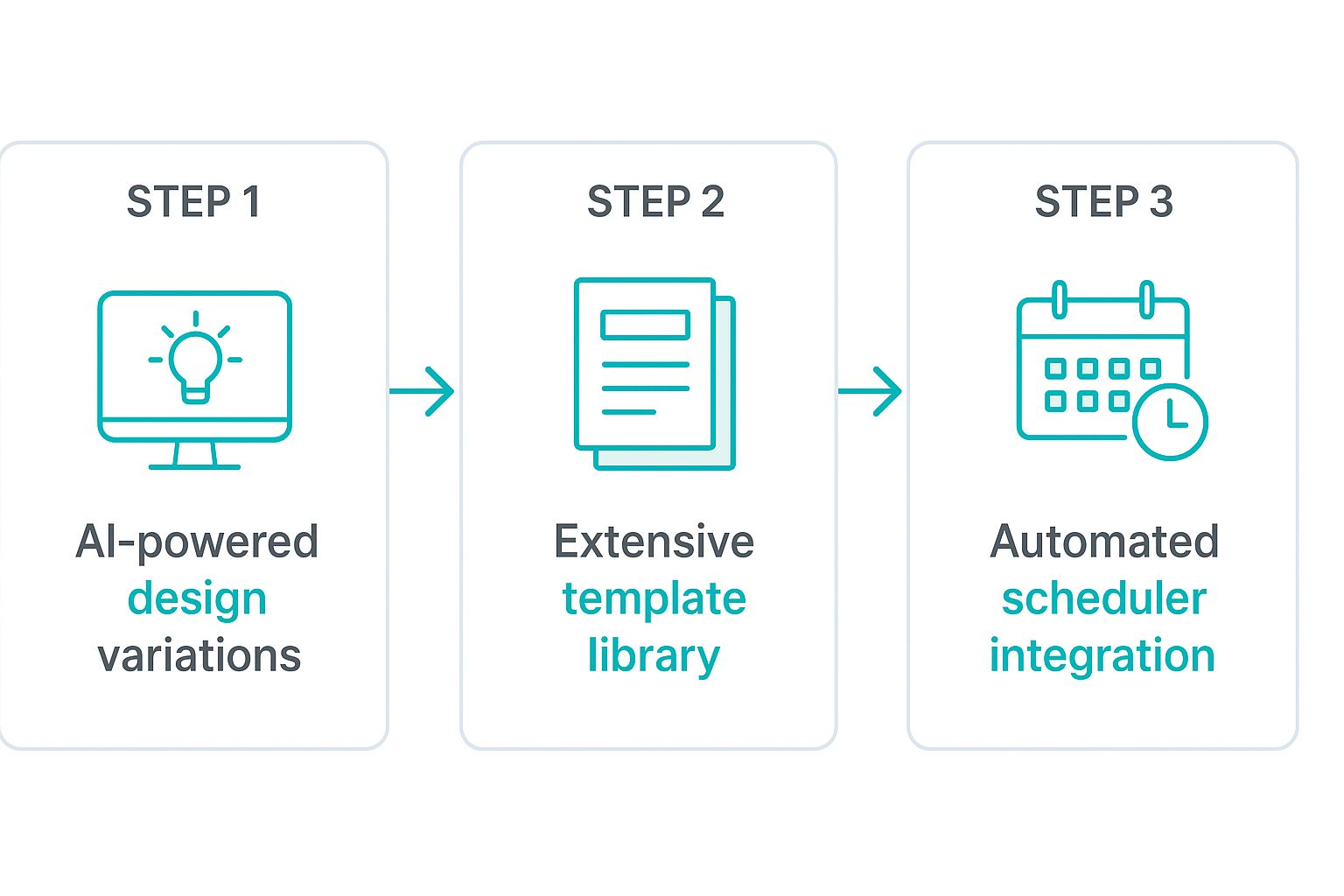
You can see how each step logically builds on the last, creating a powerful, end-to-end automation system for your entire Pinterest strategy.
Advanced Capabilities for Power Users
Once you get past the basics, the advanced features are what separate a good tool from a game-changing one. These are the functions that offer deeper control and smarter integration, putting you firmly in the driver's seat of your marketing.
For instance, a Brand Kit is a must-have. This lets you upload your specific logos, fonts, and color palettes one time. From then on, the AI applies your branding to every pin it creates, ensuring perfect consistency without you lifting a finger.
Another killer feature is seamless integration with schedulers like Tailwind or having a powerful scheduler built right in. This closes the automation loop, letting you generate and schedule an entire month's worth of pins in a single session.
Essential vs. Advanced Pin Generator Features
Choosing the right tool depends on where you are in your Pinterest journey. Are you just trying to get consistent, or are you looking to scale your efforts to the next level? This table breaks down the features you'll need at each stage.
| Feature Category | Essential (For Everyone) | Advanced (For Power Users) |
|---|---|---|
| Design & Templates | Large library of professional templates to keep content fresh. | Brand Kit for automated brand consistency (logos, fonts, colors). |
| Content Creation | Automatic text overlay from URLs (e.g., blog titles). | AI-powered text rewriting for titles and descriptions. |
| Automation | AI-driven design variations to create multiple unique pins at once. | Smart scheduling to mix and schedule content from multiple URLs. |
| Integration | Ability to download pins easily for manual uploading. | Direct integration with schedulers like Tailwind or a built-in scheduler. |
Whether you're starting out or scaling up, understanding these feature sets helps you pick a platform that will grow with you, not hold you back.
This push toward smarter automation isn't just happening in marketing. The global pin insertion machine market, a sector focused on high-precision manufacturing, is expected to jump from USD 150 million in 2024 to USD 300 million by 2033.
That's a huge leap, and it shows a wider industry trend toward the same principles that powerful pin generators bring to the creative world: efficiency, precision, and AI-driven results. You can read more about these machine trends and their market growth to see just how deep this shift toward automation runs.
How to Automate Your Pinterest Workflow
This is where the magic happens. A pin generator online is all about flipping your Pinterest routine on its head, swapping hours of tedious manual work for just a few minutes of smart, strategic setup. It’s not about making one pin a little quicker; it's about building an entire content engine that runs on its own.
Think about it. Let's say you're an e-commerce shop owner launching a new collection of handmade ceramics. The old way meant blocking off an entire afternoon to wrestle with a design tool, and you might walk away with maybe ten or fifteen pins to show for it. With an automated workflow, you're playing a completely different game.
The Journey From URL to Scheduled Pins
It all begins with a single piece of content you've already created. This one simple input is what kicks the whole automation process into gear.
- Provide a Single Input: You start by grabbing the URL of your new product category page. Just copy and paste it into the pin generator. That’s it. That’s your one job.
- AI Content Extraction: The tool immediately gets to work, acting like a super-efficient assistant. It scans the page, pulling out all your product images, the collection title, and your descriptions. All the raw materials are gathered in seconds.
- Automatic Brand Application: Your pre-set Brand Kit—your logo, specific colors, and fonts—is instantly applied to every single design. This means every pin looks exactly like your brand, maintaining perfect consistency without you lifting a finger.
This first phase is all about working smarter, not harder. The tool simply repurposes the assets you already have, saving you from the soul-crushing task of uploading and re-typing the same info over and over. If you want to go deeper on this for your whole social media strategy, this comprehensive social media automation guide is a great read.
Generation and Curation
Okay, with the raw materials and branding locked in, the tool shifts into creative mode.
The real power of a pin generator lies in its ability to create variety at scale. Instead of you brainstorming new layouts, the AI does it for you, generating dozens of unique designs based on proven templates.
You’re then shown a whole gallery of options. For your ceramics collection, you'll see a bunch of different pins showcasing various product shots, headline arrangements, and calls-to-action. You can quickly scroll through, favorite the ones you love, and tweak a bit of text here and there to target different keywords.
Finally, it’s time to schedule. You can take the 30+ fresh pins you just made and queue them up to post over the next month. This is the ultimate "set it and forget it" move, ensuring your Pinterest account stays active and keeps driving traffic to your new products while you’re off managing orders. For a full breakdown of how to get this system humming, check out our guide to fully automate your Pinterest marketing.
Seriously, this entire workflow—from a single URL to a fully scheduled content calendar—can be done in less time than it takes to finish your morning coffee.
Boosting Your Reach with AI Pin Variations
Making a great pin is one thing. Actually getting people to see it? That's a whole different ball game. This is where an online pin generator really shines, moving way beyond just being a design tool and becoming your secret weapon for SEO and engagement on Pinterest.
The magic is in the variety. For a single blog post or product, you can whip up dozens of unique pin variations in just minutes. This lets you A/B test different designs, headlines, and calls-to-action on a massive scale. Instead of guessing, you can quickly see what your audience actually clicks on and tweak your strategy based on real data.
Fueling the Pinterest Algorithm
Let's be honest: the Pinterest algorithm is hungry. It has a huge appetite for "fresh pins"—new images it has never seen before. Trying to manually create enough fresh content to keep it happy is a fast track to burnout. An online pin generator gives you a massive strategic advantage here.
By creating multiple, unique visual assets all pointing to the same URL, you’re sending a clear signal to Pinterest that your content is valuable and regularly updated. It's a simple move, but it can lead to much better distribution, boosting your visibility in search results and home feeds. Suddenly, your content has way more chances to get discovered.
Generating pin variations isn’t just a time-saver; it’s about mastering content velocity. You're building a high-frequency, high-quality stream of new pins that keeps your account active and relevant in the eyes of the algorithm.
This consistent flow of content helps you build authority on specific keywords much faster than your competitors. Think about it: every single pin variation is another shot at ranking for your target search terms. The more high-quality pins you have pointing back to your content, the stronger your digital footprint on the platform becomes. The first step is learning how to create Pinterest pins with AI.
Optimizing Your AI-Powered Creations
To get the best results from these AI-generated pins, you have to feed the tool quality instructions. The skill of crafting effective instructions for AI, often called prompt engineering, is a game-changer for creating top-tier variations. If you want to dive deeper, this guide on What Is Prompt Engineering? A Complete Guide to Mastering AI Prompts is a fantastic resource. This knowledge helps you steer the AI to produce pins that are perfectly aligned with your goals.
At the end of the day, a pin generator online completely changes your workflow from a slow, manual chore into a dynamic content engine. It empowers you to:
- Test and Iterate: Quickly discover winning designs and headlines without the manual labor.
- Boost Content Velocity: Keep the algorithm happy by consistently publishing fresh pins.
- Dominate Keywords: Build topical authority by flooding the platform with a high volume of relevant content.
This strategic approach is what separates the accounts that just exist on Pinterest from the ones that truly thrive, driving a steady stream of meaningful traffic back to their websites and stores.
Choosing the Right Pin Generator for Your Goals
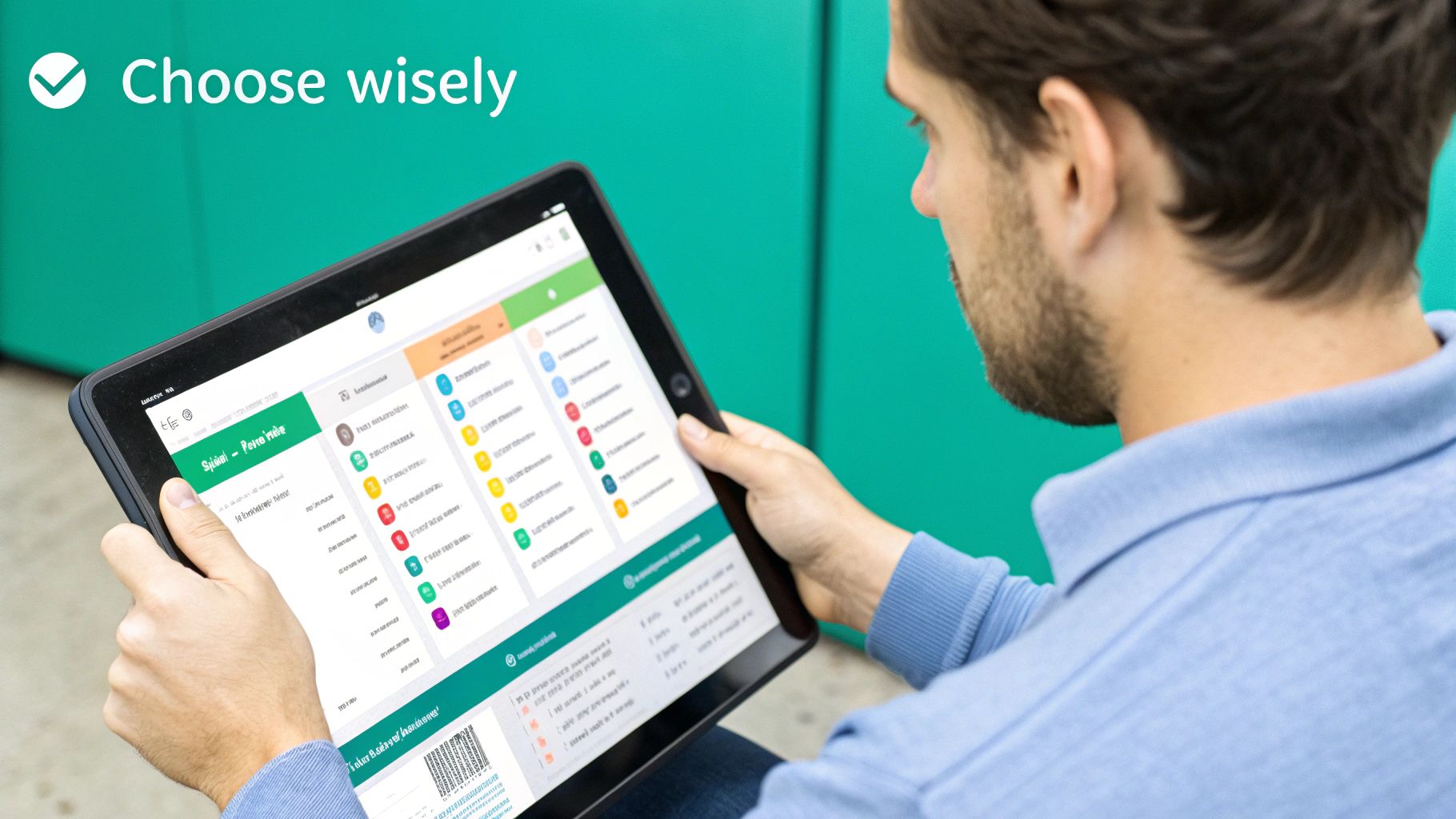
With so many tools popping up, picking the best pin generator online can feel a bit overwhelming. They all promise the moon, but the truth is, the "best" tool is the one that fits your specific needs, budget, and way of working.
Think of it like this: a solo blogger just needs a reliable scooter to zip around town and get things done. A marketing agency managing a dozen clients? They need a heavy-duty truck. Both get the job done, but they're built for totally different tasks. Your mission is to find the perfect vehicle for your Pinterest journey.
To do that, you need to look past the flashy marketing and dig into what really matters. Let's break down how to evaluate these tools so you can find a true partner for your Pinterest strategy.
Key Evaluation Criteria
Before you even think about pulling out your credit card for a subscription, run potential tools through this checklist. Don't get distracted by a super long feature list; focus on which features actually solve your problems.
- Ease of Use: How quickly can you get going? A tool packed with features is useless if it takes you a week to figure out. You want a clean, intuitive workflow that takes you from a URL to a ready-to-post pin in minutes, not hours.
- Template Quality and Variety: This is a big one. A top-tier pin generator should offer hundreds of professionally designed, modern templates. This is what keeps your content from looking stale or like everyone else's.
- Customization Options: How much control do you really have? The best tools let you lock in your brand with a Brand Kit feature—saving your specific fonts, colors, and logos so every single pin is perfectly on-brand, every time.
- Platform Integrations: Does it work well with the other tools you already use? You're looking for smooth integrations with platforms like Canva for extra design tweaks or schedulers like Tailwind to build a genuinely hands-off workflow.
- Pricing Models: Look for pricing that makes sense for you now and later. A good platform will offer a free trial or tiered plans that can grow with your business, so you're not paying for a bunch of features you don't actually need.
To help you compare your options side-by-side, I've put together a simple evaluation checklist. Just score each tool from 1 to 5 for each criterion.
Pin Generator Evaluation Checklist
| Evaluation Criteria | Tool A Score (1-5) | Tool B Score (1-5) | Notes/Comments |
|---|---|---|---|
| Ease of Use | Is the interface intuitive? How fast is the workflow? | ||
| Template Quality | Are the designs modern and professional? Good variety? | ||
| Customization | Can I set up a Brand Kit? How much control do I have? | ||
| Integrations | Does it connect with my scheduler, WordPress, etc.? | ||
| Pricing | Does it offer a free trial? Do the plans fit my budget? | ||
| AI Features | Does it have AI for titles/descriptions? How good is it? | ||
| Scheduling | Does it have a built-in scheduler? Are the options robust? | ||
| Customer Support | Is there good documentation? Is support responsive? | ||
| Overall Score |
This little scorecard can cut through the confusion and make your final decision a whole lot easier.
Matching Features to Your Role
Different people need different things from a pin generator. Knowing what you need most will help you zero in on the features that will give you the biggest bang for your buck.
Choosing the right pin generator is less about finding the tool with the most features and more about finding the one with the right features for you. Aligning the tool’s strengths with your goals is the key to unlocking a significant return on investment.
A solo creator or blogger should be laser-focused on speed and simplicity. A super-easy interface and a huge template library are your best friends for turning new blog posts into a constant stream of fresh pins without losing your entire day.
A small business owner needs brand consistency and scheduling power above all else. A solid Brand Kit feature is non-negotiable for maintaining a professional look, and a built-in scheduler ensures you stay active on Pinterest, even when you're swamped.
Finally, a marketing agency is going to need the heavy-duty stuff for managing multiple clients. This means things like separate brand kits for each client account, the ability to generate pins in bulk, and analytics to track what’s working across all those different accounts.
Common Mistakes to Avoid with Pin Automation
Automation is an incredible ally for your Pinterest strategy, but using a pin generator online without a thoughtful approach can lead to some pretty common mistakes. Think of it like cruise control in a car—it’s a powerful tool, but you still need to keep your hands on the wheel to get where you're going.
One of the biggest traps is leaning too heavily on default templates without adding your own touch. If your pins look identical to hundreds of others, they'll just get lost in the sea of content. Remember, your goal is to stop the scroll, not blend in.
Another frequent error is blindly trusting the AI-generated text. While AI can create fantastic starting points for titles and descriptions, it doesn't know your unique brand voice or the specific quirks of your audience. Always take a moment to review and tweak the copy so it sounds like you and really connects with your community.
Overlooking Content Freshness
A critical mistake is creating a massive batch of pins and then never refreshing the core assets. The Pinterest algorithm absolutely loves newness, and this goes way beyond just the pin designs themselves.
- Stale Image Assets: Using the same five product photos or blog post images for months on end will lead to visual fatigue. You've got to regularly update your image library with fresh, high-quality photos to give the AI new material to work with.
- Repetitive Pin Formats: Don't just generate standard static pins on repeat. You should be mixing in video pins, Idea Pins, and different aspect ratios to keep your content strategy dynamic and engaging for your audience.
- Ignoring Performance Data: The best pin generator gives you data. Ignoring it is a huge misstep. Pay close attention to which designs get the most clicks and saves, then use that intel to adjust your templates and overall strategy.
The most successful Pinterest accounts blend automation with a human touch. They use tools to handle the heavy lifting of content creation but apply strategic oversight to ensure every pin is optimized for performance and brand alignment.
Finally, avoid the temptation to appear spammy. Scheduling dozens of nearly identical pins back-to-back is a quick way to turn off both your followers and the Pinterest algorithm. Use the scheduling features of your pin generator online to space out your content, ensuring you have a consistent but varied presence on the platform. By sidestepping these common pitfalls, you can make sure your automation efforts lead to real, sustainable growth and meaningful engagement.
Got Questions? We've Got Answers.
Jumping into a new tool always brings up a few questions. Let's tackle some of the most common ones we hear about using a pin generator online so you can see exactly how it fits into your workflow.
Will My AI Pins Look Like Everyone Else's?
That’s a fair question, and honestly, a big worry for many creators. But the best pin generators are designed specifically to avoid that cookie-cutter look.
The secret sauce is the Brand Kit feature. You plug in your unique logos, fonts, and brand colors just once. From there, the AI applies your distinct style across a huge library of templates, making sure every single pin feels like you made it and stays true to your brand's vibe.
Is This Really a Good Investment for a Small Business?
Absolutely. For any small business, your time is your most precious resource, right? A pin generator gives you back hours you'd otherwise spend wrestling with design software.
Think about it: that's more time you can pour into developing new products, talking to customers, or just stepping away from your desk for a bit. The ROI isn't just about the traffic you get from Pinterest—it's measured in the massive chunk of your week you reclaim.
How Does It Handle Pinterest SEO?
A smart pin generator is built with Pinterest SEO baked right in. When you drop in a URL, it automatically grabs the page title and meta description to give you a solid starting point for your pin's text.
Then, you can easily tweak those fields in bulk to sprinkle in your target keywords, long-tail phrases, and the right hashtags. This helps your content show up when your ideal audience is searching, getting the right eyes on your stuff.